

Google Chrome 150.0.7871.47, released to the stable desktop channel on June 30, 2026, fixes CVE-2026-13911, a medium-severity Chromium Spellcheck flaw that could let an attacker with a compromised renderer process read potentially sensitive process memory through a crafted HTML page. The bug is not the kind of headline-grabbing Chrome zero-day that sends incident-response teams scrambling at midnight, but it is exactly the kind of browser weakness that matters in 2026: narrow, conditional, and still dangerous when chained with something worse. As documented by Google’s Chrome Releases blog and reflected in the National Vulnerability Database entry, the affected versions are Chrome builds before 150.0.7871.47. The lesson for Windows users and administrators is simple but uncomfortable: browser patching is no longer about waiting for “critical” labels; it is about shrinking the chain before attackers assemble it.
CVE-2026-13911 is described as “insufficient policy enforcement” in Chrome’s Spellcheck component. In plainer terms, a security boundary or rule around spellchecking did not hold tightly enough, and under the right conditions an attacker could use a malicious page to obtain potentially sensitive information from process memory.
The most important phrase in the CVE description is not “crafted HTML page.” It is “had compromised the renderer process.” Chrome’s renderer is the part of the browser responsible for handling web content, and Chrome’s security model assumes hostile pages will spend their lives trying to break out of that confined space. A vulnerability that only becomes useful after renderer compromise is not automatically catastrophic, but it can be valuable as the second or third link in an exploit chain.
That is why the medium severity rating should not lull anyone into ignoring it. CISA’s ADP scoring gives the vulnerability a CVSS 3.1 base score of 5.3, with high confidentiality impact but no direct integrity or availability impact. That maps neatly to the described behavior: this is a read problem, not a code-execution problem, and the attacker still needs the user to interact with a malicious page.
But modern browser exploitation often works by accumulation. One bug gets code running in a renderer, another leaks memory or bypasses a policy, and a third moves the attacker closer to escaping the sandbox or stealing secrets. CVE-2026-13911 is interesting precisely because it sits in that middle zone: not enough to dominate a patch Tuesday, but enough to make an already compromised renderer more useful.
The CVE record does not say that CVE-2026-13911 exfiltrates typed text directly. It says an attacker who has compromised the renderer process could obtain potentially sensitive information from process memory. That distinction matters. We should not inflate the claim into a password-stealing superbug when the public record does not support that.
Still, process memory is where browsers become messy. The web platform is an enormous compatibility machine, and Chrome has to juggle DOM state, extension interactions, rendering data, form inputs, translation, accessibility, sync, autofill, spelling, grammar, and enterprise policies. A memory disclosure bug in that environment is useful because secrets do not always stay where clean architecture diagrams say they should.
The Spellcheck angle also matters to enterprise administrators because many organizations treat browser features as productivity conveniences rather than data-handling surfaces. If a browser component can inspect or process user-entered text, it deserves to be considered part of the data exposure story. The line between “feature” and “attack surface” is thinner than most deployment checklists admit.
That scale is both reassuring and exhausting. It is reassuring because Chrome’s update pipeline is clearly absorbing a staggering volume of security work. It is exhausting because defenders cannot meaningfully triage hundreds of browser CVEs one by one every few weeks and still run a sane IT operation.
This is where the browser has become more like an operating system than an application. For many Windows users, Chrome or another Chromium-based browser is the daily execution environment for email, files, business apps, identity workflows, messaging, administration portals, and AI tools. A browser security update is therefore not a cosmetic app refresh; it is a platform patch.
The volume also changes how we should read severity. A medium-rated confidentiality bug in a release full of critical and high-severity issues may not be the first item on a security team’s dashboard. But the right operational response is not to hand-rank every Chrome flaw. It is to make sure Chrome updates promptly, restarts promptly, and does not linger in a vulnerable state because users leave browser sessions open for days.
That sequence matters because many enterprise tools still behave as though vulnerability metadata appears fully formed, centrally scored, and perfectly mapped the moment a CVE is published. In 2026, that assumption is increasingly brittle. NIST has been explicit that NVD is changing its enrichment model to cope with CVE growth, and the database now leans more visibly on contributed data such as CISA-ADP scoring and affected-product information.
For admins, the practical issue is not philosophical. If a scanner, software inventory tool, or patch dashboard depends on a CPE match, a missing or delayed CPE can mean a missing alert. If it depends on a NIST score, a temporarily absent NVD score can cause the item to fall through a severity-driven workflow.
In this case, the Chrome CPE was added quickly enough to make the affected-product picture clearer. But the user-facing “Are we missing a CPE?” prompt on NVD pages is a reminder that vulnerability intelligence is not a single source of truth descending from the heavens. It is an assembly line, and sometimes the bolts arrive after the chassis.
But CPE completeness is not the same as exposure completeness. Chrome’s engine is Chromium, and Chromium is embedded across a wide ecosystem of browsers and applications. Microsoft Edge, Brave, Vivaldi, Opera, Electron apps, and embedded Chromium frameworks often pick up upstream Chromium fixes on their own schedules. A Chrome CPE tells you about Google Chrome; it does not automatically tell you every Chromium-derived product sitting in your environment.
That distinction is often lost in dashboards. A CVE record may list Google Chrome because Google is the assigning or publishing source, while downstream vendors issue their own advisories, package names, build numbers, and update cadences. Windows administrators who manage both Chrome and Edge should not assume a Google Chrome version threshold answers the Edge question.
Microsoft Edge, for example, publishes its own stable-channel security updates and version numbers even though it tracks Chromium. The right question is not simply whether CVE-2026-13911 has a Chrome CPE. The better question is whether every Chromium-based browser and embedded runtime in your estate has consumed the upstream fix.
The renderer is intentionally sandboxed because web content is untrusted. JavaScript, WebAssembly, images, fonts, video, CSS, GPU paths, and browser APIs all represent inputs from the open internet or from internal web apps that may themselves be compromised. When a renderer bug appears, Chrome’s sandbox is supposed to keep the blast radius contained.
CVE-2026-13911 does not appear to be a sandbox escape. The public description says information disclosure from process memory, not arbitrary code execution or privilege escalation. That limitation is important and should keep the hype in check.
But attackers prize memory disclosure because it can defeat other protections. Leaked memory can expose pointers, tokens, origin data, user-entered content, or other state that helps move from unreliable exploitation to reliable exploitation. In a chained attack, a medium bug can become the quiet part that makes the loud bug work.
On the modern web, user interaction is the baseline. Users open links from email, Teams, Slack, Discord, search results, customer portals, vendor dashboards, QR codes, and AI-generated summaries. A crafted HTML page does not need to arrive wearing a ski mask; it can be an ordinary-looking page on a compromised site or a convincing lure inside a familiar workflow.
Administrators should therefore treat user interaction as a factor in prioritization, not as a reason to defer patching. The browser is where users interact with untrusted content all day. A vulnerability that requires a page visit is still squarely inside the browser threat model.
The “not automatable” SSVC field in the NVD record also deserves context. It suggests the vulnerability is not trivially wormable or automatically exploitable at scale under CISA’s assessment. That is useful information for triage. It does not mean attackers cannot use it selectively against high-value users.
The weak link is often not download. It is restart. A browser that has downloaded 150.0.7871.47 but has not relaunched may still be running vulnerable code. In environments where users keep dozens of tabs alive for days, “Chrome is updated” can be less true than the admin console implies.
That restart problem is particularly acute for browser vulnerabilities because the browser is now the workplace. Asking users to close it can mean interrupting meetings, cloud IDE sessions, line-of-business apps, authentication prompts, and long-running web forms. The result is a soft resistance to patch completion, even when the update itself is automatic.
Enterprises should be honest about that friction. If the risk model says Chrome updates matter, then restart enforcement is not a nicety; it is part of the control. A policy that allows indefinite relaunch deferral is a policy that accepts indefinite browser exposure.
Microsoft Edge is the most obvious case. It is Chromium-based but distributed and managed through Microsoft’s channels. Edge updates typically follow Chromium security fixes closely, but administrators still need to verify the Edge build actually deployed rather than assuming Chrome’s update equals Edge’s update.
Electron is harder. Desktop apps built on Electron may ship their own Chromium runtime, and some vendors lag behind upstream Chromium updates. A user can have fully patched Chrome and Edge while still running a vulnerable embedded browser inside a chat client, note-taking app, crypto wallet, internal tool, or vendor utility.
That does not mean CVE-2026-13911 automatically affects every Chromium-based product. Public advisories and vendor build notes still matter. But the operational habit should be broader: when a Chromium security update lands, check the Chromium estate, not just the Google Chrome icon on the taskbar.
Enterprise IT lives on policy. Admins configure browser policies for password managers, extensions, spellcheck, Safe Browsing, site isolation, sync, data-loss prevention, clipboard behavior, and managed profiles. A vulnerability that involves policy enforcement in a text-processing feature should remind administrators that policy is not magic; it is implemented in code, and code can fail.
The public record does not provide enough detail to say which exact Spellcheck policy path failed or whether enterprise-managed settings were central to the bug. Google commonly restricts access to detailed bug reports until enough users are updated, and that appears to be the case for the linked Chromium issue. That restraint is normal and usually prudent.
But even without those internals, the security model implication is clear. Features that process user content must enforce boundaries consistently, especially when a compromised renderer is already in play. If a spellchecking path can become a memory disclosure path, the feature belongs in the same risk conversation as more obviously sensitive browser subsystems.
A medium vulnerability in a rarely used local utility is not the same as a medium vulnerability in the default browser on thousands of workstations. Exposure changes priority. Attack-chain usefulness changes priority. The browser’s role as an identity, data, and application hub changes priority.
CVE-2026-13911 is a clean example. Its CVSS vector contains real limiting factors: high attack complexity, user interaction, no privileges required, unchanged scope, and confidentiality impact only. On paper, that is not an emergency siren. In practice, it sits in a component that touches untrusted content constantly and may help attackers extract information after another browser bug has done the first stage.
The answer is not to panic over every medium CVE. The answer is to stop treating CVSS as a substitute for asset context. For Chrome, Edge, and other internet-facing browsers, “medium” often still means “patch on the next operational cycle, not next quarter.”
It is also not a durable defense. Browser vulnerabilities move quickly from advisory to reverse engineering, especially after patches ship. Attackers can compare fixed and unfixed code, study issue metadata when it becomes available, and look for ways to adapt the bug into a chain.
Google’s practice of restricting bug details until a majority of users are updated is designed to reduce that window of easy weaponization. But the window does not close just because the advisory is sparse. It closes when the vulnerable population shrinks.
That is why post-release patch velocity matters more than day-one panic. If your systems are on Chrome 150.0.7871.47 or later, CVE-2026-13911 becomes mostly a historical note. If they remain on earlier Chrome 150 builds — or older 149 and 148 builds with their own large vulnerability sets — the absence of known exploitation becomes a weaker comfort every day.
That is not bureaucracy for its own sake. Each field feeds a different downstream machine. CVSS drives severity queues. CWE supports weakness analysis. SSVC helps prioritization. CPE enables product matching. References help analysts verify remediation. A missing field can break an automation path even when the human-readable advisory is clear.
This is why vulnerability management in 2026 is partly a data engineering problem. Security teams need to know which feeds their tools consume, how quickly those feeds update, whether vendor advisories override NVD gaps, and how exceptions are handled when metadata is incomplete. “The scanner did not flag it” is no longer a sufficient answer if the scanner depends on delayed enrichment.
For Chrome, the operational shortcut remains refreshingly simple: check the installed version. If it is below 150.0.7871.47 on Windows or Mac, it is behind this fix. If your tool cannot tell you that directly, the tool is not giving you enough visibility into one of the most important applications in your environment.
For small businesses, the same advice applies with a little more discipline. Inventory Chrome versions, verify relaunch completion, and check any systems where users lack permission to update software. Kiosks, shared workstations, lab machines, and VDI images are common places where browser updates lag behind normal desktops.
For enterprises, the work is less about this one CVE and more about process. Chrome 150’s security payload is large enough that administrators should review update rings, relaunch policies, reporting accuracy, and exception lists. Any device pinned to an old browser build for compatibility reasons should now be treated as an explicit risk acceptance, not an invisible workaround.
There is also a documentation obligation. Help desks should know that users may see restart prompts, that some web apps may behave differently after a major browser update, and that delaying the restart preserves exposure. The worst patch process is one where security silently pushes an update and support silently teaches users how to postpone it.
Those facts should be stated plainly because browser security coverage too often turns every CVE into an apocalypse. Overstating this bug would make readers less informed, not more secure. The most honest reading is that CVE-2026-13911 is a confidentiality weakness that becomes relevant in chained exploitation and should be fixed through normal urgent browser-update practice.
But “normal urgent browser-update practice” is doing a lot of work in that sentence. If your organization has that practice, this CVE is routine. If it does not, the bug becomes another reminder that a browser left unpatched is not a single vulnerability; it is an accumulating pile of exploit ingredients.
The difference between those two realities is not technical sophistication. It is operational muscle. Chrome’s security team can ship the fix, NVD can enrich the record, and CISA can score the impact. Only the user or administrator can make sure the vulnerable process actually stops running.
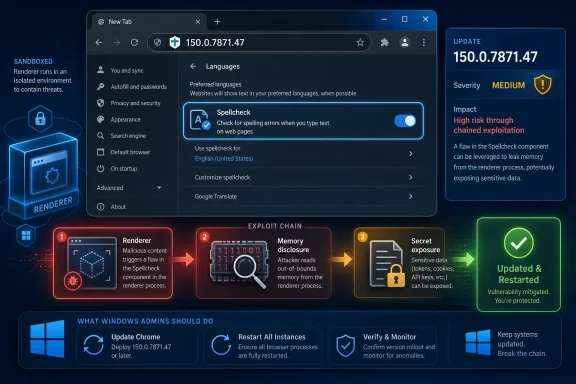 A Medium Bug Becomes Serious When the Renderer Is Already Lost
CVE-2026-13911 is described as “insufficient policy enforcement” in Chrome’s Spellcheck component. In plainer terms, a security boundary or rule around spellchecking did not hold tightly enough, and under the right conditions an attacker could use a malicious page to obtain potentially sensitive information from process memory.The most important phrase in the CVE description is not “crafted HTML page.” It is “had compromised the renderer process.” Chrome’s renderer is the part of the browser responsible for handling web content, and Chrome’s security model assumes hostile pages will spend their lives trying to break out of that confined space. A vulnerability that only becomes useful after renderer compromise is not automatically catastrophic, but it can be valuable as the second or third link in an exploit chain.
That is why the medium severity rating should not lull anyone into ignoring it. CISA’s ADP scoring gives the vulnerability a CVSS 3.1 base score of 5.3, with high confidentiality impact but no direct integrity or availability impact. That maps neatly to the described behavior: this is a read problem, not a code-execution problem, and the attacker still needs the user to interact with a malicious page.
But modern browser exploitation often works by accumulation. One bug gets code running in a renderer, another leaks memory or bypasses a policy, and a third moves the attacker closer to escaping the sandbox or stealing secrets. CVE-2026-13911 is interesting precisely because it sits in that middle zone: not enough to dominate a patch Tuesday, but enough to make an already compromised renderer more useful.
Spellcheck Is Not a Cute Feature When It Touches Private Text
Spellcheck sounds harmless because users experience it as red squiggles under mistyped words. Under the hood, however, browser spellchecking has always been close to sensitive material because it inspects text the user enters into web pages. That can include search queries, internal ticket notes, email drafts, customer data, source-code snippets, credentials typed in the wrong field, or anything else a browser text box happens to contain.The CVE record does not say that CVE-2026-13911 exfiltrates typed text directly. It says an attacker who has compromised the renderer process could obtain potentially sensitive information from process memory. That distinction matters. We should not inflate the claim into a password-stealing superbug when the public record does not support that.
Still, process memory is where browsers become messy. The web platform is an enormous compatibility machine, and Chrome has to juggle DOM state, extension interactions, rendering data, form inputs, translation, accessibility, sync, autofill, spelling, grammar, and enterprise policies. A memory disclosure bug in that environment is useful because secrets do not always stay where clean architecture diagrams say they should.
The Spellcheck angle also matters to enterprise administrators because many organizations treat browser features as productivity conveniences rather than data-handling surfaces. If a browser component can inspect or process user-entered text, it deserves to be considered part of the data exposure story. The line between “feature” and “attack surface” is thinner than most deployment checklists admit.
Google’s Huge Chrome 150 Update Makes This One Bug Easier to Miss
CVE-2026-13911 arrived inside a very large Chrome 150 stable update. Google’s release notes for the June 30 desktop update list Chrome 150.0.7871.46 and 150.0.7871.47 for Windows and Mac, with 150.0.7871.46 for Linux, and external reporting from Malwarebytes and Born’s IT and Windows Blog noted hundreds of security fixes in the same release.That scale is both reassuring and exhausting. It is reassuring because Chrome’s update pipeline is clearly absorbing a staggering volume of security work. It is exhausting because defenders cannot meaningfully triage hundreds of browser CVEs one by one every few weeks and still run a sane IT operation.
This is where the browser has become more like an operating system than an application. For many Windows users, Chrome or another Chromium-based browser is the daily execution environment for email, files, business apps, identity workflows, messaging, administration portals, and AI tools. A browser security update is therefore not a cosmetic app refresh; it is a platform patch.
The volume also changes how we should read severity. A medium-rated confidentiality bug in a release full of critical and high-severity issues may not be the first item on a security team’s dashboard. But the right operational response is not to hand-rank every Chrome flaw. It is to make sure Chrome updates promptly, restarts promptly, and does not linger in a vulnerable state because users leave browser sessions open for days.
The NVD Record Tells a Second Story About Vulnerability Data
The NVD entry for CVE-2026-13911 is a useful snapshot of the new vulnerability-data reality. At the time reflected in the record provided, NVD had not yet supplied its own CVSS 4.0 or CVSS 3.x assessment, while CISA-ADP had contributed a CVSS 3.1 vector and a CWE mapping to CWE-20, Improper Input Validation. NIST’s change history also shows the CPE configuration being added for Google Chrome versions before 150.0.7871.47.That sequence matters because many enterprise tools still behave as though vulnerability metadata appears fully formed, centrally scored, and perfectly mapped the moment a CVE is published. In 2026, that assumption is increasingly brittle. NIST has been explicit that NVD is changing its enrichment model to cope with CVE growth, and the database now leans more visibly on contributed data such as CISA-ADP scoring and affected-product information.
For admins, the practical issue is not philosophical. If a scanner, software inventory tool, or patch dashboard depends on a CPE match, a missing or delayed CPE can mean a missing alert. If it depends on a NIST score, a temporarily absent NVD score can cause the item to fall through a severity-driven workflow.
In this case, the Chrome CPE was added quickly enough to make the affected-product picture clearer. But the user-facing “Are we missing a CPE?” prompt on NVD pages is a reminder that vulnerability intelligence is not a single source of truth descending from the heavens. It is an assembly line, and sometimes the bolts arrive after the chassis.
The CPE Question Is Really an Inventory Question
The user’s instinctive question — are we missing a CPE here? — gets at something important. For CVE-2026-13911, the NVD change history indicates that a CPE configuration was added for Google Chrome versions up to, but excluding, 150.0.7871.47. That is the core CPE mapping most vulnerability-management systems need for Chrome itself.But CPE completeness is not the same as exposure completeness. Chrome’s engine is Chromium, and Chromium is embedded across a wide ecosystem of browsers and applications. Microsoft Edge, Brave, Vivaldi, Opera, Electron apps, and embedded Chromium frameworks often pick up upstream Chromium fixes on their own schedules. A Chrome CPE tells you about Google Chrome; it does not automatically tell you every Chromium-derived product sitting in your environment.
That distinction is often lost in dashboards. A CVE record may list Google Chrome because Google is the assigning or publishing source, while downstream vendors issue their own advisories, package names, build numbers, and update cadences. Windows administrators who manage both Chrome and Edge should not assume a Google Chrome version threshold answers the Edge question.
Microsoft Edge, for example, publishes its own stable-channel security updates and version numbers even though it tracks Chromium. The right question is not simply whether CVE-2026-13911 has a Chrome CPE. The better question is whether every Chromium-based browser and embedded runtime in your estate has consumed the upstream fix.
Renderer Compromise Is the Browser’s Permanent Assumption
The phrase “attacker who had compromised the renderer process” can sound like a caveat that drains the bug of urgency. It should not. Chrome’s architecture exists because renderer compromise is considered plausible enough to design around every day.The renderer is intentionally sandboxed because web content is untrusted. JavaScript, WebAssembly, images, fonts, video, CSS, GPU paths, and browser APIs all represent inputs from the open internet or from internal web apps that may themselves be compromised. When a renderer bug appears, Chrome’s sandbox is supposed to keep the blast radius contained.
CVE-2026-13911 does not appear to be a sandbox escape. The public description says information disclosure from process memory, not arbitrary code execution or privilege escalation. That limitation is important and should keep the hype in check.
But attackers prize memory disclosure because it can defeat other protections. Leaked memory can expose pointers, tokens, origin data, user-entered content, or other state that helps move from unreliable exploitation to reliable exploitation. In a chained attack, a medium bug can become the quiet part that makes the loud bug work.
The User Interaction Requirement Is a Speed Bump, Not a Wall
CISA-ADP’s vector for CVE-2026-13911 includes user interaction required. That means the described attack path depends on a user doing something, such as visiting or interacting with a crafted page. For consumer security advice, that often becomes “don’t click suspicious links,” which is true but inadequate.On the modern web, user interaction is the baseline. Users open links from email, Teams, Slack, Discord, search results, customer portals, vendor dashboards, QR codes, and AI-generated summaries. A crafted HTML page does not need to arrive wearing a ski mask; it can be an ordinary-looking page on a compromised site or a convincing lure inside a familiar workflow.
Administrators should therefore treat user interaction as a factor in prioritization, not as a reason to defer patching. The browser is where users interact with untrusted content all day. A vulnerability that requires a page visit is still squarely inside the browser threat model.
The “not automatable” SSVC field in the NVD record also deserves context. It suggests the vulnerability is not trivially wormable or automatically exploitable at scale under CISA’s assessment. That is useful information for triage. It does not mean attackers cannot use it selectively against high-value users.
Chrome’s Fast Patch Model Still Depends on Restarts
Chrome’s auto-update system is one of the better patch-distribution mechanisms in consumer and enterprise software. For unmanaged users, the browser typically downloads updates in the background and applies them after a restart. For managed Windows fleets, Google’s enterprise templates and update controls give administrators more direct governance.The weak link is often not download. It is restart. A browser that has downloaded 150.0.7871.47 but has not relaunched may still be running vulnerable code. In environments where users keep dozens of tabs alive for days, “Chrome is updated” can be less true than the admin console implies.
That restart problem is particularly acute for browser vulnerabilities because the browser is now the workplace. Asking users to close it can mean interrupting meetings, cloud IDE sessions, line-of-business apps, authentication prompts, and long-running web forms. The result is a soft resistance to patch completion, even when the update itself is automatic.
Enterprises should be honest about that friction. If the risk model says Chrome updates matter, then restart enforcement is not a nicety; it is part of the control. A policy that allows indefinite relaunch deferral is a policy that accepts indefinite browser exposure.
Windows Shops Need to Watch the Chromium Family, Not Just Chrome
For WindowsForum readers, the Chrome-specific version number is only the beginning. Many Windows systems run more than one Chromium-based browser, and many enterprise applications embed Chromium through WebView2, Electron, or bundled runtimes. Each of those components has a different patching story.Microsoft Edge is the most obvious case. It is Chromium-based but distributed and managed through Microsoft’s channels. Edge updates typically follow Chromium security fixes closely, but administrators still need to verify the Edge build actually deployed rather than assuming Chrome’s update equals Edge’s update.
Electron is harder. Desktop apps built on Electron may ship their own Chromium runtime, and some vendors lag behind upstream Chromium updates. A user can have fully patched Chrome and Edge while still running a vulnerable embedded browser inside a chat client, note-taking app, crypto wallet, internal tool, or vendor utility.
That does not mean CVE-2026-13911 automatically affects every Chromium-based product. Public advisories and vendor build notes still matter. But the operational habit should be broader: when a Chromium security update lands, check the Chromium estate, not just the Google Chrome icon on the taskbar.
The Policy-Enforcement Language Should Make Enterprises Pay Attention
The CVE description uses “insufficient policy enforcement,” not merely “buffer overflow” or “use-after-free.” That phrase is notable because it hints at a failure in applying a rule or boundary. In browser security, policy enforcement is the machinery that decides who can access what, under which origin, permission, process, profile, or feature context.Enterprise IT lives on policy. Admins configure browser policies for password managers, extensions, spellcheck, Safe Browsing, site isolation, sync, data-loss prevention, clipboard behavior, and managed profiles. A vulnerability that involves policy enforcement in a text-processing feature should remind administrators that policy is not magic; it is implemented in code, and code can fail.
The public record does not provide enough detail to say which exact Spellcheck policy path failed or whether enterprise-managed settings were central to the bug. Google commonly restricts access to detailed bug reports until enough users are updated, and that appears to be the case for the linked Chromium issue. That restraint is normal and usually prudent.
But even without those internals, the security model implication is clear. Features that process user content must enforce boundaries consistently, especially when a compromised renderer is already in play. If a spellchecking path can become a memory disclosure path, the feature belongs in the same risk conversation as more obviously sensitive browser subsystems.
“Medium” Is the New Operational Trap
Security teams have spent years teaching users and executives that critical vulnerabilities need urgent attention. That was necessary. It also created a hierarchy that can understate medium vulnerabilities in high-exposure components.A medium vulnerability in a rarely used local utility is not the same as a medium vulnerability in the default browser on thousands of workstations. Exposure changes priority. Attack-chain usefulness changes priority. The browser’s role as an identity, data, and application hub changes priority.
CVE-2026-13911 is a clean example. Its CVSS vector contains real limiting factors: high attack complexity, user interaction, no privileges required, unchanged scope, and confidentiality impact only. On paper, that is not an emergency siren. In practice, it sits in a component that touches untrusted content constantly and may help attackers extract information after another browser bug has done the first stage.
The answer is not to panic over every medium CVE. The answer is to stop treating CVSS as a substitute for asset context. For Chrome, Edge, and other internet-facing browsers, “medium” often still means “patch on the next operational cycle, not next quarter.”
The Public Silence Around Exploitation Is Good News, But Not a Strategy
The NVD and CISA-ADP data shown for CVE-2026-13911 indicate no known exploitation in the SSVC entry. Google’s public release note for this CVE does not flag it as exploited in the wild. That is good news.It is also not a durable defense. Browser vulnerabilities move quickly from advisory to reverse engineering, especially after patches ship. Attackers can compare fixed and unfixed code, study issue metadata when it becomes available, and look for ways to adapt the bug into a chain.
Google’s practice of restricting bug details until a majority of users are updated is designed to reduce that window of easy weaponization. But the window does not close just because the advisory is sparse. It closes when the vulnerable population shrinks.
That is why post-release patch velocity matters more than day-one panic. If your systems are on Chrome 150.0.7871.47 or later, CVE-2026-13911 becomes mostly a historical note. If they remain on earlier Chrome 150 builds — or older 149 and 148 builds with their own large vulnerability sets — the absence of known exploitation becomes a weaker comfort every day.
Vulnerability Management Is Becoming a Data-Quality Discipline
The NVD change history for this CVE is unusually instructive because it shows the layered process behind a vulnerability record. Chrome submitted the CVE with description, references, and affected-version data. CISA-ADP added CVSS, CWE, and SSVC information. NIST added CPE configuration and release-note typing.That is not bureaucracy for its own sake. Each field feeds a different downstream machine. CVSS drives severity queues. CWE supports weakness analysis. SSVC helps prioritization. CPE enables product matching. References help analysts verify remediation. A missing field can break an automation path even when the human-readable advisory is clear.
This is why vulnerability management in 2026 is partly a data engineering problem. Security teams need to know which feeds their tools consume, how quickly those feeds update, whether vendor advisories override NVD gaps, and how exceptions are handled when metadata is incomplete. “The scanner did not flag it” is no longer a sufficient answer if the scanner depends on delayed enrichment.
For Chrome, the operational shortcut remains refreshingly simple: check the installed version. If it is below 150.0.7871.47 on Windows or Mac, it is behind this fix. If your tool cannot tell you that directly, the tool is not giving you enough visibility into one of the most important applications in your environment.
The Patch Is Simple; The Estate Is Not
For individual Windows users, the fix is ordinary: update Chrome and relaunch it. Chrome’s About page will check for updates, install the current build, and prompt for a restart if needed. Users who rely on automatic updates should still confirm the version when a security release this large lands.For small businesses, the same advice applies with a little more discipline. Inventory Chrome versions, verify relaunch completion, and check any systems where users lack permission to update software. Kiosks, shared workstations, lab machines, and VDI images are common places where browser updates lag behind normal desktops.
For enterprises, the work is less about this one CVE and more about process. Chrome 150’s security payload is large enough that administrators should review update rings, relaunch policies, reporting accuracy, and exception lists. Any device pinned to an old browser build for compatibility reasons should now be treated as an explicit risk acceptance, not an invisible workaround.
There is also a documentation obligation. Help desks should know that users may see restart prompts, that some web apps may behave differently after a major browser update, and that delaying the restart preserves exposure. The worst patch process is one where security silently pushes an update and support silently teaches users how to postpone it.
The Practical Read on CVE-2026-13911 Is Less Dramatic Than the Risk Model
CVE-2026-13911 is not, based on public information, a remote-code-execution zero-day. It is not known to be actively exploited. It requires renderer compromise and user interaction. Its public severity is medium.Those facts should be stated plainly because browser security coverage too often turns every CVE into an apocalypse. Overstating this bug would make readers less informed, not more secure. The most honest reading is that CVE-2026-13911 is a confidentiality weakness that becomes relevant in chained exploitation and should be fixed through normal urgent browser-update practice.
But “normal urgent browser-update practice” is doing a lot of work in that sentence. If your organization has that practice, this CVE is routine. If it does not, the bug becomes another reminder that a browser left unpatched is not a single vulnerability; it is an accumulating pile of exploit ingredients.
The difference between those two realities is not technical sophistication. It is operational muscle. Chrome’s security team can ship the fix, NVD can enrich the record, and CISA can score the impact. Only the user or administrator can make sure the vulnerable process actually stops running.
The Spellcheck Bug Says More About Patch Discipline Than Spelling
The useful response to CVE-2026-13911 is not fear; it is verification. This is a medium-severity browser flaw with constrained exploitation conditions, but it lives in a high-exposure application and can matter as part of a larger chain.- Chrome on Windows and Mac should be updated to 150.0.7871.47 or later to close this specific vulnerability.
- The bug requires a compromised renderer process, which lowers standalone severity but makes the flaw potentially useful in chained browser attacks.
- The public record describes confidentiality impact from process memory, not direct code execution, sandbox escape, or data destruction.
- Administrators should verify browser relaunches, because downloaded Chrome updates do not fully protect users until the old process exits.
- Vulnerability tools should be checked for correct Chrome CPE matching, but teams should also track Chromium-based browsers and embedded runtimes separately.
- The absence of known exploitation is helpful context, not a reason to leave high-exposure browsers behind current stable builds.
References
- Primary source: NVD / Chromium
Published: 2026-07-03T07:00:31-07:00
NVD - CVE-2026-13911
 nvd.nist.gov
- Security advisory: MSRC
Published: 2026-07-03T07:00:31-07:00
Original feed URL
Security Update Guide - Microsoft Security Response Center
 msrc.microsoft.com
- Related coverage: cvefeed.io
CVE-2026-13911 - Google Chrome Spellcheck Information Disclosure
Insufficient policy enforcement in Spellcheck in Google Chrome prior to 150.0.7871.47 allowed a remote attacker who had compromised the renderer process to obtain potentially sensitive information from process memory via a crafted HTML page. (Chromium security severity: Medium)cvefeed.io - Official source: nist.gov
National Vulnerability Database
NIST maintains the National Vulnerability Database (NVD), a repository of information on software and hardware flaws that can compromise computer security. This is a key piece of the nation’s cybersecurity infrastructure.www.nist.gov - Related coverage: labs.cloudsecurityalliance.org
NVD Enrichment Triage: Enterprise Vulnerability Programs Must Adapt
PDF documentlabs.cloudsecurityalliance.org
- Official source: nvlpubs.nist.gov
Technical Specification for the Security Content Automation Protocol (SCAP): SCAP Version 1.4
The Security Content Automation Protocol (SCAP) is a suite of specifications that standardize the format and nomenclature by which software flaw and security configuration information is communicated, both to machines and humans. This publication, along with its annex (NIST Special Publication...nvlpubs.nist.gov
