

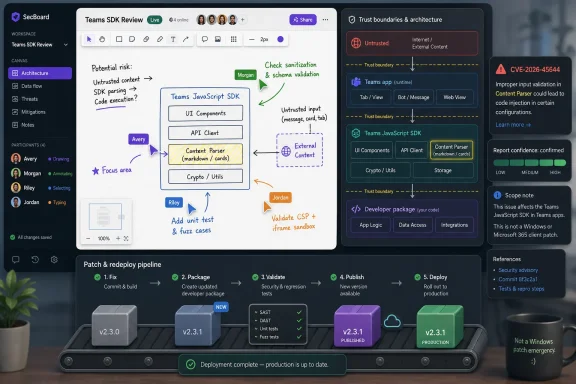
Microsoft’s Small SDK Bug Carries a Bigger Collaboration-Stack Warning
Live Share Canvas is not a household Windows component, and that is exactly why this vulnerability deserves more attention than its name will probably receive. It sits in the class of modern collaboration plumbing that developers embed into Teams-style shared experiences: whiteboards, synchronized drawing surfaces, live cursors, annotations, shared state, and multiplayer application interfaces.
That changes the shape of risk. A flaw in this sort of SDK is not necessarily about a user double-clicking a malicious executable or an administrator forgetting to patch a server role. It is about the trust boundary inside applications that allow multiple people, identities, sessions, and pieces of shared data to interact in real time.
Elevation of privilege in this context can mean something more subtle than “attacker becomes SYSTEM.” It can mean that a participant gains capabilities the application did not intend to grant, that shared session state is interpreted too generously, or that an app built on top of the SDK inherits a privilege boundary weakness from a dependency its developers treated as infrastructure.
That is the larger lesson of CVE-2026-45644. Microsoft’s collaboration ecosystem is no longer just Teams, SharePoint, Outlook, and Windows clients. It is a layered developer platform, and the security of that platform increasingly depends on small libraries that most users never see.
Report Confidence Is the Quiet Metric That Tells Defenders When to Stop Debating
The user-supplied metric description points to one of the least glamorous but most useful vulnerability-scoring ideas: report confidence. It measures how much faith defenders should place in the existence of a vulnerability and the reliability of the public technical detail around it.
That distinction matters because vulnerability management teams often confuse uncertainty with low priority. A sparse advisory can look less urgent than a detailed exploit write-up, but those are different signals. Sparse detail may mean the vendor is withholding exploit guidance, not that the bug is speculative.
For CVE-2026-45644, the confidence floor is relatively high because Microsoft has acknowledged the vulnerability through its Security Update Guide. That does not mean every attack path is public, and it does not mean proof-of-concept code is circulating. It means the existence of the flaw should not be treated as rumor.
This is where the practical reading becomes important. The public record may not yet tell administrators exactly how the Live Share Canvas SDK can be abused, but the vendor confirmation moves the issue out of the “interesting intelligence” bucket and into the “inventory and remediate” bucket.
The Absence of Exploit Detail Is a Feature, Not a Reassurance
Microsoft advisories often provide enough information to support patching decisions while withholding the kind of root-cause detail that would help attackers reproduce the bug quickly. That can frustrate security teams, especially those trying to explain risk to engineering groups that want a precise exploit narrative before they update a dependency.
But the lack of public mechanics should not be overread. In a developer SDK, the exploitability of a vulnerability can depend heavily on how the SDK is used by downstream applications. One app might expose the vulnerable path to every meeting participant; another might use the same package in a constrained internal tool where the practical risk is far lower.
That variability is why “known technical details” and “known existence” must be separated. Microsoft’s acknowledgement tells us the flaw exists. The limited public detail tells us defenders may not yet have enough information to write reliable detection logic, assess every application path, or model every abuse scenario.
For WindowsForum readers, especially those managing mixed Microsoft 365 and custom-app environments, that is the operational rub. You may not be patching Windows itself, but you may still be carrying Microsoft platform code inside your organization’s applications.
Live Share Canvas Shows How Microsoft’s Risk Surface Has Shifted Toward Embedded Experience
Microsoft’s Live Share family exists because collaboration has become an application primitive. Developers no longer simply build a web app and add chat beside it; they build experiences where documents, canvases, media, and application state are synchronized among users.
That model is powerful, but it is also security-sensitive. Shared canvases need to decide who can draw, erase, select, edit, broadcast, persist, and replay state. Those verbs sound harmless until they become authorization decisions.
A canvas SDK is not just pixels. It is event handling, identity assumptions, session coordination, serialization, permissions, and rendering behavior. If any of those layers mishandles trust, the result may be classified as elevation of privilege even if the affected user experience looks like a simple collaborative whiteboard.
This is the part of the Microsoft stack that traditional patch dashboards often undersell. Windows Update can tell you whether a workstation has received a cumulative update. It cannot tell you whether an internal Teams app, a line-of-business collaboration tool, or a custom meeting extension has rebuilt against a corrected package.
Dependency Patching Is Where Many Microsoft Shops Still Lose the Plot
Enterprise patching is mature when the asset is an operating system, a browser, or Office. It becomes much messier when the vulnerable component is a package consumed by developers. CVE-2026-45644 belongs to that messier world.
The remediation path is likely to run through package manifests, lock files, build pipelines, app redeployment, and validation in the applications that use the SDK. That is a different muscle from approving a Windows cumulative update in Intune, Configuration Manager, or Windows Server Update Services.
The result is a familiar organizational gap. Security teams see a Microsoft CVE and expect a Microsoft patching workflow. Developers see an SDK advisory and expect security to prove whether their specific implementation is exposed. Meanwhile, the vulnerable dependency can remain in production because neither side owns the full path from advisory to deployed fix.
This is why software composition analysis has become part of Windows administration whether admins asked for it or not. The Microsoft estate now includes npm packages, Teams apps, Azure-hosted services, GitHub workflows, containers, and extensions. Vulnerability management has to follow the code, not just the device.
Elevation of Privilege Is Not Always a Local Admin Story
The phrase “elevation of privilege” still carries Windows baggage. Many administrators instinctively picture a local attacker moving from standard user to administrator or from service account to SYSTEM. That remains a serious class of bug, but it is not the only one.
In web and collaboration platforms, privilege is often application-level. A user may gain access to another user’s session capabilities. A participant may perform an action reserved for an organizer. A component may trust client-supplied state that should have been mediated by the server. A shared object may accept operations from the wrong identity context.
That makes the impact harder to summarize but not necessarily less serious. In a collaborative application, the valuable asset may be meeting content, whiteboard state, design annotations, workflow decisions, or the authority to alter what other users see. The attack does not have to own the machine to compromise the business process.
For defenders, the practical question is not “does this give SYSTEM?” It is “what does our application let Live Share Canvas users do, and what would happen if those boundaries were crossed?”
Microsoft’s Advisory Model Leaves Customers With a Triage Burden
Microsoft’s Security Update Guide is good at standardizing vulnerability publication. It is less good at telling every affected customer what to do in their specific architecture. CVE-2026-45644 is a good example of why that limitation matters.
A conventional Windows vulnerability can be mapped to affected versions and KBs. An SDK vulnerability must be mapped to dependency versions, consuming applications, deployment artifacts, and sometimes transitive use. That requires internal knowledge Microsoft cannot supply from the outside.
This does not make the advisory weak. It means the advisory is the start of the work, not the end. The responsible team must identify whether Live Share Canvas is present, where it is bundled, which deployed applications include it, and whether fixed builds have actually reached users.
That last step is often missed. Updating a package in source control is not the same as remediating a production vulnerability. The fixed dependency has to make it through build, test, release, distribution, and rollback planning.
Attackers Like the Space Between Vendor Patch and Developer Redeploy
The most dangerous period for SDK vulnerabilities is often after disclosure. Before publication, attackers may not know the bug exists. After publication, they know where to look, while defenders still have to find every app that embeds the affected component.
That asymmetry is especially sharp for JavaScript and web-facing collaboration components. Package names, bundled assets, source maps, lock files, and application behavior can all provide clues. Even when no public proof-of-concept exists, attackers can start diffing patched and unpatched versions if the package update is available.
This is why report confidence can raise urgency even when exploit maturity is unclear. A confirmed vulnerability tells attackers the hunt is worth their time. Limited detail may slow them down, but it does not stop them from comparing versions, fuzzing exposed functionality, or testing authorization boundaries in apps that use the SDK.
The defender’s answer is not panic. It is speed and inventory. Organizations that already know where Microsoft collaboration SDKs live can respond in hours. Organizations that have to ask every development team manually may spend the most important part of the disclosure window simply building a list.
The Teams App Economy Needs a Security Inventory Mindset
The Microsoft collaboration platform has encouraged organizations to build custom experiences inside Teams and adjacent Microsoft 365 workflows. That strategy makes sense: users already live in those tools, identity is integrated, and the platform provides useful primitives for meetings, chat, files, and real-time interaction.
But every custom app extends the security boundary. The more an organization builds on Microsoft’s collaboration SDKs, the more it needs a living inventory of those dependencies. That inventory should not be limited to production servers; it should include Teams apps, meeting extensions, internal prototypes that became business-critical, and vendor-supplied add-ons.
CVE-2026-45644 is a reminder that “Microsoft vulnerability” does not always mean “Microsoft will patch the client and we are done.” Sometimes it means Microsoft has patched a component, and customers must patch the things they built with it.
That is an uncomfortable shift for IT departments that still divide the world into vendor software and custom software. Modern Microsoft environments are full of both at once.
Security Teams Should Ask Better First Questions
The first response to CVE-2026-45644 should not be to demand exploit code. It should be to ask whether the organization uses the affected SDK and where. That sounds basic, but in many enterprises it is the hardest question in the room.
Developers should check package manifests and lock files. Platform teams should check internal app catalogs. Microsoft 365 administrators should review custom Teams apps and meeting extensions. Security teams should search software bills of materials where available and compare production artifacts against known dependency versions.
The next question is exposure. An internal-only app used by a small trusted team is not the same risk as a widely deployed customer-facing collaboration portal. But both still need remediation if they contain the vulnerable package. Risk ranking should decide sequencing, not whether the issue is real.
Finally, teams should check whether compensating controls exist. Authentication, tenant restrictions, app permission models, meeting policies, and server-side authorization can reduce practical exposure. They should not be used as an excuse to leave a vulnerable dependency in place indefinitely.
The Real Signal Is Vendor Confirmation, Not Public Drama
High-profile vulnerabilities usually arrive with drama: exploit chains, emergency patches, ransomware crews, proof-of-concept repositories, and breathless social posts. CVE-2026-45644 may not have any of that. That does not make it irrelevant.
For most organizations, the highest-value vulnerability management work is not responding to the loudest bugs. It is consistently closing confirmed flaws before they become loud. Vendor-confirmed SDK vulnerabilities sit squarely in that category.
The report-confidence angle is useful because it tells teams how much skepticism is healthy. If a vulnerability is only rumored, security teams may reasonably wait for corroboration. If a researcher has partial evidence, they may monitor and prepare. If Microsoft has acknowledged the flaw in its update guide, the debate should move from existence to exposure and remediation.
That is the line CVE-2026-45644 crosses. The technical details may be incomplete, but the vulnerability should be treated as confirmed for operational purposes.
Developers Own the Fix More Than Desktop Administrators Do
A Windows administrator may be the first person to see the CVE in a feed, but a developer is likely to be the person who actually fixes it. That is the awkward reality of SDK vulnerabilities in Microsoft’s ecosystem.
The fix may involve updating the Live Share Canvas package, rebuilding the app, testing collaborative features, and redeploying through the organization’s normal release process. If the affected application is distributed to users, administrators may also need to ensure stale cached builds are replaced. If it is a Teams app, the app catalog and deployment policy may become part of the remediation path.
This is where mature organizations have an advantage. If dependency updates are automated, if builds are reproducible, and if releases can move quickly through staging, a confirmed SDK vulnerability is routine. If every package update is a bespoke project, the organization becomes slow exactly when speed matters.
The broader message is blunt: Microsoft platform development now requires Microsoft-grade patch discipline. If an app depends on a vendor SDK, that dependency must be treated as part of the security perimeter.
WindowsForum Readers Should Watch the Downstream Vendors
Not every affected deployment will be custom-built in-house. Third-party products may also embed Microsoft Live Share Canvas functionality. That creates a second layer of dependency risk: customers may need to wait for their vendor to consume Microsoft’s fix and ship an updated build.
This is where procurement and vendor management intersect with vulnerability response. If a product includes collaborative canvas features, meeting annotations, shared whiteboarding, or Teams-integrated live interaction, it is reasonable to ask the vendor whether CVE-2026-45644 affects them.
A good vendor answer should be specific. It should say whether the affected SDK is used, which product versions are impacted, what fixed version is available, and whether any interim mitigations exist. A vague assurance that the vendor “takes security seriously” is not remediation.
For managed environments, this is also a reason to monitor release notes from app vendors that build on Microsoft 365 and Teams. The vulnerable component may be Microsoft’s, but the update you need may arrive from someone else.
The Practical Read for CVE-2026-45644 Is Narrow but Urgent
CVE-2026-45644 is not a reason to halt every Teams meeting or distrust every collaborative canvas. It is a reason to stop treating collaboration SDKs as invisible plumbing. The vulnerability is confirmed by Microsoft, the public technical detail appears limited, and the remediation burden likely falls on whoever ships applications using the affected package.
The most useful response is disciplined and concrete:
- Organizations should identify whether any internal or third-party applications use the Microsoft Live Share Canvas SDK.
- Development teams should update affected package versions, rebuild applications, and verify that fixed builds are actually deployed.
- Security teams should treat Microsoft’s advisory as sufficient confirmation that the vulnerability exists, even if exploit details remain sparse.
- Administrators should review custom Teams apps, meeting extensions, and collaboration tools rather than focusing only on Windows Update status.
- Vendor managers should ask suppliers of Teams-integrated or live-canvas products whether their builds include the vulnerable SDK and when fixed versions will ship.
CVE-2026-45644 is a small entry in a large Microsoft security calendar, but it points toward a much bigger operating reality: the Windows and Microsoft 365 security perimeter now runs through developer packages, collaboration frameworks, and embedded SDKs as much as through endpoints and servers. The organizations that adapt will treat this advisory as a routine dependency-response exercise; the ones that do not will discover, one confirmed CVE at a time, that their patch process stops too close to the operating system.