

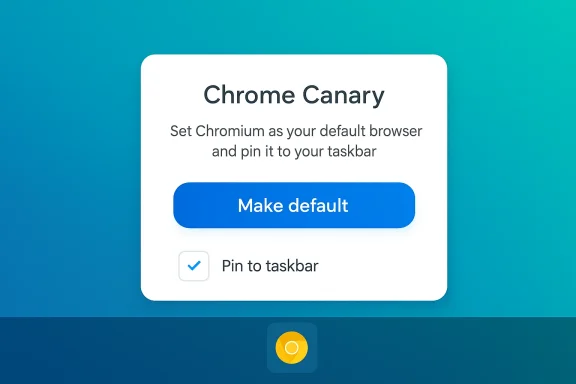
Google is quietly testing a small onboarding tweak in Chrome Canary that could have outsized effects: during first run on Windows the browser now offers a bigger “Make default” button alongside an explicit option to pin Chrome to the taskbar, putting a one‑click launch tile in front of new users at the moment their habits are forming. rce.com]
The change is currently visible only to some testers in Chrome Canary and is gated behind an experimental flag called First Run Desktop Refresh. That flag is present in Chromium’s flags metadata and describes a visually refreshed first‑run flow on desktop; enabling it in chrome://flags (search for #first-run-desktop-refresh) can force the experience for those who want to try the experiment.
At the code level the Chromium project already contains localized strings that explicitly reference both setting the browser as default and pinning to the taskbar — messages such as “Set Chromium as your default browser and pin it to your taskbar” and related first‑run titles/subtitles. Those strings live in Chromium’s resources, which means the UI and copy are prepared upstream even if Canary’s behavior can still change before Beta or Stable releases.
This experiment matters because it moves a retention play — increasing the likelihood a user will reopen a browser — to the earliest moment of the user journey: the very first launch after install. Multiple outlets and community observers have noticed the new screen in Canary builds and reported how the prompt places both the default‑browser decision and the taskbar pin side‑by‑side in a single, visually prominent panel.
A few patterns explain why this micro‑change has macro effects:
Chrome’s success here will depend on a few variables:
Source: findarticles.com Chrome Tests Windows Taskbar Pin Prompt on First Run
 Background
The change is currently visible only to some testers in Chrome Canary and is gated behind an experimental flag called First Run Desktop Refresh. That flag is present in Chromium’s flags metadata and describes a visually refreshed first‑run flow on desktop; enabling it in chrome://flags (search for #first-run-desktop-refresh) can force the experience for those who want to try the experiment.At the code level the Chromium project already contains localized strings that explicitly reference both setting the browser as default and pinning to the taskbar — messages such as “Set Chromium as your default browser and pin it to your taskbar” and related first‑run titles/subtitles. Those strings live in Chromium’s resources, which means the UI and copy are prepared upstream even if Canary’s behavior can still change before Beta or Stable releases.
This experiment matters because it moves a retention play — increasing the likelihood a user will reopen a browser — to the earliest moment of the user journey: the very first launch after install. Multiple outlets and community observers have noticed the new screen in Canary builds and reported how the prompt places both the default‑browser decision and the taskbar pin side‑by‑side in a single, visually prominent panel.
What’s changing in Chrome Canary (the specifics)
The new first‑run panel: design and options
- The first‑run panel in Canary shows a larger default button than Chrome’s older, quieter infobar approach.
- The panel can include an explicit option to pin Chrome to the Windows taskbar as part of the same flow. Copy in the build frames the action as a convenience: open links in Chrome and keep the browser accessible from your taskbar.
- The experience is A/B tested and flag‑gated; not every Canary user sees it and behavior may vary across sessions or builds. The relevant experimental flag is named
first-run-desktop-refresh.
How testers can see it today
- Install Chrome Canary (experimental, unstable builds).
- Open chrome://flags and enable First Run Desktop Refresh or search for
#first-run-desktop-refresh. - Relaunch the browser and, if the experiment is active for your build/profile, the refreshed first‑run screen should appear on the initial launch. Note that Canary features are volatile and Google can change or remove the flow without notice.
Why pinning to the taskbar matters — the product logic
The Windows taskbar is prime real estate: Microsoft’s own guidance positions it as a primary app launch surface and UX research consistently shows that pinned apps see higher repeat usage because they reduce friction. Placing a Chrome icon on the taskbar short‑circuits hunting for the browser in the Start menu or desktop shortcuts and lowers the cognitive cost of opening it. In an attention economy where seconds and clicks matter, that single extra click saved can materially increase retention at scale.A few patterns explain why this micro‑change has macro effects:
- Habit formation: the first few launches after install are when users decide which apps they’ll keep returning to. A taskbar pin makes Chrome part of that habitual surface.
- Visibility: pinned apps are seen every session; even if the user doesn’t click immediately, repeated exposure biases future choice.
- Network effects at scale: Chrome installs number in the millions; even a small percentage lift in daily active launches translates to large absolute gains.
The competitive and regulatory backdrop
Microsoft’s countermeasures
This move occurs inside an active browser war on Windows. Microsoft has experimented with ways to keep Edge visible — including outbound campaigns that prompt users to pin Edge or that leverage Windows update / OOBE flows to surface Edge promotions. Recent Edge Canary flags showed telemetry‑gated pin campaigns targeted at heavy Chrome users, a development that has been publicly reported and debated. Google’s taskbar pin experiment can be read as an industry‑typical defensive play: meet the competition on the surfaces users actually interact with.Regulation and trust risks
Any change that nudges user choice — even an opt‑in nudge — will be watched in markets with vigorous competition law oversight. The EU’s Digital Markets Act (DMA) has already forced platform changes in how defaults and choice screens are implemented in the region. While a voluntary, explicit pin option is not the same as a forced placement, the regulatory lens will examine whether the presentation and wording materially influence users’ ability to make free, informed choices. At a minimum, the new flow raises questions about transparency, consent, and whether UI design choices could be considered coercive in some jurisdictions.Technical verification and sources
We verified key technical claims against primary Chromium sources and contemporary reporting:- The Chromium source tree contains strings used for the First Run Experience (FRE) that explicitly reference pinning and default selection — e.g., identifiers like
IDS_FRE_DEFAULT_BROWSER_AND_PINNING_TITLEand copy lines reading “Set Chromium as your default browser and pin it to your taskbar.” That is a primary, verifiable artifact in the Chromium repository. - The
first-run-desktop-refreshflag is present in Chromium’s flag metadata and flag descriptions, explaining its purpose (“Enables the visually refreshed first run flow on desktop”). That metadata shows the experiment is intentional and owned by Chrome’s desktop UI/sign‑in teams. - Multiple technology outlets and community observers have captured the UI in Canary and explained how enabling the flag surfaces the onboarding prompt. These independent writeups corroborate the behavior reported in Chromium’s source strings and in community threads.
UX tradeoffs: helpful convenience or slippery slope?
Benefits
- Faster access: Pinning at first run reduces launch friction for users who intend to use Chrome frequently.
- Better onboarding: Bundling the default decision and pin makes the intent explicit and streamlines setup for average users who expect one‑click actions.
- **Explicit const pinning, Chrome’s prompt is opt‑in; Google is not (at least in Canary) auto‑pinning without user action.
Risks and drawbacks
- Prompt fatigue: Users see many prompts during first run (sign in, sync, default, extensions); a new, more assertive panel risks overload and reflexive dismissal. Poor tone or timing could reduce the feature’s effectiveness.
- Perception of manipulation: an be criticized if the UI nudges too aggressively toward a particular choice. In competition‑sensitive markets this amplifies scrutiny.
- Edge cases and bugs: Taskbar pinning on Windows has historically exhibited odd behaviors (duplicate pins, profile mismatches, pinned shortcut name variants). Adding another surface for pins risks exposing or re‑triggering those bugs in mass deployments. Community reports and forum threads across years show pin behavior complexity on Windows.
Enterprise and administrative considerations
IT administrators should note that Chrome’s onboarding surfaces are not the only way defaults or pins are controlled on Windows:- Group Policy / ADMX: Enterprises can control default‑browser behavior and suppress first‑run checks using Google’s administrative templates. Policies such as
DefaultBrowserSettingEnabledcan disable automatic default checks or enforce settings centrally. The Chromium-based code and experiment are not replacements for enterprise policies. - Registry keys / scripting: For mass deployments admins often use registry or layout XML provisioning to ensure consistent pinned items across images. Any OS‑level pin created by a first‑run flow can be undone programmatically if an organization needs to enforce a different workstation configuration.
- Managed devices and OS policies: On managed Windows images the OS may have security/configuration tooling that preempts or ignores user‑initiated pins — test images before rolling out any new onboarding guidance to users.
How to try it (practical steps)
If you’re an adventurous user or tester and want to experience the experiment yourself:- Install Chrome Canary on Windows (Canary updates daily; it’s not suitable for production use).
- Open chrome://flags and search for First Run Desktop Refresh or
#first-run-desktop-refresh. - Enable the flag and relaunch Chrome Canary.
- On the first launch after enabling the flag you may see the refreshed flow with the Make default and Pin to taskbar affordances.
--no-default-browser-check --no-first-run to bypass first‑run checks, or use enterprise policies to suppress prompts.What to expect next — rollout scenarios
Google typically stages UI experiments in this order:- Canary — early testing to validate implementation and initial telemetry.
- Dev — broader internal testing; potential feature‑flag variations and parameter tuning.
- Beta — public preview to collect real‑world feedback at scale.
- Stable — production release for all users, often with regional or platform gating if needed for regulatory compliance.
Regulatory and public policy implications — a closer read
Three policy dynamics matter here:- Choice architecture scrutiny: Regulators increasingly recognize that how choices are presented affects behavior. A big button paired with a convenience framing could be interpreted as nudging even if it requires explicit user action.
- DMA and regional rules: In the European Union, the DMA has already forced platform changes around defaults and bundling; Google will need to ensure any rolled‑out flows comply with local obligations that protect competitors’ visibility and user choice.
- Reciprocal tactics: Microsoft’s own pinning campaigns in Edge Canary (telemetry‑gated prompts aimed at heavy Chrome users) mean regulators and journalists will watch any reciprocal moves closely — this is not just product competition, it’s a public contest about fairness and market power.
Verdict: small UI change, meaningful business leverage
On balance, Google’s taskbar pin experiment in Canary is a classic example of product teams optimizing at the margins. The engineering and UX effort required is small compared to major browser features, but the behavioral leverage is high because the taskbar alters the user’s default environment. Chrome’s approach — explicit, opt‑in, and flag‑gated — reduces the bluntness of the tactic, but it doesn’t make the business logic any less aggressive: when you already command a large share of the market, incremental improvements to retention are valuable.Chrome’s success here will depend on a few variables:
- Whether the prompt feels helpful rather than pushy.
- Whether the pinned behavior is reliably implemented across Windows configurations.
-regulators respond — particularly if Microsoft or regional authorities signal that pinning nudges are problematic.
first-run-desktop-refresh flag) shows this has been engineered as a deliberate experiment, and independent reporting corroborates that testers can enable it in Canary today.Practical recommendations for readers
- If you’re curious: try Chrome Canary and the
#first-run-desktop-refreshflag in a test VM — do not run Canary on a primary work machine. - If you’re an admin: confirm your deployment policies and, if necessary, proactively enforce default or pin behaviors with ADMX / Group Policy to avoid unexpected user prompts.
- If you’re a privacy/regulatory watcher: monitor the copy variants and rollout regions; the exact wording and presentation are the clearest signals about intent.
- If you’re a competitor: expect Google to experiment further and respond with your own visibility plays — the desktop taskbar is now plainly part of the battleground.
Conclusion
What looks like a tiny UI tweak — a bigger “Make default” button and an adjacent pin to taskbar option in Chrome’s first‑run flow — is actually a strategic product maneuver. It leverages a critical habit‑formation moment to boost visibility and reduce friction to repeat usage. The experiment is implemented cleanly (visible in Chromium strings and behind a named flag), but it sits at the intersection of UX, competition, and regulatory scrutiny. Whether Google turns this Canary experiment into a global release will depend less on engineering than on user reaction and the responses of rivals and regulators. For Windows users and admins, the sensible stance is to test, watch the wording, and prepare policies that preserve predictable, enterprise‑grade behavior if and when the feature ships more broadly.Source: findarticles.com Chrome Tests Windows Taskbar Pin Prompt on First Run
