

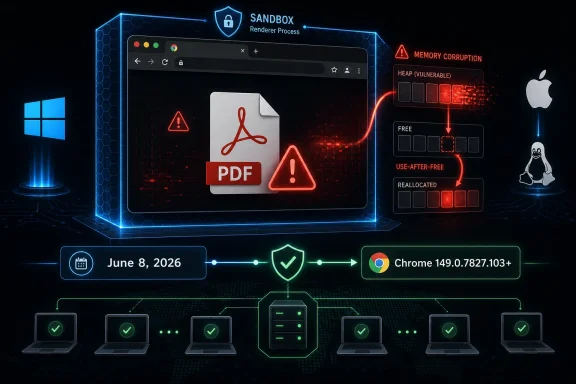
Google fixed CVE-2026-11670 on June 8, 2026, in Chrome’s desktop Stable channel update to version 149.0.7827.102/.103 for Windows and Mac and 149.0.7827.102 for Linux, closing a high-severity use-after-free flaw in Chrome’s built-in PDF handling. The vulnerability allowed remote code execution inside Chrome’s sandbox when a user opened a crafted PDF file in a vulnerable browser. That “inside a sandbox” qualifier matters, but it should not comfort anyone too much. The modern browser is no longer just a window onto the web; it is the default document viewer, identity broker, password vault, app runtime, and, in many organizations, the most exposed piece of client software on the fleet.
The important thing about CVE-2026-11670 is not that it lives in PDF code. It is that PDF code now lives inside the browser path where ordinary users do ordinary things. A malicious attachment, a drive-by document preview, a cloud storage link, or a webmail PDF open can all converge on the same attack surface.
For years, administrators treated PDF risk as a problem belonging mostly to standalone readers. That mental model has not aged well. Chrome, Edge, and other Chromium-derived browsers have trained users to open PDFs inline because it is faster, frictionless, and usually good enough.
That convenience changes the shape of vulnerability response. A PDF parsing flaw in a browser is not confined to people who installed a particular document application. It rides along with one of the most widely deployed runtimes on Windows, macOS, and Linux.
CVE-2026-11670’s description is stark: a use-after-free condition in PDF handling before Chrome 149.0.7827.103 could allow a remote attacker to execute arbitrary code inside the browser sandbox via a crafted PDF file. The attack still requires user interaction, but “open this PDF” remains one of the most plausible prompts in enterprise computing.
But the phrase can also be misleading if read too casually. A sandboxed browser exploit may still expose data available to the renderer process, enable further exploitation steps, or become one link in a chain that includes a separate sandbox escape. Attackers do not need every bug to be a full-device takeover by itself; they need enough primitives to move the campaign forward.
This is why browser vendors and vulnerability databases rate flaws like this as high severity rather than brushing them aside as contained. The first stage of a browser exploit chain often looks exactly like this: memory corruption triggered by hostile content in a format users trust.
The CVSS vector assigned by CISA’s enrichment tells the same story in compressed form. Network attack vector, low complexity, no privileges required, user interaction required, and high confidentiality, integrity, and availability impact make this a serious client-side vulnerability even without public evidence that CVE-2026-11670 itself is being exploited in the wild.
That context matters because it undercuts the idea that browser security is about isolated bugs with neat boundaries. Chrome is an operating-system-sized codebase wearing the clothes of an application. Its attack surface sprawls across graphics, media, networking, JavaScript, extensions, input handling, document rendering, and platform integration.
The update also included CVE-2026-11645, a high-severity V8 out-of-bounds memory access vulnerability that Google said had an exploit in the wild. That does not mean CVE-2026-11670 was being exploited, and it would be irresponsible to imply otherwise. But it does mean the patch train carrying the PDF fix was already urgent for reasons beyond PDF handling alone.
For administrators, this is the operational lesson: you rarely get the luxury of patching just the one CVE that sounds relevant to your environment. The browser update is the unit of action. Once the vendor ships a Stable channel fix containing dozens of memory-corruption vulnerabilities and at least one exploited issue, the practical question becomes how quickly the fleet can absorb the build.
That is the textbook explanation, but the deeper point is cultural. Browser engineering has spent years layering fuzzing, sanitizers, exploit mitigations, process isolation, and memory-safe rewrites around C and C++ code that remains difficult to reason about at Chrome scale. The bug class persists because the codebase is vast and the interfaces are numerous.
PDF handling is particularly unforgiving. The format is not just text and images; it is a sprawling container of fonts, streams, compression, forms, scripts, annotations, embedded objects, and decades of compatibility obligations. Rendering untrusted PDFs inside a browser is therefore a convenience feature built on top of a historically hostile file format.
This is not a criticism unique to Google. It is the industry’s bargain. Users expect documents to open instantly, inside the browser, across platforms, without plug-ins, and with high fidelity. Security teams inherit the risk of making that expectation safe enough.
The broader point is simpler: Windows administrators should not treat Chrome patching as a consumer-app chore. Chromium-based browsers are now part of the operational substrate of Windows environments, even when they are not delivered through Windows Update. They front-end Microsoft 365, Google Workspace, identity portals, SaaS dashboards, EDR consoles, password managers, remote support tools, and internal line-of-business apps.
That creates a split-brain maintenance problem. Windows Update may be green while browser exposure remains red. Endpoint management may report OS compliance while users are still running a vulnerable browser build because an updater is blocked, a machine has not restarted, or a third-party patching catalog has not caught up.
The right test is not “did Patch Tuesday run?” It is “which browser build is actually executing on the endpoint right now?” For CVE-2026-11670, the answer should be Chrome 149.0.7827.103 or later where that versioning applies, or the corresponding fixed build for the platform and browser channel in use.
Users open PDFs because their jobs require it. Finance teams receive invoices. HR teams receive résumés. Legal teams receive filings. Support teams receive screenshots and logs wrapped in documents. Executives receive board packets, pitch decks, and travel itineraries.
A crafted PDF does not need to be exotic to be persuasive. It needs to arrive in a context where opening it feels normal. That is why document vulnerabilities remain useful to attackers even in organizations with mature mail filtering and endpoint protection.
The browser preview habit compounds the problem. Many users do not think they are “downloading a file” or “opening an attachment” when a PDF renders in a browser tab. They think they are viewing a web page. Security training that distinguishes between dangerous attachments and safer browser activity can blur at exactly the wrong moment.
But delayed disclosure of exploit details is not automatically evasive. For browser vendors, publishing precise reproduction paths while a large population remains unpatched can turn a fix into a roadmap. The uncomfortable trade-off is that defenders must often act before they receive the full story.
That is especially true for a vulnerability like CVE-2026-11670. The public description gives enough information to prioritize patching: component, bug class, affected versions, attack vector, and impact. It does not give enough information to build reliable network detection or confidently scope exposure from logs.
Security teams should therefore avoid waiting for perfect telemetry. If the vulnerable build existed on endpoints that handle untrusted PDFs, assume exposure was possible and drive remediation. For most organizations, the highest-value response is not forensic speculation; it is build verification.
Chrome’s automatic update mechanism is one of the strongest security advantages in the consumer ecosystem. It has moved enormous numbers of users away from the old model of manually downloading browser installers and hoping for the best. But enterprises routinely interrupt that mechanism with packaging tools, browser management policies, network controls, VDI images, application control rules, and change freezes.
Some of those controls are legitimate. A hospital, factory, or trading desk cannot casually absorb every upstream change the moment it ships. Still, browser updates are different from many desktop updates because the browser is constantly exposed to attacker-controlled content.
Organizations that delay browser updates need a compensating process, not just a calendar excuse. That means staged deployment measured in hours or a few days for high-severity browser fixes, clear emergency lanes for exploited vulnerabilities, and reporting that proves the update actually landed. A policy that says “auto-update enabled” is weaker than inventory that says “all active endpoints launched the fixed build.”
That nuance is annoying but common. Chrome’s platform-specific build numbering can create apparent mismatches between advisories, databases, and third-party alerts. Administrators should validate against the vendor’s release notes and the actual channel installed, not rely solely on a single CVE page’s shorthand.
On unmanaged systems, the path is familiar: open Chrome’s About page and let it check for updates. On managed systems, the better answer is telemetry from endpoint management, browser cloud management, vulnerability scanners, or software inventory tools. The worst answer is assuming that because Chrome usually updates itself, it must have done so everywhere.
For mixed-browser fleets, the same discipline applies to Edge, Brave, Vivaldi, Opera, and other Chromium-derived browsers. A Chromium vulnerability may not land in each downstream browser on the same day, but the risk model is shared enough that administrators should verify each vendor’s fixed build rather than stop at Google Chrome.
The question is not whether PDFs should be banned. That is fantasy. The question is where high-risk PDFs should render and under what controls. For some environments, the answer may be browser isolation for untrusted webmail and external document portals. For others, it may be stricter attachment detonation, content disarm and reconstruction, or routing certain document workflows through hardened viewers.
There is also a usability balance. If security teams make the safe path painful, users will find the fast path. Browser PDF viewing became dominant because it was convenient; any replacement control has to respect that reality.
The most practical improvement is often segmentation by workflow. A developer opening an internal design PDF does not pose the same risk as a recruiting coordinator opening hundreds of unsolicited résumés. A finance mailbox receiving vendor invoices has a different exposure profile from a kiosk browser locked to a single trusted application.
This is how vulnerability intelligence often works in the real world: partial data first, enrichment later, corrections and mappings after that. Treating any single database entry as complete at the moment of publication is a mistake. Treating it as irrelevant because it is incomplete is also a mistake.
CPE mapping is especially messy for browsers. A browser is an application, but the affected configurations may include operating systems because the vulnerable application runs across them. That can look odd in scanner output, and it can trigger debates about whether the database is modeling the vulnerability elegantly.
For defenders, elegance is secondary. The actionable fact is that vulnerable Chrome builds before the fixed release need to be updated. Asset systems should be judged by whether they find those builds, not by whether the CPE taxonomy feels satisfying.
The answers are rarely centralized. PDFs arrive through Outlook, Gmail, Teams, Slack, SharePoint, OneDrive, Google Drive, Dropbox, ticketing systems, applicant-tracking systems, CRM portals, e-signature platforms, and vendor billing sites. They are also opened from local disk after being synced by agents that users barely notice.
That makes the browser a convergence point for risk. Even if mail filtering catches one malicious PDF, the same file may be shared through a cloud link. Even if endpoint protection blocks one payload, the exploit may never look like a traditional downloaded executable.
This is where security architecture needs humility. No single layer will be perfect. The patch closes the specific memory corruption bug. Sandboxing limits blast radius. Safe browsing and reputation systems may block known malicious delivery. EDR may catch post-exploitation behavior. User training may reduce clicks. The defensive value comes from the stack, not from pretending any one layer is decisive.
That does not make the PDF bug unimportant. In a healthier vulnerability-response culture, a high-severity memory corruption flaw in a common document parser gets patched before it becomes a headline-grabbing campaign. The absence of known exploitation is a reason to move efficiently, not a reason to ignore the update.
Security news tends to reward drama: zero-days, spyware chains, emergency directives, nation-state attribution. Routine patching of dangerous bugs before the public sees exploit code is less glamorous, but it is the work that prevents the next incident report.
Chrome’s security program also deserves credit for the machinery behind these updates. The advisory points to fuzzing and sanitizer tools as part of the bug-finding ecosystem. That kind of automated pressure is exactly why modern browsers find and fix so many memory issues, even if the sheer volume of fixes can make the problem look endless.
But monoculture also concentrates risk. A bug in a widely used Chromium component can matter across browsers and platforms. Attackers can invest in one exploit class and potentially reach a vast population of users.
The answer is not nostalgia for a fragmented browser market where every organization had to support a different broken stack. The answer is operational realism. If Chromium is critical infrastructure, it must be managed like critical infrastructure.
That means browser version compliance belongs in security dashboards. It means help desks need to recognize browser update failures as security issues, not cosmetic glitches. It means procurement and app-compat teams should stop treating unsupported embedded browsers and frozen WebView runtimes as harmless legacy conveniences.
For small businesses, the next step is checking every device that is routinely used for email, banking, payroll, invoicing, and administrative portals. Those are the systems most likely to open external PDFs and most likely to hurt if compromised.
For larger organizations, CVE-2026-11670 should be folded into the same response as the broader June 8 Chrome update. Inventory active Chrome versions, identify laggards, force relaunch where policy allows, and verify that update channels are not pinned below the fixed build. If you use browser management tooling, this is exactly the sort of event that should prove whether that tooling is decorative or operational.
The edge cases matter too. Nonpersistent VDI images, offline laptops, conference-room PCs, lab machines, build agents with browsers installed, and privileged administrator workstations often fall through normal patch compliance assumptions. Browser exposure does not require a machine to be someone’s daily driver.
 A PDF Bug Is Still a Browser Bug
The important thing about CVE-2026-11670 is not that it lives in PDF code. It is that PDF code now lives inside the browser path where ordinary users do ordinary things. A malicious attachment, a drive-by document preview, a cloud storage link, or a webmail PDF open can all converge on the same attack surface.For years, administrators treated PDF risk as a problem belonging mostly to standalone readers. That mental model has not aged well. Chrome, Edge, and other Chromium-derived browsers have trained users to open PDFs inline because it is faster, frictionless, and usually good enough.
That convenience changes the shape of vulnerability response. A PDF parsing flaw in a browser is not confined to people who installed a particular document application. It rides along with one of the most widely deployed runtimes on Windows, macOS, and Linux.
CVE-2026-11670’s description is stark: a use-after-free condition in PDF handling before Chrome 149.0.7827.103 could allow a remote attacker to execute arbitrary code inside the browser sandbox via a crafted PDF file. The attack still requires user interaction, but “open this PDF” remains one of the most plausible prompts in enterprise computing.
The Sandbox Softens the Blow, but It Does Not Erase the Risk
Google’s advisory language says code execution occurs inside a sandbox. That is a meaningful boundary. Chrome’s multi-process architecture and sandboxing model are specifically designed to make browser compromise harder to convert into full system compromise.But the phrase can also be misleading if read too casually. A sandboxed browser exploit may still expose data available to the renderer process, enable further exploitation steps, or become one link in a chain that includes a separate sandbox escape. Attackers do not need every bug to be a full-device takeover by itself; they need enough primitives to move the campaign forward.
This is why browser vendors and vulnerability databases rate flaws like this as high severity rather than brushing them aside as contained. The first stage of a browser exploit chain often looks exactly like this: memory corruption triggered by hostile content in a format users trust.
The CVSS vector assigned by CISA’s enrichment tells the same story in compressed form. Network attack vector, low complexity, no privileges required, user interaction required, and high confidentiality, integrity, and availability impact make this a serious client-side vulnerability even without public evidence that CVE-2026-11670 itself is being exploited in the wild.
The Real Headline Was a Crowded Patch Train
CVE-2026-11670 arrived as part of a much larger Chrome security update. Google’s June 8 Stable Channel release included 74 security fixes, with a long roster of memory-safety problems across Ozone, File Input, Aura, Bluetooth, Printing, V8, Skia, Media, Navigation, GPU, WebCodecs, and other components.That context matters because it undercuts the idea that browser security is about isolated bugs with neat boundaries. Chrome is an operating-system-sized codebase wearing the clothes of an application. Its attack surface sprawls across graphics, media, networking, JavaScript, extensions, input handling, document rendering, and platform integration.
The update also included CVE-2026-11645, a high-severity V8 out-of-bounds memory access vulnerability that Google said had an exploit in the wild. That does not mean CVE-2026-11670 was being exploited, and it would be irresponsible to imply otherwise. But it does mean the patch train carrying the PDF fix was already urgent for reasons beyond PDF handling alone.
For administrators, this is the operational lesson: you rarely get the luxury of patching just the one CVE that sounds relevant to your environment. The browser update is the unit of action. Once the vendor ships a Stable channel fix containing dozens of memory-corruption vulnerabilities and at least one exploited issue, the practical question becomes how quickly the fleet can absorb the build.
Use-After-Free Remains the Old Bug That Refuses to Retire
A use-after-free vulnerability is a memory lifecycle failure. Software frees a chunk of memory, then later continues using a pointer to that freed region as though the object were still valid. If an attacker can influence what gets placed into that memory afterward, the stale reference can become a route to memory corruption and, in the worst case, code execution.That is the textbook explanation, but the deeper point is cultural. Browser engineering has spent years layering fuzzing, sanitizers, exploit mitigations, process isolation, and memory-safe rewrites around C and C++ code that remains difficult to reason about at Chrome scale. The bug class persists because the codebase is vast and the interfaces are numerous.
PDF handling is particularly unforgiving. The format is not just text and images; it is a sprawling container of fonts, streams, compression, forms, scripts, annotations, embedded objects, and decades of compatibility obligations. Rendering untrusted PDFs inside a browser is therefore a convenience feature built on top of a historically hostile file format.
This is not a criticism unique to Google. It is the industry’s bargain. Users expect documents to open instantly, inside the browser, across platforms, without plug-ins, and with high fidelity. Security teams inherit the risk of making that expectation safe enough.
Windows Shops Should Treat Chrome and Edge as Shared Infrastructure
WindowsForum readers will naturally ask what this means for Microsoft Edge. CVE-2026-11670 is described as a Google Chrome vulnerability in the submitted NVD entry, but Edge is built on Chromium, and Chromium bugs often matter beyond Google’s own browser. Whether and when a specific Chromium issue maps to a specific Edge update depends on Microsoft’s packaging, release cadence, and security advisory process.The broader point is simpler: Windows administrators should not treat Chrome patching as a consumer-app chore. Chromium-based browsers are now part of the operational substrate of Windows environments, even when they are not delivered through Windows Update. They front-end Microsoft 365, Google Workspace, identity portals, SaaS dashboards, EDR consoles, password managers, remote support tools, and internal line-of-business apps.
That creates a split-brain maintenance problem. Windows Update may be green while browser exposure remains red. Endpoint management may report OS compliance while users are still running a vulnerable browser build because an updater is blocked, a machine has not restarted, or a third-party patching catalog has not caught up.
The right test is not “did Patch Tuesday run?” It is “which browser build is actually executing on the endpoint right now?” For CVE-2026-11670, the answer should be Chrome 149.0.7827.103 or later where that versioning applies, or the corresponding fixed build for the platform and browser channel in use.
User Interaction Is Not a Safety Net
The CVSS vector includes user interaction. In theory, that lowers exploitability. In practice, it describes almost every successful document-based intrusion of the last twenty years.Users open PDFs because their jobs require it. Finance teams receive invoices. HR teams receive résumés. Legal teams receive filings. Support teams receive screenshots and logs wrapped in documents. Executives receive board packets, pitch decks, and travel itineraries.
A crafted PDF does not need to be exotic to be persuasive. It needs to arrive in a context where opening it feels normal. That is why document vulnerabilities remain useful to attackers even in organizations with mature mail filtering and endpoint protection.
The browser preview habit compounds the problem. Many users do not think they are “downloading a file” or “opening an attachment” when a PDF renders in a browser tab. They think they are viewing a web page. Security training that distinguishes between dangerous attachments and safer browser activity can blur at exactly the wrong moment.
The Restricted Bug Detail Is a Feature, Not a Cover-Up
Google’s advisory notes that access to bug details and links may remain restricted until most users have updated. This frustrates defenders who want root-cause analysis, indicators, exploit mechanics, and component-level detail. It also frustrates researchers who would prefer immediate transparency.But delayed disclosure of exploit details is not automatically evasive. For browser vendors, publishing precise reproduction paths while a large population remains unpatched can turn a fix into a roadmap. The uncomfortable trade-off is that defenders must often act before they receive the full story.
That is especially true for a vulnerability like CVE-2026-11670. The public description gives enough information to prioritize patching: component, bug class, affected versions, attack vector, and impact. It does not give enough information to build reliable network detection or confidently scope exposure from logs.
Security teams should therefore avoid waiting for perfect telemetry. If the vulnerable build existed on endpoints that handle untrusted PDFs, assume exposure was possible and drive remediation. For most organizations, the highest-value response is not forensic speculation; it is build verification.
Patch Cadence Is Now a Security Control
The Chrome release notes say the update will roll out over the coming days and weeks. That language is normal for consumer-scale software. It is less comforting inside an enterprise threat model where “days and weeks” can define an attacker’s window.Chrome’s automatic update mechanism is one of the strongest security advantages in the consumer ecosystem. It has moved enormous numbers of users away from the old model of manually downloading browser installers and hoping for the best. But enterprises routinely interrupt that mechanism with packaging tools, browser management policies, network controls, VDI images, application control rules, and change freezes.
Some of those controls are legitimate. A hospital, factory, or trading desk cannot casually absorb every upstream change the moment it ships. Still, browser updates are different from many desktop updates because the browser is constantly exposed to attacker-controlled content.
Organizations that delay browser updates need a compensating process, not just a calendar excuse. That means staged deployment measured in hours or a few days for high-severity browser fixes, clear emergency lanes for exploited vulnerabilities, and reporting that proves the update actually landed. A policy that says “auto-update enabled” is weaker than inventory that says “all active endpoints launched the fixed build.”
The Version Numbers Deserve More Attention Than the CVE Name
CVE names are useful for tracking, but version numbers decide whether a machine is vulnerable. In this case, the Stable channel update moved Windows and Mac to 149.0.7827.102/.103 and Linux to 149.0.7827.102, while the NVD description refers to Google Chrome prior to 149.0.7827.103.That nuance is annoying but common. Chrome’s platform-specific build numbering can create apparent mismatches between advisories, databases, and third-party alerts. Administrators should validate against the vendor’s release notes and the actual channel installed, not rely solely on a single CVE page’s shorthand.
On unmanaged systems, the path is familiar: open Chrome’s About page and let it check for updates. On managed systems, the better answer is telemetry from endpoint management, browser cloud management, vulnerability scanners, or software inventory tools. The worst answer is assuming that because Chrome usually updates itself, it must have done so everywhere.
For mixed-browser fleets, the same discipline applies to Edge, Brave, Vivaldi, Opera, and other Chromium-derived browsers. A Chromium vulnerability may not land in each downstream browser on the same day, but the risk model is shared enough that administrators should verify each vendor’s fixed build rather than stop at Google Chrome.
PDF Handling Is Becoming a Policy Surface
Most organizations already have policies for macros, executable attachments, script interpreters, and archive files. Fewer have a serious policy for browser-native PDF rendering. CVE-2026-11670 is a reminder that they should.The question is not whether PDFs should be banned. That is fantasy. The question is where high-risk PDFs should render and under what controls. For some environments, the answer may be browser isolation for untrusted webmail and external document portals. For others, it may be stricter attachment detonation, content disarm and reconstruction, or routing certain document workflows through hardened viewers.
There is also a usability balance. If security teams make the safe path painful, users will find the fast path. Browser PDF viewing became dominant because it was convenient; any replacement control has to respect that reality.
The most practical improvement is often segmentation by workflow. A developer opening an internal design PDF does not pose the same risk as a recruiting coordinator opening hundreds of unsolicited résumés. A finance mailbox receiving vendor invoices has a different exposure profile from a kiosk browser locked to a single trusted application.
The NVD Entry Shows the Limits of Vulnerability Databases
The NVD record for CVE-2026-11670 is useful, but it is not the whole story. At the time reflected in the submitted details, NVD had not provided its own CVSS assessment, while CISA’s ADP enrichment supplied a CVSS 3.1 score of 8.8. The record also showed CPE configuration data being added after publication.This is how vulnerability intelligence often works in the real world: partial data first, enrichment later, corrections and mappings after that. Treating any single database entry as complete at the moment of publication is a mistake. Treating it as irrelevant because it is incomplete is also a mistake.
CPE mapping is especially messy for browsers. A browser is an application, but the affected configurations may include operating systems because the vulnerable application runs across them. That can look odd in scanner output, and it can trigger debates about whether the database is modeling the vulnerability elegantly.
For defenders, elegance is secondary. The actionable fact is that vulnerable Chrome builds before the fixed release need to be updated. Asset systems should be judged by whether they find those builds, not by whether the CPE taxonomy feels satisfying.
The Attacker Only Needs One Document Path
A vulnerability like CVE-2026-11670 should force teams to trace document flows rather than merely patch software. Where do PDFs enter the organization? Which of those paths open automatically in the browser? Which users handle documents from strangers? Which systems cannot update Chrome normally?The answers are rarely centralized. PDFs arrive through Outlook, Gmail, Teams, Slack, SharePoint, OneDrive, Google Drive, Dropbox, ticketing systems, applicant-tracking systems, CRM portals, e-signature platforms, and vendor billing sites. They are also opened from local disk after being synced by agents that users barely notice.
That makes the browser a convergence point for risk. Even if mail filtering catches one malicious PDF, the same file may be shared through a cloud link. Even if endpoint protection blocks one payload, the exploit may never look like a traditional downloaded executable.
This is where security architecture needs humility. No single layer will be perfect. The patch closes the specific memory corruption bug. Sandboxing limits blast radius. Safe browsing and reputation systems may block known malicious delivery. EDR may catch post-exploitation behavior. User training may reduce clicks. The defensive value comes from the stack, not from pretending any one layer is decisive.
The Quiet Win Is That This Was Patched Before It Became the Next PDF Panic
There is no public indication in Google’s advisory that CVE-2026-11670 itself was exploited in the wild. That distinction matters. The June 8 update did include an exploited V8 issue, but the PDF flaw should be discussed on its own facts.That does not make the PDF bug unimportant. In a healthier vulnerability-response culture, a high-severity memory corruption flaw in a common document parser gets patched before it becomes a headline-grabbing campaign. The absence of known exploitation is a reason to move efficiently, not a reason to ignore the update.
Security news tends to reward drama: zero-days, spyware chains, emergency directives, nation-state attribution. Routine patching of dangerous bugs before the public sees exploit code is less glamorous, but it is the work that prevents the next incident report.
Chrome’s security program also deserves credit for the machinery behind these updates. The advisory points to fuzzing and sanitizer tools as part of the bug-finding ecosystem. That kind of automated pressure is exactly why modern browsers find and fix so many memory issues, even if the sheer volume of fixes can make the problem look endless.
The Chrome Monoculture Cuts Both Ways
Chromium’s dominance gives defenders a single, well-resourced security engine to depend on. Google finds bugs, ships fixes, and pushes updates at a pace few vendors can match. Microsoft, in turn, benefits from the Chromium project while layering Edge-specific policy, enterprise management, and Windows integration on top.But monoculture also concentrates risk. A bug in a widely used Chromium component can matter across browsers and platforms. Attackers can invest in one exploit class and potentially reach a vast population of users.
The answer is not nostalgia for a fragmented browser market where every organization had to support a different broken stack. The answer is operational realism. If Chromium is critical infrastructure, it must be managed like critical infrastructure.
That means browser version compliance belongs in security dashboards. It means help desks need to recognize browser update failures as security issues, not cosmetic glitches. It means procurement and app-compat teams should stop treating unsupported embedded browsers and frozen WebView runtimes as harmless legacy conveniences.
The Practical Shape of This Patch Window
For home users, the guidance is straightforward: update Chrome and restart it. Browser updates often download in the background, but the fixed code is not necessarily running until the browser relaunches. A machine with an update pending is still a machine executing the old browser.For small businesses, the next step is checking every device that is routinely used for email, banking, payroll, invoicing, and administrative portals. Those are the systems most likely to open external PDFs and most likely to hurt if compromised.
For larger organizations, CVE-2026-11670 should be folded into the same response as the broader June 8 Chrome update. Inventory active Chrome versions, identify laggards, force relaunch where policy allows, and verify that update channels are not pinned below the fixed build. If you use browser management tooling, this is exactly the sort of event that should prove whether that tooling is decorative or operational.
The edge cases matter too. Nonpersistent VDI images, offline laptops, conference-room PCs, lab machines, build agents with browsers installed, and privileged administrator workstations often fall through normal patch compliance assumptions. Browser exposure does not require a machine to be someone’s daily driver.
The June 8 Chrome Fix Leaves Little Room for Browser Complacency
The concrete lessons from CVE-2026-11670 are not exotic. They are the ordinary disciplines that separate organizations that patch browsers as exposed infrastructure from those that hope auto-update will quietly save them.- Chrome installations should be updated to the fixed Stable channel build or later, with administrators validating the actual running version rather than assuming the updater completed the job.
- CVE-2026-11670 should be treated as a high-severity document-rendering risk because a crafted PDF could trigger code execution inside Chrome’s sandbox on vulnerable builds.
- The lack of public exploitation claims for CVE-2026-11670 should not reduce urgency, because the same Chrome update also addressed a separate V8 flaw that Google said was exploited in the wild.
- Windows environments should track Chromium-based browser patching separately from operating-system patch compliance, since Windows Update success does not prove Chrome or other Chromium browsers are current.
- Organizations with high-volume external PDF workflows should consider additional controls such as browser isolation, attachment detonation, or hardened document-handling paths for exposed roles.
- Vulnerability database records should be used as starting points, not final authority, because CVSS, CPE, and affected-version details can be enriched or corrected after initial publication.
References
- Primary source: NVD / Chromium
Published: 2026-06-15T19:14:28-07:00
NVD - CVE-2026-11670
 nvd.nist.gov
- Security advisory: MSRC
Published: 2026-06-15T19:14:28-07:00
Original feed URL
Security Update Guide - Microsoft Security Response Center
 msrc.microsoft.com
- Related coverage: radar.offseq.com
CVE-2026-11671: Use after free in Google Chrome - Live Threat Intelligence - Threat Radar | OffSeq.com
Detailed information about CVE-2026-11671: Use after free in Google Chrome affecting Google Chrome. Get real-time updates, technical details, and mitigation strradar.offseq.com
