

CVE-2026-13027 is a high-severity use-after-free flaw in Google Chrome’s FileSystem component, disclosed June 24, 2026, fixed before Chrome 149.0.7827.197, and exploitable by a remote attacker through a crafted HTML page if a user visits it in a vulnerable browser. The short version for WindowsForum readers is simple: update Chrome, then verify the version, because this is the kind of browser memory bug that turns ordinary web browsing into the attack surface. The more interesting question is whether the vulnerability entry is “missing a CPE,” and the answer appears to be no in the practical sense. What looks odd in the NVD record is less a missing platform than a reminder that browser vulnerabilities are cataloged through a sometimes clumsy vocabulary built for products, operating systems, and scanners that must agree on what “affected” means.
Use-after-free vulnerabilities are not exotic. They happen when software releases a chunk of memory and later continues to use it as though it were still valid, creating an opening for heap corruption and, in the worst cases, attacker-controlled code execution paths. Chrome’s security architecture is built precisely because web content is hostile by default, but memory corruption bugs remain among the browser world’s most consequential defect classes.
CVE-2026-13027 sits in Chrome’s FileSystem component, which immediately makes the phrase crafted HTML page more meaningful than it may look at first glance. This is not an attack that requires local access, administrator credentials, or a user manually installing something suspicious. The user interaction requirement is the page visit itself, the same condition that makes browser bugs so attractive to phishing crews, exploit brokers, and targeted intrusion operators.
The CISA ADP score attached to the record, 8.8 under CVSS 3.1, reflects that shape: network attack vector, low attack complexity, no privileges required, user interaction required, and high impact across confidentiality, integrity, and availability. NVD had not yet supplied its own CVSS score when the record was enriched, but that absence should not be misread as uncertainty about whether this matters. Chrome and CISA’s metadata already say enough for defenders to treat it as a real patching priority.
There is no public indication in the material provided that CVE-2026-13027 is being exploited in the wild. That distinction matters. A high-severity browser bug without known exploitation is not the same operational event as a Chrome zero-day already observed in attacks, but it is also not the kind of issue that should wait for the next leisurely maintenance window.
Modern browsers are less like document viewers and more like operating environments. They run JavaScript engines, graphics stacks, media pipelines, storage layers, synchronization services, extension frameworks, password managers, and developer APIs inside a constantly updated security perimeter. The FileSystem component is one part of that perimeter, and Chrome’s job is to let useful web applications interact with storage-like abstractions without letting a hostile site turn that interaction into arbitrary memory manipulation.
That is why the phrase “heap corruption via a crafted HTML page” carries more weight than it appears to. Heap corruption is not automatically remote code execution, and Chrome’s sandbox still matters. But heap corruption in a browser process is a traditional stepping stone: first gain a foothold in a renderer or related process, then look for a sandbox escape, privilege escalation, credential theft path, or post-exploitation chain.
For administrators, the practical point is not to reverse-engineer the FileSystem bug. It is to understand that the vulnerable code is reachable through web content. If a browser can be driven into the vulnerable state by a page, then email links, compromised websites, malvertising, watering-hole attacks, and internal web applications all become plausible delivery paths.
In CPE logic, an application vulnerability often has to be expressed as a product running on one or more platforms. A scanner wants to know not merely that “Google Chrome before version X” is affected, but whether that product-platform combination is relevant to a machine it is assessing. The result can be visually confusing: Chrome appears alongside operating systems, and readers naturally wonder whether some platform has been omitted.
Based on the record details, the key affected software is Google Chrome prior to 149.0.7827.197. The OS entries are environmental qualifiers, not separate affected products. If there is a gap to watch, it is not the absence of another desktop OS in the obvious Chrome record; it is whether Chromium-based downstream browsers, embedded Chromium runtimes, Electron applications, or vendor-maintained Chromium forks consume the fix on their own schedules.
That distinction matters in real asset management. NVD’s CPE may help vulnerability scanners identify installed Chrome on Windows, macOS, and Linux, but it does not automatically tell you whether Microsoft Edge, Brave, Vivaldi, Opera, Electron-based desktop apps, or bundled Chromium frameworks are patched. Those products often track Chromium, but they are not Google Chrome, and their advisories, version numbers, and release timing can differ.
Chrome’s update machinery is generally good, but “generally good” is not a compliance state. Managed environments can defer updates, pin versions, block background services, or depend on golden images that lag behind the live channel. Nonpersistent VDI, kiosks, lab machines, and shared workstations are especially good at producing false confidence: the browser appears familiar, the icon launches, and nobody notices that the binary is a week behind.
The common user check remains Chrome’s About page, which triggers an update check and displays the installed version. Enterprises should not rely on individual users doing that. They should query inventory, browser management telemetry, endpoint management tools, or vulnerability scanners and confirm that Chrome installations have crossed the fixed threshold.
There is a second operational nuance: a browser update is not fully useful until the old browser process is gone. Chrome can download and stage an update while the user keeps a long-running session open for days. For a memory-corruption bug reachable from web content, the difference between “update available” and “browser relaunched into the patched build” is not academic.
Attackers do not need every Chrome bug to be a zero-day. Once a patch ships, the race changes. Security researchers, offensive teams, and criminals can inspect changed code, compare builds, and infer the shape of the vulnerability. Even when bug details remain restricted, the existence of a fix narrows the search field.
That is the awkward bargain of browser security. Vendors must publish enough information for users and administrators to understand urgency, but not so much that they hand exploit developers a blueprint before most users update. Google’s habit of restricting bug details until a majority of users are patched is rational, but it also means defenders often make decisions with incomplete technical detail.
For WindowsForum’s sysadmin audience, this should feel familiar. Patch triage rarely happens with perfect exploit clarity. The better question is whether the vulnerability is remotely reachable, whether exploitation requires privileges, whether user interaction is realistic, whether the affected component is widely deployed, and whether patching is low-friction. CVE-2026-13027 checks enough boxes to move it into the “do it now” pile.
The more accurate reading is that browsers are uniquely exposed. Chrome is one of the most aggressively fuzzed, audited, attacked, and patched consumer software projects on Earth. Its security bulletins are noisy because its codebase is huge, its attack surface is enormous, and its users include nearly everyone from home users to government agencies.
That does not excuse memory safety failures. Use-after-free bugs remain an indictment of unsafe implementation patterns in security-critical code, and the industry’s slow migration toward memory-safe languages exists for a reason. But the presence of yet another UAF in Chrome is also a sign of a mature disclosure and patch pipeline doing the work in public.
The Windows ecosystem has a special stake here. Chrome is not a Microsoft product, but on many Windows fleets it is effectively a core application. It authenticates users to SaaS, stores passwords and cookies, renders internal dashboards, handles file uploads, and mediates access to cloud administration consoles. A Chrome vulnerability is therefore not “just a browser bug” inside a Windows shop; it is a vulnerability in a primary work surface.
This is where asset inventory becomes more important than vulnerability prose. Organizations should know which browsers are approved, which Chromium-based alternatives are tolerated, which Electron apps are in heavy use, and which software bundles bring their own browser runtimes. The modern endpoint does not have one web engine; it has many.
Microsoft Edge deserves separate attention in Windows environments because it shares Chromium foundations but ships through Microsoft’s channel. Edge typically receives Chromium security fixes quickly, yet it is not patched by installing Google Chrome. The same logic applies to third-party browsers: a patched Chrome version does not prove that every Chromium browser on the endpoint is safe.
The NVD record may eventually gain additional CPEs, revised configurations, or downstream mappings. That is normal. But defenders should not wait for database perfection before acting on the core fact: Chrome versions before the fixed build are vulnerable, and Chrome-like software should be checked through its own vendor channel.
The web has trained users to click through identity providers, CAPTCHA pages, document previews, shared links, and SaaS dashboards all day. A crafted HTML page does not need to look like malware. It can be wrapped in an invoice lure, an internal helpdesk spoof, a fake meeting document, or an ordinary compromised WordPress page.
This is why browser patching competes with phishing defense rather than replacing it. Security awareness can reduce bad clicks, but it cannot make HTML safe. Content filtering, isolation, and endpoint detection can help, but none of them should be treated as compensation for leaving a remotely reachable memory-corruption bug unpatched.
For home users, the advice is even less glamorous: let Chrome update, relaunch it, and stop ignoring the update button. For power users who keep sessions alive indefinitely, the relaunch is the part most likely to be skipped. The browser that has downloaded a fix but not restarted is still the browser attackers care about.
CVE-2026-13027 is a good prompt to check whether that machinery actually works. If inventory cannot quickly answer which Chrome versions are present, the organization does not have browser patch management; it has hope. If update rings exist but no one validates relaunch completion, the organization has deployment but not remediation.
There is also a policy question around update deferral. Some enterprises hold browser updates to avoid breaking line-of-business applications. That may be defensible for feature updates in narrow environments, but security point releases for web-exposed memory corruption require a much higher bar for delay. The risk of a broken internal app must be weighed against the risk of leaving the main web client exposed.
The better pattern is controlled speed: pilot quickly, monitor for breakage, roll broadly, and keep emergency override procedures ready. Browser updates are frequent enough that the process should be boring. If every Chrome security release becomes a bespoke incident, the process is already broken.
That is how modern vulnerability records evolve. Initial CVE publication is not the final state of truth. NVD enrichment, vendor advisories, CISA metadata, scanner plug-ins, distro trackers, and third-party databases often update at different times, sometimes with slightly different interpretations.
The affected-version notation in the supplied record is also a good example of why humans still need to read these entries. It lists an affected version object around 149.0.7827.197 with a less-than boundary of 149.0.7827.197, which can look semantically awkward if you stare at the JSON rather than the description. The plain-English description is clearer: Chrome before 149.0.7827.197 is affected.
For defenders, the lesson is not to discard NVD or CVSS. It is to avoid treating any one field as the whole story. The description, vendor advisory, fixed version, exploit status, attack vector, and local asset context all matter more than a single database cell.
Windows users commonly install more than one browser. Some use Chrome for Google accounts, Edge for Microsoft 365, Brave or Vivaldi for personal browsing, and Electron apps for collaboration tools. Each one has its own update path, even when the underlying vulnerability class comes from shared Chromium code.
That makes CVE-2026-13027 a narrower advisory with broader implications. The CVE record is about Google Chrome, not every Chromium derivative. But prudent administrators should use it as a trigger to review the broader Chromium footprint, especially on machines that handle privileged SaaS consoles, source code repositories, financial systems, or administrative portals.
The same goes for security tooling. A scanner that reports “Chrome fixed” may be correct and incomplete. Endpoint teams should verify whether their tools identify Chromium-based browsers and embedded runtimes with enough granularity to support real remediation.
This is where security teams should resist the gravitational pull of perfect classification. Whether the CPE list is aesthetically satisfying is less important than whether vulnerable endpoints remain in use. CPE correctness matters for scanners and reporting, but it should not become a reason to postpone remediation.
The highest-risk machines are not necessarily the most obvious ones. Developer workstations, helpdesk systems, finance users, executives, cloud administrators, and anyone with persistent access to sensitive web consoles deserve fast attention. Browser compromise on a privileged user’s machine can be more consequential than compromise on a locked-down kiosk.
The fix should also be communicated in user language. “Close and reopen Chrome to finish updating” is more useful than “CVE-2026-13027 has a CVSS 8.8 vector.” Good security operations translate vulnerability metadata into the small behaviors that actually reduce exposure.
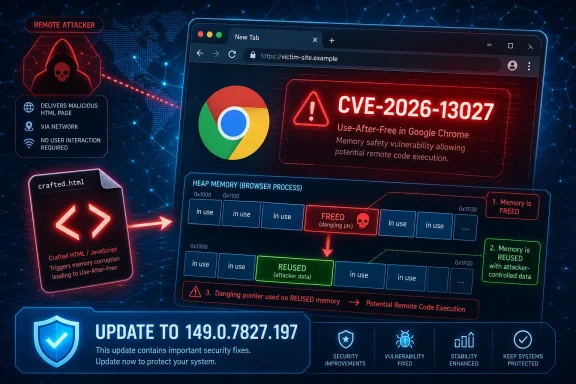 The Bug Is Ordinary in Form and Serious in Consequence
Use-after-free vulnerabilities are not exotic. They happen when software releases a chunk of memory and later continues to use it as though it were still valid, creating an opening for heap corruption and, in the worst cases, attacker-controlled code execution paths. Chrome’s security architecture is built precisely because web content is hostile by default, but memory corruption bugs remain among the browser world’s most consequential defect classes.CVE-2026-13027 sits in Chrome’s FileSystem component, which immediately makes the phrase crafted HTML page more meaningful than it may look at first glance. This is not an attack that requires local access, administrator credentials, or a user manually installing something suspicious. The user interaction requirement is the page visit itself, the same condition that makes browser bugs so attractive to phishing crews, exploit brokers, and targeted intrusion operators.
The CISA ADP score attached to the record, 8.8 under CVSS 3.1, reflects that shape: network attack vector, low attack complexity, no privileges required, user interaction required, and high impact across confidentiality, integrity, and availability. NVD had not yet supplied its own CVSS score when the record was enriched, but that absence should not be misread as uncertainty about whether this matters. Chrome and CISA’s metadata already say enough for defenders to treat it as a real patching priority.
There is no public indication in the material provided that CVE-2026-13027 is being exploited in the wild. That distinction matters. A high-severity browser bug without known exploitation is not the same operational event as a Chrome zero-day already observed in attacks, but it is also not the kind of issue that should wait for the next leisurely maintenance window.
Chrome’s FileSystem Surface Is Exactly Where Web Trust Gets Messy
The FileSystem label can sound like a local disk problem, which invites the wrong mental model. In a browser, file and storage subsystems sit at the boundary between untrusted web content, sandboxed execution, origin rules, temporary storage, permissions, and platform-specific behavior. That boundary is complicated, and complicated boundaries are where memory lifetime mistakes become security bugs.Modern browsers are less like document viewers and more like operating environments. They run JavaScript engines, graphics stacks, media pipelines, storage layers, synchronization services, extension frameworks, password managers, and developer APIs inside a constantly updated security perimeter. The FileSystem component is one part of that perimeter, and Chrome’s job is to let useful web applications interact with storage-like abstractions without letting a hostile site turn that interaction into arbitrary memory manipulation.
That is why the phrase “heap corruption via a crafted HTML page” carries more weight than it appears to. Heap corruption is not automatically remote code execution, and Chrome’s sandbox still matters. But heap corruption in a browser process is a traditional stepping stone: first gain a foothold in a renderer or related process, then look for a sandbox escape, privilege escalation, credential theft path, or post-exploitation chain.
For administrators, the practical point is not to reverse-engineer the FileSystem bug. It is to understand that the vulnerable code is reachable through web content. If a browser can be driven into the vulnerable state by a page, then email links, compromised websites, malvertising, watering-hole attacks, and internal web applications all become plausible delivery paths.
The CPE Record Looks Strange Because NVD Speaks Scanner
The user’s CPE question is the right one, because the NVD configuration shown for CVE-2026-13027 can look odd at first glance. The record lists Google Chrome versions before 149.0.7827.197 and then combines that application CPE with operating-system CPEs for Windows, Linux kernel, and macOS. That does not mean Windows, Linux, and macOS are independently vulnerable to CVE-2026-13027. It means the vulnerable Chrome application is considered in the context of supported desktop platforms.In CPE logic, an application vulnerability often has to be expressed as a product running on one or more platforms. A scanner wants to know not merely that “Google Chrome before version X” is affected, but whether that product-platform combination is relevant to a machine it is assessing. The result can be visually confusing: Chrome appears alongside operating systems, and readers naturally wonder whether some platform has been omitted.
Based on the record details, the key affected software is Google Chrome prior to 149.0.7827.197. The OS entries are environmental qualifiers, not separate affected products. If there is a gap to watch, it is not the absence of another desktop OS in the obvious Chrome record; it is whether Chromium-based downstream browsers, embedded Chromium runtimes, Electron applications, or vendor-maintained Chromium forks consume the fix on their own schedules.
That distinction matters in real asset management. NVD’s CPE may help vulnerability scanners identify installed Chrome on Windows, macOS, and Linux, but it does not automatically tell you whether Microsoft Edge, Brave, Vivaldi, Opera, Electron-based desktop apps, or bundled Chromium frameworks are patched. Those products often track Chromium, but they are not Google Chrome, and their advisories, version numbers, and release timing can differ.
The Version Number Is the Control, Not the Advisory
The most reliable operational answer is version verification. Chrome prior to 149.0.7827.197 is the affected range in the CVE description provided, and Google’s desktop stable update moved the channel to the patched 149.0.7827.196/197 family depending on platform and build. For Windows admins, the version string matters more than the prose summary of the advisory.Chrome’s update machinery is generally good, but “generally good” is not a compliance state. Managed environments can defer updates, pin versions, block background services, or depend on golden images that lag behind the live channel. Nonpersistent VDI, kiosks, lab machines, and shared workstations are especially good at producing false confidence: the browser appears familiar, the icon launches, and nobody notices that the binary is a week behind.
The common user check remains Chrome’s About page, which triggers an update check and displays the installed version. Enterprises should not rely on individual users doing that. They should query inventory, browser management telemetry, endpoint management tools, or vulnerability scanners and confirm that Chrome installations have crossed the fixed threshold.
There is a second operational nuance: a browser update is not fully useful until the old browser process is gone. Chrome can download and stage an update while the user keeps a long-running session open for days. For a memory-corruption bug reachable from web content, the difference between “update available” and “browser relaunched into the patched build” is not academic.
The Absence of Known Exploitation Is Not a Permission Slip
CISA’s SSVC metadata lists exploitation as “none,” and that is good news. It means the public enrichment available for this CVE does not put it in the same category as a Chrome bug with confirmed exploitation in the wild. But browser vulnerability response should not wait for the exploit status to change, because the economics of exploitation move faster than many enterprise patch cycles.Attackers do not need every Chrome bug to be a zero-day. Once a patch ships, the race changes. Security researchers, offensive teams, and criminals can inspect changed code, compare builds, and infer the shape of the vulnerability. Even when bug details remain restricted, the existence of a fix narrows the search field.
That is the awkward bargain of browser security. Vendors must publish enough information for users and administrators to understand urgency, but not so much that they hand exploit developers a blueprint before most users update. Google’s habit of restricting bug details until a majority of users are patched is rational, but it also means defenders often make decisions with incomplete technical detail.
For WindowsForum’s sysadmin audience, this should feel familiar. Patch triage rarely happens with perfect exploit clarity. The better question is whether the vulnerability is remotely reachable, whether exploitation requires privileges, whether user interaction is realistic, whether the affected component is widely deployed, and whether patching is low-friction. CVE-2026-13027 checks enough boxes to move it into the “do it now” pile.
Chrome’s Security Churn Is the Price of Being the Web’s Runtime
Chrome’s vulnerability cadence can look absurd from the outside. Point releases arrive, dozens of CVEs appear, memory bugs stack up across graphics, JavaScript, storage, extensions, media, and UI components, and administrators are told once again to update immediately. It is tempting to treat that as evidence that browsers are uniquely broken.The more accurate reading is that browsers are uniquely exposed. Chrome is one of the most aggressively fuzzed, audited, attacked, and patched consumer software projects on Earth. Its security bulletins are noisy because its codebase is huge, its attack surface is enormous, and its users include nearly everyone from home users to government agencies.
That does not excuse memory safety failures. Use-after-free bugs remain an indictment of unsafe implementation patterns in security-critical code, and the industry’s slow migration toward memory-safe languages exists for a reason. But the presence of yet another UAF in Chrome is also a sign of a mature disclosure and patch pipeline doing the work in public.
The Windows ecosystem has a special stake here. Chrome is not a Microsoft product, but on many Windows fleets it is effectively a core application. It authenticates users to SaaS, stores passwords and cookies, renders internal dashboards, handles file uploads, and mediates access to cloud administration consoles. A Chrome vulnerability is therefore not “just a browser bug” inside a Windows shop; it is a vulnerability in a primary work surface.
The CPE Debate Should Push Admins Beyond Google Chrome
If there is a useful controversy in the CPE entry, it is that CPEs can create a false sense of completeness. A vulnerability scanner may flag Google Chrome correctly and still miss a Chromium-derived application that carries similar code. Conversely, it may create noise by associating OS CPEs in a way that makes non-specialists think Windows or macOS themselves are directly vulnerable.This is where asset inventory becomes more important than vulnerability prose. Organizations should know which browsers are approved, which Chromium-based alternatives are tolerated, which Electron apps are in heavy use, and which software bundles bring their own browser runtimes. The modern endpoint does not have one web engine; it has many.
Microsoft Edge deserves separate attention in Windows environments because it shares Chromium foundations but ships through Microsoft’s channel. Edge typically receives Chromium security fixes quickly, yet it is not patched by installing Google Chrome. The same logic applies to third-party browsers: a patched Chrome version does not prove that every Chromium browser on the endpoint is safe.
The NVD record may eventually gain additional CPEs, revised configurations, or downstream mappings. That is normal. But defenders should not wait for database perfection before acting on the core fact: Chrome versions before the fixed build are vulnerable, and Chrome-like software should be checked through its own vendor channel.
The User-Interaction Requirement Is Weaker Than It Sounds
CVSS marks this vulnerability as requiring user interaction, which is technically correct and operationally easy to underestimate. In browser land, “user interaction” often means opening a link, loading an advertisement, visiting a compromised site, or landing on a page through a redirect. That is not a high bar.The web has trained users to click through identity providers, CAPTCHA pages, document previews, shared links, and SaaS dashboards all day. A crafted HTML page does not need to look like malware. It can be wrapped in an invoice lure, an internal helpdesk spoof, a fake meeting document, or an ordinary compromised WordPress page.
This is why browser patching competes with phishing defense rather than replacing it. Security awareness can reduce bad clicks, but it cannot make HTML safe. Content filtering, isolation, and endpoint detection can help, but none of them should be treated as compensation for leaving a remotely reachable memory-corruption bug unpatched.
For home users, the advice is even less glamorous: let Chrome update, relaunch it, and stop ignoring the update button. For power users who keep sessions alive indefinitely, the relaunch is the part most likely to be skipped. The browser that has downloaded a fix but not restarted is still the browser attackers care about.
Patch Management Has to Account for the Browser as Infrastructure
Enterprises often treat browsers as user applications while relying on them as infrastructure. That contradiction shows up every time a Chrome CVE lands. The browser may be installed per machine or per user, managed through Group Policy or MDM, updated by Google’s services or repackaged internally, extended by plug-ins, and constrained by compatibility demands from legacy internal sites.CVE-2026-13027 is a good prompt to check whether that machinery actually works. If inventory cannot quickly answer which Chrome versions are present, the organization does not have browser patch management; it has hope. If update rings exist but no one validates relaunch completion, the organization has deployment but not remediation.
There is also a policy question around update deferral. Some enterprises hold browser updates to avoid breaking line-of-business applications. That may be defensible for feature updates in narrow environments, but security point releases for web-exposed memory corruption require a much higher bar for delay. The risk of a broken internal app must be weighed against the risk of leaving the main web client exposed.
The better pattern is controlled speed: pilot quickly, monitor for breakage, roll broadly, and keep emergency override procedures ready. Browser updates are frequent enough that the process should be boring. If every Chrome security release becomes a bespoke incident, the process is already broken.
The Record’s Oddities Are a Reminder to Read Vulnerability Data Skeptically
The provided NVD change history contains small details that deserve skepticism without alarm. NVD had not yet provided its own CVSS assessment, while CISA ADP had supplied a CVSS 3.1 vector and SSVC metadata. The record also shows enrichment changes after initial publication, including CPE configuration additions and reference typing.That is how modern vulnerability records evolve. Initial CVE publication is not the final state of truth. NVD enrichment, vendor advisories, CISA metadata, scanner plug-ins, distro trackers, and third-party databases often update at different times, sometimes with slightly different interpretations.
The affected-version notation in the supplied record is also a good example of why humans still need to read these entries. It lists an affected version object around 149.0.7827.197 with a less-than boundary of 149.0.7827.197, which can look semantically awkward if you stare at the JSON rather than the description. The plain-English description is clearer: Chrome before 149.0.7827.197 is affected.
For defenders, the lesson is not to discard NVD or CVSS. It is to avoid treating any one field as the whole story. The description, vendor advisory, fixed version, exploit status, attack vector, and local asset context all matter more than a single database cell.
This Is Also a Test of Third-Party Browser Discipline
Chromium’s success created an ecosystem where one engine family underpins a large share of desktop browsing. That has security benefits: fixes can propagate from Chromium to many products, and researchers focus on a common codebase. It also creates synchronization risk: a vulnerability fixed in Google Chrome may persist elsewhere until downstream vendors integrate and ship the relevant patch.Windows users commonly install more than one browser. Some use Chrome for Google accounts, Edge for Microsoft 365, Brave or Vivaldi for personal browsing, and Electron apps for collaboration tools. Each one has its own update path, even when the underlying vulnerability class comes from shared Chromium code.
That makes CVE-2026-13027 a narrower advisory with broader implications. The CVE record is about Google Chrome, not every Chromium derivative. But prudent administrators should use it as a trigger to review the broader Chromium footprint, especially on machines that handle privileged SaaS consoles, source code repositories, financial systems, or administrative portals.
The same goes for security tooling. A scanner that reports “Chrome fixed” may be correct and incomplete. Endpoint teams should verify whether their tools identify Chromium-based browsers and embedded runtimes with enough granularity to support real remediation.
The Practical Reading Is Simple, Even If the Metadata Is Not
The NVD entry’s platform configuration may invite debate, but the operational message is not subtle. Chrome before the fixed version is vulnerable to a high-severity memory corruption issue reachable through crafted web content. The fix exists. The cost of applying it is usually low. The cost of leaving it exposed is hard to justify.This is where security teams should resist the gravitational pull of perfect classification. Whether the CPE list is aesthetically satisfying is less important than whether vulnerable endpoints remain in use. CPE correctness matters for scanners and reporting, but it should not become a reason to postpone remediation.
The highest-risk machines are not necessarily the most obvious ones. Developer workstations, helpdesk systems, finance users, executives, cloud administrators, and anyone with persistent access to sensitive web consoles deserve fast attention. Browser compromise on a privileged user’s machine can be more consequential than compromise on a locked-down kiosk.
The fix should also be communicated in user language. “Close and reopen Chrome to finish updating” is more useful than “CVE-2026-13027 has a CVSS 8.8 vector.” Good security operations translate vulnerability metadata into the small behaviors that actually reduce exposure.
What the 149.0.7827.197 Line Should Trigger in a Windows Shop
The immediate response to CVE-2026-13027 is not complicated, but it should be disciplined. Treat the fixed Chrome version as the line in the sand, then look beyond the one application entry to the surrounding browser ecosystem.- Confirm that Google Chrome installations have updated to 149.0.7827.197 or the applicable fixed build for the platform.
- Make sure users have relaunched Chrome so the patched binary is actually running, not merely staged for the next restart.
- Check managed update policies for deferrals, disabled update services, stale golden images, and per-user installs that escape normal software inventory.
- Review Microsoft Edge and other Chromium-based browsers separately, because Google Chrome’s version number does not prove downstream products are patched.
- Treat the NVD CPE operating-system entries as platform context for Chrome, not as evidence that Windows, Linux, or macOS are independently vulnerable to this CVE.
- Watch for later enrichment changes, but do not wait for NVD scoring or CPE refinements before remediating a remotely reachable browser memory bug.
References
- Primary source: NVD / Chromium
Published: 2026-06-26T17:46:36-07:00
NVD - CVE-2026-13027
 nvd.nist.gov
- Security advisory: MSRC
Published: 2026-06-26T17:46:36-07:00
Original feed URL
Security Update Guide - Microsoft Security Response Center
 msrc.microsoft.com
- Related coverage: govcert.gov.hk
GovCERT.HK - Security Alert (A26-06-27): Multiple Vulnerabilities in Google Chrome
Security Alert (A26-06-27): Multiple Vulnerabilities in Google Chromewww.govcert.gov.hk
