

Google Chrome before version 149.0.7827.197 contains CVE-2026-13023, a high-severity Chromium GPU memory-disclosure flaw published on June 24, 2026, that can let an attacker who has already compromised the renderer read potentially sensitive process memory through a crafted HTML page. The important phrase is not merely “GPU,” and it is not merely “crafted page.” The real story is the narrowing gap between browser sandbox theory and the messy, accelerated, driver-adjacent machinery that modern web apps now rely on every day.
For Windows users and administrators, this is the kind of Chrome vulnerability that is easy to underestimate because it does not read like a clean remote-code-execution headline. It requires renderer compromise, user interaction, and a high-complexity attack path, according to the current public scoring. But that does not make it decorative. In Chrome’s threat model, a bug that leaks memory after the renderer is already under attacker control can be the missing step between “the sandbox held” and “the attacker learned enough to keep going.”
Chrome’s multiprocess architecture was built around containment. The renderer handles hostile web content, the browser process holds more privilege, and specialized processes such as GPU, network, audio, and utility services carve the application into compartments. That model has made exploitation harder, but it has also turned modern browser attacks into chains rather than single blows.
CVE-2026-13023 sits in that world. The description says a remote attacker must already have compromised the renderer process before using a crafted HTML page to obtain potentially sensitive information from process memory. That is not the same as a drive-by bug that starts from a clean tab and immediately takes over the system. It is a post-renderer-compromise information leak, and that distinction matters.
It also explains why a “medium” CVSS score from CISA’s ADP enrichment can coexist with Chromium’s “High” security severity. CVSS tries to score a vulnerability as a standalone unit, while browser security teams often think in exploit chains. A memory disclosure bug that looks partial on paper may be highly valuable when paired with a separate renderer bug, a sandbox escape attempt, or a heap-layout problem that needs leaked addresses or objects.
The GPU process is especially interesting because it exists to make the web feel native. Video decode, Canvas, WebGL, WebGPU-style workloads, compositing, and hardware acceleration all pull browsers closer to the graphics stack. Every time Chrome leans on acceleration to make a web app faster, it expands the amount of complex code handling data originating from hostile pages. That tradeoff is rational, but it is not free.
That is why this class of bug can be more serious than the phrase suggests. An uninitialized variable may contain harmless junk. It may also contain fragments of memory that help an attacker infer addresses, object layouts, tokens, rendered content, cross-origin data, or other sensitive material the process should not disclose. The public CVE description does not say exactly what could be exposed here, and Google’s Chromium issue remains permission-restricted, which is standard while users and downstream projects are still catching up.
The immediate practical impact is therefore bounded but not trivial. A vulnerable Chrome build does not automatically mean an attacker can read arbitrary files from a Windows PC. It means a crafted page, in the right exploit context, could use the GPU flaw to obtain information from process memory that should have remained inaccessible.
That is why browser memory-disclosure bugs matter even when they do not grant code execution by themselves. Modern exploitation is often about defeating mitigations. Address Space Layout Randomization, sandboxing, site isolation, heap hardening, and pointer protections all assume attackers have incomplete knowledge. A leak can supply that knowledge.
That framing is too optimistic. Renderer bugs are common enough, and browser attackers routinely chain vulnerabilities. A malicious page might first exploit a JavaScript engine, DOM, media, or WebAssembly flaw to gain code execution inside the renderer sandbox. From there, it needs more information or another bug to escape containment, steal useful data, or make the attack reliable. CVE-2026-13023 belongs to that second act.
The current CISA ADP vector also marks user interaction as required and attack complexity as high. That fits the browser reality: the victim must generally visit or be directed to malicious content, and the attacker’s path is not described as push-button exploitation. But browser attacks do not need to be universal to be dangerous. Targeted campaigns, watering holes, malvertising chains, compromised business portals, and phishing pages all give attackers plausible ways to put crafted HTML in front of the right person.
The more interesting point is that Chrome’s own severity label is High. Google’s security team is not calling this critical, and there is no public statement in the material provided that it is exploited in the wild. But High in Chromium land means “patch now,” not “watchlist for next quarter.” That is especially true when the affected component touches memory handling in a privileged browser service.
The relevant CPE is the Chrome application CPE:
Still, there are two reasons scanners may stumble here. First, Chrome’s platform-specific versioning sometimes differs at the patch component, and desktop releases often list Windows/Mac and Linux builds separately. If a release says Windows and macOS are at 149.0.7827.196/.197 while Linux is at 149.0.7827.196, a scanner that treats only 149.0.7827.197 as the fixed boundary may need vendor-release nuance. The NVD entry as provided says prior to 149.0.7827.197, which is clean but may not capture every packaging wrinkle.
Second, Chromium-based browsers complicate the story. Microsoft Edge, Brave, Vivaldi, Opera, and other Chromium derivatives may inherit the same underlying Chromium fix, but they do not automatically share Chrome’s CPE. A Chrome CPE will not tell you whether Edge’s Stable channel has consumed the patched Chromium commit. For enterprise asset management, that is often the bigger “missing CPE” problem: not whether Windows should be listed, but whether every affected downstream browser has published its own advisory and version mapping.
There is also an apparent oddity in the CVE “affected” JSON shown in the prompt: it lists version 149.0.7827.197 with
That cadence is a strength, but it also creates operational blind spots. Home users are told Chrome updates automatically, and for the most part it does. Enterprises, however, often sit behind update rings, change windows, virtual desktop images, golden masters, app-control policies, proxy rules, and browser extension governance. A browser that appears self-updating on a consumer laptop may be pinned, delayed, or forked into a managed channel inside a business.
The practical result is that Chrome vulnerabilities have two timelines. Google’s timeline runs from bug report to fix to stable release. The enterprise timeline runs from release to detection to approval to deployment to relaunch. The relaunch part is still the quiet killer. Chrome can download an update and still leave the vulnerable binary active until the browser restarts.
For WindowsForum readers, that means the update check is not the whole job. The job is confirming the running version. On Windows, that can mean inspecting Chrome’s About page, checking installed application inventory, querying endpoint management telemetry, or verifying the browser executable version on disk and in active sessions. In organizations with persistent browser sessions, the difference between “installed” and “running” can last days.
That makes the GPU process an attractive and complicated attack surface. It must broker requests from untrusted renderer processes while coordinating with graphics APIs, drivers, shared memory, command buffers, shader compilers, and platform-specific acceleration paths. Security engineers can sandbox and validate, but they cannot make that complexity disappear.
The phrasing of CVE-2026-13023 — an uninitialized use in GPU — points to memory hygiene inside that machinery. The flaw is not described as a driver vulnerability, and users should not read it as a Windows graphics driver bug. But it reminds us that the browser’s GPU layer is an intermediary between hostile web input and performance-critical native code. That intermediary has to be correct under enormous pressure.
This is also where Windows users have a distinctive stake. Windows remains a vast Chrome platform, with a sprawling mix of GPUs, drivers, OEM images, enterprise security tools, and remote-session configurations. A Chrome GPU bug may be cross-platform in the CVE record, but the operational reality of finding, patching, restarting, and validating Chrome on Windows endpoints is its own discipline.
If an attacker can learn memory addresses, heap state, object contents, or sensitive fragments, they may be able to make a separate bug reliable. If they can read data that crosses a trust boundary inside the browser, they may be able to weaken site isolation assumptions or recover values that help with session theft or privilege escalation. The public description does not establish that CVE-2026-13023 does all of these things. It establishes enough to explain why the bug was treated seriously.
The phrase “potentially sensitive information from process memory” should be read carefully. It does not guarantee exposure of passwords, cookies, private keys, or document contents in every scenario. It says the bug may disclose process memory that should have been inaccessible. The content of that memory depends on timing, process state, workload, platform behavior, and the attacker’s control of the sequence that triggers the flaw.
That uncertainty is one reason vendors restrict bug details immediately after release. If the report includes a proof of concept, memory layout hints, or a reliable trigger, publishing too early can help attackers before most users are patched. Security researchers dislike opacity for good reasons, but browser vendors have learned that responsible disclosure does not end when a CVE number appears.
The first step is inventory. Managed Chrome installations should be checked through endpoint management tooling, browser cloud management, software inventory agents, or scripted version collection. The target is straightforward: Chrome must not be older than the fixed desktop build identified in the advisory. If your estate includes multiple platforms, do not assume Windows, macOS, and Linux will report identically just because they share a major Chrome version.
The second step is relaunch enforcement. Chrome’s update mechanism is good, but it cannot replace the running process until the browser restarts. Enterprises that defer relaunches for user convenience often end up carrying browser exposure longer than they realize. A security update that lands Tuesday but waits until Friday’s reboot window is a larger risk than the dashboard may suggest.
The third step is Chromium coverage. Edge, Brave, Vivaldi, Opera, and embedded Chromium frameworks have their own release processes. A Chrome CVE can be relevant to them even before their advisories are easy to find in a scanner. For managed Windows environments, Microsoft Edge deserves special attention because it may be the default corporate browser even where Chrome is also installed.
Finally, admins should avoid overcorrecting into panic. There is no public evidence in the supplied CVE data that CVE-2026-13023 is being actively exploited. CISA’s SSVC entry says exploitation is “none” at the time recorded, automation is “no,” and technical impact is partial. That does not mean ignore it. It means patch with urgency, not theater.
For CVE-2026-13023, the desktop Chrome CPE appears to be present in the NVD change history, and the OS CPEs act as applicability constraints. If you are scanning for Google Chrome on Windows, Linux, and macOS, that entry gives tools a reasonable anchor. But “reasonable” is not the same as complete.
The broader ecosystem has moved faster than the CPE model was designed to capture. Chromium is an upstream project, Google Chrome is one downstream product, Microsoft Edge is another, and countless Electron applications embed Chromium components in ways that may or may not expose the vulnerable code path. A single CVE description can be technically accurate and still leave asset teams asking whether their real deployed software is represented.
That is why the best vulnerability programs do not rely on NVD alone. They combine NVD, vendor advisories, browser management consoles, endpoint telemetry, and release notes from downstream Chromium vendors. For high-volume browser patching, the practical unit of risk is not the CVE entry. It is the installed and running browser engine version.
This also matters for procurement and compliance. If an auditor asks whether CVE-2026-13023 is remediated, the clean answer is not “our scanner says no vulnerable CPE.” The better answer is “our Chrome fleet is at or above the fixed version, active sessions have been relaunched, and Chromium-derived browsers have been separately checked against their vendor releases.” That is a higher bar, but it reflects how browser risk actually works.
For power users, the same guidance applies with a few extra caveats. If you run multiple Chrome profiles, portable builds, Beta/Dev/Canary channels, or side-by-side Chromium browsers, check each one. If Chrome is always open, restart it deliberately. If you depend on a managed browser from work or school, the update may be controlled by policy rather than your own click.
For administrators, the hard part is scale. A single out-of-date browser is easy to fix. Ten thousand endpoints with mixed user behavior, sleep states, remote access, and delayed relaunches are not. Browser patch SLAs should be closer to emergency application patching than traditional desktop software maintenance, because the browser is where untrusted internet code meets corporate identity.
There is also a communications angle. Users ignore update prompts when they see them too often, and Chrome’s quiet updates can create the illusion that no action is required. A short, clear instruction — “close and reopen Chrome today to complete a security update” — often does more than a high-severity CVE bulletin pasted into an internal portal.
But the structural lesson persists. The browser is no longer a document viewer. It is a hardware-accelerated application runtime, a login broker, a video studio, a graphics engine, a password vault interface, a development platform, and, for many users, the operating environment where most work actually happens. Bugs in its GPU layer are not side issues; they are bugs in one of the pathways that makes the modern web usable.
The security architecture around that runtime has improved enormously, but it depends on frequent updates and fast adoption. Sandboxing limits the blast radius, but exploit chains look for seams between compartments. Site isolation reduces cross-origin exposure, but memory bugs can still be valuable. Automatic updates shorten the window, but only if the patched browser actually relaunches.
That is why Chrome vulnerabilities like this one are best understood as maintenance tests. They ask whether an organization can move quickly on a browser update without drama, whether it knows what browser engines are actually installed, and whether it can distinguish a scary headline from a real operational priority. CVE-2026-13023 is not the end of the world. It is a reminder that the web’s most important security boundary is continuously under negotiation.
That is why version hygiene matters more than theoretical comfort. A user on a patched build has reduced this specific risk. A user on an older build has not. A management console that says Chrome is installed but does not show the running version is not giving the whole picture.
The CPE entry, as presented, is not missing the main Chrome application CPE. It may still be incomplete for the broader Chromium ecosystem, and downstream browsers need their own vendor-specific confirmation. For WindowsForum readers, that is the distinction worth keeping: NVD can identify the Chrome product, but your environment determines whether Chrome is the only browser engine you have to care about.
For Windows users and administrators, this is the kind of Chrome vulnerability that is easy to underestimate because it does not read like a clean remote-code-execution headline. It requires renderer compromise, user interaction, and a high-complexity attack path, according to the current public scoring. But that does not make it decorative. In Chrome’s threat model, a bug that leaks memory after the renderer is already under attacker control can be the missing step between “the sandbox held” and “the attacker learned enough to keep going.”
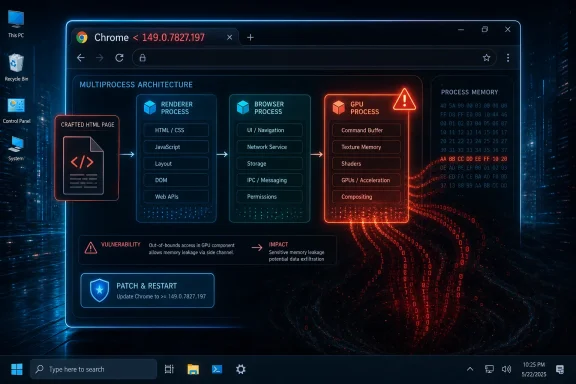 The Browser Sandbox Still Has Seams, and the GPU Is One of Them
Chrome’s multiprocess architecture was built around containment. The renderer handles hostile web content, the browser process holds more privilege, and specialized processes such as GPU, network, audio, and utility services carve the application into compartments. That model has made exploitation harder, but it has also turned modern browser attacks into chains rather than single blows.CVE-2026-13023 sits in that world. The description says a remote attacker must already have compromised the renderer process before using a crafted HTML page to obtain potentially sensitive information from process memory. That is not the same as a drive-by bug that starts from a clean tab and immediately takes over the system. It is a post-renderer-compromise information leak, and that distinction matters.
It also explains why a “medium” CVSS score from CISA’s ADP enrichment can coexist with Chromium’s “High” security severity. CVSS tries to score a vulnerability as a standalone unit, while browser security teams often think in exploit chains. A memory disclosure bug that looks partial on paper may be highly valuable when paired with a separate renderer bug, a sandbox escape attempt, or a heap-layout problem that needs leaked addresses or objects.
The GPU process is especially interesting because it exists to make the web feel native. Video decode, Canvas, WebGL, WebGPU-style workloads, compositing, and hardware acceleration all pull browsers closer to the graphics stack. Every time Chrome leans on acceleration to make a web app faster, it expands the amount of complex code handling data originating from hostile pages. That tradeoff is rational, but it is not free.
“Uninitialized Use” Is a Boring Name for a Dangerous Primitive
The assigned weakness, CWE-457, is “Use of Uninitialized Variable.” In ordinary programming language, that means code uses a value before it has been properly set. In security language, it can mean stale memory, unpredictable state, or data left behind from an earlier operation gets exposed to a later one.That is why this class of bug can be more serious than the phrase suggests. An uninitialized variable may contain harmless junk. It may also contain fragments of memory that help an attacker infer addresses, object layouts, tokens, rendered content, cross-origin data, or other sensitive material the process should not disclose. The public CVE description does not say exactly what could be exposed here, and Google’s Chromium issue remains permission-restricted, which is standard while users and downstream projects are still catching up.
The immediate practical impact is therefore bounded but not trivial. A vulnerable Chrome build does not automatically mean an attacker can read arbitrary files from a Windows PC. It means a crafted page, in the right exploit context, could use the GPU flaw to obtain information from process memory that should have remained inaccessible.
That is why browser memory-disclosure bugs matter even when they do not grant code execution by themselves. Modern exploitation is often about defeating mitigations. Address Space Layout Randomization, sandboxing, site isolation, heap hardening, and pointer protections all assume attackers have incomplete knowledge. A leak can supply that knowledge.
The Renderer Requirement Is a Speed Bump, Not a Comfort Blanket
The line that should catch an administrator’s eye is “who had compromised the renderer process.” Some readers will treat that as a reason to relax. If the attacker already needs renderer compromise, they might ask, is this not just a second-stage bug?That framing is too optimistic. Renderer bugs are common enough, and browser attackers routinely chain vulnerabilities. A malicious page might first exploit a JavaScript engine, DOM, media, or WebAssembly flaw to gain code execution inside the renderer sandbox. From there, it needs more information or another bug to escape containment, steal useful data, or make the attack reliable. CVE-2026-13023 belongs to that second act.
The current CISA ADP vector also marks user interaction as required and attack complexity as high. That fits the browser reality: the victim must generally visit or be directed to malicious content, and the attacker’s path is not described as push-button exploitation. But browser attacks do not need to be universal to be dangerous. Targeted campaigns, watering holes, malvertising chains, compromised business portals, and phishing pages all give attackers plausible ways to put crafted HTML in front of the right person.
The more interesting point is that Chrome’s own severity label is High. Google’s security team is not calling this critical, and there is no public statement in the material provided that it is exploited in the wild. But High in Chromium land means “patch now,” not “watchlist for next quarter.” That is especially true when the affected component touches memory handling in a privileged browser service.
NVD’s CPE Entry Looks Odd, but the Meaning Is Mostly Straightforward
The user’s pointed question — whether a CPE is missing — gets to a real nuisance in vulnerability management. NVD’s initial analysis added a configuration that effectively describes Google Chrome versions below 149.0.7827.197 running on Windows, Linux, or macOS. That is not unusual for a desktop Chrome vulnerability, but it can look strange because the vulnerable software is the application, while the listed operating systems appear as companion platform constraints.The relevant CPE is the Chrome application CPE:
cpe:2.3:a:google:chrome:*:*:*:*:*:*:*:* with versions up to, but excluding, 149.0.7827.197. The operating system CPEs for Microsoft Windows, Linux kernel, and Apple macOS are there to express platform applicability for desktop Chrome. In other words, NVD is not saying the Windows operating system, Linux kernel, or macOS itself contains this GPU bug. It is saying the vulnerable Chrome package applies on those platforms.Still, there are two reasons scanners may stumble here. First, Chrome’s platform-specific versioning sometimes differs at the patch component, and desktop releases often list Windows/Mac and Linux builds separately. If a release says Windows and macOS are at 149.0.7827.196/.197 while Linux is at 149.0.7827.196, a scanner that treats only 149.0.7827.197 as the fixed boundary may need vendor-release nuance. The NVD entry as provided says prior to 149.0.7827.197, which is clean but may not capture every packaging wrinkle.
Second, Chromium-based browsers complicate the story. Microsoft Edge, Brave, Vivaldi, Opera, and other Chromium derivatives may inherit the same underlying Chromium fix, but they do not automatically share Chrome’s CPE. A Chrome CPE will not tell you whether Edge’s Stable channel has consumed the patched Chromium commit. For enterprise asset management, that is often the bigger “missing CPE” problem: not whether Windows should be listed, but whether every affected downstream browser has published its own advisory and version mapping.
There is also an apparent oddity in the CVE “affected” JSON shown in the prompt: it lists version 149.0.7827.197 with
lessThan 149.0.7827.197 and status affected. That sort of representation can be confusing because the fixed version and the less-than boundary share the same string. The intended interpretation, based on the English description, is that Chrome versions before 149.0.7827.197 are affected, and 149.0.7827.197 is the fixed threshold.Chrome’s Fast Patch Cadence Is Now Part of the Attack Surface
Chrome’s Stable channel update for desktop moved quickly because that is how Chrome security works now. The browser is not a quarterly-maintenance product. It is a constantly moving runtime for untrusted code, patched in a cadence that assumes adversaries are watching commit logs, issue trackers, bug bounty disclosures, and downstream lag.That cadence is a strength, but it also creates operational blind spots. Home users are told Chrome updates automatically, and for the most part it does. Enterprises, however, often sit behind update rings, change windows, virtual desktop images, golden masters, app-control policies, proxy rules, and browser extension governance. A browser that appears self-updating on a consumer laptop may be pinned, delayed, or forked into a managed channel inside a business.
The practical result is that Chrome vulnerabilities have two timelines. Google’s timeline runs from bug report to fix to stable release. The enterprise timeline runs from release to detection to approval to deployment to relaunch. The relaunch part is still the quiet killer. Chrome can download an update and still leave the vulnerable binary active until the browser restarts.
For WindowsForum readers, that means the update check is not the whole job. The job is confirming the running version. On Windows, that can mean inspecting Chrome’s About page, checking installed application inventory, querying endpoint management telemetry, or verifying the browser executable version on disk and in active sessions. In organizations with persistent browser sessions, the difference between “installed” and “running” can last days.
The GPU Process Has Become a Recurring Fault Line
The GPU is not a decorative subsystem anymore. It is one of the browser’s core execution environments. Every modern site that wants smooth animation, accelerated graphics, video conferencing, gaming, design tooling, mapping, machine-learning inference, or high-performance rendering pushes the browser toward hardware-backed computation.That makes the GPU process an attractive and complicated attack surface. It must broker requests from untrusted renderer processes while coordinating with graphics APIs, drivers, shared memory, command buffers, shader compilers, and platform-specific acceleration paths. Security engineers can sandbox and validate, but they cannot make that complexity disappear.
The phrasing of CVE-2026-13023 — an uninitialized use in GPU — points to memory hygiene inside that machinery. The flaw is not described as a driver vulnerability, and users should not read it as a Windows graphics driver bug. But it reminds us that the browser’s GPU layer is an intermediary between hostile web input and performance-critical native code. That intermediary has to be correct under enormous pressure.
This is also where Windows users have a distinctive stake. Windows remains a vast Chrome platform, with a sprawling mix of GPUs, drivers, OEM images, enterprise security tools, and remote-session configurations. A Chrome GPU bug may be cross-platform in the CVE record, but the operational reality of finding, patching, restarting, and validating Chrome on Windows endpoints is its own discipline.
Memory Disclosure Is the Kind of Bug Attackers Save for Chains
A vulnerability that leaks information often sounds less alarming than one that runs code. That hierarchy is understandable, but it can mislead. In exploit development, information is ammunition.If an attacker can learn memory addresses, heap state, object contents, or sensitive fragments, they may be able to make a separate bug reliable. If they can read data that crosses a trust boundary inside the browser, they may be able to weaken site isolation assumptions or recover values that help with session theft or privilege escalation. The public description does not establish that CVE-2026-13023 does all of these things. It establishes enough to explain why the bug was treated seriously.
The phrase “potentially sensitive information from process memory” should be read carefully. It does not guarantee exposure of passwords, cookies, private keys, or document contents in every scenario. It says the bug may disclose process memory that should have been inaccessible. The content of that memory depends on timing, process state, workload, platform behavior, and the attacker’s control of the sequence that triggers the flaw.
That uncertainty is one reason vendors restrict bug details immediately after release. If the report includes a proof of concept, memory layout hints, or a reliable trigger, publishing too early can help attackers before most users are patched. Security researchers dislike opacity for good reasons, but browser vendors have learned that responsible disclosure does not end when a CVE number appears.
Administrators Should Treat This as a Browser Fleet Problem, Not a Chrome Trivia Item
For IT teams, the right response is not to debate the CVSS score. It is to answer three questions: which endpoints are below the fixed Chrome version, which users have not restarted, and which Chromium-based browsers are waiting for corresponding vendor updates. Those questions are operational, not theoretical.The first step is inventory. Managed Chrome installations should be checked through endpoint management tooling, browser cloud management, software inventory agents, or scripted version collection. The target is straightforward: Chrome must not be older than the fixed desktop build identified in the advisory. If your estate includes multiple platforms, do not assume Windows, macOS, and Linux will report identically just because they share a major Chrome version.
The second step is relaunch enforcement. Chrome’s update mechanism is good, but it cannot replace the running process until the browser restarts. Enterprises that defer relaunches for user convenience often end up carrying browser exposure longer than they realize. A security update that lands Tuesday but waits until Friday’s reboot window is a larger risk than the dashboard may suggest.
The third step is Chromium coverage. Edge, Brave, Vivaldi, Opera, and embedded Chromium frameworks have their own release processes. A Chrome CVE can be relevant to them even before their advisories are easy to find in a scanner. For managed Windows environments, Microsoft Edge deserves special attention because it may be the default corporate browser even where Chrome is also installed.
Finally, admins should avoid overcorrecting into panic. There is no public evidence in the supplied CVE data that CVE-2026-13023 is being actively exploited. CISA’s SSVC entry says exploitation is “none” at the time recorded, automation is “no,” and technical impact is partial. That does not mean ignore it. It means patch with urgency, not theater.
The CPE Question Exposes a Bigger Weakness in Vulnerability Management
The frustration around CPEs is not pedantry. CPE matching drives scanner results, patch dashboards, audit evidence, and executive risk reports. If the product naming or platform logic is wrong, organizations either miss exposure or drown in false positives.For CVE-2026-13023, the desktop Chrome CPE appears to be present in the NVD change history, and the OS CPEs act as applicability constraints. If you are scanning for Google Chrome on Windows, Linux, and macOS, that entry gives tools a reasonable anchor. But “reasonable” is not the same as complete.
The broader ecosystem has moved faster than the CPE model was designed to capture. Chromium is an upstream project, Google Chrome is one downstream product, Microsoft Edge is another, and countless Electron applications embed Chromium components in ways that may or may not expose the vulnerable code path. A single CVE description can be technically accurate and still leave asset teams asking whether their real deployed software is represented.
That is why the best vulnerability programs do not rely on NVD alone. They combine NVD, vendor advisories, browser management consoles, endpoint telemetry, and release notes from downstream Chromium vendors. For high-volume browser patching, the practical unit of risk is not the CVE entry. It is the installed and running browser engine version.
This also matters for procurement and compliance. If an auditor asks whether CVE-2026-13023 is remediated, the clean answer is not “our scanner says no vulnerable CPE.” The better answer is “our Chrome fleet is at or above the fixed version, active sessions have been relaunched, and Chromium-derived browsers have been separately checked against their vendor releases.” That is a higher bar, but it reflects how browser risk actually works.
Windows Users Get the Simple Advice, IT Pros Get the Hard Part
For individual Windows users, the action is simple. Open Chrome, go to the About Google Chrome page, allow it to check for updates, and relaunch when prompted. If the browser reports a version at or above the fixed build, the Chrome-specific exposure described by this CVE is addressed.For power users, the same guidance applies with a few extra caveats. If you run multiple Chrome profiles, portable builds, Beta/Dev/Canary channels, or side-by-side Chromium browsers, check each one. If Chrome is always open, restart it deliberately. If you depend on a managed browser from work or school, the update may be controlled by policy rather than your own click.
For administrators, the hard part is scale. A single out-of-date browser is easy to fix. Ten thousand endpoints with mixed user behavior, sleep states, remote access, and delayed relaunches are not. Browser patch SLAs should be closer to emergency application patching than traditional desktop software maintenance, because the browser is where untrusted internet code meets corporate identity.
There is also a communications angle. Users ignore update prompts when they see them too often, and Chrome’s quiet updates can create the illusion that no action is required. A short, clear instruction — “close and reopen Chrome today to complete a security update” — often does more than a high-severity CVE bulletin pasted into an internal portal.
The Patch Is Small; the Lesson Is Structural
CVE-2026-13023 will probably disappear quickly from public attention. Chrome will update, scanners will refresh, and the security world will move on to the next browser CVE with a more dramatic exploit label. That is the normal rhythm of web platform security.But the structural lesson persists. The browser is no longer a document viewer. It is a hardware-accelerated application runtime, a login broker, a video studio, a graphics engine, a password vault interface, a development platform, and, for many users, the operating environment where most work actually happens. Bugs in its GPU layer are not side issues; they are bugs in one of the pathways that makes the modern web usable.
The security architecture around that runtime has improved enormously, but it depends on frequent updates and fast adoption. Sandboxing limits the blast radius, but exploit chains look for seams between compartments. Site isolation reduces cross-origin exposure, but memory bugs can still be valuable. Automatic updates shorten the window, but only if the patched browser actually relaunches.
That is why Chrome vulnerabilities like this one are best understood as maintenance tests. They ask whether an organization can move quickly on a browser update without drama, whether it knows what browser engines are actually installed, and whether it can distinguish a scary headline from a real operational priority. CVE-2026-13023 is not the end of the world. It is a reminder that the web’s most important security boundary is continuously under negotiation.
The Practical Signal Hidden in the Version Number
The most concrete fact in this advisory is the fixed boundary. Chrome prior to 149.0.7827.197 is the vulnerable range described for CVE-2026-13023. Everything else — severity debates, CPE interpretation, exploit-chain speculation — sits behind that operational fact.That is why version hygiene matters more than theoretical comfort. A user on a patched build has reduced this specific risk. A user on an older build has not. A management console that says Chrome is installed but does not show the running version is not giving the whole picture.
The CPE entry, as presented, is not missing the main Chrome application CPE. It may still be incomplete for the broader Chromium ecosystem, and downstream browsers need their own vendor-specific confirmation. For WindowsForum readers, that is the distinction worth keeping: NVD can identify the Chrome product, but your environment determines whether Chrome is the only browser engine you have to care about.
The Browser Update That Should Not Become Background Noise
The concrete response to CVE-2026-13023 is refreshingly direct, even if the underlying browser security model is not. Patch Chrome, restart it, and do not assume Chromium-based alternatives are covered until their own version lines prove it.- Chrome installations should be updated to the fixed 149.0.7827.197 threshold or later where that build applies.
- The vulnerability is a GPU-process memory disclosure flaw that becomes useful after renderer compromise, not a standalone full-system takeover described in the public advisory.
- The NVD CPE data includes the Google Chrome application CPE, with Windows, Linux, and macOS listed as desktop platform applicability constraints.
- Chromium-derived browsers should be checked separately because a Chrome CPE does not automatically prove Edge, Brave, Vivaldi, Opera, or embedded Chromium runtimes are fixed.
- Enterprise teams should verify the running browser version after relaunch, not merely the downloaded or staged update.
- The current public data does not show known exploitation in the wild, but the bug’s exploit-chain value justifies prompt deployment.
References
- Primary source: NVD / Chromium
Published: 2026-06-26T17:46:32-07:00
NVD - CVE-2026-13023
 nvd.nist.gov
- Security advisory: MSRC
Published: 2026-06-26T17:46:32-07:00
Original feed URL
Security Update Guide - Microsoft Security Response Center
 msrc.microsoft.com
