

Google Chrome before 149.0.7827.197 contained CVE-2026-13024, a high-severity Chromium navigation flaw disclosed on June 24, 2026, that could let an attacker who had already compromised Chrome’s renderer process bypass site isolation with a crafted HTML page. That narrow precondition is the whole story and the trap: this is not a drive-by remote code execution bug by itself, but it weakens one of the browser’s most important damage-containment systems. For Windows users and administrators, the practical answer is simple: get Chrome and Chromium-based browsers past the fixed build, then verify the update actually landed. For security teams, the more interesting question is why so many modern browser flaws now read less like single catastrophic breaks and more like attacks on the walls between already-failing compartments.
CVE-2026-13024 is easy to underrate if you read only the attack requirements. The published description says the attacker must have already compromised the renderer process, which means this vulnerability is not the first exploit in a normal chain. It is the next step: a way to turn a renderer compromise into a broader violation of Chrome’s isolation assumptions.
That matters because Chrome’s security model is designed around the premise that complex web content will sometimes find a way to misbehave. The browser does not merely try to prevent every memory bug, logic error, and scripting edge case. It also assumes some hostile content may execute in a renderer and then tries to keep that compromise boxed in.
Site isolation is one of the key walls in that box. It separates web origins into different processes so that a page from one site should not freely inspect or interfere with sensitive data from another. The feature is not glamorous, and most users never see it, but it is one of the reasons a browser exploit chain has to work harder than it did in the old days.
CVE-2026-13024 sits precisely in that uncomfortable middle ground. It does not scream “wormable catastrophe,” yet it attacks a mitigation layer that exists because the first layer is never perfect. The bug’s public phrasing — insufficient validation of untrusted input in Navigation — sounds bureaucratic. In browser-security terms, it points to a place where trust boundaries, process assignment, document lifecycle, and cross-origin expectations all meet.
The severity labels also tell two stories at once. Chromium rated the flaw High, while CISA’s ADP scoring placed it at a medium 4.2 under CVSS 3.1, with high attack complexity, required user interaction, low confidentiality impact, no integrity impact, and low availability impact. That is not a contradiction so much as a clash of perspectives: CVSS evaluates an individual vulnerability in a fairly formal frame, while browser vendors are often thinking about exploit chains.
Attackers understand this. Modern browser exploitation is rarely a single clean break from page load to full system ownership. It is usually a sequence: trigger code execution or logic control in a renderer, escape or confuse the sandbox, bypass origin or site boundaries, steal tokens, abuse session state, and then pivot into the user’s cloud identity or enterprise applications.
That is why site isolation bypasses deserve attention even when they do not immediately grant code execution. If an attacker can first compromise a renderer through another flaw, a navigation validation bug may help them move from “I control this malicious page’s renderer” toward “I can reach across boundaries I should not cross.” The technical impact may be partial in a scoring table, but partial breaks in browser isolation can be valuable links in a chain.
Navigation is a particularly sensitive neighborhood. A browser’s navigation machinery decides what page is loading, which origin owns it, what process should host it, what security policies apply, and how frames relate to one another. Any weakness in validating untrusted inputs there risks confusing the browser about which rules belong to which content.
That is also why the wording “crafted HTML page” should not be dismissed as routine. HTML is the browser’s native threat-delivery format. A crafted page can be a lure, a staging area, a post-exploitation primitive, or a test harness for probing process and origin boundaries.
For admins, the important lesson is not that CVE-2026-13024 alone should trigger panic. It is that browser hardening has shifted the battleground from obvious memory corruption to the internal governance systems that decide what compromised code is allowed to touch.
Chrome normally updates itself, but “normally” is not a control. Laptops sleep through maintenance windows. Users postpone restarts. Managed environments pin versions for compatibility. Virtual desktops and golden images lag behind. Some Chromium-based browsers inherit the underlying engine fix only after their vendors ingest and ship the corresponding Chromium patches.
This is where consumer advice and enterprise advice diverge. For a home user, opening Chrome’s help page and letting the browser update is usually enough. For a sysadmin, the job is to verify installed versions across endpoints, confirm restart completion, and watch for derivative browsers that may not share Google Chrome’s exact release cadence.
The messy part is that browsers have become both fast-moving applications and enterprise infrastructure. Security fixes arrive on a rhythm closer to cloud services than traditional desktop software, but they still depend on local installation state, user sessions, management templates, and update channels. The result is a patching model that feels automatic until it is audited.
Windows environments add another wrinkle: Chrome may not be the only Chromium consumer worth tracking. Microsoft Edge, Brave, Vivaldi, Opera, Electron-based desktop apps, WebView2 runtimes, and embedded browser components each have their own update pathways. CVE-2026-13024 is a Chrome CVE as published, but the underlying Chromium codebase is the shared foundation for a much wider ecosystem.
That does not mean every Chromium-based product is automatically vulnerable in the same way or on the same timeline. It means administrators should not stop at “Chrome is patched” if their risk model includes users browsing through alternative Chromium browsers or line-of-business apps that embed Chromium-derived components. The browser engine has escaped the browser window.
NVD’s initial analysis associated the vulnerable Chrome application with operating-system CPEs for Windows, Linux, and macOS as platform context. That can look odd if you are expecting a simple product-only mapping. Chrome is the affected application, but the vulnerable configurations exist on desktop operating systems, and the database machinery tries to express that relationship in a way scanners can consume.
The trouble is that CPEs are blunt instruments. They can say “Google Chrome before this version,” but they are less elegant at describing update channels, embedded runtimes, Chromium forks, portable installs, enterprise repackaging, or cases where the affected code exists inside another product. A neat CPE record often implies a tidier software universe than the one administrators actually manage.
This is why vulnerability scanners sometimes produce both false comfort and false noise. They may flag Chrome on a Windows endpoint but miss a Chromium-based app bundled in a vendor directory. They may correctly identify a vulnerable application but fail to account for whether the fixed version has been installed and the running process has restarted. They may also inherit incomplete or evolving NVD metadata during the first days after disclosure.
In this case, the public record was still being enriched after publication. NVD had not yet provided its own CVSS score at the time reflected in the supplied data, while CISA-ADP had supplied a CVSS 3.1 vector and SSVC decision data. That timing is normal, but it matters for teams that automate prioritization directly from vulnerability feeds.
The practical response is to treat CPE data as a starting point, not a verdict. For browser vulnerabilities, the authoritative control is usually installed version plus running version plus vendor update status. If those three do not agree, the machine is not as patched as the dashboard says it is.
Chromium’s High severity reflects the importance of the affected security boundary. Site isolation is a core browser defense, and a bypass can materially worsen the outcome of another compromise. Browser vendors tend to evaluate these issues with exploit-chain utility in mind, because real attackers combine primitives rather than admire them in isolation.
CISA’s ADP CVSS vector, by contrast, encodes a more constrained view. Network attack vector, high attack complexity, no privileges required, required user interaction, unchanged scope, low confidentiality impact, no integrity impact, and low availability impact produce a medium score. In plain English: a victim has to interact with malicious content, the attacker needs a renderer compromise first, and the direct measured impact is limited.
Both assessments can be right. The bug is not an emergency on the level of an actively exploited zero-day that grants immediate code execution. It is also not disposable. If your threat model includes targeted browser exploitation, a site isolation bypass is exactly the kind of secondary bug that can turn a contained compromise into a more useful intrusion.
This is the weakness of treating CVSS as a universal truth machine. It is helpful for triage, procurement language, and broad comparison, but it flattens context. A medium-scored browser mitigation bypass may outrank a higher-scored vulnerability in a rarely exposed internal tool if your users live in the browser and your adversaries target identity sessions.
The absence of reported exploitation in CISA’s SSVC data is reassuring, but it should not become an excuse for delay. Public proof-of-concept code is not the only path to risk, and exploit developers often learn from patch diffs even when bug details remain restricted. Google’s policy of limiting issue details until users are broadly updated exists because the patch itself can become a roadmap.
For defenders, this makes CVE-2026-13024 less like a lone burglar and more like a bad internal door lock. If the front door holds, the internal lock never gets tested. If the front door fails, that internal lock may decide whether the intruder is trapped in the foyer or wandering through the building.
This is exactly how browser exploit economics work. A renderer exploit without an escape or boundary bypass may be noisy, fragile, or limited. A renderer exploit paired with a site isolation bypass becomes more interesting, because it may expose cross-site data or weaken assumptions around process separation. Each component increases the value of the other.
The public description does not claim arbitrary code execution outside the sandbox, full account takeover, or system compromise. It claims a bypass of site isolation via a crafted HTML page after renderer compromise. That distinction should be preserved, because exaggerating browser bugs teaches users to ignore the next warning.
But understatement is dangerous too. Site isolation exists to protect sensitive content even when malicious or compromised content is present. A bug that bypasses it strikes at a mitigation designed for exactly the kind of scenario described in the CVE. That is why the right framing is not “catastrophic” or “minor,” but chain-enabling.
In managed environments, the relaunch step is the perennial weak link. Chrome can download and stage an update while old vulnerable processes continue running. A user with 47 tabs and a week-old browser session may believe they are protected because the update is “installed,” while the active executable is still the previous build until restart.
Administrators should also watch policy-controlled update delays. Enterprise rings are useful, but browser security fixes are increasingly poor candidates for long deferral unless a regression is known and actively being tested. The browser is too exposed, and the exploit-chain value of mitigation bypasses is too high.
The Windows angle also includes Edge. Microsoft’s browser uses Chromium, but it ships on Microsoft’s schedule and uses Microsoft’s versioning. Admins should validate Edge separately rather than assume Chrome’s fixed version maps one-to-one to Edge’s installed build. The same principle applies to any Chromium-based browser allowed in the environment.
The best operational metric is not “did the patch deploy?” It is “what percentage of active browser sessions are now running a fixed engine?” That distinction forces teams to include restarts, stale processes, alternate browsers, and unmanaged installs in the same conversation.
This leaves the public record thin: component, vulnerability class, affected versions, broad exploit condition, and fixed build. Security teams often want more — affected code paths, exploitability notes, regression tests, indicators of compromise, and whether related products share the flaw. For Chrome bugs, those answers often arrive slowly or remain implicit in the patch history.
The lack of detail should influence how we talk about the bug. It is not responsible to invent exploitation mechanics beyond the published description. It is responsible to explain the security model it touches and the operational action it requires.
The CWE assignment, CWE-20 improper input validation, is broad but useful. It tells us this is not necessarily a memory corruption flaw; it is a failure to validate data crossing a trust boundary. In a navigation component, that kind of failure can become a policy confusion bug, where the browser is tricked into applying the wrong security assumptions at the wrong time.
That category has become increasingly important as browsers harden memory safety and sandboxing. When direct corruption gets harder, logic bugs in security decisions become more attractive. The attack surface is no longer just parsing hostile bytes; it is interpreting hostile state.
The uncomfortable part is that users experience this as background churn. Version numbers blur together. Security advisories pile up. A serious fix can look like just another browser relaunch prompt competing with meetings, forms, and half-written posts.
Attackers benefit from that fatigue. Even when auto-update works, the gap between release and restart creates a window. In enterprises, phased rollout strategies stretch that window further. In consumer environments, rarely restarted machines and portable installs can sit behind quietly.
This is why browser patch management increasingly resembles endpoint detection: continuous, measurable, and unforgiving of assumptions. The old monthly-patch mindset does not fit a component that processes hostile internet content all day. A critical OS update may wait for a maintenance cycle; a browser mitigation bypass should not linger simply because it does not have a scary CVSS number.
There is also a communications problem. Users understand “hackers can take over your computer” more readily than “an attacker who already compromised the renderer can bypass site isolation.” The latter is more precise, but it sounds less urgent. Security teams need to translate without distorting: this is a browser containment fix, and containment is what keeps one exploit from becoming a worse one.
Developer environments deserve particular attention. Engineers often run Canary, Dev, portable Chromium builds, Electron apps, test browsers, and automation stacks side by side. Some are intentionally pinned to reproduce bugs. Those systems may also hold source code, cloud credentials, and privileged internal access, making browser exposure more consequential.
VDI and golden images create another pattern. A base image may be patched after disclosure, but active sessions spawned earlier may persist. Nonpersistent desktops may revert to an older image if the update process is not baked properly into the image pipeline. The inventory says “managed,” but the runtime tells a more complicated story.
Third-party application vendors are harder still. Many Windows applications embed browser components for login, dashboards, help systems, or web content rendering. The security of those components depends on whether the vendor uses a maintained runtime, a bundled Chromium build, or the system WebView2 runtime. The difference is operationally significant.
For procurement and vendor management, browser-engine currency should be a standard question. If an application embeds Chromium, the vendor should be able to explain how quickly it ingests upstream Chromium security fixes. “We use Chromium” is not a security answer; it is the beginning of a maintenance obligation.
Users should also be skeptical of advice that turns every browser CVE into a demand to switch browsers immediately. Firefox, Safari, Edge, Chrome, and smaller Chromium browsers all ship security fixes. The more important habit is to run a browser that is actively maintained and updating promptly.
Extensions remain part of the broader risk picture, though not specifically the stated cause of CVE-2026-13024. A hardened browser with a pile of unnecessary extensions is still an enlarged attack surface. Removing extensions you do not use is one of the few browser-security steps that ordinary users can take without waiting for a vendor.
The same goes for session hygiene. Browser isolation bugs become more valuable when the browser is full of live authenticated sessions to mail, cloud storage, banking, and admin panels. Logging out of sensitive services when they are not needed is old advice, but the modern browser has made it newly relevant.
None of this is glamorous. Browser security in 2026 is mostly an exercise in boring discipline: update quickly, restart fully, reduce add-ons, and avoid treating the browser as an immortal session vault. The boring steps are still the ones that close the most real-world gaps.
The security industry often wants clean categories: exploited or not exploited, critical or not critical, patched or unpatched. Browser vulnerabilities resist that neatness. Their real value depends on chaining, timing, target environment, and what sensitive sessions are available when the exploit lands.
For Microsoft and Google alike, the strategic challenge is that Chromium has become shared infrastructure. That gives the web a common high-performance platform, but it also means a single class of bug can echo through multiple products and operating environments. The patch may begin in Chrome, but the exposure map rarely ends there.
For Windows administrators, the lesson is to treat the browser engine as a first-class asset. It deserves the same inventory seriousness as the OS, the same update urgency as remote-access software, and the same runtime verification as endpoint protection. Anything less assumes away the component users expose to the hostile internet most often.
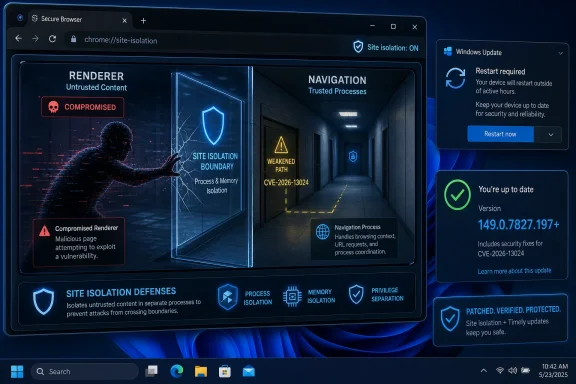 The Bug Is Not the Beachhead; It Is the Hallway After the Door Opens
CVE-2026-13024 is easy to underrate if you read only the attack requirements. The published description says the attacker must have already compromised the renderer process, which means this vulnerability is not the first exploit in a normal chain. It is the next step: a way to turn a renderer compromise into a broader violation of Chrome’s isolation assumptions.That matters because Chrome’s security model is designed around the premise that complex web content will sometimes find a way to misbehave. The browser does not merely try to prevent every memory bug, logic error, and scripting edge case. It also assumes some hostile content may execute in a renderer and then tries to keep that compromise boxed in.
Site isolation is one of the key walls in that box. It separates web origins into different processes so that a page from one site should not freely inspect or interfere with sensitive data from another. The feature is not glamorous, and most users never see it, but it is one of the reasons a browser exploit chain has to work harder than it did in the old days.
CVE-2026-13024 sits precisely in that uncomfortable middle ground. It does not scream “wormable catastrophe,” yet it attacks a mitigation layer that exists because the first layer is never perfect. The bug’s public phrasing — insufficient validation of untrusted input in Navigation — sounds bureaucratic. In browser-security terms, it points to a place where trust boundaries, process assignment, document lifecycle, and cross-origin expectations all meet.
The severity labels also tell two stories at once. Chromium rated the flaw High, while CISA’s ADP scoring placed it at a medium 4.2 under CVSS 3.1, with high attack complexity, required user interaction, low confidentiality impact, no integrity impact, and low availability impact. That is not a contradiction so much as a clash of perspectives: CVSS evaluates an individual vulnerability in a fairly formal frame, while browser vendors are often thinking about exploit chains.
Chrome’s Strongest Defenses Are Now the Attack Surface
The browser has become the operating system’s exposed nerve ending. Mail, banking, identity, admin consoles, source control, SaaS dashboards, password managers, and remote work portals all flow through it. That makes Chrome’s renderer sandbox and site isolation less like nice-to-have hardening and more like the load-bearing walls of everyday computing.Attackers understand this. Modern browser exploitation is rarely a single clean break from page load to full system ownership. It is usually a sequence: trigger code execution or logic control in a renderer, escape or confuse the sandbox, bypass origin or site boundaries, steal tokens, abuse session state, and then pivot into the user’s cloud identity or enterprise applications.
That is why site isolation bypasses deserve attention even when they do not immediately grant code execution. If an attacker can first compromise a renderer through another flaw, a navigation validation bug may help them move from “I control this malicious page’s renderer” toward “I can reach across boundaries I should not cross.” The technical impact may be partial in a scoring table, but partial breaks in browser isolation can be valuable links in a chain.
Navigation is a particularly sensitive neighborhood. A browser’s navigation machinery decides what page is loading, which origin owns it, what process should host it, what security policies apply, and how frames relate to one another. Any weakness in validating untrusted inputs there risks confusing the browser about which rules belong to which content.
That is also why the wording “crafted HTML page” should not be dismissed as routine. HTML is the browser’s native threat-delivery format. A crafted page can be a lure, a staging area, a post-exploitation primitive, or a test harness for probing process and origin boundaries.
For admins, the important lesson is not that CVE-2026-13024 alone should trigger panic. It is that browser hardening has shifted the battleground from obvious memory corruption to the internal governance systems that decide what compromised code is allowed to touch.
The Version Number Is the Security Boundary Users Can Actually See
The fixed Chrome desktop version named in the disclosure is 149.0.7827.197, with related platform builds reported around the same stable-channel update. That number is not trivia. In fleet operations, it is the difference between a theoretical policy and an observable security state.Chrome normally updates itself, but “normally” is not a control. Laptops sleep through maintenance windows. Users postpone restarts. Managed environments pin versions for compatibility. Virtual desktops and golden images lag behind. Some Chromium-based browsers inherit the underlying engine fix only after their vendors ingest and ship the corresponding Chromium patches.
This is where consumer advice and enterprise advice diverge. For a home user, opening Chrome’s help page and letting the browser update is usually enough. For a sysadmin, the job is to verify installed versions across endpoints, confirm restart completion, and watch for derivative browsers that may not share Google Chrome’s exact release cadence.
The messy part is that browsers have become both fast-moving applications and enterprise infrastructure. Security fixes arrive on a rhythm closer to cloud services than traditional desktop software, but they still depend on local installation state, user sessions, management templates, and update channels. The result is a patching model that feels automatic until it is audited.
Windows environments add another wrinkle: Chrome may not be the only Chromium consumer worth tracking. Microsoft Edge, Brave, Vivaldi, Opera, Electron-based desktop apps, WebView2 runtimes, and embedded browser components each have their own update pathways. CVE-2026-13024 is a Chrome CVE as published, but the underlying Chromium codebase is the shared foundation for a much wider ecosystem.
That does not mean every Chromium-based product is automatically vulnerable in the same way or on the same timeline. It means administrators should not stop at “Chrome is patched” if their risk model includes users browsing through alternative Chromium browsers or line-of-business apps that embed Chromium-derived components. The browser engine has escaped the browser window.
NVD’s CPE Confusion Is a Symptom of a Bigger Inventory Problem
The user-facing question buried in the NVD text — “Are we missing a CPE here?” — is more than a database housekeeping note. It exposes a recurring problem in vulnerability management: the public record often struggles to model how software is actually deployed.NVD’s initial analysis associated the vulnerable Chrome application with operating-system CPEs for Windows, Linux, and macOS as platform context. That can look odd if you are expecting a simple product-only mapping. Chrome is the affected application, but the vulnerable configurations exist on desktop operating systems, and the database machinery tries to express that relationship in a way scanners can consume.
The trouble is that CPEs are blunt instruments. They can say “Google Chrome before this version,” but they are less elegant at describing update channels, embedded runtimes, Chromium forks, portable installs, enterprise repackaging, or cases where the affected code exists inside another product. A neat CPE record often implies a tidier software universe than the one administrators actually manage.
This is why vulnerability scanners sometimes produce both false comfort and false noise. They may flag Chrome on a Windows endpoint but miss a Chromium-based app bundled in a vendor directory. They may correctly identify a vulnerable application but fail to account for whether the fixed version has been installed and the running process has restarted. They may also inherit incomplete or evolving NVD metadata during the first days after disclosure.
In this case, the public record was still being enriched after publication. NVD had not yet provided its own CVSS score at the time reflected in the supplied data, while CISA-ADP had supplied a CVSS 3.1 vector and SSVC decision data. That timing is normal, but it matters for teams that automate prioritization directly from vulnerability feeds.
The practical response is to treat CPE data as a starting point, not a verdict. For browser vulnerabilities, the authoritative control is usually installed version plus running version plus vendor update status. If those three do not agree, the machine is not as patched as the dashboard says it is.
“High” and “Medium” Are Both Telling the Truth
Security severity can look incoherent when one source calls a vulnerability High and another scores it Medium. CVE-2026-13024 is a useful example of why those labels do not always answer the same question.Chromium’s High severity reflects the importance of the affected security boundary. Site isolation is a core browser defense, and a bypass can materially worsen the outcome of another compromise. Browser vendors tend to evaluate these issues with exploit-chain utility in mind, because real attackers combine primitives rather than admire them in isolation.
CISA’s ADP CVSS vector, by contrast, encodes a more constrained view. Network attack vector, high attack complexity, no privileges required, required user interaction, unchanged scope, low confidentiality impact, no integrity impact, and low availability impact produce a medium score. In plain English: a victim has to interact with malicious content, the attacker needs a renderer compromise first, and the direct measured impact is limited.
Both assessments can be right. The bug is not an emergency on the level of an actively exploited zero-day that grants immediate code execution. It is also not disposable. If your threat model includes targeted browser exploitation, a site isolation bypass is exactly the kind of secondary bug that can turn a contained compromise into a more useful intrusion.
This is the weakness of treating CVSS as a universal truth machine. It is helpful for triage, procurement language, and broad comparison, but it flattens context. A medium-scored browser mitigation bypass may outrank a higher-scored vulnerability in a rarely exposed internal tool if your users live in the browser and your adversaries target identity sessions.
The absence of reported exploitation in CISA’s SSVC data is reassuring, but it should not become an excuse for delay. Public proof-of-concept code is not the only path to risk, and exploit developers often learn from patch diffs even when bug details remain restricted. Google’s policy of limiting issue details until users are broadly updated exists because the patch itself can become a roadmap.
The Renderer Compromise Requirement Narrows the Door, Not the Damage
The phrase “who had compromised the renderer process” is the key qualifier in the CVE description. It means an attacker needs another foothold first. That could be a separate vulnerability, a chained exploit, or some other condition that gives hostile content control inside the renderer.For defenders, this makes CVE-2026-13024 less like a lone burglar and more like a bad internal door lock. If the front door holds, the internal lock never gets tested. If the front door fails, that internal lock may decide whether the intruder is trapped in the foyer or wandering through the building.
This is exactly how browser exploit economics work. A renderer exploit without an escape or boundary bypass may be noisy, fragile, or limited. A renderer exploit paired with a site isolation bypass becomes more interesting, because it may expose cross-site data or weaken assumptions around process separation. Each component increases the value of the other.
The public description does not claim arbitrary code execution outside the sandbox, full account takeover, or system compromise. It claims a bypass of site isolation via a crafted HTML page after renderer compromise. That distinction should be preserved, because exaggerating browser bugs teaches users to ignore the next warning.
But understatement is dangerous too. Site isolation exists to protect sensitive content even when malicious or compromised content is present. A bug that bypasses it strikes at a mitigation designed for exactly the kind of scenario described in the CVE. That is why the right framing is not “catastrophic” or “minor,” but chain-enabling.
Windows Users Should Think Beyond Chrome’s About Box
For WindowsForum readers, the immediate path is familiar: check Chrome, apply the update, relaunch the browser. The about page is still the fastest consumer-grade verification point. If Chrome reports a version earlier than 149.0.7827.197, it should not be considered current for this issue.In managed environments, the relaunch step is the perennial weak link. Chrome can download and stage an update while old vulnerable processes continue running. A user with 47 tabs and a week-old browser session may believe they are protected because the update is “installed,” while the active executable is still the previous build until restart.
Administrators should also watch policy-controlled update delays. Enterprise rings are useful, but browser security fixes are increasingly poor candidates for long deferral unless a regression is known and actively being tested. The browser is too exposed, and the exploit-chain value of mitigation bypasses is too high.
The Windows angle also includes Edge. Microsoft’s browser uses Chromium, but it ships on Microsoft’s schedule and uses Microsoft’s versioning. Admins should validate Edge separately rather than assume Chrome’s fixed version maps one-to-one to Edge’s installed build. The same principle applies to any Chromium-based browser allowed in the environment.
The best operational metric is not “did the patch deploy?” It is “what percentage of active browser sessions are now running a fixed engine?” That distinction forces teams to include restarts, stale processes, alternate browsers, and unmanaged installs in the same conversation.
The Public Bug Details Are Sparse by Design
The Chromium issue link attached to CVE-2026-13024 is restricted, which is normal for newly patched browser security bugs. That restriction can frustrate defenders who want technical detail, but it is part of the disclosure tradeoff. Publishing a precise recipe before most users update would help attackers more than administrators.This leaves the public record thin: component, vulnerability class, affected versions, broad exploit condition, and fixed build. Security teams often want more — affected code paths, exploitability notes, regression tests, indicators of compromise, and whether related products share the flaw. For Chrome bugs, those answers often arrive slowly or remain implicit in the patch history.
The lack of detail should influence how we talk about the bug. It is not responsible to invent exploitation mechanics beyond the published description. It is responsible to explain the security model it touches and the operational action it requires.
The CWE assignment, CWE-20 improper input validation, is broad but useful. It tells us this is not necessarily a memory corruption flaw; it is a failure to validate data crossing a trust boundary. In a navigation component, that kind of failure can become a policy confusion bug, where the browser is tricked into applying the wrong security assumptions at the wrong time.
That category has become increasingly important as browsers harden memory safety and sandboxing. When direct corruption gets harder, logic bugs in security decisions become more attractive. The attack surface is no longer just parsing hostile bytes; it is interpreting hostile state.
Patch Velocity Is Now Part of Browser Security
Chrome 149 has already seen multiple security updates in June 2026, including earlier fixes in the same major release line. That cadence is not a sign that Chrome is uniquely broken. It is a sign that a dominant browser with an enormous codebase, aggressive fuzzing, external research, and rapid release engineering is constantly surfacing and shipping fixes.The uncomfortable part is that users experience this as background churn. Version numbers blur together. Security advisories pile up. A serious fix can look like just another browser relaunch prompt competing with meetings, forms, and half-written posts.
Attackers benefit from that fatigue. Even when auto-update works, the gap between release and restart creates a window. In enterprises, phased rollout strategies stretch that window further. In consumer environments, rarely restarted machines and portable installs can sit behind quietly.
This is why browser patch management increasingly resembles endpoint detection: continuous, measurable, and unforgiving of assumptions. The old monthly-patch mindset does not fit a component that processes hostile internet content all day. A critical OS update may wait for a maintenance cycle; a browser mitigation bypass should not linger simply because it does not have a scary CVSS number.
There is also a communications problem. Users understand “hackers can take over your computer” more readily than “an attacker who already compromised the renderer can bypass site isolation.” The latter is more precise, but it sounds less urgent. Security teams need to translate without distorting: this is a browser containment fix, and containment is what keeps one exploit from becoming a worse one.
The Enterprise Risk Is in the Exceptions
Most well-managed Windows fleets will patch Chrome quickly. The risk lives in exceptions: kiosks, lab machines, nonpersistent VDI images, developer workstations with multiple browsers, contractors outside device management, and packaged apps with embedded web runtimes. Those are the places where a “Chrome fixed” dashboard can conceal unfixed Chromium code.Developer environments deserve particular attention. Engineers often run Canary, Dev, portable Chromium builds, Electron apps, test browsers, and automation stacks side by side. Some are intentionally pinned to reproduce bugs. Those systems may also hold source code, cloud credentials, and privileged internal access, making browser exposure more consequential.
VDI and golden images create another pattern. A base image may be patched after disclosure, but active sessions spawned earlier may persist. Nonpersistent desktops may revert to an older image if the update process is not baked properly into the image pipeline. The inventory says “managed,” but the runtime tells a more complicated story.
Third-party application vendors are harder still. Many Windows applications embed browser components for login, dashboards, help systems, or web content rendering. The security of those components depends on whether the vendor uses a maintained runtime, a bundled Chromium build, or the system WebView2 runtime. The difference is operationally significant.
For procurement and vendor management, browser-engine currency should be a standard question. If an application embeds Chromium, the vendor should be able to explain how quickly it ingests upstream Chromium security fixes. “We use Chromium” is not a security answer; it is the beginning of a maintenance obligation.
The Home User’s Best Defense Is Still Boring
For individual users, the recommendation is less dramatic and more useful: update Chrome, restart it, and do the same for other Chromium-based browsers. If the browser says an update is pending, do not leave it pending. If the machine has not been restarted in weeks, restart it.Users should also be skeptical of advice that turns every browser CVE into a demand to switch browsers immediately. Firefox, Safari, Edge, Chrome, and smaller Chromium browsers all ship security fixes. The more important habit is to run a browser that is actively maintained and updating promptly.
Extensions remain part of the broader risk picture, though not specifically the stated cause of CVE-2026-13024. A hardened browser with a pile of unnecessary extensions is still an enlarged attack surface. Removing extensions you do not use is one of the few browser-security steps that ordinary users can take without waiting for a vendor.
The same goes for session hygiene. Browser isolation bugs become more valuable when the browser is full of live authenticated sessions to mail, cloud storage, banking, and admin panels. Logging out of sensitive services when they are not needed is old advice, but the modern browser has made it newly relevant.
None of this is glamorous. Browser security in 2026 is mostly an exercise in boring discipline: update quickly, restart fully, reduce add-ons, and avoid treating the browser as an immortal session vault. The boring steps are still the ones that close the most real-world gaps.
This One Chrome CVE Says Plenty About the Next One
CVE-2026-13024 is not the loudest browser vulnerability of the year, and that is precisely why it is instructive. It shows how modern browser risk increasingly accumulates in layers. A renderer bug here, a navigation validation error there, a sandbox assumption somewhere else — individually bounded, collectively dangerous.The security industry often wants clean categories: exploited or not exploited, critical or not critical, patched or unpatched. Browser vulnerabilities resist that neatness. Their real value depends on chaining, timing, target environment, and what sensitive sessions are available when the exploit lands.
For Microsoft and Google alike, the strategic challenge is that Chromium has become shared infrastructure. That gives the web a common high-performance platform, but it also means a single class of bug can echo through multiple products and operating environments. The patch may begin in Chrome, but the exposure map rarely ends there.
For Windows administrators, the lesson is to treat the browser engine as a first-class asset. It deserves the same inventory seriousness as the OS, the same update urgency as remote-access software, and the same runtime verification as endpoint protection. Anything less assumes away the component users expose to the hostile internet most often.
The Sensible Response Is Fast Verification, Not Panic
CVE-2026-13024 does not justify hysteria, but it does justify immediate version checks because it weakens Chrome’s site-isolation defenses after renderer compromise. The concrete action is to move affected Chrome installations to 149.0.7827.197 or later and confirm that users have relaunched into the fixed build.- Chrome versions before 149.0.7827.197 are the affected baseline identified in the public CVE record for this flaw.
- The vulnerability requires a prior renderer compromise, which makes it more relevant as part of an exploit chain than as a standalone entry point.
- The affected area, Navigation, matters because browser navigation decisions help enforce origin, process, and site-isolation boundaries.
- NVD metadata and CPE mappings may evolve after disclosure, so administrators should rely on installed and running browser versions rather than feed data alone.
- Chromium-based browsers and embedded runtimes should be verified separately because Google Chrome’s update does not automatically prove every Chromium consumer is fixed.
- A staged browser update is not complete until old browser processes have exited and the fixed version is actually running.
References
- Primary source: NVD / Chromium
Published: 2026-06-26T17:46:33-07:00
NVD - CVE-2026-13024
 nvd.nist.gov
- Security advisory: MSRC
Published: 2026-06-26T17:46:33-07:00
Original feed URL
Security Update Guide - Microsoft Security Response Center
 msrc.microsoft.com
