

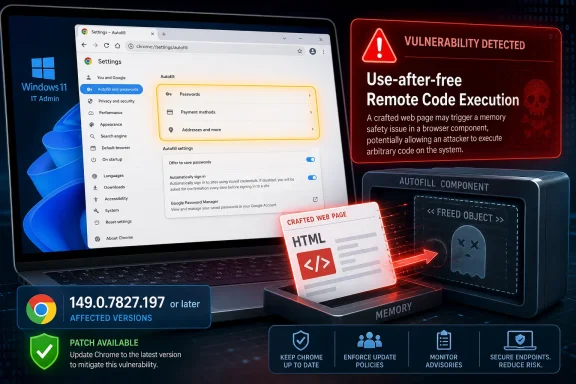
CVE-2026-13038 is a critical use-after-free flaw in Google Chrome’s Autofill component on Windows, disclosed June 24, 2026, and fixed for affected Chrome users by updating to version 149.0.7827.197 or later after Google’s late-June Stable Channel desktop release. The uncomfortable part is not merely that a browser memory bug can become code execution. It is that the vulnerable surface is Autofill, a convenience feature many users barely think of as code at all.
That makes this a useful reminder of how modern browser risk actually works. The thing that saves time at checkout, speeds through login forms, and remembers names, addresses, cards, and identities is also an attack-facing parser of hostile web content. Chrome’s security team has patched the immediate bug, but the broader lesson is for Windows users and administrators who still treat browser updates as ordinary application maintenance rather than emergency security plumbing.
Autofill looks boring because it is designed to disappear. Its purpose is to infer intent from a web page, recognize fields, retrieve stored user data, and place that data into the correct boxes with as little friction as possible. That invisibility is precisely why a critical Autofill vulnerability should make administrators sit up.
A browser’s Autofill system has to read pages it did not create and cannot trust. It must interpret HTML, form labels, field attributes, scripts, focus states, page structure, and user gestures. If a crafted HTML page can push that machinery into using memory after it has been freed, the bug stops being about convenience and becomes about remote code execution.
The official description is stark: Chrome on Windows before 149.0.7827.197 allowed a remote attacker to execute arbitrary code via a crafted HTML page. The CVSS vector assigned by CISA’s enrichment process is not theoretical theater either: network attack vector, low complexity, no privileges required, user interaction required, and high confidentiality, integrity, and availability impact.
That “user interaction required” clause should not comfort anyone too much. In browser security, user interaction often means visiting a page, clicking a link, loading a malicious ad chain, or being routed through a compromised site. It does not necessarily mean a user has to download a suspicious executable with a skull icon and override multiple Windows warnings.
Browsers are hardened aggressively against this class of mistake. Chrome benefits from sandboxing, site isolation, memory safety mitigations, exploit defenses, and years of lessons learned from public and private research. But the continued appearance of high- and critical-severity use-after-free bugs shows the limits of mitigation in sprawling C++ codebases that must parse the entire web at speed.
Autofill is a particularly interesting target because it sits at the intersection of browser internals and personal data. It is not simply rendering pixels. It is making decisions about identity fields, addresses, payment-related contexts, and form semantics. That does not mean CVE-2026-13038 is known to steal Autofill contents directly; the public description says arbitrary code execution via crafted HTML. But it does explain why this component is security-sensitive in a way that ordinary users may not appreciate.
The phrase crafted HTML page sounds almost quaint in 2026, as if the exploit were a simple static file. In practice, hostile web content can be delivered through compromised websites, injected ad networks, phishing pages, shared documents, short links, and supply-chain abuse of web widgets. The web is the delivery mechanism because the browser is the operating environment most users keep open all day.
The Windows-specific wording may reflect platform-dependent exploitability, a Windows-only code path, or simply the affected configuration as represented in the CVE data. Public CVE entries often do not give defenders the internal engineering story, and Google’s Chromium issue tracker typically restricts access to sensitive bug details until enough users have updated. In other words, the absence of a full exploit narrative is not evidence of low risk.
For IT teams, the actionable reading is simpler: if Chrome for Windows is below 149.0.7827.197, it is in scope for this critical CVE. If the machine runs a Chromium-derived browser, it should be checked against that vendor’s corresponding update stream. If an enterprise browser inventory cannot answer those two questions quickly, the browser fleet is not really being managed.
The Windows angle also changes the blast-radius conversation. Browser compromise on a personal Mac is serious. Browser compromise on a Windows domain-joined workstation with cached credentials, VPN access, browser-synced passwords, privileged admin portals, and SaaS sessions can become a beachhead. The browser is often the first hop, not the final prize.
CVSS tries to standardize exploitability and impact across vendors and products. It accounts for network reachability, required privileges, user interaction, scope, and the impact on confidentiality, integrity, and availability. A score of 8.8 is already severe enough to justify urgent patching in most environments.
Chromium’s Critical label reflects how Google views the flaw within the browser’s threat model. Remote code execution in a major browser component is one of the classic nightmare categories, even when exploitation requires a user to visit or interact with a malicious page. Browser vendors have learned that the time between patch publication and attacker adaptation can be short.
There is also no public indication in the available advisory data that CVE-2026-13038 was being exploited in the wild at disclosure. CISA’s SSVC enrichment listed exploitation as “none.” That is useful, but it should not be overread. “No known exploitation” is not “unexploitable,” and once a patch ships, attackers can begin diffing the fix against the vulnerable code.
The operational conclusion is plain: this is not a “wait until next month’s maintenance window” issue. It is a “verify update status now, then let the rest of the risk conversation proceed” issue.
For enterprises, nothing about browser patching is ever quite that clean. Some users keep browser sessions open for weeks. Some VDI or kiosk environments are rebuilt from stale images. Some update channels are pinned for compatibility reasons. Some security tools detect installed versions but miss per-user installs, portable browser copies, or unmanaged Chromium forks.
The uncomfortable truth is that the browser has become the most important endpoint application, while many organizations still manage it like an accessory. Windows Update discipline does not automatically equal browser update discipline. Microsoft Edge, Google Chrome, Brave, Vivaldi, and other Chromium-based browsers each ride the Chromium security wave, but their vendor-specific packaging and release timing can differ.
That matters because attackers do not need every endpoint. They need the overlooked one: the test machine left on an old image, the jump box used only occasionally, the contractor laptop outside normal management, the kiosk running a locked-down but outdated browser, or the executive workstation that avoids reboots. Browser update automation is only as good as the restart behavior and inventory reporting around it.
Administrators should not treat the presence of auto-update as proof of remediation. They should confirm the installed version after relaunch, validate that policies are not holding updates back, and check telemetry from endpoint management rather than relying on user self-reporting. In the browser world, “installed” and “active after restart” are two different states.
CVE-2026-13038 is described as a Google Chrome on Windows vulnerability, not as an Edge CVE in the public data presented here. That distinction matters. Browser vendors can compile different features, carry different patches, or expose different code paths. Still, the responsible enterprise posture is to monitor Microsoft’s Edge security release notes and ensure Edge is current, especially where Edge is the default or mandated browser.
The same logic applies to the wider Chromium family. Brave, Vivaldi, Opera, and other Chromium-derived browsers may need to ingest the upstream fixes, rebuild, test, and ship. In many past Chromium security cycles, downstream vendors have followed quickly, but “quickly” is still a window of exposure.
This is where the Chromium monoculture argument becomes less academic. Standardizing on Chromium has brought compatibility, performance, extension support, and shared security engineering. It has also created synchronized vulnerability pressure. A serious bug in a shared component can become a calendar event for every vendor downstream.
For Windows shops, the practical answer is not to panic about monoculture. It is to inventory the monoculture. If the organization permits multiple Chromium browsers, it must patch multiple Chromium browsers. If it does not know which browsers are installed, then the policy exists only on paper.
That gap is normal. The CVE ecosystem is not a single oracle speaking all at once. Vendors publish advisories, CVE records are created, NVD enriches them, CISA may add decision-support data, security companies ingest them into scanners, and administrators try to convert all of it into patch tickets before attackers convert it into exploit logic.
The CPE configuration is especially important for vulnerability scanners. In this case, the NVD analysis added a configuration tying Google Chrome versions before 149.0.7827.197 to Microsoft Windows. That helps scanners map the CVE to software inventory, but it also highlights why CPE data can lag or feel oddly narrow in the first days after disclosure.
The user-facing question “Are we missing a CPE here?” is more than bureaucratic housekeeping. Missing or incomplete CPEs can cause scanners to underreport exposure. Overbroad CPEs can cause noisy false positives. Both outcomes waste defender time at exactly the moment when clarity matters most.
This is why mature security teams do not wait passively for a perfect vulnerability record. They correlate vendor advisories, installed versions, endpoint telemetry, software inventory, and scanner output. NVD is critical infrastructure, but it is not a substitute for knowing what is actually running in your environment.
The tradeoff is that defenders must act on a sparse advisory. They get component, severity, broad impact, affected version, fixed version, and perhaps a CVSS vector. They usually do not get a step-by-step exploit chain, a reproducer, or a full root-cause analysis right away.
That asymmetry is uncomfortable but necessary. If you are responsible for endpoints, you do not need the exploit recipe to know what to do. A critical Chromium memory safety issue with remote code execution potential is enough to prioritize patching over almost every ordinary desktop maintenance task.
Security teams should resist the temptation to downgrade urgency because “details are private.” Private details do not mean low exploitability. They mean the vendor is trying to give the patch a head start.
Users want browsers to remember forms. Enterprises want fewer help-desk tickets for mistyped addresses, repeated profile data, and lost productivity. Website operators want frictionless conversion. Attackers want any parser, heuristic, or state machine that touches hostile content and trusted data in the same breath.
Chrome and other browsers have spent years tightening Autofill behavior, especially around payments, credentials, and hidden fields. But the basic tension remains. The web is adversarial, and Autofill’s job is to be helpful inside that adversarial space.
For security-conscious users, this CVE is not necessarily a reason to disable Autofill everywhere. It is a reason to treat Autofill as part of the browser’s attack surface rather than a harmless personal preference. For high-risk roles, privileged administrators, journalists, finance staff, executives, and anyone operating sensitive portals, reducing stored browser data may be a defensible layer of damage control.
That does not replace patching. It changes the post-compromise math. If a browser is exploited, the amount of useful material immediately available inside that browser matters.
CVE-2026-13038 should not be sensationalized into a claim of mass exploitation. The public record does not support that. But it should also not be buried as just another Chrome dot-release. Critical remote code execution paths in browser components are exactly the class of bug that turn stale endpoints into soft targets.
The immediate response should be boring and rigorous. Check Chrome versions. Force relaunches where necessary. Confirm update policies. Review downstream Chromium browsers. Validate scanner coverage once the CPE data settles. Keep an eye on whether additional advisories, exploit reports, or vendor follow-ups emerge.
The browser has become the new office suite, VPN client, password portal, SaaS shell, and sometimes thin-client operating system. Treating it as a high-priority security dependency is not alarmism. It is simply acknowledging where work now happens.
That makes this a useful reminder of how modern browser risk actually works. The thing that saves time at checkout, speeds through login forms, and remembers names, addresses, cards, and identities is also an attack-facing parser of hostile web content. Chrome’s security team has patched the immediate bug, but the broader lesson is for Windows users and administrators who still treat browser updates as ordinary application maintenance rather than emergency security plumbing.
 Autofill Was Never Just a Convenience Feature
Autofill looks boring because it is designed to disappear. Its purpose is to infer intent from a web page, recognize fields, retrieve stored user data, and place that data into the correct boxes with as little friction as possible. That invisibility is precisely why a critical Autofill vulnerability should make administrators sit up.A browser’s Autofill system has to read pages it did not create and cannot trust. It must interpret HTML, form labels, field attributes, scripts, focus states, page structure, and user gestures. If a crafted HTML page can push that machinery into using memory after it has been freed, the bug stops being about convenience and becomes about remote code execution.
The official description is stark: Chrome on Windows before 149.0.7827.197 allowed a remote attacker to execute arbitrary code via a crafted HTML page. The CVSS vector assigned by CISA’s enrichment process is not theoretical theater either: network attack vector, low complexity, no privileges required, user interaction required, and high confidentiality, integrity, and availability impact.
That “user interaction required” clause should not comfort anyone too much. In browser security, user interaction often means visiting a page, clicking a link, loading a malicious ad chain, or being routed through a compromised site. It does not necessarily mean a user has to download a suspicious executable with a skull icon and override multiple Windows warnings.
The Bug Class Is Old, but the Target Is Modern
Use-after-free vulnerabilities are among the most familiar browser bug classes, but familiarity should not be mistaken for harmlessness. In broad terms, a program frees a memory object and later tries to use it again. If an attacker can influence what occupies that memory afterward, the program may end up acting on attacker-controlled data.Browsers are hardened aggressively against this class of mistake. Chrome benefits from sandboxing, site isolation, memory safety mitigations, exploit defenses, and years of lessons learned from public and private research. But the continued appearance of high- and critical-severity use-after-free bugs shows the limits of mitigation in sprawling C++ codebases that must parse the entire web at speed.
Autofill is a particularly interesting target because it sits at the intersection of browser internals and personal data. It is not simply rendering pixels. It is making decisions about identity fields, addresses, payment-related contexts, and form semantics. That does not mean CVE-2026-13038 is known to steal Autofill contents directly; the public description says arbitrary code execution via crafted HTML. But it does explain why this component is security-sensitive in a way that ordinary users may not appreciate.
The phrase crafted HTML page sounds almost quaint in 2026, as if the exploit were a simple static file. In practice, hostile web content can be delivered through compromised websites, injected ad networks, phishing pages, shared documents, short links, and supply-chain abuse of web widgets. The web is the delivery mechanism because the browser is the operating environment most users keep open all day.
Windows Is the Named Platform, and That Matters
CVE-2026-13038 is specifically described as affecting Google Chrome on Windows prior to 149.0.7827.197. Google’s broader desktop Stable Channel update moved Windows and macOS to 149.0.7827.196/.197 and Linux to 149.0.7827.196, but this CVE’s NVD description singles out Windows. That distinction matters for WindowsForum readers because Chrome is not merely another third-party app on Windows; it is part of the daily authentication, SaaS, banking, and administration workflow for millions of endpoints.The Windows-specific wording may reflect platform-dependent exploitability, a Windows-only code path, or simply the affected configuration as represented in the CVE data. Public CVE entries often do not give defenders the internal engineering story, and Google’s Chromium issue tracker typically restricts access to sensitive bug details until enough users have updated. In other words, the absence of a full exploit narrative is not evidence of low risk.
For IT teams, the actionable reading is simpler: if Chrome for Windows is below 149.0.7827.197, it is in scope for this critical CVE. If the machine runs a Chromium-derived browser, it should be checked against that vendor’s corresponding update stream. If an enterprise browser inventory cannot answer those two questions quickly, the browser fleet is not really being managed.
The Windows angle also changes the blast-radius conversation. Browser compromise on a personal Mac is serious. Browser compromise on a Windows domain-joined workstation with cached credentials, VPN access, browser-synced passwords, privileged admin portals, and SaaS sessions can become a beachhead. The browser is often the first hop, not the final prize.
The Score Says High; Chromium Says Critical
There is a familiar mismatch in this case. Chromium labels the vulnerability Critical, while the CISA-ADP CVSS 3.1 score lands at 8.8, which is High. That difference is not a contradiction so much as a reminder that scoring systems and product security severity labels answer different questions.CVSS tries to standardize exploitability and impact across vendors and products. It accounts for network reachability, required privileges, user interaction, scope, and the impact on confidentiality, integrity, and availability. A score of 8.8 is already severe enough to justify urgent patching in most environments.
Chromium’s Critical label reflects how Google views the flaw within the browser’s threat model. Remote code execution in a major browser component is one of the classic nightmare categories, even when exploitation requires a user to visit or interact with a malicious page. Browser vendors have learned that the time between patch publication and attacker adaptation can be short.
There is also no public indication in the available advisory data that CVE-2026-13038 was being exploited in the wild at disclosure. CISA’s SSVC enrichment listed exploitation as “none.” That is useful, but it should not be overread. “No known exploitation” is not “unexploitable,” and once a patch ships, attackers can begin diffing the fix against the vulnerable code.
The operational conclusion is plain: this is not a “wait until next month’s maintenance window” issue. It is a “verify update status now, then let the rest of the risk conversation proceed” issue.
The Patch Is Simple; the Enterprise Reality Is Not
For individual users, the patch path is almost insultingly simple. Open Chrome, go to the browser’s About page, let it update, and relaunch. The fixed Windows build called out for this CVE is 149.0.7827.197 or later.For enterprises, nothing about browser patching is ever quite that clean. Some users keep browser sessions open for weeks. Some VDI or kiosk environments are rebuilt from stale images. Some update channels are pinned for compatibility reasons. Some security tools detect installed versions but miss per-user installs, portable browser copies, or unmanaged Chromium forks.
The uncomfortable truth is that the browser has become the most important endpoint application, while many organizations still manage it like an accessory. Windows Update discipline does not automatically equal browser update discipline. Microsoft Edge, Google Chrome, Brave, Vivaldi, and other Chromium-based browsers each ride the Chromium security wave, but their vendor-specific packaging and release timing can differ.
That matters because attackers do not need every endpoint. They need the overlooked one: the test machine left on an old image, the jump box used only occasionally, the contractor laptop outside normal management, the kiosk running a locked-down but outdated browser, or the executive workstation that avoids reboots. Browser update automation is only as good as the restart behavior and inventory reporting around it.
Administrators should not treat the presence of auto-update as proof of remediation. They should confirm the installed version after relaunch, validate that policies are not holding updates back, and check telemetry from endpoint management rather than relying on user self-reporting. In the browser world, “installed” and “active after restart” are two different states.
Edge and the Chromium Supply Chain Sit in the Same Weather System
Windows users often ask whether a Chrome CVE automatically means Edge is vulnerable. The honest answer is: not automatically, but the question must be asked every time. Microsoft Edge is built on Chromium, and Microsoft normally incorporates Chromium security fixes into Edge through its own Stable and Extended Stable channels.CVE-2026-13038 is described as a Google Chrome on Windows vulnerability, not as an Edge CVE in the public data presented here. That distinction matters. Browser vendors can compile different features, carry different patches, or expose different code paths. Still, the responsible enterprise posture is to monitor Microsoft’s Edge security release notes and ensure Edge is current, especially where Edge is the default or mandated browser.
The same logic applies to the wider Chromium family. Brave, Vivaldi, Opera, and other Chromium-derived browsers may need to ingest the upstream fixes, rebuild, test, and ship. In many past Chromium security cycles, downstream vendors have followed quickly, but “quickly” is still a window of exposure.
This is where the Chromium monoculture argument becomes less academic. Standardizing on Chromium has brought compatibility, performance, extension support, and shared security engineering. It has also created synchronized vulnerability pressure. A serious bug in a shared component can become a calendar event for every vendor downstream.
For Windows shops, the practical answer is not to panic about monoculture. It is to inventory the monoculture. If the organization permits multiple Chromium browsers, it must patch multiple Chromium browsers. If it does not know which browsers are installed, then the policy exists only on paper.
The NVD Entry Shows the Messy Middle of Vulnerability Disclosure
The NVD record for CVE-2026-13038 is a good example of what vulnerability information looks like in the first 48 hours: useful, incomplete, and easy to misread. NVD published the entry on June 24, 2026, and modified it on June 25. NIST had not yet assigned its own CVSS score in the entry, while CISA-ADP had contributed a CVSS 3.1 vector and SSVC assessment.That gap is normal. The CVE ecosystem is not a single oracle speaking all at once. Vendors publish advisories, CVE records are created, NVD enriches them, CISA may add decision-support data, security companies ingest them into scanners, and administrators try to convert all of it into patch tickets before attackers convert it into exploit logic.
The CPE configuration is especially important for vulnerability scanners. In this case, the NVD analysis added a configuration tying Google Chrome versions before 149.0.7827.197 to Microsoft Windows. That helps scanners map the CVE to software inventory, but it also highlights why CPE data can lag or feel oddly narrow in the first days after disclosure.
The user-facing question “Are we missing a CPE here?” is more than bureaucratic housekeeping. Missing or incomplete CPEs can cause scanners to underreport exposure. Overbroad CPEs can cause noisy false positives. Both outcomes waste defender time at exactly the moment when clarity matters most.
This is why mature security teams do not wait passively for a perfect vulnerability record. They correlate vendor advisories, installed versions, endpoint telemetry, software inventory, and scanner output. NVD is critical infrastructure, but it is not a substitute for knowing what is actually running in your environment.
The Lack of Public Exploit Detail Is a Feature, Not a Gap
Google’s Chromium issue for CVE-2026-13038 is marked as requiring permission, which is standard for many security bugs shortly after release. That can frustrate researchers and administrators who want proof, but it is part of the defense model. Publicly dumping exploit-enabling details while much of the install base remains unpatched would be reckless.The tradeoff is that defenders must act on a sparse advisory. They get component, severity, broad impact, affected version, fixed version, and perhaps a CVSS vector. They usually do not get a step-by-step exploit chain, a reproducer, or a full root-cause analysis right away.
That asymmetry is uncomfortable but necessary. If you are responsible for endpoints, you do not need the exploit recipe to know what to do. A critical Chromium memory safety issue with remote code execution potential is enough to prioritize patching over almost every ordinary desktop maintenance task.
Security teams should resist the temptation to downgrade urgency because “details are private.” Private details do not mean low exploitability. They mean the vendor is trying to give the patch a head start.
Autofill Expands the Browser’s Trust Boundary
Autofill is not just a UI feature. It is a browser subsystem that handles identity-adjacent data and decides when pages deserve access to user convenience. That makes it one of the places where usability and security bargain with each other constantly.Users want browsers to remember forms. Enterprises want fewer help-desk tickets for mistyped addresses, repeated profile data, and lost productivity. Website operators want frictionless conversion. Attackers want any parser, heuristic, or state machine that touches hostile content and trusted data in the same breath.
Chrome and other browsers have spent years tightening Autofill behavior, especially around payments, credentials, and hidden fields. But the basic tension remains. The web is adversarial, and Autofill’s job is to be helpful inside that adversarial space.
For security-conscious users, this CVE is not necessarily a reason to disable Autofill everywhere. It is a reason to treat Autofill as part of the browser’s attack surface rather than a harmless personal preference. For high-risk roles, privileged administrators, journalists, finance staff, executives, and anyone operating sensitive portals, reducing stored browser data may be a defensible layer of damage control.
That does not replace patching. It changes the post-compromise math. If a browser is exploited, the amount of useful material immediately available inside that browser matters.
The Right Response Is Verification, Not Drama
There is a predictable rhythm to browser CVEs now. A critical advisory lands, security feeds light up, users ask whether they are doomed, and within a day or two the conversation shifts to the next patch. That churn can make even serious vulnerabilities feel routine.CVE-2026-13038 should not be sensationalized into a claim of mass exploitation. The public record does not support that. But it should also not be buried as just another Chrome dot-release. Critical remote code execution paths in browser components are exactly the class of bug that turn stale endpoints into soft targets.
The immediate response should be boring and rigorous. Check Chrome versions. Force relaunches where necessary. Confirm update policies. Review downstream Chromium browsers. Validate scanner coverage once the CPE data settles. Keep an eye on whether additional advisories, exploit reports, or vendor follow-ups emerge.
The browser has become the new office suite, VPN client, password portal, SaaS shell, and sometimes thin-client operating system. Treating it as a high-priority security dependency is not alarmism. It is simply acknowledging where work now happens.
The June Chrome Fix Belongs on the Short List
This is the part of the story worth pinning to the admin dashboard for the next few days. The vulnerability is narrow enough to patch decisively, but broad enough in consequence that missed endpoints matter.- CVE-2026-13038 affects Google Chrome on Windows before version 149.0.7827.197 and is tied to a use-after-free flaw in Autofill.
- The public impact statement says a remote attacker could execute arbitrary code by using a crafted HTML page.
- Chromium rates the issue Critical, while CISA’s CVSS 3.1 enrichment gives it an 8.8 High score with high confidentiality, integrity, and availability impact.
- Public advisory data did not indicate known exploitation at disclosure, but that should not delay patching because released fixes can guide attacker research.
- Administrators should verify the active browser version after relaunch rather than assuming auto-update completed successfully.
- Organizations using Edge or other Chromium-based browsers should monitor and apply the corresponding vendor updates instead of assuming Chrome-only wording ends the matter.
References
- Primary source: NVD / Chromium
Published: 2026-06-26T17:46:45-07:00
NVD - CVE-2026-13038
 nvd.nist.gov
- Security advisory: MSRC
Published: 2026-06-26T17:46:45-07:00
Original feed URL
Security Update Guide - Microsoft Security Response Center
 msrc.microsoft.com
- Related coverage: govcert.gov.hk
GovCERT.HK - Security Alert (A26-06-27): Multiple Vulnerabilities in Google Chrome
Security Alert (A26-06-27): Multiple Vulnerabilities in Google Chromewww.govcert.gov.hk
