

The Emergency Was Never Just the Call
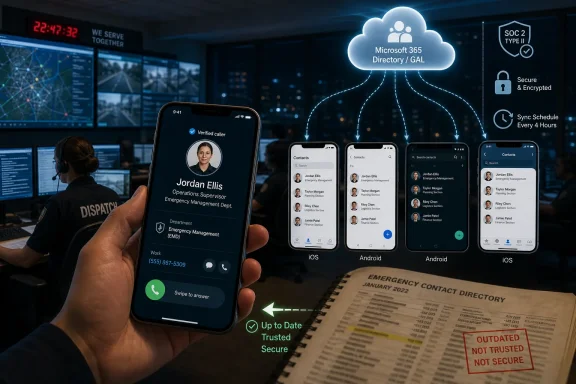
The press release, distributed by EIN Presswire and attributed to CiraSync, frames the problem in operational terms rather than software-category terms. A dispatcher cannot identify an inbound call. A field worker cannot reach a coordinator because the number on the phone is stale. A department changes staff, but the update lives in Microsoft 365 while the device in a truck, clinic, public works yard, or emergency operations center remains frozen in yesterday’s reality.
That is the kind of failure IT departments often file under “user inconvenience” until it shows up in an incident review. In a business office, a missed internal call may become an annoyance. In government and emergency-response work, it can become a delay, a duplicate dispatch, or a preventable escalation.
CiraSync’s argument is simple: the Microsoft 365 Global Address List, shared calendars, public-folder contacts, and related directory sources are only as useful as their reach. If the authoritative data never lands in the phone’s native contacts app, then caller ID, quick dialing, text-message recognition, and field workflows are still operating outside the organization’s source of truth.
That distinction matters because most workers do not experience “the directory” as an admin object. They experience it as a name that appears—or does not appear—when the phone rings.
Microsoft 365 Centralized Identity Still Has a Last-Mile Problem
Microsoft 365 has spent years turning identity, mail, collaboration, device management, and compliance into a tightly integrated cloud stack. Entra ID, Exchange Online, Outlook, Teams, Intune, and Conditional Access can make a user’s account central to nearly every workday interaction. But the native contact store on iOS and Android remains an awkward edge of that empire.
Microsoft’s own support material for Outlook mobile describes contact sync as a feature that can save or sync Outlook contacts to the device address book, subject to account type, platform behavior, and administrator policy. It is useful, but it is not the same thing as a clean, organization-wide push of the entire Global Address List to every eligible device with role-based targeting and central administrative control.
That is the opening vendors like CiraSync have long occupied. Microsoft provides the directory and the collaboration platform; the third-party layer turns that directory into device-resident contacts that work with native phone calls, SMS, and mobile address-book behavior.
For WindowsForum readers, this is familiar territory. Microsoft often builds the platform foundation and leaves specialized workflows to partners, especially when the workflow crosses into mobile OS limitations, legacy Exchange deployments, hybrid environments, and public-sector procurement realities. The result can be powerful, but it is rarely seamless by default.
CiraSync is not selling an alternative to Microsoft 365. It is selling a fix for the portion of Microsoft 365 that stops just short of the user’s thumb.
The Global Address List Is Authoritative Until Nobody Can See It
The Global Address List is one of Exchange’s oldest and most useful abstractions: a single place to find people, roles, rooms, and distribution objects inside an organization. In a browser or Outlook client, that model works well enough. On a phone during a time-sensitive call, it becomes less reliable if the user must search inside Outlook, switch apps, or guess whether an unknown number belongs to a colleague, contractor, neighboring agency, or spammer.
CiraSync’s release says its platform pushes authoritative contact data from Microsoft 365 directly to employee devices on an automated schedule. Administrators control the data source, sync frequency, and delivery scope, while end users receive updated contacts without manual setup. The company positions that as a way to remove the spreadsheet exports, printed directories, help-desk tickets, and “please add this number” emails that still haunt public agencies.
That last point is more important than it looks. A directory that depends on user behavior is not really centralized. It is a suggestion.
The public sector is full of partially synchronized systems because many agencies evolve through budget cycles, leadership changes, departmental autonomy, and vendor-specific projects. Police, fire, utilities, health, courts, finance, and emergency management may all be “on Microsoft 365” while still maintaining different habits for contact distribution. The result is a familiar split brain: central IT owns the directory, but each department owns its own workaround.
The most persuasive part of CiraSync’s claim is that it treats contact data as operational infrastructure. Not glamorous infrastructure, and not infrastructure that wins modernization awards, but infrastructure nonetheless.
St. Lucie County and Austin Make the Case for Boring Automation
CiraSync points to St. Lucie County and the City of Austin as examples of the public-sector use case. According to the company’s release, St. Lucie County deployed CiraSync to address unrecognized inbound calls from county departments, which cost staff time and delayed response. After deployment, employees could identify verified internal contacts on their devices, reducing missed calls and voicemail waste.
The City of Austin example is more symbolic. CiraSync says Austin replaced printed phone directories that became stale as soon as they were published, syncing the city’s Microsoft 365 directory to employee devices automatically. Anyone who has worked in local government will recognize the genre: laminated phone lists, PDF directories, shared spreadsheets, intranet pages nobody trusts, and contact trees that are useful until the first reorganization.
These are not the sort of case studies that make cloud executives stride across keynote stages. They are more useful than that. They describe the slow death of manual coordination in institutions where personnel changes, department transfers, temporary assignments, and emergency roles are routine.
The printed directory is the perfect villain here because it represents a pre-cloud assumption: information can be published, distributed, and treated as stable for a while. Emergency response does not work that way. Government staffing does not work that way. Modern mobile work does not work that way.
Automation wins not because it is futuristic, but because it stops pretending the organization is static.
Contact Sync Is a Security Story, Whether Vendors Say It or Not
CiraSync’s release highlights SOC 2 Type II certification, centralized administration, and deployment across cloud, hybrid Exchange, and fully on-premises environments. It also says agencies with strict data residency requirements can keep sync operations inside their own infrastructure through on-premises deployment. Those claims are aimed squarely at public-sector buyers who have learned to distrust any product that treats “cloud” as a universal answer.
The security angle cuts both ways. Putting more internal contacts on more devices can make communication faster, but it also expands the footprint of organizational metadata. Names, titles, phone numbers, departments, and reporting structures are not passwords, but they are not harmless either. They can help social engineers impersonate staff, map agencies, or target high-value roles.
That does not mean agencies should avoid device contact sync. It means they should treat it as a governed data-distribution system, not as a convenience setting. The right question is not “Can we sync the GAL?” It is “Which contacts should be synced to which people, on which devices, under which controls, and with what removal behavior when a user leaves?”
This is where CiraSync’s administrative targeting and deployment flexibility become more than marketing copy. In a small agency, broad sync may be fine. In a large city or county, the better model is likely scoped: emergency operations contacts for responders, departmental contacts for staff, leadership contacts for coordinators, and limited exposure for sensitive roles.
The same logic applies to personal devices. Bring-your-own-device programs are attractive to budget-constrained agencies, but they complicate contact governance. A tool that can push accurate contacts is useful; a policy that defines device eligibility, app protection, wipe behavior, and offboarding is what keeps that usefulness from turning into a data spill.
The Native Phone App Still Beats the Enterprise Portal
The stubborn fact behind this whole category is that people answer calls in the native phone app. They see names—or unknown numbers—through the operating system’s contact store. They send texts, check recent calls, tap favorites, and search contacts using the device’s built-in behavior.
Enterprise software people often assume workers will live inside the enterprise app. Reality says otherwise. During field work, driving, dispatching, inspecting, canvassing, or responding to an incident, the shortest path wins.
Microsoft Teams can be a communications hub, and Outlook can be a productivity anchor. Neither fully replaces the moment when a public works supervisor receives a call from a number they do not recognize while standing beside a broken water main. If the device says “Unknown Caller,” the organization has failed at the last inch of identity.
This is why contact sync feels mundane but is operationally potent. It turns identity from something a user must search for into something the device can recognize automatically. That is not a new idea, but it becomes more valuable as agencies try to coordinate across departments and jurisdictions.
In emergency response, the best interface is often the one that disappears. Accurate caller ID is not a dashboard. It is a reduction in hesitation.
Hybrid Exchange Refuses to Die, and Public Agencies Know Why
CiraSync’s support for cloud, hybrid Exchange, and on-premises deployment is not incidental. Public-sector IT is rarely a clean greenfield environment. Agencies may have Microsoft 365 tenants, legacy Exchange components, specialized compliance systems, union or records-retention constraints, and inherited infrastructure from years of partial modernization.
Hybrid support matters because the public sector cannot always move at the pace vendors prefer. Some agencies need cloud services where they make sense and local control where the risk, law, or politics demand it. Others have operational networks that are deliberately segmented from broader cloud dependencies.
A vendor that says “just migrate everything” is not serious about government. A vendor that can work across cloud and on-premises environments at least understands the terrain.
That said, hybrid flexibility also raises implementation complexity. Directory hygiene becomes a prerequisite. If job titles, phone fields, department names, and deprovisioning workflows are messy in Microsoft 365 or Exchange, automated sync will faithfully distribute that mess. Automation does not cure bad data; it accelerates whatever data governance already exists.
This is the part agencies should not skip. Before any broad GAL-to-mobile rollout, IT should review authoritative fields, ownership of updates, lifecycle processes, and exception handling. The contact-sync tool is the transport. The directory is still the truth—or the lie.
Vendors Are Filling a Microsoft Gap, Not Fighting Microsoft
It would be easy to frame CiraSync’s announcement as another niche add-on orbiting Microsoft 365. That would miss the larger pattern. Microsoft’s ecosystem has always depended on partners that make the platform usable in specific, messy, real-world scenarios.
The company’s own mobile apps cover a broad set of contact and calendar workflows, and Intune can manage Outlook behavior in enterprise contexts. But device-native contact experiences sit at the intersection of Exchange, Microsoft 365, iOS, Android, MDM policy, user privacy, and organizational data design. That intersection is exactly where platform vendors tend to stop short.
CiraSync’s value proposition is that it makes Microsoft 365 directory data behave like a managed mobile resource. Not just searchable in Outlook. Not just visible in Teams. Present where caller ID, dialing, and device-native contacts need it.
That is a defensible niche because the alternative is often human labor. IT exports lists. Department admins maintain spreadsheets. Users create local contacts. Help desks field tickets. Managers forward updates. Eventually nobody knows which list is current.
A platform subscription that eliminates that churn can be easier to justify than it appears, especially when the cost of bad contact data shows up as missed calls, slower coordination, and unnecessary operational friction.
“Real Time” Needs a Sober Reading
The headline language around “real-time contact sync” deserves scrutiny. CiraSync’s release also says administrators control sync frequency and that data is pushed on an automated schedule. In practice, many enterprise sync systems are near-real-time or scheduled rather than instantaneous in the database-replication sense.
That distinction matters for IT buyers. If a phone number changes during an incident, agencies need to know whether the update reaches devices in seconds, minutes, or at the next scheduled interval. They also need to know what happens when a device is offline, when a user has multiple devices, when contacts conflict, or when a record must be removed quickly.
Marketing language tends to compress those details. Procurement and pilots should expand them again.
The operational standard should be based on use case. For routine staff changes, hourly or daily sync may be enough. For emergency operations rosters, incident command assignments, or temporary mutual-aid coordination, the tolerance may be much lower. The right architecture might include multiple contact groups with different sync frequencies and visibility scopes.
“Real time” is less important than predictable time. Public-sector IT should demand measurable sync behavior, auditability, and clear failure modes.
The Hidden Cost of Bad Contacts Is Paid by Everyone But IT
One reason contact sync remains underfunded is that the pain is distributed. The help desk sees tickets. Staff see missed calls. Supervisors see delays. Dispatchers see ambiguity. Citizens see slower service. No single budget line captures the loss.
That makes the problem easy to postpone. A department can survive with stale contacts until it cannot. A city can keep printing directories until the staff responsible for updating them retire, move roles, or simply stop being able to keep pace. A county can rely on Outlook search until mobile workflows become too important to ignore.
The cost also hides because users compensate. They save local contacts manually. They create group texts. They exchange personal numbers. They build unofficial call trees. Every workaround feels practical in the moment and corrosive over time.
Unofficial contact systems are shadow IT in its most human form. They are not rogue servers or unsanctioned SaaS apps; they are the names and numbers workers trust because the official system failed them. Once that trust shifts away from the directory, central IT has a cultural problem as well as a technical one.
CiraSync’s release is therefore less about adding a feature than restoring confidence in the official source of contact truth.
Public-Sector Rollouts Should Start With Governance, Not Gadgets
The temptation with a tool like CiraSync is to treat deployment as a sync job. Pick a source, pick a group, push contacts, declare victory. That may work for a pilot, but it is not enough for a city, county, state agency, school district, or emergency-response organization with sensitive roles and complex reporting lines.
The first decision should be ownership. Who is allowed to change phone numbers? Which system is authoritative for mobile numbers, desk extensions, radio bridge lines, emergency contacts, and departmental aliases? How quickly must HR changes propagate? Who approves contacts that cross department boundaries?
The second decision is minimization. Not every user needs every contact. A blanket GAL sync may be convenient, but it can also clutter devices and expose more metadata than necessary. A good deployment should feel targeted, not like dumping the corporate directory into everyone’s pocket.
The third decision is offboarding. When a user leaves, loses a device, changes roles, or exits an emergency assignment, synced contacts should be removed or updated according to policy. The value of central sync is not only distribution; it is revocation.
The fourth decision is testing under field conditions. It is one thing for contacts to appear on a managed phone in an office with strong connectivity. It is another for them to behave correctly across iPhones, Android devices, shared devices, low-signal areas, and users who already have personal contact stores.
The Directory Finally Meets the Pickup Truck
CiraSync’s July 7 announcement is ultimately a reminder that digital transformation often succeeds or fails at the least glamorous layer. The cloud tenant may be modern. The identity stack may be well managed. The security posture may be documented. But if the person in the field still cannot tell whether an incoming call is from the right coordinator, the system has not reached the edge of the work.
That edge is where government technology becomes real. Not in the admin center, not in the procurement deck, and not in the architecture diagram, but on the device an employee already has in hand.
For Microsoft 365 administrators, the announcement should prompt a simple audit: how does directory data actually reach mobile devices today? If the answer involves user opt-ins, manual saves, printed directories, forwarded spreadsheets, or “they can search Outlook,” then the organization may be more dependent on informal process than it wants to admit.
For emergency-response leaders, the issue is even simpler. Communication plans are only as current as the contact data behind them. A stale phone number is not a clerical error during an incident; it is a broken link in the response chain.
The Practical Wins Are Small Enough to Be Believable
The most credible benefits here are not sweeping claims about transformation. They are modest and concrete: fewer unknown internal calls, fewer voicemails caused by uncertainty, fewer stale printed lists, fewer help-desk requests to distribute updated numbers, and faster recognition of who is trying to reach whom.
That is why the St. Lucie County and Austin examples resonate. They do not require believing that contact sync will revolutionize government operations. They require believing that removing repeated low-level friction can make time-sensitive work less brittle.
The risk is overstatement. Contact sync will not fix poor incident command, understaffed dispatch centers, weak interoperability, or outdated radio systems. It will not make bad directory data good. It will not replace training, policy, or cross-agency coordination agreements.
But it can remove a surprisingly common failure point. Sometimes the most useful modernization project is the one that stops making employees wonder whether they should answer the phone.
The Address Book Is Becoming Part of Incident Readiness
CiraSync’s announcement should land with IT pros as a practical nudge rather than a product epiphany. The product category is not new, and the public-sector pain point is not mysterious. What is changing is the expectation that the mobile device should always reflect the authoritative directory without users doing anything heroic.
- Government agencies should treat mobile contact accuracy as part of operational readiness, not as a convenience feature for Outlook users.
- Microsoft 365 administrators should distinguish between contacts being searchable inside Microsoft apps and contacts being present in the native device address book.
- Public-sector deployments should scope synced contacts by role, department, and incident need rather than blindly pushing the entire directory everywhere.
- Security teams should evaluate contact sync as controlled metadata distribution, with clear rules for device eligibility, retention, and offboarding.
- Buyers should test the actual sync interval, conflict behavior, offline handling, and removal process before accepting “real time” as a procurement answer.
- Directory cleanup should precede automation, because a sync platform will distribute inaccurate fields just as efficiently as accurate ones.
The broader lesson is that Microsoft 365’s center of gravity keeps expanding, but the last mile of public-sector work still runs through messy devices, mixed environments, and human urgency. CiraSync is betting that agencies will pay to close that gap, and the bet is plausible because the gap is visible every time a critical call arrives as an unknown number. If government IT wants cloud systems to matter in the field, the directory has to leave the portal and show up where the work actually happens.
References
- CiraSync Brings Real-Time Contact Sync to Government Emergency Response Teams Automated Microsoft 365 Directory Sync - EIN Presswire EIN Presswire · Tue, 07 Jul 2026 18:07:00 GMT
- support.microsoft.com support.microsoft.com