

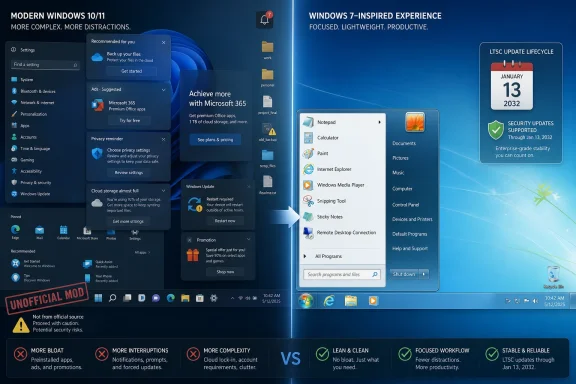
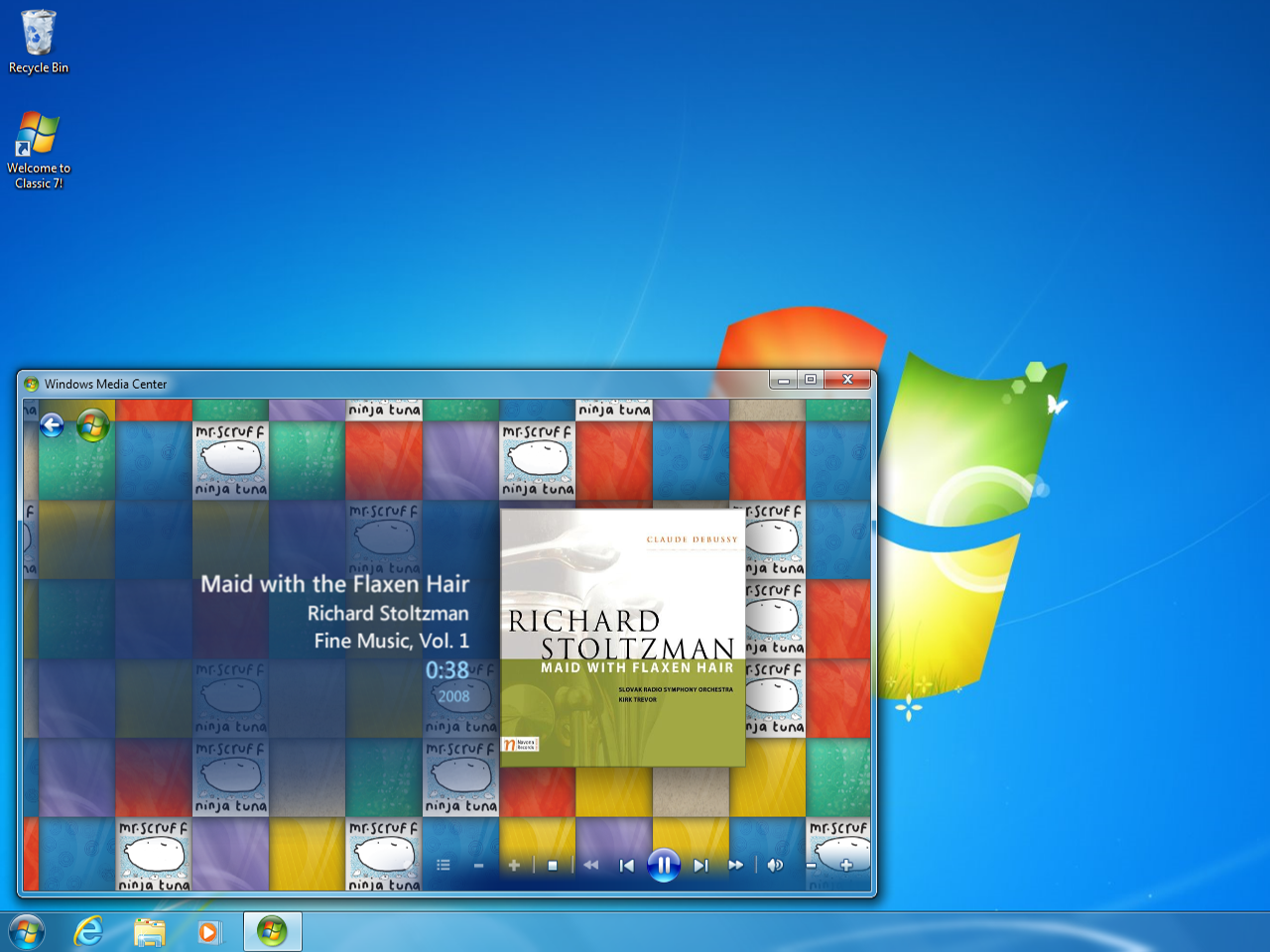
Classic 7 is a community-built Windows modification that makes Windows 10 IoT Enterprise LTSC 2021 look and behave like Windows 7 while relying on Microsoft’s IoT lifecycle for security updates through January 13, 2032. That premise is irresistible because it turns nostalgia into a support strategy. It is also a reminder that Microsoft’s hardest Windows problem is no longer whether Windows 11 can run on enough PCs, but whether enough users believe the modern Windows bargain is worth accepting.
Windows 7 has been officially gone from the supported consumer desktop for years, but it never quite left the room. It lingers in muscle memory: the translucent Aero glass, the predictable Start menu, the Control Panel-era sense that the operating system was a tool rather than a feed. For a generation of PC users, Windows 7 was the last Microsoft desktop that felt finished without feeling busy.
Classic 7 is clever because it does not try to resurrect Windows 7 in the literal sense. Running actual Windows 7 in 2026 is an exercise in managed risk, unsupported drivers, browser attrition, and security exposure. Instead, the project appears to take the opposite route: start with a still-supported Windows 10 branch, remove or suppress much of what modern Windows users complain about, and then rebuild the surface until the machine feels like it came from 2009.
That distinction matters. Classic 7 is not magic, and it is not an official Microsoft SKU hiding in plain sight. It is Windows 10 IoT Enterprise LTSC 2021 dressed for a reunion tour, with the underlying operating system still belonging to the Windows 10 family and the nostalgic effect supplied by community modification.
The result is less a “revived Windows 7” than a protest build. It says that many users do not primarily miss an old kernel or an old driver model. They miss a product philosophy.
IoT Enterprise LTSC is not meant to be the sentimentalist’s workstation OS. It is designed for specialized devices: industrial PCs, medical systems, point-of-sale terminals, kiosks, signage, factory equipment, and other machines where predictable servicing matters more than feature churn. The Long-Term Servicing Channel exists because some computers are infrastructure, not lifestyle accessories.
That makes the Classic 7 pitch both technically understandable and strategically awkward. The same qualities that make IoT LTSC attractive to embedded-device makers also make it appealing to Windows power users who are tired of consumer-facing change. Fewer feature surprises, a quieter servicing model, and a longer security runway are exactly what many desktop users say they want.
But Microsoft did not design that bargain for them. The Windows business has long separated the mass-market PC from the managed appliance, and Classic 7 blurs that line. It borrows the stability story of an enterprise platform and repackages it as a consumer nostalgia machine.
That is why the project is compelling, and also why it should be handled carefully. It is not simply “Windows 7 with updates.” It is a heavily modified edition of Windows 10 whose support story depends on Microsoft’s servicing commitments for a specific commercial product line.
This is the difference between an operating system support lifecycle and a community build lifecycle. Microsoft can ship patches for Windows 10 IoT Enterprise LTSC 2021 without validating every shell replacement, visual patch, removed component, or installer bundle that a third-party project layers on top. If an update breaks a cosmetic tweak, a legacy-style component, or some repackaged behavior, that is not Microsoft’s problem.
There is also the matter of Windows 10 itself becoming a shrinking target for third-party software. Even where an LTSC edition remains supported, application vendors may increasingly optimize for Windows 11 and later. Drivers, anti-cheat systems, creative software, VPN clients, endpoint security agents, and hardware utilities tend to follow the center of the installed base, not the longest Microsoft lifecycle table.
That does not make the 2032 date meaningless. It makes it specific. Security updates for the base platform are valuable, especially compared with running unsupported Windows 7 on bare metal. But they are not a universal guarantee that the entire user experience will age gracefully.
Classic 7 therefore sits in a strange middle ground. It is more defensible than clinging to real Windows 7, but less clean than running an official, unmodified, properly licensed Windows edition.
For many users, those grievances are not separate annoyances. They form a pattern. The PC feels less like a personal computer and more like a managed endpoint in Microsoft’s consumer cloud.
Windows 7 occupies a privileged place in memory because it predates that perception. It had plenty of flaws: User Account Control fatigue in the Vista hangover years, driver weirdness, and the usual Windows cruft. But it did not feel like it was constantly negotiating with the user over services, subscriptions, identity, and telemetry.
Classic 7 exploits that emotional opening. By recreating the Windows 7 look atop a quieter LTSC base, it turns interface nostalgia into a critique of modern Windows. The project’s popularity says less about glassy title bars than about the number of people who want the operating system to stop competing for their attention.
This is where Microsoft should pay attention. The market for “Windows without the circus” exists, even if it is fragmented across LTSC enthusiasts, Linux switchers, debloating scripts, local-account holdouts, and people who simply refuse to replace otherwise functional PCs. Classic 7 is just the most photogenic version of that demand.
An OS image can contain almost anything. It can include modified system files, added services, changed policies, altered defaults, bundled tools, unsigned components, persistence mechanisms, or simply mistakes that weaken the system. Even if a project is well-intentioned, the attack surface is enormous because the user is starting from a state they did not build and cannot easily audit.
This is why the security advice around projects like Classic 7 has to be more sober than the nostalgia. A beautiful Windows 7-style desktop does not tell you whether the image supply chain is clean. A long support date does not tell you whether the build process is reproducible. A community reputation does not replace provenance.
For a secondary machine, a lab box, or a virtual machine, the risk may be acceptable to an enthusiast who understands what they are doing. For a primary PC holding credentials, tax documents, browser sessions, password manager access, work files, and banking activity, the calculus is different.
The irony is sharp. Classic 7 is attractive partly because it promises a calmer, more private Windows experience. But privacy begins with trust in the software supply chain, and unofficial operating system distributions ask users to grant maximum trust at installation.
That does not mean enthusiasts cannot find keys or images online. They can, and they do. But “can find” and “properly licensed” are not the same thing, especially for organizations that must account for software assets. A home tinkerer may treat activation as a nuisance. A business cannot.
This is one reason Classic 7 should not be mistaken for an IT strategy. No competent administrator is going to standardize a fleet on a third-party nostalgic rebuild of a Microsoft IoT SKU because some users miss Aero. Even if the technical experience is pleasant, the compliance, supportability, imaging, patching, and vendor-risk questions are disqualifying for most serious environments.
The licensing wrinkle also complicates the moral simplicity of the pitch. Many users dislike the way consumer Windows has evolved, and that frustration is legitimate. But routing around Microsoft through gray-market activation and unofficial images is not the same as obtaining a clean, supported, auditable platform.
Classic 7 may be a fun weekend project. It may even be a useful accessibility or familiarity experiment for certain users. But the moment it becomes a daily driver, licensing stops being background noise.
Windows 10 IoT Enterprise LTSC 2021, with its restrained feature set and long support window, looks like a practical answer to that waste. If a PC runs well, why should it become e-waste because it fails a policy gate? In that context, Classic 7’s lightweight presentation feels less like cosplay and more like an argument for continuity.
The catch is that unsupported Windows 11 installs, Linux distributions, ChromeOS Flex, ordinary Windows 10 with Extended Security Updates where eligible, and official LTSC deployments all compete for the same role. Classic 7 is only one path, and it is the path with the most trust and provenance questions. Its strengths are aesthetic coherence and convenience for users who specifically want the Windows 7 feel.
For aging hardware that never handles sensitive data, that may be enough. A retro gaming tower, offline media workstation, testing VM, or nostalgia box is a much safer target than a work laptop. The lower the value of the data and the more isolated the environment, the easier it is to justify experimentation.
But the hardware argument should not be inflated into a universal recommendation. Extending the life of old PCs is good. Doing it with an unofficial operating system image requires discipline.
The Windows 11 migration has been shaped by three overlapping complaints. Some users cannot upgrade because their hardware is not supported. Some can upgrade but dislike the interface and policy changes. Some would upgrade if they trusted Microsoft not to keep adding more promotional surfaces, cloud dependencies, and AI features into the default experience.
Classic 7 speaks most directly to the second and third groups. It tells them there is still a version of Windows that can feel like a utility rather than an upsell surface. Whether that perception is entirely fair to Windows 11 is almost beside the point; operating systems are judged by accumulated friction, not by release notes.
Microsoft has shown that it can listen when pressure becomes loud enough. The company has softened some interface decisions, improved performance in places, and continues to refine Windows 11’s rough edges. But it has not fully resolved the trust gap created by years of nudges, defaults, bundled services, and confusing control surfaces.
That trust gap is why a Windows 7 impersonator can get attention in 2026. Users are not merely asking for old icons. They are asking for a desktop that feels less adversarial.
This is the slow decay that faces every long-term Windows holdout. Microsoft can keep shipping security fixes to a base OS while the surrounding ecosystem gradually moves on. The result is not a dramatic cliff but a series of small exclusions: an installer that refuses to proceed, a driver package that skips the version, a support agent who asks the user to reproduce the issue on Windows 11, an app update that quietly drops compatibility.
LTSC editions are built to reduce change, not to preserve consumer software culture forever. That works well for a kiosk running one line-of-business app. It is less predictable for a general-purpose desktop whose job is to run whatever the user discovers next week.
Classic 7 may therefore age in two directions at once. Its base may remain patched, while its nostalgic promise becomes harder to maintain. The more the project modifies, removes, or replaces, the more work it must do to stay coherent.
That is not a fatal flaw. It is the price of trying to make an operating system serve two eras at the same time.
A virtual machine is the obvious first stop. It lets users inspect the experience, compare behavior, snapshot changes, monitor network activity, and decide whether the project is more than a screenshot generator. It also contains the blast radius if something is misconfigured or suspect.
For bare-metal installs, isolation matters. A machine used for old games, offline experiments, or non-sensitive browsing is very different from one used for email, banking, work VPN access, password storage, or family records. The question is not whether Classic 7 can boot and patch. The question is what the user is willing to entrust to it.
That framing may disappoint those who want a clean verdict. But unofficial operating system projects do not deserve blanket endorsement or blanket dismissal. They deserve threat modeling.
For Windows enthusiasts, that is part of the fun. For ordinary users, it is a warning label.
That gap creates a market for unofficial solutions. Some users install Start menu replacements. Some strip components with scripts. Some choose LTSC through channels Microsoft does not really aim at them. Some move to Linux. Some, now, may try Classic 7.
The frustrating part is that Microsoft already knows how to build restrained Windows editions. LTSC proves it. Enterprise policy controls prove it. The company can make Windows quiet when the customer is an organization with purchasing power. It is much less willing to sell that same quiet to ordinary users as a first-class experience.
This is not just an aesthetic complaint. Clutter has administrative cost. Interface churn has training cost. Cloud nudges have trust cost. AI integration has governance cost. The more Windows tries to be a service surface, the more some users will seek refuge in older metaphors.
Classic 7 is a small project, but the demand signal is not small. It is the sound of users asking for less.
 The Windows 7 Dream Never Really Died
Windows 7 has been officially gone from the supported consumer desktop for years, but it never quite left the room. It lingers in muscle memory: the translucent Aero glass, the predictable Start menu, the Control Panel-era sense that the operating system was a tool rather than a feed. For a generation of PC users, Windows 7 was the last Microsoft desktop that felt finished without feeling busy.Classic 7 is clever because it does not try to resurrect Windows 7 in the literal sense. Running actual Windows 7 in 2026 is an exercise in managed risk, unsupported drivers, browser attrition, and security exposure. Instead, the project appears to take the opposite route: start with a still-supported Windows 10 branch, remove or suppress much of what modern Windows users complain about, and then rebuild the surface until the machine feels like it came from 2009.
That distinction matters. Classic 7 is not magic, and it is not an official Microsoft SKU hiding in plain sight. It is Windows 10 IoT Enterprise LTSC 2021 dressed for a reunion tour, with the underlying operating system still belonging to the Windows 10 family and the nostalgic effect supplied by community modification.
The result is less a “revived Windows 7” than a protest build. It says that many users do not primarily miss an old kernel or an old driver model. They miss a product philosophy.
Microsoft’s Supported Escape Hatch Was Built for Kiosks, Not Gamers
The reason Classic 7 can plausibly claim a long update runway is Windows 10 IoT Enterprise LTSC 2021. Microsoft’s lifecycle documentation lists that edition with extended support ending on January 13, 2032, years beyond the October 14, 2025 end of support for mainstream consumer Windows 10 editions. That date is the hook, but the edition’s intended audience is the caveat.IoT Enterprise LTSC is not meant to be the sentimentalist’s workstation OS. It is designed for specialized devices: industrial PCs, medical systems, point-of-sale terminals, kiosks, signage, factory equipment, and other machines where predictable servicing matters more than feature churn. The Long-Term Servicing Channel exists because some computers are infrastructure, not lifestyle accessories.
That makes the Classic 7 pitch both technically understandable and strategically awkward. The same qualities that make IoT LTSC attractive to embedded-device makers also make it appealing to Windows power users who are tired of consumer-facing change. Fewer feature surprises, a quieter servicing model, and a longer security runway are exactly what many desktop users say they want.
But Microsoft did not design that bargain for them. The Windows business has long separated the mass-market PC from the managed appliance, and Classic 7 blurs that line. It borrows the stability story of an enterprise platform and repackages it as a consumer nostalgia machine.
That is why the project is compelling, and also why it should be handled carefully. It is not simply “Windows 7 with updates.” It is a heavily modified edition of Windows 10 whose support story depends on Microsoft’s servicing commitments for a specific commercial product line.
The 2032 Date Is Real, but the Promise Is Narrower Than It Sounds
The most marketable claim around Classic 7 is simple: updates until 2032. The more precise version is less viral but more useful: Windows 10 IoT Enterprise LTSC 2021 is scheduled for extended support until January 13, 2032. That means the underlying Microsoft platform remains in lifecycle for security servicing, not that every Classic 7 modification is guaranteed to remain stable, trustworthy, or compatible until then.This is the difference between an operating system support lifecycle and a community build lifecycle. Microsoft can ship patches for Windows 10 IoT Enterprise LTSC 2021 without validating every shell replacement, visual patch, removed component, or installer bundle that a third-party project layers on top. If an update breaks a cosmetic tweak, a legacy-style component, or some repackaged behavior, that is not Microsoft’s problem.
There is also the matter of Windows 10 itself becoming a shrinking target for third-party software. Even where an LTSC edition remains supported, application vendors may increasingly optimize for Windows 11 and later. Drivers, anti-cheat systems, creative software, VPN clients, endpoint security agents, and hardware utilities tend to follow the center of the installed base, not the longest Microsoft lifecycle table.
That does not make the 2032 date meaningless. It makes it specific. Security updates for the base platform are valuable, especially compared with running unsupported Windows 7 on bare metal. But they are not a universal guarantee that the entire user experience will age gracefully.
Classic 7 therefore sits in a strange middle ground. It is more defensible than clinging to real Windows 7, but less clean than running an official, unmodified, properly licensed Windows edition.
Nostalgia Is Doing the Work Microsoft’s UX Team Hasn’t
The appeal of Classic 7 is not hard to diagnose. Windows 11 has improved since launch, and Microsoft has made visible efforts to tune performance, refine the interface, and respond to complaints about clutter. But the company has also spent years training users to expect promotions, account nudges, OneDrive pressure, Edge insistence, Teams experiments, Copilot positioning, and shifting Settings layouts as part of the desktop experience.For many users, those grievances are not separate annoyances. They form a pattern. The PC feels less like a personal computer and more like a managed endpoint in Microsoft’s consumer cloud.
Windows 7 occupies a privileged place in memory because it predates that perception. It had plenty of flaws: User Account Control fatigue in the Vista hangover years, driver weirdness, and the usual Windows cruft. But it did not feel like it was constantly negotiating with the user over services, subscriptions, identity, and telemetry.
Classic 7 exploits that emotional opening. By recreating the Windows 7 look atop a quieter LTSC base, it turns interface nostalgia into a critique of modern Windows. The project’s popularity says less about glassy title bars than about the number of people who want the operating system to stop competing for their attention.
This is where Microsoft should pay attention. The market for “Windows without the circus” exists, even if it is fragmented across LTSC enthusiasts, Linux switchers, debloating scripts, local-account holdouts, and people who simply refuse to replace otherwise functional PCs. Classic 7 is just the most photogenic version of that demand.
The Security Question Is Not Whether Windows 10 Can Be Patched
The largest practical risk with Classic 7 is not the Microsoft lifecycle. It is trust. Installing an operating system image from an unofficial community project is fundamentally different from changing a theme, installing a Start menu replacement, or disabling a few scheduled tasks.An OS image can contain almost anything. It can include modified system files, added services, changed policies, altered defaults, bundled tools, unsigned components, persistence mechanisms, or simply mistakes that weaken the system. Even if a project is well-intentioned, the attack surface is enormous because the user is starting from a state they did not build and cannot easily audit.
This is why the security advice around projects like Classic 7 has to be more sober than the nostalgia. A beautiful Windows 7-style desktop does not tell you whether the image supply chain is clean. A long support date does not tell you whether the build process is reproducible. A community reputation does not replace provenance.
For a secondary machine, a lab box, or a virtual machine, the risk may be acceptable to an enthusiast who understands what they are doing. For a primary PC holding credentials, tax documents, browser sessions, password manager access, work files, and banking activity, the calculus is different.
The irony is sharp. Classic 7 is attractive partly because it promises a calmer, more private Windows experience. But privacy begins with trust in the software supply chain, and unofficial operating system distributions ask users to grant maximum trust at installation.
Licensing Is the Unromantic Part of the Fantasy
The licensing question is where the project’s retro charm runs into enterprise reality. Windows 10 IoT Enterprise LTSC 2021 is a commercial Microsoft edition, not a free community base layer. It is normally obtained through OEM, embedded, enterprise, or specialized licensing channels rather than ordinary retail purchase.That does not mean enthusiasts cannot find keys or images online. They can, and they do. But “can find” and “properly licensed” are not the same thing, especially for organizations that must account for software assets. A home tinkerer may treat activation as a nuisance. A business cannot.
This is one reason Classic 7 should not be mistaken for an IT strategy. No competent administrator is going to standardize a fleet on a third-party nostalgic rebuild of a Microsoft IoT SKU because some users miss Aero. Even if the technical experience is pleasant, the compliance, supportability, imaging, patching, and vendor-risk questions are disqualifying for most serious environments.
The licensing wrinkle also complicates the moral simplicity of the pitch. Many users dislike the way consumer Windows has evolved, and that frustration is legitimate. But routing around Microsoft through gray-market activation and unofficial images is not the same as obtaining a clean, supported, auditable platform.
Classic 7 may be a fun weekend project. It may even be a useful accessibility or familiarity experiment for certain users. But the moment it becomes a daily driver, licensing stops being background noise.
The Hardware Argument Is Real, Even If the Cure Is Messy
One reason projects like Classic 7 resonate is that Windows 11 drew a hard compatibility line. TPM 2.0, supported CPU lists, Secure Boot expectations, and Microsoft’s broader modernization push left many otherwise capable PCs outside the official upgrade path. Some of those machines are genuinely old; others are still perfectly usable for web browsing, office work, media, light development, retro gaming, or lab duty.Windows 10 IoT Enterprise LTSC 2021, with its restrained feature set and long support window, looks like a practical answer to that waste. If a PC runs well, why should it become e-waste because it fails a policy gate? In that context, Classic 7’s lightweight presentation feels less like cosplay and more like an argument for continuity.
The catch is that unsupported Windows 11 installs, Linux distributions, ChromeOS Flex, ordinary Windows 10 with Extended Security Updates where eligible, and official LTSC deployments all compete for the same role. Classic 7 is only one path, and it is the path with the most trust and provenance questions. Its strengths are aesthetic coherence and convenience for users who specifically want the Windows 7 feel.
For aging hardware that never handles sensitive data, that may be enough. A retro gaming tower, offline media workstation, testing VM, or nostalgia box is a much safer target than a work laptop. The lower the value of the data and the more isolated the environment, the easier it is to justify experimentation.
But the hardware argument should not be inflated into a universal recommendation. Extending the life of old PCs is good. Doing it with an unofficial operating system image requires discipline.
Windows 11’s Problem Is No Longer Just Compatibility
Microsoft would probably prefer to frame these projects as niche nostalgia. That would be a mistake. Classic 7 is niche, but the dissatisfaction it reflects is broader.The Windows 11 migration has been shaped by three overlapping complaints. Some users cannot upgrade because their hardware is not supported. Some can upgrade but dislike the interface and policy changes. Some would upgrade if they trusted Microsoft not to keep adding more promotional surfaces, cloud dependencies, and AI features into the default experience.
Classic 7 speaks most directly to the second and third groups. It tells them there is still a version of Windows that can feel like a utility rather than an upsell surface. Whether that perception is entirely fair to Windows 11 is almost beside the point; operating systems are judged by accumulated friction, not by release notes.
Microsoft has shown that it can listen when pressure becomes loud enough. The company has softened some interface decisions, improved performance in places, and continues to refine Windows 11’s rough edges. But it has not fully resolved the trust gap created by years of nudges, defaults, bundled services, and confusing control surfaces.
That trust gap is why a Windows 7 impersonator can get attention in 2026. Users are not merely asking for old icons. They are asking for a desktop that feels less adversarial.
A Pretty Shell Cannot Freeze Time
Even if Classic 7 delivers a convincing Windows 7 experience today, time will keep moving underneath it. Web standards will change. Browsers will eventually tighten their supported OS matrices. GPU drivers will prioritize newer platforms. Game anti-cheat systems may become less tolerant of modified environments. Security tools may flag or dislike altered system images.This is the slow decay that faces every long-term Windows holdout. Microsoft can keep shipping security fixes to a base OS while the surrounding ecosystem gradually moves on. The result is not a dramatic cliff but a series of small exclusions: an installer that refuses to proceed, a driver package that skips the version, a support agent who asks the user to reproduce the issue on Windows 11, an app update that quietly drops compatibility.
LTSC editions are built to reduce change, not to preserve consumer software culture forever. That works well for a kiosk running one line-of-business app. It is less predictable for a general-purpose desktop whose job is to run whatever the user discovers next week.
Classic 7 may therefore age in two directions at once. Its base may remain patched, while its nostalgic promise becomes harder to maintain. The more the project modifies, removes, or replaces, the more work it must do to stay coherent.
That is not a fatal flaw. It is the price of trying to make an operating system serve two eras at the same time.
The Safe Place for Classic 7 Is the Lab, Not the Payroll Department
The most responsible way to treat Classic 7 is as an enthusiast build with a narrow recommended habitat. It belongs in virtual machines, test benches, retro-themed setups, secondary PCs, and carefully isolated systems where the user understands the consequences. It does not belong on machines that hold the keys to a person’s digital life.A virtual machine is the obvious first stop. It lets users inspect the experience, compare behavior, snapshot changes, monitor network activity, and decide whether the project is more than a screenshot generator. It also contains the blast radius if something is misconfigured or suspect.
For bare-metal installs, isolation matters. A machine used for old games, offline experiments, or non-sensitive browsing is very different from one used for email, banking, work VPN access, password storage, or family records. The question is not whether Classic 7 can boot and patch. The question is what the user is willing to entrust to it.
That framing may disappoint those who want a clean verdict. But unofficial operating system projects do not deserve blanket endorsement or blanket dismissal. They deserve threat modeling.
For Windows enthusiasts, that is part of the fun. For ordinary users, it is a warning label.
The Desktop Microsoft Forgot Still Has an Audience
Classic 7’s existence also points to a product gap that Microsoft has never convincingly filled. There is no mainstream “quiet Windows” edition for consumers: no officially supported, easily licensed, low-clutter Windows build for people who want security updates, broad compatibility, local-first defaults, and minimal promotion. Windows Pro comes closest in some respects, but it still lives inside the same consumer-facing design and servicing universe.That gap creates a market for unofficial solutions. Some users install Start menu replacements. Some strip components with scripts. Some choose LTSC through channels Microsoft does not really aim at them. Some move to Linux. Some, now, may try Classic 7.
The frustrating part is that Microsoft already knows how to build restrained Windows editions. LTSC proves it. Enterprise policy controls prove it. The company can make Windows quiet when the customer is an organization with purchasing power. It is much less willing to sell that same quiet to ordinary users as a first-class experience.
This is not just an aesthetic complaint. Clutter has administrative cost. Interface churn has training cost. Cloud nudges have trust cost. AI integration has governance cost. The more Windows tries to be a service surface, the more some users will seek refuge in older metaphors.
Classic 7 is a small project, but the demand signal is not small. It is the sound of users asking for less.
The 2009 Desktop Wins the Screenshot, but 2026 Sets the Rules
Classic 7 is best understood as a fascinating compromise rather than a miracle cure. It may satisfy the desire for a Windows 7-style desktop while leaning on a supported Windows 10 IoT base, but every strength comes paired with a practical limitation.- Classic 7 is not official Windows 7 with new Microsoft support; it is a modified Windows 10 IoT Enterprise LTSC 2021 environment made to resemble Windows 7.
- The January 13, 2032 support date belongs to Microsoft’s IoT Enterprise LTSC 2021 lifecycle, not to every third-party change layered onto the image.
- The biggest security risk is the trustworthiness of the unofficial operating system image and its modifications, not the concept of LTSC servicing itself.
- Licensing matters because Windows 10 IoT Enterprise LTSC is a commercial edition, not a normal retail Windows download for consumers.
- The safest use cases are virtual machines, secondary systems, lab machines, and low-sensitivity retro setups rather than primary work or personal PCs.
- The project’s popularity says Microsoft still has an unmet audience for a quieter, more predictable, less promotional Windows experience.
References
- Primary source: Ubergizmo
Published: Mon, 25 May 2026 10:34:06 GMT
Nostalgic! Project “Revives” Windows 7 With Updates Until 2032
While Microsoft has taken steps to optimize Windows 11 by promising a faster interface with fewer artificial intelligence elements, the operating... www.ubergizmo.com
- Official source: learn.microsoft.com

What's new in Windows 10 IoT Enterprise LTSC 2021
New features in Windows 10 IoT Enterprise LTSC 2021.learn.microsoft.com - Official source: techcommunity.microsoft.com
The next Windows 10 Long Term Servicing Channel (LTSC) release | Microsoft Community Hub
Find out when the next LTSC release will be available plus when and how LTSC versions are best utilized in an organization. techcommunity.microsoft.com
- Related coverage: notebookcheck.info
O Classic 7 combina o Windows 7 e o Windows 10 IoT para trazer de volta os bons velhos tempos
O senhor se lembra de quando o Windows era realmente meio decente? Os dias antes do inchaço da IA, da telemetria e da publicidade forçada. O Classic 7 tem como objetivo trazer de volta a aparência do Windows 7, em uma base de sistema operacional que deve receber atualizações de segurança até 2032. www.notebookcheck.info
- Related coverage: pureinfotech.com

Microsoft wrongly flags Windows 10 LTSC 2021 as unsupported – don't worry, both LTSC and IoT LTSC still supported
If you’re seeing Your version has reached end of support" on Windows 10 LTSC 2021, don’t panic. Microsoft still supports it until 2027 (and IoT until 2032). pureinfotech.com
- Related coverage: techradar.com

What is Windows 10 IoT Enterprise LTSC 2021 and why does it expire in 2032 and not in 2025?
Most versions of Windows 10 have passed their support deadline – but why does this one expire in 2032?www.techradar.com
- Related coverage: notebookcheck.net
Classic 7 blends Windows 7 and Windows 10 IoT to bring back the good old days
Remember when Windows was actually half decent? The days before AI bloat, telemetry, and enforced advertising. Classic 7 aims to bring back the look and feel of Windows 7, on an operating system base that should receive security updates until 2032. www.notebookcheck.net
- Related coverage: notebookcheck.biz
Classic 7 mélange Windows 7 et Windows 10 IoT pour faire revivre le bon vieux temps
Vous souvenez-vous de l'époque où Windows était à moitié décent ? L'époque où il n'y avait pas de gonflement de l'intelligence artificielle, de télémétrie et de publicité forcée. Classic 7 vise à rétablir l'aspect et la convivialité de Windows 7, sur la base d'un système d'exploitation qui... www.notebookcheck.biz
- Related coverage: tomshardware.com
Windows 10 update incorrectly tells some users they've reached end-of-life, despite having extended support — Microsoft confirms message sent to Enterprise, Pro, and Education users in error
Windows 10 is not completely dead, yet.www.tomshardware.com
- Related coverage: laptopmag.com

This secret version of Windows 10 still gets updates until 2032
No Copilot, no ads, no bloat, no AI — and seven extra years of official support. It sounds too good to be true, but there's a reason most haven't heard of it.www.laptopmag.com
- Related coverage: moxa.com
