

Classic 7 is a community-made Windows modification publicized in May 2026 that rebuilds Windows 10 IoT Enterprise LTSC 2021 with a Windows 7-style desktop, including Aero Glass, gadgets, themes, and older shell conventions, while relying on Microsoft’s IoT support lifecycle into January 2032. That combination is why the project has spread so quickly through Windows nostalgia circles: it promises not merely a skin, but a time machine with security updates. The catch is that every part of that promise depends on trust, licensing, and tolerance for an operating system that Microsoft never meant to become a general-purpose refuge from Windows 11.
The first thing to understand about Classic 7 is that it is not just another Rainmeter layout, icon pack, or Start menu replacement. Its pitch is more ambitious: take Windows 10 IoT Enterprise LTSC 2021, strip away much of what makes modern Windows feel modern, and reconstruct the Windows 7 desktop experience as though Microsoft had simply kept refining Aero instead of abandoning it.
That idea lands because Windows 7 still occupies a strange emotional position in the Windows timeline. For many users, it was the last version that felt visually coherent, locally controlled, and comfortably boring. It was not free of telemetry, nags, or rough edges, but compared with the web-connected churn of Windows 10 and the increasingly promotional surfaces of Windows 11, it has become a symbol of an operating system that mostly stayed out of the way.
Classic 7 turns that feeling into an installable proposition. According to the project’s public materials and recent reporting, the modification aims to restore the Windows 7 Start menu and taskbar, Aero Glass effects, desktop gadgets, theme pack support, and other visual and behavioral cues from the late-2000s Microsoft desktop. The base, however, is not Windows 7. It is Windows 10 IoT Enterprise LTSC 2021, a long-servicing edition originally designed for fixed-purpose commercial and embedded systems.
That is the clever bit, and also the dangerous bit. Windows 7 itself is long out of support for normal users, and building a daily driver around it in 2026 is a bad security decision. Windows 10 IoT Enterprise LTSC 2021, by contrast, remains on Microsoft’s lifecycle calendar until January 13, 2032. Classic 7 is therefore not selling the past exactly; it is selling a modern support runway dressed in the clothes of the past.
Classic 7’s appeal is that it makes the operating system feel less like a services funnel. Windows 10 IoT Enterprise LTSC is already a quieter base than consumer Windows, because LTSC editions are built for stability and long-term servicing rather than feature churn. They do not receive the same rolling stream of consumer-facing feature additions, and they are commonly associated with industrial PCs, kiosks, medical systems, retail terminals, and other machines where surprise behavior is a liability.
That is why the project resonates beyond mere retro computing. A Windows 7 theme pack is nostalgia. A Windows 7-style shell on a supported LTSC base is a statement about how many users would trade Microsoft’s current product direction for predictability, localism, and visual calm.
Still, the phrase “Windows 7 on supported Windows 10” can obscure what is really happening. Classic 7 is not blessed by Microsoft, not sold through Microsoft’s channels, and not a supported migration path for Windows 10 Home or Pro users facing the post-2025 support cliff. It is a modification that depends on a special-purpose Windows edition, and that means the legal and operational story is far messier than the screenshots.
That does not mean the edition is a secret consumer upgrade. Microsoft’s IoT materials consistently frame it around fixed-purpose devices and commercial deployment. Licensing typically flows through OEMs, distributors, volume licensing arrangements, or other business channels rather than the retail path a home user follows when buying Windows 11 Pro.
This is the uncomfortable gap into which Classic 7 steps. Technically, a user can install an image based on Windows 10 IoT Enterprise LTSC 2021 and see what happens. Practically, using it as a daily operating system requires a legitimate license, and the farther the use case drifts from fixed-purpose commercial hardware, the less it resembles the scenario Microsoft intended.
That matters because Windows enthusiasts often treat edition boundaries as technical trivia. They are not. In enterprises, licensing is part of the security model, the audit model, and the vendor-support model. A build that looks ideal in a YouTube demo may become indefensible when a procurement team, cyber insurer, or compliance auditor asks where the bits came from and why they are running on that machine.
Classic 7 may be fun in a virtual machine. It may be fascinating on a spare laptop. It may even run surprisingly well on old hardware. But for anyone responsible for production systems, the base OS is not a loophole. It is a product with a defined channel, defined purpose, and defined obligations.
But support dates are not magic dust. Microsoft supports Windows 10 IoT Enterprise LTSC 2021 as Microsoft ships it, through Microsoft’s servicing mechanisms, for properly licensed customers. Microsoft is not thereby validating every unofficial ISO, shell patch, component replacement, or post-install customization that someone wraps around it.
This distinction is especially important with projects that modify the desktop environment deeply enough to recreate an older Windows experience. The Windows shell is not cosmetic plumbing. It intersects with update behavior, file associations, UAC prompts, Explorer extensions, window management, accessibility, Start menu indexing, and security surfaces that users only notice when something breaks.
A system can receive monthly cumulative updates and still be fragile. An update can land cleanly but undo a patch. A shell replacement can work today and fail after a servicing stack change. A restored component can introduce behavior Microsoft is no longer testing in that configuration. The farther Classic 7 goes toward authenticity, the more it has to fight the operating system underneath.
That does not make the project malicious or doomed. It does mean “supported until 2032” should be read narrowly. The underlying edition has a support runway. The unofficial transformation layered on top of it has whatever support the Classic 7 developers and community can provide.
It is weaker because operating system images are an extreme trust boundary. Installing Windows from Microsoft media is one thing. Installing an unofficially modified Windows image from a community project is another. Even if the developers are acting in good faith, users must ask how the image was built, what binaries were changed, what services were removed, whether Defender and Windows Update behave normally, and how reproducible the build process is.
This is where enthusiasts sometimes wave away the wrong risk. The biggest concern is not merely that a malicious actor could hide malware in an ISO, though that is real. The subtler risk is that well-intentioned modifications can disable protections, weaken defaults, break future updates, or create a system that is impossible to reason about when troubleshooting security incidents.
For a hobbyist, that may be acceptable. For a sysadmin, it should set off alarms. A desktop that looks like Windows 7 but reports as Windows 10 IoT Enterprise LTSC is already a conversation starter in an asset inventory. A fleet of such machines would be a governance problem unless the organization itself built, signed, documented, licensed, and validated the image.
Classic 7 therefore sits in a familiar grey zone in Windows culture. It may be safer than clinging to the real Windows 7. It may be less safe than installing a clean, licensed LTSC image and applying cosmetic tools yourself. It is certainly not equivalent to a Microsoft-supported edition just because the foundation comes from one.
But the lived experience for many Windows users is that the OS has become more assertive. It recommends, advertises, redirects, pins, suggests, and explains itself in ways that can feel less like helpful onboarding and more like a permanent sales layer. Even when individual prompts are removable, the cumulative effect is fatigue.
Classic 7’s audience is not simply refusing change. Many of these users have accepted SSDs, modern drivers, secure boot, Windows Defender, DirectX improvements, HiDPI displays, and modern browsers. What they reject is the idea that an operating system must be a constantly refreshed engagement platform.
That is why Microsoft’s incremental concessions rarely settle the matter. Bringing back some taskbar customization, improving performance, or reducing the prominence of a disliked feature helps, but it does not fully answer the deeper objection. For a subset of users, Windows 11’s problem is not any single toggle. It is the sense that the desktop is no longer primarily theirs.
Classic 7 is compelling because it reverses the emotional hierarchy. The user sees a familiar desktop first and Microsoft’s modern servicing machinery second. That order matters.
Aero Glass, for all its charm, was also a product of its era. It reflected a moment when Microsoft wanted the PC to feel premium, dimensional, and hardware-accelerated. The translucent title bars and glossy taskbar were not just decorative; they were a statement that Windows Vista’s underlying graphics architecture had finally found a more stable, more acceptable home in Windows 7.
But design fashion changed. Microsoft moved toward flatter surfaces, then hybrid touch-friendly layouts, then service-connected shells. The problem is not that Windows 7 was objectively perfect and everything after it was decline. The problem is that Microsoft never found a replacement desktop language that users loved as intensely as they loved Windows 7’s mix of clarity and ornament.
Classic 7 benefits from that unresolved affection. It does not need to prove that Windows 7 was flawless. It only needs to show that Windows can still feel deliberate, legible, and personal. Against the clutter of a modern default install, that is enough.
The irony is that a successful Classic 7 machine is a very modern artifact. It depends on Windows 10’s kernel, driver ecosystem, security patches, and application compatibility. The past being restored is mostly surface and workflow. Underneath, the project is betting that the best Windows experience in 2026 is one where Microsoft’s old interface instincts are grafted onto its newer engineering.
Windows 10 IoT Enterprise LTSC can feel lighter than consumer Windows because it avoids some bundled components and feature churn. On older hardware, fewer default distractions can make a system feel more responsive. On low-end machines, shaving background activity can matter. The official minimum requirements for Windows 10 IoT Enterprise LTSC are modest compared with what people associate with Windows 11-era PCs.
Gaming is more complicated. Frame rates depend on GPU drivers, CPU scheduling, memory pressure, storage, anti-cheat compatibility, graphics APIs, game engines, overlays, and vendor utilities. A quieter Windows image can help at the margins, but it is rarely a universal performance key. Some games and launchers also assume components that stripped-down builds may remove or alter.
There is also the problem of benchmark selection. Anecdotes tend to travel faster than controlled comparisons. One user’s “it feels faster” may reflect a clean install, fewer startup apps, different drivers, or the absence of years of accumulated cruft rather than Classic 7 itself. A clean Windows 11 install, a clean Windows 10 LTSC install, and Classic 7 on identical hardware would be a more meaningful test.
For enthusiasts, this uncertainty is part of the fun. For IT pros, it is a reason to slow down. Performance that cannot be reproduced is not a deployment argument. It is a weekend experiment.
If Edge is absent, users will install something else. If Store components are missing or reduced, some apps may require alternate deployment paths. If Microsoft account integration is less prominent, that may be welcome, but it can also affect convenience features that ordinary users now expect. A clean-feeling Windows install can become less clean once the user rebuilds the ecosystem manually.
This is not a fatal flaw. Many WindowsForum readers would happily trade Microsoft’s defaults for a hand-built stack: Firefox or Chrome, classic utilities, local accounts, manual backups, and carefully chosen drivers. But that is a power-user posture, not a mass-market one.
The broader software industry has moved on from the Windows 7 assumptions. Game launchers, password managers, cloud storage clients, collaboration tools, VPNs, EDR agents, and peripheral software all bring their own updaters and telemetry. Classic 7 can make Windows itself feel older and calmer. It cannot make the entire software ecosystem return to 2009.
That limitation is important because the dream of “the good old days” often imagines an operating system alone. In practice, the daily Windows experience is now a stack of vendors competing for attention. Microsoft is only the largest and most visible offender.
Yet administrators should still pay attention. Classic 7 is a warning flare from users who feel that mainstream Windows has become less respectful of time, attention, and hardware. Those complaints will not disappear just because Microsoft says Windows 11 is the supported path.
The post-Windows 10 transition has been unusually awkward. Hardware requirements left many otherwise capable PCs outside the official Windows 11 upgrade path. Extended Security Updates created a paid bridge for some users, but not a satisfying long-term answer. LTSC editions remain attractive precisely because they appear to offer what Microsoft’s consumer channel does not: stability without constant persuasion.
For managed environments, the lesson is not “deploy Classic 7.” It is “understand why people want it.” If users are rebelling against Windows 11 defaults, administrators can often address the practical irritants through policy: removing consumer experiences, controlling Start menu layout, disabling promotional content, managing Edge behavior, and using enterprise tooling to make Windows feel less chaotic.
The best enterprise Windows 11 deployments already do this. They treat Microsoft’s default consumer posture as raw material, not destiny. Classic 7 simply dramatizes what happens when users conclude that the only way to get a respectful Windows desktop is to leave the supported consumer path entirely.
That makes the “bring your own license” caveat do a lot of work. It shifts responsibility from the project to the user, which is understandable but not especially comforting. Many people attracted to Classic 7 will not have a legitimate IoT Enterprise LTSC license sitting around. Some will experiment unactivated. Some will hunt for grey-market keys. Some will download images from places they should not trust.
This is where enthusiasm and responsibility diverge. A retro Windows build can be a legitimate community experiment and still be a bad recommendation for average users. The more popular the project becomes, the more likely it is to attract repackagers, fake downloads, malware-laced mirrors, and SEO farms promising easy activation.
That risk is not hypothetical in Windows modding culture. Every unofficial Windows ISO lives in a hostile distribution environment. Users searching for performance, privacy, or nostalgia are exactly the kind of users who can be tempted into disabling security checks because a forum post told them to.
If Classic 7’s developers want the project to be taken seriously, transparency will matter. Build documentation, checksums, reproducible tooling where possible, clear licensing language, and a conservative security posture are not boring details. They are the difference between a fascinating mod and a trust-me operating system.
Microsoft has pieces of this already. Enterprise policy can suppress many irritants. LTSC proves the company understands long-term stability. Windows 11 is gradually regaining some customization that users complained about losing. But the pieces are scattered across editions, licensing channels, management tools, and deployment assumptions.
What users keep asking for is simpler: let Windows be a platform again. Let the Start menu launch things. Let the taskbar behave predictably. Let local accounts and local files remain first-class. Let AI features be optional tools rather than atmospheric pressure. Let the operating system make money through licenses and services people choose, not through persistent attempts to redirect attention.
Classic 7 is not proof that Microsoft should bring back Windows 7 wholesale. It is proof that the company has undervalued emotional continuity. Users do not merely want security patches and app compatibility. They want an environment that feels stable enough to become muscle memory.
That is a design problem as much as a business problem. Microsoft’s challenge is not that nobody likes new things. It is that many users no longer trust new Windows features to arrive without a catch.
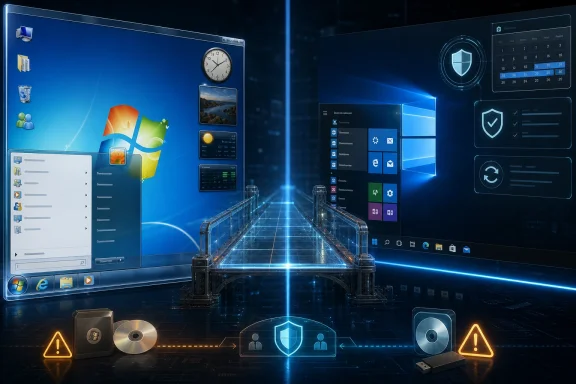 Classic 7 Sells Nostalgia as a Servicing Strategy
The first thing to understand about Classic 7 is that it is not just another Rainmeter layout, icon pack, or Start menu replacement. Its pitch is more ambitious: take Windows 10 IoT Enterprise LTSC 2021, strip away much of what makes modern Windows feel modern, and reconstruct the Windows 7 desktop experience as though Microsoft had simply kept refining Aero instead of abandoning it.That idea lands because Windows 7 still occupies a strange emotional position in the Windows timeline. For many users, it was the last version that felt visually coherent, locally controlled, and comfortably boring. It was not free of telemetry, nags, or rough edges, but compared with the web-connected churn of Windows 10 and the increasingly promotional surfaces of Windows 11, it has become a symbol of an operating system that mostly stayed out of the way.
Classic 7 turns that feeling into an installable proposition. According to the project’s public materials and recent reporting, the modification aims to restore the Windows 7 Start menu and taskbar, Aero Glass effects, desktop gadgets, theme pack support, and other visual and behavioral cues from the late-2000s Microsoft desktop. The base, however, is not Windows 7. It is Windows 10 IoT Enterprise LTSC 2021, a long-servicing edition originally designed for fixed-purpose commercial and embedded systems.
That is the clever bit, and also the dangerous bit. Windows 7 itself is long out of support for normal users, and building a daily driver around it in 2026 is a bad security decision. Windows 10 IoT Enterprise LTSC 2021, by contrast, remains on Microsoft’s lifecycle calendar until January 13, 2032. Classic 7 is therefore not selling the past exactly; it is selling a modern support runway dressed in the clothes of the past.
The Real Product Is Not Aero Glass, but Escape
Notebookcheck framed the project around a familiar complaint: Windows 11 has become too noisy, too promotional, and too opinionated. That complaint is not limited to hobbyists. IT departments have spent years navigating Microsoft account prompts, Teams and Copilot placement, Start menu recommendations, Edge nudges, OneDrive defaults, and settings that seem to relocate with every release wave.Classic 7’s appeal is that it makes the operating system feel less like a services funnel. Windows 10 IoT Enterprise LTSC is already a quieter base than consumer Windows, because LTSC editions are built for stability and long-term servicing rather than feature churn. They do not receive the same rolling stream of consumer-facing feature additions, and they are commonly associated with industrial PCs, kiosks, medical systems, retail terminals, and other machines where surprise behavior is a liability.
That is why the project resonates beyond mere retro computing. A Windows 7 theme pack is nostalgia. A Windows 7-style shell on a supported LTSC base is a statement about how many users would trade Microsoft’s current product direction for predictability, localism, and visual calm.
Still, the phrase “Windows 7 on supported Windows 10” can obscure what is really happening. Classic 7 is not blessed by Microsoft, not sold through Microsoft’s channels, and not a supported migration path for Windows 10 Home or Pro users facing the post-2025 support cliff. It is a modification that depends on a special-purpose Windows edition, and that means the legal and operational story is far messier than the screenshots.
Microsoft’s Long-Tail Windows Is Not Meant for Your Gaming Rig
Windows 10 IoT Enterprise LTSC 2021 exists because some devices cannot behave like normal PCs. A point-of-sale terminal, an imaging workstation, a factory controller, or a medical appliance may need security patches for years without receiving interface changes that retrain staff or break vendor validation. LTSC is Microsoft’s answer to that market: fewer feature changes, a longer lifecycle, and a servicing model built around stability.That does not mean the edition is a secret consumer upgrade. Microsoft’s IoT materials consistently frame it around fixed-purpose devices and commercial deployment. Licensing typically flows through OEMs, distributors, volume licensing arrangements, or other business channels rather than the retail path a home user follows when buying Windows 11 Pro.
This is the uncomfortable gap into which Classic 7 steps. Technically, a user can install an image based on Windows 10 IoT Enterprise LTSC 2021 and see what happens. Practically, using it as a daily operating system requires a legitimate license, and the farther the use case drifts from fixed-purpose commercial hardware, the less it resembles the scenario Microsoft intended.
That matters because Windows enthusiasts often treat edition boundaries as technical trivia. They are not. In enterprises, licensing is part of the security model, the audit model, and the vendor-support model. A build that looks ideal in a YouTube demo may become indefensible when a procurement team, cyber insurer, or compliance auditor asks where the bits came from and why they are running on that machine.
Classic 7 may be fun in a virtual machine. It may be fascinating on a spare laptop. It may even run surprisingly well on old hardware. But for anyone responsible for production systems, the base OS is not a loophole. It is a product with a defined channel, defined purpose, and defined obligations.
The 2032 Date Is Real, but It Does Not Bless the Whole Stack
The most potent number in the Classic 7 story is 2032. Microsoft’s lifecycle documentation lists Windows 10 IoT Enterprise LTSC 2021 with mainstream support ending in January 2027 and extended support ending in January 2032. That makes it the longest-lived Windows 10 client branch still relevant to many discussions after standard Windows 10 support ended on October 14, 2025.But support dates are not magic dust. Microsoft supports Windows 10 IoT Enterprise LTSC 2021 as Microsoft ships it, through Microsoft’s servicing mechanisms, for properly licensed customers. Microsoft is not thereby validating every unofficial ISO, shell patch, component replacement, or post-install customization that someone wraps around it.
This distinction is especially important with projects that modify the desktop environment deeply enough to recreate an older Windows experience. The Windows shell is not cosmetic plumbing. It intersects with update behavior, file associations, UAC prompts, Explorer extensions, window management, accessibility, Start menu indexing, and security surfaces that users only notice when something breaks.
A system can receive monthly cumulative updates and still be fragile. An update can land cleanly but undo a patch. A shell replacement can work today and fail after a servicing stack change. A restored component can introduce behavior Microsoft is no longer testing in that configuration. The farther Classic 7 goes toward authenticity, the more it has to fight the operating system underneath.
That does not make the project malicious or doomed. It does mean “supported until 2032” should be read narrowly. The underlying edition has a support runway. The unofficial transformation layered on top of it has whatever support the Classic 7 developers and community can provide.
The Security Question Is Trust, Not Just Patch Tuesday
The security case for Classic 7 is both stronger and weaker than the nostalgia pitch suggests. It is stronger because a supported Windows 10 LTSC base is plainly safer than running an unpatched Windows 7 machine on the open internet. Security updates still matter, and the cumulative Windows servicing model gives LTSC users fixes for serious vulnerabilities long after consumer Windows 10 users have been pushed to Windows 11, ESU, or replacement hardware.It is weaker because operating system images are an extreme trust boundary. Installing Windows from Microsoft media is one thing. Installing an unofficially modified Windows image from a community project is another. Even if the developers are acting in good faith, users must ask how the image was built, what binaries were changed, what services were removed, whether Defender and Windows Update behave normally, and how reproducible the build process is.
This is where enthusiasts sometimes wave away the wrong risk. The biggest concern is not merely that a malicious actor could hide malware in an ISO, though that is real. The subtler risk is that well-intentioned modifications can disable protections, weaken defaults, break future updates, or create a system that is impossible to reason about when troubleshooting security incidents.
For a hobbyist, that may be acceptable. For a sysadmin, it should set off alarms. A desktop that looks like Windows 7 but reports as Windows 10 IoT Enterprise LTSC is already a conversation starter in an asset inventory. A fleet of such machines would be a governance problem unless the organization itself built, signed, documented, licensed, and validated the image.
Classic 7 therefore sits in a familiar grey zone in Windows culture. It may be safer than clinging to the real Windows 7. It may be less safe than installing a clean, licensed LTSC image and applying cosmetic tools yourself. It is certainly not equivalent to a Microsoft-supported edition just because the foundation comes from one.
Windows 11 Created the Market for This
The existence of Classic 7 says as much about Windows 11 as it does about Windows 7. Microsoft’s current client strategy is built around integration: cloud accounts, subscription services, AI assistance, app promotion, cross-device sync, and policy-managed security. Some of that is defensible. Some of it is useful. Some of it is exactly what enterprise customers asked for.But the lived experience for many Windows users is that the OS has become more assertive. It recommends, advertises, redirects, pins, suggests, and explains itself in ways that can feel less like helpful onboarding and more like a permanent sales layer. Even when individual prompts are removable, the cumulative effect is fatigue.
Classic 7’s audience is not simply refusing change. Many of these users have accepted SSDs, modern drivers, secure boot, Windows Defender, DirectX improvements, HiDPI displays, and modern browsers. What they reject is the idea that an operating system must be a constantly refreshed engagement platform.
That is why Microsoft’s incremental concessions rarely settle the matter. Bringing back some taskbar customization, improving performance, or reducing the prominence of a disliked feature helps, but it does not fully answer the deeper objection. For a subset of users, Windows 11’s problem is not any single toggle. It is the sense that the desktop is no longer primarily theirs.
Classic 7 is compelling because it reverses the emotional hierarchy. The user sees a familiar desktop first and Microsoft’s modern servicing machinery second. That order matters.
The Old Desktop Was Never as Simple as Memory Claims
There is a trap in all Windows nostalgia: the remembered operating system is usually better than the real one. Windows 7 was not a frictionless paradise. It had driver failures, update loops, malware problems, indexing issues, Control Panel sprawl, and a security model that looks increasingly dated from a 2026 vantage point.Aero Glass, for all its charm, was also a product of its era. It reflected a moment when Microsoft wanted the PC to feel premium, dimensional, and hardware-accelerated. The translucent title bars and glossy taskbar were not just decorative; they were a statement that Windows Vista’s underlying graphics architecture had finally found a more stable, more acceptable home in Windows 7.
But design fashion changed. Microsoft moved toward flatter surfaces, then hybrid touch-friendly layouts, then service-connected shells. The problem is not that Windows 7 was objectively perfect and everything after it was decline. The problem is that Microsoft never found a replacement desktop language that users loved as intensely as they loved Windows 7’s mix of clarity and ornament.
Classic 7 benefits from that unresolved affection. It does not need to prove that Windows 7 was flawless. It only needs to show that Windows can still feel deliberate, legible, and personal. Against the clutter of a modern default install, that is enough.
The irony is that a successful Classic 7 machine is a very modern artifact. It depends on Windows 10’s kernel, driver ecosystem, security patches, and application compatibility. The past being restored is mostly surface and workflow. Underneath, the project is betting that the best Windows experience in 2026 is one where Microsoft’s old interface instincts are grafted onto its newer engineering.
Performance Claims Need More Than Vibes
As with every stripped-down Windows build, Classic 7 has already attracted performance chatter. Users love the idea that removing consumer extras, background services, and modern UI baggage will make games faster and old PCs feel new again. Sometimes that is true. Often it is overstated.Windows 10 IoT Enterprise LTSC can feel lighter than consumer Windows because it avoids some bundled components and feature churn. On older hardware, fewer default distractions can make a system feel more responsive. On low-end machines, shaving background activity can matter. The official minimum requirements for Windows 10 IoT Enterprise LTSC are modest compared with what people associate with Windows 11-era PCs.
Gaming is more complicated. Frame rates depend on GPU drivers, CPU scheduling, memory pressure, storage, anti-cheat compatibility, graphics APIs, game engines, overlays, and vendor utilities. A quieter Windows image can help at the margins, but it is rarely a universal performance key. Some games and launchers also assume components that stripped-down builds may remove or alter.
There is also the problem of benchmark selection. Anecdotes tend to travel faster than controlled comparisons. One user’s “it feels faster” may reflect a clean install, fewer startup apps, different drivers, or the absence of years of accumulated cruft rather than Classic 7 itself. A clean Windows 11 install, a clean Windows 10 LTSC install, and Classic 7 on identical hardware would be a more meaningful test.
For enthusiasts, this uncertainty is part of the fun. For IT pros, it is a reason to slow down. Performance that cannot be reproduced is not a deployment argument. It is a weekend experiment.
The Browser and App Story Is Where the Past Ends
One notable claim around Windows 10 IoT Enterprise LTSC is that it forgoes some consumer-facing components such as Xbox Game Bar, advertising surfaces, and Microsoft Edge. That can be attractive to users who want a minimal base, but it also illustrates the tension in running a “classic” Windows desktop in 2026. The modern web still needs a modern browser, and modern applications increasingly assume modern identity, update, and security frameworks.If Edge is absent, users will install something else. If Store components are missing or reduced, some apps may require alternate deployment paths. If Microsoft account integration is less prominent, that may be welcome, but it can also affect convenience features that ordinary users now expect. A clean-feeling Windows install can become less clean once the user rebuilds the ecosystem manually.
This is not a fatal flaw. Many WindowsForum readers would happily trade Microsoft’s defaults for a hand-built stack: Firefox or Chrome, classic utilities, local accounts, manual backups, and carefully chosen drivers. But that is a power-user posture, not a mass-market one.
The broader software industry has moved on from the Windows 7 assumptions. Game launchers, password managers, cloud storage clients, collaboration tools, VPNs, EDR agents, and peripheral software all bring their own updaters and telemetry. Classic 7 can make Windows itself feel older and calmer. It cannot make the entire software ecosystem return to 2009.
That limitation is important because the dream of “the good old days” often imagines an operating system alone. In practice, the daily Windows experience is now a stack of vendors competing for attention. Microsoft is only the largest and most visible offender.
For Administrators, Classic 7 Is a Warning Flare
No serious IT department should see Classic 7 as an enterprise desktop strategy. That may sound harsh, but it is the only responsible reading. An unofficial modified OS image, built around an edition intended for specialized use, is not a manageable endpoint standard unless an organization can fully validate, license, secure, and support it.Yet administrators should still pay attention. Classic 7 is a warning flare from users who feel that mainstream Windows has become less respectful of time, attention, and hardware. Those complaints will not disappear just because Microsoft says Windows 11 is the supported path.
The post-Windows 10 transition has been unusually awkward. Hardware requirements left many otherwise capable PCs outside the official Windows 11 upgrade path. Extended Security Updates created a paid bridge for some users, but not a satisfying long-term answer. LTSC editions remain attractive precisely because they appear to offer what Microsoft’s consumer channel does not: stability without constant persuasion.
For managed environments, the lesson is not “deploy Classic 7.” It is “understand why people want it.” If users are rebelling against Windows 11 defaults, administrators can often address the practical irritants through policy: removing consumer experiences, controlling Start menu layout, disabling promotional content, managing Edge behavior, and using enterprise tooling to make Windows feel less chaotic.
The best enterprise Windows 11 deployments already do this. They treat Microsoft’s default consumer posture as raw material, not destiny. Classic 7 simply dramatizes what happens when users conclude that the only way to get a respectful Windows desktop is to leave the supported consumer path entirely.
The Licensing Gap Will Keep This in the Hobbyist Lane
Classic 7’s greatest practical weakness is not technical; it is distribution. A Windows modification that depends on Windows 10 IoT Enterprise LTSC 2021 cannot be normalized for ordinary users without colliding with licensing reality. Microsoft does not sell IoT Enterprise LTSC as a nostalgic desktop edition for people tired of Copilot buttons and Start menu recommendations.That makes the “bring your own license” caveat do a lot of work. It shifts responsibility from the project to the user, which is understandable but not especially comforting. Many people attracted to Classic 7 will not have a legitimate IoT Enterprise LTSC license sitting around. Some will experiment unactivated. Some will hunt for grey-market keys. Some will download images from places they should not trust.
This is where enthusiasm and responsibility diverge. A retro Windows build can be a legitimate community experiment and still be a bad recommendation for average users. The more popular the project becomes, the more likely it is to attract repackagers, fake downloads, malware-laced mirrors, and SEO farms promising easy activation.
That risk is not hypothetical in Windows modding culture. Every unofficial Windows ISO lives in a hostile distribution environment. Users searching for performance, privacy, or nostalgia are exactly the kind of users who can be tempted into disabling security checks because a forum post told them to.
If Classic 7’s developers want the project to be taken seriously, transparency will matter. Build documentation, checksums, reproducible tooling where possible, clear licensing language, and a conservative security posture are not boring details. They are the difference between a fascinating mod and a trust-me operating system.
The Best Version of This Idea Would Be Official and Boring
The uncomfortable truth for Microsoft is that Classic 7 points toward a product people still want: a quiet, stable, low-noise Windows desktop for general-purpose PCs. Not an IoT edition. Not an enterprise-only licensing maze. Not an unsupported community ISO. A mainstream Windows mode that values continuity over engagement.Microsoft has pieces of this already. Enterprise policy can suppress many irritants. LTSC proves the company understands long-term stability. Windows 11 is gradually regaining some customization that users complained about losing. But the pieces are scattered across editions, licensing channels, management tools, and deployment assumptions.
What users keep asking for is simpler: let Windows be a platform again. Let the Start menu launch things. Let the taskbar behave predictably. Let local accounts and local files remain first-class. Let AI features be optional tools rather than atmospheric pressure. Let the operating system make money through licenses and services people choose, not through persistent attempts to redirect attention.
Classic 7 is not proof that Microsoft should bring back Windows 7 wholesale. It is proof that the company has undervalued emotional continuity. Users do not merely want security patches and app compatibility. They want an environment that feels stable enough to become muscle memory.
That is a design problem as much as a business problem. Microsoft’s challenge is not that nobody likes new things. It is that many users no longer trust new Windows features to arrive without a catch.
The Classic 7 Bargain Is Tempting, Narrow, and Fragile
Classic 7 deserves attention because it combines a real Microsoft lifecycle quirk with a real user backlash against modern Windows. But the bargain is narrower than the screenshots imply, and anyone treating it as a drop-in Windows 11 alternative is skipping the hard parts.- Classic 7 is best understood as a community modification of Windows 10 IoT Enterprise LTSC 2021, not as a Microsoft-supported Windows 7 revival.
- The January 2032 support date applies to the underlying IoT Enterprise LTSC 2021 edition, not to every unofficial shell change or redistributed image built around it.
- The licensing model keeps Classic 7 in hobbyist and lab territory for most users, because IoT Enterprise LTSC is aimed at commercial and fixed-purpose deployments.
- The security risk is not only malware in a download, but also the possibility that deep system changes weaken defaults, complicate updates, or make troubleshooting opaque.
- The project’s popularity is a useful signal that Microsoft’s default Windows experience has become too noisy for a meaningful slice of its most technically engaged users.
- The safest way to explore Classic 7 is in a virtual machine or spare test system, not as the primary OS on a machine that handles sensitive work.
References
- Primary source: Notebookcheck
Published: Fri, 22 May 2026 09:18:00 GMT
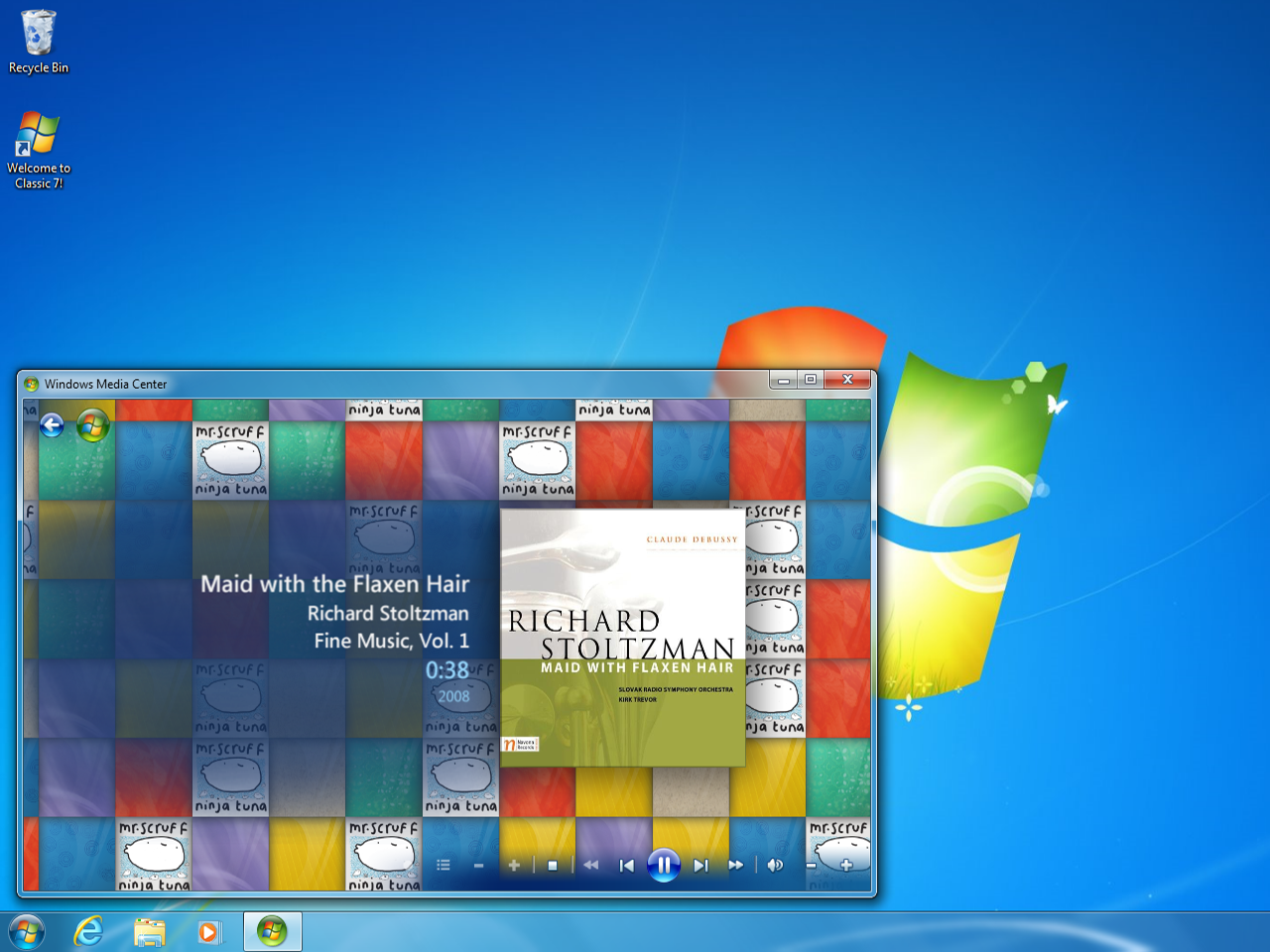
Classic 7 blends Windows 7 and Windows 10 IoT to bring back the good old days
Remember when Windows was actually half decent? The days before AI bloat, telemetry, and enforced advertising. Classic 7 aims to bring back the look and feel of Windows 7, on an operating system base that should receive security updates until 2032. www.notebookcheck.net
- Official source: learn.microsoft.com

Windows 10 IoT Enterprise LTSC 2021 - Microsoft Lifecycle
Windows 10 IoT Enterprise LTSC 2021 follows the Fixed Lifecycle Policy.learn.microsoft.com - Related coverage: techradar.com

What is Windows 10 IoT Enterprise LTSC 2021 and why does it expire in 2032 and not in 2025?
Most versions of Windows 10 have passed their support deadline – but why does this one expire in 2032?www.techradar.com
- Official source: techcommunity.microsoft.com
The next Windows 10 Long Term Servicing Channel (LTSC) release | Microsoft Community Hub
Find out when the next LTSC release will be available plus when and how LTSC versions are best utilized in an organization. techcommunity.microsoft.com
- Related coverage: techbloat.com
Windows 10 Enterprise LTSC 2021 - TechBloat
Windows 10 Enterprise LTSC 2021: Stability for Businesses. www.techbloat.com
- Related coverage: techtarget.com

What are the hardware requirements for Windows 10 IoT? | TechTarget
Understanding the hardware requirements for Windows 10 IoT is the first step to deploying a fleet of embedded systems. Learn what's needed for each version.www.techtarget.com
- Related coverage: arrow.com
- Related coverage: tomshardware.com
Windows 10 update incorrectly tells some users they've reached end-of-life, despite having extended support — Microsoft confirms message sent to Enterprise, Pro, and Education users in error
Windows 10 is not completely dead, yet.www.tomshardware.com
- Related coverage: computerworld.com

Windows 11 LTSC explained: The OS when you need stability above all
Formerly known as the Long-Term Servicing Branch (LTSB), Windows' Long-Term Servicing Channel (LTSC) is designed for mission-critical, highly regulated, or restricted environments, allowing companies to maintain a stable, feature-locked OS for years. www.computerworld.com
- Related coverage: windowscentral.com
- Related coverage: laptopmag.com

This secret version of Windows 10 still gets updates until 2032
No Copilot, no ads, no bloat, no AI — and seven extra years of official support. It sounds too good to be true, but there's a reason most haven't heard of it.www.laptopmag.com
- Related coverage: ricelake.com
- Related coverage: theregister.com

Classic 7 is Windows 10 LTSC cosplaying as Windows 7
Uncanny rebuild resurrects the 2009 desktop, complete with support, updates, and licensing questionswww.theregister.com
- Related coverage: windowsforum.com

Classic 7: Windows 10 LTSC 2021 Reskinned to Feel Like Windows 7 (2032 Security Support)
Classic 7 is a fan-made Windows modification publicized in May 2026 that reshapes Windows 10 IoT Enterprise LTSC 2021 to look and feel like Windows 7 while retaining Microsoft’s security-support runway into January 2032. That combination is why a niche desktop skin suddenly matters beyond... windowsforum.com
- Related coverage: mindbento.com

Classic 7 is a Windows 10 LTSC mod to look 1:1 to Windows 7
TLDR Classic 7 is a Windows 10 IoT Enterprise LTSC 2021 mod restoring Windows 7 visuals including Aero Glass, gadgets, Media Center, and .themepack support. Key Takeaways Built on Windows 10 IoT Enter…www.mindbento.com
