

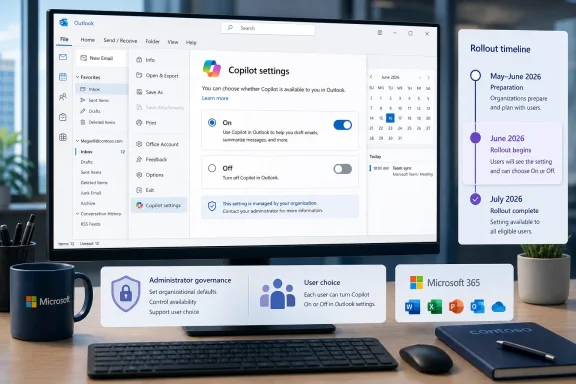
Microsoft 365 Message Center post MC1358831 does not force-enable Copilot in classic Outlook for Windows. It adds an in-app setting that lets eligible users turn Copilot on or off, removing the need to move someone to new Outlook merely to obtain that control.
Published by Microsoft on June 4, 2026, MC1358831 scheduled worldwide general availability to begin in early July and finish by late July 2026. Public Preview began in early June and was expected to complete by mid-June. This is a staged settings rollout, not a new Copilot entitlement or mandatory activation.
Once the change reaches a classic Outlook installation, Microsoft’s published path is:
That distinction answers the central concern raised by the rollout: “Copilot settings are arriving” does not mean “Microsoft is enabling Copilot for everyone.” The post concerns access to an on/off setting inside classic Outlook, while Microsoft says existing tenant and administrator controls remain unchanged.
The setting should therefore be understood within the organization’s existing Microsoft 365 boundaries. Administrators should continue using the controls already approved for their tenant rather than treating an individual Outlook preference as a replacement for centralized governance.
WindowsForum users have repeatedly shown why that separation matters. Reports about missing Copilot buttons, changing Outlook behavior, and newly arriving AI features often look similar from the user’s side: something appears, disappears, or moves. For support teams, however, a phased interface rollout, an account-access problem, and an administrator-imposed restriction are different cases and require different checks.
A separate WindowsForum report concerned Copilot Chat and other Copilot entry points disappearing in classic Outlook after an update to build 20026.20182 or later for some users. That report should not be merged with MC1358831.
The disappearance report describes expected controls going missing. MC1358831 describes Microsoft deliberately adding access to settings. The supplied Microsoft issue excerpt is dated July 8 and does not establish a June 29 service-side repair, a resolution date, or instructions to restart and update Outlook. Those details therefore should not be presented as confirmed Microsoft guidance here.
WindowsForum users have also reported unrelated classic Outlook changes, including a case in which the From field in Sent Items displayed the sender’s email address rather than the familiar display name after moving to Windows 11 24H2. That issue has nothing to do with Copilot, but it illustrates a useful diagnostic principle: a visible Outlook change should not automatically be attributed to the newest prominent rollout.
The same caution applies to WindowsForum’s coverage of Copilot Agent Mode through Microsoft’s Frontier early-access program. An experimental or early-access Outlook experience is not evidence that MC1358831 grants those capabilities, changes licensing, or enables them in a production tenant. Each announcement needs to be evaluated according to its own scope.
This limited table is more useful than attaching an unsupported catalog of Outlook differences to a Copilot settings announcement. MC1358831 does not substantiate detailed claims about VBA macros, COM add-ins, custom forms, offline behavior, file compatibility, or particular meeting features. Organizations considering a client migration should verify every required Outlook capability against Microsoft’s current documentation and their own deployed configuration.
The defensible conclusion is simpler: classic Outlook is receiving the published Copilot setting, so the absence of that setting is no longer, by itself, a reason to migrate.
The new setting gives eligible users an in-app on/off choice. Microsoft has not established in the supplied material that this one setting governs every Copilot surface, changes organization-wide data handling, revokes a license, or supersedes tenant decisions. It should not be described as a complete privacy control.
Communication should stay precise:
That does not prove classic and new Outlook are equivalent. It means only that MC1358831 closes this specific settings gap. Before choosing either client, administrators should inventory business-critical workflows and check Microsoft’s current feature documentation rather than relying on assumptions about add-ins, automation, offline use, forms, files, or AI features.
For July, the immediate work is modest: watch for File > Copilot settings > On/Off, test the setting with appropriate accounts, and update support material so users understand the difference between a visible setting and usable Copilot access.
WindowsForum will continue watching whether comparable controls arrive in classic Outlook later than in Microsoft’s newer clients. That timing remains an open watch item, not a question answered by MC1358831.
Published by Microsoft on June 4, 2026, MC1358831 scheduled worldwide general availability to begin in early July and finish by late July 2026. Public Preview began in early June and was expected to complete by mid-June. This is a staged settings rollout, not a new Copilot entitlement or mandatory activation.
 The New Setting Changes User Preference, Not Eligibility
Once the change reaches a classic Outlook installation, Microsoft’s published path is:- Open classic Outlook for Windows.
- Select File.
- Go to Copilot settings.
- Select On or Off.
That distinction answers the central concern raised by the rollout: “Copilot settings are arriving” does not mean “Microsoft is enabling Copilot for everyone.” The post concerns access to an on/off setting inside classic Outlook, while Microsoft says existing tenant and administrator controls remain unchanged.
The setting should therefore be understood within the organization’s existing Microsoft 365 boundaries. Administrators should continue using the controls already approved for their tenant rather than treating an individual Outlook preference as a replacement for centralized governance.
WindowsForum users have repeatedly shown why that separation matters. Reports about missing Copilot buttons, changing Outlook behavior, and newly arriving AI features often look similar from the user’s side: something appears, disappears, or moves. For support teams, however, a phased interface rollout, an account-access problem, and an administrator-imposed restriction are different cases and require different checks.
WindowsForum Reports Put the July Rollout in Context
WindowsForum’s report on the July 2026 rollout described Microsoft as bringing direct access to multiple Copilot settings into classic Outlook for Windows. The practical significance is that organizations still using the established desktop client can give users access to the published on/off setting without requiring a switch to new Outlook for that purpose alone.A separate WindowsForum report concerned Copilot Chat and other Copilot entry points disappearing in classic Outlook after an update to build 20026.20182 or later for some users. That report should not be merged with MC1358831.
The disappearance report describes expected controls going missing. MC1358831 describes Microsoft deliberately adding access to settings. The supplied Microsoft issue excerpt is dated July 8 and does not establish a June 29 service-side repair, a resolution date, or instructions to restart and update Outlook. Those details therefore should not be presented as confirmed Microsoft guidance here.
WindowsForum users have also reported unrelated classic Outlook changes, including a case in which the From field in Sent Items displayed the sender’s email address rather than the familiar display name after moving to Windows 11 24H2. That issue has nothing to do with Copilot, but it illustrates a useful diagnostic principle: a visible Outlook change should not automatically be attributed to the newest prominent rollout.
The same caution applies to WindowsForum’s coverage of Copilot Agent Mode through Microsoft’s Frontier early-access program. An experimental or early-access Outlook experience is not evidence that MC1358831 grants those capabilities, changes licensing, or enables them in a production tenant. Each announcement needs to be evaluated according to its own scope.
What MC1358831 Does—and Does Not—Establish
The available Microsoft information supports a deliberately narrow comparison:| Question or capability | Classic Outlook after MC1358831 | New Outlook | What the supplied evidence establishes |
|---|---|---|---|
| In-app Copilot on/off setting | Added through File > Copilot settings > On/Off | A migration is no longer necessary solely to obtain this type of control | MC1358831 establishes the classic Outlook path and July rollout |
| New Copilot entitlement | No | No change established | The post is a settings rollout, not a license grant |
| Existing tenant and administrator controls | Remain in effect | Remain in effect | Microsoft says existing controls are unchanged |
| Access for an otherwise ineligible user | Not granted by the setting | No new access established | Seeing a setting is not proof of eligibility |
| Broader Outlook feature parity | Not established | Not established | MC1358831 is not a general classic-versus-new Outlook comparison |
| Specific add-in, automation, offline, form, or meeting-feature differences | Not established | Not established | Those details are outside the verified scope of the post |
The defensible conclusion is simpler: classic Outlook is receiving the published Copilot setting, so the absence of that setting is no longer, by itself, a reason to migrate.
Admins Should Separate Visibility, Access, and Permission
For administrators and help desks, the July rollout creates three practical questions:- Is the setting visible?
MC1358831 is scheduled as a phased worldwide rollout through late July. Its absence early in the rollout does not by itself prove that an administrator blocked it. - Can the signed-in account use Copilot?
The new setting does not create an entitlement. Account eligibility must be checked separately. - Does the organization permit the experience?
Microsoft says existing tenant and administrator controls remain unchanged. MC1358831 does not override them.
- Confirm that the user is running classic Outlook for Windows.
- Check whether the rollout should have reached the organization.
- Look only for Microsoft’s published path: File > Copilot settings > On/Off.
- Verify the user’s Copilot eligibility separately from the setting’s visibility.
- Confirm that the tenant’s existing administrative decisions permit the expected experience.
- Record whether the problem is a missing setting, missing Copilot entry point, or inability to use a visible feature.
- Escalate only after ruling out rollout timing, account eligibility, and existing organizational restrictions.
The Setting Is Not a Complete Privacy or Governance Switch
The arrival of an icon or settings page can create anxiety because users may read it as consent for AI processing or as proof that a new service has been activated. MC1358831 supports neither interpretation.The new setting gives eligible users an in-app on/off choice. Microsoft has not established in the supplied material that this one setting governs every Copilot surface, changes organization-wide data handling, revokes a license, or supersedes tenant decisions. It should not be described as a complete privacy control.
Communication should stay precise:
- Do not tell employees that Copilot has been granted to everyone.
- Do not promise that one Outlook setting disables every Microsoft 365 AI experience.
- Do tell users that classic Outlook is receiving a direct Copilot on/off setting.
- Do explain that account eligibility and existing organizational controls still apply.
The Migration Decision Returns to Broader Outlook Requirements
Organizations evaluating new Outlook should base that decision on verified application requirements, compatibility testing, support plans, and the features their users actually need. A Copilot on/off setting no longer needs to carry the migration argument.That does not prove classic and new Outlook are equivalent. It means only that MC1358831 closes this specific settings gap. Before choosing either client, administrators should inventory business-critical workflows and check Microsoft’s current feature documentation rather than relying on assumptions about add-ins, automation, offline use, forms, files, or AI features.
For July, the immediate work is modest: watch for File > Copilot settings > On/Off, test the setting with appropriate accounts, and update support material so users understand the difference between a visible setting and usable Copilot access.
WindowsForum will continue watching whether comparable controls arrive in classic Outlook later than in Microsoft’s newer clients. That timing remains an open watch item, not a question answered by MC1358831.
Frequently Asked Questions
Does MC1358831 enable Copilot for every classic Outlook user?
No. It adds access to an on/off setting. It does not grant a license, establish eligibility, or override existing administrator controls.Where is the new setting?
Microsoft’s published path is File > Copilot settings > On/Off in classic Outlook for Windows.Why can’t I see the setting yet?
The worldwide rollout was scheduled to begin in early July and finish by late July 2026. During a phased rollout, different organizations or installations may receive the change at different times.Does seeing the setting prove that Copilot will work?
No. Setting visibility and Copilot access are separate questions. The signed-in account must still meet the applicable eligibility requirements, and the organization’s existing controls still apply.Is this the same issue as disappearing Copilot buttons?
No. WindowsForum users reported a separate problem involving Copilot entry points disappearing in classic Outlook after an update. MC1358831 concerns the planned addition of Copilot settings. The supplied Microsoft excerpt does not substantiate a June 29 repair date or restart-and-update instructions for that separate incident.Does turning the setting off disable every Copilot experience across Microsoft 365?
MC1358831 does not establish that scope. It verifies an in-app on/off setting in classic Outlook, while existing tenant and administrator controls remain unchanged.Must an organization migrate to new Outlook to give users this setting?
No. The purpose of the July rollout is to make the published Copilot setting available directly in classic Outlook for Windows. Migration decisions should be based on the organization’s broader, independently verified Outlook requirements.References
- Primary source: learn.microsoft.com
How to enable copilot in classic Outlook - Microsoft Q&A
How to enable the Copilot app in the classic Outlook. Currently, it is only enabled in the web version of Outlooklearn.microsoft.com - Independent coverage: support.microsoft.com
Copilot buttons are missing in classic Outlook for Windows | Microsoft Support
This article describes the issue regarding Copilit buttons missing in classic Outlook for Windowssupport.microsoft.com - Independent coverage: microsoft.com
Microsoft 365 Roadmap | Microsoft 365
The Microsoft 365 Roadmap lists updates that are currently planned for applicable subscribers. Check here for more information on the status of new features and updates.www.microsoft.com
- Independent coverage: techcommunity.microsoft.com
- Primary source: WindowsForum
Outlook Classic Copilot Settings Roll Out in July 2026 | Windows Forum
Microsoft is rolling out direct access to multiple Copilot settings inside classic Outlook for Windows in July 2026, bringing the controls to the desktop...windowsforum.com