

IT administrators should keep Windows Search in Classic mode for standardized, managed fleets and reserve Enhanced mode for Copilot+ PCs or knowledge-worker devices where files are frequently scattered outside approved locations and the search benefit justifies extra storage, power, and support cost. That is the practical answer hiding behind what looks like a simple Windows Settings toggle. Enhanced broadens discovery; Classic preserves predictability. In a fleet, predictability usually wins unless the business case for broader local search is explicit.
The procedure is simple on an individual PC: open Settings > Privacy & security > Searching Windows, look under Find my files, and choose either Classic or Enhanced. Classic limits indexed search to the traditional, curated locations and lets users or admins customize search locations. Enhanced expands indexing across the PC, which can improve file discovery but also increases the indexer’s footprint and activity.
For managed devices, the better framing is not “Which mode is smarter?” but “Which mode matches our file-placement model?” Microsoft’s own Search Policy CSP shows that Windows Search is not merely a consumer preference surface: administrators can govern indexer behavior through policies such as AllowFindMyFiles, AllowWindowsIndexer, DisableBackoff, DoNotUseWebResults, and related Search controls documented by Microsoft. The existence of AllowFindMyFiles, which can disable the feature entirely, is the clue: this is a fleet policy decision wearing a user-interface costume.
Classic mode is the safer baseline for organizations that already have disciplined storage practices. If users are expected to work from Documents, Desktop, OneDrive-synced known folders, departmental shares, or application-defined locations, the narrower index is not a weakness. It is a reflection of the environment’s design.
That matters because search is never only about convenience. It is also about supportability, performance, and user expectations. A help desk can troubleshoot a curated file-placement workflow because the answer to “Where should this file be?” is stable. Classic reinforces that model by keeping search aligned with known locations rather than turning every local drive into a broad discovery surface.
Microsoft’s support guidance distinguishes Classic and Enhanced in plain terms: Classic is the narrower mode, while Enhanced searches more broadly by indexing the whole PC. The engineering tradeoff follows directly from that difference. Broader coverage means more indexer work, more local metadata to maintain, and more opportunity for users to expect instant results from places IT never intended them to use as primary storage.
For many managed fleets, that tradeoff is not worth it. The value of search is highest when it helps users retrieve sanctioned work quickly. If Enhanced helps users find unsanctioned local sprawl, IT may have solved one user irritation while quietly weakening the storage discipline that makes backup, retention, eDiscovery, and endpoint replacement manageable.
The key phrase is local knowledge surface. Enhanced is most compelling when the device is genuinely a knowledge workstation: engineers with project folders outside the profile, creators with local media libraries, consultants who inherit messy client archives, or executives who expect natural file discovery across a device rather than inside a prescribed folder tree. In those scenarios, Classic can feel artificially constrained.
But the same broader reach makes Enhanced a poorer default for task workers, shared devices, kiosks, frontline endpoints, labs, and tightly managed corporate laptops. Those devices do not need to discover everything; they need to behave consistently. If the user’s job does not benefit from broad local search, then Enhanced mostly adds moving parts.
This is where Copilot+ enthusiasm needs a cold administrative filter. On-device semantic search may make file retrieval feel more conversational, and WindowsForum’s recent coverage of semantic indexing on Copilot+ PCs reflects why enthusiasts are paying attention. But a smarter search experience still rests on an indexer that consumes local resources. Intelligence at the top of the stack does not eliminate operational cost at the bottom.
If users routinely keep work in secondary drives, project roots, local repositories, exported case folders, or application-specific directories outside the user profile, Enhanced deserves a pilot. It may reduce help-desk friction and user downtime by making local discovery more forgiving. But the pilot should be framed as a workstyle exception, not as a new universal standard.
This is especially important in environments that have moved aggressively to cloud storage. If OneDrive known-folder move, SharePoint libraries, Teams files, or line-of-business repositories are the intended source of truth, then broad local indexing can become a bandage over a governance problem. Search should not become the mechanism that normalizes unmanaged local hoarding.
Classic mode supports a cleaner contract: IT tells users where work belongs, ensures those locations are indexed, and supports that path. Enhanced changes the contract: the PC becomes a broader search domain, and support inherits the messy reality of whatever users stored locally.
AllowFindMyFiles is the most revealing control because it can turn off the Find My Files capability completely and disable the associated user choice. In other words, Microsoft gives administrators a way to say: this machine does not get that broader local-search option. That is not a recommendation to disable it everywhere; it is evidence that the setting belongs in policy design.
AllowWindowsIndexer is the broader lever around the Windows indexer itself. DoNotUseWebResults addresses whether Search performs web queries and displays web results, a separate but often adjacent concern in enterprise environments. DisableBackoff controls whether indexing throttles back when system activity is high, which can be tempting during migrations or rebuilds but risky if used casually.
The policy lesson is simple: do not manage Enhanced as a vibes-based user education issue. If the organization has a position, enforce it. If the organization does not yet have a position, pilot it. What does not scale is allowing the setting to drift across a fleet and then asking support to explain why two nominally identical devices search differently.
The storage impact is also not just about raw disk space. The index must be maintained as files are added, moved, changed, or deleted. The broader the search domain, the more churn the indexer has to observe and reconcile. That activity can collide with real-world moments users care about: first sign-in, device provisioning, post-migration cleanup, travel days, low-battery work, and the first week after a hardware refresh.
DisableBackoff deserves particular caution here. The setting exists because Windows normally uses backoff behavior to reduce indexing pressure when system activity is high. Disabling that backoff may make indexing finish sooner, but it can also make the PC feel worse precisely when the user is trying to work. That is a tactical lever, not a blanket optimization.
For Copilot+ PCs, the temptation will be to assume that newer silicon makes these tradeoffs disappear. It does not. Better hardware can absorb more work, and NPUs may enable richer local experiences, but indexing still touches storage, power, and support expectations. A premium device can make Enhanced more tolerable; it does not make Enhanced free.
Classic gives support a narrower diagnostic path. Check the approved locations, confirm indexing status, validate the user’s storage workflow, and adjust indexed locations if needed. Enhanced expands the possible search universe, which can reduce missed files but also makes it harder to explain why a given item appears, does not appear, or appears later than expected.
There is also a user-training risk. If Enhanced makes it easier to find files stored anywhere, users may become less disciplined about where files belong. That can quietly undermine other IT projects, especially endpoint replacement, backup policy, data loss prevention, and records management. Search convenience is real, but so is the behavior it encourages.
This is why the decision should sit with endpoint engineering, security, and support together. Search is not just a Windows UX preference. It intersects with data placement, compliance posture, device performance, and the psychological contract between IT and users.
That is where segmentation helps. A Copilot+ pilot group can run Enhanced if its members have a workstyle that benefits from broader discovery. A standardized operations group can remain on Classic because its documents are expected to live in controlled locations. A developer group may need a separate policy conversation because repositories, build outputs, and local project trees create a different search profile.
WindowsForum’s related coverage of Enhanced Search with semantic indexing for Copilot+ PCs and on-device semantic indexing with NPUs captures the excitement around the feature direction. The fleet decision, however, should be more boring than the demo. Boring is good in endpoint management. Boring means fewer surprises.
Admins should also separate semantic search from the Classic-versus-Enhanced decision. Enhanced defines how broadly Windows indexes the PC. Semantic experiences may change how users query and retrieve information. Those are related, but not identical, and treating them as one magic feature will lead to sloppy policy.
The pilot should measure user outcomes, not just whether the toggle works. Are users finding files they previously could not find? Are support tickets decreasing? Are devices busier during working hours? Are users storing more work outside sanctioned locations because search now makes that painless? The answers matter more than the elegance of the setting.
Policy should also define reversibility. If Enhanced causes support friction or undesirable storage behavior, admins need a path back to Classic or to a disabled Find My Files configuration. That is another reason to prefer managed policy over informal user guidance. A fleet setting that cannot be rolled back cleanly is not a pilot; it is drift with a meeting invite.
The cleanest framework is not anti-Enhanced. It is anti-defaulting-to-Enhanced-without-a-file-strategy. Enhanced is valuable when broader local discovery is a business requirement. Classic is valuable when controlled storage is the business requirement. The mistake is pretending those are the same requirement.
In a managed fleet, admins should instead define a standard. Start by deciding whether users are allowed to configure Find My Files at all. Then decide whether the Windows indexer should run under the organization’s normal assumptions, whether web results should be allowed in Search, and whether backoff behavior should remain in place. Microsoft’s Search Policy CSP is the administrative map for those choices.
The policy names matter because they stop the discussion from becoming abstract. AllowFindMyFiles governs whether the broader Find My Files capability is available. AllowWindowsIndexer governs indexer availability and behavior at a higher level. DoNotUseWebResults separates local file search from web-connected Search behavior. DisableBackoff changes the indexer’s willingness to throttle itself under load.
Admins do not need to over-engineer the first version. For many organizations, the starting point is simply Classic for standard users, Enhanced for a defined pilot group, web results controlled according to existing search and privacy policy, and backoff left alone unless there is a specific operational reason to change it. That is enough to replace drift with intent.
For executives and mobile knowledge workers, Enhanced may be a reasonable default if the device is powerful, storage is sufficient, and local file sprawl is a known pain point. For regulated teams, shared devices, call centers, and tightly scripted workflows, Classic remains the more defensible standard. The device class matters, but the work pattern matters more.
There is also a communications issue. If IT enables Enhanced for some users and not others, the reason should be documented in plain language. “This group works across local project folders” is better than “Copilot+ pilot.” The former describes a workflow; the latter describes a purchasing category.
The more Microsoft promotes smarter Windows Search, the more users will ask why their experience differs. A good policy gives the help desk an answer that sounds like design, not denial.
That standard should treat Classic as the controlled baseline and Enhanced as a role-based exception. It should also clarify whether users may change Find My Files themselves or whether policy will lock the choice. The presence of AllowFindMyFiles makes that governance question unavoidable.
The standard should include support guidance. If a user says Search cannot find a file, support should first ask where the file is stored and whether that location is supposed to be indexed. If the answer is “somewhere else,” that is either a reason to add a supported location or a reason to coach the user back into the approved storage model.
This is where Windows Search becomes a useful forcing function. It exposes whether the organization actually has a file-placement policy. If nobody can say where work should live, Enhanced will feel like a rescue. If the answer is clear, Classic will usually feel like discipline.
The procedure is simple on an individual PC: open Settings > Privacy & security > Searching Windows, look under Find my files, and choose either Classic or Enhanced. Classic limits indexed search to the traditional, curated locations and lets users or admins customize search locations. Enhanced expands indexing across the PC, which can improve file discovery but also increases the indexer’s footprint and activity.
For managed devices, the better framing is not “Which mode is smarter?” but “Which mode matches our file-placement model?” Microsoft’s own Search Policy CSP shows that Windows Search is not merely a consumer preference surface: administrators can govern indexer behavior through policies such as AllowFindMyFiles, AllowWindowsIndexer, DisableBackoff, DoNotUseWebResults, and related Search controls documented by Microsoft. The existence of AllowFindMyFiles, which can disable the feature entirely, is the clue: this is a fleet policy decision wearing a user-interface costume.
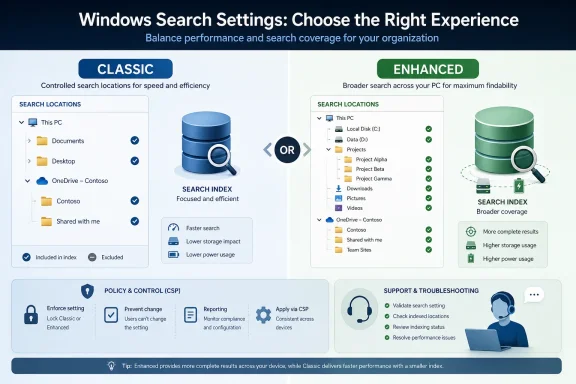 Classic Is the Default Answer When IT Controls Where Work Lives
Classic mode is the safer baseline for organizations that already have disciplined storage practices. If users are expected to work from Documents, Desktop, OneDrive-synced known folders, departmental shares, or application-defined locations, the narrower index is not a weakness. It is a reflection of the environment’s design.That matters because search is never only about convenience. It is also about supportability, performance, and user expectations. A help desk can troubleshoot a curated file-placement workflow because the answer to “Where should this file be?” is stable. Classic reinforces that model by keeping search aligned with known locations rather than turning every local drive into a broad discovery surface.
Microsoft’s support guidance distinguishes Classic and Enhanced in plain terms: Classic is the narrower mode, while Enhanced searches more broadly by indexing the whole PC. The engineering tradeoff follows directly from that difference. Broader coverage means more indexer work, more local metadata to maintain, and more opportunity for users to expect instant results from places IT never intended them to use as primary storage.
For many managed fleets, that tradeoff is not worth it. The value of search is highest when it helps users retrieve sanctioned work quickly. If Enhanced helps users find unsanctioned local sprawl, IT may have solved one user irritation while quietly weakening the storage discipline that makes backup, retention, eDiscovery, and endpoint replacement manageable.
Enhanced Is a Workstyle Bet, Not a Free Upgrade
Enhanced mode has an obvious appeal: users lose files, Windows Search misses things, and “index the whole PC” sounds like the direct fix. On Copilot+ PCs in particular, where Microsoft is pushing more intelligent local experiences and WindowsForum readers are already following the semantic search discussion, Enhanced fits the broader narrative of the PC becoming a more capable local knowledge surface. That does not make it universally appropriate.The key phrase is local knowledge surface. Enhanced is most compelling when the device is genuinely a knowledge workstation: engineers with project folders outside the profile, creators with local media libraries, consultants who inherit messy client archives, or executives who expect natural file discovery across a device rather than inside a prescribed folder tree. In those scenarios, Classic can feel artificially constrained.
But the same broader reach makes Enhanced a poorer default for task workers, shared devices, kiosks, frontline endpoints, labs, and tightly managed corporate laptops. Those devices do not need to discover everything; they need to behave consistently. If the user’s job does not benefit from broad local search, then Enhanced mostly adds moving parts.
This is where Copilot+ enthusiasm needs a cold administrative filter. On-device semantic search may make file retrieval feel more conversational, and WindowsForum’s recent coverage of semantic indexing on Copilot+ PCs reflects why enthusiasts are paying attention. But a smarter search experience still rests on an indexer that consumes local resources. Intelligence at the top of the stack does not eliminate operational cost at the bottom.
The First Policy Question Is Where Files Are Supposed to Be
Before choosing Classic or Enhanced, admins should map the organization’s real file-placement behavior. Not the policy in the handbook, not the architecture diagram from the last migration, but the places where files actually accumulate. If users mostly live in approved locations, Classic plus curated indexing is the clean answer.If users routinely keep work in secondary drives, project roots, local repositories, exported case folders, or application-specific directories outside the user profile, Enhanced deserves a pilot. It may reduce help-desk friction and user downtime by making local discovery more forgiving. But the pilot should be framed as a workstyle exception, not as a new universal standard.
This is especially important in environments that have moved aggressively to cloud storage. If OneDrive known-folder move, SharePoint libraries, Teams files, or line-of-business repositories are the intended source of truth, then broad local indexing can become a bandage over a governance problem. Search should not become the mechanism that normalizes unmanaged local hoarding.
Classic mode supports a cleaner contract: IT tells users where work belongs, ensures those locations are indexed, and supports that path. Enhanced changes the contract: the PC becomes a broader search domain, and support inherits the messy reality of whatever users stored locally.
Microsoft’s CSPs Turn a Toggle Into a Governance Surface
The important administrative fact is that Microsoft exposes Search behavior through policy. The Search Policy CSP includes controls such as AllowFindMyFiles, AllowWindowsIndexer, DisableBackoff, DoNotUseWebResults, and related settings. That means admins can treat Windows Search as part of endpoint configuration rather than leaving it entirely to user preference.AllowFindMyFiles is the most revealing control because it can turn off the Find My Files capability completely and disable the associated user choice. In other words, Microsoft gives administrators a way to say: this machine does not get that broader local-search option. That is not a recommendation to disable it everywhere; it is evidence that the setting belongs in policy design.
AllowWindowsIndexer is the broader lever around the Windows indexer itself. DoNotUseWebResults addresses whether Search performs web queries and displays web results, a separate but often adjacent concern in enterprise environments. DisableBackoff controls whether indexing throttles back when system activity is high, which can be tempting during migrations or rebuilds but risky if used casually.
The policy lesson is simple: do not manage Enhanced as a vibes-based user education issue. If the organization has a position, enforce it. If the organization does not yet have a position, pilot it. What does not scale is allowing the setting to drift across a fleet and then asking support to explain why two nominally identical devices search differently.
Storage and Power Are Not Edge Cases on Modern Fleets
Enhanced’s cost is not hypothetical. Because it indexes more of the PC, it can consume more system resources. On a single high-end desktop, that may be barely noticeable after the initial indexing pass. Across a laptop fleet, especially one with mixed hardware, battery sensitivity, and impatient users, the same behavior becomes a support variable.The storage impact is also not just about raw disk space. The index must be maintained as files are added, moved, changed, or deleted. The broader the search domain, the more churn the indexer has to observe and reconcile. That activity can collide with real-world moments users care about: first sign-in, device provisioning, post-migration cleanup, travel days, low-battery work, and the first week after a hardware refresh.
DisableBackoff deserves particular caution here. The setting exists because Windows normally uses backoff behavior to reduce indexing pressure when system activity is high. Disabling that backoff may make indexing finish sooner, but it can also make the PC feel worse precisely when the user is trying to work. That is a tactical lever, not a blanket optimization.
For Copilot+ PCs, the temptation will be to assume that newer silicon makes these tradeoffs disappear. It does not. Better hardware can absorb more work, and NPUs may enable richer local experiences, but indexing still touches storage, power, and support expectations. A premium device can make Enhanced more tolerable; it does not make Enhanced free.
The Support Desk Will Feel the Difference Before the CIO Does
Search settings rarely fail spectacularly. They fail as low-grade irritation: “Windows can’t find my file,” “Search is slow,” “My laptop is busy after login,” “Why does this PC behave differently from my old one?” Those tickets do not always name the indexer, but the indexer often sits somewhere in the story.Classic gives support a narrower diagnostic path. Check the approved locations, confirm indexing status, validate the user’s storage workflow, and adjust indexed locations if needed. Enhanced expands the possible search universe, which can reduce missed files but also makes it harder to explain why a given item appears, does not appear, or appears later than expected.
There is also a user-training risk. If Enhanced makes it easier to find files stored anywhere, users may become less disciplined about where files belong. That can quietly undermine other IT projects, especially endpoint replacement, backup policy, data loss prevention, and records management. Search convenience is real, but so is the behavior it encourages.
This is why the decision should sit with endpoint engineering, security, and support together. Search is not just a Windows UX preference. It intersects with data placement, compliance posture, device performance, and the psychological contract between IT and users.
Copilot+ PCs Make the Decision More Visible, Not Less Complicated
The arrival of more AI-forward Windows experiences changes the politics of this decision. When users see Microsoft promoting smarter local search, they will reasonably ask why their managed PC cannot search more broadly. The answer cannot be “because IT said so.” It has to be “because this device class follows this data model.”That is where segmentation helps. A Copilot+ pilot group can run Enhanced if its members have a workstyle that benefits from broader discovery. A standardized operations group can remain on Classic because its documents are expected to live in controlled locations. A developer group may need a separate policy conversation because repositories, build outputs, and local project trees create a different search profile.
WindowsForum’s related coverage of Enhanced Search with semantic indexing for Copilot+ PCs and on-device semantic indexing with NPUs captures the excitement around the feature direction. The fleet decision, however, should be more boring than the demo. Boring is good in endpoint management. Boring means fewer surprises.
Admins should also separate semantic search from the Classic-versus-Enhanced decision. Enhanced defines how broadly Windows indexes the PC. Semantic experiences may change how users query and retrieve information. Those are related, but not identical, and treating them as one magic feature will lead to sloppy policy.
The Better Deployment Pattern Is Segmented, Measured, and Reversible
A sensible deployment framework starts with Classic as the default for managed fleets. Then IT identifies exception groups where Enhanced has a plausible productivity payoff. Those groups should be small enough to support closely and diverse enough to reveal performance and behavior issues before any wider rollout.The pilot should measure user outcomes, not just whether the toggle works. Are users finding files they previously could not find? Are support tickets decreasing? Are devices busier during working hours? Are users storing more work outside sanctioned locations because search now makes that painless? The answers matter more than the elegance of the setting.
Policy should also define reversibility. If Enhanced causes support friction or undesirable storage behavior, admins need a path back to Classic or to a disabled Find My Files configuration. That is another reason to prefer managed policy over informal user guidance. A fleet setting that cannot be rolled back cleanly is not a pilot; it is drift with a meeting invite.
The cleanest framework is not anti-Enhanced. It is anti-defaulting-to-Enhanced-without-a-file-strategy. Enhanced is valuable when broader local discovery is a business requirement. Classic is valuable when controlled storage is the business requirement. The mistake is pretending those are the same requirement.
The Settings Path Is Simple; the Fleet Standard Is the Work
On a standalone Windows PC, the user-facing path is straightforward: go to Settings, open Privacy & security, select Searching Windows, and choose Classic or Enhanced under Find my files. If Classic is selected, use the search-location customization controls to keep approved work folders indexed. If Enhanced is selected, expect Windows to broaden indexing and allow time for the index to build.In a managed fleet, admins should instead define a standard. Start by deciding whether users are allowed to configure Find My Files at all. Then decide whether the Windows indexer should run under the organization’s normal assumptions, whether web results should be allowed in Search, and whether backoff behavior should remain in place. Microsoft’s Search Policy CSP is the administrative map for those choices.
The policy names matter because they stop the discussion from becoming abstract. AllowFindMyFiles governs whether the broader Find My Files capability is available. AllowWindowsIndexer governs indexer availability and behavior at a higher level. DoNotUseWebResults separates local file search from web-connected Search behavior. DisableBackoff changes the indexer’s willingness to throttle itself under load.
Admins do not need to over-engineer the first version. For many organizations, the starting point is simply Classic for standard users, Enhanced for a defined pilot group, web results controlled according to existing search and privacy policy, and backoff left alone unless there is a specific operational reason to change it. That is enough to replace drift with intent.
The Practical Rule for Copilot+ Rollouts
Copilot+ PCs should not automatically receive Enhanced mode just because they are new. They should receive it when the user role benefits from broader local file discovery and the organization accepts the resource and support tradeoffs. That distinction will become more important as Microsoft continues tying local AI features to the Windows search experience.For executives and mobile knowledge workers, Enhanced may be a reasonable default if the device is powerful, storage is sufficient, and local file sprawl is a known pain point. For regulated teams, shared devices, call centers, and tightly scripted workflows, Classic remains the more defensible standard. The device class matters, but the work pattern matters more.
There is also a communications issue. If IT enables Enhanced for some users and not others, the reason should be documented in plain language. “This group works across local project folders” is better than “Copilot+ pilot.” The former describes a workflow; the latter describes a purchasing category.
The more Microsoft promotes smarter Windows Search, the more users will ask why their experience differs. A good policy gives the help desk an answer that sounds like design, not denial.
A Search Policy Worth Writing Down
The concrete recommendation is to write a short Windows Search standard before broad Copilot+ deployment. It does not need to be a 20-page document. It needs to define the default mode, the exception path, the supported indexed locations, and the policies that enforce or constrain user choice.That standard should treat Classic as the controlled baseline and Enhanced as a role-based exception. It should also clarify whether users may change Find My Files themselves or whether policy will lock the choice. The presence of AllowFindMyFiles makes that governance question unavoidable.
The standard should include support guidance. If a user says Search cannot find a file, support should first ask where the file is stored and whether that location is supposed to be indexed. If the answer is “somewhere else,” that is either a reason to add a supported location or a reason to coach the user back into the approved storage model.
This is where Windows Search becomes a useful forcing function. It exposes whether the organization actually has a file-placement policy. If nobody can say where work should live, Enhanced will feel like a rescue. If the answer is clear, Classic will usually feel like discipline.
The Admin’s Real-World Decision Matrix
The choice is not ideological. It is operational. Classic and Enhanced are both valid; the wrong answer is choosing either one without matching it to the fleet’s storage model, hardware profile, and support capacity.- Use Classic when users are expected to store work in standardized locations such as Documents, Desktop, known folders, or approved sync locations.
- Use Enhanced when a defined role genuinely needs broader local discovery across the PC and the productivity gain outweighs higher resource use.
- Keep indexer backoff behavior unless there is a specific, temporary operational reason to force indexing at full speed.
- Use policy controls such as AllowFindMyFiles when the organization needs to prevent user-driven drift between Classic and Enhanced behavior.
- Treat Copilot+ PCs as candidates for Enhanced pilots, not as automatic proof that every endpoint should index more broadly.
- Separate local file-search policy from web-result policy so privacy, compliance, and user-experience decisions do not get bundled into one vague “Search” setting.