

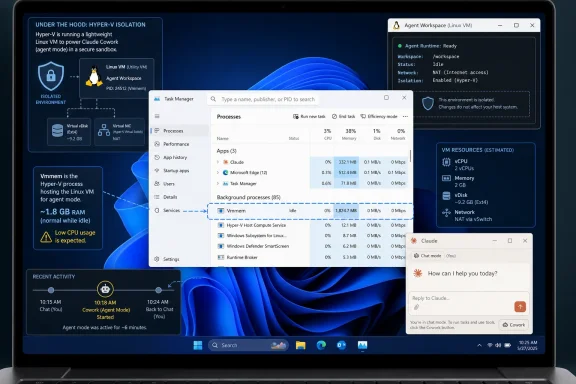
Claude Desktop on Windows is reportedly keeping a Hyper-V-backed workspace alive after users touch Claude Cowork or agent mode, leaving a roughly 1.8GB Vmmem process in Task Manager even when they later reopen the app only for ordinary chat. The complaint, surfaced by Neowin and amplified through GitHub and Hacker News, is not just that Claude is using memory. It is that the app appears to have blurred the line between a heavyweight local agent runtime and a lightweight chat client.
That distinction matters because Windows users have been trained for years to understand Vmmem as the shadow cast by virtualization: WSL, Docker Desktop, Hyper-V guests, and now AI agents that want a sandbox. When that process appears unexpectedly, it looks less like an implementation detail and more like a product failing to respect the machine it is running on. The episode is a small bug with a large message: desktop AI agents are beginning to inherit all the messiness of local infrastructure software, but they are still being packaged and marketed like consumer apps.
The headline version is simple enough. Users say Claude Desktop on Windows can spin up a virtualized environment tied to Claude Cowork or agent mode, and that environment can remain part of the app’s startup behavior afterward. In Task Manager, the visible symptom is Vmmem consuming around 1.8GB of RAM while showing little or no CPU activity.
That number will not frighten anyone running a workstation with 64GB or 128GB of memory. It will absolutely irritate someone on a 16GB laptop, and it can become hostile on an 8GB machine that is already juggling Edge, Teams, Visual Studio Code, OneDrive, security software, and perhaps WSL. The annoyance is not theoretical; the complaint is that the user did not ask for agent infrastructure during a later chat-only session.
Anthropic’s design rationale is not hard to infer. Claude Cowork and Claude Code-style local sessions need somewhere safer than the host OS to run shell commands, write code, stage files, and execute potentially messy tool calls. Anthropic’s own architecture materials describe Cowork as using two execution environments: a native agent loop on the device and code execution inside a dedicated Linux VM, with Hyper-V providing isolation on Windows.
That is a defensible architecture. It is also exactly the kind of architecture that demands obvious lifecycle controls. A sandbox that wakes only when needed is a security feature; a sandbox that silently becomes part of every launch starts to feel like a tax.
That is why the Claude complaint has traveled farther than a normal bug report. Users can see the cost in a familiar place, and the cost is large enough to be emotionally legible. A 1.8GB process is not a rounding error on many Windows systems; it is the difference between a quiet laptop and a fan ramp, between a browser that stays smooth and one that starts paging.
The deeper failure is that the UI apparently does not give users a satisfying answer. If a user opens Claude for chat, the mental model is “web app in a desktop shell.” If that same launch starts a VM because the user once tried Cowork, the product has switched models without making the switch explicit. The app is no longer merely a chat client; it is a local orchestration layer for agentic computing.
Windows power users can hunt down processes, inspect services, clear app data, and kill virtual machines. But that is not the standard Anthropic is selling to knowledge workers. If a feature requires Hyper-V, downloads VM images, and can alter startup memory behavior, the app needs a visible on/off switch, a reset button, and a plain-English explanation of what remains installed.
A Linux VM is one of the more understandable answers. It gives the vendor a predictable environment, reduces the blast radius of shell commands, and makes Windows, macOS, and perhaps other platforms more consistent from the agent’s point of view. For developers, that kind of repeatability is not a luxury; it is the difference between “works on my machine” chaos and a product that can be supported.
But the VM choice transfers complexity to the user’s PC. Hyper-V has prerequisites. Windows editions differ. Host Compute Service, networking, NAT, virtual disk files, app package permissions, and security settings can all become part of the failure surface. The user thought they installed an AI assistant; they actually installed a small distributed systems problem.
That mismatch is visible across the surrounding reports. Some users have described startup failures, VM service errors, stale session files, large VM bundles, networking problems, and Windows edition quirks. Not all of those reports are necessarily the same bug, and some may be configuration-specific. But together they point to the same conclusion: the agent layer has become infrastructure, and infrastructure needs administration-grade transparency.
Agentic desktop software ruins that illusion the moment it touches the local machine. It needs permissions, file access, credentials, sandboxes, network routes, update channels, logs, recovery states, and cleanup behavior. The more capable the agent becomes, the less it can remain a simple chat window.
This is where Claude’s Windows issue becomes more than a Claude issue. Microsoft Copilot, OpenAI’s desktop ambitions, Google’s agentic tooling, and Anthropic’s Cowork push are all converging on the same territory: the assistant that does not merely answer but acts. Acting on a PC is a privileged operation. It is not a prettier search box.
If the assistant is going to act, users need to know when the machinery is armed. They need to know when a VM is running, when files are being staged, when a local workspace exists, and how to tear it down. “Trust us, it is part of the experience” is not enough when the experience occupies gigabytes of memory.
Windows also has a uniquely tangled relationship with virtualization. Hyper-V, Windows Hypervisor Platform, Virtual Machine Platform, WSL2, Docker Desktop, Android subsystems, emulator stacks, security features, and enterprise endpoint controls can all coexist on the same machine. They mostly work, until a new app assumes that the virtualization layer is a clean, predictable substrate.
For IT pros, this is familiar territory. Anything that depends on Hyper-V is not merely an app deployment; it is a platform dependency. It can collide with policy, device guardrails, BIOS settings, storage restrictions, network inspection, VPN clients, EDR tools, and user privilege models. A desktop AI agent that requires this layer is closer to Docker Desktop than to Slack.
That is not inherently bad. Many serious tools require serious local machinery. The problem is packaging that machinery as though it were invisible. On Windows, invisible infrastructure has a way of becoming visible at the worst possible moment.
What makes the Claude case galling is the alleged lack of a clear way to stop the behavior once triggered. Users are not merely complaining that Cowork uses memory when Cowork is active. They are complaining that a past use of Cowork or agent mode appears to change the behavior of future launches, including sessions intended only for chat.
That distinction turns resource use into consent. If an app tells me that agent mode requires a VM and starts it when I enter agent mode, that is a bargain I can accept or reject. If the same VM returns during ordinary chat with no obvious switch, the bargain has changed after the fact.
The fix, conceptually, is boring. There should be a visible “agent workspace” status indicator, a stop button, a setting that prevents agent services from starting with the app, a way to delete local workspaces and VM bundles, and a fallback mode that preserves chat without local agent infrastructure. Boring fixes are often the most important ones, because they encode respect for the user’s machine.
Anthropic has been courting business users aggressively, and Claude’s appeal inside organizations is obvious. Knowledge workers want agents that can read files, summarize documents, generate code, update spreadsheets, and coordinate across systems. But every one of those capabilities raises the burden on admins to understand where work happens and what artifacts are left behind.
A Hyper-V-based workspace is not necessarily a security weakness. In many respects, it is a sign that Anthropic is trying to avoid running untrusted commands directly on the host. But isolation is not the same thing as manageability. Admins still need knobs: disable Cowork, allow chat only, set storage locations, block local execution, define network egress, inspect logs, and clean up state.
The consumer version of the complaint is “Why is Claude using my RAM?” The enterprise version is sharper: “What exactly did this app deploy, where is it running, and how do I prove it is off?” If AI vendors want desktop agents to become normal enterprise software, they will need to answer those questions before the help desk does.
Agents are pulling the center of gravity back toward the endpoint. The model may still run in the cloud, but the work increasingly happens near the user’s files, browser sessions, terminals, IDEs, and corporate apps. The endpoint becomes the place where cloud intelligence meets local authority.
That shift is powerful. It is also why bugs like this matter. A local agent runtime is not just another feature; it is a new resident on the PC. It consumes memory, creates files, depends on OS services, crosses trust boundaries, and may persist between sessions.
Windows users have lived through this pattern before. Sync clients, updaters, launchers, telemetry agents, game anti-cheat systems, VPN clients, and endpoint security suites all began as helpers and became permanent background citizens. AI agents risk joining that club unless vendors build restraint into the product from the start.
That is useful to engineers but exhausting for users. The average person should not need to learn the difference between Vmmem, vmwp, Hyper-V services, HCS, VHDX files, VM bundles, NAT networks, and app package directories just to understand why an AI assistant is heavy at startup. When they do, the product has leaked its internal architecture into the user experience.
Some of the reported workarounds circulating in communities involve deleting cache folders, removing VM bundles, killing processes, or creating scheduled cleanup tasks. Those may help specific systems, but they are not product fixes. They are folk medicine for an app that needs a proper control surface.
Anthropic is hardly alone here. Developer tools have long relied on community-discovered fixes. The difference is that Claude Cowork is not being pitched solely to developers who enjoy spelunking through logs. It is being pitched to knowledge workers who expect the computer to remain comprehensible.
It also means Windows has become more layered than ever. A modern Windows PC may run Windows on top of a hypervisor, Linux inside WSL, containers inside Docker, Android-style subsystems in some configurations, and now agent workspaces inside AI apps. Each layer is rational on its own. Together, they produce a desktop where a chat app can plausibly consume memory like a small server.
Microsoft can help by making virtualization resource ownership clearer to users. Task Manager has improved, but Vmmem remains a blunt instrument. When a process accounts for virtualized memory, the user should be able to trace it cleanly to the responsible app and stop it without becoming an amateur hypervisor administrator.
Still, the primary responsibility sits with Anthropic. If Claude starts the workspace, Claude must own the explanation, lifecycle, cleanup, and opt-out. Platform complexity is not a license to hide product complexity.
The standard should be honest overhead. If Claude needs a Linux VM for Cowork, say so at the moment of activation. If the VM will remain resident for faster future sessions, say so and let the user change it. If session files persist, show where they live and provide a cleanup button. If chat can run without the workspace, guarantee that mode.
This is not merely about politeness. It is about trust. Users are already being asked to give AI tools access to documents, codebases, email, calendars, terminals, and enterprise systems. A product that cannot clearly account for 1.8GB of local memory will struggle to convince skeptical admins that it can account for more sensitive forms of access.
Anthropic’s brand has been built partly around safety and caution. The Windows VM issue is a reminder that safety is not only about model behavior, jailbreaks, or policy classifiers. On the desktop, safety includes boring operational hygiene: processes stop when they should, files are cleaned up, and users can tell what is running.
There are a few concrete lessons worth carrying forward:
That distinction matters because Windows users have been trained for years to understand Vmmem as the shadow cast by virtualization: WSL, Docker Desktop, Hyper-V guests, and now AI agents that want a sandbox. When that process appears unexpectedly, it looks less like an implementation detail and more like a product failing to respect the machine it is running on. The episode is a small bug with a large message: desktop AI agents are beginning to inherit all the messiness of local infrastructure software, but they are still being packaged and marketed like consumer apps.
 Claude’s Windows Problem Is Really an Agent Problem
The headline version is simple enough. Users say Claude Desktop on Windows can spin up a virtualized environment tied to Claude Cowork or agent mode, and that environment can remain part of the app’s startup behavior afterward. In Task Manager, the visible symptom is Vmmem consuming around 1.8GB of RAM while showing little or no CPU activity.That number will not frighten anyone running a workstation with 64GB or 128GB of memory. It will absolutely irritate someone on a 16GB laptop, and it can become hostile on an 8GB machine that is already juggling Edge, Teams, Visual Studio Code, OneDrive, security software, and perhaps WSL. The annoyance is not theoretical; the complaint is that the user did not ask for agent infrastructure during a later chat-only session.
Anthropic’s design rationale is not hard to infer. Claude Cowork and Claude Code-style local sessions need somewhere safer than the host OS to run shell commands, write code, stage files, and execute potentially messy tool calls. Anthropic’s own architecture materials describe Cowork as using two execution environments: a native agent loop on the device and code execution inside a dedicated Linux VM, with Hyper-V providing isolation on Windows.
That is a defensible architecture. It is also exactly the kind of architecture that demands obvious lifecycle controls. A sandbox that wakes only when needed is a security feature; a sandbox that silently becomes part of every launch starts to feel like a tax.
The Vmmem Process Is the Receipt Windows Users Actually Read
Vmmem has become one of those Windows names that ordinary users learn against their will. It is not an app in the usual sense but a visible accounting bucket for virtualized memory used by systems such as WSL2, Docker Desktop, and Hyper-V-backed workloads. When Vmmem appears, the machine is telling you that something below the regular app layer is active.That is why the Claude complaint has traveled farther than a normal bug report. Users can see the cost in a familiar place, and the cost is large enough to be emotionally legible. A 1.8GB process is not a rounding error on many Windows systems; it is the difference between a quiet laptop and a fan ramp, between a browser that stays smooth and one that starts paging.
The deeper failure is that the UI apparently does not give users a satisfying answer. If a user opens Claude for chat, the mental model is “web app in a desktop shell.” If that same launch starts a VM because the user once tried Cowork, the product has switched models without making the switch explicit. The app is no longer merely a chat client; it is a local orchestration layer for agentic computing.
Windows power users can hunt down processes, inspect services, clear app data, and kill virtual machines. But that is not the standard Anthropic is selling to knowledge workers. If a feature requires Hyper-V, downloads VM images, and can alter startup memory behavior, the app needs a visible on/off switch, a reset button, and a plain-English explanation of what remains installed.
Anthropic Chose Isolation, and Isolation Has a Bill
It is tempting to frame this as sloppy engineering, but that is only half the story. The other half is that AI agents are expensive to run safely on a local desktop. Once an assistant can write files, call tools, run commands, or operate inside a workspace, it needs boundaries.A Linux VM is one of the more understandable answers. It gives the vendor a predictable environment, reduces the blast radius of shell commands, and makes Windows, macOS, and perhaps other platforms more consistent from the agent’s point of view. For developers, that kind of repeatability is not a luxury; it is the difference between “works on my machine” chaos and a product that can be supported.
But the VM choice transfers complexity to the user’s PC. Hyper-V has prerequisites. Windows editions differ. Host Compute Service, networking, NAT, virtual disk files, app package permissions, and security settings can all become part of the failure surface. The user thought they installed an AI assistant; they actually installed a small distributed systems problem.
That mismatch is visible across the surrounding reports. Some users have described startup failures, VM service errors, stale session files, large VM bundles, networking problems, and Windows edition quirks. Not all of those reports are necessarily the same bug, and some may be configuration-specific. But together they point to the same conclusion: the agent layer has become infrastructure, and infrastructure needs administration-grade transparency.
The Bug Is Annoying Because the Product Category Is Still Pretending to Be Frictionless
Consumer AI products are sold with a kind of magical minimalism. Type a prompt. Get an answer. Ask the assistant to do the work. The entire pitch is that complexity disappears behind a conversational interface.Agentic desktop software ruins that illusion the moment it touches the local machine. It needs permissions, file access, credentials, sandboxes, network routes, update channels, logs, recovery states, and cleanup behavior. The more capable the agent becomes, the less it can remain a simple chat window.
This is where Claude’s Windows issue becomes more than a Claude issue. Microsoft Copilot, OpenAI’s desktop ambitions, Google’s agentic tooling, and Anthropic’s Cowork push are all converging on the same territory: the assistant that does not merely answer but acts. Acting on a PC is a privileged operation. It is not a prettier search box.
If the assistant is going to act, users need to know when the machinery is armed. They need to know when a VM is running, when files are being staged, when a local workspace exists, and how to tear it down. “Trust us, it is part of the experience” is not enough when the experience occupies gigabytes of memory.
Windows Makes the Trade-Off More Visible Than macOS
The reports suggest the most visible pain is on Windows desktop users rather than CLI-only users or users on other platforms. That makes sense. Windows exposes virtualization costs in a way that is both technically useful and psychologically brutal. Vmmem is right there in Task Manager, quietly indicting whatever app caused it.Windows also has a uniquely tangled relationship with virtualization. Hyper-V, Windows Hypervisor Platform, Virtual Machine Platform, WSL2, Docker Desktop, Android subsystems, emulator stacks, security features, and enterprise endpoint controls can all coexist on the same machine. They mostly work, until a new app assumes that the virtualization layer is a clean, predictable substrate.
For IT pros, this is familiar territory. Anything that depends on Hyper-V is not merely an app deployment; it is a platform dependency. It can collide with policy, device guardrails, BIOS settings, storage restrictions, network inspection, VPN clients, EDR tools, and user privilege models. A desktop AI agent that requires this layer is closer to Docker Desktop than to Slack.
That is not inherently bad. Many serious tools require serious local machinery. The problem is packaging that machinery as though it were invisible. On Windows, invisible infrastructure has a way of becoming visible at the worst possible moment.
The Missing Control Is More Damaging Than the Memory Use
A 1.8GB idle VM is wasteful, but not automatically scandalous. Developers routinely tolerate heavier toolchains. Electron apps, browsers, containers, local databases, language servers, emulators, and AI coding tools have already normalized desktop bloat.What makes the Claude case galling is the alleged lack of a clear way to stop the behavior once triggered. Users are not merely complaining that Cowork uses memory when Cowork is active. They are complaining that a past use of Cowork or agent mode appears to change the behavior of future launches, including sessions intended only for chat.
That distinction turns resource use into consent. If an app tells me that agent mode requires a VM and starts it when I enter agent mode, that is a bargain I can accept or reject. If the same VM returns during ordinary chat with no obvious switch, the bargain has changed after the fact.
The fix, conceptually, is boring. There should be a visible “agent workspace” status indicator, a stop button, a setting that prevents agent services from starting with the app, a way to delete local workspaces and VM bundles, and a fallback mode that preserves chat without local agent infrastructure. Boring fixes are often the most important ones, because they encode respect for the user’s machine.
Enterprise IT Will See a Policy Problem Before a Performance Problem
For enterprises, the RAM number is not the scariest part. The scarier part is that a user-facing AI app may install or activate local execution infrastructure that behaves like a developer toolchain. That has implications for endpoint management, auditability, data boundaries, and support.Anthropic has been courting business users aggressively, and Claude’s appeal inside organizations is obvious. Knowledge workers want agents that can read files, summarize documents, generate code, update spreadsheets, and coordinate across systems. But every one of those capabilities raises the burden on admins to understand where work happens and what artifacts are left behind.
A Hyper-V-based workspace is not necessarily a security weakness. In many respects, it is a sign that Anthropic is trying to avoid running untrusted commands directly on the host. But isolation is not the same thing as manageability. Admins still need knobs: disable Cowork, allow chat only, set storage locations, block local execution, define network egress, inspect logs, and clean up state.
The consumer version of the complaint is “Why is Claude using my RAM?” The enterprise version is sharper: “What exactly did this app deploy, where is it running, and how do I prove it is off?” If AI vendors want desktop agents to become normal enterprise software, they will need to answer those questions before the help desk does.
The Windows Desktop Is Becoming the New AI Runtime
For the last two years, the AI industry has treated the cloud as the natural home of intelligence. Models ran in data centers, and users interacted through browsers, APIs, or thin desktop wrappers. That architecture kept local machines relatively simple.Agents are pulling the center of gravity back toward the endpoint. The model may still run in the cloud, but the work increasingly happens near the user’s files, browser sessions, terminals, IDEs, and corporate apps. The endpoint becomes the place where cloud intelligence meets local authority.
That shift is powerful. It is also why bugs like this matter. A local agent runtime is not just another feature; it is a new resident on the PC. It consumes memory, creates files, depends on OS services, crosses trust boundaries, and may persist between sessions.
Windows users have lived through this pattern before. Sync clients, updaters, launchers, telemetry agents, game anti-cheat systems, VPN clients, and endpoint security suites all began as helpers and became permanent background citizens. AI agents risk joining that club unless vendors build restraint into the product from the start.
The GitHub Thread Is a Warning About Support Debt
The reports around Claude’s Windows behavior also show how quickly support debt accumulates when infrastructure features reach broad desktop audiences. A GitHub issue can start as a narrow bug report and become a clearinghouse for similar symptoms, partial workarounds, environment dumps, logs, frustration, and speculation.That is useful to engineers but exhausting for users. The average person should not need to learn the difference between Vmmem, vmwp, Hyper-V services, HCS, VHDX files, VM bundles, NAT networks, and app package directories just to understand why an AI assistant is heavy at startup. When they do, the product has leaked its internal architecture into the user experience.
Some of the reported workarounds circulating in communities involve deleting cache folders, removing VM bundles, killing processes, or creating scheduled cleanup tasks. Those may help specific systems, but they are not product fixes. They are folk medicine for an app that needs a proper control surface.
Anthropic is hardly alone here. Developer tools have long relied on community-discovered fixes. The difference is that Claude Cowork is not being pitched solely to developers who enjoy spelunking through logs. It is being pitched to knowledge workers who expect the computer to remain comprehensible.
Microsoft’s Platform Is Both Enabler and Accomplice
There is an irony in watching a third-party AI assistant lean on Hyper-V at the same moment Microsoft is trying to make Windows feel like an AI-native platform. Microsoft has spent years turning Windows into a host for virtualization-backed features, from WSL2 to security isolation to developer containers. That work made products like Claude Cowork on Windows possible.It also means Windows has become more layered than ever. A modern Windows PC may run Windows on top of a hypervisor, Linux inside WSL, containers inside Docker, Android-style subsystems in some configurations, and now agent workspaces inside AI apps. Each layer is rational on its own. Together, they produce a desktop where a chat app can plausibly consume memory like a small server.
Microsoft can help by making virtualization resource ownership clearer to users. Task Manager has improved, but Vmmem remains a blunt instrument. When a process accounts for virtualized memory, the user should be able to trace it cleanly to the responsible app and stop it without becoming an amateur hypervisor administrator.
Still, the primary responsibility sits with Anthropic. If Claude starts the workspace, Claude must own the explanation, lifecycle, cleanup, and opt-out. Platform complexity is not a license to hide product complexity.
The Real Standard Is Not Zero Overhead, but Honest Overhead
No serious person should demand that agentic software use no resources. A tool that can inspect files, write code, operate a browser, and execute commands will require more than a tab in a browser. The age of “AI as text box” is giving way to “AI as local operator,” and local operators need runtime environments.The standard should be honest overhead. If Claude needs a Linux VM for Cowork, say so at the moment of activation. If the VM will remain resident for faster future sessions, say so and let the user change it. If session files persist, show where they live and provide a cleanup button. If chat can run without the workspace, guarantee that mode.
This is not merely about politeness. It is about trust. Users are already being asked to give AI tools access to documents, codebases, email, calendars, terminals, and enterprise systems. A product that cannot clearly account for 1.8GB of local memory will struggle to convince skeptical admins that it can account for more sensitive forms of access.
Anthropic’s brand has been built partly around safety and caution. The Windows VM issue is a reminder that safety is not only about model behavior, jailbreaks, or policy classifiers. On the desktop, safety includes boring operational hygiene: processes stop when they should, files are cleaned up, and users can tell what is running.
The Lesson Windows Users Should Take From Claude’s 1.8GB Shadow
The immediate advice is not to panic, but neither should users shrug. A visible Vmmem process tied to Claude after Cowork or agent use is a sign that the app’s local agent infrastructure may be active or at least reserved in a way the user did not expect. Until Anthropic provides a clearer fix or control, users who care about memory should treat Cowork and agent mode as features that can change Claude Desktop’s footprint beyond the current session.There are a few concrete lessons worth carrying forward:
- Users who only want chat should be cautious about enabling agent or Cowork features on memory-constrained Windows machines until lifecycle controls are clearer.
- IT administrators should evaluate Claude Desktop as software with virtualization dependencies, not merely as a chat client.
- Anthropic should expose a visible workspace status, a reliable stop command, and a cleanup path for VM images and session state.
- Windows users should interpret Vmmem as a clue that a virtualization-backed workload is active, even when the foreground app looks idle.
- AI vendors should assume that local agent runtimes require the same transparency users expect from developer tools, sync clients, and endpoint agents.
References
- Primary source: Neowin
Published: Wed, 10 Jun 2026 20:18:00 GMT
Claude on Windows is eating up massive amounts of RAM, with no way to stop it - Neowin
A Claude desktop bug is back in the spotlight as users accuse Anthropic of wasting nearly 2GB of RAM on Windows, even when AI agent features aren't in use. www.neowin.net
- Official source: github.com
[BUG] Cowork: "Failed to start Claude's workspace" — VM service not running, persists after reboot · Issue #27801 · anthropics/claude-code · GitHub
Preflight Checklist I have searched existing issues and this hasn't been reported yet This is a single bug report (please file separate reports for different bugs) I am using the latest version of Claude Code What's Wrong? aWhen opening ... github.com
- Related coverage: claudecowork.im
Claude Cowork Is Now on Windows: Setup Guide and What's New - Claude Cowork Blog | Claude Cowork Guide
Claude Cowork launched on Windows on February 10, 2026 with full feature parity to macOS. Here's how to get started and what Windows users can expect.claudecowork.im
- Official source: code.claude.com
Desktop application - Claude Code Docs
Get more out of Claude Code Desktop: parallel sessions with Git isolation, drag-and-drop pane layout, integrated terminal and file editor, side chats, computer use, Dispatch sessions from your phone, visual diff review, app previews, PR monitoring, connectors, and enterprise configuration.code.claude.com - Related coverage: iconpolls.com
Claude Computer Use 2026 Review: API, GitHub, Windows, Linux, User Experience and FAQs - ICON
Brand NameClaude Computer UseParent CompanyAnthropicProduct TypeAI Desktop Automation / Computer Control AgentInitial LaunchOctober 2024 (API beta), March 23, 2026 (consumer research preview)Current StatusResearch Previe... iconpolls.com
- Related coverage: memesita.com
Claude Desktop Slow Performance & 10GB VM Bundle Issue (Workaround) - Memesita
San Francisco, CA – Users of Anthropic’s Claude Desktop are reporting significant performance issues stemming from the “cowork” feature, with a core problem: www.memesita.com
- Related coverage: winbuzzer.com
Claude Cowork and Claude Code Can Now Control Your Windows Desktop
Anthropic has expanded Claude's desktop control to Windows in Cowork and Claude Code, adding a Dispatch feature that lets users assign tasks from their phone.winbuzzer.com - Related coverage: arstechnica.com
Claude Code can now take over your computer to complete tasks - Ars Technica
But Anthropic urges caution as "research preview" safeguards "aren't absolute."arstechnica.com - Related coverage: 32blog.com
Claude Code on WSL2 Keeps Disconnecting — Causes and Fixes | 32blog
Claude Code suddenly stops responding on WSL2? Learn why WSL2 drops connections and how to fix it with .wslconfig settings, VMMem management, and Insider Build considerations.32blog.com - Related coverage: venturebeat.com
Anthropic’s Claude Cowork finally lands on Windows — and it wants to automate your workday | VentureBeat
Anthropic has launched Claude Cowork for Windows, bringing its AI agent’s file access and task automation to most desktop users as Microsoft deepens its partnership with Anthropic while reassessing its $13 billion OpenAI alliance.venturebeat.com - Related coverage: thedecipherist.com
127.0.0.1:42365/articles/claude_memory_issues/_pdf_temp_claude_memory_issues.html
PDF documentthedecipherist.com
- Official source: support.claude.com
Claude Cowork architecture overview | Claude Help Center
support.claude.com
- Related coverage: remoteopenclaw.com
Claude Cowork for Windows: Availability and Setup (2026) | Remote OpenClaw
Claude Cowork for Windows is available now on all paid Claude plans. Requirements, setup steps, troubleshooting, and what the Windows version can do in 2026.remoteopenclaw.com - Official source: support.anthropic.com
Install Claude Desktop | Claude Help Center
- Official source: anthropic.com
Claude Cowork | Claude by Anthropic
With Claude Cowork, you can start a task at your desk, check in on it from your phone, and get a polished deck, document, or spreadsheet for review. Connect your data; schedule a daily, weekly, or monthly task; and ask for the format you need.www.anthropic.com - Related coverage: cybersecurityforme.com
How To Fix Claude Cowork On Windows: A Complete Troubleshooting Guide (May 2026) - Cybersecurity For Me
Fix Claude Cowork on Windows: Complete troubleshooting guide for 'yukonSilver' errors, missing tabs, and Windows edition issues. cybersecurityforme.com
- Related coverage: allbound-solutions.com
AI OS Foundation — Build Your Own AI Operating System | Allbound Solutions
Build a working AI operating system for your service business in 3 weeks. Configured workspaces, automated workflows, and a rollout plan your team actually uses.allbound-solutions.com
- Related coverage: publicservicesalliance.org
Hands On With Anthropics Claude Cowork an AI Agent That Actually Works WIRED
PDF documentpublicservicesalliance.org
- Related coverage: mavgpt.ai
- Related coverage: bpb-us-e1.wpmucdn.com
- Related coverage: claudehq.netlify.app
Claude API Deadlines — What to Migrate Before It Breaks | ClaudeHQ
PDF documentclaudehq.netlify.app
