

Anthropic’s Claude has taken a decisive step deeper into the spreadsheets that run modern businesses: the company has expanded its Excel integration beyond a small enterprise beta and announced broader availability for paying subscribers, while adding practical features that aim to reduce the friction of real-world spreadsheet work. The update introduces multi-file drag-and-drop, safer cell editing that avoids overwriting your existing cells, and automatic session compaction to sustain longer work sessions — changes that matter whether you’re cleaning messy data, debugging formulas, or building financial models. But the rollout also raises practical questions about scope, reliability, and governance: who really can use the add-in today, how the integration manages long context windows, and what safeguards analysts should place around AI-driven edits in mission-critical workbooks.
Practical implication: Confirm the current plan-level availability with Anthropic’s official admin or help center pages before planning a rollout.
Mitigation: Require a review stage in the workflow, use Excel’s revision history and change-tracking, and run independent validation checks (unit-tests for formulas; reconciliation scripts).
Mitigation: Treat external files as untrusted input; sanitize or quarantine files before letting Claude operate on them; use strict data governance and scanning for suspicious patterns in cells and comments.
Mitigation: Coordinate with Microsoft 365 admins early, confirm tenant-level policies for add-ins, and test the sign-in flow with sample accounts.
Mitigation: Run pilot programs with anonymized or synthetic data; request written assurances from Anthropic on data handling; consider on-prem or VPC models where available.
At the same time, enterprise adoption must be cautious and methodical. The two most important guardrails are:
Anthropic has given spreadsheet-heavy teams a powerful new tool, but the real work now is operational: integrating Claude into the careful, audit-first processes that finance and accounting teams depend on. When paired with disciplined verification and clear governance, Claude’s Excel add-in can accelerate routine cleanup, explain complexity, and free analysts to focus on judgment — but unchecked adoption risks subtle errors and compliance exposure. The sensible route is measured pilots, tight controls, and an insistence that every AI-generated edit be explainable, reversible, and tested.
Source: the-decoder.com Anthropic opens Claude's improved Excel integration to all Pro subscribers after limited beta
 Background
Where Claude for Excel started
Anthropic first signaled a targeted push into financial workflows with a late-October product preview that introduced a Claude sidebar inside Microsoft Excel. That initial release positioned the integration as a research preview for a limited set of enterprise and Max-class customers and emphasized financial data connectors, agent skills, and model-level improvements aimed at spreadsheet-heavy tasks. The October preview highlighted Claude’s ability to read, explain, edit, and generate spreadsheets while providing cell-level transparency about edits — a feature explicitly designed to match finance teams’ audit and traceability needs.The new rollout (what changed)
In late January, Anthropic announced an expanded availability and feature set for the Excel add-in. The most visible changes are:- Wider availability: The add-in is being made available to more paying customers beyond the initial limited beta cohort.
- Multi-file drag-and-drop: You can now drop multiple documents into the add-in — useful for workflows that combine CSVs, Excel workbooks, and reference PDFs.
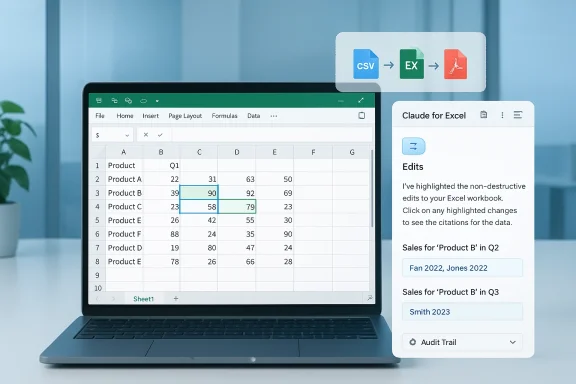
- Non‑destructive edits: Claude’s Excel interface is engineered to avoid silently overwriting existing cells; edits are surfaced and explained so you can review them before accepting changes.
- Automatic compaction (session compression): The system compresses earlier conversation context to allow longer sessions inside the sidebar without exhausting context capacity.
Overview: what the integration actually does
Sidebar-first, workbook-aware assistant
Claude’s Excel add-in works as a sidebar that reads the workbook you have open, inspects formulas and structure, and responds to natural-language requests. Typical capabilities include:- Explain a formula or a range of cells with references to exact cell locations.
- Debug formula errors and suggest fixes while preserving formula dependencies.
- Reformat or clean datasets, reorder columns, and standardize inconsistent entries.
- Populate templates or build draft models using provided assumptions.
- Generate or suggest Excel formulas, Office Scripts, or VBA snippets to automate repeated tasks (depending on version and permissions).
Financial connectors and agent skills
From the October preview onward Anthropic emphasized integrations to commercial data providers for live pricing, transcripts, and credit data. The rollout for Excel sits alongside a broader financial toolkit that includes agent “skills” for tasks like discounted cash flow (DCF) models, valuation comparisons, and due-diligence summarization.Operational mechanics: changes are trackable
One of the most important operational claims is that the add-in highlights every edit it proposes or makes and gives an explanation that points back to the workbook — in other words, cell‑level citations for auditability. That’s central to any deployment in regulated or high-stakes financial workflows.Deep dive: technical context and model choices
Model family and why it matters
Anthropic’s Claude family includes different model flavors tuned for particular tradeoffs: speed, balance, or highest-accuracy reasoning. The Excel integration has been shown in earlier product notes to make use of Sonnet-branded models for spreadsheet tasks; later announcements also positioned Opus-family models as targets for advanced Excel capabilities. The practical implication:- Sonnet variants are tuned for fast, reliable office tasks and were used in early finance-focused previews.
- Opus models aim for higher reasoning and code-level capabilities, which matter when the add-in drafts Office Scripts, designs complex formulas, or performs multi-step agentic analyses.
Session compression: convenience vs. risk
Automatic compaction (sometimes called context compression or auto-compaction) reduces the explicit conversational context by summarizing or compressing earlier parts of a long session so the model can keep working as conversations grow. This improves practical usability — you can carry on for hours — but it introduces two major caveats:- Loss of detail: Compression can drop nuance from earlier user clarifications or the exact phrasing of constraints that mattered to a calculation.
- Higher risk of errors in arithmetic or logic: When the model operates on a compressed, lossy description of prior context, there’s an elevated chance of subtle errors — especially in multi-step financial logic. Users familiar with Claude Code and long-agent workflows report that compression can occasionally produce surprising regressions in precision.
Strengths: what this release gets right
- Workflow ergonomics: Drag-and-drop multi-file support reduces manual import steps and matches how analysts typically work across spreadsheets, CSV exports, and reference documents.
- Non-destructive editing: Avoiding silent overwrites and surfacing described edits gives users the chance to review changes — a pragmatic countermeasure to AI hallucinations in spreadsheets.
- Model improvements for finance: The combination of tailored agent skills and real-time connectors to market data providers addresses analyst needs for up-to-the-minute context and helps automate repetitive due-diligence work.
- Enterprise deployment path: Distribution via Microsoft’s add-in ecosystem (Marketplace/AppSource and the Microsoft 365 admin deployment path) fits established IT procurement and governance models, making it easier for large organizations to deploy and manage centrally.
- Transparency features: Cell-level citations and explaining edits are essential features for auditors, compliance teams, and any group that needs traceability for model-driven changes.
Risks, gaps, and areas of caution
Unclear plan availability and user confusion
Public messaging about which subscription tiers can access the add-in has been inconsistent across announcements and support pages. Some channels report a rollout to a broad set of paid plans including Pro, while internal support docs and earlier messaging referenced Max/Team/Enterprise and limited betas. This mismatch creates deployment confusion for IT admins and individual users trying to enable the add-in.Practical implication: Confirm the current plan-level availability with Anthropic’s official admin or help center pages before planning a rollout.
Model errors and hallucinations
No generative model — including the ones powering Claude — has a guaranteed zero-error rate for calculations and logic. Even systems that perform well on benchmarks can produce incorrect cell edits, mis-evaluate formula dependency graphs, or accidentally introduce off-by-one and rounding errors. The addition of “auto-compaction” increases the chance of subtle errors because the model’s internal representation of prior context becomes lossy.Mitigation: Require a review stage in the workflow, use Excel’s revision history and change-tracking, and run independent validation checks (unit-tests for formulas; reconciliation scripts).
Prompt injection and malicious workbook content
Spreadsheets can contain embedded text, comments, or hidden formulas that could be weaponized as malicious prompts. When an LLM reads and executes instructions sourced from an untrusted workbook, there’s a risk of prompt-injection-style exploitation where hidden instructions guide the model to perform unintended edits.Mitigation: Treat external files as untrusted input; sanitize or quarantine files before letting Claude operate on them; use strict data governance and scanning for suspicious patterns in cells and comments.
Admin and identity friction
Multiple community reports indicate friction when individuals attempt to enable the add-in — admins may need to permit the add-in at the organization level, or sign-in flows can tie the add-in to a different account than the one that holds subscription privileges. For organizations, Microsoft 365 admin deployment is required for broad availability; for individuals, the add-in must be installed from marketplace and linked to a Claude account that has the proper plan enabled.Mitigation: Coordinate with Microsoft 365 admins early, confirm tenant-level policies for add-ins, and test the sign-in flow with sample accounts.
Data privacy and regulatory exposure
Excel files often contain PII, contractual terms, or highly sensitive financial information. Sending workbook contents to a cloud-hosted model raises compliance questions for regulated industries. Anthropic advertises enterprise controls and workarounds, but organizations must validate the data residency, processing, and retention policies before permitting the add-in on production files.Mitigation: Run pilot programs with anonymized or synthetic data; request written assurances from Anthropic on data handling; consider on-prem or VPC models where available.
Practical adoption playbook (for IT and analysts)
- Pilot with non-sensitive workbooks
- Select representative spreadsheets that mimic production complexity but contain no real PII or confidential figures.
- Test multi-file workflows and evaluate how the add-in surfaces edits.
- Validate edit tracking and audit trail
- Confirm changes are visibly flagged and include cell-level citations.
- Verify that Excel’s undo and revision history behave as expected after Claude edits.
- Test compression behavior under long sessions
- Run extended, multi-hour sessions and intentionally revisit early assumptions to see whether compression preserves essential constraints.
- Record any divergence or error introduced after compaction.
- Define governance and approval stages
- Require manual review for all AI-proposed edits on sensitive or financial sheets.
- Set thresholds for when automated edits can be applied without human sign-off.
- Harden data handling
- Configure tenant-level deployment policies in Microsoft 365 admin center.
- Establish rules to prevent upload of files with regulated data categories until legal and security approvals are obtained.
- Train users on prompt engineering for spreadsheets
- Teach analysts to provide explicit constraints (units, rounding conventions, sign conventions) and to ask Claude to explain every step.
- Encourage small iterative changes and frequent validations, rather than large one-shot transformations.
What IT leaders should ask Anthropic (and themselves)
- Which subscription tiers are supported today and how is plan-level availability different across regions?
- Is there an enterprise-grade, contractable SLA for uptime and response time for model-driven edits?
- What data retention, residency, and redaction guarantees exist for files processed via the Excel add-in?
- Can the auto-compaction feature be toggled off for critical sessions to avoid lossy summarization?
- Are there admin controls to disable multi-file drag-and-drop or to whitelist allowed file types?
Real-world signals from early users
Community reports show highly positive productivity anecdotes — users claim time savings on cleaning and formula-debugging tasks. At the same time, the same forums include practical complaints: sign-in friction, inconsistent availability across plans, and a handful of bug reports (file encoding and upload edge-cases were discussed publicly). Those signals point to a familiar product lifecycle: strong productivity potential plus a need for robust QA and enterprise hardening.The competitive angle: Copilot and other rivals
Embedding an LLM into Microsoft Office is not unique to Anthropic; Microsoft has invested heavily in Copilot and integrated LLM assistants across its productivity stack. Anthropic’s strategy differentiates by emphasizing finance-focused connectors, explicit edit explanations, and agentic skills geared to analyst workflows. For many organizations the choice will hinge on trust, governance, and which provider integrates best with existing procurement and compliance regimes.Final assessment and recommendations
Anthropic’s expanded Excel integration is a meaningful step toward practical AI-assisted spreadsheet workflows. The most valuable elements are the non-destructive editing pattern, the multi-file ingestion convenience, and the financial connectors that give Claude domain context. These features lower friction and map to real analyst needs.At the same time, enterprise adoption must be cautious and methodical. The two most important guardrails are:
- Verification-by-design: Treat Claude’s output as proposed edits that require automated and human verification before being applied to authoritative workbooks.
- Governance and pilot discipline: Run staged pilots with defined data governance, and validate how the add-in behaves under long sessions and edge-case inputs.
Anthropic has given spreadsheet-heavy teams a powerful new tool, but the real work now is operational: integrating Claude into the careful, audit-first processes that finance and accounting teams depend on. When paired with disciplined verification and clear governance, Claude’s Excel add-in can accelerate routine cleanup, explain complexity, and free analysts to focus on judgment — but unchecked adoption risks subtle errors and compliance exposure. The sensible route is measured pilots, tight controls, and an insistence that every AI-generated edit be explainable, reversible, and tested.
Source: the-decoder.com Anthropic opens Claude's improved Excel integration to all Pro subscribers after limited beta
