Anthropic’s Claude has quietly moved from a research chat assistant into the spreadsheet at the center of corporate finance, with a beta “Claude for Excel” add‑in that places a Claude sidebar inside Microsoft Excel and positions the startup as a direct challenger to Microsoft’s Copilot in high‑stakes financial workflows. The product launch — announced by Anthropic as part of an expanded “Claude for Financial Services” push — and Microsoft’s own shift to a multi‑model Copilot architecture together reshape who controls model choice inside Office workflows and raise immediate governance, auditability and procurement questions for IT and finance teams.
Anthropic’s October 27, 2025 update frames Claude for Excel as a research preview targeted at Max, Team and Enterprise customers, with an initial limited cohort (roughly 1,000 testers) invited to the waitlist for the beta. The company describes the add‑in as a sidebar assistant that can read, analyze, modify and create workbooks while tracking and explaining every edit at the cell level. Anthropic also announced new real‑time financial data connectors and a set of prebuilt “Agent Skills” for common analyst tasks like discounted cash flow modeling and earnings analysis. Microsoft’s strategic posture has been evolving in parallel: in late September 2025 Microsoft began exposing Anthropic’s Claude Sonnet 4 and Claude Opus 4.1 as selectable model backends inside Microsoft 365 Copilot — notably inside the Researcher tool and Copilot Studio for agent building — signaling Copilot’s transition from a single‑provider dependency into a multi‑model orchestration layer. That decision makes the arrival of Claude inside Excel both a competitive and operationally complex development for customers who run Copilot and are now being offered multiple model suppliers for similar tasks.
For IT leaders and finance chiefs the immediate task is pragmatic: run disciplined pilots, demand measurable telemetry and audit trails, and validate vendor claims with business‑real prompts. If adopted cautiously, Claude for Excel — whether used directly or via Copilot’s Anthropic backend — can accelerate modeling and reduce repetitive work. If adopted without governance, it risks audit surprises, compliance exposure and unpredictable costs.
The new battleground for enterprise AI is not raw model capability alone; it is the combination of vertical expertise, verifiable audit trails and enterprise‑grade controls. Organizations that treat model choice as a governed operational capability rather than a convenience will extract value without exposing the business to unnecessary risk.
Source: varindia.com Claude AI Joins Excel, Challenging Microsoft Copilot
 Background
Anthropic’s October 27, 2025 update frames Claude for Excel as a research preview targeted at Max, Team and Enterprise customers, with an initial limited cohort (roughly 1,000 testers) invited to the waitlist for the beta. The company describes the add‑in as a sidebar assistant that can read, analyze, modify and create workbooks while tracking and explaining every edit at the cell level. Anthropic also announced new real‑time financial data connectors and a set of prebuilt “Agent Skills” for common analyst tasks like discounted cash flow modeling and earnings analysis. Microsoft’s strategic posture has been evolving in parallel: in late September 2025 Microsoft began exposing Anthropic’s Claude Sonnet 4 and Claude Opus 4.1 as selectable model backends inside Microsoft 365 Copilot — notably inside the Researcher tool and Copilot Studio for agent building — signaling Copilot’s transition from a single‑provider dependency into a multi‑model orchestration layer. That decision makes the arrival of Claude inside Excel both a competitive and operationally complex development for customers who run Copilot and are now being offered multiple model suppliers for similar tasks. What Claude for Excel actually does
At a glance
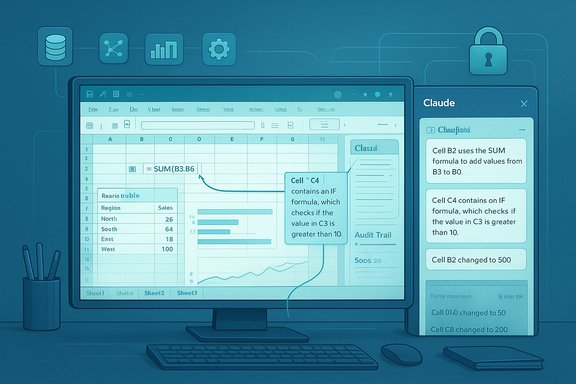
- In‑app sidebar: Claude appears as a task pane inside Excel, letting users interact with the workbook via natural language prompts without leaving the file.
- Read and analyze: The assistant can parse multi‑sheet workbooks, traverse formula chains, and summarize assumptions or drivers across a model.
- Edit and build: Claude can modify cells, fix formula errors, and create new worksheets or entire draft models from prompts while attempting to preserve formula integrity and dependencies.
- Cell‑level transparency: Every change the assistant makes is tracked and accompanied by navigable explanations that point to the exact cells used in the response. Anthropic emphasizes this as an auditability feature for financial workflows.
- Live connectors and Agent Skills: The initial slate includes connectors to market data and analytics providers (announced partners include global market data vendors) and prebuilt skills for common analyst workflows. These connectors are presented as a way to reduce manual copy/paste and keep models tied to authoritative sources.
How it differs from a clipboard or macro bot
Unlike simple macro libraries or clipboard‑based assistants, Claude for Excel is designed to understand formula relationships, preserve formatting and cell dependencies, and explain why a change was made. That difference matters in finance: a cell‑level citation that lets a reviewer jump to the source of a number reduces the inspection effort compared with blind, bulk edits. Still, Anthropic cautions that Claude can make mistakes and human review remains required for client‑facing or audit‑critical outputs.Why this matters to finance teams and Excel power users
Excel is more than a spreadsheet; it’s the lingua franca of corporate modeling, regulatory filings and transaction work. Embedding an LLM that can operate directly on workbook structures changes the unit of productivity and the points of failure:- For junior analysts, Claude promises faster model construction and routine formula repairs.
- For seniors, it can accelerate iteration cycles and provide quick sanity checks or scenario rewrites.
- For audit, cell‑level explanations and tracked edits create a potential trail — but only if those trails are preserved in a verifiable, tamper‑resistant way.
How Claude positions itself against Microsoft Copilot
Two simultaneous fronts
- Anthropic is putting Claude directly inside Excel as a dedicated add‑in optimized for finance workflows. That surface competes with Microsoft Copilot features already embedded in Excel, such as Agent Mode and in‑cell Copilot functions that can create formulas and perform narrative analysis.
- Microsoft, meanwhile, has made Copilot multi‑model by allowing Anthropic’s Claude models to be selectable backends for Copilot’s Researcher and Copilot Studio features. That means the same Claude family that Anthropic surfaces in a dedicated add‑in can now also be an option inside Copilot’s agent framework — a dual approach that blurs lines between direct integrations and platformed model selection.
Competitive strengths
- Specialization: Anthropic’s pitch centers on finance‑specific skills, connectors and templates — a verticalized product that targets the exact workflows Excel users care about. That focus can produce higher ROI for analysts than a more generalized Copilot answer.
- Transparency features: Cell‑level traceability and change annotations are designed to meet audit demands more directly than freeform chat responses. Anthropic emphasizes tracked edits as a key differentiator.
- Model choice: Microsoft’s multi‑model route gives organizations the option to run Anthropic inside Copilot if they prefer, while Anthropic’s add‑in provides a vendor‑owned experience with its own controls and pricing. That choice benefits customers who want to test alternative suppliers or compare quality on real business prompts.
Competitive risks and limitations
- Overlap with Copilot: Organizations that already standardized on Microsoft 365 may ask why they need an additional add‑in when Copilot offers in‑app automation. The answer will hinge on measured performance, audit trails and how connectors and licensing actually work in practice.
- Capability gaps in preview: Anthropic’s own materials note limitations — initial preview support excludes some advanced constructs such as complex macros or certain PivotTable workflows — which could limit usefulness for teams that rely on bespoke VBA logic.
Technical snapshot and verifiable claims
Multiple sources corroborate the headline claims and a few technical numbers:- Anthropic publicly announced the Excel add‑in and the finance push on October 27, 2025. The company’s post spells out the beta preview, connectors and Agent Skills.
- Claude for Excel is available via a limited waitlist (about 1,000 initial testers for Max, Team and Enterprise plans) with a staged rollout planned thereafter. Anthropic’s support pages and product landing content echo the limited research preview status.
- Microsoft documented the inclusion of Anthropic’s Claude Sonnet 4 and Opus 4.1 into Microsoft 365 Copilot on September 24, 2025; Reuters and major tech outlets reported the move at the time. Anthropic’s models are often hosted on third‑party clouds such as AWS Bedrock, which Microsoft acknowledged as a cross‑cloud inference path to consider.
Enterprise implications: governance, compliance and procurement
Data flows and hosting
A critical architectural detail is where model inference and context processing occur. Anthropic’s models — when used through Microsoft surfaces — are commonly hosted outside Microsoft‑managed infrastructure (notably on AWS Bedrock or other cloud marketplaces). That creates cross‑cloud data paths with direct consequences:- Compliance mapping: Data residency, logging, retention and lawful‑access considerations must be re‑mapped when requests leave the tenant’s primary cloud. Contracts and Data Processing Addenda (DPAs) should reflect this reality.
- Billing and cost center reconciliation: Third‑party model use may produce separate line items or pass‑through costs; organizations should require transparent metering and reporting before enabling Anthropic models broadly.
Auditability and reproducibility
Tracked edits and cell‑level explanations are useful, but do not automatically equal compliance. IT and internal audit teams should demand:- Per‑request telemetry that records model identifier, timestamp, inputs, outputs, latencies and cost.
- Immutable audit trails (e.g., append‑only logs or signed manifests) that link model actions to workbook versions.
- Deterministic workflows for client deliverables: change review checklists, sign‑offs and version gating before numbers hit regulatory filings.
Security and IP exposure
Connecting a spreadsheet to external market data and inference endpoints raises questions around secret management (API keys for data providers), leakage of proprietary assumptions into model telemetry, and vendor IP rights over generated content. Legal and infosec teams should insist on:- Clear license terms for AI‑generated outputs.
- Controls for excluding sensitive columns or workbooks from agent access.
- Endpoint encryption, retention limits and breach notification provisions in contracts.
Practical rollout checklist for IT administrators
- Pilot in a controlled environment. Start with non‑client facing models and a small cohort (finance or FP&A teams) to measure accuracy, human edit rates and downstream impact.
- Enable admin controls first. Require tenant admin opt‑in and use group‑based deployment from Microsoft AppSource or the Microsoft 365 Admin Center.
- Instrument logging. Capture per‑request model metadata, inputs, outputs and cost; integrate model telemetry into existing SIEM and observability dashboards.
- Update policy playbooks. Map data flows and define where Anthropic / Copilot model outputs can be used (e.g., internal analysis vs. client deliverables).
- Run blind quality comparisons. Compare Claude, Copilot on OpenAI models and in‑house baselines on genuine business prompts; measure hallucination rate, correction time and human edit percentages.
Strengths, risks and the balance enterprises must strike
Notable strengths
- Domain focus: Anthropic’s finance‑oriented Agent Skills and data connectors can materially speed recurring analyst tasks.
- Transparency features: Cell‑level explanations and tracked edits are practical improvements for audit and review.
- Greater vendor choice: Microsoft’s multi‑model Copilot and Anthropic’s direct add‑in give organizations options to pick the model that best matches cost, latency and quality tradeoffs.
Key risks
- Governance complexity: Cross‑cloud inference and multiple model vendors expand the attack surface for compliance and legal teams.
- Operational surprise: Without telemetry, organizations may discover model‑generated edits in production documents and face remediation costs.
- Unverified vendor benchmarks: Vendor‑reported performance figures (benchmarks on finance tasks) should not be taken at face value; independent validation is essential.
Where verification matters: what to test before deploying
- Accuracy on your data: Run real, representative prompts and compare outputs against ground‑truth human work.
- Audit logging completeness: Confirm that every Claude action is logged, timestamped and tied to a user and a workbook version.
- Failure modes: Inject malformed inputs, broken formulas and large pivot tables to observe how the assistant behaves and whether it preserves workbook integrity.
- Cost predictability: Simulate typical workloads and estimate per‑user monthly inference costs under different usage patterns.
- Legal posture: Confirm that commercial connectors (market data feeds) have licensing clauses that permit redistribution in generated materials.
The broader competitive landscape and what comes next
Embedding specialized assistants into productivity surfaces is now a multi‑track race. Microsoft is diversifying model supply within Copilot while building its own internal models; Anthropic is verticalizing Claude into finance and other domains; Google, xAI and smaller vendors are pursuing similar in‑app experiences. The likely next steps are:- Deeper platform partnerships: Expect to see more certified connectors to market data vendors and possible Azure marketplace availability for Sonnet/Opus variants.
- Feature convergence: Copilot and Claude features will converge on usability (sidebar agents, tracked edits), making procurement decisions hinge on governance, file‑level guarantees and commercial terms.
- Tighter enterprise controls: Admin consoles will surface model selection, per‑tenant policy, and billing transparency as table stakes.
Conclusion
Claude for Excel represents a meaningful inflection in how LLM vendors approach deeply embedded productivity workflows: instead of competing only at the cloud or model layer, Anthropic is meeting users inside Excel with domain‑tuned skills, live data connectors and cell‑level transparency. Microsoft’s concurrent shift to a multi‑model Copilot multiplies the product options but also the governance burden.For IT leaders and finance chiefs the immediate task is pragmatic: run disciplined pilots, demand measurable telemetry and audit trails, and validate vendor claims with business‑real prompts. If adopted cautiously, Claude for Excel — whether used directly or via Copilot’s Anthropic backend — can accelerate modeling and reduce repetitive work. If adopted without governance, it risks audit surprises, compliance exposure and unpredictable costs.
The new battleground for enterprise AI is not raw model capability alone; it is the combination of vertical expertise, verifiable audit trails and enterprise‑grade controls. Organizations that treat model choice as a governed operational capability rather than a convenience will extract value without exposing the business to unnecessary risk.
Source: varindia.com Claude AI Joins Excel, Challenging Microsoft Copilot