

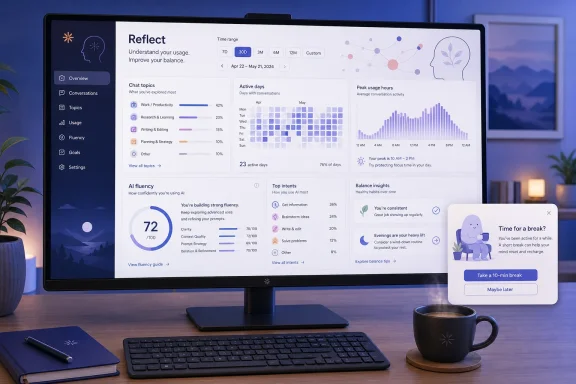
Anthropic’s new Reflect dashboard gives Claude users a retrospective view of how they use the chatbot, along with optional prompts to step away from it. The feature launched in beta on July 9 and is available in Claude’s web client and desktop app, making it relevant to Windows users who use Claude as a daily research, writing, or coding companion.
As Anthropic explains, Reflect summarizes chat activity over selectable periods, including the past month, three months, six months, or 12 months. It identifies broad topics, usage patterns, active days, and peak hours, then generates suggestions intended to make work with Claude more efficient.
Reflect is not a general activity log that appears automatically for everyone. According to Anthropic’s support documentation, it requires Claude Memory to be enabled and is currently offered to Free, Pro, and Max users. It is not available on Team or Enterprise plans.
To generate a report:
These are nudges, not locks. A user can dismiss a reminder and continue chatting, which makes the feature more of a self-management aid than an administrative control. That distinction matters for IT departments: Reflect is not a replacement for browser policy, endpoint controls, or an organization’s AI-use rules.
Anthropic has not yet added a direct measure of total time spent using Claude. Ryn Linthicum, Anthropic’s head of wellbeing policy, told Engadget that the company did not previously track the metric internally because it was not something the product team wanted to optimize. Anthropic says a time-spent view is planned.
That makes the dashboard less like Windows’ screen-time reporting and more like a usage audit for an AI assistant. The value is likely highest for regular Claude users who want to identify redundant prompting habits or establish a clearer boundary between quick task assistance and open-ended chatbot use.
For now, Windows users can access Reflect through Claude on the web or desktop app, provided Memory is enabled and their account is eligible.
As Anthropic explains, Reflect summarizes chat activity over selectable periods, including the past month, three months, six months, or 12 months. It identifies broad topics, usage patterns, active days, and peak hours, then generates suggestions intended to make work with Claude more efficient.
 How to enable it
Reflect is not a general activity log that appears automatically for everyone. According to Anthropic’s support documentation, it requires Claude Memory to be enabled and is currently offered to Free, Pro, and Max users. It is not available on Team or Enterprise plans.To generate a report:
- Open Claude in a browser or the Claude desktop application.
- Open Settings.
- Select Reflect.
- Wait for Claude to create the recap, then select a different time range if needed.
Usage limits without hard enforcement
The practical part of Reflect is its time-management controls. Users can configure break reminders after a chosen period of activity and set quiet hours during which Claude should discourage use. Engadget reports that break prompts can be scheduled at intervals ranging from 15 minutes to several hours, while quiet hours can be set separately for individual days.These are nudges, not locks. A user can dismiss a reminder and continue chatting, which makes the feature more of a self-management aid than an administrative control. That distinction matters for IT departments: Reflect is not a replacement for browser policy, endpoint controls, or an organization’s AI-use rules.
Anthropic has not yet added a direct measure of total time spent using Claude. Ryn Linthicum, Anthropic’s head of wellbeing policy, told Engadget that the company did not previously track the metric internally because it was not something the product team wanted to optimize. Anthropic says a time-spent view is planned.
A productivity tool disguised as a wellbeing tool
Reflect also includes “AI fluency” recommendations, based on recurring patterns in a user’s chats. For example, someone repeatedly pasting the same background information into prompts may be directed toward Claude Projects, which can retain organized context for related work.That makes the dashboard less like Windows’ screen-time reporting and more like a usage audit for an AI assistant. The value is likely highest for regular Claude users who want to identify redundant prompting habits or establish a clearer boundary between quick task assistance and open-ended chatbot use.
For now, Windows users can access Reflect through Claude on the web or desktop app, provided Memory is enabled and their account is eligible.
References
- Primary source: Engadget
Published: 2026-07-19T18:30:00+00:00
How To Use Claude's Reflect Dashboard And Learn When It's Time To Touch Grass
Break reminders are your friend.www.engadget.com - Official source: anthropic.com
A new way to reflect on how you use Claude \ Anthropic
Introducing a new way to reflect on and refine how you use Claude. It lets you easily track and visualize how you use Claude, and decide whether that time aligns with your goals.www.anthropic.com - Related coverage: eweek.com
Claude Gets a Spotify Wrapped-Style Dashboard for AI Use | eWeek
Claude Reflect gives users a Wrapped-style look at AI habits, workflow patterns, recurring tasks, and break settings in a new free beta. www.eweek.com
- Related coverage: claude-for.com
Claude Reflect: see how you actually use AI — claude/for
Claude Reflect is a monthly recap of your chats: top topics, peak hour, an AI-skills breakdown. Here's how to turn it on and read it.claude-for.com - Related coverage: trendhunter.com
- Related coverage: easternherald.com
Anthropic's Reflect Tracks Claude Habits and Retains Users
Anthropic launched Reflect, a usage analytics dashboard for Claude users. It shows conversation patterns and nudges users toward Claude's own features.easternherald.com