

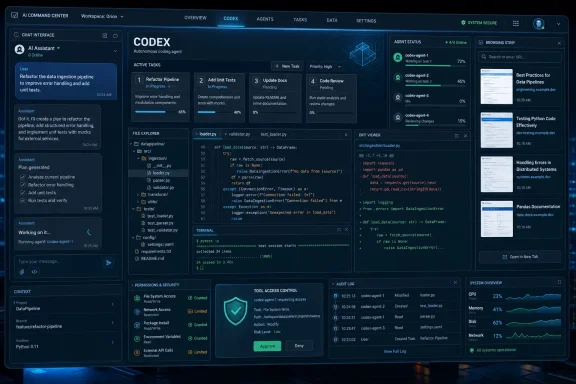
That matters because the Windows desktop has seen this movie before. Productivity platforms do not become dominant by answering questions; they become dominant by owning workflows. If OpenAI succeeds, ChatGPT may stop feeling like a chatbot you visit and start behaving like a resident software layer that plans, writes, codes, browses, edits, automates, and supervises work across the machine.
Codex Is Becoming the Place Where ChatGPT Grows Up
The line that lit up the AI-watching corner of the internet came from OpenAI’s Thibault “Tibo” Sottiaux, who joked on X that the company was “bringing ChatGPT to Codex so that Codex can be in ChatGPT in Codex in ChatGPT.” The phrasing was deliberately absurd, but the product logic behind it is not. OpenAI is collapsing the boundary between the conversational assistant and the execution environment.
That boundary used to be clean. ChatGPT was where users asked, drafted, summarized, brainstormed, and occasionally pasted code. Codex was where developers handed off engineering tasks, reviewed diffs, and let agents work inside repositories. But once an AI can reason across files, operate tools, remember project context, and run tasks in parallel, the difference between “write me an email,” “fix this bug,” and “prepare this launch checklist” becomes more about permissions than product category.
OpenAI’s February 2026 introduction of the Codex desktop app described it as a “command center for agents,” not simply a code editor companion. That wording now looks less like marketing flourish and more like roadmap leakage. A command center is not a plugin. It is the surface from which other things are coordinated.
The more important shift is architectural. ChatGPT’s original interface is a transcript: prompt, answer, prompt, answer. Codex’s emerging interface is a workspace: tasks, branches, files, terminals, agents, previews, automations, and persistent context. If OpenAI wants AI to do work instead of merely describe work, Codex is the more natural foundation.
The “Superapp” Story Is Really a Fight Over the Desktop
The phrase “superapp” is usually imported from mobile platforms, where messaging, payments, shopping, ride-hailing, and services collapse into a single consumer portal. On the desktop, the term means something different. It means the app that sits closest to the user’s intent before that intent becomes activity in Word, VS Code, a browser, a terminal, Slack, Excel, GitHub, or a line-of-business tool.
That is why OpenAI’s reported plan to combine ChatGPT, Codex, and browsing capabilities is strategically bigger than a user-interface cleanup. TechRadar, citing earlier reporting, framed the effort as a simplification of OpenAI’s increasingly fragmented app lineup. Wired later described Sottiaux as overseeing both ChatGPT and Codex as OpenAI works toward an all-in-one platform. The product story is consolidation; the competitive story is control.
For Windows users, this is not abstract. The Windows desktop remains the most important work surface in enterprise computing, even in organizations that have pushed aggressively into SaaS. If OpenAI can place a persistent agent workspace on that surface, it gets closer to the actual work than a browser tab ever could.
Microsoft already understands this, which is why Copilot has been pushed into Windows, Microsoft 365, Edge, GitHub, Power Platform, and Azure. OpenAI’s move with Codex looks less like a retreat into developer tooling and more like an attempt to build its own cross-application layer before Copilot, Claude, Gemini, or a future local-first assistant defines the category.
ChatGPT Was the Brand, but Codex May Be the Operating Model
ChatGPT is still OpenAI’s household name. It is the product people recognize, the subscription people pay for, and the interface that turned generative AI into a mainstream habit. But popularity does not automatically make it the right chassis for the next phase.
The classic ChatGPT interface is optimized for interaction. Codex is optimized for delegation. That difference becomes decisive as AI companies shift from answer engines to agent platforms.
A coding agent has to inspect a repository, decide which files matter, make changes, run tests, interpret failures, and revise. Those requirements forced Codex to develop muscles that general chatbots only gradually acquired: tool use, state management, sandboxing, long-running execution, and structured review. In other words, the coding product had to become an agent product sooner because software development punishes hand-waving.
That is why VentureBeat’s reporting that OpenAI is expanding Codex beyond coding lands as a key clue. If Codex can already operate with local context and tool access, then adding writing, research, image generation, browser previews, data analysis, and project planning is not a category violation. It is the logical broadening of an agent shell.
The irony is that the “coding app” may become the general-purpose app because coding was the first mainstream workflow demanding real agency. Developers became the beta testers for everyone else’s AI office.
OpenAI’s Real Target Is Friction, Not Just Fragmentation
Product consolidation is often sold as convenience. One app is simpler than three. One login is better than multiple silos. One context store beats copying and pasting between windows.
But the deeper issue is friction at the moment of handoff. Today, many AI workflows still fall apart when users move from planning to execution. ChatGPT can draft a plan, but the user must open the relevant app, find the files, paste the output, adapt it, test it, and report back. Every handoff is an opportunity for the task to die.
Codex attacks that failure point. It does not merely advise; it can operate inside a bounded environment. It can turn a request into a branch, a diff, a test run, or a repeatable automation. That model can extend naturally from code to documents, spreadsheets, browser tasks, internal tools, and administrative workflows.
This is why the “ChatGPT inside Codex” framing may be more important than “Codex inside ChatGPT.” The former suggests ChatGPT’s conversational abilities are being embedded into a task engine. The latter suggests a coding feature is being added to a chatbot. Those are very different futures.
If OpenAI wants an AI workspace that handles everything from writing a proposal to patching an app to researching a vendor to preparing a slide deck, the company needs a surface that treats conversation as one input among many. Codex is closer to that than the traditional chat window.
Windows Makes the Bet More Interesting—and More Complicated
OpenAI’s Codex app began on macOS, but the Windows version matters disproportionately. Windows is where the messy reality of enterprise work lives: PowerShell scripts, local directories, legacy apps, corporate VPNs, group policies, endpoint protection agents, Excel workbooks, internal portals, and decades of accumulated operational habits.
TechRadar noted OpenAI’s Windows Codex release after the company updated its original app announcement to confirm Windows availability. OpenAI positioned the Windows version around native agent sandboxing and support for Windows developer environments, including PowerShell. That is not a minor platform footnote. It is a signal that OpenAI knows the agent layer must meet users where their work actually happens.
For sysadmins, the appeal is obvious. An agent that can read logs, explain scripts, prepare remediation steps, generate deployment notes, inspect configuration files, and coordinate repetitive tasks could save hours. For developers, the value is already clearer: parallel agents can work on features, tests, refactors, and documentation while humans review the results.
But Windows also exposes the risk more sharply. A local agent with broad tool access is not just a smarter assistant; it is a new class of privileged software. It touches files, shells, credentials, browsers, repositories, and potentially business data. The better it gets, the more carefully it must be governed.
That is where OpenAI’s “secure by default, configurable by design” language around Codex deserves scrutiny. Security defaults are only meaningful if organizations can understand them, audit them, restrict them, and explain them to users. The superapp future will not be judged only by model capability. It will be judged by whether IT departments can safely allow it onto managed endpoints.
The Agentic Future Will Be Won by Memory, Permissions, and Trust
AI companies like to talk about agents as if autonomy were mainly a reasoning problem. Reasoning matters, but the practical future of agents depends on three less glamorous systems: memory, permissions, and trust.
Memory determines whether the app understands ongoing work instead of treating every session like a first date. Permissions determine whether it can act without becoming a security nightmare. Trust determines whether users and administrators believe its actions are legible enough to supervise.
Codex is interesting because it naturally forces all three. A coding agent must remember project conventions, know which files it can touch, and show diffs before changes are accepted. Those habits map well to other knowledge work. A document agent should show edits. A spreadsheet agent should explain formulas. A browser agent should disclose what it clicked. An operations agent should produce a changelog before touching production.
The danger is that consumer AI products often hide complexity in the name of magic. A superapp cannot afford that. The more domains it spans, the more users need visible boundaries.
This is where OpenAI’s rumored and observed convergence faces its hardest product challenge. ChatGPT’s success came partly from feeling effortless. Codex’s value comes partly from being inspectable. A unified app must preserve both qualities without becoming either a toy or a cockpit.
The Browser Piece Is the Missing Middle Layer
The submitted report focuses on ChatGPT and Codex, but broader reporting has repeatedly connected OpenAI’s superapp ambitions with browsing. That makes sense. A browser is where modern work gathers before it becomes something else.
Research happens in browser tabs. SaaS administration happens in browser tabs. Customer records, dashboards, procurement systems, documentation portals, bug trackers, and cloud consoles all live behind web interfaces. If an AI workspace cannot see and operate in that environment, it remains dependent on copy-and-paste labor.
This is why the reported inclusion of browsing capabilities, sometimes associated with OpenAI’s Atlas work, matters. A unified AI app that combines chat, coding, browsing, and local task execution would sit across the three major surfaces of modern work: conversation, files, and web apps. That is the real superapp shape.
It also raises the stakes for identity. Once an agent can browse on a user’s behalf, the question becomes whether it is acting as the user, as a delegated assistant with scoped permissions, or as a separate auditable principal. Enterprise IT will care deeply about that distinction.
The consumer version may arrive as convenience. The enterprise version will have to arrive as governance.
Microsoft Is Both Partner and Shadow Competitor
No discussion of OpenAI’s desktop ambitions can avoid Microsoft. The two companies remain deeply intertwined, yet their product incentives are not identical. Microsoft wants AI to reinforce Windows, Microsoft 365, Azure, GitHub, and enterprise licensing. OpenAI wants its own application layer to remain central, portable, and valuable regardless of where the user works.
A unified OpenAI desktop app could complement Microsoft’s ecosystem, especially on Windows where OpenAI benefits from native platform access and Microsoft benefits from broader AI adoption. But it could also overlap with Copilot in uncomfortable ways. If users open OpenAI’s app to write documents, summarize mail, automate tasks, code, browse, and analyze data, where exactly does Copilot sit?
The answer may vary by customer. Microsoft has the distribution advantage inside managed enterprises. OpenAI has the brand advantage among AI-native users and developers who see ChatGPT and Codex as primary tools rather than add-ons. GitHub Copilot remains powerful in developer workflows, but Codex’s broader agent framing suggests OpenAI wants to move above individual editor integrations.
That makes the coming desktop battle less about which model answers best and more about which assistant becomes the default coordinator. In enterprise software, coordination is power.
The Productivity Suite Is Being Unbundled From the Inside
For decades, productivity software was organized around document types. Word processed text. Excel handled spreadsheets. PowerPoint made slides. Outlook managed messages. Visual Studio and VS Code handled code. Browsers handled everything web-shaped.
AI scrambles that taxonomy. Users do not wake up wanting to “use a word processor.” They want to prepare a quarterly review, fix a customer issue, launch a feature, investigate an outage, reconcile a budget, or draft a policy. Those tasks often cut across multiple applications.
A unified AI workspace is compelling because it starts from the task rather than the file format. The agent can draft the memo, inspect the spreadsheet, query the documentation, update the code, prepare the pull request, and summarize the outcome. At least, that is the promise.
But the promise contains a threat to existing software categories. If the AI workspace becomes the place where intent is expressed and results are reviewed, traditional apps become execution substrates. Users may still need Word, Excel, VS Code, GitHub, Edge, and Teams, but they may spend less time thinking of them as destinations.
That is why OpenAI’s superapp trajectory is not just another AI feature story. It points toward a reorganization of desktop computing around tasks, agents, and review loops.
The Hype Is Running Ahead of the Product, but Not the Direction
It is important to separate what is confirmed from what is inferred. OpenAI has clearly released and expanded Codex as a desktop agent app. It has described Codex as a command center for agents. It has made Codex available through ChatGPT accounts and across multiple surfaces. Reporting from outlets including TechRadar, VentureBeat, Wired, and Ars Technica has described OpenAI’s broader push toward a unified superapp.
What OpenAI has not done, at least publicly, is publish a simple migration calendar saying ChatGPT Desktop will be replaced by Codex on a given date. Nor has it fully explained how existing ChatGPT features, Codex projects, browser tooling, memory, enterprise controls, and subscription limits will merge. The absence of that roadmap matters.
Still, the direction is increasingly hard to miss. Features are moving across product boundaries. Codex is expanding beyond code. ChatGPT is gaining more structured app and project surfaces. Mobile access to Codex-related work has reportedly expanded through ChatGPT. The center of gravity is shifting from “chat with a model” to “manage work with agents.”
That shift can be overhyped in the short term and still be real in the long term. The first versions will be uneven. Some users will find the unified app confusing. Others will resent subscription changes, usage limits, or the loss of separate product identities. But product convergence is not the same as immediate perfection.
Enterprise IT Will Treat the Superapp as a New Endpoint Class
For WindowsForum readers, the most practical question is not whether the app is exciting. It is how it behaves on a managed machine. A unified AI workspace is not just another productivity client; it may become a privileged intermediary between users, files, code, browsers, credentials, and cloud services.
That creates a new administrative burden. IT teams will need policies for what the app can access, what data it can retain, how logs are stored, whether agents can run shell commands, whether browser actions are recorded, and how output is reviewed. Existing software deployment models were not designed around semi-autonomous assistants that can act across domains.
Security teams will also have to think about prompt injection differently. If an agent reads a webpage, opens a repository, parses a document, and then executes a workflow, malicious instructions can be hidden in places users do not notice. The more capable the agent becomes, the more valuable its instruction chain becomes as an attack surface.
This is not an argument against deployment. It is an argument for treating deployment seriously. The organizations that benefit most from agentic workspaces will likely be the ones that pair them with strong controls, clear user training, and conservative rollout rings.
The worst version of the superapp future is not that AI agents fail. It is that they succeed just enough to be trusted before they are understood.
Developers Are the First Real Test Case
Codex began with developers because software work offers unusually good feedback loops. Code either builds or it does not. Tests pass or fail. Diffs can be reviewed. Repositories preserve history. A botched change can often be reverted. That makes coding a safer proving ground for agentic systems than many business processes.
Even so, developers remain skeptical for good reasons. AI-generated code can be subtly wrong. It can misunderstand architecture. It can introduce dependencies, security flaws, or maintenance burdens. It can produce plausible changes that pass shallow tests while failing deeper requirements.
Codex’s advantage is that it can operate within the same review culture that already governs software teams. Pull requests, tests, branches, comments, and CI pipelines are all natural guardrails. The agent does not need to be trusted blindly if its work is visible and reversible.
The question is whether OpenAI can export that review model to non-developer workflows. Most office work does not have unit tests. Most business documents do not have CI. Most spreadsheet changes are not reviewed like code. If the superapp brings agentic power to everyone, it also needs to bring developer-grade review habits to everyone.
That may be the hidden cultural shift. AI will not just make non-developers more technical. It may make their work more versioned, inspected, and auditable.
The User Interface Problem Is Bigger Than the Model Problem
OpenAI and its competitors often present progress through models: more reasoning, larger context, better tool use, faster generation, lower hallucination rates. Those improvements matter. But a superapp rises or falls on interface design.
How does a user know what the agent is doing? How do they interrupt it? How do they compare versions? How do they approve some actions and reject others? How do they distinguish a draft from a committed change? How do they recover from mistakes? How do they prevent a work assistant from becoming an attention sink?
ChatGPT’s clean chat box was perfect for the first era because it reduced AI to a familiar act: type and receive. The agent era is messier. It needs queues, task cards, notifications, state indicators, file access panels, approval gates, memory controls, logs, and undo paths. Done badly, it becomes a confusing dashboard. Done well, it becomes the new command line for knowledge work.
Codex’s desktop app gives OpenAI a chance to experiment with this complexity among users who tolerate more visible machinery. Developers do not mind seeing diffs, logs, terminals, and task status. The mainstream audience will need the same power translated into calmer language.
That translation may determine whether the superapp becomes a mass-market workspace or remains a power-user instrument with a famous brand attached.
The Next OpenAI App Will Be Judged by What It Refuses to Do
The temptation in a unified app is to make everything possible. Let it browse anywhere, edit anything, run commands, generate documents, send messages, schedule meetings, open pull requests, and deploy fixes. That demo would look spectacular.
The better product may be defined by restraint. It should ask for approval at the right moments. It should show its work. It should refuse unsafe actions. It should make permissions legible. It should keep sensitive contexts separated unless the user explicitly joins them. It should avoid turning every task into an opaque act of faith.
This is particularly important on Windows, where personal, professional, developer, gaming, and administrative contexts often coexist on the same machine. A local AI workspace must understand boundaries that users themselves sometimes blur. The system should not assume that because it can read a file, it should use that file as context.
OpenAI’s challenge is that frictionless productivity and safe autonomy pull in opposite directions. Too many prompts and the agent feels useless. Too few and it becomes dangerous. The superapp will need to find a middle path that changes by user, organization, task, and risk level.
That is a harder design problem than adding another model picker.
The Codex Clues Point to a Work OS, Not a Chatbot Refresh
The concrete signs now line up in one direction: Codex as a desktop app, Codex on Windows, Codex through ChatGPT accounts, reporting about ChatGPT-Codex-browser convergence, OpenAI insiders joking about product recursion, and observers noting ChatGPT-like capabilities appearing in the Codex environment. None of those alone proves a final product name or launch date. Together, they reveal OpenAI’s center of gravity.
The company appears to be building a work operating system above the operating system. Not an OS in the kernel sense, and not a Windows replacement, but a layer where intent is captured, context is assembled, agents are dispatched, and results are reviewed. That layer could become more important to users than the individual apps underneath it.
For Windows enthusiasts, that is both thrilling and uncomfortable. Windows has always been at its best when it serves as a flexible host for powerful software. But if the AI workspace becomes the primary interface for work, Windows risks becoming the substrate rather than the stage.
Microsoft will try to prevent that through Copilot. OpenAI will try to prevent being absorbed into Microsoft’s stack through its own apps. Anthropic, Google, Apple, and others will push their own versions of the same idea. The result will be a messy, competitive, fast-moving period in which “desktop app” stops meaning what it used to mean.
The Codex-to-ChatGPT Merger Leaves Users With Five Immediate Realities
The near-term lesson is not that everyone should abandon ChatGPT Desktop tomorrow or move all work into Codex today. The lesson is that OpenAI’s products are converging around agentic workflows, and users should evaluate them less like chatbots and more like software platforms that will ask for increasing trust.
- OpenAI has not announced a final replacement date for ChatGPT Desktop, but its public Codex roadmap and recent reporting point toward a unified AI workspace.
- Codex is no longer only a coding assistant; it is becoming the environment where OpenAI tests multi-agent work, automation, local context, and broader desktop capabilities.
- Windows support matters because it brings OpenAI’s agent model closer to the enterprise and power-user environments where automation has the highest value and the highest risk.
- The biggest unresolved issues are governance, permissions, auditability, memory, and how much control users and administrators will have over agent behavior.
- The winners in this market will not simply have the smartest model; they will have the safest and clearest interface for supervising AI that acts on the user’s behalf.
OpenAI’s “superapp” may not arrive as a single dramatic launch so much as a gradual disappearance of product borders: ChatGPT becoming more task-aware, Codex becoming more general, browsing becoming more agentic, and the desktop becoming the place where AI stops talking about work and starts doing it. For Windows users and IT pros, the right posture is neither blind hype nor reflexive dismissal. The smart move is to watch the permissions model, test the workflows, demand visibility, and recognize that the next major productivity platform may look less like an app you open and more like an assistant that never really leaves.
Update: OpenAI launches unified ChatGPT desktop client with Work and Codex (July 10, 2026)
OpenAI made its desktop consolidation official on July 9, according to 36Kr’s Heji Finance. The new ChatGPT desktop client now provides three parallel entry points: Chat for conversations and search, Work for general productivity tasks, and Codex for software development. The previous desktop application has been renamed ChatGPT Classic.
This development moves beyond the earlier signs of convergence. Rather than replacing Codex, OpenAI has integrated it into a broader client while extracting its agent-based workflow into ChatGPT Work. Work can research, analyze files, operate authorized desktop applications and websites, and produce documents, spreadsheets, presentations, reports, dashboards, and websites.
Existing Codex users will receive the unified client through a standard application update, although developers can retain Codex as their default interface and app icon. OpenAI also began rolling out GPT-5.6 across ChatGPT, Codex, and its API, with Sol, Terra, and Luna tiers targeting different capability, speed, and cost requirements.
For Windows users and administrators, the change confirms that OpenAI’s proposed “superapp” is becoming a shipping product rather than merely a roadmap direction. It also increases the urgency of reviewing app connectors, local computer-control permissions, scheduled tasks, and access to corporate files before deploying the updated client broadly.
References
- OpenAI has found a new job for Codex 36 Kr · 2026-07-10T10:50:11.214541
- openai.com openai.com
