

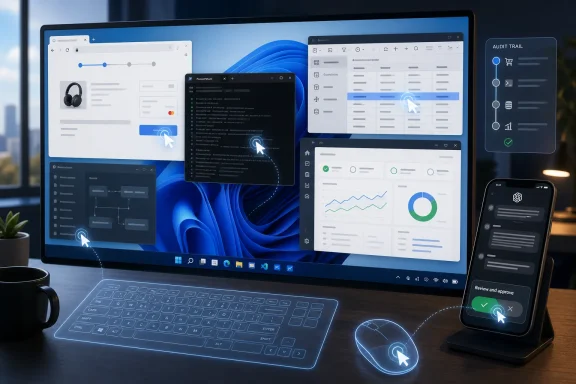
OpenAI added Computer Use support to the Codex desktop app for Windows 11 on May 29, 2026, letting the coding agent see, click, and type inside Windows applications while users supervise locally or from ChatGPT’s mobile apps. That makes Windows more than a target platform for AI-generated code; it turns the PC itself into the workspace the agent can operate. The practical breakthrough is not that Codex can write a function faster. It is that Codex can now cross the brittle border between code, browser, terminal, database client, dashboard, installer, and test environment.
For the past year, AI coding has been sold as an acceleration story: autocomplete became chat, chat became patches, and patches became semi-autonomous pull requests. But most real developer work does not happen in a single editor buffer. It happens across local tools, staging services, flaky test pages, screenshots, log viewers, browser tabs, admin panels, and the terminal window someone forgot was still using the wrong environment variable.
That is why Codex gaining Computer Use on Windows 11 matters. The feature gives OpenAI’s coding agent a virtual mouse and keyboard, allowing it to operate software through the graphical interface rather than only through text prompts and command-line integrations. In plain terms, Codex can now behave less like a chatbot that suggests what to do and more like a junior operator that actually performs the sequence.
The obvious demo is simple: open a browser, verify a checkout page, run a test, check a database row, and report back. The deeper implication is that a Windows machine can become a semi-autonomous execution surface for development work. For a platform that still dominates corporate desktops, enterprise developer laptops, and internal line-of-business tooling, that is a bigger shift than a Mac-first launch could ever be.
OpenAI is also tying this to mobile control. Users can start, review, and steer Codex tasks from ChatGPT on iPhone or Android while the Windows machine continues working. That turns the PC into something closer to a supervised agent host — not quite a server, not quite a remote desktop session, but a new hybrid category that will make IT departments reach for both their automation playbooks and their security policies.
Codex’s Computer Use feature leans into that mess. Instead of requiring every tool to expose a clean API, it allows the agent to operate the same visible controls a human would. That means it can work with old Windows apps, browser-based admin consoles, internal dashboards, installers, database front ends, and test harnesses that were never designed for modern automation.
This is why the feature lands differently on Windows. macOS may have been the first desktop environment to receive OpenAI’s agentic Computer Use push, but Windows is where many organizations keep the awkward stuff: Win32 utilities, legacy enterprise clients, vendor tools, and internal apps that have survived three platform migrations because nobody wants to rewrite them. If an AI agent can click through those workflows with enough reliability, the addressable automation surface expands dramatically.
There is a catch. GUI automation is powerful precisely because it is not disciplined. It can click the wrong thing, misread a state, encounter an unexpected pop-up, or proceed through a workflow whose meaning depends on context the model does not fully understand. That makes the virtual mouse a bridge — but also a liability.
This distinction matters because risk changes when software starts taking actions. A code suggestion can be reviewed before it is applied. A patch can be diffed. A command can be copied, inspected, and run manually. But a desktop agent that navigates applications collapses several of those review points into one continuous performance.
That does not mean the feature is reckless by default. Supervision remains central to the model OpenAI is describing, and the ability to review and steer work from mobile devices suggests the company understands that unattended autonomy is not the right sales pitch for most developers. The pitch is controlled delegation: let Codex do the dull, sequential, cross-application work while the human remains in the loop.
Still, Windows users should recognize the shift. Once an agent can see the screen and type into apps, the boundary between “help me do this” and “do this for me” becomes much thinner. The same capability that can verify a checkout page can also enter credentials, alter records, change configuration, or trigger deployment actions if permissions and guardrails allow it.
For sysadmins, the first question is not whether Codex can save developers time. It is what the agent is allowed to touch. A developer workstation often holds source code, secrets, SSH keys, package tokens, cloud credentials, internal URLs, database clients, and browser sessions that are already authenticated into sensitive systems. Giving an AI agent the ability to operate that environment makes identity and endpoint boundaries more important, not less.
The second question is observability. Traditional automation leaves traces: scripts, logs, scheduled tasks, CI jobs, API calls. GUI-driven agent work can be harder to audit unless the vendor and the organization deliberately capture what happened. If Codex changes a setting in a web console or updates a record through an internal tool, teams will want more than a cheerful summary. They will want a replayable trail.
The third question is policy. Enterprises already struggle with shadow AI use in browsers and IDE plugins. A desktop agent that can manipulate local applications raises the stakes because it no longer merely consumes or emits text. It acts within the user’s authenticated context. That makes endpoint governance, least privilege, and data-loss prevention part of the AI coding conversation.
The free-tier availability is important because it gets the feature into the hands of hobbyists, students, small teams, and curious enterprise developers before procurement has finished writing policy. That is how habits form. If a developer becomes accustomed to asking Codex to verify a UI flow or perform a tedious database-admin chore, the feature becomes part of the workday before it becomes a line item.
But the eventual paid-plan shift is also telling. Computer Use consumes more than model tokens. It requires orchestration, desktop integration, safety systems, likely heavier monitoring, and support expectations that are very different from a text-only coding assistant. When an agent controls the desktop, every failure feels less like a bad answer and more like a botched operation.
This is where OpenAI’s consumer and enterprise incentives diverge. Consumers want access everywhere, cheaply, now. Businesses want control, auditability, contractual assurances, and admin knobs. If OpenAI wants Codex Computer Use to become serious Windows infrastructure rather than a novelty, the enterprise version will need to feel less like a clever demo and more like a managed endpoint capability.
That changes the rhythm of developer work. A developer could leave Codex testing a bug fix, reviewing a dashboard, reproducing a UI issue, or stepping through a local workflow while commuting or sitting in a meeting. The human does not disappear from the loop; the loop stretches across devices and time.
This sounds mundane until you compare it with how remote workstations are used today. Developers already rely on remote desktop sessions, cloud dev environments, CI pipelines, and build servers. Codex’s approach sits awkwardly among them: it uses the local Windows environment, with all its installed tools and authenticated state, but exposes enough control through ChatGPT mobile to make the machine feel remotely steerable.
That awkwardness is the product. Many workflows are not ready for clean CI automation or cloud-hosted dev containers. They depend on local state, proprietary clients, test data, and half-documented steps. A remote-steered desktop agent can go after exactly that gray zone.
That distinction matters because developer machines are high-value targets. Recent reporting around malicious packages and token theft in the broader coding-tool ecosystem is a reminder that attackers follow developer workflows closely. If an agent can access the same environment as a developer, the blast radius of a compromised account, malicious dependency, poisoned prompt, or unsafe instruction can grow.
Prompt injection also becomes more concrete when the model can act on a screen. A malicious web page, issue description, README, log message, or dashboard field could try to influence the agent’s behavior. In text-only tools, that may lead to bad advice or an unsafe command suggestion. In a desktop-control scenario, the agent may be positioned to carry out the instruction unless safeguards intervene.
The right answer is not panic. It is compartmentalization. Developers should run agentic desktop workflows in constrained environments where possible, avoid exposing unnecessary credentials, and treat AI-operated sessions as distinct from ordinary interactive use. Enterprises should assume that “the agent only does what the user can do” is not a sufficient risk argument, because many users can already do too much.
Early reports around versioning and setup friction should be read in that context. A feature that depends on screen access, app control, sandboxing, and local integration has more failure modes than a web app. Some users will encounter permission problems, unavailable plugins, Store update quirks, or conflicts with corporate security tools.
That does not make the launch weak. It makes it Windows. Any company shipping deep desktop automation into the Windows ecosystem has to survive the diversity of real-world PCs. The test is not whether the launch is flawless; it is whether OpenAI can make failures diagnosable and safe.
Microsoft’s own position in this story is also worth watching. Windows has Copilot, Power Automate, Dev Home, Windows Sandbox, WSL, Intune, Defender, and a sprawling enterprise management stack. OpenAI’s Codex may be a partner technology in the Microsoft orbit, but it is also staking a claim to operate the Windows desktop in a way that overlaps with Microsoft’s long-running automation ambitions.
That includes verifying UI flows after a change, checking whether a local app still launches, clicking through a staging admin panel, generating a quick dashboard, comparing expected and actual output, updating test data, or reproducing a bug report that requires several tools. These tasks are not always intellectually hard. They are context-heavy, sequential, and irritating.
Codex’s advantage is that it already understands the development context. It can connect code changes to UI behavior, test output, project structure, and the user’s stated goal. Computer Use extends that understanding into the visible environment where many consequences of code actually appear.
The danger is over-delegation. Developers may be tempted to ask the agent to handle workflows they do not themselves fully understand. That can produce a false sense of completion: the agent clicked through something, reported success, and moved on. The responsible pattern is to start with verifiable, reversible tasks where the output can be inspected independently.
That does not mean it replaces RPA platforms outright. Enterprises use RPA for governed, repeatable, auditable processes at scale. Codex is better understood as an agentic workbench for variable, developer-centered tasks. It thrives where the instruction is specific but the path may require adaptation.
Still, the long-term pressure on RPA vendors is obvious. If general-purpose AI agents become good enough at screen operation, the market will ask why some workflows need heavyweight bot-building platforms at all. The answer will be governance, reliability, compliance, and integration depth — but those answers will have to be earned, not assumed.
For Windows users, the more immediate comparison is Power Automate. Microsoft’s tooling has long promised automation across apps and services, including desktop flows. Codex approaches the same territory from the developer side, with a model that can reason about code and intent. The collision between these approaches could define the next stage of Windows automation.
That phrase should not be read as dystopian. The PC has always been a machine for delegation. Batch files, macros, scheduled tasks, installers, shells, scripts, services, and management agents all exist because humans do not want to repeat mechanical steps forever. AI agents are the next layer in that tradition, but they are less deterministic and more conversational.
That makes them harder to classify. Codex is not just an IDE plugin, not just a chatbot, not just an automation script, and not just remote control. It is a system that interprets intent, manipulates tools, and reports outcomes. Windows has hosted every previous generation of automation; now it has to host one that can improvise.
The central question is reliability. If Codex succeeds 80 percent of the time, it is a novelty for risky tasks and a helper for low-stakes chores. If it succeeds 95 percent of the time with strong audit trails and safe rollback patterns, it becomes infrastructure. The difference between those two worlds is enormous.
The early sweet spot is local development work with bounded consequences. Let Codex reproduce a UI bug, run a test flow, generate a report, or compare application behavior after a change. Keep it away from production systems, irreversible admin consoles, financial workflows, and broad credential stores until your organization has policy and observability in place.
The most interesting deployments will likely happen inside prepared environments. A dedicated Windows 11 dev VM, a non-production account, seeded test data, and limited network access give the agent room to work without giving it the keys to the kingdom. That may sound less magical than “AI controls your PC,” but it is how serious automation becomes boring enough to trust.
The important details are concrete:
 Windows Finally Becomes the Agent’s Native Workbench
For the past year, AI coding has been sold as an acceleration story: autocomplete became chat, chat became patches, and patches became semi-autonomous pull requests. But most real developer work does not happen in a single editor buffer. It happens across local tools, staging services, flaky test pages, screenshots, log viewers, browser tabs, admin panels, and the terminal window someone forgot was still using the wrong environment variable.That is why Codex gaining Computer Use on Windows 11 matters. The feature gives OpenAI’s coding agent a virtual mouse and keyboard, allowing it to operate software through the graphical interface rather than only through text prompts and command-line integrations. In plain terms, Codex can now behave less like a chatbot that suggests what to do and more like a junior operator that actually performs the sequence.
The obvious demo is simple: open a browser, verify a checkout page, run a test, check a database row, and report back. The deeper implication is that a Windows machine can become a semi-autonomous execution surface for development work. For a platform that still dominates corporate desktops, enterprise developer laptops, and internal line-of-business tooling, that is a bigger shift than a Mac-first launch could ever be.
OpenAI is also tying this to mobile control. Users can start, review, and steer Codex tasks from ChatGPT on iPhone or Android while the Windows machine continues working. That turns the PC into something closer to a supervised agent host — not quite a server, not quite a remote desktop session, but a new hybrid category that will make IT departments reach for both their automation playbooks and their security policies.
The Mouse and Keyboard Are the Compatibility Layer
The software industry keeps rediscovering a simple truth: the graphical user interface is the most universal API ever shipped. It is also the messiest. Every button, dialog box, modal warning, spinner, and half-loaded page is a contract humans learned to tolerate and automation systems learned to hate.Codex’s Computer Use feature leans into that mess. Instead of requiring every tool to expose a clean API, it allows the agent to operate the same visible controls a human would. That means it can work with old Windows apps, browser-based admin consoles, internal dashboards, installers, database front ends, and test harnesses that were never designed for modern automation.
This is why the feature lands differently on Windows. macOS may have been the first desktop environment to receive OpenAI’s agentic Computer Use push, but Windows is where many organizations keep the awkward stuff: Win32 utilities, legacy enterprise clients, vendor tools, and internal apps that have survived three platform migrations because nobody wants to rewrite them. If an AI agent can click through those workflows with enough reliability, the addressable automation surface expands dramatically.
There is a catch. GUI automation is powerful precisely because it is not disciplined. It can click the wrong thing, misread a state, encounter an unexpected pop-up, or proceed through a workflow whose meaning depends on context the model does not fully understand. That makes the virtual mouse a bridge — but also a liability.
Codex Moves From Assistant to Operator
The word assistant has always been a little too polite for where AI coding tools were heading. An assistant suggests. An operator acts. Computer Use pushes Codex further into the second category.This distinction matters because risk changes when software starts taking actions. A code suggestion can be reviewed before it is applied. A patch can be diffed. A command can be copied, inspected, and run manually. But a desktop agent that navigates applications collapses several of those review points into one continuous performance.
That does not mean the feature is reckless by default. Supervision remains central to the model OpenAI is describing, and the ability to review and steer work from mobile devices suggests the company understands that unattended autonomy is not the right sales pitch for most developers. The pitch is controlled delegation: let Codex do the dull, sequential, cross-application work while the human remains in the loop.
Still, Windows users should recognize the shift. Once an agent can see the screen and type into apps, the boundary between “help me do this” and “do this for me” becomes much thinner. The same capability that can verify a checkout page can also enter credentials, alter records, change configuration, or trigger deployment actions if permissions and guardrails allow it.
The Enterprise Desktop Is Now an Automation Target
Windows 11 support makes Codex relevant to a different audience than the early adopter crowd that lives in terminal-first workflows. It brings the agentic coding discussion directly into managed fleets, corporate laptops, virtual desktops, endpoint protection stacks, and compliance regimes. That is where the feature will either become boringly useful or politically explosive.For sysadmins, the first question is not whether Codex can save developers time. It is what the agent is allowed to touch. A developer workstation often holds source code, secrets, SSH keys, package tokens, cloud credentials, internal URLs, database clients, and browser sessions that are already authenticated into sensitive systems. Giving an AI agent the ability to operate that environment makes identity and endpoint boundaries more important, not less.
The second question is observability. Traditional automation leaves traces: scripts, logs, scheduled tasks, CI jobs, API calls. GUI-driven agent work can be harder to audit unless the vendor and the organization deliberately capture what happened. If Codex changes a setting in a web console or updates a record through an internal tool, teams will want more than a cheerful summary. They will want a replayable trail.
The third question is policy. Enterprises already struggle with shadow AI use in browsers and IDE plugins. A desktop agent that can manipulate local applications raises the stakes because it no longer merely consumes or emits text. It acts within the user’s authenticated context. That makes endpoint governance, least privilege, and data-loss prevention part of the AI coding conversation.
Free Access Is a Land Grab, Not a Pricing Strategy
PCWorld reports that Computer Use is initially available across Codex plans, including free and lower-cost tiers, but is expected to move behind major paid plans such as Plus, Pro, Business, and Enterprise. That pattern should surprise no one. OpenAI is using broad access to seed behavior before monetizing the most operationally valuable version of it.The free-tier availability is important because it gets the feature into the hands of hobbyists, students, small teams, and curious enterprise developers before procurement has finished writing policy. That is how habits form. If a developer becomes accustomed to asking Codex to verify a UI flow or perform a tedious database-admin chore, the feature becomes part of the workday before it becomes a line item.
But the eventual paid-plan shift is also telling. Computer Use consumes more than model tokens. It requires orchestration, desktop integration, safety systems, likely heavier monitoring, and support expectations that are very different from a text-only coding assistant. When an agent controls the desktop, every failure feels less like a bad answer and more like a botched operation.
This is where OpenAI’s consumer and enterprise incentives diverge. Consumers want access everywhere, cheaply, now. Businesses want control, auditability, contractual assurances, and admin knobs. If OpenAI wants Codex Computer Use to become serious Windows infrastructure rather than a novelty, the enterprise version will need to feel less like a clever demo and more like a managed endpoint capability.
Mobile Control Turns the PC Into a Remote Agent Host
The mobile integration may look secondary, but it is strategically important. If Codex can keep working on a Windows machine while the user starts, reviews, and redirects it from a phone, the PC becomes less like a device someone is actively using and more like a workbench left running in the background.That changes the rhythm of developer work. A developer could leave Codex testing a bug fix, reviewing a dashboard, reproducing a UI issue, or stepping through a local workflow while commuting or sitting in a meeting. The human does not disappear from the loop; the loop stretches across devices and time.
This sounds mundane until you compare it with how remote workstations are used today. Developers already rely on remote desktop sessions, cloud dev environments, CI pipelines, and build servers. Codex’s approach sits awkwardly among them: it uses the local Windows environment, with all its installed tools and authenticated state, but exposes enough control through ChatGPT mobile to make the machine feel remotely steerable.
That awkwardness is the product. Many workflows are not ready for clean CI automation or cloud-hosted dev containers. They depend on local state, proprietary clients, test data, and half-documented steps. A remote-steered desktop agent can go after exactly that gray zone.
The Security Model Has to Catch Up With the UX
The most dangerous version of this story is the one where users treat Codex Computer Use as merely a productivity feature. It is not. It is a privileged automation layer running across a user’s visible workspace.That distinction matters because developer machines are high-value targets. Recent reporting around malicious packages and token theft in the broader coding-tool ecosystem is a reminder that attackers follow developer workflows closely. If an agent can access the same environment as a developer, the blast radius of a compromised account, malicious dependency, poisoned prompt, or unsafe instruction can grow.
Prompt injection also becomes more concrete when the model can act on a screen. A malicious web page, issue description, README, log message, or dashboard field could try to influence the agent’s behavior. In text-only tools, that may lead to bad advice or an unsafe command suggestion. In a desktop-control scenario, the agent may be positioned to carry out the instruction unless safeguards intervene.
The right answer is not panic. It is compartmentalization. Developers should run agentic desktop workflows in constrained environments where possible, avoid exposing unnecessary credentials, and treat AI-operated sessions as distinct from ordinary interactive use. Enterprises should assume that “the agent only does what the user can do” is not a sufficient risk argument, because many users can already do too much.
Windows Gives Codex Reach, But Also Friction
Windows support gives Codex access to a vast installed base, but it also brings OpenAI into a more fragmented operating environment. Windows machines vary wildly by endpoint security product, corporate hardening policy, Store access, PowerShell restrictions, local admin rights, virtualization settings, regional availability, and update cadence. The desktop agent that works beautifully on a clean consumer Windows 11 laptop may behave differently on a locked-down enterprise build.Early reports around versioning and setup friction should be read in that context. A feature that depends on screen access, app control, sandboxing, and local integration has more failure modes than a web app. Some users will encounter permission problems, unavailable plugins, Store update quirks, or conflicts with corporate security tools.
That does not make the launch weak. It makes it Windows. Any company shipping deep desktop automation into the Windows ecosystem has to survive the diversity of real-world PCs. The test is not whether the launch is flawless; it is whether OpenAI can make failures diagnosable and safe.
Microsoft’s own position in this story is also worth watching. Windows has Copilot, Power Automate, Dev Home, Windows Sandbox, WSL, Intune, Defender, and a sprawling enterprise management stack. OpenAI’s Codex may be a partner technology in the Microsoft orbit, but it is also staking a claim to operate the Windows desktop in a way that overlaps with Microsoft’s long-running automation ambitions.
Developers Will Use It First for the Work They Hate
The killer use case for desktop agents will not be glamorous. It will be the annoying task that nobody wants to script because it changes just often enough to break automation and happens just often enough to waste time.That includes verifying UI flows after a change, checking whether a local app still launches, clicking through a staging admin panel, generating a quick dashboard, comparing expected and actual output, updating test data, or reproducing a bug report that requires several tools. These tasks are not always intellectually hard. They are context-heavy, sequential, and irritating.
Codex’s advantage is that it already understands the development context. It can connect code changes to UI behavior, test output, project structure, and the user’s stated goal. Computer Use extends that understanding into the visible environment where many consequences of code actually appear.
The danger is over-delegation. Developers may be tempted to ask the agent to handle workflows they do not themselves fully understand. That can produce a false sense of completion: the agent clicked through something, reported success, and moved on. The responsible pattern is to start with verifiable, reversible tasks where the output can be inspected independently.
This Is Not RPA Rebranded, But RPA Should Be Nervous
It is tempting to describe Codex Computer Use as robotic process automation for developers. That comparison is useful, but incomplete. Traditional RPA usually depends on predefined workflows, brittle selectors, and business-process mapping. Codex brings language understanding, code awareness, and flexible reasoning to the same visual surface.That does not mean it replaces RPA platforms outright. Enterprises use RPA for governed, repeatable, auditable processes at scale. Codex is better understood as an agentic workbench for variable, developer-centered tasks. It thrives where the instruction is specific but the path may require adaptation.
Still, the long-term pressure on RPA vendors is obvious. If general-purpose AI agents become good enough at screen operation, the market will ask why some workflows need heavyweight bot-building platforms at all. The answer will be governance, reliability, compliance, and integration depth — but those answers will have to be earned, not assumed.
For Windows users, the more immediate comparison is Power Automate. Microsoft’s tooling has long promised automation across apps and services, including desktop flows. Codex approaches the same territory from the developer side, with a model that can reason about code and intent. The collision between these approaches could define the next stage of Windows automation.
The Agent Era Arrives Through the Side Door
AI companies like to frame agents as a clean break from old computing models. In practice, they are arriving through the side door: first as coding helpers, then as terminal operators, then as desktop users. Codex on Windows 11 is another step in that incremental takeover.That phrase should not be read as dystopian. The PC has always been a machine for delegation. Batch files, macros, scheduled tasks, installers, shells, scripts, services, and management agents all exist because humans do not want to repeat mechanical steps forever. AI agents are the next layer in that tradition, but they are less deterministic and more conversational.
That makes them harder to classify. Codex is not just an IDE plugin, not just a chatbot, not just an automation script, and not just remote control. It is a system that interprets intent, manipulates tools, and reports outcomes. Windows has hosted every previous generation of automation; now it has to host one that can improvise.
The central question is reliability. If Codex succeeds 80 percent of the time, it is a novelty for risky tasks and a helper for low-stakes chores. If it succeeds 95 percent of the time with strong audit trails and safe rollback patterns, it becomes infrastructure. The difference between those two worlds is enormous.
The Practical Windows 11 Playbook Starts Small
For Windows enthusiasts and IT pros, the right response is neither hype nor blanket refusal. The sensible move is controlled experimentation. Treat Codex Computer Use as a new automation surface that deserves the same evaluation you would give a remote management tool, a browser extension with broad permissions, or a new endpoint agent.The early sweet spot is local development work with bounded consequences. Let Codex reproduce a UI bug, run a test flow, generate a report, or compare application behavior after a change. Keep it away from production systems, irreversible admin consoles, financial workflows, and broad credential stores until your organization has policy and observability in place.
The most interesting deployments will likely happen inside prepared environments. A dedicated Windows 11 dev VM, a non-production account, seeded test data, and limited network access give the agent room to work without giving it the keys to the kingdom. That may sound less magical than “AI controls your PC,” but it is how serious automation becomes boring enough to trust.
The Windows Desktop Just Became a Test of Trust
Codex Computer Use on Windows 11 is easy to summarize and harder to absorb. The feature is not merely about clicking buttons; it is about relocating AI from the suggestion layer into the action layer. Once that happens, trust becomes operational rather than rhetorical.The important details are concrete:
- OpenAI brought Codex Computer Use to Windows 11 on May 29, 2026, after the capability had already appeared in the macOS experience.
- The feature lets Codex use a virtual mouse and keyboard to operate visible Windows applications under user supervision.
- Mobile integration allows users to start, review, and steer work on a Windows machine from ChatGPT’s mobile apps.
- The most useful early scenarios are developer workflows that cross browsers, local tools, tests, dashboards, and databases.
- Organizations should evaluate the feature as endpoint automation with security implications, not merely as a coding assistant upgrade.
- Broad initial access may help adoption, but the durable enterprise story will depend on controls, logs, isolation, and predictable pricing.
References
- Primary source: PCWorld
Published: Tue, 02 Jun 2026 16:28:00 GMT
OpenAI's Codex can finally control Windows 11 PCs on its own | PCWorld
The Computer Use feature of Codex is now on Windows 11, letting the AI control apps, test code, and manage workflows on your PC.www.pcworld.com - Related coverage: techradar.com
OpenAI Codex tool with over 29,000 downloads linked to malicious npm supply chain attack stealing authentication tokens | TechRadar
A tool started benign and turned sour after a little whilewww.techradar.com - Official source: help.openai.com
- Related coverage: techtimes.com
OpenAI Codex Computer Use Now on Windows: Foreground Takeover, Europe Excluded
OpenAI has expanded Codex from a coding assistant into a desktop-operating agent on Windows, officially documenting support for Computer Usewww.techtimes.com - Related coverage: thurrott.com
OpenAI Brings Computer Use to Codex App on Windows - Thurrott.com
OpenAI announced today that Codex app users on Windows 11 now have computer use capabilities and ChatGPT mobile app integration.www.thurrott.com - Related coverage: oflight.co.jp
OpenAI Codex Computer Use Comes to Windows — Reading "Windows users, this one's for you." from the Primary Sources and What It Means for Japanese Enterprises (May 2026) | Oflight Inc.
On May 29, 2026, OpenAI's Codex desktop app v26.527 brought Computer Use (Codex driving any app by seeing, clicking, and typing on the screen) to Windows for the first time — previously macOS-only. This column reads the official Changelog and Codex Computer Use docs as primary sources to...www.oflight.co.jp

- Related coverage: totalum.app
Codex Computer Use on Windows in 2026: What OpenAI Shipped and What Builders Can Do With It - Totalum Blog
Codex Computer Use on Windows shipped May 29, 2026 in Codex app v26.527. What changed, comparison to Anthropic and Cursor, caveats, and how to ship to production. www.totalum.app
- Official source: github.com
Computer Use fails to start on Windows with sandbox ACL setup error · Issue #25162 · openai/codex · GitHub
What version of the Codex App are you using (From “About Codex” dialog)? Codex 26.527.30818 What subscription do you have? ChatGPT Pro What platform is your computer? Windows 11 25H2 What issue are you seeing? Summary Computer Use fails ... github.com
- Related coverage: ai-primer.com
OpenAI Codex adds Windows computer use and ChatGPT mobile remote control | AI Primer
OpenAI added computer use to Codex on Windows and lets ChatGPT mobile steer tasks running on Windows PCs. The update extends Codex to existing Windows dev machines and adds remote review and debugging from mobile.www.ai-primer.com - Related coverage: hammerautomation.ai
OpenAI Codex release notes: Windows gets Computer Use and remote control | The Forge
OpenAI Codex 26.527 brings Computer Use and mobile remote access to Windows for teams that want to review GUI workflows with sandboxing and approvals.hammerautomation.ai - Related coverage: macrumors.com
OpenAI's Codex Can Now Use Your Mac Even When It's Locked
OpenAI has rolled out Computer Use for its Codex desktop app on macOS, and its latest trick is that your Mac doesn't even have to be unlocked for the coding agent to use your apps while you're away. In a post on X, OpenAI Developers said users can now send Codex tasks from their phone...www.macrumors.com - Related coverage: windowsforum.com
Codex on Windows 11: Control Computer Use from ChatGPT Mobile | Windows Forum
OpenAI said on May 29, 2026, that Codex app users on Windows 11 can now enable computer use and control active Codex work from the ChatGPT mobile app on...windowsforum.com
