

Microsoft has begun shipping Copilot Actions to Windows users as part of the broader Copilot rollout, bringing experimental agentic automation—agents that can click, type, open files and chain multi‑step workflows—to Windows in a permissioned, visible Agent Workspace designed for auditability and user control.
Microsoft’s Copilot initiative has evolved rapidly from a chat window to a system‑level assistant for Windows, organized around three interlocking pillars: Copilot Voice (opt‑in wake‑word and conversational voice), Copilot Vision (session‑bound screen analysis and OCR), and Copilot Actions (agentic automations that can operate on local apps and files). This strategy is being delivered through staged updates, the Copilot atore, and preview rings for Windows Insiders before broader availability. Microsoft frames Actions as experimental and opt‑in; early distributions target Windows Insiders and Copilot Labs testers while Microsoft refines permissioning, sandboxing and signing requirements for agents. The company is pairing this software wave with lot+ PCs**—that include high‑performance NPUs (Neural Processing Units) capable of 40+ TOPS for lower‑latency, on‑device AI.
That said, this capability also raises governance and security questions that matter for both individual users and IT teams. The attack surface expands when software can programmatically manipulate UIs, access files, and call external services. Microsoft’s engineering tradeoffs—Agent Workspaces, signed agents, scoped permissions, and visible step logs—are necessary mitigations but not panaceas. Early incidents (for example, the reprompt exploit patched in January 2026) demonstrate that aggressive hardening, rapid patching, and conservative admin policies will be required while the ecosystem matures. For enthusiasts and early adopters, Copilot Actions is an exciting new tool—useful, sometimes magical, but still experimental. For enterprises, the prudent path is to pilot selectively, enforce signing and consent policies, and treat agentic automation as a discipline that requires the same controls you apply to any service‑account automation or RPA toolset.
Copilot Actions is a defining milestone in Windows’ AI transition: it brings measurable automation power to the desktop while demanding new operational discipline. The outcome depends less on the technology’s novelty and more on how carefully users, administrators, and Microsoft itself manage permissions, signing, telemetry, and the inevitable security tradeoffs that accompany giving software the power to act.
Source: MSN http://www.msn.com/en-in/money/news...vertelemetry=1&renderwebcomponents=1&wcseo=1]
 Background
Microsoft’s Copilot initiative has evolved rapidly from a chat window to a system‑level assistant for Windows, organized around three interlocking pillars: Copilot Voice (opt‑in wake‑word and conversational voice), Copilot Vision (session‑bound screen analysis and OCR), and Copilot Actions (agentic automations that can operate on local apps and files). This strategy is being delivered through staged updates, the Copilot atore, and preview rings for Windows Insiders before broader availability. Microsoft frames Actions as experimental and opt‑in; early distributions target Windows Insiders and Copilot Labs testers while Microsoft refines permissioning, sandboxing and signing requirements for agents. The company is pairing this software wave with lot+ PCs**—that include high‑performance NPUs (Neural Processing Units) capable of 40+ TOPS for lower‑latency, on‑device AI. What Copilot Actions Is — Plain English
Copilot Actions is a new capability that lets Copilot act on your behalf inside a controlled environment. Rather than only suggesting next steps, the agent can:- Open desktop and web applications.
- Interact with UI elements (click menus, type text, scroll).
- Operate on local files (resize images, extract tables from PDFs, reorganize folders).
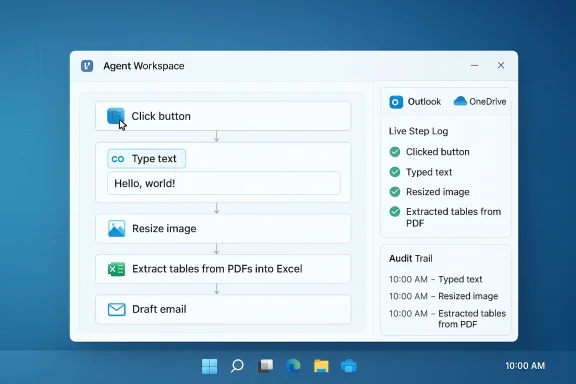
- Chain tasks across apps (e.g., extract invoice data into Excel, generate a summary, then draft an email). ([blogs.windows.com](Copilot on Windows: Copilot Actions begins rolling out to Windows Insiders actions are carried out inside a visible Agent Workspace—an isolated desktop instance where the agent’s activity is observable, auditable, and interruptible. Agents run under dedicated, low‑privilege accounts and request explicit permission to access files or connected services. Microsoft positions this as a compromise between automation convenience and system safety.
Key capabilities in the preview
- Batch file operations: photo resizing, deduplication, and sorting.
- Content extraction: OCR and table extraction from PDFs into Excel.
- In‑window text editing: in‑flow rewrite/summarize/refine inside shared application windows during a Vision session.
- Multi‑step automation: chain steps across apps and cloud connectors (Outlook, OneDrive, Gmail) with OAuth consent.
How Copilot Actions Works (Technical Anatomy)
Copilot Actions is the composition of several components working in concert:1. Copilot Vision (Visual grounding)
Copilot Vision provides the agent with visual context. When a user starts a Vision session, they select a window or screen region to share. The assistant performs OCR and UI detection so that natural‑language instructions can be mapped to concrete UI operations (buttons, text fields, menus). Vision is session‑bound and explicitly opt‑in.2. Agent Orchestration aneasoning layer translates a user’s intent into a sequence of UI events—clicks, keystrokes, menu traversals—executed programmatically inside the Agent Workspace. The agent plans, executes, and exposes a step log so users can review and intervene. This is what enables a single command like “Extract all invoices from these PDFs and send a summarized report to my manager” to unfold into dozens of UI steps.
3. Agent Workspace and Identity Separation
Actions do not run invisibly in the user’s session. Instead, Microsoft provisions a temporary Agent Workspace—implemented as an isolated desktop session—where each agent runs under a dedicated, non‑interactive Windows account with constrained privileges. This separation lets Windows apply ACLs, auditing, and revocation similar to standard service accounts. Agents must be digitally signed and are subject to platform controls.4. Scoped Permissions and Connectors
Agents start with access to common user folders (Documents, Desktop, Downloads, Pictures) and must request explicit authorization for broader access. Connectors (Gmail, Outlook, cloud drives) require OAuth consent. Microsoft emphasizes visible consent prompts and a requirement to approve sensitive steps.System Requirements and How to Try It
- Copilot Actions initially ships through the Copilot app and is gated to Windows Insiders and Copilot Labs in phased rollouts. The preview requires a recent Copilot app package and specific Windows builds for certain features. For example, in‑window text editing required Copilot app version 1.25121.60.0 and Windows build 26200.6899 for Insider channels during the preview. Availability excludes some regions during staged rollouts (EEA noted in early previews).
- Broader Copilot features (Vision, Voice) are delivered via the Copilot app in the Microsoft Store and may be surfntegration and "Ask Copilot" UI in File Explorer and Search.
- For premium, low‑latency on‑device experiences, Microsoft recommends Copilot+ PCs—laptops equipped with NPUs rated at 40+ TOPS and baseline RAM/storage (commonly 16 GB RAM and 256 GB storage). The Copilot+ spec and device list are published in Microsoft’s Copilot+ guidance.
Real‑World Examples and Early Behavior
Early demos and Insider previews show practical, time‑saving workflows:- A photographer asks Copilot Actions to deduplicate and resize a set of vacation photos, producing a cleaned folder and an email with selected images attached.
- An analyst requests extraction of tables from a batch of invoices (PDFs) into Excel, followed by a generated summary and a draft email to stakeholders.
- While editing a document inside an app, a user can start a Vision session and ask Copilot to “rewrite this paragraph to be more formal,” review the preview, and accept the edit without copy‑pasting.
Security, Privacy, and Risk Analysis
Copilot Actions changes the threat model for the desktop. Giving software the ability to manipulate UIs, access files, and interact with cloud services raises new attack surfaces. Below are the most consequential considerations and how Microsoft is addressing them.Strengths and mitigations Microsoft has introduced
- Visible Agent Workspace: Actions run in a separate, observable desktop session, so users can watch what the agent does and abort tasks if something looks wrong.
- Identity and signing: Agents run under dedicated, low‑privilege accounts and require digital signing; this supports enterprise revocation and governance.
- Scoped permissions and explicit consent: Agents must request access to folders and external connectors through OAuth. Vision and voice interactions are opt‑in and session‑bound.
- Audit logs and step logs: Users and administrators can inspect what the agent did; Microsoft has emphasized logging and visibility as core safety features.
Persistent and emerging risks
- Prompt injection and remote control risks: Agents that accept free‑form instructions can be manipulated by malicious input or crafted web content. A recently disclosed Copilot vulnerability (the “Reprompt” exploit) showed how attackers could craft a URL parameter to trigger a Copilot behavior that exfiltrated data—an exploit Microsoft patched in January 2026—underscoring the real threat of invisible agent triggers and the need for hardening. This incident highlights that permissioned agents do not eliminate all attack vectors and that connectors and web content require additional validation.
- Supply‑chain and rogue agent risk: If third‑party or unsigned agents are permitted, they could be a vector for malicious automation. Microsoft’s requirement for signed agents and platform revocation helps, but enterprise policies must be configured to disallow untrusted agents.
- Data leakage via connectors: Agents that access email, cloud storage, or session cookies may inadvertently include sensitive data in cloud‑side model calls or external sites. Tight OAuth scopes, token governance, and clear UI messaging are essential guardrails.
- Accuracy and semantic errors: Agents executing edits or data extraction can introduce incorrect facts (e.g., mixing units, misreading technical terms). These are particularly risky in legal, medical, or financial contexts; human review remains mandatory.
Enterprise controls and the admin view
Microsoft is exposing policy controls for enterprises. Recent Windows updates also introduced a Group Policy to remove the Microsoft Copilot app under limited conditions for managed devices, reflecting pressure from IT teams to regain control over AI features in managed environments. Enterprises should audit Copilot installation status, configure connector consent policies, and restrict agent execution to signed/trusted binaries.Governance Checklist — For IT Teams
- Ensure devices that must remain locked down are excluded from Insider/Copilot preview channels.
- Enforce application control to allow only signed agent binaries; block unsigned Copilot agent packages.
- Configure OAuth and connector policies to require admin consent for sensitive scopes.
- Audit and collect agent workspace logs and enable alerts for unusual agent behaviors.
- Establish a human‑in‑the‑loop policy for any agent actions touching regulatory or sensitive data.
- Maintain a patching cadence—apply security updates promptly (e.g., the January 2026 Copilot patch) and use telemetry to detect anomalous agent prompts.
Benefits — Why Copilot Actions Matters
- Productivity gains for repetitive tasks: Routine, multi‑step chores can be offloaded safely to a visible agent, freeing time for higher‑value work.
- Reduced context switching: In‑window edits and Vision‑grounded actions mean users don’t need to export/import or copy/paste between apps.
- Accessibility: Voice and vision inputs unlock new interaction models for users who benefit from hands‑free controls or on‑screen guidance.
- Platform extensibility: Connectors and agent components open the door for third‑party automation and enterprise workflows that integrate Microsoft 365, SharePoint, and other systems.
Limitations and Caveats
- Preview fragility: The feature set is experimental. Agents can misinterpret UIs, and complex desktop applications may not expose consistent controls for reliable automation. Microsoft warns that users should monitor agent work and be ready to intervene.
- Regional and channel gating: Early rollouts exclude regions like the EEA and are initially available to Insiders, meaning broad availability will lag previews.
- Hardware tier fragmentation: Many lower‑end PCs will rely on cloud processing rather than on‑device inference; Copilot+ features remain gated to machines with 40+ TOPS NPUs, creating a two‑tier experience. Organizations need to weigh value versus upgrade cost.
Practical Recommendations — For Power Users and Enthusiasts
- Start in preview on a non‑critical device or an Insider channel VM to evaluate reliability for your workflows.
- Use the Agent Workspace to observe and step in—accept only operations you understand.
- Avoid granting blanket connector or folder permissions; prefer per‑task explicit folder selection.
- Treat AI‑edited content as suggestions—proofread and verify before publishing or sent.
Cross‑Checks and Verifications
Key technical claims in this article have been cross‑checked against multiple sources:- Copilot Actions rollout and Agent Workspace design (Windows Insider announcements and Microsoft support/docs).
- Copilot app and Windows build requirements for Vision text editing (Windows Insider Blog).
- Copilot+ PC hardware guidance and 40+ TOPS NPU threshold (Microsoft Copilot+ guidance and Microsoft Learn pages, corroborated by independent outlets discussing Copilot+ device lists).
- Recent security incidents and patches that affect Copilot (reported vulnerability and Microsoft patching timeline).
Final Assessment — Balance of Opportunity and Risk
Copilot Actions represents the most consequential shift in Windows’ UX since the integration of Cortana and the system search box: it moves the OS from a passive surface into an agentic platform that can act for users. The potential productivity upside is clear—chained automations, in‑flow edits, and permissioned, auditable agent runs can trim hours of repetitive work from knowledge‑worker workflows.That said, this capability also raises governance and security questions that matter for both individual users and IT teams. The attack surface expands when software can programmatically manipulate UIs, access files, and call external services. Microsoft’s engineering tradeoffs—Agent Workspaces, signed agents, scoped permissions, and visible step logs—are necessary mitigations but not panaceas. Early incidents (for example, the reprompt exploit patched in January 2026) demonstrate that aggressive hardening, rapid patching, and conservative admin policies will be required while the ecosystem matures. For enthusiasts and early adopters, Copilot Actions is an exciting new tool—useful, sometimes magical, but still experimental. For enterprises, the prudent path is to pilot selectively, enforce signing and consent policies, and treat agentic automation as a discipline that requires the same controls you apply to any service‑account automation or RPA toolset.
What to Watch Next
- Expansion beyond Insiders: how quickly Microsoft widens availability to general Windows 11 users and EEA markets.
- Enterprise management controls: additional Group Policy templates and Intune controls for agent policy enforcement and connector governance.
- Security hardening: mitigation of prompt‑injection and reprompt‑style attacks, plus better browser and connector isolation.
- On‑device inference: wider availability of Copilot+ features as more NPUs meet the 40+ TOPS threshold and Intel/AMD platforms ship compatible silicon.
Copilot Actions is a defining milestone in Windows’ AI transition: it brings measurable automation power to the desktop while demanding new operational discipline. The outcome depends less on the technology’s novelty and more on how carefully users, administrators, and Microsoft itself manage permissions, signing, telemetry, and the inevitable security tradeoffs that accompany giving software the power to act.
Source: MSN http://www.msn.com/en-in/money/news...vertelemetry=1&renderwebcomponents=1&wcseo=1]
