

Microsoft’s latest Copilot-for-Windows social spot was meant to be a short, reassuring demo of AI helping with everyday tasks — instead it turned into a viral lesson in how an assistant that doesn’t check the screen can actively damage trust and raise real accessibility concerns.
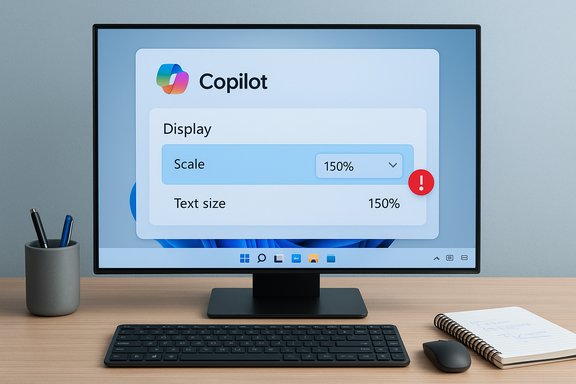
Microsoft has tightly woven Copilot into Windows 11 as a conversational, screen-aware assistant intended to make settings, accessibility, and multi-step tasks easier for mainstream users. That strategy is part of a broader push to position Windows as an agentic OS — a platform that can proactively act on a user’s behalf when permitted. Recent promotional material and executive commentary pushing that vision have provoked strong community pushback about usability, telemetry, and forced feature integration. This week’s flashpoint is a short influencer clip Microsoft distributed through official Windows channels that shows an on-screen user asking Copilot to “make the text on my screen bigger.” The assistant guides the user to a display setting, recommends a scale value that is already active, and fails to surface the dedicated Text size accessibility control that Windows documents specifically for enlarging text alone. Multiple outlets reconstituted the viral clip and community threads filed quick, often scathing reactions.
For users, the takeaway is simple and practical: AI helpers must be demonstrably better than the alternatives at mapping intent to action, and they must visibly respect accessibility and state. For Microsoft, the lesson is equally clear: the road to an “agentic OS” is paved by trust-building micro‑interactions — not by aspirational messaging alone. Fix those micro‑interactions, and the agentic vision becomes compelling; ignore them, and the company risks alienating the very audience it needs to carry Windows forward.
The clip’s viral life-span will pass, but the structural issues it highlights are durable: state awareness, clarifying intent, proper QA for AI demos, and respect for accessibility. Addressing those concretely would turn a one-off PR embarrassment into a catalyst for much‑needed product maturity.
Source: Windows Report Copilot fails badly in a new Windows ad, and users are understandably fuming
 Background
Microsoft has tightly woven Copilot into Windows 11 as a conversational, screen-aware assistant intended to make settings, accessibility, and multi-step tasks easier for mainstream users. That strategy is part of a broader push to position Windows as an agentic OS — a platform that can proactively act on a user’s behalf when permitted. Recent promotional material and executive commentary pushing that vision have provoked strong community pushback about usability, telemetry, and forced feature integration. This week’s flashpoint is a short influencer clip Microsoft distributed through official Windows channels that shows an on-screen user asking Copilot to “make the text on my screen bigger.” The assistant guides the user to a display setting, recommends a scale value that is already active, and fails to surface the dedicated Text size accessibility control that Windows documents specifically for enlarging text alone. Multiple outlets reconstituted the viral clip and community threads filed quick, often scathing reactions. Overview of the ad and what went wrong
The sequence viewers saw
The clip unfolds in a few short beats that reveal both UX and state‑awareness failures:- The creator invokes Copilot with the wake phrase and asks to make on‑screen text bigger.
- Copilot opens Settings, points to Display and highlights the Scale & layout control rather than the Accessibility → Text size slider.
- Copilot recommends 150% scaling despite the on-screen control already showing 150% selected; the human on camera manually chooses 200%, which visibly solves the problem.
Why viewers felt the ad was especially tone‑deaf
- The demo missed an accessibility-first path: Windows has a dedicated Text size control that changes only typography without altering app layout. Steering users away from that control undermines accessibility best practices.
- The assistant’s suggestion contradicted visible state, which is a basic reliability expectation for any UI-aware helper.
- The clip was distributed by official accounts and an influencer, turning a narrow UX bug into a widely shared proof point for critics who already distrust Copilot’s ubiquity.
Background technical primer: Text size vs Scale in Windows 11
Understanding why this matters requires a quick, concrete primer on the two distinct controls in Windows 11.- Text size (Settings > Accessibility > Text size) — This slider changes only the size of system text (menus, title bars, labels). It’s the accessibility-first control designed for users who need larger type without changing layout or app scaling. Microsoft documents this exact flow and recommends it when the user’s goal is to read text more comfortably.
- Scale & layout (Settings > System > Display > Scale) — This dropdown scales everything on the display: text, icons, apps, and UI chrome. It’s the correct adjustment for addressing high-DPI issues, touch-target size, or when a user wants broader UI enlargement. Some app behavior may still vary after scaling changes and sign‑out/sign‑in may be required.
Technical analysis: How Copilot likely failed
Three plausible technical problems explain what viewers observed. Each failure mode points to different parts of the Copilot stack and suggests different mitigations.1) Intent detection and lack of clarifying prompts
LLMs map natural language to likely actions using statistical priors. When a user says “make text bigger,” the model may default to the most common remediation — total display scaling — without asking a short clarifying question. A robust assistant should ask: “Do you want only the text to look bigger, or the whole interface?” The absence of such a disambiguation step is a UX failure, not a theoretical limitation.2) UI parsing and state‑awareness mismatch
Copilot’s screen‑context features rely on reading the UI and current control values (OCR + control parsing). Recommending “150%” when the scale control already shows 150% implies one of three things: Copilot didn’t read the UI accurately; it used cached or out‑of‑sync state; or the demo was edited in a way that obscured intermediate state. Each outcome reveals a gap in engineering or production QA.3) Marketing and post‑production editing artifacts
Short influencer clips are edited for pace. Edits that change on‑screen state between cuts can create an illusion of failure. That said, the core problem remains: a staged demo must match the narrative. Human reviewers on the marketing side should have prevented or fixed the contradiction before distribution. This is a production‑QA problem layered on a technical one.Accessibility and trust: why this is more than an ad gaffe
Accessibility is not optional; it is a measurable user need. Steering users away from the specific accessibility control designed for text enlargement can produce unintended side effects:- Layout regressions: Scaling everything changes touch targets and app layouts; this can reduce usability for some assistive-tech users.
- Loss of confidence: Users who rely on assistive settings need predictable outcomes. An assistant that recommends the wrong control undermines that predictability and erodes trust.
- Marketing credibility: High‑profile demos are intended to build confidence. When a demo visibly fails, it amplifies existing doubts about Copilot’s readiness for broad audiences and fuels narratives that Microsoft prioritizes flashy AI marketing over core usability fixes.
The broader context: agentic OS and product strategy
This ad misfire comes amid a divisive strategic push. Some Microsoft leadership have publicly described Windows’ future as an “agentic OS” — an operating system that can proactively act on the user’s behalf given permission. That framing has intensified debates about how much autonomy an OS should take, which defaults are acceptable, and whether the company is prioritizing AI feature rollouts over foundational usability. The messaging has drawn vocal criticism and distrust from segments of the Windows community. For many long‑time Windows users, this is not a narrow fight about a single feature. It ties into larger grievances: mandatory account requirements, perceived bloat, frequent disruptive updates, and the erosion of deep customization. An ad that visibly demonstrates an AI assistant getting a basic accessibility task wrong feeds those concerns and stiffens resistance to the agentic vision.Marketing and QA lessons — what Microsoft and other vendors should learn
This episode offers concrete lessons for any company shipping AI-enabled UX demonstrations:- Pre‑shoot state verification: Verify and log UI state before recording. A simple checklist would have prevented the contradiction.
- Force clarifying prompts for ambiguous intents: When user intent is ambiguous — especially in accessibility flows — the assistant should ask one clarifying question rather than guessing.
- Run demos through technical reviewers: Engineers should validate that any recorded demo path is faithful to the product’s actual behavior. Marketing should avoid “creative” edits that break causality.
- Surface state transparently: If an assistant cannot or will not act on the user’s behalf (sandboxed actions), it must clearly state its limitations and provide a precise next step. Vague guidance will be perceived as failure.
Risks and potential downstream effects
- Reputational drift: Repeated visible failures in marketing hurt adoption and can produce sustained negative sentiment among enthusiasts and IT buyers. A single viral clip can multiply those effects.
- Accessibility backlash: Demonstrations that mishandle accessibility flows risk regulatory and community backlash in jurisdictions where accessibility is a compliance requirement.
- Increased scrutiny of agentic features: Product managers may face demands for clearer opt‑ins, better transparency on agentic actions, and more conservative defaults. This can slow roadmap execution and complicate enterprise procurement.
What Microsoft could do now — recommended next steps
- Immediately issue a clear, short statement that acknowledges the clip’s mismatch and explains whether it was a production edit, a demo of a different flow, or a genuine bug. If the issue was a production artifact, clarifying that reduces uncertainty.
- Publish a short explainer showing the correct Copilot flow for increasing text size — ideally demonstrating both Text size and Scale & layout with on-screen verification. Visual, reproducible guidance rebuilds trust.
- Ship a micro‑UX change: when a user asks an ambiguous request like “make text bigger,” have Copilot ask one quick clarifying question. This is low-effort, high-impact.
- Add a marketing QA gate that requires technical sign‑off for any AI-enabled demo involving stateful interactions. Marketing should not publish stateful demos without engineering validation.
Separating verifiable facts from social commentary
Verified facts in this episode:- The clip shows Copilot directing the user to Display → Scale instead of Accessibility → Text size. This behavior is visible in the distributed video and reconstructed by multiple independent outlets.
- Microsoft’s documentation explicitly distinguishes Text size (accessibility, text-only) from Scale (affects text, apps, UI), and recommends Text size for font enlargement.
- Whether Copilot’s behavior in the clip reflects production code, an Insider build, or a staged marketing workflow is not fully verifiable from the clip alone; Microsoft has not publicly provided a definitive explanation at the time of writing. That detail requires a company statement or a reproduced test on a controlled build. This account treats that point as unresolved and flags it for confirmation.
Final assessment: why this matters for the Windows ecosystem
This single, short ad should not eclipse the technical progress Microsoft has made integrating on‑device and cloud AI into Windows. However, it is a high‑leverage moment: marketing that promises effortless, trustworthy assistance must earn that trust through accuracy, transparency, and accessible defaults.For users, the takeaway is simple and practical: AI helpers must be demonstrably better than the alternatives at mapping intent to action, and they must visibly respect accessibility and state. For Microsoft, the lesson is equally clear: the road to an “agentic OS” is paved by trust-building micro‑interactions — not by aspirational messaging alone. Fix those micro‑interactions, and the agentic vision becomes compelling; ignore them, and the company risks alienating the very audience it needs to carry Windows forward.
The clip’s viral life-span will pass, but the structural issues it highlights are durable: state awareness, clarifying intent, proper QA for AI demos, and respect for accessibility. Addressing those concretely would turn a one-off PR embarrassment into a catalyst for much‑needed product maturity.
Source: Windows Report Copilot fails badly in a new Windows ad, and users are understandably fuming
