

Microsoft’s new Copilot agents bring a long-awaited shift from “ask and receive” AI to agents that act inside the apps people use every day, automating repetitive work, coordinating multi-step workflows across Microsoft 365, and—if configured—taking pre-authorized actions on behalf of teams and channels.
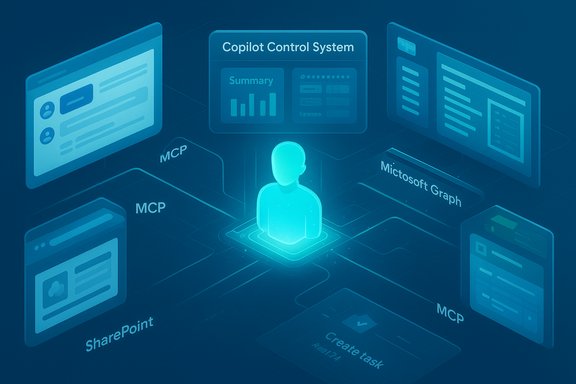
Microsoft has extended the Copilot family beyond chat and search into a platform of autonomous, context-aware agents that operate inside Teams, Outlook, Word, Excel, PowerPoint, SharePoint and other Microsoft 365 surfaces. These agents are designed to do more than answer questions; they can perform actions, orchestrate across services using Microsoft Graph, and be composed with other agents through a protocol Microsoft calls the Model Context Protocol (MCP).
Two authoring paths are provided: a low-code, in-context experience via Copilot Studio Lite (or the in-app builder), and a full, pro-grade Copilot Studio experience for enterprise-grade agents that require multi-step workflows and external hosting. Microsoft also provides a catalog—an Agent Store and Marketplace—where prebuilt Microsoft and partner agents can be discovered and deployed.
Flagging unverifiable or changeable claims: any specific price-per-message figures, exact GA timelines for particular agents, or model assignments may change rapidly. Those items should be verified against Microsoft’s official product/licensing pages or tenant admin notices prior to procurement.
The counterpoint is that agentic AI raises new operational responsibilities for IT: identity management for agents, DLP tuning, cost management and a lifecycle process for agent catalogs. Organizations that prepare for those responsibilities stand to gain; those that don’t risk unexpected bills, security exposures, or brittle automation.
Source: Petri IT Knowledgebase Introducing Copilot Agents: What You Need to Know
 Background
Microsoft has extended the Copilot family beyond chat and search into a platform of autonomous, context-aware agents that operate inside Teams, Outlook, Word, Excel, PowerPoint, SharePoint and other Microsoft 365 surfaces. These agents are designed to do more than answer questions; they can perform actions, orchestrate across services using Microsoft Graph, and be composed with other agents through a protocol Microsoft calls the Model Context Protocol (MCP).Two authoring paths are provided: a low-code, in-context experience via Copilot Studio Lite (or the in-app builder), and a full, pro-grade Copilot Studio experience for enterprise-grade agents that require multi-step workflows and external hosting. Microsoft also provides a catalog—an Agent Store and Marketplace—where prebuilt Microsoft and partner agents can be discovered and deployed.
What is a Copilot agent?
Core concept
A Copilot agent is an AI-enabled bot that lives inside Microsoft 365 apps and can carry out tasks on behalf of users or teams—everything from summarizing meetings and drafting emails to launching scripts, creating Power BI dashboards, or orchestrating Planner tasks. Unlike the single-turn responses from Copilot Chat or Copilot Search, agents are intended for multi-step, action-oriented automation.Key capabilities (at a glance)
- Natural-language interaction: users describe what they want in conversational language.
- Contextual grounding via Microsoft Graph: agents use tenant context (files, calendars, chats, membership) to make informed decisions.
- Orchestration and multi-app workflows: agents can coordinate tasks across Teams, SharePoint, Planner, Excel, Power BI, and third-party systems via MCP.
- Declarative and pro-code authoring: low-code declarative agents for quick wins, and custom engine agents for deep customization and external hosting.
Why this matters for productivity and IT
For knowledge workers
Agents reduce the friction of context switching. A channel-scoped agent can ingest meeting transcripts, linked documents, and project plans and then generate polished outputs (summaries, follow-ups, draft emails) without manual copy/paste. That compounds time savings across teams because agents can perform recurring, low‑value steps automatically.For teams and organizations
Agents enable a form of “operational memory”: workspace-scoped knowledge that remains available in a channel or SharePoint site. New team members can query the agent for a curated catch‑up instead of reading hundreds of messages. Agents can also stitch decisions into tracked tasks and dashboards, reducing the risk of missed follow-ups.For IT and security
Microsoft built governance into the stack—agent identities, action-level permissions, Purview integrations and the Copilot Control System—so administrators can treat agents like managed principals with auditable actions and configurable access to data. That said, the risk surface grows when agents are allowed to act autonomously, so admins must design conservative defaults and approval workflows.How Copilot agents work — architecture and plumbing
The core layers
- Orchestrator — the runtime that coordinates triggers, actions and multi-step flows.
- Foundation model — an LLM (Microsoft leverages OpenAI models among others) that provides reasoning and natural‑language understanding.
- User experience layer — where agents appear: Copilot Chat rails, app panes in Word/Excel, Teams channel rails, and the Agent Store.
Context fabric — Microsoft Graph and MCP
Agents rely heavily on Microsoft Graph to retrieve membership, calendar entries, files and meeting transcripts so outputs are tenant-grounded and scoped correctly. To enable multi-agent choreography and third‑party integration, Microsoft introduced Model Context Protocol (MCP): a way for agents to expose tools, share structured context, and call each other inside a workflow. This composability is a key design decision that separates a single-agent assistant from a coordinated agent ecosystem.Types of agents: Declarative vs Custom engine
Microsoft distinguishes two main agent types, each suited for different needs.Declarative agents (low-code)
- Built in Copilot Studio Lite or the in-app authoring surface.
- Use the native orchestrator and Microsoft’s foundation models.
- Inherit Microsoft 365 security, compliance and the Copilot governance stack automatically.
- Best for quick automations: meeting summarizers, channel catch-ups, simple SharePoint monitors.
Custom engine agents (pro-code)
- Developed using Visual Studio, Visual Studio Code or full Copilot Studio web experience.
- Hosted externally (commonly on Azure) and can use custom models, specialized APIs and non-Microsoft data sources.
- Provide full flexibility and are suited for enterprise-grade workflows, but require the organization to implement security, logging and compliance controls.
Real-world use cases
- Automating HR onboarding: agent posts required forms, schedules orientation, and updates a SharePoint onboarding tracker.
- Sales reporting: agent generates weekly sales summaries from Excel and emails stakeholders, or drafts follow-ups to leads.
- Meeting facilitator: the Facilitator agent builds agendas, takes live notes, timestamps decisions and converts outcomes into Planner tasks. This agent reached general availability in early rollouts.
- Knowledge Agent for SharePoint: tags files, assesses freshness and provides cited answers when Copilot responds to queries.
- Cross-app deliverables: an Office Agent can create a PowerPoint from a Word document plus spreadsheet data, including visuals and speaker notes.
Governance, security and compliance — where the heavy lifting is
Identity and accountability
Agents receive managed identities (Entra Agent ID) so actions are attributable and controllable through the same identity and access frameworks IT already uses. This lets administrators set least-privilege boundaries and audit agent activity.Data access controls
- Agents can access content only if a user or admin has granted permissions. Microsoft emphasizes that agents will surface content that a user is already authorized to see.
- Integration with Purview and the Copilot Control System allows enforcement of sensitivity labels, retention and DLP policies for agent-accessed content.
Action-level permissions
Admins can restrict what agents are permitted to do: read-only summarization, draft-only outputs that require human approval before posting, or full autonomous actions for pre-approved flows. These granular controls are essential to prevent accidental disclosures or unwanted changes.Risks, limitations and practical cautions
Hallucinations and provenance
Like other generative systems, agents can hallucinate—produce plausible-sounding but incorrect outputs—especially when synthesizing across disparate documents or combining web-grounded results with tenant data. Microsoft is addressing this with knowledge‑agent patterns that attach citations and lineage, but human review remains essential for business‑critical outputs.Cost and metering risk
Agents and certain Copilot features are metered. Microsoft has experimented with pay‑as‑you‑go message metering and prepaid packs in early programs; heavy or unmonitored agent usage can create surprising billing if controls aren’t in place. Organizations should treat consumption and message metering like a new utility to monitor.Agent sprawl and operational burden
Easy authoring (Copilot Studio Lite) makes it simple for citizen developers to build agents. Without lifecycle governance, catalogs of poorly maintained agents can proliferate—each adding potential security and compliance tasks. The recommended approach is a formal agent lifecycle with staging, testing, approvals and telemetry-backed retirement processes.External integrations and custom hosting
Custom engine agents bring flexibility but also responsibility. Hosting on Azure or other clouds means the organization must secure compute, key management, data flows, and logging; these are not automatically inherited from Microsoft 365 and require explicit engineering and compliance work.How to get started — a practical playbook for IT and teams
Start small, measure impact, and scale through governed templates. A recommended phased approach:- Pilot one high-value, low-risk workflow (for example: meeting summarization or weekly sales digest).
- Author a declarative agent in Copilot Studio Lite and scope it to a single channel or team. Test for correctness, permissions and audit logs.
- Define approval gates and action-level permissions—require human sign‑off for any agent action that modifies persistent data or posts externally.
- Monitor consumption and telemetry (Copilot Analytics) to quantify time reclaimed and detect runaway usage.
- When a workflow needs deeper integration or scale, consider building a custom engine agent with clear SLAs, security controls and external hosting practices.
- Enforce least privilege for agent data access.
- Require approval for agents that perform write or posting actions.
- Configure Purview sensitivity label enforcement and DLP protections for agent interactions.
- Set consumption caps or prepaid packs to limit spend and avoid billing surprises.
- Enable robust telemetry and audit logging, and schedule regular agent reviews.
Licensing, availability and the reality check
Microsoft’s rollout strategy has combined phased previews, selective GA (for agents like Facilitator), and commercial metering models. Some Copilot features are included in consumer Microsoft 365 tiers while enterprise-grade Copilot capabilities commonly require a Copilot add-on or relevant licenses—historically Microsoft listed a $30/user/month add-on for full Microsoft 365 Copilot features in certain commercial announcements, but entitlements, pricing and availability vary by tenant and region and have evolved during 2024–2025. Organizations must verify their exact licensing and price terms with Microsoft or their reseller before planning broad rollout. Treat published metering mechanics and price points as indicative and confirm contractually.Flagging unverifiable or changeable claims: any specific price-per-message figures, exact GA timelines for particular agents, or model assignments may change rapidly. Those items should be verified against Microsoft’s official product/licensing pages or tenant admin notices prior to procurement.
Strengths and opportunities
- Immediate productivity wins: Agents automate repetitive synthesis and handoffs that typically cost hours per week across teams.
- Integrated governance stack: agent identities, Purview and the Copilot Control System provide a real path to enterprise control when configured correctly.
- Composability: MCP enables partner agents and tenant agents to interoperate, enabling rich cross‑tool workflows and a marketplace of specialized agents.
- Democratized authoring: Copilot Studio Lite empowers citizen makers to prototype use cases quickly, lowering time to value.
Risks and red flags
- Overtrusting autonomous actions: agents that post, change documents, or create tasks should be restricted until workflow accuracy is proven.
- Cost surprises: metered models require strict consumption monitoring and quotas.
- Hallucination and provenance gaps: summaries and synthesized outputs must include lineage and be subject to human verification for critical decisions.
- Operational debt: an ungoverned agent catalog becomes a maintenance burden; lifecycle management is essential.
Practical scenarios — short decision guide
- Need quick, low-risk automation (summaries, alerts, simple templates)? Use a declarative agent in Copilot Studio Lite.
- Need cross-system orchestration (CRM, ERP, internal APIs) or custom models? Invest in a custom engine agent, plan for hosting, security and cost.
- Want to let teams self-serve but retain control? Publish a curated set of approved agents to the Agent Store and enforce approval workflows and telemetry.
Final analysis — where Copilot agents will make the biggest difference
Copilot agents are not a generic replacement for human judgment, but they are a powerful tool to eliminate the repetitive glue work that drains teams: meeting capture, task follow‑ups, routine reporting and context synthesis. When deployed with clear governance, conservative defaults and consumption controls, agents can noticeably accelerate knowledge-worker throughput and reduce time‑to‑decision. The real advantage is composability: agents that can call other agents and integrate with existing enterprise systems create automation that is resilient, auditable and more strategic than single-purpose macros or basic RPA.The counterpoint is that agentic AI raises new operational responsibilities for IT: identity management for agents, DLP tuning, cost management and a lifecycle process for agent catalogs. Organizations that prepare for those responsibilities stand to gain; those that don’t risk unexpected bills, security exposures, or brittle automation.
Conclusion
Copilot agents represent the next practical step in embedding AI into daily work: not only answering questions, but doing the work. They promise time savings, better continuity across documents and meetings, and an extensible platform for building intelligent assistants that operate at the team level. However, the upside comes with new governance, operational and cost responsibilities that demand early planning and conservative pilots. Start with a single, well-scoped use case, enforce least-privilege access and approval gates, monitor consumption closely, and iterate. With those guardrails in place, Copilot agents can move from promising novelty to dependable workplace coworkers.Source: Petri IT Knowledgebase Introducing Copilot Agents: What You Need to Know
