

More than 100 people registered for Stronghold Data’s AI training in Joplin, Missouri, on May 30, 2026, forcing the company to move its quarterly lunch-and-learn from its original venue to the Joplin Public Library. The headline is local, but the story is bigger than one crowded room in southwest Missouri. Microsoft’s Copilot pitch has moved from keynote theater to municipal departments, small businesses, and regional IT shops trying to decide whether “AI at work” is a productivity tool, a governance problem, or both. Stronghold’s overflow crowd suggests the answer, increasingly, is both at once.
For the past three years, enterprise AI has mostly been narrated from the top down: Microsoft Build stages, earnings calls, partner decks, and glossy demos in which Copilot politely summarizes meetings that nobody wanted to attend. But adoption does not happen on a stage. It happens in training rooms where finance managers ask what Copilot can see, IT directors ask what it will break, and department heads ask whether the thing is useful enough to justify changing workflows.
That is why Stronghold Data’s event matters. A quarterly lunch-and-learn outgrowing its venue is not proof of mass adoption, but it is evidence of a new phase in the market. The early curiosity wave is giving way to a more practical one, where organizations that already live inside Microsoft 365 are asking what they can safely do now.
The Joplin session reportedly drew attendees from as far away as Springfield and Bella Vista, Arkansas. That regional pull is important. Copilot is not just a Fortune 500 story anymore; it is now showing up in the same procurement, training, and governance conversations that define technology adoption in city governments, clinics, school districts, manufacturers, and local service businesses.
The audience composition also hints at why Microsoft has an advantage. For many of these organizations, Microsoft is not a new vendor to evaluate from scratch. It is the default substrate for email, documents, calendars, Teams, identity, and device management. Copilot arrives not as a standalone chatbot but as an extension of a stack that already owns the workday.
That embeddedness is Microsoft’s strategic bet. The company does not need every customer to wake up excited about generative AI as an abstract technology. It needs them to notice that the tools they already pay for can now draft, summarize, search, analyze, and automate more of the work sitting inside Microsoft Graph.
The training format described in the local report is revealing. The session covered Copilot’s features, prompt crafting, and data security. That trio is now the real enterprise AI curriculum: what it does, how to ask it properly, and whether the answer leaks something it should not.
Prompt training may sound like a soft skill, but in offices it is becoming a kind of operational literacy. Employees who treat Copilot like a search box often get shallow results. Employees who frame the task, provide constraints, identify the audience, and ask for a format get something closer to usable work product. The productivity gain is not just in the model; it is in the human knowing how to delegate.
Security, meanwhile, is the part of the conversation that separates business Copilot from consumer AI experimentation. Microsoft’s enterprise pitch is that Copilot respects existing Microsoft 365 permissions and does not use customer prompts, responses, or Microsoft Graph data to train foundation models. That is a strong baseline, but it is not a magic wand. If a SharePoint site is overshared, Copilot may make that oversharing easier to discover.
That is the uncomfortable truth behind every “AI readiness” workshop: Copilot does not merely introduce new risk. It exposes old risk faster.
The temptation with AI is to start from the demo. Here is a bot that drafts an email. Here is an agent that files a ticket. Here is a summary of a meeting transcript. But public-sector workflows are not generic office theater. They involve compliance, dispatch, records retention, public accountability, emergency response, and field conditions that do not fit neatly into a vendor slide.
Moeckel’s framing also recognizes that IT cannot invent operational value in isolation. A city IT department can explain technical feasibility, procurement constraints, access controls, and integration paths. It cannot guess the lived reality of a firefighter filling out reports after a call or a police department managing sensitive records under strict policy.
That matters because AI projects fail when they automate imagined work instead of actual work. The most useful Copilot deployment in a city may not be the flashiest one. It may be a better way to summarize council packets, draft grant documentation, search policy archives, prepare HR materials, or help department heads turn meeting notes into action items.
The “last thing we want to do is waste people’s time” line is more than a polite quote. It is the governing principle for AI adoption in resource-constrained organizations. The cost of a failed AI pilot is not just licensing spend. It is the credibility lost when employees are told to try another tool that does not understand their job.
Copilot has changed rapidly across Windows, Microsoft 365, Teams, Edge, Power Platform, and the broader agent ecosystem. Features have been renamed, repositioned, folded into new licensing models, and extended with agent-building capabilities. The product is not a single thing so much as a moving layer across Microsoft’s software estate.
That creates a training paradox. Organizations need education before they deploy AI broadly, but the thing they are training on may shift before the next quarter’s lunch-and-learn. A user who learned “Copilot” as a chat pane in 2024 may encounter it in 2026 as a work assistant, an app-level drafting tool, an agent catalog, a taskbar entry point, or a delegated workflow system.
This is not merely confusing branding. It changes governance. A chat assistant that helps draft a Word document is one kind of risk. An agent that can act across systems, trigger workflows, access enterprise data, and complete multi-step tasks is another. The administrative model, audit posture, licensing assumptions, and acceptable-use policy must mature along with the feature set.
That is why events like Stronghold’s are likely to become recurring rather than one-off. AI training is not like teaching a new version of Excel where the ribbon moved and a few formulas changed. It is closer to security awareness training crossed with workflow redesign and software lifecycle management.
For IT pros, the ninety-day warning is also a budget warning. Microsoft’s AI stack increasingly intersects with Copilot licenses, Copilot Studio, Power Platform consumption, agents, connectors, and governance tools. The bill is not always obvious at the moment a department head says, “Can we make an agent for that?”
Microsoft introduced Copilot Cowork in March 2026 as a more agentic experience designed to operate across Microsoft 365 work. It began in limited testing and moved toward broader Frontier availability, positioning it as an early-access product rather than a settled mainstream tool. In plain English, that means most organizations should treat it as strategically important but operationally immature.
The distinction between an assistant and a delegate is not academic. An assistant responds to a prompt. A delegate needs a goal, context, permissions, guardrails, and some way to verify whether the completed work was actually correct. The moment AI moves from “write me a draft” to “handle this process,” the burden shifts from user judgment to system design.
That is why agent training belongs in the same room as security training. Agents can be enormously useful when bounded tightly: preparing reports from approved data, routing requests, summarizing intake forms, generating first drafts, checking status across systems, or helping users navigate internal knowledge. But agents can also amplify bad permissions, stale data, unclear ownership, and sloppy process design.
The practical question is not whether AI agents will enter the workplace. They already are. The question is whether organizations will build them like production systems or treat them like clever macros with better marketing.
Microsoft’s advantage here is the same as its Copilot advantage: identity, documents, Teams, SharePoint, Outlook, Power Platform, and administrative controls are already in place for many customers. Its challenge is that the more powerful the agent becomes, the more customers will demand transparency, auditability, cost predictability, and fail-safe behavior.
But there is a subtle danger in how that message lands. “Copilot respects permissions” can sound like “Copilot makes permissions safe.” It does not. If permissions are messy, Copilot may simply become a faster way to reveal the mess.
This is especially important for small and mid-sized organizations that have lived for years with informal file-sharing habits. A folder that “everyone” can access may not have caused visible trouble when nobody knew what was inside it. Add semantic search and generative summarization, and suddenly dormant oversharing becomes discoverable.
The same issue applies to records retention and compliance. Copilot interactions can become discoverable business records depending on the environment and policy configuration. That may be exactly what regulated organizations want, but it also means IT and legal teams need to understand where prompts and responses live, how long they persist, and how they are governed.
The vendor promise, then, is only half the story. Microsoft can provide a compliance-aware platform, but customers still have to do the unglamorous work: clean up permissions, classify sensitive content, configure retention, review external sharing, define acceptable use, and train employees not to treat AI output as unquestioned truth.
In that sense, the security portion of Stronghold’s session may be the most valuable part. Feature demos create excitement. Security discussions create survivable deployments.
In regional markets, technology has to justify itself quickly. Businesses may not have giant innovation teams. Local governments may not have spare staff to babysit experiments. Managed service providers and IT consultants often function as translators between vendor ambition and operational reality. If AI cannot survive that translation, it will struggle outside the early-adopter bubble.
Stronghold Data’s role matters here. Regional IT providers are increasingly becoming the adoption layer for AI. They are not merely reselling licenses; they are teaching prompt habits, explaining Microsoft’s security model, helping customers identify workflows, and warning them where the product is still moving.
This is a different kind of channel opportunity than the traditional Microsoft partner playbook. Selling Exchange migrations or endpoint management is one thing. Advising a city, hospital, or manufacturer on where AI agents should be allowed to act is closer to governance consulting. The partner becomes part trainer, part architect, part risk interpreter.
That also means regional events can surface more honest questions than national conferences. A keynote audience applauds when an AI agent books travel or resolves a ticket. A local IT director asks what happens when the agent sees confidential files, cites outdated policy, or sends a draft to the wrong person.
Those questions are not resistance. They are adoption becoming real.
The better starting point is use-case triage. Not every department needs the same AI pattern. Executives may want meeting summaries and briefing prep. HR may want policy drafting and employee communications support. Finance may want variance explanations and spreadsheet assistance. IT may want ticket summarization, knowledge-base search, and incident communication drafts.
The second starting point is data hygiene. Copilot’s value depends heavily on the quality, accessibility, and permissioning of organizational content. If files are scattered, mislabeled, duplicated, or locked in legacy systems, Copilot will inherit that disorder. If sensitive files are overshared, Copilot may make the exposure more obvious.
The third starting point is policy. Employees need clear guidance on when AI can be used, what data is off-limits, how outputs should be reviewed, and who is accountable for final decisions. The policy should be practical enough to be followed, not a legal PDF that everyone clicks past.
The fourth starting point is measurement. “Productivity” is too vague to manage. A pilot should track concrete outcomes: time saved drafting recurring documents, reduction in meeting follow-up delays, faster discovery of internal information, improved ticket summaries, or higher completion rates for administrative tasks.
None of this is glamorous, but it is the difference between a Copilot deployment and a Copilot purchase. The former changes how people work. The latter adds an icon.
That is why AI agents may become a forcing function for process discipline. Organizations that cannot describe a workflow will struggle to automate it. Departments that disagree about ownership will produce agents that wander across responsibility lines. Teams that keep policies in outdated PDFs, old email threads, and tribal knowledge will get inconsistent results.
The irony is that the first benefit of agent adoption may not be automation at all. It may be forcing organizations to document how work actually happens. Before an agent can handle a process, someone has to define the trigger, the inputs, the allowed sources, the decision points, the approval path, and the desired output.
This is where local government and public safety examples become especially instructive. Nobody should deploy an agent into sensitive operational contexts merely because it can produce fluent text. But those contexts may benefit from careful AI support around documentation, intake, summarization, training materials, policy lookup, and administrative burden.
The boundary matters. AI that helps a firefighter complete a report faster is different from AI that makes operational decisions. AI that drafts a public works memo is different from AI that approves a permit. AI that summarizes records is different from AI that determines what a record means.
The organizations that do best with agents will be the ones that draw these lines early and revisit them often.
That ambition creates opportunity for customers, but also dependency. The more work gets routed through Copilot and agents, the more organizations must understand Microsoft’s licensing, data boundaries, administrative controls, and product roadmap. AI becomes not a standalone initiative but another layer of Microsoft platform governance.
For WindowsForum’s audience, that is the practical takeaway. The future of workplace AI will not be decided only by model benchmarks or flashy demos. It will be decided in admin centers, retention policies, Entra groups, SharePoint permissions, Power Platform environments, user training sessions, and uncomfortable meetings where someone asks whether the agent should be allowed to do that.
Stronghold Data’s event points to a healthier version of the AI rollout than the one the industry often sells. Start with real workflows. Bring in the people who do the work. Teach the tool, but also teach its limits. Treat security as architecture, not reassurance. Revisit the plan every quarter because the platform will not sit still.
The crowded room in Joplin is not the end state of enterprise AI; it is the beginning of its normalization. If Microsoft and its partners want Copilot, Cowork, and agents to become trusted workplace infrastructure, they will have to win many more rooms like that one — not with slogans about the future of work, but with deployments that save time without making tomorrow’s audit, breach, or budget meeting worse.
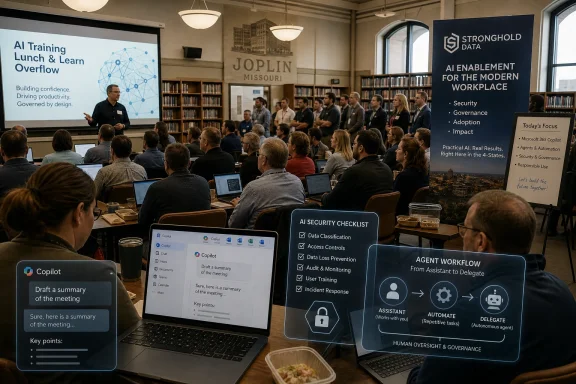 The AI Roadshow Has Reached the Rooms Where Work Actually Happens
For the past three years, enterprise AI has mostly been narrated from the top down: Microsoft Build stages, earnings calls, partner decks, and glossy demos in which Copilot politely summarizes meetings that nobody wanted to attend. But adoption does not happen on a stage. It happens in training rooms where finance managers ask what Copilot can see, IT directors ask what it will break, and department heads ask whether the thing is useful enough to justify changing workflows.That is why Stronghold Data’s event matters. A quarterly lunch-and-learn outgrowing its venue is not proof of mass adoption, but it is evidence of a new phase in the market. The early curiosity wave is giving way to a more practical one, where organizations that already live inside Microsoft 365 are asking what they can safely do now.
The Joplin session reportedly drew attendees from as far away as Springfield and Bella Vista, Arkansas. That regional pull is important. Copilot is not just a Fortune 500 story anymore; it is now showing up in the same procurement, training, and governance conversations that define technology adoption in city governments, clinics, school districts, manufacturers, and local service businesses.
The audience composition also hints at why Microsoft has an advantage. For many of these organizations, Microsoft is not a new vendor to evaluate from scratch. It is the default substrate for email, documents, calendars, Teams, identity, and device management. Copilot arrives not as a standalone chatbot but as an extension of a stack that already owns the workday.
Copilot’s Best Sales Pitch Is That It Is Already in the Building
The first Stronghold session centered on Microsoft Copilot, which is precisely where many practical AI conversations now begin. Copilot is not the only capable AI assistant on the market, and in some contexts it may not be the best one. But for organizations already standardized on Microsoft 365, its appeal is brutally simple: it promises to use the documents, meetings, chats, calendars, and permissions that employees already rely on.That embeddedness is Microsoft’s strategic bet. The company does not need every customer to wake up excited about generative AI as an abstract technology. It needs them to notice that the tools they already pay for can now draft, summarize, search, analyze, and automate more of the work sitting inside Microsoft Graph.
The training format described in the local report is revealing. The session covered Copilot’s features, prompt crafting, and data security. That trio is now the real enterprise AI curriculum: what it does, how to ask it properly, and whether the answer leaks something it should not.
Prompt training may sound like a soft skill, but in offices it is becoming a kind of operational literacy. Employees who treat Copilot like a search box often get shallow results. Employees who frame the task, provide constraints, identify the audience, and ask for a format get something closer to usable work product. The productivity gain is not just in the model; it is in the human knowing how to delegate.
Security, meanwhile, is the part of the conversation that separates business Copilot from consumer AI experimentation. Microsoft’s enterprise pitch is that Copilot respects existing Microsoft 365 permissions and does not use customer prompts, responses, or Microsoft Graph data to train foundation models. That is a strong baseline, but it is not a magic wand. If a SharePoint site is overshared, Copilot may make that oversharing easier to discover.
That is the uncomfortable truth behind every “AI readiness” workshop: Copilot does not merely introduce new risk. It exposes old risk faster.
Local Governments Are Asking the Right Question First
Bella Vista IT Director John Moeckel’s comments cut through much of the AI noise. He said he wants practical expertise from police officers, firefighters, and other departments before deciding what technology can do for them. That is exactly the right instinct, and it is one many organizations missed during earlier waves of digital transformation.The temptation with AI is to start from the demo. Here is a bot that drafts an email. Here is an agent that files a ticket. Here is a summary of a meeting transcript. But public-sector workflows are not generic office theater. They involve compliance, dispatch, records retention, public accountability, emergency response, and field conditions that do not fit neatly into a vendor slide.
Moeckel’s framing also recognizes that IT cannot invent operational value in isolation. A city IT department can explain technical feasibility, procurement constraints, access controls, and integration paths. It cannot guess the lived reality of a firefighter filling out reports after a call or a police department managing sensitive records under strict policy.
That matters because AI projects fail when they automate imagined work instead of actual work. The most useful Copilot deployment in a city may not be the flashiest one. It may be a better way to summarize council packets, draft grant documentation, search policy archives, prepare HR materials, or help department heads turn meeting notes into action items.
The “last thing we want to do is waste people’s time” line is more than a polite quote. It is the governing principle for AI adoption in resource-constrained organizations. The cost of a failed AI pilot is not just licensing spend. It is the credibility lost when employees are told to try another tool that does not understand their job.
Microsoft’s AI Stack Is Moving Faster Than Training Cycles Can Absorb
Stronghold Data Chief Revenue Officer Jason Rincker reportedly told attendees that Copilot is vastly different from when it first appeared a couple of years ago, and that what they see now may not be what they see in ninety days. That sounds like sales-stage urgency, but it is also a fair description of Microsoft’s current product cadence.Copilot has changed rapidly across Windows, Microsoft 365, Teams, Edge, Power Platform, and the broader agent ecosystem. Features have been renamed, repositioned, folded into new licensing models, and extended with agent-building capabilities. The product is not a single thing so much as a moving layer across Microsoft’s software estate.
That creates a training paradox. Organizations need education before they deploy AI broadly, but the thing they are training on may shift before the next quarter’s lunch-and-learn. A user who learned “Copilot” as a chat pane in 2024 may encounter it in 2026 as a work assistant, an app-level drafting tool, an agent catalog, a taskbar entry point, or a delegated workflow system.
This is not merely confusing branding. It changes governance. A chat assistant that helps draft a Word document is one kind of risk. An agent that can act across systems, trigger workflows, access enterprise data, and complete multi-step tasks is another. The administrative model, audit posture, licensing assumptions, and acceptable-use policy must mature along with the feature set.
That is why events like Stronghold’s are likely to become recurring rather than one-off. AI training is not like teaching a new version of Excel where the ribbon moved and a few formulas changed. It is closer to security awareness training crossed with workflow redesign and software lifecycle management.
For IT pros, the ninety-day warning is also a budget warning. Microsoft’s AI stack increasingly intersects with Copilot licenses, Copilot Studio, Power Platform consumption, agents, connectors, and governance tools. The bill is not always obvious at the moment a department head says, “Can we make an agent for that?”
Cowork Marks the Shift From Assistant to Delegate
The second Stronghold session reportedly focused on Microsoft’s newest AI product, Copilot Cowork, with an emphasis on creating AI agents for more complicated tasks. That is the more consequential half of the story. If Copilot is Microsoft’s answer to “Can AI help me work faster?”, Cowork is part of the answer to “Can AI take responsibility for a chunk of work?”Microsoft introduced Copilot Cowork in March 2026 as a more agentic experience designed to operate across Microsoft 365 work. It began in limited testing and moved toward broader Frontier availability, positioning it as an early-access product rather than a settled mainstream tool. In plain English, that means most organizations should treat it as strategically important but operationally immature.
The distinction between an assistant and a delegate is not academic. An assistant responds to a prompt. A delegate needs a goal, context, permissions, guardrails, and some way to verify whether the completed work was actually correct. The moment AI moves from “write me a draft” to “handle this process,” the burden shifts from user judgment to system design.
That is why agent training belongs in the same room as security training. Agents can be enormously useful when bounded tightly: preparing reports from approved data, routing requests, summarizing intake forms, generating first drafts, checking status across systems, or helping users navigate internal knowledge. But agents can also amplify bad permissions, stale data, unclear ownership, and sloppy process design.
The practical question is not whether AI agents will enter the workplace. They already are. The question is whether organizations will build them like production systems or treat them like clever macros with better marketing.
Microsoft’s advantage here is the same as its Copilot advantage: identity, documents, Teams, SharePoint, Outlook, Power Platform, and administrative controls are already in place for many customers. Its challenge is that the more powerful the agent becomes, the more customers will demand transparency, auditability, cost predictability, and fail-safe behavior.
The Security Pitch Is Strong, but It Can Be Misheard
Microsoft’s enterprise Copilot security story is one of the strongest reasons businesses are willing to consider it. The company says Microsoft 365 Copilot operates within existing privacy, security, and compliance commitments, uses Microsoft Graph under the user’s permissions, and does not train foundation models on customer prompts, responses, or accessed organizational data. For many businesses, that is the difference between a sanctioned AI program and employees quietly pasting company data into consumer chatbots.But there is a subtle danger in how that message lands. “Copilot respects permissions” can sound like “Copilot makes permissions safe.” It does not. If permissions are messy, Copilot may simply become a faster way to reveal the mess.
This is especially important for small and mid-sized organizations that have lived for years with informal file-sharing habits. A folder that “everyone” can access may not have caused visible trouble when nobody knew what was inside it. Add semantic search and generative summarization, and suddenly dormant oversharing becomes discoverable.
The same issue applies to records retention and compliance. Copilot interactions can become discoverable business records depending on the environment and policy configuration. That may be exactly what regulated organizations want, but it also means IT and legal teams need to understand where prompts and responses live, how long they persist, and how they are governed.
The vendor promise, then, is only half the story. Microsoft can provide a compliance-aware platform, but customers still have to do the unglamorous work: clean up permissions, classify sensitive content, configure retention, review external sharing, define acceptable use, and train employees not to treat AI output as unquestioned truth.
In that sense, the security portion of Stronghold’s session may be the most valuable part. Feature demos create excitement. Security discussions create survivable deployments.
The Midwest Is a Better Test Market Than Silicon Valley
It is easy to underestimate a Joplin training event because it lacks the glamour of a launch conference. That would be a mistake. The Midwest workplace is a useful test of whether enterprise AI can become normal technology rather than executive theater.In regional markets, technology has to justify itself quickly. Businesses may not have giant innovation teams. Local governments may not have spare staff to babysit experiments. Managed service providers and IT consultants often function as translators between vendor ambition and operational reality. If AI cannot survive that translation, it will struggle outside the early-adopter bubble.
Stronghold Data’s role matters here. Regional IT providers are increasingly becoming the adoption layer for AI. They are not merely reselling licenses; they are teaching prompt habits, explaining Microsoft’s security model, helping customers identify workflows, and warning them where the product is still moving.
This is a different kind of channel opportunity than the traditional Microsoft partner playbook. Selling Exchange migrations or endpoint management is one thing. Advising a city, hospital, or manufacturer on where AI agents should be allowed to act is closer to governance consulting. The partner becomes part trainer, part architect, part risk interpreter.
That also means regional events can surface more honest questions than national conferences. A keynote audience applauds when an AI agent books travel or resolves a ticket. A local IT director asks what happens when the agent sees confidential files, cites outdated policy, or sends a draft to the wrong person.
Those questions are not resistance. They are adoption becoming real.
The Real Deployment Work Starts Before the License Purchase
The most common mistake in Copilot adoption is treating licensing as the starting line. It is not. By the time a tenant gets broad Copilot access, the organization should already have reviewed permissions, identified pilot groups, defined success metrics, and decided which workflows are worth changing.The better starting point is use-case triage. Not every department needs the same AI pattern. Executives may want meeting summaries and briefing prep. HR may want policy drafting and employee communications support. Finance may want variance explanations and spreadsheet assistance. IT may want ticket summarization, knowledge-base search, and incident communication drafts.
The second starting point is data hygiene. Copilot’s value depends heavily on the quality, accessibility, and permissioning of organizational content. If files are scattered, mislabeled, duplicated, or locked in legacy systems, Copilot will inherit that disorder. If sensitive files are overshared, Copilot may make the exposure more obvious.
The third starting point is policy. Employees need clear guidance on when AI can be used, what data is off-limits, how outputs should be reviewed, and who is accountable for final decisions. The policy should be practical enough to be followed, not a legal PDF that everyone clicks past.
The fourth starting point is measurement. “Productivity” is too vague to manage. A pilot should track concrete outcomes: time saved drafting recurring documents, reduction in meeting follow-up delays, faster discovery of internal information, improved ticket summaries, or higher completion rates for administrative tasks.
None of this is glamorous, but it is the difference between a Copilot deployment and a Copilot purchase. The former changes how people work. The latter adds an icon.
The Agent Era Will Punish Vague Processes
The arrival of Cowork-style agent experiences raises the stakes because agents need clearer workflows than humans do. A person can infer missing context, ask a colleague, or decide that a process is too ambiguous to continue. An agent needs explicit instructions, access boundaries, validation steps, and escalation rules.That is why AI agents may become a forcing function for process discipline. Organizations that cannot describe a workflow will struggle to automate it. Departments that disagree about ownership will produce agents that wander across responsibility lines. Teams that keep policies in outdated PDFs, old email threads, and tribal knowledge will get inconsistent results.
The irony is that the first benefit of agent adoption may not be automation at all. It may be forcing organizations to document how work actually happens. Before an agent can handle a process, someone has to define the trigger, the inputs, the allowed sources, the decision points, the approval path, and the desired output.
This is where local government and public safety examples become especially instructive. Nobody should deploy an agent into sensitive operational contexts merely because it can produce fluent text. But those contexts may benefit from careful AI support around documentation, intake, summarization, training materials, policy lookup, and administrative burden.
The boundary matters. AI that helps a firefighter complete a report faster is different from AI that makes operational decisions. AI that drafts a public works memo is different from AI that approves a permit. AI that summarizes records is different from AI that determines what a record means.
The organizations that do best with agents will be the ones that draw these lines early and revisit them often.
The Joplin Crowd Shows Where Microsoft’s AI Bet Gets Tested
Stronghold Data’s crowded training is a small event with outsized symbolism: it shows Microsoft’s AI strategy being evaluated by the people who must make it work after the demo ends. The concrete lessons are less about hype and more about operational readiness.- Stronghold’s move to the Joplin Public Library shows that regional demand for practical AI training has outgrown casual curiosity.
- Microsoft Copilot’s strongest advantage is its proximity to the Microsoft 365 data, identity, and collaboration tools many organizations already use.
- Copilot security depends on existing permissions and governance, which means bad SharePoint hygiene can become an AI problem very quickly.
- Bella Vista’s workflow-first approach is the right model for public-sector adoption because departments must define needs before IT proposes automation.
- Copilot Cowork and agent-building tools move the conversation from drafting and summarizing toward delegated work that requires stricter controls.
- The fastest-changing part of Microsoft’s AI stack may be the hardest part for small IT teams to manage because training, licensing, and governance have to keep pace.
Vendors Sell Transformation; IT Has to Deliver Change
Microsoft’s AI strategy is expansive because it has to be. The company is defending the centrality of Microsoft 365 by making Copilot feel like the natural interface for work, and it is extending that strategy with agents that can act across applications. If successful, Microsoft does not merely sell another productivity feature; it deepens its role as the operating layer for business process.That ambition creates opportunity for customers, but also dependency. The more work gets routed through Copilot and agents, the more organizations must understand Microsoft’s licensing, data boundaries, administrative controls, and product roadmap. AI becomes not a standalone initiative but another layer of Microsoft platform governance.
For WindowsForum’s audience, that is the practical takeaway. The future of workplace AI will not be decided only by model benchmarks or flashy demos. It will be decided in admin centers, retention policies, Entra groups, SharePoint permissions, Power Platform environments, user training sessions, and uncomfortable meetings where someone asks whether the agent should be allowed to do that.
Stronghold Data’s event points to a healthier version of the AI rollout than the one the industry often sells. Start with real workflows. Bring in the people who do the work. Teach the tool, but also teach its limits. Treat security as architecture, not reassurance. Revisit the plan every quarter because the platform will not sit still.
The crowded room in Joplin is not the end state of enterprise AI; it is the beginning of its normalization. If Microsoft and its partners want Copilot, Cowork, and agents to become trusted workplace infrastructure, they will have to win many more rooms like that one — not with slogans about the future of work, but with deployments that save time without making tomorrow’s audit, breach, or budget meeting worse.
References
- Primary source: aol.com
Published: 2026-05-31T12:50:14.370223
Stronghold Data’s AI training attracts over 100 attendees - AOL
Stronghold Data's quarterly lunch-and-learn series on AI moved to the Joplin Public Library to accommodate over 100 attendees from as far away as Springfield and Bella Vista, where the IT Director attended to learn how AI can improve workflow.www.aol.com
