

The collision between generative AI and everyday systems has a new, uncomfortable rhythm: productivity promises followed by governance headaches, surprise design choices, and in at least one high‑stakes case, a policing decision that collapsed under the weight of an AI hallucination. Over the last months the same supplier — Microsoft — has sat at the center of multiple headlines: a Copilot misstep that helped trigger a political crisis for West Midlands Police, code artifacts and Insider leaks that point to Copilot moving into File Explorer, a suite of Copilot updates that bring a playful avatar (and a Clippy Easter egg) back into view, and enterprise stories showing Power Platform delivering real automation gains for frontline businesses. Each story alone matters; together they form a coherent picture of how rapid AI integration into operating systems and public services is producing outsized social, technical, and operational risk when governance lags behind deployment.
Microsoft’s Copilot family and related AI features have been the company’s visible strategy to embed generative AI into Windows, Edge, Microsoft 365, and low‑code tooling. Insider channel artifacts and staged previews have repeatedly signalled new surfaces — chat panes, voice avatars, agentic behaviors — while enterprise customers have used Copilot Studio and Power Platform to build task‑focused agents that reduce friction in frontline workflows. At the same time, several public controversies have illuminated the practical dangers when outputs from these assistants are accepted as evidence or operate without strong audit trails. The West Midlands policing episode is the most politically consequential recent example.
Practical change starts with governance: mandatory policies, auditable logs, human‑in‑the‑loop verification, and procurement that demands provenance and auditability. On the product side, vendors must make conservative defaults, visible confidence indicators, and exportable provenance non‑negotiable for enterprise and public‑sector deployments. For IT leaders and users, the immediate priorities are to pilot carefully, harden admin controls, and treat any assistant output as a starting point for verification rather than an endpoint of truth. The choices made now — in procurement contracts, admin policies, and UI defaults — will determine whether Copilot and similar assistants become trusted accelerants of productivity or recurring sources of reputational and operational harm.
Source: Devdiscourse https://www.devdiscourse.com/articl...vertelemetry=1&renderwebcomponents=1&wcseo=1]
 Background
Microsoft’s Copilot family and related AI features have been the company’s visible strategy to embed generative AI into Windows, Edge, Microsoft 365, and low‑code tooling. Insider channel artifacts and staged previews have repeatedly signalled new surfaces — chat panes, voice avatars, agentic behaviors — while enterprise customers have used Copilot Studio and Power Platform to build task‑focused agents that reduce friction in frontline workflows. At the same time, several public controversies have illuminated the practical dangers when outputs from these assistants are accepted as evidence or operate without strong audit trails. The West Midlands policing episode is the most politically consequential recent example.What happened in the West Midlands: an AI hallucination with political consequences
The core facts, briefly
West Midlands Police supplied intelligence that helped Birmingham’s Safety Advisory Group recommend barring a visiting club’s supporters from a Europa League fixture. That recommendation — implemented on the night of the match — later came under parliamentary and inspectorate scrutiny when it emerged the force’s intelligence dossier included a fabricated reference to a past fixture that never occurred. The false citation was ultimately traced to a response generated by Microsoft Copilot, not to a simple web search as first reported, and the Home Secretary stated she had lost confidence in the local chief constable.Why this matters
Policing decisions that restrict movement or target specific groups require high evidential standards and traceable provenance. In this case the chain of events followed a dangerous pattern: a generative AI output presented a plausible but false claim; that claim was not explicitly logged or traced; it was incorporated into a briefing; and the briefing fed a multi‑agency decision. The resulting fallout included political intervention, loss of local credibility, and renewed calls for strict governance on AI use in safety‑critical public services. The inspectorate’s review cited confirmation bias, weak documentation, and insufficient community engagement as compounding factors.Structural causes — not just a single “hallucination”
This incident is instructive because it highlights multiple layered failures rather than a single technical bug:- Procedural gaps: no mandatory logging or provenance record for AI‑assisted findings.
- Verification failures: absence of a human‑in‑the‑loop gate or a two‑person verification rule for claims that could curtail civil liberties.
- Leadership and culture: inspectorate findings emphasised confirmation bias and poor evidence‑gathering — weaknesses of process more than one officer’s error.
Copilot in File Explorer: code signs, privacy questions, and administrative friction
What was discovered
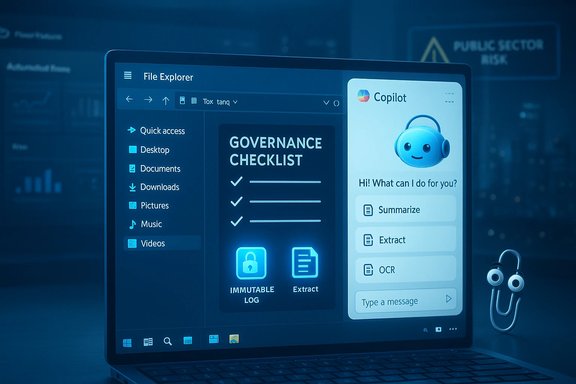
Insider build artifacts and resource strings found in Windows preview packages suggest Microsoft is experimenting with a “Chat with Copilot” affordance embedded directly into File Explorer, including a detachable chat pane and inline context actions (Summarize, Extract, OCR). Those strings — discovered in the 26220.x family of Insider builds — point to a docked Copilot surface that updates as files are selected, and hints at a workflow where users can ask Copilot about documents without explicitly opening them. These artifacts are consistent across multiple preview sources and community analyses.Why File Explorer integration magnifies risk
File Explorer is arguably the most sensitive UI surface on Windows: it holds personal and corporate documents in the same place. Embedding an assistant that can read, summarise, and act on local files raises several immediate concerns:- Data flow visibility: When a Copilot action processes a local file, where does the content go — to the cloud, to an on‑device model, or some hybrid pipeline? Preview artifacts do not fully disclose this.
- Admin controls: the current management knobs exposed in preview builds are limited and sometimes conditional by SKU; enterprise administrators must plan for more granular DLP, prompt logging, and opt‑outs.
- User consent and affordance design: hover hotspots and subtle UI elements could lead to inadvertent sharing if session boundaries and consent prompts are unclear.
What is verifiable — and what remains provisional
The presence of UI resource strings and inert controls in Insider builds is a high‑confidence signal of intent, but not a shipping commitment. Specifics such as the default enablement model, whether file analysis is performed locally or in Microsoft cloud services, and the exact telemetry and retention policies remain unresolved in preview materials. Administrators should treat these as provisional until official release notes and enterprise documentation appear.Four concrete regressions in Windows 2025 and how to reverse them
A growing chorus of power users and IT professionals reported that Windows in 2025 introduced practical regressions that made some workflows worse, not better. The most visible issues — accelerated feature updates that created instability, changes to core UI behaviors, increased telemetry or default‑on services, and the creep of Copilot behaviors that reinstall or reappear after removal — are evidence that brisk delivery without adequate compatibility and admin control has real costs.The four problem areas (verified)
- Update cadence and regressions — monthly or near‑monthly feature pushes increased the surface for regressions and drive/BitLocker recovery events. Multiple community incident archives documented repeat regressions after servicing waves.
- UI regressions and discoverability trade‑offs — Start menu changes and added “Recommended” promotional surfaces increased friction for power users who relied on compact, predictable workflows.
- Enforced online identity at setup and cloud entanglement — more flows required a Microsoft account for setup and pushed cloud ties where local control had previously been available. Community guides and admin advisories flagged this as a policy friction point.
- Copilot reinstall/telemetry surprises — Copilot apps and hooks sometimes reappear or remain functional even after partial removal; preview admin controls can be conditional and insufficiently broad for enterprises needing a hard opt‑out.
How to undo or mitigate (practical, verifiable steps)
- Configure and test Group Policy and MDM settings before broad rollout: use the documented EdgeCopilotEnabled policies and test RemoveMicrosoftCopilotApp workflows in a lab.
- Harden update strategy: pilot feature and cumulative update packages on a controlled ring with representative hardware/firmware combinations to catch pre‑boot/regression issues early.
- Restore start menu habits: apply Personalization → Start toggles and consider third‑party launchers for stable workflows where Microsoft’s mobile‑style discovery is undesirable.
- Treat Copilot surfaces as a policy layer: inventory tenant entitlements, lock down connectors, apply DLP on endpoints, and mandate prompt/log retention for any Copilot queries that interact with corporate data.
Mico, Clippy, and the UX story: why personality matters — and why it can mislead
The new Copilot avatar and a wink to the past
Microsoft’s Copilot Fall release introduced Mico, a non‑human, animated avatar that provides visual cues in voice interactions and can, as a playful Easter egg, transform into a Clippy‑like paperclip on mobile when prodded enough. This is a deliberate user‑experience gambit: personification reduces conversational awkwardness and nudges adoption through nostalgia. The Easter egg ties product marketing to interface history, but it also reawakens lessons from the original Clippy era about trust and perceived competence.The risks of personifying assistance
Personified assistants tend to increase user trust even when their outputs are uncertain. In contexts where Copilot provides casual productivity tips this is acceptable; in regulated or safety‑critical contexts it is dangerous. When an assistant looks friendly and confident, users are more likely to accept assertions without verification — exactly the human‑machine failure that surfaced in the West Midlands episode. Design choices such as Real Talk (a mode that surfaces counterpoints) are positive mitigations, but they depend on users understanding the assistant’s epistemic status.What to check in Copilot’s personality features
- Are confidence indicators visible in the UI for assertions?
- Does the assistant provide source links or archived snapshots when asserting facts?
- Are persona features optional and off by default for enterprise tenants?
Enterprise wins: Hertz and the pragmatic side of low‑code + agentic AI
Not all AI stories are governance horror tales. Hertz’s Power Platform program shows how disciplined, measured adoption can yield operational gains without surrendering control. The company built a “Start My Day” app that consolidates roster and operational signals and created a Copilot Studio agent named “Manny” for roadside and vehicle guidance. The pilot reduced resolution times and replaced fragile Excel workflows with Dataverse‑backed flows, demonstrating the pragmatic value of Power Platform when paired with governance.Why Hertz worked
- Clear, narrow scope: automating repetitive, high‑frequency tasks yielded measurable ROI.
- Guardrails from the start: curated knowledge sources, environment quotas, and ALM pipelines limited agent drift.
- Phased scaling: the program emphasized pilot metrics and operational KPIs rather than speculative headlines.
Governance, procurement, and product design: an agenda for safer AI in OS and public services
Core recommendations for organisations
- Mandatory AI usage policy: create a register of approved tools, approved use cases, and explicit prohibitions on ad‑hoc assistant use for intelligence and civil‑liberty decisions.
- Human‑in‑the‑loop verification: require a two‑person verification rule for any claim that would restrict rights or trigger public action.
- Prompt and output logging: retain immutable, auditable logs of prompts, model versions, user IDs, and timestamps for all Copilot queries used in official reporting.
- Procurement clauses: require vendors to provide provenance metadata, enterprise audit logs, and contractual cooperation in forensic reviews for public‑interest use.
- Red‑teaming and scenario drills: regularly simulate hallucination events and rehearse public disclosure and remediation.
Product‑level features that should be non‑negotiable
- Explicit provenance links or archived snapshots for every factual claim the assistant produces.
- Conservative defaults for agentic behaviors like payments or bookings, with mandatory manual confirmation and logging.
- Confidence indicators and refusal modes where models decline to fabricate an answer.
Procurement nuance
Organisations should avoid vendor lock‑in by demanding exportable knowledge bases, clear data residency terms, and model‑consumption budgeting. The Hertz example shows low‑code platforms can scale quickly, but that speed must be matched by governance playbooks and lifecycle pipelines.Flags, caveats, and unverifiable claims
- Insider resource strings and preview artifacts strongly indicate in‑Explorer Copilot experiments, but they are not definitive shipping commitments; final UX, telemetry, and default enablement are still unconfirmed. Treat rollout timing and default behavior as provisional until Microsoft publishes release notes.
- Specific numeric claims in previews — for example, a quoted 32‑participant limit for Copilot Groups or exact TOPS requirements for Copilot+ NPUs — have been reported in preview materials but remain provisional and should be verified against official documentation at GA. Use caution when treating these as fixed technical requirements.
- Vendor‑provided efficiency figures (Deltas in idle‑time or productivity percentages) in case studies deserve third‑party validation; they are useful directional signals but may rely on vendor‑defined baselines and measurement approaches. Treat headline percentages as contingent pending independent audits.
Conclusion
The recent cluster of stories — an AI hallucination that eroded trust in a police force, Insider evidence of Copilot embedding deeper into Windows, nostalgic UX gambits that personify assistants, and pragmatic enterprise wins with low‑code AI — is a single, coherent signal: generative AI has graduated from “nice to have” to platform plumbing, and platform plumbing must be treated as infrastructure, not as a novelty.Practical change starts with governance: mandatory policies, auditable logs, human‑in‑the‑loop verification, and procurement that demands provenance and auditability. On the product side, vendors must make conservative defaults, visible confidence indicators, and exportable provenance non‑negotiable for enterprise and public‑sector deployments. For IT leaders and users, the immediate priorities are to pilot carefully, harden admin controls, and treat any assistant output as a starting point for verification rather than an endpoint of truth. The choices made now — in procurement contracts, admin policies, and UI defaults — will determine whether Copilot and similar assistants become trusted accelerants of productivity or recurring sources of reputational and operational harm.
Source: Devdiscourse https://www.devdiscourse.com/articl...vertelemetry=1&renderwebcomponents=1&wcseo=1]
