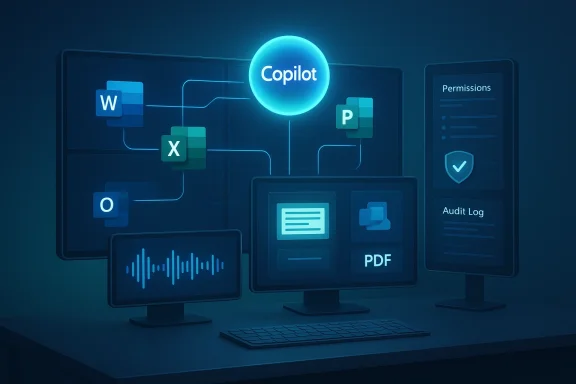
Copilot is no longer best understood as a single chatbot, a ribbon button, or even a Microsoft 365 add-on. It is becoming infrastructure: a layer that spans Windows, Edge, Microsoft 365, mobile clients, the web, and enterprise agent frameworks, with the browser increasingly serving as the front door to work. Microsoft’s recent product and platform updates make that shift plain, from Edge’s Copilot Mode and Agent Mode to Microsoft 365 Copilot’s expanding role across apps and agents. (microsoft.com)
Background — full context
The phrase “Copilot as infrastructure” captures a change in strategy that goes beyond branding. In earlier phases, Copilot was marketed as a helpful assistant layered onto existing software. Now Microsoft is positioning it as connective tissue across the productivity stack, with AI features embedded in the browser, the desktop, collaboration tools, and enterprise controls. That matters because infrastructure is not just about what users can see; it is about where workflows begin, where context is stored, and which services mediate action. Microsoft’s own Edge and Microsoft 365 materials show exactly that direction. (microsoft.com)The browser is central to this story. Microsoft Edge now frames itself as a secure AI browser with Copilot built in, letting users ask questions, draft content, and work with documents without leaving the page. Microsoft also highlights Copilot Mode and Agent Mode, which can handle multi-step workflows under user control. That is a significant shift from passive assistance to task orchestration, and it places the browser closer to the role once reserved for the operating system shell. (microsoft.com)
At the same time, Microsoft 365 Copilot is becoming more deeply integrated into core applications and enterprise data. Microsoft’s March 2026 messaging describes “wave 3” as a point where agentic capabilities are embedded directly into Word, Excel, PowerPoint, Outlook, and Copilot Chat, with shared intelligence across user data, enterprise data, and agent actions. The company is also pushing governance and observability through Agent 365, reinforcing the idea that AI is not an add-on feature but a managed layer of workplace operations. (microsoft.com)
The result is a platform story rather than a feature story. When Microsoft speaks about Copilot now, it is not simply talking about answering prompts. It is describing a system that can search, summarize, draft, plan, act, and govern actions across multiple surfaces. That system lives in the browser, in Office apps, in Teams, and in the cloud. It also depends on identity, policy, and data access controls to make those actions safe enough for business use. (microsoft.com)
For Windows users, this is especially important because Microsoft is blurring the line between local computing and cloud-mediated work. The Copilot key, Win + C access, Edge integration, and Microsoft 365 app integration all point to a future where the entry point matters less than the continuity of context. In practical terms, that means the “app” is becoming less visible while the AI layer becomes more pervasive. (microsoft.com)
The Copilot stack: from app to infrastructure
Why infrastructure is the right metaphor
Infrastructure is durable, shared, and increasingly invisible. It supports many workloads without always being the thing users think about first. Copilot is moving in that direction because it is becoming the layer that mediates documents, emails, browsing, meetings, and enterprise search across devices and platforms. Microsoft’s current messaging strongly implies that Copilot is not one product among many; it is the unifying service that ties them together. (microsoft.com)This has several consequences:
- It becomes a default interface for work tasks.
- It spans multiple devices and form factors instead of living in one app.
- It uses organizational context to produce better answers.
- It requires governance and policy controls to stay safe at scale.
- It changes user expectations about where work starts and ends. (microsoft.com)
The browser as the new control plane
Microsoft’s Edge positioning makes clear that the browser is no longer just a window to the web. With Copilot built in, the browser becomes a workspace where reading, drafting, summarizing, and acting can happen in the same place. That’s especially important for enterprise use, where the browser is already the default access layer for SaaS applications, cloud dashboards, and line-of-business tools. (microsoft.com)The browser-based model also matters because it travels well across operating systems. A browser-centric Copilot strategy is inherently multiplatform: Windows, macOS, and mobile all become valid endpoints. That broadens adoption while keeping Microsoft’s intelligence layer consistent. In other words, the browser becomes the seat of continuity even when the endpoint changes. (microsoft.com)
Microsoft 365 as the enterprise substrate
Microsoft 365 Copilot is not just about generating text. Microsoft now describes it as a system with access to work context across emails, files, meetings, chats, and enterprise data, while also supporting agents and governance. The March 2026 update further emphasizes agentic features inside Word, Excel, PowerPoint, Outlook, and Copilot Chat, which is a strong signal that the application suite itself is being redesigned around AI-assisted workflows. (microsoft.com)That means Microsoft 365 is becoming the substrate on which Copilot operates. The apps still matter, but the AI layer is increasingly what binds them together. This is a classic platform evolution: the vendor stops selling isolated utilities and starts selling a system of coordinated capabilities. (microsoft.com)
Windows, Edge, and the changing meaning of “the desktop”
The Copilot key and the desktop’s new entry point
Microsoft has already taught users to invoke Copilot from Windows 11 with the Copilot key and the Win + C shortcut. That may look small, but it is symbolically large: it puts AI access on the same footing as the Start menu or search. The desktop is no longer merely a place where apps run; it is a launchpad into a conversational and agentic layer. (microsoft.com)From a user experience standpoint, this creates a hybrid model:
- Local operating system controls
- Cloud-backed AI services
- Browser-based task execution
- Cross-app context flow
- Persistent identity and policy enforcement (microsoft.com)
Edge for Business and secure AI browsing
Microsoft’s Edge for Business messaging is particularly revealing. The company calls it a secure enterprise AI browser and says Copilot Mode turns it into a browser where AI is integrated into core browsing tasks. That wording is not accidental. It suggests that Microsoft views the browser as a security boundary as much as a productivity surface, and Copilot as a controlled capability within that boundary. (microsoft.com)The “secure browser” framing is strategically important because many enterprise AI concerns are really browser concerns in disguise: data leakage, shadow IT, unmanaged extensions, uncontrolled copy-paste, and unsafe web workflows. Embedding Copilot in Edge lets Microsoft argue that it can reduce friction while also keeping organizational policy in the loop. (microsoft.com)
Multiplatform by design
The “multiplatform” part of this story is easy to miss if you focus only on Windows. But Microsoft’s own ecosystem now spans Windows PCs, macOS, web clients, mobile apps, and browser-based access. The company’s Copilot blog and Microsoft 365 materials repeatedly present Copilot as a service rather than a single-device feature. That makes the AI layer portable across devices even as the user’s primary endpoint changes. (microsoft.com)That portability has practical value:
- Employees can move between devices without losing the workflow.
- IT can standardize policy across diverse endpoints.
- Organizations can adopt AI incrementally instead of through a risky big bang.
- Users can meet Copilot where they already work rather than retraining around one interface. (microsoft.com)
Copilot in work apps: the productivity layer gets deeper
Word, Excel, PowerPoint, Outlook
Microsoft’s March 2026 update says agentic capabilities are embedded directly into Word, Excel, PowerPoint, Outlook, and Copilot Chat. That means the familiar suite is no longer just a collection of applications; it is being reinterpreted as a workspace where AI can assist with drafting, analysis, summarization, and action. (microsoft.com)The significance here is not merely efficiency. It is that Microsoft is redefining what “using Office” means. Instead of manually navigating each app, users can increasingly delegate parts of the workflow to Copilot, with the app serving as the final presentation layer. That can compress entire work cycles. (microsoft.com)
Copilot Chat and the new conversational core
Copilot Chat is becoming the universal front end for enterprise interaction. Microsoft describes it as secure AI chat for work and notes that it is available to every Microsoft 365 subscriber at no additional cost. This matters because chat is the interface people understand fastest. It is also the interface most likely to absorb use cases from search, Q&A, basic analysis, and internal knowledge lookup. (microsoft.com)The likely trajectory looks like this:
- Ask a question
- Pull context from documents and data
- Generate a draft or summary
- Launch an action or agent
- Return results into the app or workflow (microsoft.com)
Agent Mode and multi-step execution
Agent Mode is one of the clearest signs that Copilot is moving from assistant to infrastructure. Microsoft says it can execute multi-step workflows on a user’s behalf, under user control. That is a meaningful shift because it changes AI from a one-shot generator into a delegated worker that can carry context forward and coordinate steps. (microsoft.com)This is where the platform story becomes operational. If Copilot can move through tasks instead of only answering them, then the company has created a system that resembles a lightweight operating environment for knowledge work. That environment needs auditability, permissions, and a trustworthy data model. Microsoft is clearly aware of that, which is why governance features are being elevated in parallel. (microsoft.com)
Agents, governance, and enterprise trust
Agent 365 and observability
Microsoft’s March 2026 announcement puts governance front and center. Agent 365 is presented as the operational layer that helps organizations observe, govern, and secure agents as they move from experimentation to scale. That is crucial, because enterprise AI failures are often not model failures but management failures. (microsoft.com)A useful way to think about it is this:
- Copilot generates value
- Agents execute work
- Agent 365 provides oversight
- Identity and policy determine access
- Security tooling keeps the system compliant (microsoft.com)
Trust as a product feature
Microsoft repeatedly emphasizes trust, policy, and observability in its AI messaging. That is not just marketing. It is recognition that AI adoption at scale depends on whether IT and compliance teams can explain what the system did, why it did it, and what data it touched. The more Copilot becomes infrastructure, the more trust becomes a prerequisite rather than a nice-to-have. (microsoft.com)The enterprise control problem
Once AI is embedded across work surfaces, the challenge shifts from “Can it do the task?” to “Can we manage it?” That includes:- Authentication
- Permission boundaries
- Data retention
- Audit logs
- Policy enforcement
- Human approval checkpoints (microsoft.com)
The platform economics behind Copilot
Why Microsoft wants AI in the middle
There is a clear economic logic behind this strategy. If Copilot sits in the middle of everyday workflows, Microsoft gains a recurring interface that can connect Windows, Edge, Microsoft 365, security, identity, and cloud services. That creates stickiness and raises the value of the ecosystem as a whole. (microsoft.com)The gains are structural:
- Higher platform retention
- More frequent user engagement
- More cross-sell opportunities
- Greater dependence on Microsoft identity and security
- A stronger rationale for premium bundles and licenses (microsoft.com)
Bundling as strategy
Microsoft’s recent announcements around E7, Copilot, Agent 365, Entra, Intune, and Purview show how tightly the company is bundling AI with the rest of the enterprise stack. That bundling makes Copilot less like a standalone add-on and more like a reason to stay inside the Microsoft ecosystem. (microsoft.com)The service-layer advantage
A service-layer AI model also lets Microsoft iterate quickly. Instead of waiting for each app to evolve independently, the company can improve the common intelligence layer and have those improvements show up across the stack. The January 2026 release notes already show updated underlying models in Copilot features, which reinforces the idea that Microsoft is managing the intelligence centrally. (learn.microsoft.com)The user experience: convenience, friction, and habit formation
How habits form around AI
The biggest advantage of a ubiquitous Copilot layer is habit formation. Once people get used to asking questions in the browser, drafting inside Office, or initiating tasks from Chat, the AI layer becomes part of muscle memory. That is how infrastructure wins: not by dramatic moments, but by becoming the default path of least resistance. (microsoft.com)The hidden UX challenge
Yet ubiquity also creates risk. If Copilot appears everywhere, users may not always know:- What data it can see
- Which model it is using
- What permissions apply
- Whether the output is actionable or approximate
- When human review is still required (microsoft.com)
Multiplatform consistency
The strongest UX argument for Copilot as infrastructure is consistency. Whether a worker is on Windows, in Edge, inside Outlook, or using a mobile companion app, the interaction model increasingly looks and feels the same. That lowers training costs and reduces cognitive load, especially in organizations where employees switch devices throughout the day. (microsoft.com)Strengths and Opportunities
What Microsoft is doing well
Microsoft’s current Copilot strategy has several clear strengths. First, it is leveraging places where users already spend time: the browser, Microsoft 365, Teams, and Windows. Second, it is pairing user-facing features with enterprise controls, which is essential for credibility in business environments. Third, it is making AI portable across platforms rather than locking it to a single device class. (microsoft.com)Strategic opportunities
This creates a large opportunity set:- Smarter browser workflows
- Better enterprise search
- Faster drafting and analysis
- Agent-assisted project management
- Workflow automation across apps
- New governance and security products
- Deeper adoption of Microsoft 365 subscriptions (microsoft.com)
Why this matters for Windows users
For Windows users, the opportunity is not merely convenience. It is a more coherent computing model where AI, identity, cloud context, and productivity tools are aligned. If Microsoft executes well, the result could be fewer context switches, less repetitive work, and a more responsive desktop experience. (microsoft.com)A better enterprise AI story
Microsoft also has the advantage of being able to tell a whole-stack story to IT: endpoint, browser, identity, productivity, and governance. Competitors may offer strong models or strong apps, but Microsoft can often offer the surrounding infrastructure that makes deployment easier in a regulated workplace. (microsoft.com)Risks and Concerns
The complexity tax
The more Copilot becomes infrastructure, the more complex it becomes to manage. Users may face feature sprawl, confusing licensing, uneven rollouts, and unclear boundaries between consumer and enterprise experiences. Infrastructure can be powerful, but it can also become opaque if too many capabilities are layered on too quickly. (microsoft.com)Data governance and hallucination risk
No matter how integrated Copilot becomes, it still inherits the known risks of generative AI: inaccuracies, overconfidence, and possible misuse of sensitive data. Microsoft’s governance messaging acknowledges this, but the practical burden remains on organizations to configure access, review outputs, and train users. (microsoft.com)Browser centralization concerns
Placing more AI power inside the browser is efficient, but it also concentrates a lot of capability in a single surface. If the browser becomes the primary control plane for work, then browser security, identity hygiene, and extension management become even more important. That is a benefit if managed well, and a risk if not. (microsoft.com)Adoption fatigue
There is also a human risk: users can become fatigued by too many AI prompts, too many suggestions, or too many “helpful” interventions. For Copilot to succeed as infrastructure, it must feel useful, not noisy. The best infrastructure disappears into the background until needed. (microsoft.com)What to Watch Next
Product signals
The next phase to watch is how aggressively Microsoft pushes Copilot Mode and Agent Mode in Edge, and how quickly those features mature from preview language into everyday enterprise use. If Microsoft can make browsing itself an AI-assisted workflow without losing trust, that will be a strong indicator that the strategy is working. (microsoft.com)Enterprise rollout patterns
It will also be worth watching how organizations adopt Agent 365 and the broader governance stack. If admins embrace these tools, that suggests businesses see Copilot not as a novelty but as a managed operational layer. If adoption stalls, Microsoft may need to simplify packaging or clarify value. (microsoft.com)Integration depth
The most important question is how deeply Copilot can connect across apps without becoming brittle. Success would look like smoother movement between Outlook, Teams, Word, Excel, PowerPoint, Edge, and cloud data sources, with policies and permissions intact. That is the essence of infrastructure: seamlessness with boundaries. (microsoft.com)Signals to monitor
- How many workflows become agent-driven
- Whether Copilot remains predictable across devices
- How well Microsoft explains permissions and data use
- Whether enterprises standardize on Edge for AI browsing
- Whether users trust AI enough to delegate multi-step tasks
- Whether licensing remains comprehensible
- Whether model updates improve utility without adding confusion (microsoft.com)
The competitive backdrop
Microsoft is not alone in pushing AI deeper into productivity. But its advantage lies in distribution, installed base, and the ability to stitch together browser, desktop, cloud, and enterprise controls. That combination makes Copilot’s infrastructure play especially important to watch over the next several quarters. (microsoft.com)Copilot as infrastructure is more than a slogan; it is a description of how Microsoft wants computing to work in the AI era. The browser becomes a workspace, the desktop becomes a launch point, Office becomes an AI-enabled operating surface, and enterprise governance becomes part of the product story. If Microsoft can keep the system useful, secure, and comprehensible, Copilot may become less like an app you open and more like the environment in which work simply happens.
Source: lancasteronline.com HG Master Gardener f20 2 Copilot.jpg
Last edited: