

On July 1, 2026, GitHub announced that Microsoft’s C++ Language Server is available as a Copilot CLI marketplace plugin, adding a built-in setup skill that can generate and refresh the
C++ has never lacked powerful editors. It has lacked a universal, low-friction way for those editors to know what the compiler knows.
That distinction matters because C++ code intelligence is not just a matter of scanning files. Include paths, macros, compiler flags, generated headers, target-specific settings, and platform conditionals can all change what a symbol means. A language server that guesses wrong is not merely incomplete; it can become actively misleading.
The Microsoft C++ Language Server depends on
The problem has always been the plumbing. CMake can produce the file directly in many workflows, but only when configured to do so. MSBuild projects often need extra extraction steps. Custom enterprise builds may involve wrappers, vendored toolchains, hermetic environments, or CI-only configuration that a generic tool cannot infer. GitHub’s new Copilot CLI skill is aimed directly at that friction point.
By letting a developer say “regenerate compile commands” or “load project,” GitHub is reframing build metadata as an agent task. The developer still owns the build. But Copilot CLI is being asked to perform the repetitive configuration work that often stands between a C++ repository and useful semantic intelligence.
That matters because tool adoption often dies in the first five minutes. Requiring developers to leave one toolchain, install a global npm package, accept a license, wire up language-server configuration, and then separately create a compilation database is a lot of surface area for failure. Moving the language server into the Copilot Plugins marketplace makes the experience feel more like enabling a capability than assembling a stack.
The plugin still sits in a real development environment. The repository documentation continues to describe prerequisites, authentication, EULA acceptance, configuration files, platform support, and logging behavior. This is not magic dust sprinkled over C++; it is a language server, launched by Copilot CLI, authenticated through GitHub, and dependent on build metadata that must remain accurate.
But marketplace installation changes the default posture. Instead of “go install this thing elsewhere and come back,” GitHub is telling developers to add the C++ language server where they already interact with Copilot CLI. That is especially useful for teams standardizing AI-assisted development workflows, because a single plugin command is easier to document, automate, and support than a more fragile pile of local setup instructions.
The cross-platform claim is also meaningful. GitHub says the plugin path simplifies staying updated on Windows, Linux, and macOS. For C++ teams, that spread is not decorative. A single repository may build on Windows with MSBuild, on Linux with CMake and Ninja, and inside containers or CI systems with custom wrappers. Any C++ assistant that cannot travel across those boundaries risks becoming a toy for demos rather than a useful tool for production code.
The deeper shift is that
Traditional editor features degrade visibly when project metadata is missing. Go-to-definition becomes unreliable. Diagnostics disappear or become noisy. Header resolution breaks. Developers usually notice, grumble, and work around it.
AI agents make the failure mode subtler. If an assistant is asked to modify C++ code without accurate compiler context, it may produce changes that look plausible while violating the actual build configuration. It may miss platform-specific macros, choose the wrong overload, misunderstand generated types, or edit code that is excluded from the active target. In C++, a confident assistant with the wrong compilation model is a liability.
That is why Microsoft’s language-server work is strategically important for Copilot CLI. The agent needs tools that can answer questions about a codebase with semantic precision. The language server provides that layer, but only if it has a faithful compilation database. The new skill is the bridge between “AI can edit files” and “AI can reason about this C++ project as built.”
The automatic watching of
It also exposes the maintenance burden that GitHub is trying to automate. A compilation database is not a one-time artifact. It is a snapshot of build reality. If your build changes and the file does not, your tools are now confidently wrong.
That distinction is worth making because it keeps the announcement in perspective. GitHub is not replacing CMake’s native support. It is giving Copilot CLI a guided way to configure or refresh the compilation database so the language server can work without the developer remembering the exact flag or build-directory convention.
For developers who already run modern CMake with Ninja or Makefile generators, the benefit may be convenience rather than transformation. They may already have a compilation database checked into a build folder, symlinked into the repository root, or consumed by clangd and other tools. For those users, the skill is a nicer interface to a known workflow.
For mixed-experience teams, however, convenience is not trivial. C++ shops often have senior engineers who understand the build deeply and newer contributors who just need code navigation to work. A repeatable Copilot CLI instruction helps turn tribal setup knowledge into a reproducible action.
That is particularly relevant to WindowsForum readers who work in Windows-first shops that have gradually adopted CMake for cross-platform builds. Those environments often carry a blend of Visual Studio expectations, CMake presets, CI scripts, and developer-local conventions. A skill that can help align the language server with the active project type may reduce the “works on my machine” flavor of editor intelligence problems.
That phrasing deserves a careful read. The guided setup is the smoother path, but Microsoft’s repository documentation still notes that MSBuild extraction may require adaptation for complex projects. In other words, this is not a universal promise that every
That is not a criticism so much as a reality check. MSBuild projects can accumulate years of property sheets, conditional imports, platform toolsets, custom targets, generated files, environment-dependent paths, and solution-level assumptions. Translating that into a clean per-translation-unit command list is harder than it sounds.
Still, even partial automation is useful. The Windows C++ ecosystem has long paid a tax when using tooling that expects Clang-style compilation databases. Visual Studio has its own rich model, but cross-editor and cross-agent tooling often wants
The risk is that teams mistake “generated” for “correct.” A compilation database that misses a configuration dimension can produce language-server output that is subtly wrong. For serious MSBuild codebases, the first run of the skill should be treated as onboarding, not certification. Developers and build owners should inspect the output, compare it with known build behavior, and document when to regenerate it.
That is the most revealing part of the announcement. GitHub is not only using Copilot CLI as a consumer of plugins; it is positioning skills as a way to encode local development procedure. In old terms, this might have been a wiki page, a shell script, or a paragraph in
For enterprise C++ teams, that could be powerful. Many large codebases depend on carefully pinned toolchains, internal package caches, wrapper scripts, generated source steps, and environment variables that cannot be inferred from the repository alone. If a skill can reliably regenerate
But this is also where governance enters. A project-specific skill that runs build-discovery commands is part of the development environment. It should be reviewed like any other automation. It may encode paths, toolchain assumptions, environment variables, or access patterns that have operational and security implications.
The important conceptual shift is that AI tooling is no longer just asking permission to edit code. It is asking to participate in the setup of the codebase. That makes repeatability more valuable, but it also makes transparency more important. Teams should know exactly how their compilation database is produced, because that file becomes the semantic map used by both the language server and the agent.
That is a meaningful product direction. In the early phase of AI coding tools, the interface was the novelty: ask a question, get code. The next phase is infrastructure. Agents need access to semantic tools, build context, test runners, package managers, issue trackers, and project conventions. Without those, the assistant is a fluent outsider.
The C++ language server plugin fits that pattern. It gives Copilot CLI a way to query and navigate C++ code with the same kind of precision developers expect from mature IDEs. The setup skill then helps produce the metadata required for that precision. Together, they make the agent less dependent on text search and more dependent on actual program structure.
For Windows users, this also blurs the line between Visual Studio-style intelligence and command-line workflows. Microsoft says the language server brings C++ code intelligence used in Visual Studio and VS Code to Copilot CLI. That does not mean Copilot CLI replaces those tools. It means the semantic engine that powers a developer experience can increasingly be shared across interfaces.
That matters for how developers work now. A sysadmin debugging a native extension, a Windows engineer patching a service, or a cross-platform maintainer reviewing C++ changes may not always live inside one IDE. If the command-line assistant can understand the same project structure, it becomes more useful in the places where real work already happens.
That will divide reactions. Developers already paying for Copilot may see the plugin as a welcome addition that makes the subscription more useful for C++ work. Developers who prefer open tooling may see it as another example of useful development infrastructure being tied to a commercial AI product.
The repository’s continued mention of npm distribution also creates an interesting transition moment. The changelog says marketplace installation replaces the previous npm-based installation for getting started, while the repository still documents npm distribution and command-line usage. That is not unusual during a product shift, but administrators should read the current docs carefully before standardizing installation steps.
For managed environments, the subscription and authentication model matter as much as the feature list. The language server requires GitHub login, and the documentation discusses token storage, GitHub CLI fallback, GitHub Enterprise Cloud considerations, and plaintext secret storage only as an explicit constrained-environment option. Those are not footnotes for IT departments. They are deployment details.
Security-minded teams should also pay attention to logs. Microsoft’s documentation says logs may be stored in a workspace-specific directory under the temp path and advises reviewing logs before attaching them publicly. For C++ codebases that include proprietary paths, internal symbols, or build configuration, that guidance is not theoretical.
A lot of Windows C++ development is not greenfield CMake. It is legacy and living code: Visual Studio solutions,
Tempting, because the code is often complex and underdocumented. Dangerous, because local context matters enormously. A one-line macro, platform define, or build property can change the meaning of a file. Without accurate build metadata, AI-generated edits can be confidently wrong in ways that only show up at compile time, test time, or worse, runtime.
The new skill does not eliminate that risk. It reduces one source of it. If Copilot CLI can help generate a current compilation database for an MSBuild or CMake project, the language server has a better chance of grounding navigation and analysis in the actual project configuration.
WSL and cross-platform development add another layer. A Windows developer may edit a repository in Windows, build in WSL, test in a container, and ship to multiple platforms.
That first impression is hard to recover from. Developers do not patiently debug editor infrastructure when they are trying to fix production code. They disable the noisy extension, go back to grep, or retreat to the IDE configuration that already works.
The Copilot CLI setup skill attacks that first-run failure. By providing a built-in path to generate or refresh
This matters for Copilot’s reputation, too. AI coding assistants are judged not only on model quality but on integration quality. If the assistant cannot understand the codebase, the model’s general programming ability is less relevant. For C++, integration quality begins with the build.
The most successful version of this feature will be boring. A developer installs the plugin, loads the project, lets the skill generate the compilation database, and never thinks about the file again except when the build configuration changes. That is the right ambition for developer infrastructure: make the critical path less dramatic.
A
GitHub’s advice to reinvoke the skill whenever the build configuration changes is therefore central, not incidental. Teams should treat regeneration as part of the same discipline as updating generated project files, refreshing dependencies, or rerunning configuration steps after changing presets. If the build moves, the compilation database must move with it.
There is also a question of multiple configurations. C++ projects often have Debug and Release variants, platform-specific targets, feature flags, sanitizer builds, embedded builds, and CI-only configurations. A single compilation database usually represents one view of the project. Developers must understand which view the language server is using.
That is where project-specific skills could become more than convenience. A well-designed skill can encode the intended configuration: which generator, which preset, which architecture, which toolchain, which environment, and where the output should live. A vague skill that merely “makes it work” may help today and confuse tomorrow.
The marketplace command is easy to document. The harder parts are policy and lifecycle. Who approves Copilot CLI plugins? Which version is deployed? How is the EULA acceptance handled? How are GitHub credentials stored on developer machines, containers, WSL distributions, and remote hosts? Are logs captured, rotated, or excluded from support bundles?
There is also the matter of repository hygiene. If a project-specific skill becomes the recommended path, it belongs in source control and code review. If generated
On Windows, organizations with Visual Studio-centric development should test the MSBuild path against representative projects, not just clean samples. Property sheets, unusual platform toolsets, custom build steps, and internal SDKs are where the gap between demo and deployment usually appears. A successful pilot should include an intentionally ugly project.
The good news is that the feature’s shape lends itself to gradual adoption. Teams can begin with CMake projects, use the guided MSBuild path where it works, and reserve custom skills for repositories with special build requirements. No one needs to convert an entire native-code estate overnight.
For scripting languages and many managed environments, the boundary between editor context and runtime context is often easier to approximate. C++ is less forgiving. The build system is not outside the code; it is part of the program’s meaning. Include order, defines, language standard flags, compiler extensions, and platform SDKs can all shape what the code is.
That is why this feature feels more consequential than a convenience wrapper. Microsoft and GitHub are acknowledging that C++ assistance requires build-aware semantics, and that build-aware semantics require better onboarding than “please produce a correct compilation database somehow.”
If Copilot CLI can reliably maintain that bridge, the agent becomes more credible for native code. It can navigate with less guesswork, propose changes with better grounding, and answer questions against the project as configured. That does not make it infallible. It makes it less detached from reality.
The strongest version of AI-assisted C++ development will not be the flashiest. It will be the one that knows when it is looking at the wrong target, when the compilation database is stale, when a generated header is missing, and when a project-specific build rule matters. This update is a step toward that less glamorous but far more useful future.
compile_commands.json file needed for accurate C++ code intelligence. That sounds like a small tooling update, but for C++ developers it lands on one of the language’s oldest productivity fault lines: the editor is only as smart as its understanding of the build. Microsoft and GitHub are not merely shipping another helper command; they are turning project configuration into something an AI agent can own, repeat, and update. For Windows developers living between Visual Studio, MSBuild, CMake, WSL, and cross-platform repos, that is the real story.
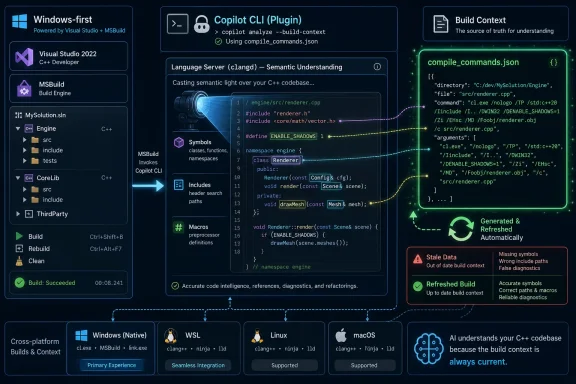 Microsoft Moves the C++ Bottleneck From the Human to the Agent
C++ has never lacked powerful editors. It has lacked a universal, low-friction way for those editors to know what the compiler knows.That distinction matters because C++ code intelligence is not just a matter of scanning files. Include paths, macros, compiler flags, generated headers, target-specific settings, and platform conditionals can all change what a symbol means. A language server that guesses wrong is not merely incomplete; it can become actively misleading.
The Microsoft C++ Language Server depends on
compile_commands.json, the compilation database format commonly associated with Clang tooling. That file records the command used to compile each translation unit, giving tools a reliable view of the project as the compiler sees it. When it is present and current, symbol navigation, diagnostics, refactoring, and AI-assisted code changes have a much better chance of being grounded in reality.The problem has always been the plumbing. CMake can produce the file directly in many workflows, but only when configured to do so. MSBuild projects often need extra extraction steps. Custom enterprise builds may involve wrappers, vendored toolchains, hermetic environments, or CI-only configuration that a generic tool cannot infer. GitHub’s new Copilot CLI skill is aimed directly at that friction point.
By letting a developer say “regenerate compile commands” or “load project,” GitHub is reframing build metadata as an agent task. The developer still owns the build. But Copilot CLI is being asked to perform the repetitive configuration work that often stands between a C++ repository and useful semantic intelligence.
The Marketplace Plugin Is the Distribution Change That Makes the Skill Matter
The headline feature is the setup skill, but the packaging change is just as important. The language server can now be installed from inside Copilot CLI with/plugin install cpp-language-server@copilot-plugins, replacing the earlier npm-centered installation path for ordinary onboarding.That matters because tool adoption often dies in the first five minutes. Requiring developers to leave one toolchain, install a global npm package, accept a license, wire up language-server configuration, and then separately create a compilation database is a lot of surface area for failure. Moving the language server into the Copilot Plugins marketplace makes the experience feel more like enabling a capability than assembling a stack.
The plugin still sits in a real development environment. The repository documentation continues to describe prerequisites, authentication, EULA acceptance, configuration files, platform support, and logging behavior. This is not magic dust sprinkled over C++; it is a language server, launched by Copilot CLI, authenticated through GitHub, and dependent on build metadata that must remain accurate.
But marketplace installation changes the default posture. Instead of “go install this thing elsewhere and come back,” GitHub is telling developers to add the C++ language server where they already interact with Copilot CLI. That is especially useful for teams standardizing AI-assisted development workflows, because a single plugin command is easier to document, automate, and support than a more fragile pile of local setup instructions.
The cross-platform claim is also meaningful. GitHub says the plugin path simplifies staying updated on Windows, Linux, and macOS. For C++ teams, that spread is not decorative. A single repository may build on Windows with MSBuild, on Linux with CMake and Ninja, and inside containers or CI systems with custom wrappers. Any C++ assistant that cannot travel across those boundaries risks becoming a toy for demos rather than a useful tool for production code.
compile_commands.json Becomes the New Contract Between Build Systems and AI
The deeper shift is that compile_commands.json is becoming a practical contract between build systems and AI coding tools. That is not because the file is new. It is because AI coding assistants are making its absence more painful.Traditional editor features degrade visibly when project metadata is missing. Go-to-definition becomes unreliable. Diagnostics disappear or become noisy. Header resolution breaks. Developers usually notice, grumble, and work around it.
AI agents make the failure mode subtler. If an assistant is asked to modify C++ code without accurate compiler context, it may produce changes that look plausible while violating the actual build configuration. It may miss platform-specific macros, choose the wrong overload, misunderstand generated types, or edit code that is excluded from the active target. In C++, a confident assistant with the wrong compilation model is a liability.
That is why Microsoft’s language-server work is strategically important for Copilot CLI. The agent needs tools that can answer questions about a codebase with semantic precision. The language server provides that layer, but only if it has a faithful compilation database. The new skill is the bridge between “AI can edit files” and “AI can reason about this C++ project as built.”
The automatic watching of
compile_commands.json is a practical touch. GitHub says the language server detects changes to the file, so updates take effect without restarting. That is the kind of detail that matters in real C++ work, where build flags shift as developers switch targets, regenerate project files, or test alternate configurations.It also exposes the maintenance burden that GitHub is trying to automate. A compilation database is not a one-time artifact. It is a snapshot of build reality. If your build changes and the file does not, your tools are now confidently wrong.
CMake Gets the Cleanest Path Because It Already Speaks the Language
CMake users are the obvious beneficiaries. For many CMake projects,compile_commands.json can already be generated by enabling CMAKE_EXPORT_COMPILE_COMMANDS during configuration. The new Copilot CLI skill does not invent that capability; it operationalizes it.That distinction is worth making because it keeps the announcement in perspective. GitHub is not replacing CMake’s native support. It is giving Copilot CLI a guided way to configure or refresh the compilation database so the language server can work without the developer remembering the exact flag or build-directory convention.
For developers who already run modern CMake with Ninja or Makefile generators, the benefit may be convenience rather than transformation. They may already have a compilation database checked into a build folder, symlinked into the repository root, or consumed by clangd and other tools. For those users, the skill is a nicer interface to a known workflow.
For mixed-experience teams, however, convenience is not trivial. C++ shops often have senior engineers who understand the build deeply and newer contributors who just need code navigation to work. A repeatable Copilot CLI instruction helps turn tribal setup knowledge into a reproducible action.
That is particularly relevant to WindowsForum readers who work in Windows-first shops that have gradually adopted CMake for cross-platform builds. Those environments often carry a blend of Visual Studio expectations, CMake presets, CI scripts, and developer-local conventions. A skill that can help align the language server with the active project type may reduce the “works on my machine” flavor of editor intelligence problems.
MSBuild Support Is Welcome, but the Edge Cases Are Where the Work Begins
MSBuild is the more interesting case because it is central to the Windows C++ world and less naturally aligned withcompile_commands.json. GitHub’s changelog says MSBuild-based projects get two paths: guided setup through the Copilot CLI skill, or manual generation using Microsoft’s sample extractor application.That phrasing deserves a careful read. The guided setup is the smoother path, but Microsoft’s repository documentation still notes that MSBuild extraction may require adaptation for complex projects. In other words, this is not a universal promise that every
.vcxproj in the wild can be perfectly translated into a compilation database by one command.That is not a criticism so much as a reality check. MSBuild projects can accumulate years of property sheets, conditional imports, platform toolsets, custom targets, generated files, environment-dependent paths, and solution-level assumptions. Translating that into a clean per-translation-unit command list is harder than it sounds.
Still, even partial automation is useful. The Windows C++ ecosystem has long paid a tax when using tooling that expects Clang-style compilation databases. Visual Studio has its own rich model, but cross-editor and cross-agent tooling often wants
compile_commands.json. A Copilot-aware path for MSBuild projects helps close that gap.The risk is that teams mistake “generated” for “correct.” A compilation database that misses a configuration dimension can produce language-server output that is subtly wrong. For serious MSBuild codebases, the first run of the skill should be treated as onboarding, not certification. Developers and build owners should inspect the output, compare it with known build behavior, and document when to regenerate it.
Custom Build Systems Remain the Territory Where Automation Needs Memory
GitHub is unusually candid about custom builds. Hermetic, vendored, or wrapper-based toolchains may not be discoverable by standard logic. The recommendation is to create a project-specific skill that captures the build setup once and makes it repeatable.That is the most revealing part of the announcement. GitHub is not only using Copilot CLI as a consumer of plugins; it is positioning skills as a way to encode local development procedure. In old terms, this might have been a wiki page, a shell script, or a paragraph in
CONTRIBUTING.md. In the Copilot CLI model, it becomes an invocable capability.For enterprise C++ teams, that could be powerful. Many large codebases depend on carefully pinned toolchains, internal package caches, wrapper scripts, generated source steps, and environment variables that cannot be inferred from the repository alone. If a skill can reliably regenerate
compile_commands.json under those constraints, then code intelligence becomes less dependent on a particular engineer’s memory.But this is also where governance enters. A project-specific skill that runs build-discovery commands is part of the development environment. It should be reviewed like any other automation. It may encode paths, toolchain assumptions, environment variables, or access patterns that have operational and security implications.
The important conceptual shift is that AI tooling is no longer just asking permission to edit code. It is asking to participate in the setup of the codebase. That makes repeatability more valuable, but it also makes transparency more important. Teams should know exactly how their compilation database is produced, because that file becomes the semantic map used by both the language server and the agent.
Copilot CLI Is Becoming a Development Shell, Not Just a Chat Box
This announcement also says something about Copilot CLI itself. The product is steadily moving from a command-line chat assistant toward a plugin-driven development shell, where language servers, skills, and project-specific automation can be attached to the agent’s workflow.That is a meaningful product direction. In the early phase of AI coding tools, the interface was the novelty: ask a question, get code. The next phase is infrastructure. Agents need access to semantic tools, build context, test runners, package managers, issue trackers, and project conventions. Without those, the assistant is a fluent outsider.
The C++ language server plugin fits that pattern. It gives Copilot CLI a way to query and navigate C++ code with the same kind of precision developers expect from mature IDEs. The setup skill then helps produce the metadata required for that precision. Together, they make the agent less dependent on text search and more dependent on actual program structure.
For Windows users, this also blurs the line between Visual Studio-style intelligence and command-line workflows. Microsoft says the language server brings C++ code intelligence used in Visual Studio and VS Code to Copilot CLI. That does not mean Copilot CLI replaces those tools. It means the semantic engine that powers a developer experience can increasingly be shared across interfaces.
That matters for how developers work now. A sysadmin debugging a native extension, a Windows engineer patching a service, or a cross-platform maintainer reviewing C++ changes may not always live inside one IDE. If the command-line assistant can understand the same project structure, it becomes more useful in the places where real work already happens.
The Subscription Requirement Keeps This in the Copilot Economy
There is a catch, and GitHub is explicit about it: an active GitHub Copilot subscription is required. The language server is not being presented as a free standalone replacement for existing C++ tooling. It is part of the Copilot ecosystem.That will divide reactions. Developers already paying for Copilot may see the plugin as a welcome addition that makes the subscription more useful for C++ work. Developers who prefer open tooling may see it as another example of useful development infrastructure being tied to a commercial AI product.
The repository’s continued mention of npm distribution also creates an interesting transition moment. The changelog says marketplace installation replaces the previous npm-based installation for getting started, while the repository still documents npm distribution and command-line usage. That is not unusual during a product shift, but administrators should read the current docs carefully before standardizing installation steps.
For managed environments, the subscription and authentication model matter as much as the feature list. The language server requires GitHub login, and the documentation discusses token storage, GitHub CLI fallback, GitHub Enterprise Cloud considerations, and plaintext secret storage only as an explicit constrained-environment option. Those are not footnotes for IT departments. They are deployment details.
Security-minded teams should also pay attention to logs. Microsoft’s documentation says logs may be stored in a workspace-specific directory under the temp path and advises reviewing logs before attaching them publicly. For C++ codebases that include proprietary paths, internal symbols, or build configuration, that guidance is not theoretical.
The Windows Angle Is MSBuild, WSL, and the Long Tail of Native Code
For WindowsForum’s audience, the significance is not just “C++ developers get a new Copilot feature.” It is that Microsoft and GitHub are trying to make modern AI-assisted workflows less hostile to the native-code projects that still power much of the Windows ecosystem.A lot of Windows C++ development is not greenfield CMake. It is legacy and living code: Visual Studio solutions,
.vcxproj files, property sheets, SDK dependencies, COM interfaces, drivers, game engines, plug-ins, internal tools, and cross-platform libraries with Windows-specific branches. These are precisely the projects where AI assistance is tempting and dangerous.Tempting, because the code is often complex and underdocumented. Dangerous, because local context matters enormously. A one-line macro, platform define, or build property can change the meaning of a file. Without accurate build metadata, AI-generated edits can be confidently wrong in ways that only show up at compile time, test time, or worse, runtime.
The new skill does not eliminate that risk. It reduces one source of it. If Copilot CLI can help generate a current compilation database for an MSBuild or CMake project, the language server has a better chance of grounding navigation and analysis in the actual project configuration.
WSL and cross-platform development add another layer. A Windows developer may edit a repository in Windows, build in WSL, test in a container, and ship to multiple platforms.
compile_commands.json can become the common artifact that tells tooling which compilation universe it is supposed to inhabit. The trick is keeping that artifact aligned with the environment the developer actually cares about.The Hidden Win Is Fewer Broken First Impressions
C++ tooling often fails in ways that make a product look worse than it is. A developer installs a language server, opens a large repository, and immediately sees missing includes, bogus diagnostics, or dead navigation. The problem may not be the language server. It may be that the compilation database is absent, stale, or pointed at the wrong build directory.That first impression is hard to recover from. Developers do not patiently debug editor infrastructure when they are trying to fix production code. They disable the noisy extension, go back to grep, or retreat to the IDE configuration that already works.
The Copilot CLI setup skill attacks that first-run failure. By providing a built-in path to generate or refresh
compile_commands.json, GitHub is trying to make “semantic C++ support works” the default outcome rather than a reward for those who know the right incantation.This matters for Copilot’s reputation, too. AI coding assistants are judged not only on model quality but on integration quality. If the assistant cannot understand the codebase, the model’s general programming ability is less relevant. For C++, integration quality begins with the build.
The most successful version of this feature will be boring. A developer installs the plugin, loads the project, lets the skill generate the compilation database, and never thinks about the file again except when the build configuration changes. That is the right ambition for developer infrastructure: make the critical path less dramatic.
The Failure Mode Is Stale Certainty
The main risk is not that the skill fails loudly. Loud failures are annoying but diagnosable. The larger risk is stale certainty.A
compile_commands.json file can look official while being out of date. A language server can then deliver confident answers based on an obsolete build configuration. An AI agent can compound the problem by using those answers to make changes. The result is a workflow where everyone believes the tool has context, but the context has drifted.GitHub’s advice to reinvoke the skill whenever the build configuration changes is therefore central, not incidental. Teams should treat regeneration as part of the same discipline as updating generated project files, refreshing dependencies, or rerunning configuration steps after changing presets. If the build moves, the compilation database must move with it.
There is also a question of multiple configurations. C++ projects often have Debug and Release variants, platform-specific targets, feature flags, sanitizer builds, embedded builds, and CI-only configurations. A single compilation database usually represents one view of the project. Developers must understand which view the language server is using.
That is where project-specific skills could become more than convenience. A well-designed skill can encode the intended configuration: which generator, which preset, which architecture, which toolchain, which environment, and where the output should live. A vague skill that merely “makes it work” may help today and confuse tomorrow.
The Admin Story Is Standardization, Not Just Installation
For IT pros and developer-platform teams, the question is not whether one developer can run the plugin. It is whether the workflow can be standardized across a team without creating support debt.The marketplace command is easy to document. The harder parts are policy and lifecycle. Who approves Copilot CLI plugins? Which version is deployed? How is the EULA acceptance handled? How are GitHub credentials stored on developer machines, containers, WSL distributions, and remote hosts? Are logs captured, rotated, or excluded from support bundles?
There is also the matter of repository hygiene. If a project-specific skill becomes the recommended path, it belongs in source control and code review. If generated
compile_commands.json files are local artifacts, teams should decide whether they are ignored, symlinked, stored under build directories, or generated on demand. Ambiguity here produces exactly the configuration drift the feature is meant to reduce.On Windows, organizations with Visual Studio-centric development should test the MSBuild path against representative projects, not just clean samples. Property sheets, unusual platform toolsets, custom build steps, and internal SDKs are where the gap between demo and deployment usually appears. A successful pilot should include an intentionally ugly project.
The good news is that the feature’s shape lends itself to gradual adoption. Teams can begin with CMake projects, use the guided MSBuild path where it works, and reserve custom skills for repositories with special build requirements. No one needs to convert an entire native-code estate overnight.
The Real Test Is Whether Copilot Can Respect the Build
The C++ language server plugin is a small announcement in the daily churn of Copilot updates, but it touches a bigger question: can AI coding tools respect the build system as the source of truth?For scripting languages and many managed environments, the boundary between editor context and runtime context is often easier to approximate. C++ is less forgiving. The build system is not outside the code; it is part of the program’s meaning. Include order, defines, language standard flags, compiler extensions, and platform SDKs can all shape what the code is.
That is why this feature feels more consequential than a convenience wrapper. Microsoft and GitHub are acknowledging that C++ assistance requires build-aware semantics, and that build-aware semantics require better onboarding than “please produce a correct compilation database somehow.”
If Copilot CLI can reliably maintain that bridge, the agent becomes more credible for native code. It can navigate with less guesswork, propose changes with better grounding, and answer questions against the project as configured. That does not make it infallible. It makes it less detached from reality.
The strongest version of AI-assisted C++ development will not be the flashiest. It will be the one that knows when it is looking at the wrong target, when the compilation database is stale, when a generated header is missing, and when a project-specific build rule matters. This update is a step toward that less glamorous but far more useful future.
The Compile Database Is Now Part of the Copilot Onboarding Checklist
The practical reading for Windows developers and administrators is straightforward: treat this as a setup improvement with strategic implications. It is not a new C++ compiler, not a replacement for Visual Studio, and not a guarantee that Copilot understands every corner of a legacy native-code tree. It is a way to make Copilot CLI’s C++ understanding depend on better project metadata.- Install the Microsoft C++ Language Server through Copilot CLI’s plugin marketplace if your team is standardizing on Copilot CLI for C++ work.
- Use the new setup skill to generate or refresh
compile_commands.jsonfor CMake and MSBuild projects instead of relying on undocumented local steps. - Re-run the skill whenever build configuration changes, because stale compilation databases can produce misleading language-server and AI behavior.
- Treat MSBuild and custom build-system support as workflows to validate, especially for complex Visual Studio projects with property sheets, custom targets, or internal toolchains.
- Put project-specific skills through normal code review when they encode enterprise build assumptions, paths, credentials, or toolchain behavior.
- Remember that an active GitHub Copilot subscription and appropriate authentication are part of the deployment model, not optional background details.
References
- Primary source: The GitHub Blog
Published: Wed, 01 Jul 2026 20:32:52 GMT
New C++ language server config skill for Copilot CLI - GitHub Changelog
The Microsoft C++ Language Server is now available as a plugin on the Copilot Plugins marketplace. It includes a new built-in setup skill that helps automate project setup, making it…github.blog
