

Microsoft made Copilot Cowork generally available worldwide on June 16, 2026, bringing the delegated-work experience into Microsoft 365 Copilot and shipping generally available plugins for Dynamics 365 Sales, Dynamics 365 Customer Service, Dynamics 365 ERP apps, and Microsoft Fabric. The announcement turns a three-month Frontier preview into a production product, but the real story is not merely another Copilot surface. It is Microsoft’s attempt to make agentic work feel native to the Microsoft 365 and Dynamics estate while pushing customers toward a more consumption-driven model of AI operations. For Dynamics 365 CE customers, that makes Cowork both an opportunity and a governance test.
Copilot Cowork arrives with the kind of phrasing Microsoft now reserves for products it wants customers to treat as a platform rather than a feature. Charles Lamanna, Microsoft’s executive vice president for Copilot, Agents, and Platform, described it as the fastest-growing feature in the company’s Frontier program and framed the preview as proof that users are ready to hand off more than simple drafting or summarization tasks.
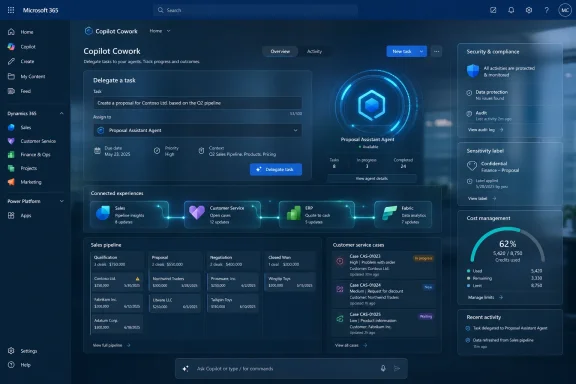
That distinction matters. Microsoft 365 Copilot began life, for many users, as a chat box with privileged access to work data. Cowork is a step toward something more operational: a workspace where a user can assign work, connect plugins, select models, and let the system coordinate multi-step activity across Microsoft and third-party services.
The product’s move to general availability is therefore less about adding another icon to the Microsoft 365 Copilot app and more about tightening the loop between conversation and execution. Microsoft has spent the last three years telling customers that Copilot can reason over mail, meetings, files, and business records. Cowork is where that pitch becomes more transactional: not just “tell me what happened,” but “go do something with what happened.”
That is why the Dynamics 365 plugins deserve more attention than the broader announcement may suggest. Sales and service teams are where Microsoft’s AI promises meet messy CRM data, uneven process adoption, and skeptical business leaders who have heard too many automation pitches before. If Cowork can perform useful work against Dynamics 365 data without turning administrators into unpaid prompt engineers, Microsoft has a stronger claim that Copilot is becoming part of the business application layer, not just the productivity layer.
For Dynamics 365 Sales, the promise is straightforward: Cowork can query leads, opportunities, accounts, and pipeline information. That sounds mundane until you consider the amount of managerial time spent stitching together sales narratives from CRM views, Outlook threads, Teams meetings, and spreadsheet exports. The useful version of Cowork is not a chatbot that tells a seller what an opportunity record already says. It is a delegated analyst that can sift pipeline context, identify risky deals, compare account patterns, and prepare a usable next step while staying inside governed Microsoft 365 boundaries.
For Dynamics 365 Customer Service, the same logic applies to cases, knowledge articles, and support workflows. Service operations live and die by triage speed, escalation quality, and consistency of answers. A Cowork task that can review cases, surface likely knowledge content, prepare follow-up actions, or identify bottlenecks has clearer operational value than a generic AI assistant that writes cheerful support prose.
The challenge is that “out-of-the-box Dynamics 365 data” is not how many mature Dynamics environments look in practice. Large CE deployments often include years of custom fields, renamed entities, Power Automate flows, ISV add-ons, regional compliance adaptations, and business-process workarounds that exist because real organizations are not reference architectures. Microsoft is starting Cowork in the sane place, but the customers most likely to pay for serious AI assistance are also the ones most likely to have complicated estates.
That makes this GA more of a boundary marker than a finish line. It says Microsoft now considers the baseline Dynamics 365 CE integration mature enough to sell globally. It does not prove that Cowork can yet handle every deep customization, every nonstandard sales methodology, or every service process that has accreted over a decade of CRM administration.
That list is not random. It sketches the workflow Microsoft wants Cowork to inhabit: project management, finance, legal, market data, energy data, SAP context, design assets, enterprise content, analytics platforms, and collaboration boards. In other words, Microsoft is trying to turn Cowork into an orchestration surface for the software sprawl it cannot fully replace.
For IT administrators, the important phrase is not “partner ecosystem.” It is who gets to authorize what. Partner plugins authenticate against external services, custom plugins can be built and deployed by organizations, and Microsoft’s own plugins connect to business data that may contain customer records, financial data, sales forecasts, and support histories. The value of Cowork rises as it gains access to more systems, but so does the blast radius of a bad permission model, a sloppy plugin approval process, or a misunderstood data boundary.
This is where Microsoft’s enterprise advantage is both real and fragile. The company can credibly argue that Cowork inherits Microsoft 365 governance surfaces, auditability, sensitivity labels, and administrative controls. That will be reassuring to organizations that already trust Microsoft Purview, Entra ID, Microsoft 365 admin center workflows, and Dynamics security roles.
But a control plane only works if customers actually use it. Many organizations still struggle to govern Teams apps, Power Platform connectors, SharePoint sharing links, and guest access. Cowork adds another layer: agents acting across approved tools, sometimes with user-delegated authority, sometimes through scheduled or unattended work patterns, and often with business users expecting consumer-grade speed.
Microsoft’s pitch is that this is safer than employees pasting CRM exports into unapproved AI tools. That is probably true. But “safer than shadow AI” is not the same as “safe by default for every tenant.” GA status means the product is ready for adoption; it does not mean the customer’s governance model is ready for the product.
For Dynamics 365 ERP, Microsoft’s documentation already describes an MCP server that exposes data tools, form tools, and action tools for finance and operations apps, with access shaped by security permissions and application configuration. That matters because it points to the future Microsoft is building: agents that do not merely query a static API, but dynamically understand what a user can see and do in the application.
For CE customers, the Sales and Customer Service plugins now in GA may become the practical proving ground for whether Microsoft’s agent integration story delivers real value. Dynamics customers do not need another conceptual diagram of agentic architecture. They need to know whether a seller can delegate pipeline review without corrupting CRM hygiene, whether a service manager can automate case analysis without leaking restricted account details, and whether administrators can explain cost and behavior before the finance team asks why AI usage has spiked.
The MCP story is promising because it can reduce brittle integration work. If an agent can discover available actions based on role, context, and configuration, the system becomes more adaptable to real business applications. That is a better direction than hard-coded demos built around idealized CRM schemas.
Still, MCP does not erase the old problems. Permissions remain hard. Data quality remains hard. Business process ambiguity remains hard. If a sales organization has three definitions of “at risk opportunity,” an agent will not save it from organizational confusion; it will merely produce faster confusion with better formatting.
The most interesting thing about Cowork’s Dynamics plugins is that they may help customers test Microsoft’s broader agent infrastructure with lower-risk, business-readable scenarios. A CRM leader can judge whether Cowork’s output matches how sellers and service teams actually work. An admin can observe which permissions matter. A finance stakeholder can see whether the consumption model maps to outcomes or just activity.
This is where the product becomes politically interesting inside enterprises. Microsoft 365 Copilot was already a difficult budget conversation because it attached a premium per-user price to a productivity tool whose value varies wildly by role, data readiness, and user behavior. Cowork adds a variable-cost layer on top of that. Now the question is not just “who gets a Copilot license?” It is “who is allowed to generate consumption, through which models, against which plugins, and for what kind of work?”
The model choice feature is part usability, part cost lever. Users and administrators can treat different tasks differently, selecting models based on the balance of capability, latency, and price. That sounds sensible, but it also assumes organizations are ready to educate users about the financial consequences of agentic work. Many are not.
The July 1, 2026 billing transition for certain Frontier tenants underscores the point. Microsoft is giving organizations that used Cowork during the preview a short grace period before billing begins, which is reasonable as a transition mechanism. But for managed service providers, global IT teams, and heavily delegated Microsoft 365 environments, that is not much time to move from experimentation to cost governance.
This is the cloud economics story repeating itself. The first phase of adoption celebrates elasticity and access. The second phase asks why a team burned through budget by leaving powerful tools ungoverned. Cowork’s success will depend partly on whether Microsoft can make its cost reporting granular enough for business owners to understand and predictable enough for IT and finance teams to trust.
For Dynamics 365 customers, the cost question is even sharper because the work has measurable business value. If Cowork helps close deals faster or deflect service escalations, variable AI spend may be easy to justify. If it mostly produces polished summaries of data users could already access, the bill will become ammunition for Copilot skeptics.
That is the right direction, and it is also a reminder that agentic AI complicates security review. Traditional enterprise search asks what a user can retrieve. Cowork asks what a user can delegate. The difference is subtle until it is not.
A user with access to customer records may be allowed to read those records, summarize them, and prepare a report. But should that same user be allowed to schedule recurring agent tasks that analyze sensitive accounts, combine CRM data with third-party market intelligence, and generate artifacts for sharing? The answer may be yes, but it needs to be an intentional yes.
Dynamics 365 role-based security helps constrain what a user or agent can access, and that is a major advantage over unmanaged AI workflows. But role design in business applications often reflects years of compromises. Users may have more access than they need because restricting it broke a workflow in 2019. Teams may share service accounts. Admin roles may be broader than policy documents suggest. Cowork will not create those weaknesses, but it can make them more consequential.
There is also the issue of explainability. When an agent produces a recommendation about an opportunity or a support case, users need to understand the basis for that output well enough to challenge it. In regulated industries, that may mean preserving prompts, outputs, source context, and user actions in a way compliance teams can reconstruct later. Microsoft’s integration with Purview-style controls helps, but organizations will still need process around review and accountability.
The safest deployment pattern will not be a tenant-wide celebration. It will be a phased rollout with known scenarios, known data boundaries, approved plugins, spending limits, and a feedback loop involving business owners, administrators, security teams, and the users who know when the AI is confidently wrong.
The Dynamics 365 plugins require an associated Power Platform environment, which means administrators need to know which environment is connected and whether that environment is the right one. In many organizations, production, sandbox, regional, and departmental environments coexist with inconsistent naming and ownership. An agent pointed at the wrong environment is not a futuristic risk; it is a very ordinary Microsoft cloud administration mistake.
The default enablement posture also deserves scrutiny. Microsoft documentation indicates that Dynamics 365 Customer Service and Sales integrations are enabled by default and can be disabled in the Microsoft 365 admin center. That may be convenient for adoption, but admins should treat it as a review item, not a footnote. Default-on integrations have a way of becoming production dependencies before governance catches up.
Plugin management is another obvious pressure point. If users can request or add plugins from the Microsoft 365 App Store after admin approval, organizations need a policy for evaluating those plugins. That policy should consider not just vendor reputation but data access, authentication model, retention behavior, auditability, support obligations, and whether the plugin creates a new path for regulated information to move outside expected systems.
Then there is training. Cowork’s value depends on users learning to delegate work in a way the system can complete and the organization can govern. A vague instruction to “check the pipeline” is not the same as a well-scoped task that defines territory, timeframe, risk signals, output format, and acceptable actions. The better the prompt discipline, the more Cowork can become a real assistant rather than a novelty.
Dynamics 365 CE gives Microsoft a stronger path to usefulness than generic productivity scenarios because sales and service work is rich in repeatable patterns. Pipeline review, case triage, account briefing, escalation preparation, renewal analysis, and knowledge lookup are all plausible agent tasks. They have business owners, measurable outcomes, and existing systems of record.
But CRM data is also notorious for being incomplete, stale, or politically massaged. Sellers may update opportunities late. Support teams may use inconsistent case categories. Account hierarchies may not reflect reality. Knowledge articles may lag product changes. An agent operating over flawed data may produce output that looks more authoritative than the underlying system deserves.
This is where Cowork could unintentionally become a mirror. If the agent struggles, the problem may not be the model. It may be that the organization’s CRM discipline is too weak for agentic automation. That is uncomfortable, but potentially useful. AI projects often fail because companies discover too late that their data estate is not ready. Cowork may surface that truth earlier.
The better organizations will treat Dynamics Cowork adoption as a business process audit. They will ask which records matter, which fields drive decisions, which workflows are safe to automate, which outputs need human approval, and which teams have enough data maturity to benefit. The weaker organizations will turn it on broadly, celebrate initial novelty, and then blame the technology when users discover that automated bad process is still bad process.
That strategy is both logical and risky. It is logical because Microsoft controls the productivity suite, identity plane, collaboration graph, business apps, developer platform, and a large chunk of enterprise security tooling. Few companies are better positioned to make AI agents useful inside real organizations.
It is risky because customers already complain about Microsoft licensing complexity, admin sprawl, product renaming, and overlapping Copilot SKUs. Cowork can either simplify work by becoming a coherent delegation layer, or it can become another Microsoft cloud feature whose value is obscured by knobs, credits, plugins, model choices, and documentation pages.
Dynamics 365 CE customers sit at the center of that tension. They have high-value workflows that could justify AI investment, but they also have complex environments where trust is hard won. A sales leader will tolerate experimentation only if Cowork improves pipeline clarity. A service leader will care about case resolution, escalation quality, and customer satisfaction. A CIO will care about spend, auditability, and whether the system creates new operational risk.
Microsoft’s advantage is that it can tie Cowork to data and controls customers already use. Its disadvantage is that customers know from experience that Microsoft integration does not automatically mean simplicity. GA is the beginning of the hard part: proving that delegated AI work can survive contact with real enterprise mess.
Microsoft has now put Copilot Cowork into the global market with Dynamics 365 CE plugins ready for production use, but the product’s real verdict will be written inside customer tenants rather than launch blogs. If Cowork can turn Dynamics data into governed, repeatable, outcome-oriented work, it will make Microsoft’s agent platform feel less like an AI land grab and more like the next practical layer of enterprise software. If it cannot, administrators will remember this GA as the moment Copilot’s promise became one more budget line to explain.
 Microsoft Moves Cowork From Demo Theater to Daily Work
Copilot Cowork arrives with the kind of phrasing Microsoft now reserves for products it wants customers to treat as a platform rather than a feature. Charles Lamanna, Microsoft’s executive vice president for Copilot, Agents, and Platform, described it as the fastest-growing feature in the company’s Frontier program and framed the preview as proof that users are ready to hand off more than simple drafting or summarization tasks.That distinction matters. Microsoft 365 Copilot began life, for many users, as a chat box with privileged access to work data. Cowork is a step toward something more operational: a workspace where a user can assign work, connect plugins, select models, and let the system coordinate multi-step activity across Microsoft and third-party services.
The product’s move to general availability is therefore less about adding another icon to the Microsoft 365 Copilot app and more about tightening the loop between conversation and execution. Microsoft has spent the last three years telling customers that Copilot can reason over mail, meetings, files, and business records. Cowork is where that pitch becomes more transactional: not just “tell me what happened,” but “go do something with what happened.”
That is why the Dynamics 365 plugins deserve more attention than the broader announcement may suggest. Sales and service teams are where Microsoft’s AI promises meet messy CRM data, uneven process adoption, and skeptical business leaders who have heard too many automation pitches before. If Cowork can perform useful work against Dynamics 365 data without turning administrators into unpaid prompt engineers, Microsoft has a stronger claim that Copilot is becoming part of the business application layer, not just the productivity layer.
Dynamics 365 CE Becomes a First-Class Cowork Target
The generally available Dynamics 365 Sales and Customer Service plugins give Cowork a validated path into common customer engagement data. Microsoft describes the Sales and Customer Service plugins as using quality-validated prompts against out-of-the-box Dynamics 365 data, which is a careful way of saying that the first production use cases are meant to work with standard objects and conventional implementations before customers start demanding magic against every bespoke table and business rule.For Dynamics 365 Sales, the promise is straightforward: Cowork can query leads, opportunities, accounts, and pipeline information. That sounds mundane until you consider the amount of managerial time spent stitching together sales narratives from CRM views, Outlook threads, Teams meetings, and spreadsheet exports. The useful version of Cowork is not a chatbot that tells a seller what an opportunity record already says. It is a delegated analyst that can sift pipeline context, identify risky deals, compare account patterns, and prepare a usable next step while staying inside governed Microsoft 365 boundaries.
For Dynamics 365 Customer Service, the same logic applies to cases, knowledge articles, and support workflows. Service operations live and die by triage speed, escalation quality, and consistency of answers. A Cowork task that can review cases, surface likely knowledge content, prepare follow-up actions, or identify bottlenecks has clearer operational value than a generic AI assistant that writes cheerful support prose.
The challenge is that “out-of-the-box Dynamics 365 data” is not how many mature Dynamics environments look in practice. Large CE deployments often include years of custom fields, renamed entities, Power Automate flows, ISV add-ons, regional compliance adaptations, and business-process workarounds that exist because real organizations are not reference architectures. Microsoft is starting Cowork in the sane place, but the customers most likely to pay for serious AI assistance are also the ones most likely to have complicated estates.
That makes this GA more of a boundary marker than a finish line. It says Microsoft now considers the baseline Dynamics 365 CE integration mature enough to sell globally. It does not prove that Cowork can yet handle every deep customization, every nonstandard sales methodology, or every service process that has accreted over a decade of CRM administration.
The Plugin Catalog Is Really a Control Plane Argument
The partner plugin list gives the announcement its marketplace flavor. Microsoft says nine partner plugins are available now, including offerings from monday.com, Morningstar, Moody’s, Miro, LSEG, S&P Global Energy, TeamsMaestro, Harvey, and enosix. Additional plugins are expected from Adobe, Atlassian, Box, Canva, CB Insights, Databricks, MoneyForward, and Templafy.That list is not random. It sketches the workflow Microsoft wants Cowork to inhabit: project management, finance, legal, market data, energy data, SAP context, design assets, enterprise content, analytics platforms, and collaboration boards. In other words, Microsoft is trying to turn Cowork into an orchestration surface for the software sprawl it cannot fully replace.
For IT administrators, the important phrase is not “partner ecosystem.” It is who gets to authorize what. Partner plugins authenticate against external services, custom plugins can be built and deployed by organizations, and Microsoft’s own plugins connect to business data that may contain customer records, financial data, sales forecasts, and support histories. The value of Cowork rises as it gains access to more systems, but so does the blast radius of a bad permission model, a sloppy plugin approval process, or a misunderstood data boundary.
This is where Microsoft’s enterprise advantage is both real and fragile. The company can credibly argue that Cowork inherits Microsoft 365 governance surfaces, auditability, sensitivity labels, and administrative controls. That will be reassuring to organizations that already trust Microsoft Purview, Entra ID, Microsoft 365 admin center workflows, and Dynamics security roles.
But a control plane only works if customers actually use it. Many organizations still struggle to govern Teams apps, Power Platform connectors, SharePoint sharing links, and guest access. Cowork adds another layer: agents acting across approved tools, sometimes with user-delegated authority, sometimes through scheduled or unattended work patterns, and often with business users expecting consumer-grade speed.
Microsoft’s pitch is that this is safer than employees pasting CRM exports into unapproved AI tools. That is probably true. But “safer than shadow AI” is not the same as “safe by default for every tenant.” GA status means the product is ready for adoption; it does not mean the customer’s governance model is ready for the product.
MCP Servers Turn From Architecture Diagram to Procurement Question
The MSDynamicsWorld angle is especially sharp because it connects Cowork to Microsoft’s Model Context Protocol work around Dynamics. MCP has become the enterprise AI integration acronym of the moment: a way for agents to discover tools, context, and actions exposed by systems without every integration becoming a one-off connector project.For Dynamics 365 ERP, Microsoft’s documentation already describes an MCP server that exposes data tools, form tools, and action tools for finance and operations apps, with access shaped by security permissions and application configuration. That matters because it points to the future Microsoft is building: agents that do not merely query a static API, but dynamically understand what a user can see and do in the application.
For CE customers, the Sales and Customer Service plugins now in GA may become the practical proving ground for whether Microsoft’s agent integration story delivers real value. Dynamics customers do not need another conceptual diagram of agentic architecture. They need to know whether a seller can delegate pipeline review without corrupting CRM hygiene, whether a service manager can automate case analysis without leaking restricted account details, and whether administrators can explain cost and behavior before the finance team asks why AI usage has spiked.
The MCP story is promising because it can reduce brittle integration work. If an agent can discover available actions based on role, context, and configuration, the system becomes more adaptable to real business applications. That is a better direction than hard-coded demos built around idealized CRM schemas.
Still, MCP does not erase the old problems. Permissions remain hard. Data quality remains hard. Business process ambiguity remains hard. If a sales organization has three definitions of “at risk opportunity,” an agent will not save it from organizational confusion; it will merely produce faster confusion with better formatting.
The most interesting thing about Cowork’s Dynamics plugins is that they may help customers test Microsoft’s broader agent infrastructure with lower-risk, business-readable scenarios. A CRM leader can judge whether Cowork’s output matches how sellers and service teams actually work. An admin can observe which permissions matter. A finance stakeholder can see whether the consumption model maps to outcomes or just activity.
The New Cost Model Makes AI Adoption a FinOps Exercise
Microsoft’s GA announcement brings cost controls to the center of the Cowork story, and that is a tell. Cowork is not simply included as another static capability inside the familiar Microsoft 365 Copilot per-user subscription. Microsoft is introducing usage reporting, spending limits, budgeting controls, and consumption options, including pay-as-you-go pricing based on Copilot credits.This is where the product becomes politically interesting inside enterprises. Microsoft 365 Copilot was already a difficult budget conversation because it attached a premium per-user price to a productivity tool whose value varies wildly by role, data readiness, and user behavior. Cowork adds a variable-cost layer on top of that. Now the question is not just “who gets a Copilot license?” It is “who is allowed to generate consumption, through which models, against which plugins, and for what kind of work?”
The model choice feature is part usability, part cost lever. Users and administrators can treat different tasks differently, selecting models based on the balance of capability, latency, and price. That sounds sensible, but it also assumes organizations are ready to educate users about the financial consequences of agentic work. Many are not.
The July 1, 2026 billing transition for certain Frontier tenants underscores the point. Microsoft is giving organizations that used Cowork during the preview a short grace period before billing begins, which is reasonable as a transition mechanism. But for managed service providers, global IT teams, and heavily delegated Microsoft 365 environments, that is not much time to move from experimentation to cost governance.
This is the cloud economics story repeating itself. The first phase of adoption celebrates elasticity and access. The second phase asks why a team burned through budget by leaving powerful tools ungoverned. Cowork’s success will depend partly on whether Microsoft can make its cost reporting granular enough for business owners to understand and predictable enough for IT and finance teams to trust.
For Dynamics 365 customers, the cost question is even sharper because the work has measurable business value. If Cowork helps close deals faster or deflect service escalations, variable AI spend may be easy to justify. If it mostly produces polished summaries of data users could already access, the bill will become ammunition for Copilot skeptics.
Security Inheritance Is Necessary, Not Sufficient
Microsoft says Cowork prompts, responses, and generated artifacts flow through existing Microsoft 365 controls, with audit logging, data security posture management, eDiscovery, communication compliance, and sensitivity-label inheritance in the GA security story. Data loss prevention, insider risk management, and data lifecycle management are described as coming later.That is the right direction, and it is also a reminder that agentic AI complicates security review. Traditional enterprise search asks what a user can retrieve. Cowork asks what a user can delegate. The difference is subtle until it is not.
A user with access to customer records may be allowed to read those records, summarize them, and prepare a report. But should that same user be allowed to schedule recurring agent tasks that analyze sensitive accounts, combine CRM data with third-party market intelligence, and generate artifacts for sharing? The answer may be yes, but it needs to be an intentional yes.
Dynamics 365 role-based security helps constrain what a user or agent can access, and that is a major advantage over unmanaged AI workflows. But role design in business applications often reflects years of compromises. Users may have more access than they need because restricting it broke a workflow in 2019. Teams may share service accounts. Admin roles may be broader than policy documents suggest. Cowork will not create those weaknesses, but it can make them more consequential.
There is also the issue of explainability. When an agent produces a recommendation about an opportunity or a support case, users need to understand the basis for that output well enough to challenge it. In regulated industries, that may mean preserving prompts, outputs, source context, and user actions in a way compliance teams can reconstruct later. Microsoft’s integration with Purview-style controls helps, but organizations will still need process around review and accountability.
The safest deployment pattern will not be a tenant-wide celebration. It will be a phased rollout with known scenarios, known data boundaries, approved plugins, spending limits, and a feedback loop involving business owners, administrators, security teams, and the users who know when the AI is confidently wrong.
WindowsForum Readers Should Watch the Admin Center, Not the Launch Video
For WindowsForum’s sysadmin and IT pro audience, the practical story is less glamorous than Microsoft’s launch copy. Cowork is a workload that touches identity, licensing, Microsoft 365 governance, Dynamics 365 security, Power Platform environments, plugin approvals, browser-based activity through Edge, and potentially third-party data services. That makes it a cross-functional admin problem from day one.The Dynamics 365 plugins require an associated Power Platform environment, which means administrators need to know which environment is connected and whether that environment is the right one. In many organizations, production, sandbox, regional, and departmental environments coexist with inconsistent naming and ownership. An agent pointed at the wrong environment is not a futuristic risk; it is a very ordinary Microsoft cloud administration mistake.
The default enablement posture also deserves scrutiny. Microsoft documentation indicates that Dynamics 365 Customer Service and Sales integrations are enabled by default and can be disabled in the Microsoft 365 admin center. That may be convenient for adoption, but admins should treat it as a review item, not a footnote. Default-on integrations have a way of becoming production dependencies before governance catches up.
Plugin management is another obvious pressure point. If users can request or add plugins from the Microsoft 365 App Store after admin approval, organizations need a policy for evaluating those plugins. That policy should consider not just vendor reputation but data access, authentication model, retention behavior, auditability, support obligations, and whether the plugin creates a new path for regulated information to move outside expected systems.
Then there is training. Cowork’s value depends on users learning to delegate work in a way the system can complete and the organization can govern. A vague instruction to “check the pipeline” is not the same as a well-scoped task that defines territory, timeframe, risk signals, output format, and acceptable actions. The better the prompt discipline, the more Cowork can become a real assistant rather than a novelty.
The Preview Hype Meets the Reality of Line-of-Business Data
Microsoft’s claim that more than half of the Fortune 500 used Cowork during preview is impressive, but preview usage is not the same as embedded operational reliance. Large enterprises often try Microsoft preview features because they already have strategic account teams, Copilot pilots, and executive pressure to evaluate AI. The more important question is how many of those organizations will let Cowork touch core workflows after procurement, security, and business owners finish arguing.Dynamics 365 CE gives Microsoft a stronger path to usefulness than generic productivity scenarios because sales and service work is rich in repeatable patterns. Pipeline review, case triage, account briefing, escalation preparation, renewal analysis, and knowledge lookup are all plausible agent tasks. They have business owners, measurable outcomes, and existing systems of record.
But CRM data is also notorious for being incomplete, stale, or politically massaged. Sellers may update opportunities late. Support teams may use inconsistent case categories. Account hierarchies may not reflect reality. Knowledge articles may lag product changes. An agent operating over flawed data may produce output that looks more authoritative than the underlying system deserves.
This is where Cowork could unintentionally become a mirror. If the agent struggles, the problem may not be the model. It may be that the organization’s CRM discipline is too weak for agentic automation. That is uncomfortable, but potentially useful. AI projects often fail because companies discover too late that their data estate is not ready. Cowork may surface that truth earlier.
The better organizations will treat Dynamics Cowork adoption as a business process audit. They will ask which records matter, which fields drive decisions, which workflows are safe to automate, which outputs need human approval, and which teams have enough data maturity to benefit. The weaker organizations will turn it on broadly, celebrate initial novelty, and then blame the technology when users discover that automated bad process is still bad process.
Microsoft’s Real Bet Is That Copilot Becomes the Workbench
The Cowork GA announcement fits a broader Microsoft pattern. The company is trying to make Microsoft 365 Copilot the front door for work while using plugins, agents, MCP servers, and business application integrations to pull more enterprise activity into that experience. Windows, Office, Teams, Dynamics, Power Platform, Fabric, and Edge all become less interesting as isolated products and more important as connected surfaces for agentic work.That strategy is both logical and risky. It is logical because Microsoft controls the productivity suite, identity plane, collaboration graph, business apps, developer platform, and a large chunk of enterprise security tooling. Few companies are better positioned to make AI agents useful inside real organizations.
It is risky because customers already complain about Microsoft licensing complexity, admin sprawl, product renaming, and overlapping Copilot SKUs. Cowork can either simplify work by becoming a coherent delegation layer, or it can become another Microsoft cloud feature whose value is obscured by knobs, credits, plugins, model choices, and documentation pages.
Dynamics 365 CE customers sit at the center of that tension. They have high-value workflows that could justify AI investment, but they also have complex environments where trust is hard won. A sales leader will tolerate experimentation only if Cowork improves pipeline clarity. A service leader will care about case resolution, escalation quality, and customer satisfaction. A CIO will care about spend, auditability, and whether the system creates new operational risk.
Microsoft’s advantage is that it can tie Cowork to data and controls customers already use. Its disadvantage is that customers know from experience that Microsoft integration does not automatically mean simplicity. GA is the beginning of the hard part: proving that delegated AI work can survive contact with real enterprise mess.
The Dynamics 365 Cowork Rollout Has a Short List of Hard Truths
The immediate lesson from Cowork’s GA is not that every Dynamics 365 CE customer should rush into production. It is that the product has crossed the threshold where serious evaluation should move from curiosity to governance-backed pilots. The right pilots will be narrow, measurable, and tied to business outcomes rather than generic AI enthusiasm.- Organizations should verify which Microsoft 365 Copilot users can access Cowork and whether Dynamics 365 Sales and Customer Service plugins are enabled in their tenant.
- Administrators should confirm the connected Power Platform environment before letting users rely on Dynamics 365 plugin output.
- Business owners should select a small number of sales or service scenarios where success can be measured against existing operational metrics.
- Security and compliance teams should review plugin approvals, audit logging, sensitivity-label behavior, and retention requirements before expanding access.
- Finance and IT should configure cost controls early because Cowork introduces consumption behavior that does not behave like a simple per-seat license.
- Dynamics teams should treat poor Cowork output as a possible signal of CRM data-quality problems, not only as a model-performance issue.
Microsoft has now put Copilot Cowork into the global market with Dynamics 365 CE plugins ready for production use, but the product’s real verdict will be written inside customer tenants rather than launch blogs. If Cowork can turn Dynamics data into governed, repeatable, outcome-oriented work, it will make Microsoft’s agent platform feel less like an AI land grab and more like the next practical layer of enterprise software. If it cannot, administrators will remember this GA as the moment Copilot’s promise became one more budget line to explain.
References
- Primary source: msdynamicsworld.com
Published: Wed, 17 Jun 2026 17:37:45 GMT
Microsoft announces worldwide GA of Copilot Cowork, including Dynamics 365 CE plugins
MSDW Insight: Dynamics 365 CE customers using Copilot Cowork could soon get better perspective on the reamsdynamicsworld.com - Related coverage: techradar.com
Microsoft makes Copilot Cowork open to everyone, and wants to help you tackle even the trickiest work tasks | TechRadar
Copilot Cowork gets an upgrade as it opens to all userswww.techradar.com - Official source: support.microsoft.com
- Official source: learn.microsoft.com
Available plugins for Copilot Cowork | Microsoft Learn
Browse Microsoft and partner plugins that extend Microsoft 365 Copilot Cowork with new skills and connectors.learn.microsoft.com - Official source: news.microsoft.com
Copilot Cowork est désormais généralement disponible - Source EMEA
 news.microsoft.com
- Official source: microsoft.com
Moving sales, service, and finance to the Frontier with Microsoft 365 Copilot | Microsoft 365 Blog
Microsoft is announcing the addition of role-based AI solutions to Microsoft 365 Copilot for sales, service, and finance professionals.www.microsoft.com
- Official source: blogs.microsoft.com
Introducing Microsoft Dynamics 365 Copilot, the world’s first copilot in both CRM and ERP, that brings next-generation AI to every line of business - The Official Microsoft Blog
Today, we’re announcing the next generation of AI product updates across our business applications portfolio, including the launch of the new Microsoft Dynamics 365 Copilot – providing interactive, AI-powered assistance across business functions. According to our recent survey on business...blogs.microsoft.com - Related coverage: itpro.com
Anthropic's Cowork tool is coming to Microsoft Copilot | IT Pro
The new Copilot Cowork tool will be made available through a new Microsoft 365 tier at the end of March.www.itpro.com - Official source: techcommunity.microsoft.com
Business Applications Partner Alert Announcing new features in Dynamics 365 Field Service and Supply Chain Management
PDF documenttechcommunity.microsoft.com
