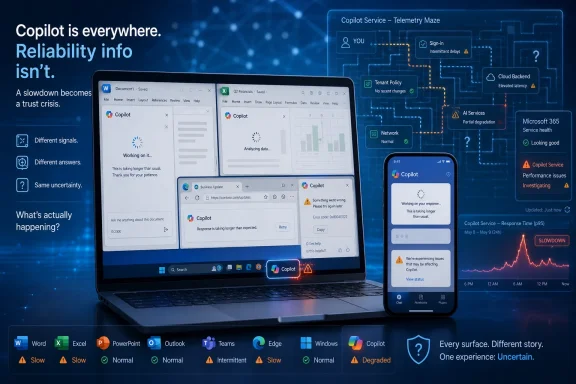
On Friday, May 29, 2026, users reported problems reaching or using Microsoft Copilot, with consumer news outlets pointing to Downdetector complaints while Microsoft’s public-facing service channels had not clearly established a single universal outage. That distinction matters because Copilot is no longer a novelty chatbot tucked away on a website. It is a productivity surface, a Windows affordance, a Microsoft 365 upsell, and increasingly a dependency that sits between users and their work. When it slows down, fails, or merely appears unreliable, the incident becomes less about one AI assistant and more about Microsoft’s attempt to make AI feel like infrastructure before it behaves like infrastructure.
The immediate story is simple enough: people tried to use Copilot and found it slow, unavailable, or inconsistent. AOL.com and the Asbury Park Press both surfaced the same consumer-facing question in plain language: is Copilot down right now? That framing is revealing, because it treats Copilot like email, search, maps, or cloud storage — a service whose absence interrupts a task rather than a feature whose absence can be ignored.
Microsoft has spent the past several years encouraging exactly that shift in perception. Copilot is not marketed as a chatbot one visits when bored; it is positioned as a layer across Windows, Edge, Bing, Teams, Outlook, Word, Excel, PowerPoint, GitHub, Security, and Azure. The name itself is a promise of accompaniment. The product is supposed to be there when the user reaches for it.
But “there” is doing a lot of work. A conventional app can crash locally, and a conventional website can return an error page. Copilot failures are murkier. The interface may load while answers hang. A prompt may submit but never resolve. A response may degrade from useful synthesis into generic filler. The service may be available in one region, one tenant, or one product shell while failing in another. That makes the common user question — is it down? — both understandable and technically inadequate.
This is the first lesson of the May 29 reports: AI outages often look like performance problems before they look like outages. A chatbot that takes 45 seconds to answer a trivial question is not “down” in the old sense. It is worse in a different way. It invites the user to wait, retry, rewrite, refresh, and doubt their own environment before admitting the service has failed them.
But there is a reason IT teams do not treat Downdetector as a postmortem. It measures complaint volume, not causality. It can tell us that more people than usual are reporting trouble with Copilot; it cannot tell us whether the issue originated in Microsoft’s model hosting, authentication stack, regional routing, browser integration, Microsoft 365 tenant policy, a dependent service, or a sudden load spike caused by another provider’s disruption.
That limitation is especially important for Copilot because the product is not one thing. Microsoft Copilot as a consumer web assistant, Microsoft 365 Copilot inside workplace apps, Copilot Chat for commercial users, GitHub Copilot for developers, and Copilot-branded security tooling are related by brand but not always by architecture, licensing, or operational surface. A “Copilot problem” can mean very different things depending on where the user encountered it.
For WindowsForum readers, the practical takeaway is that outage reports should trigger triage, not panic. If Copilot in Edge is slow, that does not automatically mean Microsoft 365 Copilot is unusable in your tenant. If Copilot Chat fails for a commercial account, that does not prove the consumer Copilot site is down globally. If GitHub Copilot stalls in an IDE, the problem may sit nowhere near the consumer Copilot endpoint that casual users are checking.
The trouble is that Microsoft’s branding collapses those distinctions for normal people. A user sees the Copilot logo, asks a question, and gets no useful response. From the user’s perspective, Copilot is broken. Microsoft may be able to draw a clean internal boundary between services, but it has taught the market to see one assistant.
That is commercially sensible. Microsoft’s most defensible advantage in AI is not that it alone can build large models. It is that it already owns the places where people work. If Copilot is present in Word when the blank page appears, in Outlook when the inbox overflows, in Teams when the meeting ends, and in Windows when the user hits a confusing task, then Microsoft does not need users to go looking for AI. It can make AI ambient.
But ubiquity changes the reliability bar. A feature that appears occasionally can fail occasionally. A layer that is always present must earn a different kind of trust. The more aggressively Microsoft embeds Copilot into daily workflows, the less tolerance users will have for vague slowdowns, unexplained timeouts, or silent degradation.
This is where AI assistants are colliding with the expectations created by mature cloud software. Users do not expect Exchange Online, OneDrive, or Teams to be perfect, but they do expect clear incident communication, reasonably bounded blast radius, and administrative visibility. They expect service health dashboards to matter. They expect tenant admins to have some path from “users are complaining” to “here is what Microsoft says is happening.”
Copilot is not yet fully socialized into that operational contract. It often behaves like a cloud service, is marketed like a productivity suite, and is explained like a magic assistant. The result is an accountability haze. When it fails, users ask the internet. Admins check service health. Journalists check Downdetector. Everyone is looking at a different instrument panel.
AI failures are slipperier. Copilot can fail while still appearing conversational. It can answer slowly, answer incompletely, answer with less context than expected, or produce a response that technically resolves but is not worth the wait. To the monitoring stack, some of those events may not count as hard failures. To the user, they are failures all the same.
Latency is particularly corrosive for an assistant because the entire product category is sold on flow. The user is supposed to stay in the document, stay in the thread, stay in the code editor, stay in the meeting recap, and ask the assistant to accelerate the next step. A delay breaks the spell. After enough delays, the assistant becomes another queue.
That matters more than it might appear. AI tools are habit products. Their value compounds only if users repeatedly reach for them and are rewarded often enough to build muscle memory. A single outage will not kill Copilot. Repeated moments of uncertainty can.
For enterprises, the issue is not emotional; it is economic. Microsoft 365 Copilot is a paid add-on whose business case depends on recovered time, improved synthesis, faster drafting, and smoother knowledge retrieval. If users conclude that Copilot is unreliable, they do not merely complain. They stop incorporating it into workflows, and the promised productivity return becomes harder to measure.
Admins need more than a green checkmark or a generic advisory. They need to know which Copilot experience is affected, which regions are implicated, which tenants or licenses are in scope, whether failures involve authentication or inference, whether responses are delayed or blocked, and whether data grounding in Microsoft Graph is working normally. Those details matter because the remediation options differ.
If Teams is down, an organization may shift to email or another conferencing tool. If Copilot in Word is slow, the fallback is simply to write without it. If Copilot is being used for security triage, compliance review, or executive workflow automation, the fallback may require a more formal operational plan. Microsoft’s own expansion of Copilot into higher-value work makes incident specificity more important, not less.
There is also a psychological component. IT departments already live with the awkwardness of cloud dependency: they are responsible to users for services they do not control. When a vendor dashboard lags user reports, the help desk is left translating ambiguity. Copilot adds another layer because many organizations are still trying to justify adoption, define acceptable use, and calm privacy concerns.
A Copilot incident is therefore not just a service problem. It becomes a governance problem. Admins must answer whether the tool is approved, whether data remains protected, whether the problem is local, whether users should keep trying, and whether the promised AI transformation has once again turned into a ticket queue.
The brand unity is useful for marketing, but operationally it creates confusion. A consumer outage headline can make enterprise users wonder whether their paid Copilot tenant is affected. A Microsoft 365 advisory can prompt consumer users to assume the public assistant is broken. A GitHub Copilot issue can be mistaken for a broader Microsoft AI problem.
Microsoft is not alone here. The entire AI industry is struggling with product names that span models, apps, APIs, agents, subscriptions, enterprise controls, and integrations. But Microsoft’s case is unusually consequential because of its installed base. Windows and Office are not niche surfaces. When Microsoft adds a button to those environments, the resulting support burden is enormous.
The company needs sharper public language around Copilot incidents. “Copilot” is too broad to be a useful status object. Users need to know whether the affected service is consumer Copilot, Microsoft 365 Copilot Chat, app-integrated Copilot experiences, GitHub Copilot, Copilot Studio, Copilot for Security, or the identity and data services underneath them.
Until that taxonomy is clearer, every Copilot hiccup will generate a familiar loop: users report trouble, outage sites spike, search engines fill with “is Copilot down,” and Microsoft’s official posture appears either narrowly technical or too slow for the public conversation.
This is the risk of putting a horizontal assistant across vertical products. The assistant becomes a shared perception layer. Even if the underlying apps remain healthy, the user’s experience of the suite is colored by the assistant’s behavior.
Microsoft has encouraged users to think of Copilot as a universal helper. That carries an implicit guarantee: the helper should not be the least reliable part of the room. When it is, the assistant stops feeling futuristic and starts feeling like Clippy with cloud latency.
The comparison is unfair in technical terms but potent in user terms. Clippy was annoying because it interrupted work with low-value suggestions. A slow Copilot risks a modern version of the same sin: it inserts itself into workflows and then fails to justify the interruption. The product may be vastly more capable, but the tolerance window is still set by the user’s task at hand.
A skeptical finance chief does not need a rigorous outage analysis to question a subscription. A cautious security officer does not need a global incident to slow a rollout. A frustrated user does not need to understand model infrastructure to decide that drafting the summary manually is faster.
This is the adoption trap for enterprise AI. The tool must be used enough to prove its value, but it must be reliable enough to be used repeatedly. Early failures do not merely inconvenience users; they influence the organizational narrative around the product.
Microsoft knows this. Its Copilot push has increasingly emphasized measurable productivity, role-specific scenarios, and administrative controls. But real-world confidence is earned in moments of stress. When users ask whether Copilot is down, they are also asking whether the AI layer can be trusted as part of the workday.
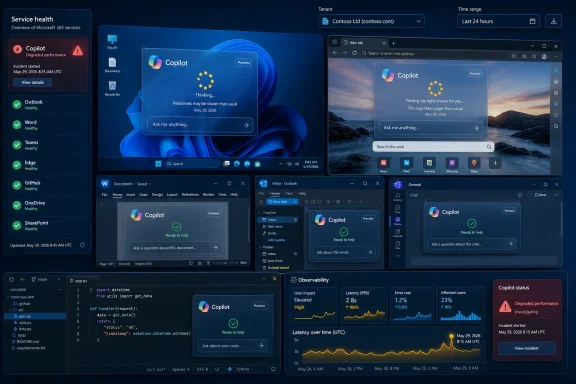
Imagine an admin seeing that Copilot Chat requests in North America are experiencing elevated latency, that grounding against SharePoint content is healthy, that Teams meeting recap generation is delayed, and that Word drafting is unaffected. That kind of visibility would transform Copilot incidents from rumor management into operations management.
Microsoft already has many of the ingredients. It has the Microsoft 365 admin center, service health advisories, telemetry across its cloud, and role-based admin tooling. The gap is product maturity and clarity. Copilot needs to be treated less like a feature ribbon and more like a distributed service with first-class observability.
There is a user-facing version of this too. Copilot should be better at saying when Copilot is the problem. A stalled prompt that ends in a vague apology wastes more time than a clear status message. If the assistant cannot complete a task because the service is degraded, say so. If a tenant policy blocks access to certain data, say so. If a request is queued, say so.
The AI industry has spent enormous effort making assistants sound human. It should spend more effort making them operationally honest.
That is a milestone, but it is not purely flattering. When a product becomes infrastructure, it inherits infrastructure’s obligations. Users expect durability. Admins expect transparency. Buyers expect measurable value. Security teams expect predictable controls. Journalists expect the company’s public narrative to line up with observed user experience.
Microsoft’s advantage is that it can embed Copilot everywhere. Microsoft’s burden is that it has embedded Copilot everywhere. Every outage, slowdown, confusing advisory, or mismatch between user reports and official status now lands inside a broader debate about whether AI is ready to become the interface for work.
The company does not have to make Copilot perfect. No large cloud service is perfect. But it does have to make Copilot understandable when it fails. The next phase of AI competition will not be won only by better models or flashier demos. It will be won by the vendors that make AI dependable enough to disappear into the workflow.
 Copilot’s Bad Day Exposed the Gap Between Product and Utility
The immediate story is simple enough: people tried to use Copilot and found it slow, unavailable, or inconsistent. AOL.com and the Asbury Park Press both surfaced the same consumer-facing question in plain language: is Copilot down right now? That framing is revealing, because it treats Copilot like email, search, maps, or cloud storage — a service whose absence interrupts a task rather than a feature whose absence can be ignored.Microsoft has spent the past several years encouraging exactly that shift in perception. Copilot is not marketed as a chatbot one visits when bored; it is positioned as a layer across Windows, Edge, Bing, Teams, Outlook, Word, Excel, PowerPoint, GitHub, Security, and Azure. The name itself is a promise of accompaniment. The product is supposed to be there when the user reaches for it.
But “there” is doing a lot of work. A conventional app can crash locally, and a conventional website can return an error page. Copilot failures are murkier. The interface may load while answers hang. A prompt may submit but never resolve. A response may degrade from useful synthesis into generic filler. The service may be available in one region, one tenant, or one product shell while failing in another. That makes the common user question — is it down? — both understandable and technically inadequate.
This is the first lesson of the May 29 reports: AI outages often look like performance problems before they look like outages. A chatbot that takes 45 seconds to answer a trivial question is not “down” in the old sense. It is worse in a different way. It invites the user to wait, retry, rewrite, refresh, and doubt their own environment before admitting the service has failed them.
Downdetector Is a Smoke Alarm, Not a Root-Cause Analysis
The consumer news cycle around Copilot leaned heavily on user reports, especially Downdetector-style telemetry. That is not inherently a problem. For consumer-facing cloud services, crowdsourced outage reports are often the first sign that something has gone wrong, especially before a vendor acknowledges it.But there is a reason IT teams do not treat Downdetector as a postmortem. It measures complaint volume, not causality. It can tell us that more people than usual are reporting trouble with Copilot; it cannot tell us whether the issue originated in Microsoft’s model hosting, authentication stack, regional routing, browser integration, Microsoft 365 tenant policy, a dependent service, or a sudden load spike caused by another provider’s disruption.
That limitation is especially important for Copilot because the product is not one thing. Microsoft Copilot as a consumer web assistant, Microsoft 365 Copilot inside workplace apps, Copilot Chat for commercial users, GitHub Copilot for developers, and Copilot-branded security tooling are related by brand but not always by architecture, licensing, or operational surface. A “Copilot problem” can mean very different things depending on where the user encountered it.
For WindowsForum readers, the practical takeaway is that outage reports should trigger triage, not panic. If Copilot in Edge is slow, that does not automatically mean Microsoft 365 Copilot is unusable in your tenant. If Copilot Chat fails for a commercial account, that does not prove the consumer Copilot site is down globally. If GitHub Copilot stalls in an IDE, the problem may sit nowhere near the consumer Copilot endpoint that casual users are checking.
The trouble is that Microsoft’s branding collapses those distinctions for normal people. A user sees the Copilot logo, asks a question, and gets no useful response. From the user’s perspective, Copilot is broken. Microsoft may be able to draw a clean internal boundary between services, but it has taught the market to see one assistant.
Microsoft Wanted Copilot Everywhere, So Reliability Now Has to Be Everywhere
The broader stakes come from Microsoft’s distribution strategy. Copilot has been added to Windows, pinned into Microsoft 365 experiences, surfaced in Edge, sold as a premium productivity subscription, and framed as the new interface for work. The company has not merely offered AI as an optional tool; it has treated AI as the next operating layer.That is commercially sensible. Microsoft’s most defensible advantage in AI is not that it alone can build large models. It is that it already owns the places where people work. If Copilot is present in Word when the blank page appears, in Outlook when the inbox overflows, in Teams when the meeting ends, and in Windows when the user hits a confusing task, then Microsoft does not need users to go looking for AI. It can make AI ambient.
But ubiquity changes the reliability bar. A feature that appears occasionally can fail occasionally. A layer that is always present must earn a different kind of trust. The more aggressively Microsoft embeds Copilot into daily workflows, the less tolerance users will have for vague slowdowns, unexplained timeouts, or silent degradation.
This is where AI assistants are colliding with the expectations created by mature cloud software. Users do not expect Exchange Online, OneDrive, or Teams to be perfect, but they do expect clear incident communication, reasonably bounded blast radius, and administrative visibility. They expect service health dashboards to matter. They expect tenant admins to have some path from “users are complaining” to “here is what Microsoft says is happening.”
Copilot is not yet fully socialized into that operational contract. It often behaves like a cloud service, is marketed like a productivity suite, and is explained like a magic assistant. The result is an accountability haze. When it fails, users ask the internet. Admins check service health. Journalists check Downdetector. Everyone is looking at a different instrument panel.
The New Failure Mode Is Latency With a Friendly Face
Traditional outages have a useful bluntness. A site refuses to load. A login fails. A mailbox cannot sync. An app throws a clear error. Those failures are frustrating, but they are legible.AI failures are slipperier. Copilot can fail while still appearing conversational. It can answer slowly, answer incompletely, answer with less context than expected, or produce a response that technically resolves but is not worth the wait. To the monitoring stack, some of those events may not count as hard failures. To the user, they are failures all the same.
Latency is particularly corrosive for an assistant because the entire product category is sold on flow. The user is supposed to stay in the document, stay in the thread, stay in the code editor, stay in the meeting recap, and ask the assistant to accelerate the next step. A delay breaks the spell. After enough delays, the assistant becomes another queue.
That matters more than it might appear. AI tools are habit products. Their value compounds only if users repeatedly reach for them and are rewarded often enough to build muscle memory. A single outage will not kill Copilot. Repeated moments of uncertainty can.
For enterprises, the issue is not emotional; it is economic. Microsoft 365 Copilot is a paid add-on whose business case depends on recovered time, improved synthesis, faster drafting, and smoother knowledge retrieval. If users conclude that Copilot is unreliable, they do not merely complain. They stop incorporating it into workflows, and the promised productivity return becomes harder to measure.
The Admin Center Cannot Be an Afterthought in the AI Era
Microsoft’s official guidance for Microsoft 365 service health remains the administrative path: check the Microsoft 365 admin center, review service health, and report an issue if the tenant appears affected but no advisory is visible. That model works reasonably well for known Microsoft 365 workloads. It is less satisfying for a product family as diffuse as Copilot.Admins need more than a green checkmark or a generic advisory. They need to know which Copilot experience is affected, which regions are implicated, which tenants or licenses are in scope, whether failures involve authentication or inference, whether responses are delayed or blocked, and whether data grounding in Microsoft Graph is working normally. Those details matter because the remediation options differ.
If Teams is down, an organization may shift to email or another conferencing tool. If Copilot in Word is slow, the fallback is simply to write without it. If Copilot is being used for security triage, compliance review, or executive workflow automation, the fallback may require a more formal operational plan. Microsoft’s own expansion of Copilot into higher-value work makes incident specificity more important, not less.
There is also a psychological component. IT departments already live with the awkwardness of cloud dependency: they are responsible to users for services they do not control. When a vendor dashboard lags user reports, the help desk is left translating ambiguity. Copilot adds another layer because many organizations are still trying to justify adoption, define acceptable use, and calm privacy concerns.
A Copilot incident is therefore not just a service problem. It becomes a governance problem. Admins must answer whether the tool is approved, whether data remains protected, whether the problem is local, whether users should keep trying, and whether the promised AI transformation has once again turned into a ticket queue.
Consumer Copilot and Enterprise Copilot Share a Brand, Not a Trust Model
One of Microsoft’s persistent challenges is that Copilot means different things to different audiences. For a consumer, it may be the AI button in Edge or the web assistant at copilot.microsoft.com. For a Microsoft 365 customer, it may be a tenant-aware assistant that grounds responses in organizational data. For a developer, it may be GitHub Copilot in Visual Studio Code. For a security team, it may be an incident-response accelerator.The brand unity is useful for marketing, but operationally it creates confusion. A consumer outage headline can make enterprise users wonder whether their paid Copilot tenant is affected. A Microsoft 365 advisory can prompt consumer users to assume the public assistant is broken. A GitHub Copilot issue can be mistaken for a broader Microsoft AI problem.
Microsoft is not alone here. The entire AI industry is struggling with product names that span models, apps, APIs, agents, subscriptions, enterprise controls, and integrations. But Microsoft’s case is unusually consequential because of its installed base. Windows and Office are not niche surfaces. When Microsoft adds a button to those environments, the resulting support burden is enormous.
The company needs sharper public language around Copilot incidents. “Copilot” is too broad to be a useful status object. Users need to know whether the affected service is consumer Copilot, Microsoft 365 Copilot Chat, app-integrated Copilot experiences, GitHub Copilot, Copilot Studio, Copilot for Security, or the identity and data services underneath them.
Until that taxonomy is clearer, every Copilot hiccup will generate a familiar loop: users report trouble, outage sites spike, search engines fill with “is Copilot down,” and Microsoft’s official posture appears either narrowly technical or too slow for the public conversation.
The AI Assistant Is Becoming a Single Point of Perceived Failure
The irony of Copilot is that it is designed to reduce friction across many applications, but when it stumbles, it can make the whole environment feel less dependable. A Word outage affects Word. A Copilot slowdown inside Word can make the user distrust Word, Copilot, Microsoft 365, and the AI strategy behind it.This is the risk of putting a horizontal assistant across vertical products. The assistant becomes a shared perception layer. Even if the underlying apps remain healthy, the user’s experience of the suite is colored by the assistant’s behavior.
Microsoft has encouraged users to think of Copilot as a universal helper. That carries an implicit guarantee: the helper should not be the least reliable part of the room. When it is, the assistant stops feeling futuristic and starts feeling like Clippy with cloud latency.
The comparison is unfair in technical terms but potent in user terms. Clippy was annoying because it interrupted work with low-value suggestions. A slow Copilot risks a modern version of the same sin: it inserts itself into workflows and then fails to justify the interruption. The product may be vastly more capable, but the tolerance window is still set by the user’s task at hand.
Outages Hit Harder When Adoption Is Still Being Negotiated
Copilot is not yet like email, where organizations accept occasional downtime because the tool is non-negotiable. Many companies are still piloting it, limiting it to certain roles, debating licensing costs, writing acceptable-use policies, and measuring whether the productivity gains are real. In that environment, reliability incidents carry extra political weight.A skeptical finance chief does not need a rigorous outage analysis to question a subscription. A cautious security officer does not need a global incident to slow a rollout. A frustrated user does not need to understand model infrastructure to decide that drafting the summary manually is faster.
This is the adoption trap for enterprise AI. The tool must be used enough to prove its value, but it must be reliable enough to be used repeatedly. Early failures do not merely inconvenience users; they influence the organizational narrative around the product.
Microsoft knows this. Its Copilot push has increasingly emphasized measurable productivity, role-specific scenarios, and administrative controls. But real-world confidence is earned in moments of stress. When users ask whether Copilot is down, they are also asking whether the AI layer can be trusted as part of the workday.
The Most Useful Copilot Status Page May Be the One Inside the Tenant
The public web wants a binary answer: up or down. Enterprise IT needs something more granular. The most useful future for Copilot service health is not a generic public page but a tenant-aware diagnostic view that maps user complaints to actual service dependencies.Imagine an admin seeing that Copilot Chat requests in North America are experiencing elevated latency, that grounding against SharePoint content is healthy, that Teams meeting recap generation is delayed, and that Word drafting is unaffected. That kind of visibility would transform Copilot incidents from rumor management into operations management.
Microsoft already has many of the ingredients. It has the Microsoft 365 admin center, service health advisories, telemetry across its cloud, and role-based admin tooling. The gap is product maturity and clarity. Copilot needs to be treated less like a feature ribbon and more like a distributed service with first-class observability.
There is a user-facing version of this too. Copilot should be better at saying when Copilot is the problem. A stalled prompt that ends in a vague apology wastes more time than a clear status message. If the assistant cannot complete a task because the service is degraded, say so. If a tenant policy blocks access to certain data, say so. If a request is queued, say so.
The AI industry has spent enormous effort making assistants sound human. It should spend more effort making them operationally honest.
Microsoft’s AI Ambition Now Depends on Boring Reliability
The May 29 Copilot reports did not need to represent a catastrophic global outage to be significant. Their importance lies in what they reveal about expectations. Copilot has crossed the line from interesting feature to assumed utility for enough people that slowdowns now generate mainstream “is it down?” coverage.That is a milestone, but it is not purely flattering. When a product becomes infrastructure, it inherits infrastructure’s obligations. Users expect durability. Admins expect transparency. Buyers expect measurable value. Security teams expect predictable controls. Journalists expect the company’s public narrative to line up with observed user experience.
Microsoft’s advantage is that it can embed Copilot everywhere. Microsoft’s burden is that it has embedded Copilot everywhere. Every outage, slowdown, confusing advisory, or mismatch between user reports and official status now lands inside a broader debate about whether AI is ready to become the interface for work.
The company does not have to make Copilot perfect. No large cloud service is perfect. But it does have to make Copilot understandable when it fails. The next phase of AI competition will not be won only by better models or flashier demos. It will be won by the vendors that make AI dependable enough to disappear into the workflow.
The May 29 Copilot Flare-Up Left a Map for IT
The useful lesson from this incident is not that Copilot was definitively broken for everyone, everywhere. It is that organizations need a clearer operational posture for AI assistants before those assistants become invisible dependencies.- Organizations should distinguish between consumer Copilot, Microsoft 365 Copilot, GitHub Copilot, and other Copilot-branded services when investigating user complaints.
- Help desks should treat crowdsourced outage spikes as early-warning signals, not as authoritative incident reports.
- Microsoft 365 administrators should check tenant-specific service health before assuming a public Copilot complaint applies to their environment.
- Teams rolling out paid Copilot licenses should document fallback workflows for roles that depend on AI summaries, drafting, coding help, or security analysis.
- Microsoft should provide more granular Copilot health signals because the brand now spans too many products for a single “up or down” answer to be useful.
- Users should be encouraged to report whether Copilot is unavailable, slow, producing incomplete answers, or failing only inside a specific app, because those are operationally different failures.
References
- Primary source: aol.com
Published: Fri, 29 May 2026 16:04:34 GMT
Copilot issues today. Microsoft Copilot down? Copilot down right now? - AOL
Downdetector reports that the biggest problem is people being able to access the Copilot app.www.aol.com - Independent coverage: Asbury Park Press
Published: Fri, 29 May 2026 16:04:00 GMT
Copilot issues today. Microsoft Copilot down? Copilot down right now?
Downdetector reports that the biggest problem is people being able to access the Copilot app.www.app.com - Related coverage: outage.report

Microsoft Copilot down? Outage map, service status, incidents history
See if Microsoft Copilot is down or it's just you. Check current status and outage map. Post yours and see other's reports and complaints
outage.report
- Related coverage: windowscentral.com
"We’ve confirmed service health has returned to normal": Microsoft 365 and Outlook are back up and running | Windows Central
If you're just sitting down to your desk, you may not be able to use Outlook or Microsoft 365.www.windowscentral.com - Related coverage: outage.now

Microsoft Copilot down? Current status and outage map
See if Microsoft Copilot is down or it's just you. Check current status and outage map. Post yours and see other's reports and complaints
outage.now
- Related coverage: downdetector.es
Microsoft Copilot down? Current problems and outages - ES
Real-time problems and outages for Microsoft Copilot. Is Microsoft Copilot down? Here you see what is going on.downdetector.es
- Related coverage: downforeveryoneorjustme.com
Is Copilot down? Live status and problems past 24 hours
Live problems for Copilot. Error received? Down? Slow? Check what is going on. downforeveryoneorjustme.com
- Related coverage: downdetector.pr
Microsoft Copilot down? Current problems and outages - PR
Real-time problems and outages for Microsoft Copilot. Is Microsoft Copilot down? Here you see what is going on.downdetector.pr - Related coverage: isdown.app
Is Microsoft Copilot Down? Check current status and user reports | IsDown
Check if Microsoft Copilot is down right now. Live Microsoft Copilot status, real-time outage detection, and instant alerts when Microsoft Copilot has issues. Free 14-day trial. isdown.app
- Related coverage: gamesradar.com
Xbox CEO confirms it's "winding down" Microsoft Copilot on mobile and ending it on console | GamesRadar+
Xbox originally announced Copilot for console in Marchwww.gamesradar.com - Official source: learn.microsoft.com
How to check Microsoft 365 service health - Microsoft 365 Enterprise | Microsoft Learn
View the health status of Microsoft 365 services before you call support to see if there's an active service interruption.learn.microsoft.com - Related coverage: downdetector.tw
Microsoft Copilot down? Current problems and outages - TW
Real-time problems and outages for Microsoft Copilot. Is Microsoft Copilot down? Here you see what is going on.downdetector.tw - Official source: microsoft.com
Microsoft Copilot for Security productivity findings Whitepaper Jan2024
PDF documentwww.microsoft.com
- Related coverage: veepn.com
Is Copilot Down Right Now? Check Server Status & Outages | VeePN
Copilot not working? Check live Copilot status to see if is Copilot down for everyone or if the issue is only on your side. veepn.com
- Related coverage: techradar.com
Microsoft admits an Office bug exposed confidential user emails to Copilot | TechRadar
Copilot was ignoring 'confidential' email flagswww.techradar.com - Related coverage: tomsguide.com
Outlook is down — the latest on the ongoing Microsoft outage | Tom's Guide
What's happening with Microsoft's popular service?www.tomsguide.com - Official source: cdn-dynmedia-1.microsoft.com
Security Copilot: Evidence of Productivity Gains in Live Operations
Accessible PDFcdn-dynmedia-1.microsoft.com
- Official source: microsoft.ai
- Official source: download.microsoft.com
- Official source: adoption.microsoft.com