

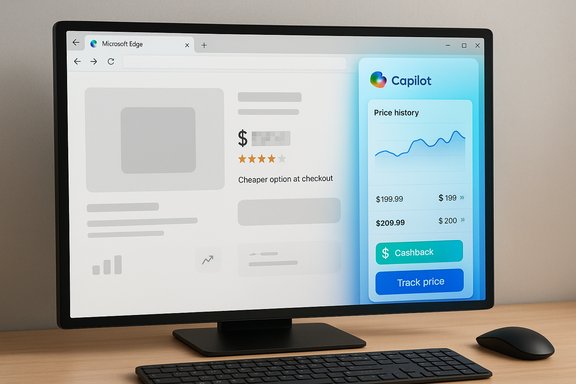
Microsoft’s Copilot in Edge has quietly become a pragmatic shopping assistant: click the Copilot icon on a supported retailer page and you get an AI-powered product card with price comparisons, price history charts, cashback flags, and the ability to track or set alerts — and when Copilot Mode is active it can even notify you at checkout if a lower price or a cashback offer is available elsewhere.
Microsoft has consolidated existing Edge shopping tools into the Copilot experience, integrating features that were previously presented as separate in-browser shopping utilities. The update places price comparison, price history, price tracking, cashback eligibility, and product insights behind the Copilot interface and enables a more proactive behavior when Copilot Mode is enabled. The changes are rolling out first in the United States, with broader availability to follow, and require an up-to-date Microsoft Edge and a signed-in Microsoft account for the personalized features to function.
This article explains what the Copilot shopping assistant actually does, how to use it step-by-step, the technical and privacy trade-offs involved, and what every Windows and Edge user should know before relying on Copilot for buying decisions. It synthesizes official product descriptions and independent reporting to deliver a clear, actionable guide for shoppers and IT administrators alike.
Note: Merchant coverage varies. Copilot does not guarantee that every possible online seller will be included in comparisons; supported retailers are specifically recognized by the feature and sellers outside those feeds may not appear.
This consolidation strategy favors a single in-browser assistant model, but it also raises questions about ecosystem neutrality, merchant visibility, and whether commercial relationships will shape which offers are emphasized. The result is useful for casual shoppers and potentially lucrative for Microsoft and partner merchants — but it’s essential for users to understand the assistant’s scope and limitations.
However, shoppers who require exhaustive market comparisons, maximum privacy, or strict separation between personal and work browsing should exercise caution. Use the assistant as a decision-support layer: enable it when convenience outweighs privacy concerns, verify any cashback claims manually, and keep enterprise policies in mind for work-managed devices.
That upside comes with responsibilities: users must understand opt-in privacy choices, the limits of Copilot’s market coverage, and the potential for automation errors. Enterprises will want clear policies around Copilot’s data access. In short, the Copilot shopping assistant is a powerful tool when used with awareness — enable it to streamline buying decisions, but verify final prices and cashback details before you click “Buy.”
Source: ETV Bharat Microsoft Rolls Out AI-Powered Shopping Assistant Feature For Copilot In Edge Browser: How To Use This Functionality
 Background / Overview
Microsoft has consolidated existing Edge shopping tools into the Copilot experience, integrating features that were previously presented as separate in-browser shopping utilities. The update places price comparison, price history, price tracking, cashback eligibility, and product insights behind the Copilot interface and enables a more proactive behavior when Copilot Mode is enabled. The changes are rolling out first in the United States, with broader availability to follow, and require an up-to-date Microsoft Edge and a signed-in Microsoft account for the personalized features to function.This article explains what the Copilot shopping assistant actually does, how to use it step-by-step, the technical and privacy trade-offs involved, and what every Windows and Edge user should know before relying on Copilot for buying decisions. It synthesizes official product descriptions and independent reporting to deliver a clear, actionable guide for shoppers and IT administrators alike.
What the Copilot shopping assistant does — feature-by-feature
Copilot’s shopping capabilities are organized around a few core functions that shoppers will see when visiting supported product pages in Edge.Key features
- Price comparison — Copilot surfaces alternative sellers and current prices so you can see if the same product is cheaper elsewhere without manually opening multiple tabs.
- Price history — Interactive charts show historical pricing trends for the product, helping you judge whether today’s price is a discount or a spike.
- Price tracking & alerts — You can add an item to a watchlist and receive notifications if the price drops to a threshold you define.
- Cashback detection — Copilot identifies when a purchase may be eligible for cashback and prompts you to activate the offer before completing checkout.
- Product insights — Consolidated product information including ratings, summary, notable attributes, and suggested alternatives appear in a single product card.
- Proactive checkout alerts (Copilot Mode) — When Copilot Mode is enabled, the assistant can proactively warn you on a checkout page if a lower price exists elsewhere or if a cashback opportunity is available.
How to use the Copilot shopping assistant in Edge — step-by-step
- Update Microsoft Edge to the latest version.
- Sign in to Edge with your Microsoft account to enable personalized shopping features.
- Enable Copilot or Copilot Mode if you want proactive alerts and agentic assistance. Copilot Mode is optional and gated behind an explicit toggle.
- (Optional) Turn on Page Context or allow Copilot to access browsing history if you want Copilot to use your past browsing to improve recommendations. This is an opt-in setting.
- Visit a supported retailer’s product page.
- Click the Copilot icon (top-right or in the sidebar). A product insights card will appear.
- From the card you can:
- View price comparisons to see alternative sellers.
- Check the price history graph.
- Click “Track price” to add the item to a watchlist and set a target alert price.
- Follow Copilot prompts to activate cashback if available.
- If Copilot Mode is active, continue to the checkout page; Copilot may surface an on-the-spot alert if it detects a cheaper option or cashback opportunity elsewhere, so you can pause and compare.
What’s new versus the old Edge shopping tools
Previously, Edge presented shopping information via a blue "shopping tag" icon and standalone flyouts at checkout. The new approach moves those functions into the Copilot sidebar and folds them into the broader Copilot experience. That change means:- A single, AI-powered interface for shopping and conversational follow-ups.
- Proactive behavior when Copilot Mode is enabled (alerts at checkout).
- Consolidation of features like price history and cashback into Copilot’s product cards.
- A shift from multiple discrete UI affordances to a centralized assistant-driven model.
Availability and system requirements
- Initial rollout is U.S.-first. The shopping features and proactive Copilot Mode alerts are being made widely available to U.S. users first, with other markets to follow.
- Use requires the current Microsoft Edge release. Keep Edge updated to the latest build to receive shopping feature updates.
- A signed-in Microsoft account is required for the personalized features such as price tracking and notifications.
- Some advanced capabilities (Copilot Mode, Page Context features) are opt-in and may be placed behind limited previews during staged rollouts.
Behind the scenes: how Copilot finds prices and cashback offers
Copilot aggregates publicly available product listings across retailers, displays price information, and cross-references cashback/provider offers the assistant can detect. The product card consolidates:- The retailer and listed price you are viewing.
- Comparable listings and prices from other sites.
- Historical price data for that SKU or product identifier.
- Cashback eligibility flags when those programs are recognized.
Note: Merchant coverage varies. Copilot does not guarantee that every possible online seller will be included in comparisons; supported retailers are specifically recognized by the feature and sellers outside those feeds may not appear.
Privacy, data control and enterprise considerations
Microsoft positions Copilot’s access to browsing history and other browser data as an explicit opt-in. Key practical points:- Page Context and other features that let Copilot use browsing history are not enabled by default; the user must opt in.
- Copilot provides visual indicators when it is actively viewing or interacting with pages to increase transparency.
- Enterprise admins can control sharing of browsing history with Copilot in managed environments, and tenant policies exist to limit or enable history sharing with Microsoft 365 Copilot Search for work accounts.
- Some on-device features (like local AI for enhanced search) are designed to keep sensitive data local rather than sending everything to the cloud.
- Enabling Page Context or Copilot Mode will allow the assistant to use local browsing context to enrich recommendations — convenient, but this increases the scope of personal data the assistant can act on.
- For work-managed or sensitive sessions, IT administrators should review group policies and consider limiting Copilot’s access to browsing history or credentials.
- Copilot’s proactive agentic features that can use saved credentials or make automated changes are explicitly opt-in and should be used cautiously, especially in an enterprise environment.
Strengths: why Copilot’s shopping assistant matters
- Convenience and time savings. Copilot replaces manual tab juggling and site-hopping with a single consolidated view, saving time when comparing options.
- Contextual decision-making. Price history adds context — helping buyers distinguish real discounts from short-lived price spikes.
- Proactive money-saving nudges. Copilot Mode’s alerts at checkout can catch last-minute better prices or cashback offers you might otherwise miss.
- Conversational follow-ups. Natural language follow-ups let you refine searches without flipping between tabs.
- Centralized watchlist. Built-in price tracking keeps a list across sites in one place, reducing reliance on third-party tracking tools.
Risks, gaps, and real-world caveats
- Coverage limitations. Copilot only compares against retailers and partners it indexes or recognizes; fringe sellers, niche marketplaces, or region-specific stores may be excluded.
- Accuracy and agent reliability. Agentic features that attempt actions (e.g., activating cashback) can fail, misreport success, or behave unexpectedly; always verify that cashback is applied and complete before trusting automation.
- Privacy trade-offs. Allowing Copilot to access browsing history and credentials expands the assistant’s helpfulness but increases potential user exposure; users should weigh convenience versus data minimization.
- Potential conflicts of interest. The assistant may surface partner offers or cashback programs shaped by commercial relationships; shoppers should confirm the final price and terms on the merchant site.
- Regional rollout and legal/regulatory constraints. Availability, cashback offers, and retailer lists will differ by country and legal environment; expect features to behave differently outside the initial rollout region.
- False sense of comprehensiveness. The presence of a “lowest price” alert is helpful, but it is not a guaranteed or exhaustive market sweep. Some deals (coupon stacking, store-specific promotions, or in-store only offers) may be omitted.
- Enterprise policy mismatch. Organizations should validate group policy and data sharing settings before broadly enabling Copilot Mode for employees, especially if browsing history or saved credentials could be used in agentic flows.
Practical tips to get the most from Copilot shopping — smart user habits
- Keep Edge updated; new shopping features and merchant coverage expand with builds.
- Sign in with a Microsoft account if you want the watchlist and alert features; be mindful of which account you use (personal versus work).
- Use Copilot Mode for convenience; disable it if you prefer manual control or if you’re handling sensitive or work-related purchases.
- Double-check cashback activation and final cart totals on the merchant site before completing a purchase.
- Use price tracking as a decision-support tool, not the sole arbiter; corroborate with known price trackers for high-value items.
- If privacy is a concern, avoid enabling Page Context or clear browsing data when done with shopping sessions.
- For enterprise environments, consult admin guidelines before enabling Copilot features at scale.
For power users and administrators: controls and policies
- Users can toggle Copilot Mode and Page Context from Edge settings to limit the assistant’s access to browsing history and credentials.
- Enterprises can apply policies (via group policy or Microsoft 365 admin controls) to restrict sharing of browsing history with Copilot or Microsoft 365 Copilot Search; managed accounts may be subject to different defaults than consumer accounts.
- Administrators should test Copilot’s agentic behaviors in a safe environment before enabling them across a work fleet. Actions like auto-filling or third-party site interactions can interact unpredictably with SSO and MFA flows.
- Use in private or guest profiles for one-off shopping that you don’t want linked to your main browsing history or account.
Competitive and market context
Browsers and AI vendors are racing to integrate shopping assistance directly into browsing experiences. Microsoft’s approach ties shopping utilities to Copilot, combining conversational AI, proactive alerts, and agentic capabilities. Other companies have introduced similar shopping features, but Microsoft’s advantage is integrating these features into a mainstream browser while folding prior Edge shopping tools into Copilot.This consolidation strategy favors a single in-browser assistant model, but it also raises questions about ecosystem neutrality, merchant visibility, and whether commercial relationships will shape which offers are emphasized. The result is useful for casual shoppers and potentially lucrative for Microsoft and partner merchants — but it’s essential for users to understand the assistant’s scope and limitations.
What to watch next (risks and likely evolution)
- Merchant network expansion: expect Microsoft to broaden the list of supported retailers and deepen price and cashback feeds.
- International rollout: features launching in the U.S. first will likely roll out to other markets as localization and legal checks complete.
- Agentic feature maturation: early reports indicate agentic tasks can fail; Microsoft will need to improve reliability before users trust full automation.
- Regulatory scrutiny: as browsers take on more shopping and agentic behaviors, regulators might probe transparency, ad disclosure, and merchant ranking policies.
- Privacy tooling improvements: look for clearer toggles, audit logs, and per-domain consent options as the company responds to privacy concerns.
Bottom line: who should use Copilot shopping and how to approach it
Copilot’s shopping assistant is a useful, time-saving tool for everyday consumers who want a quick, consolidated view of product pricing, historical trends, and simple alerts. It shines for holiday shopping, price tracking of desired items, and catching last-minute cashback or cheaper offers during checkout.However, shoppers who require exhaustive market comparisons, maximum privacy, or strict separation between personal and work browsing should exercise caution. Use the assistant as a decision-support layer: enable it when convenience outweighs privacy concerns, verify any cashback claims manually, and keep enterprise policies in mind for work-managed devices.
Quick troubleshooting and FAQ
- If you don’t see Copilot shopping features:
- Update Edge to the latest release and sign in with a Microsoft account.
- Check Settings > Privacy, search, and services to ensure shopping/connected experiences are enabled.
- Confirm you are on a supported retailer page — not all merchants are included yet.
- How to turn off Copilot Mode:
- Go to Edge Settings, locate the Copilot or Copilot Mode toggle, and switch it off to return to classic browsing.
- Will Copilot access my saved passwords to buy things?
- Copilot can use additional browser context only if you explicitly enable those features and allow Page Context or related permissions. Admin controls exist for managed accounts.
- Are cashback offers guaranteed?
- No. Copilot can detect cashback opportunities and prompt activation, but you should confirm the cashback was applied in the merchant’s confirmation or account.
Final assessment
Microsoft’s integration of shopping features into Copilot in Edge represents a logical step in making browsers more helpful and proactive. The combination of price comparison, price history, and proactive checkout alerts is a clear convenience win for consumers, and for many shoppers the feature will save time and occasionally money.That upside comes with responsibilities: users must understand opt-in privacy choices, the limits of Copilot’s market coverage, and the potential for automation errors. Enterprises will want clear policies around Copilot’s data access. In short, the Copilot shopping assistant is a powerful tool when used with awareness — enable it to streamline buying decisions, but verify final prices and cashback details before you click “Buy.”
Source: ETV Bharat Microsoft Rolls Out AI-Powered Shopping Assistant Feature For Copilot In Edge Browser: How To Use This Functionality
