

Microsoft has folded its existing Edge shopping toolkit into Copilot and added a new proactive deal-detection layer—so when you shop in Microsoft Edge, Copilot can now compare prices, show price history, surface product insights, enable price tracking, and even nudge you to a lower price or cashback offer discovered on another open tab.
Microsoft’s move is less a sudden product experiment and more a consolidation and expansion: the shopping features that previously lived as separate Edge UI elements (the blue shopping tag, standalone flyouts and separate price-tracking widgets) are being unified under Copilot in Edge. The integration bundles Cashback, Price comparison, Price history, Product insights, and Price tracking behind a single conversational entry point in the Copilot sidebar and Copilot Mode. This rollout is staged and regionally gated: Microsoft is prioritizing the United States for the initial release as a holiday-season push, with other markets to follow later. The company frames the change as a usability upgrade—fewer scattered controls, more conversation-driven follow-ups—while also positioning Copilot as an active shopping assistant that can proactively surface savings as you browse.
Microsoft’s announcement and support documentation are the primary evidence for the feature set and rollout, while independent reporting confirms that the company is aggressively positioning Edge as an AI-first shopping surface amid competition from Google, OpenAI, and others. Expect updates to documentation, merchant onboarding details, and privacy controls as the rollout matures; until then, cautious experimentation by users is the prudent approach.
Source: Gadgets 360 https://www.gadgets360.com/ai/news/...iday-season-google-openai-perplexity-9703022/
 Background / Overview
Microsoft’s move is less a sudden product experiment and more a consolidation and expansion: the shopping features that previously lived as separate Edge UI elements (the blue shopping tag, standalone flyouts and separate price-tracking widgets) are being unified under Copilot in Edge. The integration bundles Cashback, Price comparison, Price history, Product insights, and Price tracking behind a single conversational entry point in the Copilot sidebar and Copilot Mode. This rollout is staged and regionally gated: Microsoft is prioritizing the United States for the initial release as a holiday-season push, with other markets to follow later. The company frames the change as a usability upgrade—fewer scattered controls, more conversation-driven follow-ups—while also positioning Copilot as an active shopping assistant that can proactively surface savings as you browse. What Microsoft announced — feature-by-feature
Core capabilities moved into Copilot
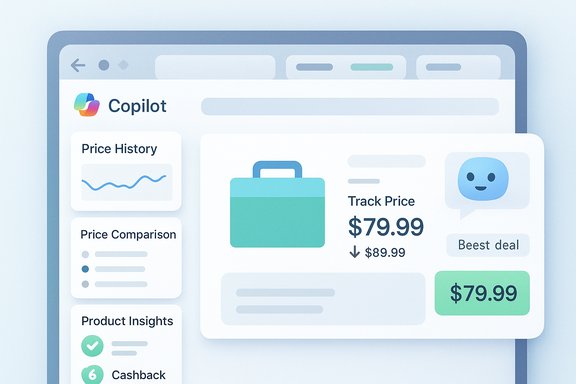
Microsoft’s official announcement frames the new Copilot shopping surface as the centralized home for existing shopping tools. When visiting a supported retailer page you can open the Copilot pane and expect to see:- Price comparison cards that pull pricing from multiple retailers.
- Price history charts that show historical price ranges.
- Price tracking and alerts to set target prices and receive notifications.
- Product insights that summarize reviews and highlight pros/cons.
- Cashback signals that indicate when a purchase is eligible for money-back incentives.
The new proactive detection across tabs
One of the more notable additions is a proactive feature in Copilot Mode: if you have multiple tabs open on different merchants and attempt to buy on one site, Copilot may notify you that a lower price or cashback offer exists on another open tab. That nudge turns Copilot from a purely reactive helper into an active deal agent—prompting you before you commit to checkout. This proactive behavior is explicitly part of the Copilot Mode push.How cashback works (what Microsoft documents)
Microsoft continues to operate a cashback program integrated into Edge (previously marketed under Bing Rebates / Microsoft Cashback). Microsoft’s own product pages state that cashback rewards are paid out via PayPal after the purchase is confirmed, and the cashback dashboard lists participating retailers and redemption flows. Community reports show users sometimes encounter delays or redemption issues, so while Microsoft documents PayPal payout as the mechanism, the experience has had friction in practice.Why this matters: strategic context and market dynamics
The AI shopping war and platform incentives
Microsoft is now competing alongside Google, OpenAI, Perplexity and others that aim to make shopping a primary vector for AI engagement. The ambition is straightforward: shopping is highly transactional, frequently repeated, and monetizable—if an assistant can reliably shorten the path from discovery to purchase, platforms can capture more user attention and open new revenue routes, from affiliate economics to native checkout commissions. Microsoft’s consolidation of shopping features into Copilot follows that exact playbook. Where Microsoft’s advantage lies is distribution: Edge ships with Windows and ties into a broad Microsoft account ecosystem, allowing Copilot to optionally use signals like order history, saved preferences, and account-level personalization (with user consent) to tailor recommendations. That integrated stack is different from a standalone AI chat app because it can span device-level surfaces and tie back into enterprise and merchant tooling.Holiday timing is deliberate
The November rollout aligns with seasonal retail behavior: the holiday period concentrates purchase intent and high-volume transactions, making it the ideal time to launch a discovery-to-checkout funnel. By debuting proactive price and cashback nudges now, Copilot aims to demonstrate immediate user value (savings, convenience) and collect rich behavioral signals that refine future recommendations.Practical walkthrough: using Copilot shopping in Edge
- Update Edge and sign in with a Microsoft account to unlock personalized shopping signals; some features are gated behind account sign-in and the latest browser release.
- Navigate to a supported retailer page and click the Copilot icon in the sidebar. A product insights card appears with image, price, rating, price-history graph, and comparison entries.
- To track a price, click Track Price (or the alert icon), set a price goal and duration, and let Copilot notify you by email or in-app when the item reaches the target.
- If you have multiple merchant tabs open, enable Copilot Mode and allow Copilot to access Page Context (opt-in). Copilot may then proactively alert you to better offers or cashback opportunities while you’re on a checkout page.
Strengths and user benefits
- Convenience and time savings. Consolidating price history, comparisons, cashback and review summaries into a single Copilot pane removes repetitive tab-hopping and manual price-tracking chores. The conversational model lets you ask follow-ups without rebuilding searches.
- Integrated alerts and tracking. Built-in price tracking and alerting reduces the need for third‑party extensions and separate services. For frequent shoppers, that’s a meaningful reduction in setup friction.
- Proactive deal detection. Copilot Mode’s nudge when a lower price is detected on another open tab can save money in real time—particularly useful during flash sales or limited-time promotions.
- Platform leverage potential. Microsoft can combine Edge reach with account-level features (order history, Microsoft Rewards ties, merchant partnerships) to create a sticky discovery-to-checkout loop—if consumers opt in.
Risks, trade-offs and unanswered questions
Privacy and data retention
The shopping features are useful because they can access browsing context, order history, and personalization signals. That convenience comes with a trade-off: centralized order and purchase signals create a valuable dataset that may be used for personalization, advertising, and measurement. Microsoft states these are opt-in and provides some toggles, but the specifics of retention windows, cross-product usage (e.g., will shopping data inform ads shown elsewhere), and aggregate telemetry policies are either lightly documented or only available in more granular product pages. Users should review Copilot privacy toggles and manage Page Context permissions carefully.Accuracy, summarization risk, and “AI confidence” problems
AI-generated product summaries and price judgments carry the usual risks of overconfidence and hallucination. Copilot’s review-insights and price-insight layers are helpful shorthand, but they can miss merchant-specific tokens (limited-time coupons, bundle discounts), fail to surface provenance clearly, or overweight noisy review signals. Treat Copilot’s summary as an aid—not a definitive verdict—until provenance and confidence measures are explicit in the UI.Merchant economics and potential bias
Edge-integrated shopping placement could reshape merchant traffic flows. Prominent placement in Copilot could become an asset merchants want; that creates obvious commercial incentives for paid placement or partner-favored promotion. Microsoft’s public materials say paid ads will be labeled and that non-advertised suggestions are not paid, but the opaque details about ranking, partnership economics and preferential placements are not fully public. That gap matters for merchants and consumers alike: if Copilot’s “best price” subtly favors partners, the value proposition weakens. Flagging this possibility is not an accusation; it is a commercial dynamic that regulators and observers will watch.Operational frictions in cashback redemption
Microsoft documents that cashback is paid out via PayPal, but community reports and support threads show intermittent issues with transfers and verification steps. That operational friction—delays, verification failures, or temporary service errors—has been a recurring theme in user communities and should temper expectations about seamless cashback redemptions. In short: cashback exists, but redemption can take time and occasionally requires support intervention.How Microsoft’s approach compares to rivals
- Google/Chrome (Gemini + Shopping): Google integrates Gemini into search and Chrome, leaning on its search commerce signals and merchant network. Google’s strength is search-scale and ad inventory, which supports a tightly integrated shopping experience. Microsoft’s Edge play differs by being browser‑anchored and by folding its unique Copilot conversational surface into each tab.
- OpenAI / ChatGPT (Atlas & Shopping Research): OpenAI’s shopping research and agentic features are chat-first and model-centric; distribution is different (standalone app/browser builds vs. browser-as-platform). Microsoft counters with native Edge integration and Windows distribution, giving it an installed-base advantage.
- Perplexity and smaller players: Competitors like Perplexity are experimenting with chat-first shopping assistants and alternative ranking strategies. Their nimbleness can produce rapid experimentation, but they lack Microsoft’s distribution reach and cross-product integration.
Practical recommendations for power users
- Review and toggle Page Context and Copilot permissions in Edge before enabling proactive features; prefer a conservative setting if you are privacy-conscious.
- Use price-tracking alerts as one data point, not the single signal—set conservative thresholds and validate seller credentials manually for high-value purchases.
- If you plan to rely on cashback, check Microsoft Cashback dashboard requirements and monitor redemption windows; allow for delays and keep screenshots of eligible purchases until cashback is confirmed in your account.
- For merchants and sellers, monitor placement bias: track referral traffic changes if Copilot cards begin directing disproportionate clicks to particular partners. If you depend on discovery economics, experiment with merchant onboarding and ensure domain verification is complete for accurate listing.
What’s still unclear — and what to watch next
- Exactly how merchant ranking and cashback prioritization will be surfaced and audited. Microsoft promises labeling for ads and claims about neutral suggestions, but detailed ranking logic and partner economics remain opaque. This is a live issue for both competition and consumer protection watchers.
- Retention and cross-product usage of purchase/order history. Microsoft documents order-history surfaces in Copilot previews, but the retention windows and downstream use cases (ads personalization, cross-product signals) require closer, documented limits. Users should look for clearer privacy docs and controls.
- Merchant inclusion criteria and API coverage. The experience depends on which retailers are supported for product cards, price comparisons and cashback. Broader merchant participation improves usefulness; narrow coverage limits it. Microsoft’s merchant guidance and onboarding docs will be important to follow.
Final analysis: opportunity vs. caution
Microsoft’s consolidation of Edge shopping features into Copilot is a pragmatic, strategically coherent move: it reduces friction for shoppers, leverages Edge’s install base, and creates a credible route from discovery to purchase that can scale into a monetizable channel. The strengths—convenience, integrated alerts, conversational follow-ups, and a potential native checkout path—are real and user-visible today. At the same time, the risks demand attention: privacy and data-retention trade-offs, the need for transparent ranking and partnership disclosures, the accuracy limits of AI summarization, and the operational frictions reported around cashback redemption. Users and regulators will rightly scrutinize how these systems balance convenience with fairness and transparency. For Windows and Edge users, the practical takeaway is straightforward: Copilot shopping can save time and money, but it is still evolving. Treat Copilot recommendations as a helpful assistant rather than a final arbiter, review privacy settings before enabling proactive modes, and validate high-value transactions directly with merchant pages. Microsoft’s holiday push will show whether Copilot can compete on both utility and trust—if it succeeds, Edge will have turned another feature set into a platform advantage; if not, the market and regulators will push for clearer rules and protections.Microsoft’s announcement and support documentation are the primary evidence for the feature set and rollout, while independent reporting confirms that the company is aggressively positioning Edge as an AI-first shopping surface amid competition from Google, OpenAI, and others. Expect updates to documentation, merchant onboarding details, and privacy controls as the rollout matures; until then, cautious experimentation by users is the prudent approach.
Source: Gadgets 360 https://www.gadgets360.com/ai/news/...iday-season-google-openai-perplexity-9703022/
