
Microsoft announced on June 25, 2026, that Copilot in Excel is gaining reusable Skills, expanded finance data connectors, planning controls, and clearer change attribution across Excel for the web, Windows, and macOS for Microsoft 365 Copilot customers. The update is not just another “AI in Office” demo. It is Microsoft’s attempt to turn Excel from a place where experts manually encode business logic into a place where those experts can package that logic for everyone else. If it works, the spreadsheet becomes less of a personal craft tool and more of an organizational automation surface.
That is a much bigger claim than “Copilot can write a formula.” Excel has always lived in the uncomfortable space between end-user productivity and shadow enterprise infrastructure. Microsoft is now leaning into that reality: the models, the formulas, the formatting conventions, the monthly close routines, the board-pack templates, and the variance analysis rituals are not incidental spreadsheet work. They are business process.
Every company has a few people who know where the workbook bodies are buried. They know why a formula refers to last quarter’s oddly named tab, which input cell must never be touched, and why a perfectly normal-looking model breaks if a regional sales file arrives with an extra column. This expertise is rarely documented well because the spreadsheet itself usually becomes the documentation.
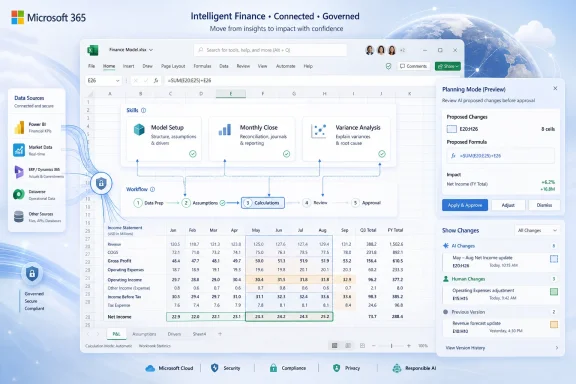
Skills for Copilot in Excel are Microsoft’s answer to that institutional memory problem. A Skill is a reusable set of instructions that tells Copilot how to perform a repeatable workbook task: build a model, format a report, transform imported data, apply calculation logic, or follow a team’s preferred structure. Instead of asking Copilot from scratch every month to “make this look like the finance report,” a user can invoke a named Skill that already describes the process.
That sounds minor until you consider how spreadsheet labor actually happens. Much of the value in Excel is not in any single formula or chart. It is in the sequence: clean the data, normalize the labels, apply the assumptions, check the outliers, generate the summary, format the deck-ready output, and leave enough evidence for someone else to trust it. Microsoft is trying to make that sequence portable.
The notable design choice is that custom Skills can be defined through a
The hard part is control. Can the tool follow the house style? Can it respect the model’s assumptions? Can it avoid silently rewriting a calculation that downstream teams depend on? Can it explain what it changed after the fact? Skills matter because they shift Copilot from a conversational helper into something closer to a repeatable workflow engine inside the spreadsheet.
That distinction is important for WindowsForum readers because Excel is not just an app in the Microsoft 365 bundle. It is the local runtime for a huge amount of business logic. Even in organizations with expensive ERP systems, BI platforms, and data warehouses, final-mile analysis still lands in Excel because the grid is flexible, familiar, and politically acceptable. If Microsoft can make Copilot operate inside that world with enough repeatability, it has a path to make AI useful in the place where work already happens.
The risk is that “Skills” becomes another overloaded Copilot term. Microsoft’s AI branding has already forced users and admins to distinguish between Copilot Chat, Microsoft 365 Copilot, Copilot Studio, agents, connectors, extensions, plugins, and now Skills. The product direction is coherent; the vocabulary is not always so kind.
The new prebuilt finance Skills are designed for work such as discounted cash flow models, monthly reporting, variance analysis, and close-related workflows. These are exactly the tasks where a generic AI assistant is least satisfying and a repeatable process is most valuable. A finance analyst does not want a charming answer; they want a workbook that follows the right structure, uses the right assumptions, and can survive review.
That is also why Microsoft is expanding financial data connectors. The company says Copilot in Excel is adding connectors for providers including CB Insights, Daloopa, FactSet, Morningstar, PitchBook, and S&P Global data through Kensho technology, building on earlier work around LSEG and Moody’s. Some of these integrations require separate subscriptions, which means this is not a free data buffet. It is a way to bring licensed, trusted financial data into the workbook through Copilot rather than forcing analysts to copy, paste, export, reconcile, and hope.
The finance emphasis is a tell. Microsoft knows that if Copilot can prove itself in workflows where auditability, sourcing, and repeatability matter, the argument for other departments becomes easier. HR reports, sales forecasts, procurement analysis, compliance logs, and operations dashboards all have their own versions of the same problem: too much expert process trapped in fragile workbooks.
With federated Copilot connectors, Microsoft is trying to make Copilot the conversational access layer for institutional data. The promise is not merely that Copilot can answer a question, but that it can bring the right data into the workbook at the point of analysis. In finance, that means public company fundamentals, market intelligence, ratings, research, private-company signals, and other datasets that professionals already pay to use.
This changes Excel’s role. It becomes less of a disconnected file and more of a governed interface to enterprise and third-party data. That is strategically useful for Microsoft because it keeps Excel central even as business data spreads across SaaS platforms, data clouds, and specialized research services.
It also creates new administrative questions. Who is allowed to connect which provider? How are entitlements enforced? What happens when a workbook built with licensed data is shared outside the group that has rights to that data? Microsoft says availability depends on licensing, region, and provider subscriptions, but the practical burden will land on tenant admins and data owners. The cleaner the demo, the more important the governance plumbing becomes.
That is a necessary concession to how people actually trust software. The promise of AI agents is that they can perform multi-step work on your behalf. The fear is that they will perform multi-step work on your behalf. In a spreadsheet, a bad edit can be subtle, consequential, and hard to spot until the wrong number has propagated into a report.
Planning mode gives Copilot a visible runway. It turns an opaque action into a proposed method, which is much easier for an analyst or manager to evaluate. It also reflects a broader trend in enterprise AI: the future is not simply “the agent does everything.” The future is staged autonomy, where the system proposes, the user approves, and the organization keeps a trail.
Microsoft is also improving the Show Changes pane so Copilot edits can be distinguished from human edits. That sounds like a small interface detail, but in regulated or high-stakes workflows, attribution is everything. If an output is wrong, teams need to know whether the error came from an analyst, a stale source, a broken assumption, or an AI-generated change.
For IT, that creates both opportunity and obligation. A well-designed Skill could standardize recurring analysis across a department. A poorly designed one could standardize a mistake. If Skills become shareable and deployable at scale, organizations will need lifecycle management: ownership, review, versioning, retirement, access controls, and a way to distinguish official Skills from someone’s experimental shortcut.
This is familiar territory for anyone who has managed Office macros, Excel add-ins, Power Automate flows, or Power BI datasets. Microsoft often wins by empowering power users first and governing later. That model creates astonishing productivity and astonishing mess. Skills are arriving with more awareness of governance than macros did, but the underlying tension remains.
The most interesting future question is whether Skills become a new kind of internal software artifact. They are not traditional applications. They are not quite prompts. They are procedural knowledge expressed for an AI system that can act in Excel. That makes them powerful, but it also makes them hard to classify under existing IT controls.
A Skill has to come from somewhere. Someone needs to know the desired output, the required structure, the relevant assumptions, and the failure modes. The finance lead who understands the reporting pack is not made irrelevant by Skills; that person becomes the author of the reusable process. The analyst who knows how to clean vendor exports becomes the person who turns cleanup into an organizational capability.
That may change the social structure around Excel work. Today, many teams rely on informal experts who are constantly interrupted to fix files, explain formulas, or rebuild recurring reports. If those experts can package common routines, they may spend less time repeating the same mechanical work and more time improving the process itself.
But there is a catch. Packaging expertise requires a different skill set from merely having expertise. Writing a useful Skill means describing a workflow clearly enough for an AI system to follow and for colleagues to trust. That is part documentation, part prompt engineering, part process design, and part internal product management. Microsoft is betting that enough organizations will find that trade worthwhile.
That is why change tracking, planning, and attribution are not cosmetic. They are the basis for trust. A finance workbook may contain sensitive assumptions, confidential forecasts, or data subject to retention and compliance rules. If Copilot can update formulas and transform data, organizations need clarity about review, rollback, and audit.
The presence of external data connectors adds another layer. Copilot may be operating across workbook data, organizational files, and third-party licensed datasets. That creates a more capable analysis environment, but it also increases the number of systems implicated in a single output. For admins, the policy surface keeps expanding.
Microsoft’s broader Purview and compliance story will matter here, but product-level transparency matters just as much. Users need to see what changed. Reviewers need to know why it changed. Admins need to know which capabilities are available in which tenant, region, app version, and release channel. Enterprise AI fails not only when the model is wrong, but when nobody can explain what happened.
Custom Skills are more staged. They are beginning with Microsoft 365 Insiders on Windows and Mac, with broader general availability planned over the following month across Excel for the web, Windows, and Mac. Partner-built Skills are expected in the third quarter of 2026. As usual with Microsoft 365, exact timing can vary by tenant, region, license, and rollout ring.
That nuance matters because the headline feature is not necessarily the feature every user will see today. For many organizations, the first practical step will be evaluating the prebuilt finance Skills and the planning/change-tracking behavior. The larger organizational shift—creating custom Skills and deploying partner Skills—will take longer.
This is also where Windows admins should pay attention. Excel on Windows remains a core endpoint for business work, but Copilot features increasingly depend on cloud services, identity, licensing, OneDrive storage, and Microsoft 365 release channels. The app may be local, but the capability is increasingly tenant-shaped.
The spreadsheet is a natural place for this transition because it already contains semi-structured business logic. A workbook has inputs, formulas, tabs, named ranges, charts, tables, and review patterns. Unlike a blank chat box, it gives the AI system a working environment. Unlike a rigid enterprise application, it gives users flexibility.
That flexibility is why Excel became indispensable in the first place. It is also why Excel became dangerous. Workbooks proliferate, logic forks, assumptions drift, and critical processes depend on files that were never designed as production systems. Skills do not eliminate that problem. They may even accelerate it if organizations treat them casually.
But used well, Skills could impose more structure on the very workflows that previously resisted structure. A repeatable Copilot Skill is at least visible, nameable, and potentially governable. That is an improvement over the analyst’s memory, the undocumented macro, or the “final_v7_really_final” workbook passed around at quarter end.
That is a much bigger claim than “Copilot can write a formula.” Excel has always lived in the uncomfortable space between end-user productivity and shadow enterprise infrastructure. Microsoft is now leaning into that reality: the models, the formulas, the formatting conventions, the monthly close routines, the board-pack templates, and the variance analysis rituals are not incidental spreadsheet work. They are business process.
 Microsoft Is Trying to Capture the Spreadsheet Expert Before They Walk Out the Door
Every company has a few people who know where the workbook bodies are buried. They know why a formula refers to last quarter’s oddly named tab, which input cell must never be touched, and why a perfectly normal-looking model breaks if a regional sales file arrives with an extra column. This expertise is rarely documented well because the spreadsheet itself usually becomes the documentation.Skills for Copilot in Excel are Microsoft’s answer to that institutional memory problem. A Skill is a reusable set of instructions that tells Copilot how to perform a repeatable workbook task: build a model, format a report, transform imported data, apply calculation logic, or follow a team’s preferred structure. Instead of asking Copilot from scratch every month to “make this look like the finance report,” a user can invoke a named Skill that already describes the process.
That sounds minor until you consider how spreadsheet labor actually happens. Much of the value in Excel is not in any single formula or chart. It is in the sequence: clean the data, normalize the labels, apply the assumptions, check the outliers, generate the summary, format the deck-ready output, and leave enough evidence for someone else to trust it. Microsoft is trying to make that sequence portable.
The notable design choice is that custom Skills can be defined through a
SKILL.md file saved in OneDrive. That is a very Microsoft 2026 move: simple enough for power users to understand, structured enough for IT to govern, and open enough to suggest a future marketplace of repeatable AI workflows. It also implies that Copilot’s most useful enterprise behaviors may not come from Microsoft alone, but from the finance team, the operations analyst, or the consultant who codifies how work should be done.Excel’s AI Story Finally Moves Beyond the Party Trick
The first wave of Copilot-in-Excel demos often felt like upgraded autocomplete with a marketing budget. Ask for a formula. Summarize a table. Generate a chart. Useful, certainly, but not transformative for the people who already know Excel well. For experienced analysts, the hard part is rarely remembering thatXLOOKUP exists.The hard part is control. Can the tool follow the house style? Can it respect the model’s assumptions? Can it avoid silently rewriting a calculation that downstream teams depend on? Can it explain what it changed after the fact? Skills matter because they shift Copilot from a conversational helper into something closer to a repeatable workflow engine inside the spreadsheet.
That distinction is important for WindowsForum readers because Excel is not just an app in the Microsoft 365 bundle. It is the local runtime for a huge amount of business logic. Even in organizations with expensive ERP systems, BI platforms, and data warehouses, final-mile analysis still lands in Excel because the grid is flexible, familiar, and politically acceptable. If Microsoft can make Copilot operate inside that world with enough repeatability, it has a path to make AI useful in the place where work already happens.
The risk is that “Skills” becomes another overloaded Copilot term. Microsoft’s AI branding has already forced users and admins to distinguish between Copilot Chat, Microsoft 365 Copilot, Copilot Studio, agents, connectors, extensions, plugins, and now Skills. The product direction is coherent; the vocabulary is not always so kind.
Finance Is the Beachhead Because Finance Has the Pain and the Budget
Microsoft is explicitly pitching this Excel update at finance professionals, and that is not accidental. Finance teams are among the heaviest Excel users in the enterprise, but they are also among the least tolerant of vague AI output. A sales draft can be polished. A forecast model has to reconcile.The new prebuilt finance Skills are designed for work such as discounted cash flow models, monthly reporting, variance analysis, and close-related workflows. These are exactly the tasks where a generic AI assistant is least satisfying and a repeatable process is most valuable. A finance analyst does not want a charming answer; they want a workbook that follows the right structure, uses the right assumptions, and can survive review.
That is also why Microsoft is expanding financial data connectors. The company says Copilot in Excel is adding connectors for providers including CB Insights, Daloopa, FactSet, Morningstar, PitchBook, and S&P Global data through Kensho technology, building on earlier work around LSEG and Moody’s. Some of these integrations require separate subscriptions, which means this is not a free data buffet. It is a way to bring licensed, trusted financial data into the workbook through Copilot rather than forcing analysts to copy, paste, export, reconcile, and hope.
The finance emphasis is a tell. Microsoft knows that if Copilot can prove itself in workflows where auditability, sourcing, and repeatability matter, the argument for other departments becomes easier. HR reports, sales forecasts, procurement analysis, compliance logs, and operations dashboards all have their own versions of the same problem: too much expert process trapped in fragile workbooks.
The Connector Strategy Turns Excel Into a Front End for Paid Data
The connector announcements may be just as important as Skills, even if they sound less flashy. Excel has always been a universal destination for business data, but the route into the grid has often been messy. Analysts download CSV files, paste tables from web portals, refresh Power Query jobs, or maintain brittle links to external systems.With federated Copilot connectors, Microsoft is trying to make Copilot the conversational access layer for institutional data. The promise is not merely that Copilot can answer a question, but that it can bring the right data into the workbook at the point of analysis. In finance, that means public company fundamentals, market intelligence, ratings, research, private-company signals, and other datasets that professionals already pay to use.
This changes Excel’s role. It becomes less of a disconnected file and more of a governed interface to enterprise and third-party data. That is strategically useful for Microsoft because it keeps Excel central even as business data spreads across SaaS platforms, data clouds, and specialized research services.
It also creates new administrative questions. Who is allowed to connect which provider? How are entitlements enforced? What happens when a workbook built with licensed data is shared outside the group that has rights to that data? Microsoft says availability depends on licensing, region, and provider subscriptions, but the practical burden will land on tenant admins and data owners. The cleaner the demo, the more important the governance plumbing becomes.
Planning Mode Is Microsoft Admitting That Autonomy Needs Brakes
One of the smartest parts of the update is planning mode. Before Copilot edits a workbook, it can show the worksheets, ranges, formulas, and assumptions it intends to use. The user can inspect the plan before approving changes.That is a necessary concession to how people actually trust software. The promise of AI agents is that they can perform multi-step work on your behalf. The fear is that they will perform multi-step work on your behalf. In a spreadsheet, a bad edit can be subtle, consequential, and hard to spot until the wrong number has propagated into a report.
Planning mode gives Copilot a visible runway. It turns an opaque action into a proposed method, which is much easier for an analyst or manager to evaluate. It also reflects a broader trend in enterprise AI: the future is not simply “the agent does everything.” The future is staged autonomy, where the system proposes, the user approves, and the organization keeps a trail.
Microsoft is also improving the Show Changes pane so Copilot edits can be distinguished from human edits. That sounds like a small interface detail, but in regulated or high-stakes workflows, attribution is everything. If an output is wrong, teams need to know whether the error came from an analyst, a stale source, a broken assumption, or an AI-generated change.
The Admin Center Is About to Become Part of the Spreadsheet Story
Partner-built Skills are expected to arrive through Microsoft Marketplace and the Microsoft 365 Admin Center later in 2026. That detail hints at where this is going. Microsoft does not want Skills to remain a personal productivity trick. It wants them to become deployable organizational assets.For IT, that creates both opportunity and obligation. A well-designed Skill could standardize recurring analysis across a department. A poorly designed one could standardize a mistake. If Skills become shareable and deployable at scale, organizations will need lifecycle management: ownership, review, versioning, retirement, access controls, and a way to distinguish official Skills from someone’s experimental shortcut.
This is familiar territory for anyone who has managed Office macros, Excel add-ins, Power Automate flows, or Power BI datasets. Microsoft often wins by empowering power users first and governing later. That model creates astonishing productivity and astonishing mess. Skills are arriving with more awareness of governance than macros did, but the underlying tension remains.
The most interesting future question is whether Skills become a new kind of internal software artifact. They are not traditional applications. They are not quite prompts. They are procedural knowledge expressed for an AI system that can act in Excel. That makes them powerful, but it also makes them hard to classify under existing IT controls.
The Power User Is Not Replaced; the Power User Becomes the Publisher
The lazy reading of this announcement is that Microsoft is trying to make Excel expertise unnecessary. The more plausible reading is that Microsoft is trying to make Excel expertise distributable. The distinction matters.A Skill has to come from somewhere. Someone needs to know the desired output, the required structure, the relevant assumptions, and the failure modes. The finance lead who understands the reporting pack is not made irrelevant by Skills; that person becomes the author of the reusable process. The analyst who knows how to clean vendor exports becomes the person who turns cleanup into an organizational capability.
That may change the social structure around Excel work. Today, many teams rely on informal experts who are constantly interrupted to fix files, explain formulas, or rebuild recurring reports. If those experts can package common routines, they may spend less time repeating the same mechanical work and more time improving the process itself.
But there is a catch. Packaging expertise requires a different skill set from merely having expertise. Writing a useful Skill means describing a workflow clearly enough for an AI system to follow and for colleagues to trust. That is part documentation, part prompt engineering, part process design, and part internal product management. Microsoft is betting that enough organizations will find that trade worthwhile.
The Security Conversation Moves From “Can Copilot See It?” to “Can Copilot Change It?”
Much of the Microsoft 365 Copilot security debate has focused on access: whether Copilot can surface documents, emails, chats, and files a user technically has permission to view. Excel Skills sharpen a different question. Once Copilot is acting inside a workbook, what exactly is it allowed to change?That is why change tracking, planning, and attribution are not cosmetic. They are the basis for trust. A finance workbook may contain sensitive assumptions, confidential forecasts, or data subject to retention and compliance rules. If Copilot can update formulas and transform data, organizations need clarity about review, rollback, and audit.
The presence of external data connectors adds another layer. Copilot may be operating across workbook data, organizational files, and third-party licensed datasets. That creates a more capable analysis environment, but it also increases the number of systems implicated in a single output. For admins, the policy surface keeps expanding.
Microsoft’s broader Purview and compliance story will matter here, but product-level transparency matters just as much. Users need to see what changed. Reviewers need to know why it changed. Admins need to know which capabilities are available in which tenant, region, app version, and release channel. Enterprise AI fails not only when the model is wrong, but when nobody can explain what happened.
Availability Is Broad, but the Most Interesting Piece Is Still Rolling Out
Microsoft says many of the newly announced Excel Copilot features are generally available for Microsoft 365 Copilot customers using Excel on the web, Windows, and macOS. That includes items such as prebuilt Skills, planning features, personalization, workbook rules, connector-related experiences, and Copilot attribution in Show Changes.Custom Skills are more staged. They are beginning with Microsoft 365 Insiders on Windows and Mac, with broader general availability planned over the following month across Excel for the web, Windows, and Mac. Partner-built Skills are expected in the third quarter of 2026. As usual with Microsoft 365, exact timing can vary by tenant, region, license, and rollout ring.
That nuance matters because the headline feature is not necessarily the feature every user will see today. For many organizations, the first practical step will be evaluating the prebuilt finance Skills and the planning/change-tracking behavior. The larger organizational shift—creating custom Skills and deploying partner Skills—will take longer.
This is also where Windows admins should pay attention. Excel on Windows remains a core endpoint for business work, but Copilot features increasingly depend on cloud services, identity, licensing, OneDrive storage, and Microsoft 365 release channels. The app may be local, but the capability is increasingly tenant-shaped.
This Is the Spreadsheet Becoming an Agent Platform
Microsoft’s broader Copilot strategy has been moving steadily from assistance to agency. The company wants Copilot to answer questions, then draft content, then take actions, then execute multi-step workflows across business systems. Excel Skills fit neatly into that progression.The spreadsheet is a natural place for this transition because it already contains semi-structured business logic. A workbook has inputs, formulas, tabs, named ranges, charts, tables, and review patterns. Unlike a blank chat box, it gives the AI system a working environment. Unlike a rigid enterprise application, it gives users flexibility.
That flexibility is why Excel became indispensable in the first place. It is also why Excel became dangerous. Workbooks proliferate, logic forks, assumptions drift, and critical processes depend on files that were never designed as production systems. Skills do not eliminate that problem. They may even accelerate it if organizations treat them casually.
But used well, Skills could impose more structure on the very workflows that previously resisted structure. A repeatable Copilot Skill is at least visible, nameable, and potentially governable. That is an improvement over the analyst’s memory, the undocumented macro, or the “final_v7_really_final” workbook passed around at quarter end.
The Spreadsheet War Is Now About Trust, Not Features
The concrete news is easy to summarize; the harder part is deciding whether this changes how people work. Microsoft is adding reusable Skills, financial connectors, planning mode, and better change attribution to Copilot in Excel. The strategic bet is that organizations want to turn expert spreadsheet behavior into repeatable AI-assisted workflows.- Skills let teams package recurring Excel processes so Copilot can reuse them across workbooks instead of relying on one-off prompts.
- Custom Skills use a
SKILL.mdfile in OneDrive, while partner-built Skills are planned for distribution through Microsoft Marketplace and the Microsoft 365 Admin Center. - New finance connectors bring providers such as CB Insights, Daloopa, FactSet, Morningstar, PitchBook, and S&P Global data through Kensho into Copilot-assisted Excel workflows, subject to subscriptions and availability.
- Planning mode gives users a chance to review Copilot’s intended workbook edits before changes are applied.
- Improved Show Changes attribution separates Copilot edits from human edits, which is essential for review-heavy spreadsheet work.
References
- Primary source: thewincentral.com
Published: 2026-06-26T06:53:12.141157
Loading…
thewincentral.com - Independent coverage: Windows Report
Published: 2026-06-26T05:12:12.140562
Loading…
windowsreport.com - Official source: support.microsoft.com
Loading…
support.microsoft.com - Official source: news.microsoft.com
Loading…
news.microsoft.com - Related coverage: thurrott.com
Microsoft Excel Adds New Financial Connectors and Reusable Copilot Skills
Microsoft announced today the introduction of new financial connectors in Microsoft Excel, along with reusable Copilot Skills.www.thurrott.com - Official source: learn.microsoft.com
Loading…
learn.microsoft.com
- Related coverage: tomsguide.com
Biggest Microsoft Build 2026 announcements — agentic AI, RTX Spark Dev Box, GitHub Copilot app, new MAI models, and more | Tom's Guide
All the big news from Microsoft's AI-focused eventwww.tomsguide.com - Related coverage: windowscentral.com
Only 3.3% of Microsoft 365 users pay for Copilot | Windows Central
A new report suggests that only a fraction of the Microsoft 365 and Office 365 users who interact with Copilot Chat actually pay for it.www.windowscentral.com - Related coverage: techradar.com
Microsoft spent billions on Copilot, but only 3.3% of users are actually paying for the AI tools | TechRadar
Microsoft spent $37.5 billion on AI tools, with limited returns so farwww.techradar.com - Related coverage: moneycontrol.com
Loading…
www.moneycontrol.com - Official source: microsoft.com
Loading…
www.microsoft.com - Official source: techcommunity.microsoft.com
Loading…
techcommunity.microsoft.com - Related coverage: supersimple365.com
Loading…
supersimple365.com - Official source: blogs.microsoft.com
Announcing Copilot leadership update - The Official Microsoft Blog
Satya Nadella, Chairman and CEO, and Mustafa Suleyman, Executive Vice President and CEO of Microsoft AI, shared the below communications with Microsoft employees this morning. SATYA NADELLA MESSAGE I want to share two org changes we’re making to our Copilot org and superintelligence effort. It’s...blogs.microsoft.com - Official source: cdn-dynmedia-1.microsoft.com
- Related coverage: nextepinvestimentos.com.br
Microsoft Offers Its First Ever Buyouts to Shape Workforce Around AI Push - WSJ
PDF documentnextepinvestimentos.com.br
- Official source: dmc.partner.microsoft.com
Loading…
dmc.partner.microsoft.com - Related coverage: msthesource.thesourcemediaassets.com
Loading…
msthesource.thesourcemediaassets.com