

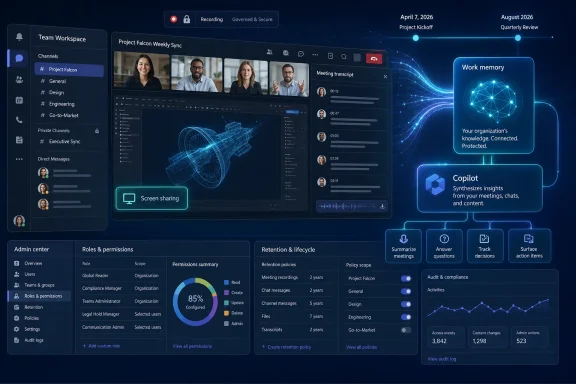
Microsoft expanded Microsoft 365 Copilot Chat into Teams chats, channels, calling, and meetings on April 7, 2026, and its roadmap now points to an August 2026 rollout for Copilot analyzing desktop screen-shared meeting content when recording is enabled. The practical answer for Teams users is simple: Copilot is moving from a chat assistant you invoke in one place to a memory layer that follows work across the places Teams users actually collaborate. For IT, the calendar matters less than the architecture. Microsoft is teaching Copilot to remember not just what people said, but where the work happened, what was shown, and how a conversation turned into a decision.
The easy headline is “Copilot is coming to more Teams meetings.” That is true, but it undersells the shift. The more important story is that Teams is becoming one of Microsoft 365 Copilot’s primary memory surfaces, stretching from chats and channels into calls, meetings, transcripts, meeting chat, recordings, and soon screen-shared content.
On April 7, 2026, Microsoft’s release notes expanded Microsoft 365 Copilot Chat into Teams chats, channels, calling, and meetings across Windows, Mac, and web, with mobile support described as coming soon. That is not merely another button in the Teams chrome. It is Microsoft pushing Copilot closer to the places where work is negotiated before it becomes a document, ticket, spreadsheet, or decision.
The August 2026 roadmap item adds the missing visual layer. Copilot in Teams is slated to analyze content shared on-screen during a meeting when recording is enabled, using that screen-shared content alongside the meeting transcript and meeting chat. In plain English, the assistant is being positioned to answer questions not only about the conversation, but about the material everyone was looking at while the conversation happened.
That distinction matters. A transcript can tell you that someone said “the second option is safer.” A screen-aware meeting memory can, in theory, connect that remark to the spreadsheet, browser page, slide, or document visible at the time. That is the difference between meeting notes and searchable work memory.
For users, the near-term action is straightforward: open a Teams chat or channel and launch Copilot where it is available, then use it to ask questions or generate insights from the collaboration context Microsoft exposes to it. In meetings, users can try Copilot during the meeting to support real-time collaboration. The exact experience will still depend on tenant licensing, rollout state, platform, and admin configuration, but the direction is clear enough for planning.
For administrators, April’s change is not just another feature to announce in a newsletter. It is the point at which Copilot governance starts to overlap more deeply with Teams governance. If Teams chats and channels are now Copilot surfaces, then stale permissions, sprawling channels, and casual oversharing become AI-retrieval problems, not merely collaboration hygiene problems.
That is why this change belongs in the same long-running WindowsForum conversation around Copilot’s enterprise sprawl, not as a one-off Teams enhancement. Earlier coverage of Microsoft 365 Copilot updates and the broader Microsoft 365 rebrand cycle has already shown the pattern: Microsoft rarely ships Copilot as a single app. It ships Copilot as a slowly spreading interface across the suite, then asks IT to catch up.
This is the point where the meeting stops being only a spoken record. If someone shares a spreadsheet, a document, slides, a website, or another desktop app through screen sharing, that shared material becomes part of what Copilot can reason over. The assistant can then be asked to locate details from what was displayed or combine audience feedback from chat and speech with the presented content.
The limitation is just as important as the promise. Microsoft says the first wave works with desktop screen sharing, while support for PowerPoint Live and Whiteboard in Teams will come later. That means this is not yet universal understanding of every Teams sharing mode. It is a narrower feature aimed at what was shared through the desktop screen-share path.
That boundary will matter in real deployments. Many organizations use PowerPoint Live precisely because it behaves differently from raw screen sharing, and Whiteboard is often where brainstorming happens. If those modes arrive later, admins should expect inconsistent user expectations: some meetings will produce richer Copilot recall than others, depending on how people shared content.
For security-minded admins, recording is already one of the most sensitive Teams meeting settings. It affects retention, discovery, compliance review, participant expectations, and sometimes regulatory exposure. Adding screen-aware Copilot analysis raises the stakes because the recorded meeting is no longer just a file someone might replay. It becomes a source of AI-queryable context.
That does not make the feature inherently reckless. It does mean organizations need to stop treating meeting recording as a convenience toggle. If a meeting includes customer data, unreleased financials, health information, legal strategy, source code, credentials accidentally visible in a terminal, or private HR material, screen sharing can expose information that was never meant to become reusable meeting memory.
The practical work for IT is therefore less glamorous than the demo. Review who can record meetings, which meetings should disable recording, how retention policies apply, and whether users understand that what they show may become part of a Copilot-assisted recap or follow-up workflow. The technology may be new, but the administrative lesson is old: if you do not govern the container, you do not govern what the AI can retrieve from it.
This is not necessarily a bad thing. Many organizations already suffer from meeting amnesia: decisions made in calls but not written down, spreadsheet numbers discussed without context, and action items buried in chat fragments. A Copilot layer that can connect meeting speech, chat, and screen-shared material could reduce that lossiness if the meeting itself is structured enough.
But the feature will also expose sloppy habits. If presenters jump between unrelated windows, show sensitive tabs, discuss one document while displaying another, or use chat as a parallel private commentary track, Copilot’s “memory” may become noisy. The assistant can only be as useful as the meeting record it is given.
For enthusiasts and power users, this will be tempting to treat as magic. It is better understood as an indexing system over collaboration artifacts. The promise is not that Copilot suddenly understands the business. The promise is that Teams can preserve more of the context users normally lose five minutes after the call ends.
That order matters because it gives Microsoft a way to normalize Copilot’s presence before asking users to trust it with more complicated meeting memory. A chat assistant in channels is easier to understand than an AI system that can connect a spoken comment to a spreadsheet cell shown during a recorded meeting. Microsoft appears to be laying the groundwork before expanding what the assistant can see and reconstruct.
This is also consistent with the broader Copilot pattern across Microsoft 365. The company tends to start with assistance inside familiar apps, then connect those experiences through shared context. Teams is especially valuable because it is where work happens before it is formalized. If Copilot can extract useful memory from Teams, Microsoft gets closer to making Copilot the connective tissue of Microsoft 365 rather than a sidebar attached to Office apps.
WindowsForum readers have seen this movie before in Microsoft 365 Copilot coverage: branding changes first, then app-level features, then deeper workflow integration. The April and August 2026 Teams changes belong to that third phase. They are less about novelty and more about Copilot becoming ambient infrastructure.
But the quieter risk is misplaced confidence. Once Copilot can summarize a recorded meeting and what was shown on screen, users may treat its output as the authoritative memory of the event. That could be useful when the output is accurate and grounded. It could be dangerous when a summary misses a caveat, misreads context, or gives equal weight to a throwaway comment and a formal decision.
This is where IT policy and user training need to meet. Organizations should tell employees what Copilot can help with, but also what it is not. It is not a substitute for formal minutes in regulated contexts. It is not a compliance officer. It is not a guarantee that every visual detail was interpreted correctly.
The best use case is assistive recall: finding what was discussed, identifying likely action items, drafting follow-up text, and surfacing details from the shared material. The worst use case is treating AI-generated meeting memory as a perfect record without human review. That difference will decide whether this becomes a productivity gain or another source of administrative cleanup.
Start with Teams information architecture. If Copilot Chat is available across chats and channels, then channel membership, guest access, and data sprawl matter more. Old channels full of sensitive historical material should not be treated as harmless just because nobody manually searches them today.
Then review meeting policies. Recording permissions, transcription settings, retention behavior, and meeting templates should be aligned with how the organization handles sensitive work. If certain meetings should never become AI-queryable memory, the answer is probably not a stern reminder in a training deck. The answer is policy.
Finally, prepare user guidance that is concrete rather than theatrical. Users do not need a philosophical essay on AI. They need to know when recording is appropriate, what not to share on screen, why PowerPoint Live and Whiteboard support may differ from desktop sharing at first, and when Copilot output must be reviewed before being forwarded.
That is why the April and August entries should be read together. April puts Copilot Chat into the everyday Teams surfaces where work is discussed. August adds the ability, under the recording requirement, to analyze what was shared visually during meetings and combine that with transcript and chat. One expands reach; the other expands memory.
The result is a more searchable version of organizational life. Chats, channels, calls, meetings, meeting chat, transcript, recording, and shared desktop content are all becoming potential inputs into Copilot-assisted work. That is powerful, but it also means administrators need to think about Teams as a knowledge system, not only a communication app.
Microsoft’s challenge is to make this useful without making it creepy, and governable without making it unusable. The company’s staged rollout suggests it knows the problem is bigger than a feature toggle. The remaining question is whether tenants will do the equally unglamorous work of preparing their collaboration estate.
Those dates should trigger practical work now:
Microsoft’s April-to-August 2026 Teams Copilot shift is not just another AI feature arriving in the productivity suite; it is the beginning of Teams becoming a searchable work memory layer. If Microsoft executes well, users will recover decisions and context that used to vanish into meetings. If organizations prepare poorly, they will discover that AI did not create their governance problems — it simply made those problems easier to query.
 Microsoft Is Turning Teams Into a Work Memory System
The easy headline is “Copilot is coming to more Teams meetings.” That is true, but it undersells the shift. The more important story is that Teams is becoming one of Microsoft 365 Copilot’s primary memory surfaces, stretching from chats and channels into calls, meetings, transcripts, meeting chat, recordings, and soon screen-shared content.On April 7, 2026, Microsoft’s release notes expanded Microsoft 365 Copilot Chat into Teams chats, channels, calling, and meetings across Windows, Mac, and web, with mobile support described as coming soon. That is not merely another button in the Teams chrome. It is Microsoft pushing Copilot closer to the places where work is negotiated before it becomes a document, ticket, spreadsheet, or decision.
The August 2026 roadmap item adds the missing visual layer. Copilot in Teams is slated to analyze content shared on-screen during a meeting when recording is enabled, using that screen-shared content alongside the meeting transcript and meeting chat. In plain English, the assistant is being positioned to answer questions not only about the conversation, but about the material everyone was looking at while the conversation happened.
That distinction matters. A transcript can tell you that someone said “the second option is safer.” A screen-aware meeting memory can, in theory, connect that remark to the spreadsheet, browser page, slide, or document visible at the time. That is the difference between meeting notes and searchable work memory.
The April Release Was the Distribution Move
The April 7 release-note entry is the foundation. Microsoft 365 Copilot Chat became accessible in Teams chats, channels, calling, and meetings, which means the assistant is no longer framed as something users leave Teams to consult. It becomes an in-context layer for the collaboration stream itself.For users, the near-term action is straightforward: open a Teams chat or channel and launch Copilot where it is available, then use it to ask questions or generate insights from the collaboration context Microsoft exposes to it. In meetings, users can try Copilot during the meeting to support real-time collaboration. The exact experience will still depend on tenant licensing, rollout state, platform, and admin configuration, but the direction is clear enough for planning.
For administrators, April’s change is not just another feature to announce in a newsletter. It is the point at which Copilot governance starts to overlap more deeply with Teams governance. If Teams chats and channels are now Copilot surfaces, then stale permissions, sprawling channels, and casual oversharing become AI-retrieval problems, not merely collaboration hygiene problems.
That is why this change belongs in the same long-running WindowsForum conversation around Copilot’s enterprise sprawl, not as a one-off Teams enhancement. Earlier coverage of Microsoft 365 Copilot updates and the broader Microsoft 365 rebrand cycle has already shown the pattern: Microsoft rarely ships Copilot as a single app. It ships Copilot as a slowly spreading interface across the suite, then asks IT to catch up.
August Is the Context Move
The August 2026 roadmap item is more ambitious because it changes what counts as meeting context. Copilot in Teams will be able to analyze content shared on-screen during a meeting when recording is enabled. Microsoft says it will use the meeting transcript and meeting chat together with the screen-shared material to summarize, find specific details, consolidate insights, and draft new content from what was shown.This is the point where the meeting stops being only a spoken record. If someone shares a spreadsheet, a document, slides, a website, or another desktop app through screen sharing, that shared material becomes part of what Copilot can reason over. The assistant can then be asked to locate details from what was displayed or combine audience feedback from chat and speech with the presented content.
The limitation is just as important as the promise. Microsoft says the first wave works with desktop screen sharing, while support for PowerPoint Live and Whiteboard in Teams will come later. That means this is not yet universal understanding of every Teams sharing mode. It is a narrower feature aimed at what was shared through the desktop screen-share path.
That boundary will matter in real deployments. Many organizations use PowerPoint Live precisely because it behaves differently from raw screen sharing, and Whiteboard is often where brainstorming happens. If those modes arrive later, admins should expect inconsistent user expectations: some meetings will produce richer Copilot recall than others, depending on how people shared content.
The Recording Requirement Is the Governance Hook
The most important operational detail is that the August feature requires recording to be enabled. That is not a footnote. It is the control point that determines whether screen-shared content becomes available for Copilot analysis in the described workflow.For security-minded admins, recording is already one of the most sensitive Teams meeting settings. It affects retention, discovery, compliance review, participant expectations, and sometimes regulatory exposure. Adding screen-aware Copilot analysis raises the stakes because the recorded meeting is no longer just a file someone might replay. It becomes a source of AI-queryable context.
That does not make the feature inherently reckless. It does mean organizations need to stop treating meeting recording as a convenience toggle. If a meeting includes customer data, unreleased financials, health information, legal strategy, source code, credentials accidentally visible in a terminal, or private HR material, screen sharing can expose information that was never meant to become reusable meeting memory.
The practical work for IT is therefore less glamorous than the demo. Review who can record meetings, which meetings should disable recording, how retention policies apply, and whether users understand that what they show may become part of a Copilot-assisted recap or follow-up workflow. The technology may be new, but the administrative lesson is old: if you do not govern the container, you do not govern what the AI can retrieve from it.
The User Experience Will Reward Better Meeting Discipline
Microsoft’s direction will also change meeting behavior. Teams users who want useful Copilot output will need to run meetings in ways that machines can parse. That means clearer screen sharing, explicit decisions, visible source material, and fewer side-channel conversations that never make it into transcript or chat.This is not necessarily a bad thing. Many organizations already suffer from meeting amnesia: decisions made in calls but not written down, spreadsheet numbers discussed without context, and action items buried in chat fragments. A Copilot layer that can connect meeting speech, chat, and screen-shared material could reduce that lossiness if the meeting itself is structured enough.
But the feature will also expose sloppy habits. If presenters jump between unrelated windows, show sensitive tabs, discuss one document while displaying another, or use chat as a parallel private commentary track, Copilot’s “memory” may become noisy. The assistant can only be as useful as the meeting record it is given.
For enthusiasts and power users, this will be tempting to treat as magic. It is better understood as an indexing system over collaboration artifacts. The promise is not that Copilot suddenly understands the business. The promise is that Teams can preserve more of the context users normally lose five minutes after the call ends.
Microsoft’s Cadence Shows a Staged Rollout, Not a Big Bang
The April-to-August arc looks deliberate. First, Microsoft expands Copilot Chat across Teams surfaces. Then it prepares a deeper meeting capability that can incorporate what was shown on screen. Distribution comes before richer context.That order matters because it gives Microsoft a way to normalize Copilot’s presence before asking users to trust it with more complicated meeting memory. A chat assistant in channels is easier to understand than an AI system that can connect a spoken comment to a spreadsheet cell shown during a recorded meeting. Microsoft appears to be laying the groundwork before expanding what the assistant can see and reconstruct.
This is also consistent with the broader Copilot pattern across Microsoft 365. The company tends to start with assistance inside familiar apps, then connect those experiences through shared context. Teams is especially valuable because it is where work happens before it is formalized. If Copilot can extract useful memory from Teams, Microsoft gets closer to making Copilot the connective tissue of Microsoft 365 rather than a sidebar attached to Office apps.
WindowsForum readers have seen this movie before in Microsoft 365 Copilot coverage: branding changes first, then app-level features, then deeper workflow integration. The April and August 2026 Teams changes belong to that third phase. They are less about novelty and more about Copilot becoming ambient infrastructure.
The Enterprise Risk Is Not Just Privacy, It Is Misplaced Confidence
The obvious concern is privacy, and it is valid. Screen-shared content can include material that users did not intend to preserve or summarize. Meeting chat can contain offhand remarks that read differently when extracted into a summary. Transcripts can flatten nuance.But the quieter risk is misplaced confidence. Once Copilot can summarize a recorded meeting and what was shown on screen, users may treat its output as the authoritative memory of the event. That could be useful when the output is accurate and grounded. It could be dangerous when a summary misses a caveat, misreads context, or gives equal weight to a throwaway comment and a formal decision.
This is where IT policy and user training need to meet. Organizations should tell employees what Copilot can help with, but also what it is not. It is not a substitute for formal minutes in regulated contexts. It is not a compliance officer. It is not a guarantee that every visual detail was interpreted correctly.
The best use case is assistive recall: finding what was discussed, identifying likely action items, drafting follow-up text, and surfacing details from the shared material. The worst use case is treating AI-generated meeting memory as a perfect record without human review. That difference will decide whether this becomes a productivity gain or another source of administrative cleanup.
Admins Should Prepare Before August, Not During Rollout
The action plan for IT is not to wait for August 2026 and then discover how the feature behaves in production. The April expansion is already enough reason to review Teams and Copilot readiness. The screen-analysis feature simply raises the priority.Start with Teams information architecture. If Copilot Chat is available across chats and channels, then channel membership, guest access, and data sprawl matter more. Old channels full of sensitive historical material should not be treated as harmless just because nobody manually searches them today.
Then review meeting policies. Recording permissions, transcription settings, retention behavior, and meeting templates should be aligned with how the organization handles sensitive work. If certain meetings should never become AI-queryable memory, the answer is probably not a stern reminder in a training deck. The answer is policy.
Finally, prepare user guidance that is concrete rather than theatrical. Users do not need a philosophical essay on AI. They need to know when recording is appropriate, what not to share on screen, why PowerPoint Live and Whiteboard support may differ from desktop sharing at first, and when Copilot output must be reviewed before being forwarded.
The Real Shift Is From “Meeting Assistant” to “Collaboration Archive”
The phrase “Copilot in meetings” makes the feature sound smaller than it is. A meeting assistant helps you catch up on a call. A collaboration archive helps you reconstruct how work moved from discussion to decision.That is why the April and August entries should be read together. April puts Copilot Chat into the everyday Teams surfaces where work is discussed. August adds the ability, under the recording requirement, to analyze what was shared visually during meetings and combine that with transcript and chat. One expands reach; the other expands memory.
The result is a more searchable version of organizational life. Chats, channels, calls, meetings, meeting chat, transcript, recording, and shared desktop content are all becoming potential inputs into Copilot-assisted work. That is powerful, but it also means administrators need to think about Teams as a knowledge system, not only a communication app.
Microsoft’s challenge is to make this useful without making it creepy, and governable without making it unusable. The company’s staged rollout suggests it knows the problem is bigger than a feature toggle. The remaining question is whether tenants will do the equally unglamorous work of preparing their collaboration estate.
The Calendar Now Belongs on the Admin Dashboard
The concrete dates are the anchor for planning. April 7, 2026 brought Microsoft 365 Copilot Chat into more Teams collaboration surfaces. August 2026 is the planned rollout start for Copilot’s ability to analyze desktop screen-shared content in recorded Teams meetings.Those dates should trigger practical work now:
- Organizations should verify where Microsoft 365 Copilot Chat is available in Teams chats, channels, calls, and meetings for their users.
- Teams administrators should review recording and transcription policies before screen-shared meeting content becomes part of Copilot-assisted recall.
- Security and compliance teams should treat screen sharing as potentially persistent meeting context when recording is enabled.
- User guidance should explain that the first screen-analysis wave is for desktop screen sharing, with PowerPoint Live and Whiteboard support coming later.
- Meeting owners should reserve recording-enabled Copilot workflows for meetings where searchable memory is useful and appropriate.
Microsoft’s April-to-August 2026 Teams Copilot shift is not just another AI feature arriving in the productivity suite; it is the beginning of Teams becoming a searchable work memory layer. If Microsoft executes well, users will recover decisions and context that used to vanish into meetings. If organizations prepare poorly, they will discover that AI did not create their governance problems — it simply made those problems easier to query.
References
- Primary source: learn.microsoft.com
Release Notes for Microsoft 365 Copilot | Microsoft Learn
Lists the features that reach General Availability in each release of Microsoft 365 Copilot.learn.microsoft.com - Independent coverage: microsoft.com
Microsoft 365 Roadmap | Microsoft 365
The Microsoft 365 Roadmap lists updates that are currently planned for applicable subscribers. Check here for more information on the status of new features and updates.www.microsoft.com
- Primary source: WindowsForum
Microsoft 365 Copilot April 2025 Updates: New Features, Improvements & Challenges | Windows Forum
If you were one of the IT professionals who looked at Microsoft 365 Copilot at launch and thought, "Well, that's a nice idea, but maybe I'll just stick with...windowsforum.com
