

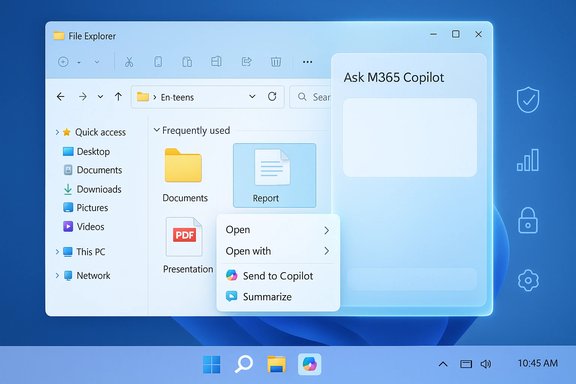
Microsoft’s Copilot is moving from sidebar novelty toward the center of Windows workflows: recent Insider artifacts and press coverage show a context‑menu “Copilot” entry in File Explorer that can send files to the assistant or produce quick summaries, and evidence of a detachable, chat‑style Copilot pane being tested inside Explorer itself.
Microsoft has pursued an aggressive plan to make Copilot an integral assistant across Windows and Microsoft 365, folding LLM‑based features into the taskbar, apps, and shell. At Ignite and in Windows preview documentation, the company confirmed that more Copilot surfaces are coming to File Explorer — including hover affordances that hand files to Microsoft 365 Copilot for on‑demand summaries and insights — and that many of these experiences will be staged through Insider builds and server‑side gating. Independent reporting and preview sleuthing first exposed a File Explorer context‑menu entry that lists actions such as Send to Copilot and Summarize; those screenshots and resource strings have appeared in multiple community writeups and hands‑on articles. Several coverage threads tracing build artifacts point to the 26080 / 26220 family of preview builds as the staging ground for these experiments. This article synthesizes the evidence, verifies technical claims where possible, highlights the real productivity benefits, and examines the privacy, security, licensing, and manageability questions Windows administrators and advanced users must weigh.
The promise is clear: faster triage, fewer context switches, and new micro‑workflows inside the OS. The cautionary note is equally clear: making the file manager a gateway to AI requires disciplined design, transparent consent, and strong governance to prevent privacy and security surprises. The coming months of Insider previews and Microsoft documentation will determine whether Copilot in File Explorer becomes a productivity win or a managerial headache.
Source: Mashable Copilot is plugging into Windows 11 File Explorer
 Background
Microsoft has pursued an aggressive plan to make Copilot an integral assistant across Windows and Microsoft 365, folding LLM‑based features into the taskbar, apps, and shell. At Ignite and in Windows preview documentation, the company confirmed that more Copilot surfaces are coming to File Explorer — including hover affordances that hand files to Microsoft 365 Copilot for on‑demand summaries and insights — and that many of these experiences will be staged through Insider builds and server‑side gating. Independent reporting and preview sleuthing first exposed a File Explorer context‑menu entry that lists actions such as Send to Copilot and Summarize; those screenshots and resource strings have appeared in multiple community writeups and hands‑on articles. Several coverage threads tracing build artifacts point to the 26080 / 26220 family of preview builds as the staging ground for these experiments. This article synthesizes the evidence, verifies technical claims where possible, highlights the real productivity benefits, and examines the privacy, security, licensing, and manageability questions Windows administrators and advanced users must weigh.What’s being tested (the current evidence)
File Explorer context menu: actions and flow
- A right‑click entry in File Explorer labeled Copilot (internally referenced as CopilotFEContextMenu in some artifacts) shows action items such as Send to Copilot and Summarize. Selecting these options appears to hand the selected file to the Copilot surface — usually the Copilot panel — and returns a short, action‑oriented output such as a bulleted summary. This behavior was documented in community coverage and early screenshots.
- Testing notes indicate the UI currently prompts for permission before sending files to Copilot, and the flow can open the Copilot panel and ingest the document for Q&A or summarization. Actual outputs vary in preview builds; testers reported incomplete or buggy summaries (expected for pre‑release builds).
Hover “Ask M365 Copilot” and Microsoft 365 hand‑off
- Microsoft has publicly said File Explorer will support a hover‑to‑ask affordance in the Home view that sends files to Microsoft 365 Copilot for context‑aware insights. This is explicitly framed as a Microsoft 365 experience — meaning tenant grounding and Graph‑aware reasoning are available when the proper licensing and permissions exist. Microsoft’s preview notes set this as “rolling out before the end of 2025” in their Ignite roadmap.
- The hover affordance differs from the general system Copilot options: the Home hover is a Microsoft 365 Copilot escalation, while the right‑click Copilot entry routes to the system Copilot surface. That distinction matters for enterprise data access and licensing.
Docked chat and detachable Copilot strings
- Resource strings discovered in Insider builds reference labels such as Chat with Copilot and Detach Copilot, suggesting Microsoft is testing an embedded, docked chat pane inside File Explorer that can be detached into a standalone window. The evidence is based on file artifacts in preview packages rather than a public product announcement, so the strings are strong indicators of intent but not definitive of final UX or behavior.
Image edits and extra actions (speculative, plausible)
- Coverage and build artifacts hint at additional file‑centric actions beyond summarization: “Rewrite” for text documents, and image edits such as background removal or upscaling when sending images to Copilot. These items appear in screenshots and early reports but remain experimental and gated by hardware (Copilot+ NPUs) or license in some scenarios.
Why this matters: productivity gains and UX rationale
Embedding Copilot actions directly inside File Explorer aligns with a simple productivity thesis: make common, low‑friction operations available where users already interact with content.- Faster triage: Summaries reduce the need to open multiple large files to eyeball content.
- Reduced context switching: Asking Copilot about a file from Explorer keeps the user in the discovery flow.
- Actionable shortcuts: One‑click exports (extract tables to Excel, summarize to Word, or draft an email referencing a PDF) could greatly shorten common tasks.
- Accessibility wins: Copilot summaries and reading can help users who depend on screen readers or simpler UI to scan documents quickly.
Technical verification: what is confirmed, and what remains tentative
- Confirmed or strongly supported
- A Copilot context‑menu entry and AI actions in File Explorer exist in preview builds and were visible to Insiders and in screenshots. Multiple outlets reproduced the same UI items.
- Microsoft publicly documented hover “Ask M365 Copilot” rollout plans in its Windows/IT blog posts and Windows Experience notes, placing these features in the preview/Insider pipeline.
- Some actions or workflows will be gated by licensing (Microsoft 365 Copilot entitlements) and by hardware tiers (Copilot+ PCs with dedicated NPUs for on‑device inference). This gating is a stated Microsoft practice across Copilot features.
- Tentative or unverified
- The precise UX of an in‑Explorer docked chat (layout, persistence, transcript storage, or session memory) is not finalized; evidence comes from resource strings in Insider packages, which Microsoft often ships ahead of server‑side enablement. Treat this as likely but not confirmed.
- The exact list of file actions (for example, which image edits will be available inline, or whether “rewrite” becomes a right‑click action) may change prior to release. Preview screenshots show plausible actions, but the final product could differ.
Privacy, governance, and security implications (detailed)
Putting Copilot inside File Explorer flips a key architectural expectation: the file manager is no longer purely local UI; it becomes a gateway for content to traverse to indexed AI services. That raises several interlocking risks.Data flow and consent
- Files selected for Copilot processing will likely be uploaded to cloud models unless on‑device inference is available and enabled. Microsoft’s materials and preview behavior indicate a permission prompt appears before upload, but the granularity of that consent (per file, per session, or global) is not consistently documented in the public artifacts. Administrators must expect to answer: What leaves the device? Where is it stored? For how long?
- Microsoft 365 Copilot escalations can involve tenant‑aware connectors and Microsoft Graph access. That makes organizational governance — connector approvals, tenant consent, and data residency controls — essential before enabling these features for enterprise users.
Compliance and eDiscovery
- If Copilot indexes or logs processed content, regulators and compliance teams will need clarity on retention, searchability, and legal hold behavior. There is early guidance that enterprise features will be managed via admin controls, but at the time of the preview the operational detail is sparse. Treat claims about full compliance integration as conditional until Microsoft publishes admin documentation.
Attack surface and data exfiltration
- Sending files to an LLM introduces risks such as prompt‑injection or exfiltration via agentic connectors. Copilot Actions and agentic workflows can call external services on behalf of the user; compromised connectors or permissive settings could create new leakage channels. Early community analysis urges careful sandboxing, logging, and tenant gating for such workflows.
Privacy UX and default settings
- The risk of privacy surprise—users inadvertently uploading sensitive files because the Copilot affordance is visually similar to other Explorer actions—is real. Microsoft’s use of similar icons for system Copilot and Microsoft 365 Copilot increases the chance users will pick the wrong assistant and expose data to a different service scope. Clear microcopy, explicit consent dialogs, and conservative default settings are critical mitigations.
Performance, stability, and hardware tiers
- Copilot features are being offered in two broad operational modes: cloud‑backed and on‑device. Microsoft reserves the fastest, lowest‑latency experiences for Copilot+ PCs with certified NPUs capable of local inference. On many devices, heavy tasks (OCR on large PDFs, image editing upscaling) will still require cloud processing. Performance and battery impact on non‑Copilot+ devices are plausible concerns, especially when multiple files are sent in quick succession.
- Insider artifacts show server‑side feature gating. Two identical machines may show different behavior based on feature flags and entitlements, complicating testing and rollout for IT teams. Admins should expect to coordinate pilot groups and verify behavior on representative hardware prior to wide deployment.
Practical guidance for administrators and advanced users
For IT administrators (action checklist)
- Inventory: Identify which user groups should get Copilot‑in‑Explorer features and which should not.
- Licensing: Confirm Microsoft 365 Copilot licenses and commercial entitlements before enabling tenant‑aware hand‑offs.
- Policy: Prepare Intune/Group Policy rules and conditional access controls to restrict Copilot connectors and agent memory features.
- Pilot: Run a controlled pilot with logging enabled and a clear rollback plan if privacy or performance issues surface.
- Communication: Draft end‑user guidance explaining what Copilot actions do, how consent is granted, and how to opt out.
For power users and enthusiasts
- Treat Copilot outputs as assistive, not authoritative. Always verify critical extractions and summaries against the original file.
- If privacy is a concern, disable Copilot file hand‑offs in Personalization > Copilot (or equivalent controls) until the feature and consent model are clear. Several guides and community notes document toggle points and ViveTool flags for early test machines.
UX design and fragmentation risk
Microsoft is running multiple Copilot surfaces in parallel — the system Copilot (the OS‑level assistant), Microsoft 365 Copilot (tenant‑aware), and companion Copilot features in apps. That dual‑Copilot reality creates a fragmentation risk: users may be uncertain which assistant they invoked and what data scope each service uses.- Visual parity (similar icons and near‑identical affordances) increases confusion.
- Admin controls and licensing differences create surprising variance: the same click on two machines can trigger different backends (local Copilot vs. M365 Copilot).
Scenarios and sample workflows
Quick document triage
- Hover a recent PDF in File Explorer Home.
- Click Ask M365 Copilot (hover action).
- Receive a bulleted summary or list of action items without opening the full PDF.
This flow saves time when identifying the correct file among many similar documents.
Image editing from Explorer
- Right‑click an image > Copilot > Send to Copilot > request “Remove background” or “Upscale”.
The action would launch an image editing pipeline (likely invoking Photos or Paint’s AI tools or cloud processing) and return the edited asset. This remains experimental and hardware‑dependent in previews.
Inline follow‑ups with a docked chat
- Use the expected “Chat with Copilot” pane attached to Explorer to ask follow‑ups: “List the spreadsheet’s headers” or “Extract a table to Excel.” If detachable, users could continue multi‑file workflows without context switching. Evidence for this detachable pane exists in resource strings but not yet in a fully functional build.
Strengths and opportunities
- High ROI micro‑tasks: Summaries, quick extractions, and small edits are high value for knowledge workers and power users.
- Natural discoverability: Placing actions in the file manager reduces friction compared with opening separate apps.
- Platform consistency: Extending Copilot into Explorer continues Microsoft’s strategy to make the assistant present wherever users work.
Risks and open questions
- Privacy transparency: How granular is consent? Are per‑file prompts default, or is there a one‑time permission?
- Data retention and eDiscovery: Are Copilot interactions logged or stored in tenant memory? How to place legal holds on those records?
- Security controls: How are connectors sandboxed, and what protections prevent agentic exfiltration?
- User confusion: Will overlapping Copilot surfaces produce accidental data exposure?
- Performance and battery: On non‑Copilot+ hardware, how much background activity will Copilot trigger?
What to watch next (rollout signals)
- Official Windows Insider blog entries or Windows Experience release notes that list File Explorer Copilot features as enabled in a given build or channel.
- Admin‑center controls and documentation for Microsoft 365 Copilot connectors, retention, and memory settings.
- Hands‑on coverage with screenshots that show a functional, docked chat pane or the hover Ask M365 Copilot working in non‑Insider channels.
- Enterprise policy options in Intune/Group Policy describing how to opt out or manage Copilot file hand‑offs.
Conclusion
The addition of Copilot actions to File Explorer is a logical extension of Microsoft’s platform strategy: put AI where content is discovered and let users perform small, high‑value tasks without opening heavyweight apps. The evidence — screenshots, resource strings, and Microsoft’s public preview roadmap — shows a coherent plan that ranges from right‑click summarization to hover hand‑offs to a potential in‑Explorer chat surface. At the same time, the feature set is still in preview. Key details about consent models, telemetry and retention, enterprise governance, and the final UX remain subject to change. Administrators and advanced users should pilot carefully, prepare policy controls, and treat Copilot outputs as assistive rather than authoritative until the product and its admin controls mature.The promise is clear: faster triage, fewer context switches, and new micro‑workflows inside the OS. The cautionary note is equally clear: making the file manager a gateway to AI requires disciplined design, transparent consent, and strong governance to prevent privacy and security surprises. The coming months of Insider previews and Microsoft documentation will determine whether Copilot in File Explorer becomes a productivity win or a managerial headache.
Source: Mashable Copilot is plugging into Windows 11 File Explorer
