

Microsoft’s revival of Kyle the dolphin is more than a nostalgia play. It is a deliberate attempt to make a practical Windows input tool feel friendlier, more modern, and a little more human at the same time. The new Copilot Keyboard positions itself as a Japanese IME first and an AI companion second, but the return of a once-beloved Office mascot is clearly the headline that will travel farthest. That balance matters, because this launch is really about how Microsoft wants people to think about AI: not as a separate destination, but as something embedded into everyday work.
Microsoft has spent decades experimenting with assistants that sit beside the user rather than replace the user. In the late 1990s, the company shipped the Office Assistant experience in Office 97, a product era that tried to make software feel more approachable through personality-driven help. The idea was simple: if the interface could look less intimidating, more people might discover features they would otherwise miss. That strategy produced a cultural icon in Clippy, but it also taught Microsoft a painful lesson about the line between helpful and intrusive.
Kyle the dolphin came from that same broader family of animated helpers. The character first appeared in Japanese editions of Office and later became recognizable to users in other regions who went looking for it. In Microsoft’s own current description of the new product, the company explicitly frames Kyle as a returning assistant character, now repurposed as a Copilot persona rather than a generic office guide. The comeback is intentionally framed as a reunion: something familiar, updated for a different era.
The technical backdrop is equally important. Japanese text input on a standard QWERTY keyboard depends on an IME, or Input Method Editor, which converts phonetic input into kana and kanji. Microsoft’s own documentation explains that Windows Japanese IME lets users type hiragana or katakana on a typical keyboard and then converts that input into kanji, without requiring a change to the Windows display language. That makes IMEs indispensable infrastructure, not novelty apps. They are the bridge between a Latin keyboard and a language system that is structurally different.
Over the years, Microsoft has kept refining the Japanese IME, including prediction, learning, dictionary settings, and compatibility options for earlier versions. In other words, this is a product category where users care deeply about accuracy, speed, and habit continuity. That is why Microsoft’s promise that the legacy IME remains available matters so much. A flashy AI layer only works if users trust they can fall back to the familiar path when needed.
The current Copilot wave also changes the context around this launch. Microsoft has spent the last several years making Copilot a brand that covers Windows, Microsoft 365, search, and consumer AI experiences. The company’s recent messaging has emphasized embedded assistance, natural-language interaction, and productivity tools that appear where people already work. Copilot Keyboard fits that strategy neatly, but it does so in a domain where low latency, privacy, and language fidelity are not optional extras.
The product description suggests a tool that can do more than conventional conversion. Microsoft says users can ask Kyle questions in natural language, request translation or paraphrasing, and look up information without losing their place in the writing flow. The app also supports Copilot Search, allowing quick definition checks without switching to a browser. That makes the experience feel closer to a contextual assistant than a pure input method.
This hybrid design is potentially clever because it lowers the barrier to trying the app. People often ignore utilities that look technical or dry, especially if they are already used to an existing IME. A character-driven design can make a feature discoverable in a way a settings page never will. The danger, of course, is that a mascot can also make users suspect that the product is being marketed before it is being solved. That skepticism is healthy.
Microsoft also says users can choose whether the Copilot icon appears on the desktop or whether one of the AI characters does. That suggests the company understands the need for restraint. Not every user wants a cartoon assistant floating over their workflow, and Microsoft appears to be offering a more subdued default path for those who prefer it.
That helps explain why Microsoft is using a Japanese-first launch to showcase a personality-heavy Copilot idea. If the company can win trust in a demanding language environment, it can credibly present the product as more than a gimmick. Japanese users are accustomed to IMEs that have strong dictionaries, customizable behavior, and precise control over punctuation, learning, and candidate selection. The bar is high, which makes the launch strategically useful.
The emphasis on up-to-date vocabulary matters because language in digital spaces evolves quickly. Social platforms, gaming communities, and online culture generate names and terms that formal dictionaries often lag behind. By promising fresh conversion data, Microsoft is signaling that the product is meant to keep pace with how people actually write now. That is a smarter pitch than simply saying the keyboard is “AI-powered.”
Microsoft also says users can import their old Microsoft IME dictionary data. That reduces switching friction and makes the product feel less like a reset. For enterprise and power users especially, preserving custom dictionary entries can be the difference between adopting a new tool and ignoring it.
There is also a broader brand strategy at work. Microsoft has been carefully turning “Copilot” into an umbrella identity that spans work tools, consumer tools, and operating system features. Reintroducing an old character under that label helps make Copilot feel less abstract and more inhabited. It is a small move, but it nudges the brand from utility toward companionship.
What is different now is the context of user intent. Copilot Keyboard is designed around direct interaction in the writing flow, and Microsoft says users can click Kyle for translation, paraphrasing, and quick lookup without leaving the task. That makes the assistant feel more optional and context-sensitive than the old Office Assistant ever did. The best-case scenario is that the mascot becomes a shortcut to useful action rather than a forced interruption.
Still, nostalgia can only carry a product so far. The real test is whether users perceive a measurable gain in speed, accuracy, or convenience. If Kyle is charming but the conversion quality disappoints, the return becomes a marketing story instead of a product story. That is the risk with every nostalgia reboot.
The product also shows how Microsoft is trying to solve one of AI’s biggest adoption problems: context switching. If you need to open a browser, search a question, and then return to your document, the workflow feels fragmented. Copilot Keyboard reduces that friction by keeping help inside the typing environment. That is exactly the sort of small convenience that can matter more than flashy demos.
That said, Microsoft is still walking a fine line. If the AI layer becomes too prominent, users may feel it is solving a problem they did not have. If it stays too subtle, the value proposition may get lost. The challenge is to make the AI feel invisible until needed, which is harder than it sounds.
The app’s floating desktop button is a good example of Microsoft testing that balance. A draggable Copilot button that accepts drop input is a familiar metaphor, almost like a quick-access helper dock. But it also hints at a future where Copilot becomes a persistent object on the desktop, not just a feature inside a window. That may appeal to some users and annoy others in equal measure.
For enterprises, the picture is more cautious. Companies care less about mascots and more about predictability, policy, and supportability. Microsoft’s assurance that user dictionary data stays local and that no input content is used for LLM training will matter more in corporate settings than the dolphin character itself. That privacy posture is clearly meant to build trust.
Enterprise adoption, by contrast, will depend on administrative control and fit with existing workflows. The ability to switch back to Microsoft IME, import existing dictionary entries, and keep data on-device is a strong start. But companies will still want to validate how the product behaves across managed devices, profiles, and security baselines. The mascot may sell the idea; policy will determine the rollout.
That split matters because Microsoft increasingly needs products that satisfy both audiences without fragmenting the platform. A consumer-friendly entrance point can build familiarity that later helps in business environments. But enterprises are also the audience most likely to reject anything that feels too decorative. Microsoft will need to prove that the underlying IME improvements are real, not just clever packaging.
The company also says the classic Microsoft IME remains available and can be switched via Windows settings. That matters from a trust perspective because it prevents the new app from feeling like a forced replacement. Users who are wary of AI, or who simply prefer mature behavior, keep an escape hatch. That is a good design decision even before you consider regulation or enterprise governance.
This also reflects a broader shift in how companies talk about AI trust. The strongest AI products increasingly are not the ones that promise the most magic, but the ones that explain where the data goes and where it does not. Microsoft seems to understand that a typing tool must earn trust through restraint. That restraint is the product’s quiet superpower.
Still, users will likely want more detail over time about how the AI character interactions are processed, what happens during lookup requests, and how much of the experience depends on cloud services versus local logic. If Microsoft wants this to be more than a novelty, it will need to keep clarifying those boundaries. Transparency is not a launch-day checkbox; it is an ongoing commitment.
The broader competitive angle is that Microsoft is trying to own more of the productivity stack, from hardware branding to operating system interactions to language tools. The Copilot key campaign already signaled a desire to make AI hardware-native, and Copilot Keyboard extends that same mindset into software input. It is a smart way to make Copilot feel like part of the system rather than an app you open.
There is also a symbolic competition at stake. Microsoft is trying to show that a legacy character can be reintroduced not as museum piece nostalgia, but as part of a modern AI workflow. That message supports its larger Copilot narrative, where the company wants to be seen as both innovative and familiar. The strategy is elegant, but it will only work if the product proves itself in daily use.
There is also a design risk in letting optional character themes become the default public face of the product. Some users will love it, but others will want the tool to disappear into the background. Microsoft has done the right thing by preserving a standard IME path, yet it must keep resisting the temptation to turn every interface into a brand showcase.
If the product works, it could become a template for other localized Copilot experiences. Microsoft may find that regional language tools are a more persuasive AI showcase than broad, one-size-fits-all chatbot features. The company’s challenge will be to keep the product useful enough that the character feels like a bonus rather than the reason to install it. That is a difficult balance, but it is also the right one.
Source: Windows Central https://www.windowscentral.com/soft...n-of-the-dolphin-kyle-stealing-the-spotlight/
 Background
Microsoft has spent decades experimenting with assistants that sit beside the user rather than replace the user. In the late 1990s, the company shipped the Office Assistant experience in Office 97, a product era that tried to make software feel more approachable through personality-driven help. The idea was simple: if the interface could look less intimidating, more people might discover features they would otherwise miss. That strategy produced a cultural icon in Clippy, but it also taught Microsoft a painful lesson about the line between helpful and intrusive.Kyle the dolphin came from that same broader family of animated helpers. The character first appeared in Japanese editions of Office and later became recognizable to users in other regions who went looking for it. In Microsoft’s own current description of the new product, the company explicitly frames Kyle as a returning assistant character, now repurposed as a Copilot persona rather than a generic office guide. The comeback is intentionally framed as a reunion: something familiar, updated for a different era.
The technical backdrop is equally important. Japanese text input on a standard QWERTY keyboard depends on an IME, or Input Method Editor, which converts phonetic input into kana and kanji. Microsoft’s own documentation explains that Windows Japanese IME lets users type hiragana or katakana on a typical keyboard and then converts that input into kanji, without requiring a change to the Windows display language. That makes IMEs indispensable infrastructure, not novelty apps. They are the bridge between a Latin keyboard and a language system that is structurally different.
Over the years, Microsoft has kept refining the Japanese IME, including prediction, learning, dictionary settings, and compatibility options for earlier versions. In other words, this is a product category where users care deeply about accuracy, speed, and habit continuity. That is why Microsoft’s promise that the legacy IME remains available matters so much. A flashy AI layer only works if users trust they can fall back to the familiar path when needed.
The current Copilot wave also changes the context around this launch. Microsoft has spent the last several years making Copilot a brand that covers Windows, Microsoft 365, search, and consumer AI experiences. The company’s recent messaging has emphasized embedded assistance, natural-language interaction, and productivity tools that appear where people already work. Copilot Keyboard fits that strategy neatly, but it does so in a domain where low latency, privacy, and language fidelity are not optional extras.
What Copilot Keyboard Actually Is
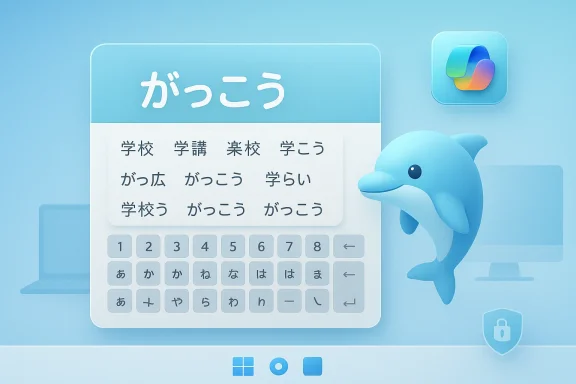
At the center of the announcement is a deceptively simple idea: Copilot Keyboard is an AI-enhanced Japanese IME for Windows 11. Microsoft says it is free, supports both x64 and ARM devices, and is designed specifically for Japan. The company also says the product is built to coexist with the standard Microsoft IME rather than replace it. That framing is important because it keeps the launch in the realm of augmentation rather than forced migration.The product description suggests a tool that can do more than conventional conversion. Microsoft says users can ask Kyle questions in natural language, request translation or paraphrasing, and look up information without losing their place in the writing flow. The app also supports Copilot Search, allowing quick definition checks without switching to a browser. That makes the experience feel closer to a contextual assistant than a pure input method.
A keyboard that is trying to be a companion
The most unusual part of the product is not the IME itself, but the decision to wrap it in an animated persona. Microsoft says users can choose AI characters, including Kyle, and the keyboard theme changes automatically to match the selected character. That is a classic Microsoft move in a new costume: it is personalization, but with personality attached. The visual layer may be playful, yet the underlying job is still serious text entry.This hybrid design is potentially clever because it lowers the barrier to trying the app. People often ignore utilities that look technical or dry, especially if they are already used to an existing IME. A character-driven design can make a feature discoverable in a way a settings page never will. The danger, of course, is that a mascot can also make users suspect that the product is being marketed before it is being solved. That skepticism is healthy.
Microsoft also says users can choose whether the Copilot icon appears on the desktop or whether one of the AI characters does. That suggests the company understands the need for restraint. Not every user wants a cartoon assistant floating over their workflow, and Microsoft appears to be offering a more subdued default path for those who prefer it.
Why Japan Matters Here
Japan is not an incidental launch market. It is the place where IME quality is a daily productivity issue, and where language tooling can have an outsized effect on how people experience a PC. Microsoft’s own support and Learn pages make clear that Japanese input on Windows involves mode switching, candidate windows, dictionary settings, and reconversion behavior that users rely on constantly. Any improvement in conversion quality or prediction can save time thousands of times a week.That helps explain why Microsoft is using a Japanese-first launch to showcase a personality-heavy Copilot idea. If the company can win trust in a demanding language environment, it can credibly present the product as more than a gimmick. Japanese users are accustomed to IMEs that have strong dictionaries, customizable behavior, and precise control over punctuation, learning, and candidate selection. The bar is high, which makes the launch strategically useful.
The IME as a productivity layer
An IME is not just a language setting. It is a workflow layer that shapes how quickly users can write, revise, and search while typing. Microsoft says Copilot Keyboard includes the latest dictionary data, including support for contemporary terms, trending expressions, and names that may be hard to convert cleanly with older vocabulary sets. That is exactly the kind of invisible improvement that users notice only when it fails.The emphasis on up-to-date vocabulary matters because language in digital spaces evolves quickly. Social platforms, gaming communities, and online culture generate names and terms that formal dictionaries often lag behind. By promising fresh conversion data, Microsoft is signaling that the product is meant to keep pace with how people actually write now. That is a smarter pitch than simply saying the keyboard is “AI-powered.”
Microsoft also says users can import their old Microsoft IME dictionary data. That reduces switching friction and makes the product feel less like a reset. For enterprise and power users especially, preserving custom dictionary entries can be the difference between adopting a new tool and ignoring it.
Kyle’s Return and Microsoft’s Nostalgia Strategy
The return of Kyle the dolphin is not random fan service. Microsoft is clearly using nostalgia as a bridge between older Office memories and newer Copilot expectations. The character gives the company a ready-made emotional hook, and that is especially useful for a product category that most people would otherwise classify as infrastructure. A cute character can make a technical launch feel like an event.There is also a broader brand strategy at work. Microsoft has been carefully turning “Copilot” into an umbrella identity that spans work tools, consumer tools, and operating system features. Reintroducing an old character under that label helps make Copilot feel less abstract and more inhabited. It is a small move, but it nudges the brand from utility toward companionship.
From Clippy to Kyle
Microsoft’s history with animated helpers is complicated. The company once believed that personality would make software more approachable, and in some ways it did. But Clippy became a symbol of interruption, not assistance, because the help often arrived at the wrong time and with the wrong confidence. Kyle’s return therefore arrives with baggage, even if the baggage is mostly affectionate.What is different now is the context of user intent. Copilot Keyboard is designed around direct interaction in the writing flow, and Microsoft says users can click Kyle for translation, paraphrasing, and quick lookup without leaving the task. That makes the assistant feel more optional and context-sensitive than the old Office Assistant ever did. The best-case scenario is that the mascot becomes a shortcut to useful action rather than a forced interruption.
Still, nostalgia can only carry a product so far. The real test is whether users perceive a measurable gain in speed, accuracy, or convenience. If Kyle is charming but the conversion quality disappoints, the return becomes a marketing story instead of a product story. That is the risk with every nostalgia reboot.
How Copilot Keyboard Fits Microsoft’s AI Ambitions
Microsoft has made it clear for years that it wants Copilot everywhere. The company has tied the name to Windows, Microsoft 365, web search, consumer AI, and now input methods. That expansion signals a long-term strategy: rather than making AI a separate app you visit, Microsoft wants it to be a layer that follows the user through each task. Copilot Keyboard is a logical extension of that thinking.The product also shows how Microsoft is trying to solve one of AI’s biggest adoption problems: context switching. If you need to open a browser, search a question, and then return to your document, the workflow feels fragmented. Copilot Keyboard reduces that friction by keeping help inside the typing environment. That is exactly the sort of small convenience that can matter more than flashy demos.
A more practical Copilot story
The main Copilot brand has sometimes struggled with the gap between ambition and everyday usefulness. A keyboard-based product narrows that gap by focusing on a task people already understand. Writing, converting, checking terms, and looking up meaning are straightforward use cases. That makes the AI feel less like a chatbot and more like a workflow enhancer.That said, Microsoft is still walking a fine line. If the AI layer becomes too prominent, users may feel it is solving a problem they did not have. If it stays too subtle, the value proposition may get lost. The challenge is to make the AI feel invisible until needed, which is harder than it sounds.
The app’s floating desktop button is a good example of Microsoft testing that balance. A draggable Copilot button that accepts drop input is a familiar metaphor, almost like a quick-access helper dock. But it also hints at a future where Copilot becomes a persistent object on the desktop, not just a feature inside a window. That may appeal to some users and annoy others in equal measure.
Consumer Impact vs Enterprise Impact
For consumers, the appeal is obvious: a free Japanese input app with fresher dictionaries, a more friendly interface, and built-in AI assistance. The fact that it is free and does not replace Microsoft IME lowers the stakes significantly. Casual users can experiment without worrying that they are breaking a familiar system tool.For enterprises, the picture is more cautious. Companies care less about mascots and more about predictability, policy, and supportability. Microsoft’s assurance that user dictionary data stays local and that no input content is used for LLM training will matter more in corporate settings than the dolphin character itself. That privacy posture is clearly meant to build trust.
Adoption patterns will differ
Consumer adoption may be driven by curiosity and design. Users who remember Kyle will try it because it is fun, and users who do not know the character may still appreciate the lighter, more approachable interface. That kind of top-of-funnel appeal can be powerful in consumer software. It is especially powerful when it is attached to a practical utility rather than a novelty app.Enterprise adoption, by contrast, will depend on administrative control and fit with existing workflows. The ability to switch back to Microsoft IME, import existing dictionary entries, and keep data on-device is a strong start. But companies will still want to validate how the product behaves across managed devices, profiles, and security baselines. The mascot may sell the idea; policy will determine the rollout.
That split matters because Microsoft increasingly needs products that satisfy both audiences without fragmenting the platform. A consumer-friendly entrance point can build familiarity that later helps in business environments. But enterprises are also the audience most likely to reject anything that feels too decorative. Microsoft will need to prove that the underlying IME improvements are real, not just clever packaging.
Privacy, Trust, and On-Device Processing
One of Microsoft’s strongest claims is that Copilot Keyboard keeps learned data on the device and does not send input content out for LLM training. That is a crucial statement, because input tools touch some of the most sensitive data a computer ever sees. Password fragments, private names, draft messages, and unfinished thoughts can all pass through an IME. Users will not tolerate vague assurances here.The company also says the classic Microsoft IME remains available and can be switched via Windows settings. That matters from a trust perspective because it prevents the new app from feeling like a forced replacement. Users who are wary of AI, or who simply prefer mature behavior, keep an escape hatch. That is a good design decision even before you consider regulation or enterprise governance.
Why local data handling matters
IME systems learn from usage over time, and those patterns can become deeply personal. If a user has custom vocabulary for names, technical terms, or domain-specific phrases, losing those mappings can create real productivity costs. Microsoft’s support for importing legacy user dictionary data is therefore not a minor convenience; it is an adoption enabler.This also reflects a broader shift in how companies talk about AI trust. The strongest AI products increasingly are not the ones that promise the most magic, but the ones that explain where the data goes and where it does not. Microsoft seems to understand that a typing tool must earn trust through restraint. That restraint is the product’s quiet superpower.
Still, users will likely want more detail over time about how the AI character interactions are processed, what happens during lookup requests, and how much of the experience depends on cloud services versus local logic. If Microsoft wants this to be more than a novelty, it will need to keep clarifying those boundaries. Transparency is not a launch-day checkbox; it is an ongoing commitment.
The Competitive Landscape
Copilot Keyboard is not being launched into an empty field. In Japan, users already have strong options for input methods, prediction, and text entry. Microsoft is competing not just on feature count, but on confidence: confidence that its dictionary is current, its behavior is stable, and its AI assistance is not a distraction. That is a much harder market to win than a casual app category.The broader competitive angle is that Microsoft is trying to own more of the productivity stack, from hardware branding to operating system interactions to language tools. The Copilot key campaign already signaled a desire to make AI hardware-native, and Copilot Keyboard extends that same mindset into software input. It is a smart way to make Copilot feel like part of the system rather than an app you open.
Rival ecosystems will be watching
Google, Apple, and third-party keyboard vendors all have reasons to watch this closely, even if the launch is geographically narrow. If Microsoft can make an AI-assisted IME feel trustworthy and useful, it validates the idea that language input is an ideal place for contextual AI. If it stumbles, it reinforces the suspicion that AI branding is being layered onto mature tools that already worked fine.There is also a symbolic competition at stake. Microsoft is trying to show that a legacy character can be reintroduced not as museum piece nostalgia, but as part of a modern AI workflow. That message supports its larger Copilot narrative, where the company wants to be seen as both innovative and familiar. The strategy is elegant, but it will only work if the product proves itself in daily use.
- Microsoft is using a niche productivity tool to reinforce a broader AI brand.
- The Japanese launch gives the company a demanding test market.
- The mascot helps marketing, but the IME’s accuracy will decide adoption.
- Competitors will compare this with existing input tools, not with chatbots.
- The launch strengthens the idea of AI as a system layer, not a separate app.
Strengths and Opportunities
Copilot Keyboard has a surprisingly strong foundation for a product that could have been pure nostalgia bait. Microsoft has tied a beloved character to a genuinely useful workflow, and that combination gives the launch more durability than a simple mascot revival would have had. The opportunity is to convert curiosity into habit by making the typing experience better in ways users can feel immediately.- Free access lowers the barrier to trial.
- Legacy IME coexistence reduces risk for existing users.
- On-device learning supports privacy messaging.
- Imported user dictionaries protect hard-earned custom vocabularies.
- AI character personalization gives the app a memorable identity.
- Copilot Search integration helps users stay in flow.
- Windows 11 and ARM support broadens the install base.
Risks and Concerns
The biggest risk is obvious: the product could be remembered more for the dolphin than for the input method. If users view Copilot Keyboard as a fun experiment rather than a serious tool, Microsoft may win headlines without winning daily usage. That would be a shame, because the IME use case is genuinely meaningful.- Mascot-first perception could overshadow utility.
- AI suggestions may feel intrusive if they interrupt the typing flow.
- Language quality expectations are high in Japanese input.
- Privacy trust must be maintained because IMEs handle sensitive text.
- Enterprise adoption may lag if admin controls are unclear.
- Feature overlap with existing IME tools may limit differentiation.
- Users may resist another Copilot surface if they already feel overloaded.
There is also a design risk in letting optional character themes become the default public face of the product. Some users will love it, but others will want the tool to disappear into the background. Microsoft has done the right thing by preserving a standard IME path, yet it must keep resisting the temptation to turn every interface into a brand showcase.
Looking Ahead
The most interesting thing about Copilot Keyboard is not that it brings back Kyle the dolphin. It is that Microsoft chose an input method, one of the most utilitarian parts of the PC experience, as the place to rehearse a warmer Copilot vision. That suggests the company sees AI success not just in chat or search, but in the unglamorous mechanics of making text entry smoother and more intelligent.If the product works, it could become a template for other localized Copilot experiences. Microsoft may find that regional language tools are a more persuasive AI showcase than broad, one-size-fits-all chatbot features. The company’s challenge will be to keep the product useful enough that the character feels like a bonus rather than the reason to install it. That is a difficult balance, but it is also the right one.
- Watch for user feedback on conversion quality and dictionary freshness.
- Watch for enterprise guidance on deployment and policy controls.
- Watch for more character-driven Copilot surfaces in Windows.
- Watch for expansion beyond Japan if the concept gains traction.
- Watch for privacy clarifications as more users test the AI features.
- Watch for whether Kyle becomes a one-off nostalgia moment or the start of a broader design language.
Source: Windows Central https://www.windowscentral.com/soft...n-of-the-dolphin-kyle-stealing-the-spotlight/
