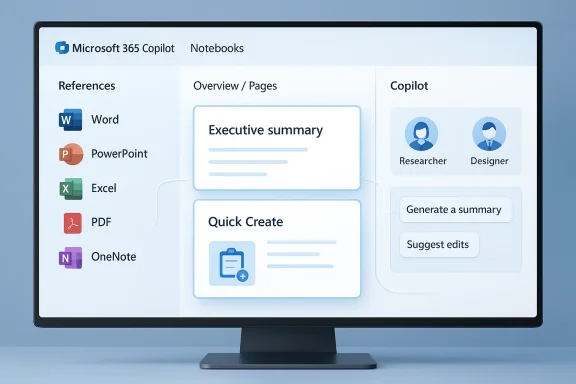
Microsoft has pushed a major visual and interaction refresh to Copilot Notebooks, reshaping how Microsoft 365 Copilot organizes research, chat history, and source material into a single, persistent workspace—and the result is unmistakable: a cleaner left‑side notebook navigation, a chat pane that rides consistently to the right, and a lively new “overview” landing card that tries to make sense of messy project context in seconds. This update is being rolled out in stages to Microsoft 365 tenants and Copilot users, and it represents a purposeful shift from ad‑hoc Copilot chats toward a structured, notebook‑centric workflow that Microsoft pitches as ideal for research, project work, and knowledge management.
Copilot Notebooks launched as Microsoft’s attempt to give users an AI‑driven workspace where scattered documents, meetings, chats and notes can be consolidated and queried together. The feature has been evolving fast since its first previews: initially visible as a preview in OneNote and the Microsoft 365 Copilot app, Notebooks were intended to marry document‑centric recall with Copilot’s natural‑language assistance. This redesign is the most visible rework since Notebooks began surfacing inside consumers’ OneNote experiences and the broader Copilot app.
Microsoft’s official release notes and support documentation make the editorial case: Notebooks should be a place to gather references, start and continue Copilot chats tied to that body of content, and get AI‑generated condensed outputs—audio overviews, brief summaries, and now richer video and multimedia summaries in some builds. The company frames the redesign as both a usability improvement (faster navigation, clearer separation of pages/chats) and an intelligence upgrade: Copilot’s “overview” now tries to surface the most important items automatically.
For organizations, the sensible path is cautious optimism: pilot the feature, wire it into governance and DLP, and build human review into any downstream workflows that rely on Copilot’s outputs. For individual users, the redesign delivers immediate productivity value—provided you curate your sources and keep a skeptical eye on claims that require verification.
Microsoft’s official docs and release notes are the source of record for capability, quota and compliance details; community feedback and pilot reports provide the ground truth for operational behavior. As Copilot Notebooks matures, expect faster parity, clearer quotas, and incremental fixes—but also keep your audit trails tight and your expectations realistic while the platform stabilizes.
Source: Neowin Copilot Notebooks get big redesign in latest update
 Background
Copilot Notebooks launched as Microsoft’s attempt to give users an AI‑driven workspace where scattered documents, meetings, chats and notes can be consolidated and queried together. The feature has been evolving fast since its first previews: initially visible as a preview in OneNote and the Microsoft 365 Copilot app, Notebooks were intended to marry document‑centric recall with Copilot’s natural‑language assistance. This redesign is the most visible rework since Notebooks began surfacing inside consumers’ OneNote experiences and the broader Copilot app.Microsoft’s official release notes and support documentation make the editorial case: Notebooks should be a place to gather references, start and continue Copilot chats tied to that body of content, and get AI‑generated condensed outputs—audio overviews, brief summaries, and now richer video and multimedia summaries in some builds. The company frames the redesign as both a usability improvement (faster navigation, clearer separation of pages/chats) and an intelligence upgrade: Copilot’s “overview” now tries to surface the most important items automatically.
What changed: a granular look at the redesign
New layout—left notebook, right chat
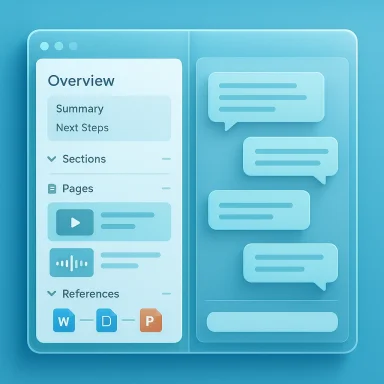
The most obvious change is the two‑pane structure: the notebook column on the left provides quick access to sections, pages, and linked references, while the chat pane sits on the right to preserve conversational context for the selected notebook. This layout mirrors how many research tools operate today and is meant to keep source navigation and generative interaction within a single view. Microsoft’s documentation highlights this as a core pattern for faster context switching.Overview landing card and media summaries
Notebooks now open to a compact Overview card—an AI‑curated snapshot that highlights the notebook’s purpose, key pages, and suggested next steps. In some builds, Microsoft is also piloting automated audio and video overviews: short syntheses that summarize a notebook’s major points and can be consumed as a quick primer. These multimedia overviews are being rolled out incrementally and are pitched as productivity accelerators for long research projects.Tighter OneNote integration
Microsoft has been integrating Copilot Notebooks into OneNote so that notebooks appear in the OneNote sidebar and can be created or opened directly from the desktop app. This reduces friction for users who already store notes in OneNote and want Copilot to analyze those pages alongside other Microsoft 365 files. The update actively pushes Notebooks closer to the place many knowledge workers already live.Source and reference management
The redesign brings improved UI for adding and managing references (Word, PowerPoint, PDF, OneNote pages, and other M365 files). Controls for removing noisy sources and collapsing or expanding reference groups are more prominent. Microsoft’s guidance emphasizes that Notebooks are meant to hold curated content that Copilot uses as its evidence base when you ask it to summarize or write.Why Microsoft is investing in Notebooks now
From ephemeral chat to sustained context
Copilot’s early years emphasized conversational interactions—quick prompts, answers, and single‑session help. The Notebook redesign reflects a strategic pivot: long‑running, multi‑document projects are where AI can add the most measurable value (research consolidation, meeting preparation, regulatory reviews). By giving Copilot a persistent, shareable corpus to reason over, Microsoft aims to reduce repetition, improve grounding, and make outputs more defensible for enterprises. Microsoft’s product notes and technical community commentary make this intent explicit.Competing with Notebook‑style tools
Google’s NotebookLM and other “notebook” products set user expectations for synthesizing multiple sources and producing audio/vioft’s move tightens the company’s position inside enterprise knowledge workflows by combining its M365 file graph, identity and compliance tooling, and Copilot’s models—all within a single user experience. Industry analysis has framed the Notebooks work as Microsoft’s answer to a growing market for AI‑native research tools.Early reactions: praise and immediate friction
- Positive reception centers on clarity and direction. Many users say the new layout reduces the cognitive cost of hunting through chats and scattered references. The Overview card is frequently called useful for getting “back into” a project quickly. Microsoft’s own community posts and several commentary pieces echo this sentiment.
- But adoption hasn’t been frictionless. Insiders and tenant admins report regressions and UI bugs in some tenants after the redesign landed: missing page links from chats, chats that refuse to open, and inconsistent behavior across browsers. Community threads show both users and Copilot engineers engaging directly to diagnose issues. These problems underscore the costs of a rapid UX pivot on a platform used across millions of business accounts.
- There are also concerns about feature parity across platforms: the desktop OneNote integration and web Copilot app receive updates faster than mobile clients, and some functionality (like notebook creation) has been limited or delayed on iOS/Android in earlier phases. Microsoft’s rollout notes indicate staged deployments and phased parity plans.
Technical verifications and confirmed claims
To separate marketing from engineering reality, we verified Microsoft’s public release notes and product guidance:- Copilot Notebooks are explicitly supported as an experience inside the Microsoft 365 Copilot app and in OneNote on Windows and web; they link to Microsoft 365 files, OneNote pages and other M365 content, and they offer AI‑generated overviews. This is documented in Microsoft’s support and release notes.
- Microsoft is rolling multimedia features such as audio overviews and experimental video overviews for notebooks in staged builds; these features are documented in January–March release notes and community posts from product teams describing pilot availability. Availability varies by tenant and channel.
- The update is being distributed incrementally to different rings and Microsoft 365 subscription types; some consumer tiers (Personal, Family, Premium) gained Notebook access in subsequent months after the initial enterprise previews. Admin controls and tenant‑level rollout options are described in the Tech Community and product posts.
Enterprise and admin considerations
Compliance, data residency, and tenant controls
Enterprises will want to confirm how Notebooks handle sensitive sources. Microsoft’s guidance indicates that Copilot actions are scoped to the tenant’s content and that enterprise controls (sensitivity labels, DLP) continue to govern documents fed into Notebooks—but the specifics matter:- Confirm whether your tenant’s Copilot data handling policies allow sensitive sources to be indexed by Notebooks and whether admin toggles exist to prevent certain content from being referenced.
- Review how Copilot references show “source links” in generated outputs so reviewers can validate claims before pushing content externally. Microsoft emphasizes source attribution, but the efficacy of attribution depends on the quality of the indexed metadata.
License and feature gating
Notebooks were initially available to specific Copilot license classes and Insiders. Administrators must check licensing entitlement for Microsoft 365 Copilot and Copilot Notebooks, and confirm whether their tenant was included in the early rollout or is still waiting. Microsoft’s release notes and Tech Community posts provide the official rollout cadence and admin guidance.Auditability for regulated workflows
If your organization uses Notebooks for regulated work (legal, clinical, financial analysis), plan for:- Documenting how Notebooks are created and who contributes sources.
- Keeping a separate audit trail of generated outputs and source links.
- Validating Copilot outputs through human review before any regulatory filing or customer communication.
Known issues and practical mitigations
Early adopters and community threads report several recurring pain points. Below are practical mitigations for IT teams and power users.- Problem: Chats sometimes fail to open or show no linked pages after the update.
- Mitigation: Clear browser cache, try a supported browser (Edge/Chrome), and confirm the tenant is not split across flight rings. Report issues to Microsoft Support and escalate through the Microsoft 365 admin center if the tenant is business/enterprise.
- Problem: Some users see missing functionality on mobile even though desktop shows the new Notebooks UI.
- Mitigation: Verify app versions for OneNote and Microsoft 365 Copilot mobile apps; check that the tenant’s rollout policy hasn’t restricted mobile previews. Use the Tech Community hub to follow platform parity announcements.
- Problem: Unclear source limits or performance slowdowns with very large notebooks.
- Mitigation: Curate sources—prefer a focused, high‑quality set of references instead of mass ingest. Break very large projects into multiple notebooks. Monitor Microsoft’s documented quotas and the admin center for throttling signals. Flag any hard limits you encounter to Microsoft support for confirmation.
Critical analysis: strengths, weak points, and risk profile
Strengths
- Focused knowledge work: The redesign aligns the UI with how people actually do research—documents on one side, an interactive assistant on the other. This reduces friction for multi‑document synthesis.
- Built into M365: Tight OneNote and M365 integration is a major advantage. Organizations that already store data in Microsoft systems can benefit from contextual retrieval without moving content to third‑party services.
- Multimedia summaries: Audio and video overviews can drastically reduce ramp‑up time on large projects and improve accessibility for users who prefer listening over reading. Early pilots show promising productivity lifts.
Weaknesses and risks
- Rollout stability: Rapid UX changes have introduced intermittent bugs across tenants. Enterprises that rely on predictability may find the cadence disruptive. Community threads show product team engagement, but stability will matter more than feature novelty in regulated deployments.
- Opaque limits: Community reports of varying limits (sources per notebook, audio overview quotas) indicate the product’s operational bounds aren’t yet consistently documented. This creates planning risk for heavy users. We found no single authoritative quota published at the time of writing, so organizations should assume conservative limits until Microsoft confirms them.
- Privacy and compliance complexity: Notebooks centralize content that may cross sensitivity boundaries. Even with tenant scoping, accidental inclusion of regulated content in a shared notebook could create exposure. Admins must treat Notebooks as a sharable artifact and apply governance accordingly.
Recommendations: practical steps for users and IT
For IT administrators
- Audit current Copilot and OneNote entitlements in your tenant and confirm whether Notebooks are enabled for your users. (techcommunity.microsoft.com)
- Set up a pilot group to run typical workflows (legal review, R&D briefs, compliance checks) and document gaps. Use pilot findings to determine whether Notebooks should be allowed broadly or gated.
- Validate DLP and sensitivity label treatment for files ingested into Notebooks. If necessary, create policies to block high‑sensitivity documents from notebook indexing.
- Track feature flight rings and release notes; use Microsoft’s release notes and the Tech Community announcements to monitor parity across platforms.
For power users
- Curate sources intentionally—quality over quantity. Break sprawling research into smaller notebooks to avoid unknown limits or performance issues.
- Use the Overview and audio/video summaries to onboard collaborators quickly, but always validate factual claims against original sources before sharing external work.
- If you hit UI bugs, provide precise repro steps and screenshots to your IT admin so they can open a support case; community forums indicate product teams respond when issues are well documented.
What to watch next: features and signals
- Microsoft’s stated roadmap includes deeper productivity integrations (more surfacing in other M365 apps, revision control for notebooks, and better sharing controls). Track the Microsoft 365 release notes for confirmations and definitive quotas.
- Expect continued parity work for mobile: many of the user complaints focus on mobile and browser inconsistencies. A robust mobile notebook experience will be crucial for adoption beyond power desktop users.
- Adoption in regulated industries will be a key test of whether Microsoft can demonstrate reliable governance and audit trails for AI‑generated outputs. Enterprises should pilot now but be conservative in external use until workflows are hardened.
Conclusion
The Copilot Notebooks redesign is a meaningful step in Microsoft’s larger strategy to turn Copilot from a “conversational helper” into a persistent, project‑aware assistant that lives alongside the documents and notes people actually use every day. The new two‑pane layout, Overview card, OneNote integration, and multimedia summaries make Notebooks far more usable for serious knowledge work. At the same time, the redesign surfaces the product’s growing pains: rollout bugs, uneven platform parity, and shaky clarity around operational limits.For organizations, the sensible path is cautious optimism: pilot the feature, wire it into governance and DLP, and build human review into any downstream workflows that rely on Copilot’s outputs. For individual users, the redesign delivers immediate productivity value—provided you curate your sources and keep a skeptical eye on claims that require verification.
Microsoft’s official docs and release notes are the source of record for capability, quota and compliance details; community feedback and pilot reports provide the ground truth for operational behavior. As Copilot Notebooks matures, expect faster parity, clearer quotas, and incremental fixes—but also keep your audit trails tight and your expectations realistic while the platform stabilizes.
Source: Neowin Copilot Notebooks get big redesign in latest update