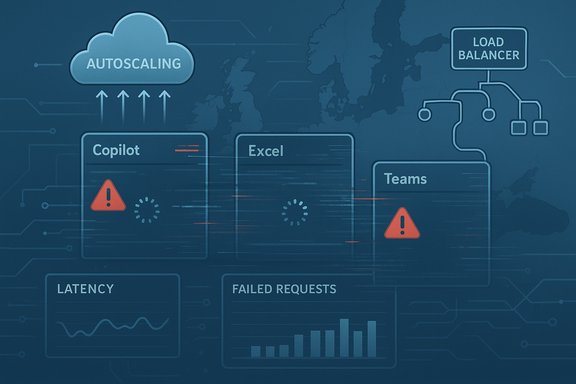
Microsoft Copilot experienced a regionally concentrated outage in early December 2025 that left many UK and European users unable to access the assistant or receiving generic fallback replies — the interruption was tracked internally as incident CP1193544 and, while Microsoft’s mitigation restored broad service, the episode crystallised real operational risks for organisations that now treat Copilot as critical productivity infrastructure.
Microsoft Copilot is the AI‑powered productivity layer embedded across Microsoft 365 — visible as Copilot Chat, in‑app assistants inside Word, Excel, Outlook, PowerPoint and Teams, and through standalone Copilot web and mobile apps. Its deep integration into everyday workflows means availability is no longer a convenience: meeting summaries, draft generation, spreadsheet analysis and Copilot‑driven automations feed directly into business operations. That dependence makes any interruption more meaningful than a consumer‑facing outage.
On 9 December 2025, Microsoft published an incident under the identifier CP1193544, warning administrators that users in the United Kingdom and parts of Europe may be unable to access Microsoft Copilot or could experience degraded features. Microsoft’s public status messaging pointed to an unexpected increase in traffic and stated engineers were manually scaling capacity and adjusting load‑balancing rules to stabilise the service. Independent outage trackers recorded sharp spikes of user reports concentrated in UK geolocations during the incident window.
Source: DesignTAXI Community https://community.designtaxi.com/topic/21064-is-microsoft-copilot-down-december-16-2025/
 Background / Overview
Microsoft Copilot is the AI‑powered productivity layer embedded across Microsoft 365 — visible as Copilot Chat, in‑app assistants inside Word, Excel, Outlook, PowerPoint and Teams, and through standalone Copilot web and mobile apps. Its deep integration into everyday workflows means availability is no longer a convenience: meeting summaries, draft generation, spreadsheet analysis and Copilot‑driven automations feed directly into business operations. That dependence makes any interruption more meaningful than a consumer‑facing outage.On 9 December 2025, Microsoft published an incident under the identifier CP1193544, warning administrators that users in the United Kingdom and parts of Europe may be unable to access Microsoft Copilot or could experience degraded features. Microsoft’s public status messaging pointed to an unexpected increase in traffic and stated engineers were manually scaling capacity and adjusting load‑balancing rules to stabilise the service. Independent outage trackers recorded sharp spikes of user reports concentrated in UK geolocations during the incident window.
What happened (concise timeline and symptoms)
Timeline — high level
- Early morning, 9 December 2025 (UK local time): widespread user complaints and independent outage monitors detect a sudden spike of Copilot failures originating in the UK and nearby European regions.
- Microsoft posts incident CP1193544 to its Microsoft 365 service channels and the Microsoft 365 Admin Center, flagging a regional impact and citing telemetry that showed an unexpected surge in request traffic.
- Engineers undertake manual capacity increases, adjust load‑balancing rules and perform targeted restarts to rebalance traffic; Microsoft reports progressive stabilization as mitigations take effect.
- Outage trackers and public monitors show complaint volumes decline after capacity rebalancing; Microsoft and third‑party observers continue investigations and post‑incident reconstruction.
User‑facing symptoms
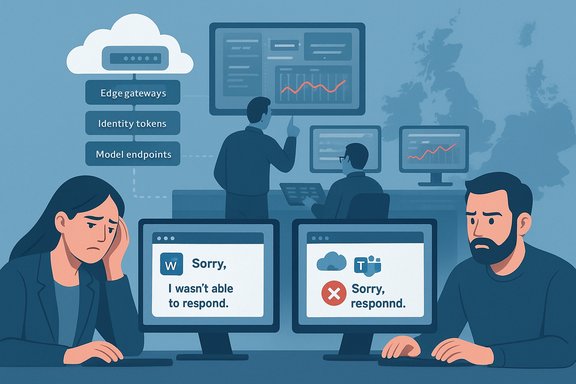
- Copilot panes failing to appear inside Word, Excel, Outlook and Teams, or the standalone Copilot interface returning a repeated fallback line: “Sorry, I wasn’t able to respond to that. Is there something else I can help with?”
- Truncated or slow chat completions, indefinite “loading” or “Coming soon” placeholders in clients, and failure of Copilot‑driven file actions such as summarise, edit or convert even when OneDrive/SharePoint storage remained reachable. These signs point to a processing/control‑plane bottleneck rather than a storage outage.
- Outage aggregators (DownDetector and peers) registered hundreds to thousands of complaint reports at peak — complaint velocity, not authoritative seat counts — but the signal matched Microsoft’s regional advisory.
Technical anatomy — why Copilot outages look broad
Copilot isn’t a single server you “ping.” It’s a multi‑layered delivery chain with several latency‑sensitive subsystems that must work together:- Client front‑ends: Office desktop apps, Teams, browsers, mobile apps and the Copilot web UI capture prompts and context.
- Global edge/gateway layer: TLS termination, CDN/edge PoPs and global load balancers route requests to regional processing planes.
- Identity/control plane: Microsoft Entra (Azure AD) issues tokens and enforces entitlements.
- Orchestration/service mesh: Microservices assemble context, mediate file access and queue inference requests.
- Inference/model endpoints: GPU/accelerator‑backed model hosts (Azure model services / Azure OpenAI endpoints) perform heavy compute.
- Telemetry/control systems: Autoscalers, rate limiters and health monitoring that trigger provisioning or failover.
Cross‑verification: what the public record supports
Multiple independent sources and Microsoft‑adjacent status pages converge on the same core facts:- Incident reported under CP1193544 and posted to Microsoft 365 service health channels on 9 December 2025.
- Affected regions: primarily the United Kingdom and parts of Europe; tenants with EU‑based organizations could see impact.
- Microsoft’s early probable cause: unexpected increase in traffic that stressed regional autoscaling; remediation included manual capacity scaling and rebalancing load‑balancer policies.
Why this matters: Copilot as a critical‑path service
For many organisations Copilot is no longer optional — it’s embedded in daily workflows:- Drafting and editing documents and emails.
- Meeting summarisation and action item extraction in Teams.
- Spreadsheet analysis and ad hoc data exploration in Excel.
- Copilot‑driven automations that perform file actions or triage helpdesk tickets.
Strengths revealed by the incident
- Quick public signalling: Microsoft posted a service incident code (CP1193544) and directed admins to the Microsoft 365 Admin Center for tenant‑specific updates, which gave administrators a canonical place to monitor the event.
- Operational response: Engineers executed manual scaling and load‑balancer adjustments that recovered service availability for many users within hours — showing that Microsoft’s on‑call procedures and runbooks can be effective in practice.
- Transparency in early messaging: By describing the issue as an unexpected increase in traffic and listing the incident ID, Microsoft provided actionable signals administrators could use to triage tenant impact and raise support tickets.
Risks and weaknesses exposed
- Autoscaling fragility: Interactive LLM inference relies on warmed instances; autoscalers and warm pools are complex and can be slower to respond than classic stateless web autoscalers. If warm capacity is insufficient, latency spikes and request queuing quickly surface to users. Microsoft explicitly mentioned autoscaling pressure in status updates.
- Regional routing and policy risk: A traffic balancing policy change was cited as a contributing factor; misapplied routing policies can funnel traffic into constrained node sets, producing regional outages despite global capacity.
- Operational opacity beyond the incident ID: While Microsoft published the incident ID and rolling updates, detailed post‑incident findings that explain why autoscaling thresholds were exceeded, why the policy change was applied, and which subsystems were hottest remain pending. Organisations should treat initial status updates as operationally useful but incomplete.
- Single‑vendor dependency: Tight coupling of many collaboration workflows to Copilot increases blast radius for outages and complicates recovery for teams that lack fallbacks or alternative automation paths.
Practical guidance for administrators and heavy Copilot users
The outage underlines a set of immediate and medium‑term actions IT teams should adopt to reduce operational exposure.Short‑term (incident and immediate recovery)
- Monitor Microsoft 365 Admin Center and the service health dashboard for incident IDs (e.g., CP1193544) and tenant‑specific updates.
- Communicate quickly to users: declare which Copilot‑dependent workflows are impacted and provide manual steps or templates as short‑term fallbacks.
- Triage automations: pause or reconfigure scheduled Copilot‑driven automations to avoid cascading failures or duplicated actions once service returns.
Medium‑term (resilience and playbooks)
- Create a Copilot outage playbook that maps critical workflows to manual alternatives, including templates, macros and human‑in‑the‑loop procedures.
- Implement monitoring and alerting that correlate Copilot errors (e.g., repeated fallback messages) with service health indicators so triage can be automated.
- Maintain a “Copilot‑off” runbook for vital processes: how teams operate for 24–72 hours without the assistant.
Architectural and procurement recommendations
- Avoid single‑vendor monopolies for automation-critical paths; where possible, design multi‑path workflows that can fall back to simpler, local scripts or alternative providers.
- Negotiate operational commitments: ask for post‑incident reports (PIRs), service credits or specific SLAs that reflect Copilot’s increasing role in your workload.
- Evaluate cost vs. resilience tradeoffs: capacity reservations, dedicated instances or higher‑tier support may reduce risk but increase cost.
Technical recommendations for platform operators and Microsoft
For platform reliability at scale with LLMs, several engineering tactics matter:- Pre‑warmed capacity & reservations: Maintain warm pools of inference instances for predictable, latency‑sensitive traffic; autoscalers must be tuned with predictive signals, not just reactive thresholds.
- Regional redundancy and smarter routing: Avoid one‑sided traffic policy changes that can accidentally concentrate load. Use progressive rollouts and canarying for routing policy changes.
- Graceful degradation & client fallbacks: Design clients to degrade gracefully (e.g., partial results, queued background processing) instead of returning a repeated generic fallback that confuses users.
- Observability improvements: Richer control‑plane telemetry exposing warm‑pool saturation, queue depths and regional imbalance signals to ops teams shortens detection and remediation windows.
- Change management: Stronger validation for traffic‑balancing and control‑plane policies; revert windows and automated rollback triggers for routing changes that shift significant traffic.
Governance, compliance and legal considerations
Organisations embedding Copilot into regulated workflows must reconsider operational and compliance postures:- Audit continuity: If Copilot assists with tagging or automated metadata, an outage can produce incomplete audit trails; ensure critical records are captured outside of Copilot or buffered locally.
- Data residency and escalation: Regional incidents that affect EU/UK users can have different legal implications; tenants with strict residency needs must validate how service imbalances impact compliance commitments.
- Contractual remedies: Enterprises should seek explicit contractual language around incident transparency, PIR delivery timelines and potential remedies for repetitive or prolonged outages.
Is “Copilot down?” — The short, practical answer (as of 16 December 2025)
- The high‑visibility regional incident that produced Copilot failures in the United Kingdom and parts of Europe was first reported on 9 December 2025 under incident CP1193544; Microsoft’s mitigation steps — manual scaling and load‑balancer adjustments — restored broad availability for most customers and Microsoft issued rolling updates through the Microsoft 365 Admin Center.
- As of 16 December 2025 there is no widespread global outage signal for Copilot equivalent to the 9 December event in public outage monitors and Microsoft’s primary status channels; however, intermittent or tenant‑specific degradations have occurred in recent months and administrators should continue to monitor service health for tenant‑level impact.
How to interpret future “Copilot down?” reports
- Treat early public chatter and DownDetector spikes as useful early signals, not definitive seat‑level metrics. Outage trackers report complaint velocity rather than confirmed impact counts.
- Wait for a Microsoft incident ID posted to the Microsoft 365 Service Health as the canonical signal for tenant admins. That ID enables traceability inside the Admin Center and helps correlate telemetry to Microsoft’s actions.
- Demand the post‑incident report (PIR) when one is promised: accepted operational practice for high‑impact cloud services is to publish a PIR that explains root cause, remediation, and action plans to prevent recurrence. If a PIR is not forthcoming, raise this in contract reviews and support escalations.
Longer‑term implications for enterprise AI adoption
The December Copilot disruption is part of a broader pattern through 2025: as generative AI systems move from pilot to production, operational maturity becomes essential. Expect:- Higher emphasis on SRE practices tailored for large‑model inference (warm pools, capacity forecasting).
- Enterprise demand for more rigorous operational SLAs, PIRs and contractual transparency.
- Growth in third‑party tools that provide orthogonal capabilities (local inference, hybrid models, cache layers) to reduce vendor single‑point‑of‑failure risk.
- More robust governance: data handling, auditability, and fallbacks will become procurement differentiators.
Quick checklist for IT teams (actionable)
- Immediately: Verify tenant health in the Microsoft 365 Admin Center; watch for incident codes and tenant messages.
- Within 24–72 hours of an incident: Communicate to users, pause fragile automations, and enable manual workarounds for high‑impact workflows.
- Within 2 weeks: Run a disaster table‑top exercise simulating a 24–72 hour Copilot outage; update runbooks.
- Within 90 days: Negotiate operational commitments (PIR delivery, escalations) and evaluate multi‑path architecture for mission‑critical automations.
- Ongoing: Monitor vendor incident patterns and ensure procurement language captures operational transparency and remediation expectations.
Conclusion
The December 9 Copilot incident (CP1193544) was a regional, high‑visibility reminder that interactive AI services are operationally different from conventional SaaS: they require warmed compute, carefully tuned autoscaling, and cautious traffic‑routing policies. Microsoft’s incident handling — posting an incident ID and manually scaling capacity to restore service — worked to bring the service back for most users, but the episode underscores the structural risks organisations face when embedding a single AI assistant deeply into daily workflows. Administrators must treat Copilot outages as plausible operational realities: prepare playbooks, maintain manual fallbacks, demand transparency in post‑incident reporting, and design automation with graceful degradation in mind. Those steps convert Copilot from a single‑point productivity booster into a resilient, governed component of the enterprise toolkit.Source: DesignTAXI Community https://community.designtaxi.com/topic/21064-is-microsoft-copilot-down-december-16-2025/