

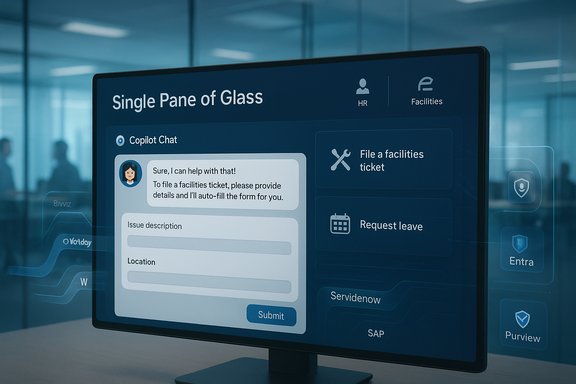
Microsoft’s Employee Self-Service Agent turns the promise of Copilot-driven workplace AI into a practical, action-capable help desk that consolidates HR, IT support, and facilities tasks into a single conversational experience for employees. The initiative—first rolled out internally as Microsoft’s “Customer Zero” program and now packaged as an extensible template built on Microsoft 365 Copilot and Copilot Studio—aims to reduce friction, speed resolution, and convert information lookups into completed actions from a single pane of glass.
Microsoft designed the Employee Self-Service Agent (ESS Agent) to solve a familiar enterprise pain point: employees navigating many apps, intranets, and ticketing systems to answer simple questions or complete routine tasks. The ESS Agent surfaces inside Microsoft 365 Copilot Chat as a tenant-grounded conversational interface that can both retrieve authoritative information and execute actions—like filing a facilities ticket, registering a visitor, initiating parental leave paperwork, or troubleshooting a device—without forcing a context switch. Microsoft’s internal rollout prioritized high-frequency, low-friction scenarios (dining, visitor registration, shuttles) to build habitual use before expanding to HR and IT workflows.
This product is positioned as a customizable template—not a one-size-fits-all turnkey bot. Organizations are expected to adapt connectors, consent flows, and knowledge sources to their tenant. The ESS Agent leverages Microsoft Graph for user and tenant context, Dataverse/Dynamics as a canonical backend option, and Copilot Studio connectors to integrate third-party systems like Workday, ServiceNow, SAP, and other HRIS or ITSM platforms.
Key functional behaviors:
Strengths are clear: action-first UX, integrated governance tooling, and a rollout strategy that uses high-frequency facilities tasks to jumpstart daily adoption. The main caveats are also clear: vendor-sourced productivity claims need independent validation; multi-model/third-party inference requires careful compliance review; and agents that can act must be guarded by human approval gates for high-risk processes. Treat the ESS Agent as a powerful template and platform, not a plug-and-play cure-all—success depends on a measured pilot, strong data governance, and product-level lifecycle management.
Conclusion: the ESS Agent is not just a demo of AI capability; it is a production pattern for enterprise self-service—powerful, extensible, and ready to deliver value when paired with disciplined governance, local validation, and continuous operational ownership.
Source: Microsoft Accelerating employee services at Microsoft with the Employee Self-Service Agent - Inside Track Blog
 Background / Overview
Microsoft designed the Employee Self-Service Agent (ESS Agent) to solve a familiar enterprise pain point: employees navigating many apps, intranets, and ticketing systems to answer simple questions or complete routine tasks. The ESS Agent surfaces inside Microsoft 365 Copilot Chat as a tenant-grounded conversational interface that can both retrieve authoritative information and execute actions—like filing a facilities ticket, registering a visitor, initiating parental leave paperwork, or troubleshooting a device—without forcing a context switch. Microsoft’s internal rollout prioritized high-frequency, low-friction scenarios (dining, visitor registration, shuttles) to build habitual use before expanding to HR and IT workflows.This product is positioned as a customizable template—not a one-size-fits-all turnkey bot. Organizations are expected to adapt connectors, consent flows, and knowledge sources to their tenant. The ESS Agent leverages Microsoft Graph for user and tenant context, Dataverse/Dynamics as a canonical backend option, and Copilot Studio connectors to integrate third-party systems like Workday, ServiceNow, SAP, and other HRIS or ITSM platforms.
How the Employee Self-Service Agent works
A single conversation that can act, not just answer
At its core, the ESS Agent is built for two capabilities: Retrieve and Take action. In practice, that means a user types a natural-language query into Copilot Chat, the agent retrieves grounded answers from vetted sources, and if applicable, presents an in-chat form that can be auto-populated and submitted to complete a request. If a situation requires higher trust or a backend tool, the agent hands off with contextual state so the employee doesn’t have to repeat steps.Key functional behaviors:
- Natural-language queries grounded to tenant data and authoritative sources.
- Form-driven task completion (with fields auto-filled from chat context).
- Multimodal input support (upload a photo to auto-classify a facilities issue).
- Context-preserving handoffs to live support or other systems, with transcripts available to technicians.
Agent orchestration and connectors
The template uses Copilot Studio as the authoring and publishing plane. Copilot Studio supports:- Low-code declarative flows and connector configuration.
- Prebuilt connectors to common enterprise systems (Workday, ServiceNow, SAP, Dynamics).
- Publish-to-Copilot and Agent Store channels for discoverability within an organization.
Use cases that drove design and adoption
Microsoft intentionally began with high-frequency, low-risk scenarios to create daily value and accelerate adoption. The internal rollout shows practical examples of how the agent is used.HR and People Operations
HR was selected as a primary vertical because it drives large volumes of queries that must be accurate and localized (policy varies by country, role, and benefit). The agent is scoped to draw only from vetted, authoritative HR sources so it can return answers and launch tasks (time-off requests, benefits lookups, internal job searches) suited to the individual’s context. Microsoft set explicit goals for HR ticket deflection and expects the ESS Agent to cut monthly HR tickets significantly as adoption scales.IT support and device troubleshooting
For IT, the ESS Agent provides device-aware troubleshooting: it knows the user’s device type, compliance state, and location, and can return targeted steps to resolve common issues (e.g., audio problems) or initiate service actions. If a live technician is required, the agent’s conversation is passed along to the support professional, saving time by preserving the troubleshooting context. The team’s target is a major reduction in IT tickets and faster mean time to resolution.Real estate and facilities
Facilities is an ideal adoption accelerator because daily needs—dining discovery, shuttle booking, visitor registration, parking—create many low-friction, high-frequency interactions. Microsoft reports that visitor registration alone (2 million registered visitors in 2024, 1.2 million for business) was simplified by the agent and could save substantial employee hours annually by issuing QR passes and automating guest invites. Those figures originate from Microsoft’s internal telemetry and are presented as vendor-provided results. Treat these as compelling but internally measured outcomes until independently validated.Technical foundations and enterprise controls
Architecture highlights
- Copilot Studio: authoring and lifecycle management for agents; supports low-code and pro-code agents.
- Microsoft Graph: supplies tenant and personalization context (people, files, calendar).
- Dataverse / Dynamics: recommended for back-end data orchestration and action orchestration.
- Prebuilt connectors: facilitate integration to Workday, ServiceNow, SAP, and other systems.
Governance, identity, and compliance
Microsoft integrated several enterprise controls designed for production use:- Entra-based agent identities to treat agents as directory principals.
- Admin approval workflows and tenant-level publishing controls.
- Purview integration for data protection, labeling, and retention.
- Audit trails and telemetry dashboards for usage, failures, and billing.
Measured outcomes, ROI claims, and validation
Microsoft presents quantifiable goals and early telemetry-based outcomes for the ESS Agent:- A projection of at least 40% fewer support tickets across help categories as a target for ROI measurement.
- An HR-specific objective: reduce monthly HR tickets by 44% by mid-2026 through expanded self-service functionality.
- Facilities examples like visitor registration were used to estimate tens of thousands of employee hours saved annually.
- These performance figures and time-saved estimates are based on internal telemetry and Customer Zero pilots. They are credible internal outcomes but should be treated as vendor-provided until validated by independent third-party studies or local pilot metrics. Organizations should pilot and measure identical KPIs in their own environment before assuming similar ROI.
Strengths — why this matters for IT and HR leaders
- Action-first design: The ESS Agent is built to complete actions (file a ticket, issue a pass) rather than merely return informational summaries, which materially reduces human handoffs.
- Single pane of glass: Consolidating HR, IT, and facilities reduces friction and increases discoverability, helping previously underused support tools see more adoption.
- Low-code extensibility: Copilot Studio and connectors reduce integration time for common enterprise systems, lowering implementation cost and time-to-value.
- Enterprise governance primitives: Entra identities for agents, Purview integration, and admin controls provide important compliance and audit capabilities—assuming correct tenant configuration.
- Customer Zero learning loop: Using Microsoft’s own workforce to test, iterate, and raise stakeholder trust before public release is a pragmatic path to a more robust launch.
Risks, limitations, and what to plan for
1. Vendor-provided metrics need local validation
Many of the bold numbers (visitor counts, hours saved, ticket-deflection percentages) come from internal telemetry and case studies. These are useful signals but not substitutes for a controlled pilot and independent measurement in your environment. Flag vendor metrics as hypotheses to test.2. Data residency and cross-cloud inference
Copilot Studio supports multi-model and third-party model options. Some configurations can route inference outside a tenant’s primary region or to non-Azure model providers, which raises data residency, contractual, and regulatory concerns for regulated industries. Map model-hosting choices to compliance obligations before enabling broad inference routing.3. Action safety and hallucination risk
Agents that execute transactions increase the risk surface—if the agent misinterprets something it could create incorrect tickets, send inaccurate messages, or start workflows that require remediation. For high-risk flows (payroll, contract changes), require human-in-the-loop approval gates and conservative defaults.4. Consent and connector complexity
Connectors to systems like Workday or ServiceNow may trigger per-user consent flows. Tenant-level configuration can mitigate friction, but consent prompts and token mechanics can complicate rollouts. Prepare support playbooks for connector and consent issues.5. Cost and metering exposure
Copilot Studio and agentic flows can be metered. Heavy usage or exposing agents to unlicensed users under Pay-As-You-Go models can increase costs. IT finance teams must monitor consumption and set message/credit caps as needed.6. Channel parity and mobile UX
Some agent experiences initially appear first in Copilot Chat or web surfaces with mobile parity on the roadmap. Validate the UX across channels for the constituency that depends on mobile-first access.Practical rollout checklist — a recommended path
- Start with a narrow pilot focused on high-frequency, low-risk intents (dining, visitor registration, shuttle booking, password resets).
- Define clear KPIs and measurement methodology:
- Ticket deflection rate
- Task completion rate in-chat
- Mean time to resolution (MTTR)
- Employee satisfaction (CSAT)
- Map data flows and model choices; document any inference that leaves tenant boundaries.
- Configure governance:
- Create agent risk classes and approval gates.
- Set Purview retention and labeling.
- Assign explicit owners for agent lifecycle (publish, tune, retire).
- Configure connectors and test consent flows with representative users.
- Instrument telemetry and cost monitoring; set message/credit caps for PayGo scenarios.
- Communicate to users: publish clear docs about what the agent can/cannot do and provide escalation routes.
- Iterate based on telemetry and stakeholder feedback; scale when KPIs meet targets.
These steps reflect both Microsoft’s internal approach and community guidance for cautious, measurable adoption.
Governance, privacy, and data-security playbook
- Treat agents as production services: assign owners, SLAs, and lifecycle processes.
- Use Entra agent identities and periodically include agents in access reviews.
- Enable Purview logging to capture agent-initiated actions and retention settings.
- Validate model-hosting locations for regulated data and document third-party model agreements if used.
- Implement human-in-the-loop approval for medium/high-risk actions.
- Prepare incident response runbooks for misrouted actions or hallucinations.
These controls are available in the platform, but their legal or compliance sufficiency depends on correct tenant-level configuration and organizational policies.
Implementation tips for maximizing success
- Prioritize user value: begin with scenarios that return immediate daily benefits to employees to build habitual use.
- Instrument for measurement: measure the exact same KPIs Microsoft reports (ticket deflection, time saved per interaction) so you can validate ROI locally.
- Keep content authoritative: route HR answers to vetted policy sources and keep knowledge bases updated to avoid misinformation.
- Limit agent scope initially: use conservative defaults for action permissions and only expand as trust accumulates.
- Invest in change management: train HR, IT, and facilities teams to co-own the agent so they help tune its responses and retain stakeholder trust.
Final assessment
The Employee Self-Service Agent is a significant, pragmatic realization of agentic AI inside a large enterprise. It combines Copilot Studio’s low-code authoring, tenant-context grounding through Microsoft Graph, and prebuilt connectors to deliver a single conversational surface that can both inform and act. For organizations with an established Microsoft 365 estate, this template can materially reduce friction, lower ticket volumes, and shorten response times—if it’s deployed with disciplined governance, local validation, and careful cost controls.Strengths are clear: action-first UX, integrated governance tooling, and a rollout strategy that uses high-frequency facilities tasks to jumpstart daily adoption. The main caveats are also clear: vendor-sourced productivity claims need independent validation; multi-model/third-party inference requires careful compliance review; and agents that can act must be guarded by human approval gates for high-risk processes. Treat the ESS Agent as a powerful template and platform, not a plug-and-play cure-all—success depends on a measured pilot, strong data governance, and product-level lifecycle management.
Key takeaways for IT, HR, and digital workplace leaders
- Approach employee assistance from the user perspective: build a “single pane of glass” that reduces cognitive load and context switching.
- Start with the high-demand categories that drive daily usage and measurable ROI (facilities, HR basics, routine IT).
- Prioritize task completion—not just answers—so users can finish work within the chat interface.
- Invest up front in data governance: confirm model routing, consent flows, and retention policies.
- Treat the agent as a customizable product built on Copilot Studio; plan for organization-specific implementation and lifecycle maintenance.
- Validate vendor-provided ROI projections with local pilots and rigorous KPI measurement before making large-scale commitments.
Conclusion: the ESS Agent is not just a demo of AI capability; it is a production pattern for enterprise self-service—powerful, extensible, and ready to deliver value when paired with disciplined governance, local validation, and continuous operational ownership.
Source: Microsoft Accelerating employee services at Microsoft with the Employee Self-Service Agent - Inside Track Blog
