

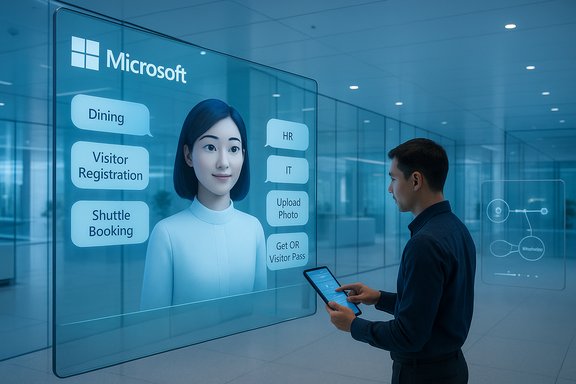
Microsoft’s campus-run daily life just got a new front desk: an AI-powered Employee Self-Service Agent built in Copilot Studio that collapses dining, parking, visitor registration, facilities tickets, shuttle booking, HR queries and IT support into a single conversational portal. The tool—already used internally across Microsoft buildings—lets employees ask natural-language questions, upload photos to create service tickets, and complete transactions without needing to remember different apps or kiosks. Microsoft describes the result as a true “one-stop shop” for employee assistance that increases adoption by solving everyday needs first (like finding teriyaki for lunch) and then expanding into higher-value areas such as HR and IT.
Microsoft’s Employee Self-Service Agent (ESS Agent) is implemented as a prebuilt agent in Microsoft 365 Copilot and created/edited via Copilot Studio, the low-code visual authoring environment for agents. The ESS Agent is positioned as an extensible template that organizations can customize and connect to existing systems—Workday, ServiceNow, SAP, Dynamics/Dataverse and other third-party services—so employees can both retrieve information and take actions in the same conversational flow. That architecture leverages the Microsoft Graph for tenant context, Dataverse/Dynamics for back-end data orchestration, and Copilot Studio connectors to avoid bespoke integration work. Microsoft’s public documentation and product blogs describe the agent as built on a modular, tenant-grounded architecture designed to respect existing security and governance controls. Microsoft’s internal rollout—in which employees act as “Customer Zero”—informed product decisions such as including campus facilities (dining, parking, shuttle, visitor registration) to accelerate daily use and build habit-forming workflows. Those early results are the basis of Microsoft’s case study on the agent and informed the public previews and documentation that followed.
Microsoft’s Employee Self-Service Agent demonstrates how agentic AI can materially change the day-to-day experience inside corporate campuses: it reduces friction, increases adoption by solving routine pain points first, and connects users to authoritative systems through a single conversational surface. The platform’s architecture—Copilot Studio, Dataverse/Dynamics integration, agent governance and Entra identity for agents—provides the necessary building blocks for secure enterprise adoption. The key to success is disciplined execution: start small, measure precisely, implement conservative governance, and scale when the pilot metrics align with your organizational policies and compliance posture. For organizations with a robust Microsoft 365 footprint, ESS Agents and Copilot Studio offer an accessible path to reimagining employee support—so long as IT, legal, security and HR partner early and treat agents as production services with continuous oversight.
Source: Microsoft Reimagining campus support at Microsoft with the Employee Self-Service Agent - Inside Track Blog
 Background / Overview
Microsoft’s Employee Self-Service Agent (ESS Agent) is implemented as a prebuilt agent in Microsoft 365 Copilot and created/edited via Copilot Studio, the low-code visual authoring environment for agents. The ESS Agent is positioned as an extensible template that organizations can customize and connect to existing systems—Workday, ServiceNow, SAP, Dynamics/Dataverse and other third-party services—so employees can both retrieve information and take actions in the same conversational flow. That architecture leverages the Microsoft Graph for tenant context, Dataverse/Dynamics for back-end data orchestration, and Copilot Studio connectors to avoid bespoke integration work. Microsoft’s public documentation and product blogs describe the agent as built on a modular, tenant-grounded architecture designed to respect existing security and governance controls. Microsoft’s internal rollout—in which employees act as “Customer Zero”—informed product decisions such as including campus facilities (dining, parking, shuttle, visitor registration) to accelerate daily use and build habit-forming workflows. Those early results are the basis of Microsoft’s case study on the agent and informed the public previews and documentation that followed. What the Employee Self-Service Agent does today
The ESS Agent groups common employee needs into conversational categories, and it can both answer questions and carry out actions. Practical functions demonstrated internally and documented publicly include:- Visitor registration: collect guest details through chat, issue QR passes by email, and reduce the need for front-desk intervention. Microsoft reports the agent could handle a substantial share of business-related visitor registrations and translate that into tens of thousands of hours saved annually (internal telemetry). This is a Microsoft-reported figure and should be considered vendor-provided unless independently validated.
- Dining discovery and ordering: natural-language search for cuisine/dish (for example, “where is teriyaki being served today?”), filter by price or dietary preference, and connect to the ordering/payment tool.
- Facilities tickets: accept photos or natural-language descriptions, classify the problem using image and NLP models, populate a ticket form, and create the work order in the facilities system.
- Transportation and spaces: book campus shuttles, find parking registration, or locate a quiet workspace.
- HR and IT tasks: check benefits or leave balances, request hardware or service support, and open support tickets in ServiceNow/Workday/SAP-connected systems.
- Cross-system handoff: recognize when a flow needs the upstream system (for example, Workday for a payroll issue) and either execute via connectors or hand off with contextual state so the user does not have to re-enter details.
Technical foundations and verified capabilities
This section verifies the product’s key technical claims against Microsoft documentation and community posts, and clarifies what is officially supported today.Copilot Studio: authoring and connectors
- Copilot Studio is the official authoring environment for declarative and custom agents; it supports low-code configuration, knowledge sources, and connectors. Agents published to Microsoft 365 Copilot can be scoped to tenant context and incorporate SharePoint, Dataverse, and other authoritative knowledge sources. This is documented in Microsoft’s Copilot Studio and Employee Self-Service guidance.
- The platform offers out-of-the-box connectors to enterprise systems commonly used for HR and IT, including Workday, ServiceNow, SAP and Dynamics 365 (Dataverse). Microsoft’s product materials explicitly list these pre-configured connectors in the ESS Agent template and in Copilot Studio publishing options.
Publication, channels and licensing
- The Employee Self-Service Agent is published as an agent for Microsoft 365 Copilot and is available in Copilot Chat channels. Microsoft’s public rollout notes indicate previews and staged GA timing across 2024–2025, with agent availability tied to Copilot licensing and Pay-As-You-Go (PayGo) options for unlicensed users. Official deployment prerequisites include Copilot licensing for environment admins and makers.
- Microsoft’s licensing guidance and partner summaries state that interactive use of agents built with Copilot Studio in Microsoft 365 apps is included for authenticated Microsoft 365 Copilot users at no additional per-agent charge, while unlicensed or external usage can be metered under pay-as-you-go credit/message packs. This licensing nuance underpins Microsoft’s position that internal Copilot license holders can run these ESS agent scenarios without separate agent licensing fees (consumption caps and message/credit accounting still apply). Third-party partner briefings and Microsoft technical guides corroborate this model.
Known limitations and roadmap items
Microsoft’s own product documentation lists important limitations and timeline items that are crucial operational details for IT teams:- The ESS Agent initially functions primarily in the Copilot chat channel (Teams support and mobile experience were noted as areas in active roadmap work). Mobile support and Teams app parity are scheduled improvements, with some features flagged for 2026 in Microsoft’s known-issues pages.
- Some integrations may prompt per-user consent dialogs (Workday/ServiceNow) unless tenant-level authorization is configured; administrators sometimes must file support requests to adjust consent behavior.
- Semantic indexing and other capacities have published limits (for example, indexing scale thresholds), and autoupdate/accelerator packages have roadmap-to-fix items. IT teams deploying ESS Agents should evaluate these constraints before committing large-scale flows.
The evidence: what Microsoft reports and where we can independently verify
Microsoft’s Inside Track case study is the primary source for the internal campus rollout narrative and the quoted benefits (time savings from guest registration, daily-dining adoption, image-based ticketing). Those operational numbers—like “more than 2 million registered visitors in 2024” and the projection that handling 50% of business-related visitor registrations via the ESS Agent would save 50,000 hours per year—are reported directly in that case study and should be treated as Microsoft-supplied telemetry unless independently audited. The case study is detailed and explicitly framed as Customer Zero lessons from Microsoft Digital. Independent public verification is available for the platform-level claims (Copilot Studio, Agent Store, Entra identity controls and agent licensing behavior) via:- Microsoft Learn and Microsoft 365 product blogs that document Copilot Studio, agent publishing and the Employee Self-Service agent overview. These are primary product documents for technical details.
- Microsoft 365 Community and Tech Community posts summarizing Build/Ignite announcements, which corroborate the commercial model (Copilot license inclusion vs. PayGo) and agent roadmap timelines. These community posts, while Microsoft-authored, are separate public artifacts that corroborate the enterprise availability claims.
Strengths: why this approach is compelling for large enterprises
- Single-pane-of-glass experience increases adoption
- By bundling routine, high-frequency tasks (dining, shuttle booking, visitor registration) with work-related support (HR, IT), the ESS Agent creates daily value for employees and builds habitual usage—an important lever for long-term adoption and ROI. Microsoft’s internal product team intentionally prioritized facilities tasks to grow daily use.
- Low-code customization reduces integration time
- Copilot Studio’s connectors—plus the ability to use Dataverse/Dynamics as a common backend—means organizations can integrate multiple vendor systems without bespoke connector engineering, shortening deployment timelines and reducing integration risk. This is a practical advantage cited by Microsoft program teams.
- Actionable, not just informational
- The ESS Agent’s ability to pre-fill forms, issue QR passes, create tickets from photos, and complete transactional flows materially reduces friction. That action-first design is what differentiates a conversational FAQ from an agent that actually reduces human handoffs.
- Governance and enterprise controls are built-in
- Microsoft’s agent model includes Entra identity concepts for agents, admin approval workflows, and Purview integration for data protection—features enterprises need to adopt agentic automation with auditable controls. The platform’s governance toolkit is repeatedly emphasized in Microsoft docs.
Risks and blind spots — what IT leaders must weigh
- Vendor-sourced productivity claims need confirmation
- Internal telemetry (visitor counts, hours saved) is persuasive but not independently verified outside Microsoft’s Customer Zero environment. Organizations should pilot and measure before assuming the same ROI at scale. Flag these metrics as vendor-provided and validate locally.
- Consent, data-flow and third-party connectors
- Integrations with Workday, ServiceNow and other systems can trigger per-user consent prompts; tenant-level authorization sometimes requires a support path. That can interrupt user experience and complicate rollout in tightly governed organizations. Microsoft’s known-issues pages document these behaviors.
- Data residency, cross-cloud inference and model routing
- Copilot Studio and agent flows can leverage different model providers and services. Some multi-model scenarios or partner-hosted model choices could route inference outside a tenant’s primary cloud region, which raises compliance questions for regulated industries. Microsoft and third-party advisories emphasize the need to map model-hosting choices to compliance obligations.
- Hallucination and action safety
- Agents that act (create tickets, send emails, change records) must be guarded against incorrect actions. Microsoft endorses human-in-the-loop gates and conservative defaults for high-risk flows; organizations must classify agent risk level and require approvals for high-impact actions. Product materials and community guidance both recommend staged pilots and approval gates.
- Operational and cost governance
- While interactive agent use is included for Copilot license holders in many scenarios, message/credit consumption and Copilot Studio pack accounting can cause costs to grow if agents are used heavily or exposed to unlicensed users under PayGo. IT finance teams must track consumption and plan message/credit caps. Published licensing guidance outlines included vs. paid usage models.
- Mobile and channel parity
- Some ESS Agent experiences were initially limited to Copilot chat and have known issues in the Teams app and mobile clients; Microsoft’s known-issues page flags mobile parity as roadmap work. Organizations that depend on mobile-first workers should validate UX across channels before full deployment.
Operational guide: recommended rollout checklist
- Start with high-frequency, low-risk scenarios
- Pilot dining, visitor registration and shuttle booking—high adoption, low regulatory risk.
- Measure usage, completion rates, AHT (average handling time) and CSAT before expanding.
- Define agent risk classes and gating
- Low-risk: read-only summarization of public or sanitized policy.
- Medium-risk: draft communications, ticket creation (human verify optional).
- High-risk: payroll, offer letters, contract changes (human approval required).
- Map connectors and consent flows
- Document which connectors require per-user consent (Workday, ServiceNow) and implement tenant-level consent flows where possible. Prepare support playbooks for consent-related help tickets.
- Configure governance and logging
- Enforce Entra-based identity for agents, retention and Purview policies for agent-generated outputs, and telemetry dashboards to track agent actions, failures and billing consumption.
- Pilot metrics & ROI framework
- Define measurable KPIs up front: ticket deflection rate, time saved per interaction, adoption rate, incident escalation rate, and net operational cost delta.
- Train and communicate
- Provide clear messaging to employees about what the agent can and cannot do, labeling for agent-generated communications, and a direct escalation path for errors.
Privacy and security: specifics to verify before production
- Confirm where image-based uploads are stored and whether image processing runs on tenant-only infrastructure or external model endpoints. Document retention, access control and deletion workflows for uploaded photos used in facilities ticketing.
- Review whether any agent flows route inference to non-Azure models or cross-region endpoints; confirm contractual and regulatory acceptability.
- Ensure agent identities are included in periodic access reviews and audited like service principals; log every agent-initiated action to an immutable audit trail.
Where claims remain unverifiable (and how to handle them)
Microsoft’s Inside Track case study includes specific, quantitative claims drawn from internal telemetry—e.g., the exact number of registered visitors in 2024 and the calculated annual employee-hours saved from shifting half of business-related visitor registrations to the ESS Agent. Those numbers are a valid representation of Microsoft’s internal program outcomes but are not independently audited public statistics. Treat vendor telemetry as compelling but pilot-driven evidence: run a short A/B pilot in your environment, measure the same KPIs Microsoft cites, and compare before committing to larger deployments. Flag any vendor-specific ROI projections as vendor-provided until validated in your own tenant.The future: multi-agent orchestration and broader adoption
Microsoft’s roadmap for Copilot Studio and the Agent Store previews multi-agent orchestration, Entra Agent IDs (agent identity in the directory), Agent Store discoverability and expanded role-based agents (Facilitator, Interpreter, Project Manager). These platform investments point toward richer agent ecosystems where tenant-specific agents can call each other, exchange state, and form composite workflows governed by enterprise controls. Early platform documentation and community posts confirm multi-agent choreography and agent lifecycle tooling as strategic priorities. For organizations, the implication is clear: agentic automation is moving from boutique pilots to scalable operational models. However, the same platform maturity that makes scale possible also raises governance and cost-control responsibilities—treat agents as products, not one-off projects.Practical verdict for enterprise IT leaders
- The Employee Self-Service Agent is a practical, production-ready example of how Copilot Studio can consolidate routine workplace needs into a single, action-capable conversational interface. Its design choices—action-first flows, low-code connectors, Dataverse/Dynamics integration—are well-suited to large enterprises with diverse systems and a strong Microsoft 365 estate.
- The platform offers genuine operational upside—reduced friction, fewer handoffs, and the possibility of measurable time-savings—but those gains are best realized when organizations adopt a disciplined rollout: measure, gate, govern and iterate.
- Key technical controls (agent identity, Purview integration, tenant-level connectors) exist in the platform, but teams must implement them correctly and validate consent behaviors for connected systems.
Key takeaways (actionable summary)
- Pick high-value, high-frequency targets first: dining, visitor registration, shuttle booking and routine IT requests drive early adoption and daily usage.
- Use Copilot Studio connectors and Dataverse/Dynamics to minimize custom integration work; validate connector behavior for tenant-level consent.
- Treat agents as products: assign owners, KPIs, monitoring and lifecycle governance (publish, tune, retire).
- Plan for billing and consumption controls: monitor Copilot Studio message/credit use if agents are exposed to heavy usage or unlicensed users.
- Validate privacy and storage for image uploads and confirm model-hosting locations for regulated data.
- Pilot, measure, iterate: validate vendor-provided ROI numbers in your environment before making enterprise-wide projections.
Microsoft’s Employee Self-Service Agent demonstrates how agentic AI can materially change the day-to-day experience inside corporate campuses: it reduces friction, increases adoption by solving routine pain points first, and connects users to authoritative systems through a single conversational surface. The platform’s architecture—Copilot Studio, Dataverse/Dynamics integration, agent governance and Entra identity for agents—provides the necessary building blocks for secure enterprise adoption. The key to success is disciplined execution: start small, measure precisely, implement conservative governance, and scale when the pilot metrics align with your organizational policies and compliance posture. For organizations with a robust Microsoft 365 footprint, ESS Agents and Copilot Studio offer an accessible path to reimagining employee support—so long as IT, legal, security and HR partner early and treat agents as production services with continuous oversight.
Source: Microsoft Reimagining campus support at Microsoft with the Employee Self-Service Agent - Inside Track Blog
