

Microsoft's Copilot has quietly added a default-on privacy toggle that lets the assistant pull product usage signals from other Microsoft services — and anyone who values control over their data should treat that change as a wake‑up call and audit their Copilot settings right now.
Microsoft has spent the past three years folding generative AI into the fabric of Windows, Edge, and Microsoft 365. The Copilot family now stretches from a taskbar assistant in Windows 11 to in‑app helpers inside Word, Excel, Outlook, and the standalone Copilot web and mobile experiences. That integration promises convenience: context‑aware suggestions, faster searches, and personalized assistance. But with convenience comes data flow, and the newest Copilot change makes that flow broader and — for many users — less obvious.
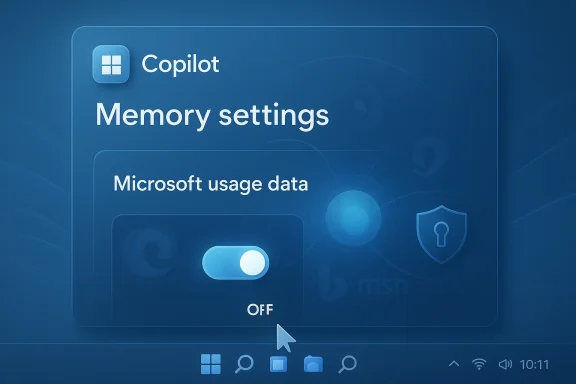
In mid‑February 2026 reporters and independent testers discovered a new switch inside the Copilot web UI labelled along the lines of “Microsoft usage data”. When enabled, the toggle allows Copilot’s Memory and personalization systems to use signals from other Microsoft products such as Edge, Bing, MSN, and related services. Multiple outlets confirmed the toggle exists and noted it appears to be enabled by default for many accounts.
This is not simply another telemetry checkbox. It is a cross‑product consent that seeds Copilot’s personalization engine with account‑level usage signals — and because it appears in the Copilot memory settings rather than in a browser privacy panel or Windows Settings, many users may never see it unless they explicitly inspect Copilot’s privacy controls.
The visible label lists Bing, MSN, and Edge explicitly; from that, a reasonable technical inference follows: Copilot can draw on search history, content‑interaction signals, and browsing activity that are associated with your Microsoft account. Reporters and community researchers have suggested — but not conclusively proved — more granular ingestion can include recent searches, visited pages recorded by signed‑in Edge profiles, interest signals surfaced by MSN, and other usage metadata tied to the account.
Important caveat: specific, low‑level claims — for example, that every cookie value or particular cookie names are forwarded to Copilot — are not confirmed in Microsoft’s public documentation and should be treated as unverified until Microsoft publishes a detailed inventory. Independent hands‑on reports and forum analysis highlight plausible categories of signals but stop short of proving exact payloads or transmission formats. That opacity is precisely what alarms privacy‑minded users.
Why cookies and browsing metadata worry people
At the same time, users must weigh two separate issues:
g steps (recommended)
If you want to harden a Windows or Microsoft account with Copilot exposure in mind, here’s a prioritized checklist:
Recommended immediate actions (concise):
Conclusion: don’t panic, but do act. A short audit and a toggle flip take minutes; the privacy consequence of inaction can last months or longer.
Source: Inbox.lv It's Dangerous: This Windows Feature Should Be Disabled Immediately
 Background / Overview
Microsoft has spent the past three years folding generative AI into the fabric of Windows, Edge, and Microsoft 365. The Copilot family now stretches from a taskbar assistant in Windows 11 to in‑app helpers inside Word, Excel, Outlook, and the standalone Copilot web and mobile experiences. That integration promises convenience: context‑aware suggestions, faster searches, and personalized assistance. But with convenience comes data flow, and the newest Copilot change makes that flow broader and — for many users — less obvious.In mid‑February 2026 reporters and independent testers discovered a new switch inside the Copilot web UI labelled along the lines of “Microsoft usage data”. When enabled, the toggle allows Copilot’s Memory and personalization systems to use signals from other Microsoft products such as Edge, Bing, MSN, and related services. Multiple outlets confirmed the toggle exists and noted it appears to be enabled by default for many accounts.
This is not simply another telemetry checkbox. It is a cross‑product consent that seeds Copilot’s personalization engine with account‑level usage signals — and because it appears in the Copilot memory settings rather than in a browser privacy panel or Windows Settings, many users may never see it unless they explicitly inspect Copilot’s privacy controls.
What exactly is the new setting?
The basics: location and label
- Where it lives: Sign in to the Copilot web interface (the Copilot account menu), open Settings → Memory, and you’ll find a toggle referenced as Microsoft usage data or phrased similarly — for example, “Let Copilot use data from Bing, MSN, Edge, and other Microsoft products you’ve used.” Reporters and hands‑on testers found the control in the Copilot web UI and in mobile clients during recent rollouts.
- Default state: Multiple independent checks show the toggle is turned on by default in many accounts, meaning Copilot may already be using cross‑product signals for personalization unless a user opts out.
Microsoft’s public position
Microsoft’s documentation frames the capability as personalization: product usage data will be used to tailor Copilot’s responses and memory for the signed‑in account and, according to Microsoft, is not used to train public foundation models. That distinction matters for regulators and enterprise compliance, but it does not remove the immediate privacy implications of a default‑on setting that aggregates signals across services. Microsoft’s privacy pages and Copilot help materials reiterate that users can change privacy settings and delete memory, but the documentation does not publish a line‑by‑line technical inventory of exactly which data points are included under the “Microsoft usage data” umbrella. ([microsoft.com](Microsoft Privacy Statement – Microsoft privacy might Copilot be ingesting?The visible label lists Bing, MSN, and Edge explicitly; from that, a reasonable technical inference follows: Copilot can draw on search history, content‑interaction signals, and browsing activity that are associated with your Microsoft account. Reporters and community researchers have suggested — but not conclusively proved — more granular ingestion can include recent searches, visited pages recorded by signed‑in Edge profiles, interest signals surfaced by MSN, and other usage metadata tied to the account.
Important caveat: specific, low‑level claims — for example, that every cookie value or particular cookie names are forwarded to Copilot — are not confirmed in Microsoft’s public documentation and should be treated as unverified until Microsoft publishes a detailed inventory. Independent hands‑on reports and forum analysis highlight plausible categories of signals but stop short of proving exact payloads or transmission formats. That opacity is precisely what alarms privacy‑minded users.
Why cookies and browsing metadata worry people
- Cookies and local storage can contain tracking identifiers, logged‑in state, and personalization signals.
- Browsing history and search queries are highly revealing of interests, health, finance, and more.
- Cross‑product aggregation increases the risk profile: data from Edge and Bing combined with mailbox metadata, calendar entries, or file access history can create a much richer user profile than any single product on its own.
How to check and turn the setting off (step‑by‑step)
If you want to confirm and control whether Copilot is using cross‑product usage signals, follow these steps in the Copilot web or mobile UI:- Sign in to your Copilot account in the Copilot web or mobile app.
- Open your account menu (tap the avatar or profile in the UI).
- Select Settings and go to the Memory or Manage personalization and memory section.
- Flip off the Microsoft usage data toggle (this prevents future ingestion of the listed product signals).
- If you want to remove previously collected personalization, choose Delete all memory (this purges saved facts, preferences, and items Copilot has stored under Memory). Note that deleting memory may be irreversible and will reduce Copilot’s personalization.
Immediate trade‑offs: privacy vs. functionality
Turning the Microsoft usage data toggle off is an opt‑out: it reduces the signals Copilot can draw on to personalize responses. Microsoft warns (and practical testing confirms) that disabling these cross‑product signals may degrade Copilot’s personalization and could make certain features less helpful or unavailable. In Microsoft 365 apps, disabling connected experiences may block fsted replies in Outlook or text predictions in Word, because these rely on analysis of content and contextual signals.At the same time, users must weigh two separate issues:
- Short‑term personalization loss: opt‑out stops Copilot from using prior product signals to tailor suggestions.
- Long‑term privacy posture: opt‑out reduces data aggregation and the long‑lived memory that could persist across devices and sign‑ins.
Why this setting matters beyond individual privacy
1. Default‑on and discoverability
A default‑on toggle buried in the Copilot Memory settings increases the chance that many users will never see or understand they have already consented to cross‑product personalization. Privacy advocates and community researchers highlight that such defaults matter: default settings strongly shape behavior at scale.2. Opaque inventory of signals
Microsoft’s high‑level description of sources (Edge, Bing, MSN) is useful but not exhaustive. Without a clear, itemized list of the exact telemetry fields, cookies, or graph signals included, security teams cannot perform a full data‑flow assessment or a precise veral Windows community threads flag this opacity as a governance risk for enterprises and privacy‑conscious individuals.3. Potential surface area for misuse
Any system that aggregates cross‑product data increases the attack surface and the potential impact of accidental disclosures. That risk is compounded if an assistant can act agentically (perform actions on web pages, fill forms, or operate inside an authenticated browser profile) — features Microsoft has been exploring under “Browser Actions” and “Copilot Tasks.” Those agentic modes make strict permissioning and clear separation of data essential. Several independent reports and forum analyses warn that agentic capabilities deserve extra scrutiny.Enterprise and admin considerations
For IT teams, two immediate points matter:- Policy and removal controls: Microsoft has added admin‑level controls to manage Copilot deployment in Windows, including options to remove the Copilot app on managed devices under defined conditions and Group Policy / Intune settings to govern Copilot behavior. Those admin tools are useful but can be narrow in scope and sometimes gated for Insider or enterprise channels; read the management documentation and test before you rely on it in production.
- Discovery, compliance, and eDiscovery: Copilot Memory can store facts associated with accounts. For organizations that must comply with data retention or eDiscovery rules, administrators should validate where Copilot memory is stored, who can access it, and how to audit or purge entries. Microsoft documents discovery and deletion mechanisms, but the lack of a fully itemized signal inventory complicates compliance mapping. Enterprises should consider blocking cross‑product ingestion by default for regulated users and enforce explicit consent processes.
g steps (recommended)
If you want to harden a Windows or Microsoft account with Copilot exposure in mind, here’s a prioritized checklist:
- Audit Copilot Memory settings (web/mobile):
- Sign into Copilot, open Settings → Memory.
- Turn off Microsoft usage data.
- If desired, use Delete all memory to purge past personalization.
- Limit Connected Experiences in Office apps:
- In Word/Excel/PowerPoint, go to File > Account > Account Privacy > Manage Settings and disable connected experiences you don’t want. This reduces in‑app analysis that feeds Copilot in Office contexts.
- Harden the browser:
- Use a separate Edge profile for sensitive browsing, or use a non‑signed profile when you do private work.
- Restrict cross‑site cookies and clear browsing data regularly.
- Consider using a different browser for sensitive workflows if you keep Edge signed in for convenience.
- For Windows users who don’t want Copilot at all:
- Hide the taskbar Copilot button (Settings → Personalization → Taskbar) or use Group Policy / registry changes to turn Copilot off more permanently for local machines. These methods have been documented and are widely adopted in privacy‑focused workflows, but test them first; registry edits and GPOs differ by edition and build.
- For enterprise admins:
- Review the new “RemoveMicrosoftCopilotApp” and other administrative templates in Insider previews and production documentation.
- Create policy baselines that disable cross‑product ingestion by default for regulated user groups.
- Monitor Microsoft’s documentation and audit logs:
- The situation is evolving. Microsoft updates product privacy pages and Copilot help pages; keep an eye on those updates and maintain an internal audit trail of changes you apply.
Technical and investigative gaps — what remains unclear
- Exact signal inventory: Microsoft lists sources (Bing, MSN, Edge) but does not publish a granular list of telemetry fields or cookie keys that flow into Copilot Memory. Independent reporting has not yet produced a comprehensive packet‑level or API‑level disclosure proving the presence of cookie values or specific identifiers. Treat highly granular claims as plausible but unverified until Microsoft clarifies.
- Windows Copilot vs. Copilot web: Some controls exist only in the Copilot web or mobile UI; the Windows‑integrated Copilot app and in‑app Copilot experiences may have different configuration surfaces and require separate management. That fragmentation complicates a one‑stop hardening strategy.
- Longitudinal retention and downstream usage: Microsoft states personalization data is not used for foundation model training, but the retention periods, internal access controls, and downstream processing policies are not public in a way that allows third‑party verification. This is a governance gap for auditors.
Critical analysis — strengths, weaknesses, and risks
Strengths
- Personalization value: When used responsibly, cross‑product signals can make assistant responses more contextually relevant and reduce repetitive prompts. For many mainstream users, that convenience improves productivity.
- Controls exist: Microsoft has surfaced toggles and deletion tools. The ability to opt out and to delete memory, plus per‑app privacy controls, gives users and admins mechanisms to limit exposure if they know where to look.
Weaknesses
- Discoverability and defaults: Burying a default‑on cross‑product consent inside a Memory settings panel makes it easy for users to be unknowingly opted in. Defaults matter at scale; this one leans heavily toward the platform convenience side.
- Opaque signal inventory: Without a precise, auditable list of what is collected, organizations can’t reliably certify compliance or accurately inform users what they’ve consented to. That opacity undermines trust.
Risks
- Sensitive data exposure: If Copilot’s memory is seeded with browsing history, search queries, or other signals tied to a Microsoft account, that data could reveal highly sensitive facets of a user’s life — medical queries, legal research, or financial searches — all of which could be retained in memory until purged.
- Misconfiguration at scale: In enterprise estates, unknown defaults or administrative lag can mean thousands of users are aggregated under personalization settings not intended for regulated data flows. Admins need to proactively set baselines.
- Agentic behaviour and credentialed automation: As Copilot gains agentic features (the ability to act inside browsers or run multi‑step tasks), combining action capability with cross‑product visibility increases the need for granular permissioning and least‑privilege controls. Early hints and insider reports highlight this as an emergent governance problem.
What to tell non‑technical stakeholders
If you need to explain this to executives, privacy officers, or less technical teammates, use three short, practical points:- Fact: Copilot now has a cross‑product usage toggle that can seed its memory with signals from Edge, Bing, and other Microsoft services, and it may be enabled by default for many accounts.
- Impact: That setting increases the richness of Copilot’s personalization but may also increase privacy exposure for sensitive searches and browsing activity. Turning it off reduces personalization but improves privacy posture.
- Action: Check Copilot’s Memory settings, disable Microsoft usage data for users or groups that handle sensitive material, and delete existing memory if you require a clean slate. Then document the change and adjust policy baselines.
Final verdict and recommended next steps
This is not a minor checkbox. It is a platform‑level consent that broadens the scope of what an assistant can remember and use to generate responses. For privacy‑conscious individuals and regulated organizations, the sensible default should be to audit and disable the setting while you assess the consequences for productivity. For administrators, assume you must enforce a conservative baseline and test the impact on workflows.Recommended immediate actions (concise):
- Audit Copilot Memory and turn off Microsoft usage data if you value privacy over seamless personalization.
- If needed, use Delete all memory to purge previously stored personalization.
- Harden Office connected experiences and Edge profiles for sensitive work.
- For enterprises, apply Group Policy and Intune baselines that disable cross‑product ingestion and document the change.
Conclusion: don’t panic, but do act. A short audit and a toggle flip take minutes; the privacy consequence of inaction can last months or longer.
Source: Inbox.lv It's Dangerous: This Windows Feature Should Be Disabled Immediately
