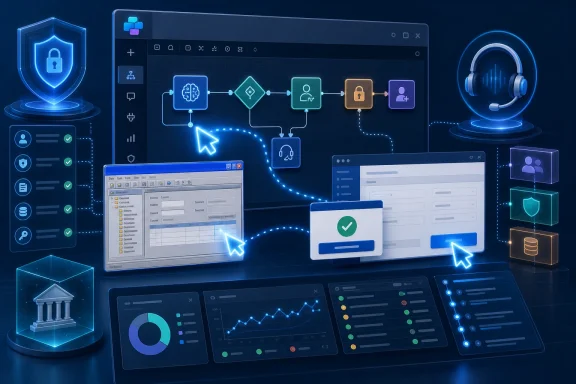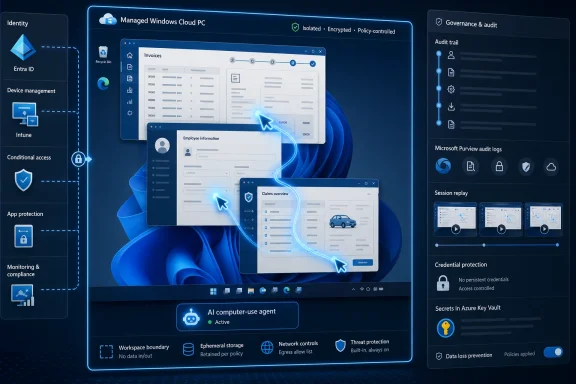
The strategic point is easy to miss if this is treated as just another Copilot feature. Computer use is Microsoft’s bid to make Power Platform the control plane for AI labor, not merely low-code workflows. In that framing, Windows is no longer just the operating system under the employee; it becomes the execution substrate for digital workers that can be governed, logged, isolated, and billed.
Microsoft Has Found the Enterprise Door Into Computer Use
The consumer version of computer-using AI has mostly been sold as spectacle. A model opens a browser, clicks around a website, fills a form, and sometimes gets lost in a modal dialog. It is impressive in the way early self-driving demos were impressive: useful as a proof of direction, but not yet the thing a compliance officer wants near payroll.
Microsoft’s Copilot Studio announcement is different because it is aimed at the boring middle of the enterprise. The company is not primarily pitching an agent that can wander the open web. It is pitching an agent that can sit inside Power Platform, authenticate into a known application, execute a defined task, and leave behind an audit trail.
That is the part that should catch the attention of Windows administrators and automation teams. Traditional robotic process automation already knows how to click buttons and type into fields, but it is brittle by design. It depends on selectors, screen positions, DOM structure, or recorded sequences that can fail when an application gets a redesign, a vendor changes a label, or a dialog appears out of order.
Computer use changes the automation model from replay to interpretation. Instead of simply following a fixed script, the agent can reason about what appears on the screen and decide the next action. That does not eliminate failure, but it moves the failure mode. The question becomes less “did the script still match the UI?” and more “did the agent correctly understand the task and the interface?”
The API Gap Is Where Automation Goes to Die
Every enterprise integration strategy eventually collides with a piece of software that refuses to cooperate. It may be a vendor portal that only exposes a web interface, a finance tool written before REST became a default assumption, or an internal line-of-business app maintained by the one person who still remembers the database schema. These systems are not edge cases. They are the stubborn center of many business processes.
The official enterprise architecture answer has long been to demand APIs, modernize the application, or replace the system. That answer is correct in the way “eat better and sleep more” is correct. It is good advice, but it does not clear a backlog of invoice exceptions by Friday afternoon.
This is why Microsoft’s framing is powerful. If a human worker can complete a task by reading a screen and making choices, a computer-use agent may be able to do the same inside a managed environment. That puts AI into the part of the workflow where companies currently burn staff hours on repetitive navigation rather than judgment.
The best early targets are not glamorous. They are work queues, account updates, data extraction from legacy dashboards, benefits administration portals, supplier onboarding systems, claims lookups, and internal tools that never made it onto a modernization roadmap. These are not tasks where an AI agent needs to invent a strategy. They are tasks where it must reliably traverse an interface that was built for a person.
General Availability Is a Procurement Event, Not Just a Product Milestone
The words general availability sound dull, but in enterprise software they are a border crossing. Preview software can be tested by innovation teams, discussed in architecture forums, and shown in executive briefings. GA software can be bought, governed, supported, and put into a roadmap with fewer asterisks.
That is Microsoft’s immediate advantage over rivals. Anthropic helped define the category with Claude’s computer-use capabilities, and Google has its own Gemini computer-use work in preview. But Microsoft is now selling the capability as part of a broader enterprise platform with the administrative machinery buyers already understand.
This is not the same as saying Microsoft has the best model, the most elegant agent loop, or the most flexible developer experience. The company’s advantage is distribution plus governance. Copilot Studio sits inside the Power Platform universe, where many organizations already manage environments, data loss prevention policies, connectors, identity, and maker permissions.
That matters because enterprises rarely adopt automation tools in isolation. They adopt them through procurement, security review, lifecycle management, and support channels. Microsoft has spent years making Power Platform acceptable to the business side without making it completely intolerable to IT. Computer use inherits that path.
The Real Product Is the Control Plane
The most important part of Microsoft’s release is not that agents can click. It is that their clicking can be watched, constrained, and reconstructed. For enterprise IT, an agent that can use any graphical application is not exciting unless it is also governable. Otherwise, it is just shadow automation with a better language model.
Microsoft’s GA package leans heavily into the governance story. The company is pairing computer use with Microsoft Purview audit logging, Dataverse records, session replay, environment isolation, data policies, and credential handling through Azure Key Vault. In plain English, that means administrators can ask what the agent did, when it did it, which application it touched, and which credentials were involved.
That auditability is not decorative. It is the difference between a pilot and a production deployment in regulated environments. If an agent updates a customer record, submits a claim, changes a billing field, or extracts data from a portal, someone will eventually need to prove what happened. “The AI did it” is not an incident report.
Session replay is particularly important because graphical automation creates a kind of evidentiary problem. API calls can be logged as structured events. UI actions are messier. Screens change, coordinates matter, and context can be lost. A replayable session gives operations and compliance teams a way to review the agent’s actual path through the application rather than relying only on a summary.
Windows Becomes the Agent’s Workplace
The inclusion of Windows 365 Cloud PC pool support is not just a deployment detail. It points to Microsoft’s likely architecture for enterprise AI labor: not agents running loose on user desktops, but agents running in isolated, managed Windows environments that can be joined to Entra ID, enrolled in Intune, and treated as disposable workstations.
That is a very Microsoft answer to the computer-use problem. Rather than treating the browser or the model API as the center of the system, Microsoft can make the managed Windows session the place where the agent does its work. The agent gets a machine. The machine gets policy. The session gets logged.
For administrators, that is much easier to reason about than an invisible agent operating somewhere in a vendor’s cloud. Cloud PCs can be segmented, assigned, monitored, patched, and retired. They also give IT a natural boundary for sensitive workflows: the agent can operate in an environment created for the task, not on a human employee’s laptop with all the incidental data and distractions that implies.
There is also a strategic Windows angle here. Microsoft has spent the Copilot era trying to make Windows feel relevant to AI beyond the Copilot key and local NPUs. Computer-use agents give Windows a server-side role in AI automation. The operating system becomes the interface compatibility layer for decades of enterprise software.
Model Choice Is Both a Feature and a Hedge
Microsoft is also making a notable model-platform move by supporting both OpenAI’s computer-using model and Anthropic’s Claude Sonnet models in Copilot Studio. That is a pragmatic admission that no single model provider owns every agentic workload. Different models may behave differently on visual interpretation, planning, latency, and error recovery.
For customers, model choice is useful only if it is operationally manageable. The enterprise question is not “which model is cleverest in a demo?” but “which model performs reliably on this workflow, at this cost, under this governance regime?” Copilot Studio gives Microsoft a place to turn that choice into a configuration decision rather than a separate platform bet.
It also hedges Microsoft’s own dependency story. The company remains deeply tied to OpenAI, but Copilot Studio increasingly looks like a broker for enterprise agents rather than a single-model shrine. That matters in a market where customers are wary of lock-in and vendors are wary of being commoditized.
Still, model choice does not remove accountability. If one model handles a screen better than another, the enterprise must still test, validate, and monitor the workflow. Computer use will need the same discipline that organizations eventually learned to apply to RPA: version control, regression testing, staged rollouts, exception handling, and clear ownership.
The Cost Model Will Punish Careless Automation
Microsoft’s pricing deserves more attention than launch coverage usually gives it. Computer use is billed through Copilot Credits, with standard models consuming five credits per step and premium models costing more. A step is not necessarily the same thing as a click; it can include one or more low-level actions, which makes real-world cost modeling dependent on how the workflow is designed and how often it runs.
That is manageable for targeted automation. A four-step workflow that replaces a few minutes of manual portal work may be easy to justify. But the economics change quickly when an agent is applied to high-volume workloads, especially if tasks require retries, escalations, additional reasoning, or premium models.
This is where enterprises need to resist the temptation to treat agentic automation as a free layer of intelligence sprinkled over every broken process. Computer use is not a substitute for architecture. If an API exists, the API will usually be cheaper, faster, more reliable, and easier to secure. If a workflow can be handled by deterministic automation, that may remain the better answer.
The sweet spot is narrower but still valuable. Computer use makes sense when the process is frequent enough to matter, manual enough to be costly, and closed enough to be controlled. It is least attractive when the workflow is ambiguous, low-volume, high-risk, or better solved by forcing a vendor to expose a real integration.
Human-in-the-Loop Is Not a Weakness
One of the quiet strengths of Microsoft’s approach is that it does not pretend full autonomy is always the goal. Copilot Studio supports human-in-the-loop checkpoints for approval steps or moments where confidence falls below an acceptable threshold. That is not a compromise; it is how serious automation gets deployed.
Many business processes are not pure execution. They contain decisions that are legally sensitive, financially material, or simply too contextual to delegate entirely. An agent can gather data, navigate the portal, prepare the transaction, and stop before submission. The human approves the consequential act.
This pattern may be more important than the dream of end-to-end autonomous agents. It lets companies capture much of the labor saving while keeping accountability anchored to a person. It also gives organizations a practical way to improve the agent over time, because escalations reveal where the system is uncertain or where the interface is confusing.
For WindowsForum’s sysadmin readership, this is the operational center of gravity. The work is not merely building agents; it is deciding where the agent must stop. That boundary will vary by department, regulation, and risk tolerance. The technology can provide the checkpoint, but the organization has to define the policy.
Security Teams Will See a New Attack Surface Wearing an Old Uniform
Any agent that can operate a graphical interface can also make mistakes in that interface. It can click the wrong button, copy the wrong value, accept a malicious prompt embedded in a page, or follow instructions that were never intended for it. Computer use inherits the risks of browsers, credentials, SaaS applications, and AI reasoning all at once.
Microsoft’s governance features reduce those risks, but they do not make them vanish. Credential storage in Azure Key Vault is better than pasting passwords into scripts. Purview logs are better than blind automation. Cloud PC isolation is better than letting agents roam on a user’s live workstation. But each control answers a specific risk, not the entire risk category.
The prompt-injection problem is especially awkward for computer-use agents. A normal automation script does not read a malicious message on a web page and reinterpret its mission. A model might. If an agent is navigating third-party portals or pages containing untrusted text, organizations need to assume that visible content can become part of the agent’s decision environment.
That means security review must include the interface itself. What pages can the agent see? What data can it access? What actions can it perform? What happens if a vendor page changes? What happens if a malicious document, ticket, or record contains instructions aimed at the agent? These are not theoretical concerns once the agent has credentials and a mouse.
The Competitive Window Is Real, but It Will Not Stay Open
Microsoft’s first-mover advantage in production-grade enterprise computer use is meaningful, but it is not permanent. Anthropic has strong credibility in the agentic AI conversation, and Google has the cloud, browser, and model infrastructure to make computer use a serious priority. The competitive gap is more about packaging and enterprise readiness than about whether others understand the category.
That makes Microsoft’s moment both powerful and fragile. If customers begin building computer-use workflows in Copilot Studio now, Microsoft gains process gravity. Agents become tied to Power Platform environments, Dataverse logs, DLP rules, Cloud PCs, and Microsoft identity. Once automation is embedded in business process, it is much harder to displace than a chatbot.
But if Microsoft’s agents prove costly, unreliable, or administratively opaque in practice, customers will wait. Enterprises are happy to experiment with AI, but production automation has a long memory. A few high-profile failures can make a tool radioactive in operations groups that still remember brittle RPA rollouts.
The rivals do not need to beat Microsoft everywhere. They only need to offer a better developer experience, stronger model performance, or more flexible deployment for enough workloads to slow Microsoft’s consolidation. The race is now less about who can show a model using a computer and more about who can make that model boringly dependable.
The Legacy App Just Became an AI Target
For years, legacy applications have survived because replacing them was too expensive and integrating them was too hard. Computer use changes that political equation. It gives CIOs a way to extract value from systems that were previously automation-resistant, but it may also delay the modernization those systems badly need.
That is the double edge. If an agent can operate an old application well enough, the business may postpone the difficult work of replacing it. In the short term, that is rational. In the long term, it can preserve bad architecture behind a layer of AI labor.
The healthier approach is to treat computer use as a bridge, not a burial ground. Use it to reduce manual pain where no API exists. Use the logs to understand the process. Use the automation data to build a case for modernization. If the agent spends thousands of steps each week nursing a decrepit internal tool, that is not just an efficiency win; it is evidence.
This is where IT leadership matters. Copilot Studio can make legacy workflows more tolerable, but it cannot decide whether the organization should keep tolerating them. The danger is that AI becomes the duct tape that lets obsolete systems persist for another decade.
The Windows Admin’s Checklist Has Changed
The practical work begins after the launch headline fades. Organizations evaluating Copilot Studio computer use should start with narrow workflows, known applications, and clear exception paths. The goal should be to prove reliability and governance before chasing autonomy.
A good first deployment is not the most impressive one. It is the one where the task is repetitive, the UI is stable enough, the data is understood, and the cost per run can be measured against a real manual baseline. Finance, HR operations, procurement, and support back offices will likely find candidates before more chaotic knowledge-work teams do.
Administrators should also insist on environment separation from day one. A computer-use agent should not be treated like a casual macro. It needs a dedicated runtime, scoped credentials, monitored activity, and a rollback plan when the vendor changes the screen on a Tuesday morning.
The First Production Wave Will Reward the Boring Use Cases
The smartest organizations will not start by asking whether computer-use agents can “transform the enterprise.” They will ask which annoying, measurable, screen-bound tasks can be removed from human queues without increasing risk. That is less exciting, but it is how durable automation begins.
- Microsoft’s general availability move makes computer-use agents a production procurement option for commercial Power Platform customers, not merely a preview feature for experimentation.
- The strongest use cases are repetitive workflows trapped inside applications, portals, and internal tools that lack usable APIs.
- The enterprise value depends as much on Purview logging, session replay, credential controls, and Cloud PC isolation as it does on the agent’s ability to click through a UI.
- Copilot Credits make cost modeling essential, especially for high-volume processes or workflows that require many steps and retries.
- Human approval checkpoints should be treated as a design pattern for safe deployment, not as evidence that the agent is inadequate.
- Computer use can reduce legacy-app pain, but it should not become an excuse to avoid modernization where proper integration is still the better answer.
Microsoft has given enterprises something more consequential than another Copilot surface: a way to put AI inside the stubborn, visual workflows that have resisted clean integration for years. Whether that becomes a new automation layer or another expensive experiment will depend on how carefully customers govern it, how honestly Microsoft prices and improves it, and how quickly rivals close the production-readiness gap. The next phase of agentic AI will not be judged by whether it can use a computer once; it will be judged by whether IT can trust it to use one every day.
References
- techcommunity.microsoft.com techcommunity.microsoft.com
- microsoft.com microsoft.com
- cdn-dynmedia-1.microsoft.com cdn-dynmedia-1.microsoft.com