

Microsoft is preparing a OneDrive web feature called Copilot Suggested Rename for June 2026 that will analyze supported files and offer three clearer name suggestions when users rename or upload them. The feature sounds tiny, almost comically so, beside Microsoft’s louder AI ambitions. But it may be one of the more honest uses of Copilot: not replacing work, not inventing a workflow, but cleaning up the mess that modern work already creates.
The file name is one of computing’s oldest user-interface contracts, and it has aged badly. We now save screenshots, scans, PDFs, Teams exports, Office drafts, invoices, and AI-generated summaries into the same cloud folders, often with names produced by cameras, scanners, web apps, or our own end-of-day impatience. Microsoft’s bet is that Copilot can turn that sludge into searchable, descriptive order at the moment the user is already thinking about the file.
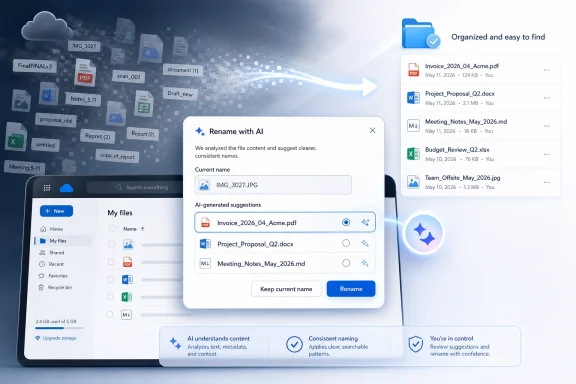
The most revealing thing about Copilot Suggested Rename is its modesty. Microsoft is not promising a new operating paradigm, a “reimagined” desktop, or a synthetic coworker that understands your entire professional life. It is promising that when you rename a file in OneDrive on the web, Copilot can look at the file and suggest three better names.
That restraint matters. A great deal of AI branding in productivity software has been pitched as transformation, but transformation is not what most users need at 4:47 p.m. when a folder contains “Scan_04182026,” “Document1,” “FinalFINALv3,” and a PDF downloaded from a vendor portal with a 38-character identifier for a name. They need the computer to notice what the file is and stop pretending that “IMG_3027” is a useful description.
This is also the kind of feature that exposes whether AI is being integrated as a product layer or merely sprinkled as a marketing term. If the system can read a contract, a deck, a spreadsheet, or a scanned document and suggest a sensible name without forcing users into a chat window, then Copilot becomes part of the file experience rather than a separate destination. That is a more durable model than asking users to remember yet another prompt.
The feature’s planned placement is telling. It appears inside the rename dialog and in the post-upload toast, the little notification that appears after a file lands in OneDrive. Microsoft is inserting AI into a narrow moment of user intent: the file is new, the name is bad, and the user is already close to making a naming decision.
The second entry point may be even more important. After a supported file is uploaded, OneDrive can surface the rename suggestion from the upload notification, catching the problem before it becomes another forgotten artifact in cloud storage. That is the point at which naming friction is lowest, because the user still remembers why the file exists.
The supported formats are broad enough to make the feature practical rather than decorative. Microsoft Office files such as Word documents, Excel workbooks, and PowerPoint presentations are obvious targets, but support for PDFs, Markdown files, and images expands the use case beyond the Office faithful. The files people most often fail to name well are frequently not pristine Office documents; they are screenshots, exported reports, receipt scans, and documents arriving from other systems.
There is a quiet product lesson here. The right AI feature is not always the one with the most impressive demo. Sometimes it is the one that appears at the point of maximum annoyance and removes one decision from the user’s queue.
That is why bad names become expensive at scale. A single vague file name is an annoyance. A thousand vague file names across a department become a compliance, discovery, and productivity tax. People duplicate work because they cannot find the original. They attach the wrong draft. They keep redundant copies because they are afraid to delete something whose name tells them nothing.
For Windows users, this problem is familiar because the operating system has historically treated the file name as a field the user must manage alone. Windows Explorer can sort, search, preview, and index, but it does not naturally ask whether “New Microsoft Word Document (3).docx” is a cry for help. The OneDrive web feature does not fix the Windows shell, but it does point toward a future in which file systems are less passive.
The irony is that Microsoft has spent decades making it easier to create documents and comparatively little time helping users name them. Templates, autosave, cloud sync, and real-time collaboration all increase document creation velocity. Without better naming assistance, the result is often a better-synced mess.
That creates a strategic feedback loop. The more OneDrive becomes the place where Copilot features work best, the more users have reason to store files there. The more files sit in OneDrive, the more useful Copilot becomes as an organizing and retrieval layer. Suggested Rename is minor in isolation, but it reinforces the idea that the cloud copy is the intelligent copy.
This is good product strategy and also a source of tension. Many Windows users still think in terms of local folders, desktop shortcuts, and Explorer workflows. Microsoft increasingly thinks in terms of cloud-resident work graphs, permissions, document intelligence, and web surfaces. A web-only launch fits Microsoft’s direction, but it also highlights the gap between where users manipulate files and where Microsoft’s newest intelligence often appears first.
If the feature remains confined to OneDrive on the web, it will help some workflows and miss others. The user dragging files around File Explorer, saving downloads from a browser, or importing photos from a phone will not benefit unless Microsoft extends the idea into Windows, the OneDrive sync client, or mobile apps. The long-term question is not whether Copilot can rename a file in the browser. It is whether Microsoft is willing to make intelligent naming feel native across the places users actually touch files.
The risk is not simply that Copilot sees a file. Microsoft 365 already includes search, indexing, previews, content classification, data loss prevention, and other services that process files in cloud environments. The sharper issue is user expectation. A rename dialog has traditionally been a dumb text field; turning it into an AI suggestion surface changes what users may assume is happening at that moment.
Administrators will want clear controls. Can the feature be disabled at the tenant level? Does it respect existing sensitivity labels, retention settings, and access boundaries? Are certain file types or locations excluded? Does it behave differently for consumer OneDrive and OneDrive for Business? The answers will determine whether this becomes a helpful default or another item in the long list of Copilot features that IT teams must evaluate before rollout.
The naming output also matters. A suggested file name can accidentally reveal sensitive content if it is displayed in a notification, synced to another device, or shown in a shared folder. “Acquisition_Targets_Q3_Diligence.pdf” may be a useful name, but usefulness is not the only criterion in a regulated environment. A good AI naming feature must understand not only what a document is, but how much it should say aloud.
There are several ways this could go wrong. Copilot might produce names that are too generic, merely replacing “Document1” with “Project Document.” It might overfit to a heading and miss the actual purpose of the file. It might suggest names that are too long, too formal, or incompatible with the naming habits of a team. It might struggle with scanned images, low-quality PDFs, multilingual documents, or files whose meaning depends on surrounding project context.
The three-suggestion design is a smart hedge. Microsoft is not asking Copilot to take unilateral control of naming; it is offering options. That preserves human judgment while reducing the blank-page problem of choosing a name from scratch. In practice, even a mediocre suggestion can be useful if it gives the user a better starting point.
But users will quickly calibrate their trust. If the first few suggestions are accurate, the feature becomes invisible in the best possible way. If they are odd, verbose, or misleading, users will dismiss them and mentally file the feature under “AI clutter.” For a utility this small, first impressions matter because there is no grand onboarding narrative to overcome skepticism.
Suggested Rename is different because it does not require users to become prompt engineers. It does not ask them to formulate intent in natural language. It does not demand that they trust a generated report or a multi-step agentic workflow. It simply notices that a file could have a better name and offers one.
That is where AI may be most persuasive in operating systems and productivity suites. Not as a theatrical assistant waiting for commands, but as ambient assistance embedded into old interfaces. Spellcheck succeeded because it lived where writing happened. Autofill succeeded because it appeared where forms were completed. A file rename helper succeeds if it appears where file chaos begins.
This is the version of Copilot that Windows users are more likely to accept: not a sidebar with a personality, but a capability that improves an existing action. Microsoft’s challenge is that the product branding often pushes in the other direction, making everything feel like a Copilot event. The best implementation of Suggested Rename would be almost boring.
Still, for WindowsForum readers, the web-only detail is the catch. Most people do not experience file renaming as a web task. They rename files in File Explorer, in Save As dialogs, on the desktop, inside downloads folders, or through context menus. If Copilot naming assistance is confined to the browser, it risks becoming another cloud feature that feels adjacent to Windows rather than integrated with it.
The natural endgame is obvious. Imagine File Explorer noticing a folder of screenshots and suggesting names based on visible content. Imagine the Windows share sheet proposing a cleaned-up file name before attachment. Imagine the OneDrive sync client offering safe, policy-aware names for scans and PDFs as they arrive. Those are more technically and politically complicated, but they are also where the feature becomes genuinely system-level.
Microsoft has been steadily turning Windows into a front end for cloud identity, cloud storage, and cloud intelligence. Suggested Rename will test whether that movement can improve mundane file handling without making users feel that the local PC has become a thin client for Microsoft 365. The distinction matters, especially to enthusiasts and admins who still value local control.
There is a real upside for organizations drowning in unstructured content. Better file names improve human review, reduce accidental duplication, and make shared libraries less hostile. In departments that lack formal document management discipline, AI suggestions could produce a baseline improvement without requiring every employee to memorize a naming taxonomy.
But IT will also worry about standardization. If Copilot suggests “Quarterly Revenue Forecast,” “Q3 Sales Projection,” and “Finance Planning Deck” for similar files, the results may be individually clear but collectively inconsistent. Enterprise value comes not only from descriptiveness, but from repeatable patterns. Microsoft may eventually need controls that let organizations tune suggestions to naming conventions, department vocabularies, or SharePoint library rules.
This is where the feature could grow from convenience into infrastructure. The first version appears to be a user-facing helper. A more powerful version would understand organizational policy: project codes, client names, date formats, confidentiality markers, and lifecycle categories. That would be harder to build, but it would turn rename suggestions into a governance tool rather than a cosmetic cleanup.
A photo of a whiteboard may matter because it came from a specific meeting. A spreadsheet may be important because it is the version sent to a regulator, not because of the numbers on its first sheet. A PDF may be one of several nearly identical exports, distinguished only by workflow state. A Markdown note may belong to a project whose name never appears in the text.
This is the boundary between content understanding and work understanding. Copilot can read what is in the file, but the best file names often encode context: date, owner, project, version, audience, status. Some of that context lives in Microsoft 365 signals, but using it responsibly is more complex than summarizing a document’s text.
That does not make the feature weak. It means Microsoft should avoid pretending that content-aware naming is the same as perfect naming. The best version of Suggested Rename will offer useful, editable scaffolding, not insist that it knows the one true name. In file management, humility is a feature.
That lower-risk surface can build confidence. If Copilot repeatedly proves useful in small moments, users may become more willing to try it in larger workflows. If it stumbles in small moments, Microsoft’s broader Copilot pitch becomes harder to sell. A rename suggestion is not strategically trivial when it is part of a trust ladder.
The feature also points toward a more mature AI design language. Instead of a single Copilot pane trying to be everything, Microsoft can distribute task-specific intelligence throughout Microsoft 365. Rename here, summarize there, classify elsewhere, suggest sharing language at the point of send. The user does not have to “use AI” as a separate activity; AI becomes one option inside familiar workflows.
That model is less glamorous but more defensible. It respects the fact that productivity software is mostly a collection of small frictions repeated endlessly. Remove enough of them, and the product genuinely improves.
The file name is one of computing’s oldest user-interface contracts, and it has aged badly. We now save screenshots, scans, PDFs, Teams exports, Office drafts, invoices, and AI-generated summaries into the same cloud folders, often with names produced by cameras, scanners, web apps, or our own end-of-day impatience. Microsoft’s bet is that Copilot can turn that sludge into searchable, descriptive order at the moment the user is already thinking about the file.
 Microsoft Finds an AI Job Small Enough to Be Useful
The most revealing thing about Copilot Suggested Rename is its modesty. Microsoft is not promising a new operating paradigm, a “reimagined” desktop, or a synthetic coworker that understands your entire professional life. It is promising that when you rename a file in OneDrive on the web, Copilot can look at the file and suggest three better names.That restraint matters. A great deal of AI branding in productivity software has been pitched as transformation, but transformation is not what most users need at 4:47 p.m. when a folder contains “Scan_04182026,” “Document1,” “FinalFINALv3,” and a PDF downloaded from a vendor portal with a 38-character identifier for a name. They need the computer to notice what the file is and stop pretending that “IMG_3027” is a useful description.
This is also the kind of feature that exposes whether AI is being integrated as a product layer or merely sprinkled as a marketing term. If the system can read a contract, a deck, a spreadsheet, or a scanned document and suggest a sensible name without forcing users into a chat window, then Copilot becomes part of the file experience rather than a separate destination. That is a more durable model than asking users to remember yet another prompt.
The feature’s planned placement is telling. It appears inside the rename dialog and in the post-upload toast, the little notification that appears after a file lands in OneDrive. Microsoft is inserting AI into a narrow moment of user intent: the file is new, the name is bad, and the user is already close to making a naming decision.
The Rename Box Becomes a Copilot Surface
On paper, Copilot Suggested Rename is straightforward. When a supported file is being renamed, Copilot reviews the content and presents three context-aware suggestions in the rename interface. The user can choose one suggestion or ignore them and keep typing.The second entry point may be even more important. After a supported file is uploaded, OneDrive can surface the rename suggestion from the upload notification, catching the problem before it becomes another forgotten artifact in cloud storage. That is the point at which naming friction is lowest, because the user still remembers why the file exists.
The supported formats are broad enough to make the feature practical rather than decorative. Microsoft Office files such as Word documents, Excel workbooks, and PowerPoint presentations are obvious targets, but support for PDFs, Markdown files, and images expands the use case beyond the Office faithful. The files people most often fail to name well are frequently not pristine Office documents; they are screenshots, exported reports, receipt scans, and documents arriving from other systems.
There is a quiet product lesson here. The right AI feature is not always the one with the most impressive demo. Sometimes it is the one that appears at the point of maximum annoyance and removes one decision from the user’s queue.
File Names Are Metadata Humans Still Have to Maintain
The modern cloud stack is rich with metadata, but the file name remains stubbornly important. Search can index contents, OneDrive can surface recent activity, Microsoft 365 can understand document context, and SharePoint can impose columns and labels. Yet when a human scans a folder, attaches a document to an email, reviews exported files, or restores something from a backup, the file name still does an outsized amount of work.That is why bad names become expensive at scale. A single vague file name is an annoyance. A thousand vague file names across a department become a compliance, discovery, and productivity tax. People duplicate work because they cannot find the original. They attach the wrong draft. They keep redundant copies because they are afraid to delete something whose name tells them nothing.
For Windows users, this problem is familiar because the operating system has historically treated the file name as a field the user must manage alone. Windows Explorer can sort, search, preview, and index, but it does not naturally ask whether “New Microsoft Word Document (3).docx” is a cry for help. The OneDrive web feature does not fix the Windows shell, but it does point toward a future in which file systems are less passive.
The irony is that Microsoft has spent decades making it easier to create documents and comparatively little time helping users name them. Templates, autosave, cloud sync, and real-time collaboration all increase document creation velocity. Without better naming assistance, the result is often a better-synced mess.
OneDrive Is Becoming the Real Copilot File System
Microsoft’s choice of OneDrive as the initial home is not accidental. OneDrive is no longer just a sync client bolted onto Windows; it is the default substrate for Microsoft 365 files, sharing, collaboration, and increasingly Copilot context. If Copilot is going to reason over user files, OneDrive is where Microsoft wants those files to live.That creates a strategic feedback loop. The more OneDrive becomes the place where Copilot features work best, the more users have reason to store files there. The more files sit in OneDrive, the more useful Copilot becomes as an organizing and retrieval layer. Suggested Rename is minor in isolation, but it reinforces the idea that the cloud copy is the intelligent copy.
This is good product strategy and also a source of tension. Many Windows users still think in terms of local folders, desktop shortcuts, and Explorer workflows. Microsoft increasingly thinks in terms of cloud-resident work graphs, permissions, document intelligence, and web surfaces. A web-only launch fits Microsoft’s direction, but it also highlights the gap between where users manipulate files and where Microsoft’s newest intelligence often appears first.
If the feature remains confined to OneDrive on the web, it will help some workflows and miss others. The user dragging files around File Explorer, saving downloads from a browser, or importing photos from a phone will not benefit unless Microsoft extends the idea into Windows, the OneDrive sync client, or mobile apps. The long-term question is not whether Copilot can rename a file in the browser. It is whether Microsoft is willing to make intelligent naming feel native across the places users actually touch files.
The Practical Magic Is Also a Privacy Prompt
Any feature that analyzes file contents to produce a name comes with an obvious privacy tradeoff. The system cannot suggest a meaningful name for a document without inspecting enough of the document to infer its subject. For many users, that will be acceptable. For some organizations, it will demand scrutiny.The risk is not simply that Copilot sees a file. Microsoft 365 already includes search, indexing, previews, content classification, data loss prevention, and other services that process files in cloud environments. The sharper issue is user expectation. A rename dialog has traditionally been a dumb text field; turning it into an AI suggestion surface changes what users may assume is happening at that moment.
Administrators will want clear controls. Can the feature be disabled at the tenant level? Does it respect existing sensitivity labels, retention settings, and access boundaries? Are certain file types or locations excluded? Does it behave differently for consumer OneDrive and OneDrive for Business? The answers will determine whether this becomes a helpful default or another item in the long list of Copilot features that IT teams must evaluate before rollout.
The naming output also matters. A suggested file name can accidentally reveal sensitive content if it is displayed in a notification, synced to another device, or shown in a shared folder. “Acquisition_Targets_Q3_Diligence.pdf” may be a useful name, but usefulness is not the only criterion in a regulated environment. A good AI naming feature must understand not only what a document is, but how much it should say aloud.
The First Version Will Be Judged by Its Mistakes
The success of Copilot Suggested Rename will depend less on whether it works in perfect demos than on how gracefully it fails. File names are short, visible, and sticky. A bad summary can be ignored; a bad file name can persist for years, propagate through links, and confuse everyone who later touches the document.There are several ways this could go wrong. Copilot might produce names that are too generic, merely replacing “Document1” with “Project Document.” It might overfit to a heading and miss the actual purpose of the file. It might suggest names that are too long, too formal, or incompatible with the naming habits of a team. It might struggle with scanned images, low-quality PDFs, multilingual documents, or files whose meaning depends on surrounding project context.
The three-suggestion design is a smart hedge. Microsoft is not asking Copilot to take unilateral control of naming; it is offering options. That preserves human judgment while reducing the blank-page problem of choosing a name from scratch. In practice, even a mediocre suggestion can be useful if it gives the user a better starting point.
But users will quickly calibrate their trust. If the first few suggestions are accurate, the feature becomes invisible in the best possible way. If they are odd, verbose, or misleading, users will dismiss them and mentally file the feature under “AI clutter.” For a utility this small, first impressions matter because there is no grand onboarding narrative to overcome skepticism.
Microsoft’s AI Push Looks Better When It Stops Performing
Copilot has often suffered from a mismatch between ambition and daily value. Microsoft’s demos tend to show sweeping productivity gains: summarize meetings, draft documents, generate presentations, analyze spreadsheets, orchestrate agents. Those are real use cases, but they can feel distant from the repetitive friction that defines much of everyday computing.Suggested Rename is different because it does not require users to become prompt engineers. It does not ask them to formulate intent in natural language. It does not demand that they trust a generated report or a multi-step agentic workflow. It simply notices that a file could have a better name and offers one.
That is where AI may be most persuasive in operating systems and productivity suites. Not as a theatrical assistant waiting for commands, but as ambient assistance embedded into old interfaces. Spellcheck succeeded because it lived where writing happened. Autofill succeeded because it appeared where forms were completed. A file rename helper succeeds if it appears where file chaos begins.
This is the version of Copilot that Windows users are more likely to accept: not a sidebar with a personality, but a capability that improves an existing action. Microsoft’s challenge is that the product branding often pushes in the other direction, making everything feel like a Copilot event. The best implementation of Suggested Rename would be almost boring.
The Web-Only Launch Keeps the Windows Story Unfinished
A web-only debut makes sense for Microsoft. OneDrive on the web is easier to update, easier to instrument, and closer to the Microsoft 365 service layer where Copilot already operates. It also gives Microsoft a controlled environment before it has to deal with the complexity of Windows Explorer, macOS Finder integration, mobile storage providers, and offline sync behavior.Still, for WindowsForum readers, the web-only detail is the catch. Most people do not experience file renaming as a web task. They rename files in File Explorer, in Save As dialogs, on the desktop, inside downloads folders, or through context menus. If Copilot naming assistance is confined to the browser, it risks becoming another cloud feature that feels adjacent to Windows rather than integrated with it.
The natural endgame is obvious. Imagine File Explorer noticing a folder of screenshots and suggesting names based on visible content. Imagine the Windows share sheet proposing a cleaned-up file name before attachment. Imagine the OneDrive sync client offering safe, policy-aware names for scans and PDFs as they arrive. Those are more technically and politically complicated, but they are also where the feature becomes genuinely system-level.
Microsoft has been steadily turning Windows into a front end for cloud identity, cloud storage, and cloud intelligence. Suggested Rename will test whether that movement can improve mundane file handling without making users feel that the local PC has become a thin client for Microsoft 365. The distinction matters, especially to enthusiasts and admins who still value local control.
IT Departments Will Read This as Governance, Not Convenience
For consumers, the appeal is simple: fewer bad file names. For IT departments, the feature lands in a broader governance conversation. Naming conventions, retention policies, eDiscovery, DLP, sensitivity labels, and SharePoint information architecture all depend on consistent handling of documents. A feature that nudges users toward clearer names can help, but only if it behaves predictably.There is a real upside for organizations drowning in unstructured content. Better file names improve human review, reduce accidental duplication, and make shared libraries less hostile. In departments that lack formal document management discipline, AI suggestions could produce a baseline improvement without requiring every employee to memorize a naming taxonomy.
But IT will also worry about standardization. If Copilot suggests “Quarterly Revenue Forecast,” “Q3 Sales Projection,” and “Finance Planning Deck” for similar files, the results may be individually clear but collectively inconsistent. Enterprise value comes not only from descriptiveness, but from repeatable patterns. Microsoft may eventually need controls that let organizations tune suggestions to naming conventions, department vocabularies, or SharePoint library rules.
This is where the feature could grow from convenience into infrastructure. The first version appears to be a user-facing helper. A more powerful version would understand organizational policy: project codes, client names, date formats, confidentiality markers, and lifecycle categories. That would be harder to build, but it would turn rename suggestions into a governance tool rather than a cosmetic cleanup.
The Small Feature Carries a Large Assumption
Copilot Suggested Rename assumes that file content is the best guide to file identity. Often, that is true. A contract, invoice, report, or slide deck usually contains enough semantic information to infer a decent name. But file identity is not always inside the file.A photo of a whiteboard may matter because it came from a specific meeting. A spreadsheet may be important because it is the version sent to a regulator, not because of the numbers on its first sheet. A PDF may be one of several nearly identical exports, distinguished only by workflow state. A Markdown note may belong to a project whose name never appears in the text.
This is the boundary between content understanding and work understanding. Copilot can read what is in the file, but the best file names often encode context: date, owner, project, version, audience, status. Some of that context lives in Microsoft 365 signals, but using it responsibly is more complex than summarizing a document’s text.
That does not make the feature weak. It means Microsoft should avoid pretending that content-aware naming is the same as perfect naming. The best version of Suggested Rename will offer useful, editable scaffolding, not insist that it knows the one true name. In file management, humility is a feature.
The Rename Button Is Where Copilot Can Earn Trust
The most concrete lesson from this rollout is that AI in productivity software does not need to be spectacular to matter. In fact, the spectacular features often face the steepest trust barrier. Users may hesitate to let AI draft a legal memo, negotiate a spreadsheet model, or summarize a sensitive meeting. They are more likely to accept help renaming a PDF.That lower-risk surface can build confidence. If Copilot repeatedly proves useful in small moments, users may become more willing to try it in larger workflows. If it stumbles in small moments, Microsoft’s broader Copilot pitch becomes harder to sell. A rename suggestion is not strategically trivial when it is part of a trust ladder.
The feature also points toward a more mature AI design language. Instead of a single Copilot pane trying to be everything, Microsoft can distribute task-specific intelligence throughout Microsoft 365. Rename here, summarize there, classify elsewhere, suggest sharing language at the point of send. The user does not have to “use AI” as a separate activity; AI becomes one option inside familiar workflows.
That model is less glamorous but more defensible. It respects the fact that productivity software is mostly a collection of small frictions repeated endlessly. Remove enough of them, and the product genuinely improves.
The Folder Full of Bad Names Finally Gets a First Pass
The immediate story is simple, but its implications are broader than the rename dialog suggests.- Microsoft plans to begin rolling out Copilot Suggested Rename for OneDrive on the web in June 2026.
- The feature is designed to analyze supported file contents and offer three clearer file-name suggestions when users rename a file.
- OneDrive will also surface the feature after upload, giving users a chance to fix vague names before they disappear into a folder.
- Supported formats are expected to include common Office documents, PDFs, Markdown files, and images.
- The first release appears aimed at web users across personal and business OneDrive, while desktop and mobile availability remains an open question.
- The feature’s usefulness will depend on accuracy, administrative controls, privacy expectations, and whether Microsoft eventually brings the same idea into Windows-native file workflows.
References
- Primary source: ARY News
Published: 2026-06-01T10:29:14.442213
Loading…
arynews.tv - Official source: microsoft.com
Loading…
www.microsoft.com - Related coverage: windowsreport.com
Loading…
windowsreport.com - Related coverage: pccentral.net

OneDrive Suggested Rename Feature Brings AI-Powered File Naming
Microsoft OneDrive introduces a Copilot-powered Suggested Rename feature that analyzes uploaded files to provide context-aware, descriptive name suggestions. pccentral.net
- Official source: learn.microsoft.com

Release Notes for Microsoft 365 Copilot
Lists the features that reach General Availability in each release of Microsoft 365 Copilot.learn.microsoft.com - Related coverage: techradar.com

Microsoft has unleashed Copilot AI agents on OneDrive
You can now interact with 20 OneDrive files in one go, instead of file-by-file, with OneDrive's new AI Agents.www.techradar.com