

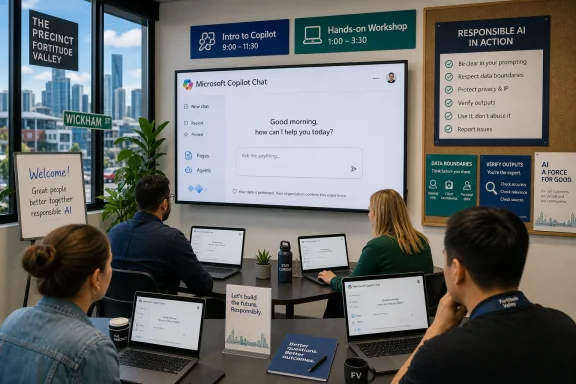
Australia’s National AI Centre listed two Queensland Government-hosted Microsoft Copilot training sessions at The Precinct in Fortitude Valley on July 7, 2026, aimed at helping workers understand Copilot Chat, generative AI basics, prompting, agents, Pages, and responsible workplace use. The listing, reported by Digital Watch Observatory and reflected on the National AI Centre’s events page, is a small local item with a much larger signal. The age of merely “making AI available” inside Microsoft 365 is giving way to the harder, less glamorous work of teaching people what to do with it. For Windows shops and Microsoft-heavy workplaces, that shift matters more than another splashy Copilot demo.
The Fortitude Valley sessions were not framed as executive transformation theatre. One was an “Intro to Copilot” hour for people with personal or business accounts; the other was a longer hands-on workshop for workers who already had Copilot at work but rarely used it or lacked confidence. That distinction is the whole story in miniature.
Microsoft has spent the past few years pushing Copilot into Windows, Edge, Teams, Outlook, Microsoft 365, and the broader enterprise stack. But availability is not adoption, and adoption is not competence. A worker who sees a Copilot button in Outlook but does not know whether it is safe to summarize a sensitive thread has not been “transformed”; they have been handed another uncertain interface.
That is why a modest AUD 25 early-bird training session in Brisbane says something useful about the state of enterprise AI in 2026. Governments and employers are no longer asking only whether generative AI is coming to work. They are asking how to make it routine without making it reckless.
The National AI Centre’s event listing is careful in its wording. It says the sessions cover access, interface features, the differences between personal and business versions, chat management, prompting techniques, Pages, Agents, and responsible AI use. Those are not buzzwords randomly arranged for a brochure. They are the exact fault lines where workplace AI rollouts tend to succeed or fail.
It has not. A chat box embedded in Microsoft 365 does not teach workers how grounding works, what data the system can see, why outputs must be checked, or when not to use the tool at all. In many offices, the first wave of Copilot use has been improvised: summarize this meeting, draft that email, rewrite this paragraph, make this slide sound more polished.
Those use cases are real, but they are also shallow. The bigger productivity claims around AI depend on users understanding workflow integration, not just prompt syntax. A good Copilot user is not someone who knows a magic phrase; it is someone who knows how to break work into steps, decide which context is appropriate, evaluate output quality, and preserve accountability.
That is why the Queensland sessions’ emphasis on “practical workplace uses” is more important than the brand name. Copilot training is becoming a proxy for a broader capability: knowing how to collaborate with probabilistic software in environments where mistakes have consequences. The skill is part writing, part systems thinking, part information governance.
For IT departments, this should sound familiar. Every major productivity platform has passed through the same cycle. Email needed etiquette and retention rules. SharePoint needed information architecture. Teams needed channel discipline. Copilot needs AI literacy, data awareness, and enough skepticism to keep enthusiasm from becoming exposure.
That national promise is big enough to sound abstract. A pair of in-person sessions at The Precinct makes it concrete. It turns “three million learners” into workers bringing laptops to a room and learning how not to misuse the tool their employer has already licensed.
There is a strategic logic here for Microsoft. The company does not just need customers to buy Copilot licenses; it needs people to form habits around Copilot. If workers try it once, get a mediocre answer, and retreat to old workflows, the product becomes shelfware with a very modern logo. Training is therefore not a charitable add-on to Microsoft’s AI push. It is a demand-generation engine dressed as workforce development.
That does not make the training cynical. It makes it politically and commercially aligned. Australia wants AI capability across the workforce; Microsoft wants Microsoft-shaped AI capability across the workforce. Queensland’s sessions sit where those interests overlap.
The National AI Centre’s neutral listing language is worth noting. It says registration is handled through third-party websites and that the centre does not endorse or take responsibility for their content. That disclaimer is boilerplate, but in this context it also reflects a wider reality: public AI literacy programs increasingly depend on ecosystems of vendors, trainers, platforms, and local innovation agencies. Government can convene and signal legitimacy, but much of the actual instruction happens through mixed public-private channels.
The more important training topics in the Queensland listing are the ones that sound administrative: account types, interface differences, chat management, responsible AI use. Those are the places where workplace risk hides. A user who does not understand the difference between a consumer Copilot experience and a work-protected Microsoft 365 Copilot Chat experience may make poor decisions about what to paste, upload, summarize, or share.
Microsoft’s own support and Learn materials draw distinctions between consumer Copilot, Microsoft 365 Copilot Chat, and the paid Microsoft 365 Copilot add-on. The free or included work chat experience is positioned around secure AI chat and enterprise data protection, while the paid add-on goes deeper into Microsoft 365 app integration and organizational data. That distinction is not academic. It determines what the user thinks the tool can access, what protections apply, and what administrators need to govern.
For WindowsForum readers, this is where the conversation becomes less about AI wonder and more about tenant hygiene. Copilot is not a single thing. It is a family of experiences spanning Windows, Edge, the Microsoft 365 Copilot app, Teams, Outlook, web chat, agents, and paid add-ons. Users see a brand; admins see licensing, policy, data boundaries, feature rollouts, and audit questions.
The inclusion of “Pages” and “Agents” in a beginner workshop is especially telling. Copilot Pages turns chat output into a persistent collaborative canvas, while agents move Copilot closer to task-specific automation. Those features take users beyond one-off answers and into reusable work objects. That is powerful, but it also means AI-generated material can travel further, persist longer, and look more official than a transient chat response.
Training therefore has to teach provenance. Who generated this? What source material did it rely on? Was it reviewed? Can it be shared? Does it contain confidential or regulated information? The answers cannot be left to vibes.
This matters because many organizations have treated Copilot as if it were self-explanatory. The interface resembles consumer chatbots, and the pitch often emphasizes natural language. But “natural language” is not the same as natural operation. Workers must learn what kinds of requests produce reliable results, what kinds produce plausible mush, and how much context is enough without becoming a data spill.
A hands-on format also helps demystify the product. Copilot can feel magical when it summarizes a meeting or drafts a project brief. It can feel useless when it misses the point. Both reactions are dangerous if left unexamined. Training gives users a middle position: the tool is neither oracle nor toy, but a system with strengths, limits, and operating rules.
That middle position is where productivity lives. The best workplace AI use often comes from small, repeatable improvements: turning rough notes into structured options, comparing policy drafts, extracting action items, preparing first-pass communications, or brainstorming test cases. None of those uses eliminates human judgment. They move the human to a different part of the workflow.
The Queensland sessions’ target audience — workers who have access but rarely use it — is also the audience Microsoft and employers most need to reach. Early adopters have already experimented. Skeptics may never be convinced by a lunch-and-learn. The undecided middle needs confidence, examples, and guardrails.
This social permission is underappreciated. Many workers do not need another feature announcement; they need assurance that using the tool is allowed, expected, and bounded. A training session hosted through a government innovation ecosystem helps normalize that posture. It says: this is not a rogue experiment; this is a workplace skill.
At the same time, public sector adjacency raises the bar. If government bodies encourage AI uptake, they must also model sober risk communication. Responsible AI cannot be reduced to a final slide telling users to check outputs. It has to be integrated into every practical exercise: what data went in, what came out, who is accountable, and what should not be automated.
Australia has been trying to position itself around responsible adoption rather than pure acceleration. The National AI Centre’s broader event calendar includes sessions on AI safety, generative AI, Gemini, Perplexity, and sector-specific training. Copilot is one tile in that mosaic, but it is a particularly important one because Microsoft already owns so much of the enterprise productivity surface.
For Microsoft-centric organizations, government-backed literacy efforts can help reduce the awkward gap between procurement and practice. Buying Copilot is an IT and finance decision. Using Copilot safely is an organizational behavior problem. Training is where those two worlds finally meet.
But workplaces are not vendor-neutral laboratories. Many Australian businesses and public agencies live inside Microsoft 365. If their documents, calendars, meetings, email, identity, and compliance policies are already tied to Microsoft’s stack, Copilot is not just another chatbot. It is the AI layer most likely to be approved, deployed, audited, and supported.
That gives Microsoft a privileged path into workforce AI education. It also creates a responsibility for trainers not to confuse product literacy with AI literacy. A good Copilot session should teach concepts that outlast today’s interface: context windows, grounding, hallucination, permissions, sensitivity labels, prompt iteration, verification, and workflow fit.
The National AI Centre listing suggests some awareness of that balance by including generative AI fundamentals and responsible use alongside Copilot-specific features. The test will be whether sessions like these produce workers who understand AI systems broadly, or merely users who know where Microsoft moved the button this month.
That concern is not theoretical. Copilot branding has shifted repeatedly, and Microsoft’s AI features have sprawled across consumer, commercial, and developer products. Even experienced IT admins can find the naming maze exhausting. If the training becomes too attached to a specific UI, it will age quickly.
A mature rollout needs more than a tenant setting. It needs a decision about which users get which Copilot experience, how sensitivity labels are enforced, what data sources are available, how agents are approved, how prompts and outputs are retained, and what users are told about acceptable use. Training should sit beside those controls, not after them.
Microsoft has given administrators more Copilot management surfaces over time, but product controls cannot replace institutional clarity. If a user does not know whether client data can be used in a prompt, a warning buried in a policy document will not save the organization. The training room is where abstract governance becomes muscle memory.
The same is true for agents. Once users can create or invoke task-specific agents, organizations must decide whether they are empowering local innovation or creating a shadow automation layer. A badly scoped agent can produce incorrect answers with confidence; a badly governed one can turn a small workflow mistake into a repeatable process.
This is why AI literacy belongs in the same conversation as security awareness. Not because every Copilot prompt is a breach waiting to happen, but because ordinary users are being asked to make more judgment calls about data, automation, and publication than before. The old security model told users not to click suspicious links. The new one asks them to understand whether a synthetic answer should be trusted, shared, or acted upon.
But organizational productivity is not measured in isolated moments of delight. It depends on whether the tool improves workflows at scale without creating rework, review burden, compliance risk, or quiet quality decay. A Copilot-generated draft that saves ten minutes but requires twenty minutes of correction is not transformation. A meeting summary that misses a critical caveat may be worse than no summary at all.
Training helps because it teaches users when the tool is likely to help. Copilot is often strongest when the task involves restructuring, summarizing, comparing, brainstorming, or producing a first draft from clear inputs. It is weaker when users ask for unsupported certainty, specialized legal or technical judgment, or conclusions from incomplete context.
That boundary is not static. Models improve, integrations deepen, and agents gain capabilities. But the habit of evaluating output will remain. The most valuable AI-trained employees may not be those who prompt most aggressively, but those who know when to slow down.
This is where the workplace AI conversation has matured. In 2023 and 2024, many organizations were still asking what generative AI could do. In 2026, the better question is what it can do reliably enough to become part of a standard operating procedure. The Queensland sessions are a tiny answer: start with practical use, responsible boundaries, and hands-on confidence.
Low-cost training also recognizes that AI literacy cannot remain a specialist credential. If Copilot is embedded in the tools ordinary workers use daily, then ordinary workers need practical instruction. Otherwise, organizations create a two-tier workplace: enthusiasts who quietly automate parts of their jobs, and everyone else who avoids the tool or uses it badly.
There is a risk, of course, that cheap training becomes shallow training. An hour can introduce Copilot, but it cannot build deep competence. A 90-minute workshop can demonstrate prompting and agents, but it cannot resolve every governance issue in a real workplace. Employers should treat sessions like these as an on-ramp, not a complete adoption program.
The strongest internal programs will likely combine public workshops, role-specific examples, admin-led governance briefings, peer champions, and refreshers as Microsoft changes features. Copilot is not a “train once and done” product. It is a moving service layer.
Still, the presence of affordable, local, in-person training matters. It lowers the barrier for workers who might not attend a vendor conference or read Microsoft Learn documentation. It also creates a shared vocabulary, which is often the first step toward safer adoption.
 Australia Turns Copilot From Product Launch Into Workplace Plumbing
The Fortitude Valley sessions were not framed as executive transformation theatre. One was an “Intro to Copilot” hour for people with personal or business accounts; the other was a longer hands-on workshop for workers who already had Copilot at work but rarely used it or lacked confidence. That distinction is the whole story in miniature.Microsoft has spent the past few years pushing Copilot into Windows, Edge, Teams, Outlook, Microsoft 365, and the broader enterprise stack. But availability is not adoption, and adoption is not competence. A worker who sees a Copilot button in Outlook but does not know whether it is safe to summarize a sensitive thread has not been “transformed”; they have been handed another uncertain interface.
That is why a modest AUD 25 early-bird training session in Brisbane says something useful about the state of enterprise AI in 2026. Governments and employers are no longer asking only whether generative AI is coming to work. They are asking how to make it routine without making it reckless.
The National AI Centre’s event listing is careful in its wording. It says the sessions cover access, interface features, the differences between personal and business versions, chat management, prompting techniques, Pages, Agents, and responsible AI use. Those are not buzzwords randomly arranged for a brochure. They are the exact fault lines where workplace AI rollouts tend to succeed or fail.
The Copilot Button Was Never the Training Plan
Microsoft’s greatest distribution advantage is also its biggest adoption trap. Copilot can appear inside the software people already use, which makes it feel less like a new system and more like a feature waiting to be clicked. That convenience encourages managers to assume the training problem has solved itself.It has not. A chat box embedded in Microsoft 365 does not teach workers how grounding works, what data the system can see, why outputs must be checked, or when not to use the tool at all. In many offices, the first wave of Copilot use has been improvised: summarize this meeting, draft that email, rewrite this paragraph, make this slide sound more polished.
Those use cases are real, but they are also shallow. The bigger productivity claims around AI depend on users understanding workflow integration, not just prompt syntax. A good Copilot user is not someone who knows a magic phrase; it is someone who knows how to break work into steps, decide which context is appropriate, evaluate output quality, and preserve accountability.
That is why the Queensland sessions’ emphasis on “practical workplace uses” is more important than the brand name. Copilot training is becoming a proxy for a broader capability: knowing how to collaborate with probabilistic software in environments where mistakes have consequences. The skill is part writing, part systems thinking, part information governance.
For IT departments, this should sound familiar. Every major productivity platform has passed through the same cycle. Email needed etiquette and retention rules. SharePoint needed information architecture. Teams needed channel discipline. Copilot needs AI literacy, data awareness, and enough skepticism to keep enthusiasm from becoming exposure.
Microsoft’s Australian Skilling Push Gets Local and Tactical
The Brisbane listing also lands inside a broader Australian AI-skilling moment. Microsoft announced in April 2026 that it would help three million Australians build workforce-ready AI skills by the end of 2028, describing the commitment as the largest AI skilling effort in the country’s history. Microsoft tied that pledge to partnerships with government, education providers, and industry, including existing work with TAFE NSW, Macquarie University, and the University of Technology Sydney.That national promise is big enough to sound abstract. A pair of in-person sessions at The Precinct makes it concrete. It turns “three million learners” into workers bringing laptops to a room and learning how not to misuse the tool their employer has already licensed.
There is a strategic logic here for Microsoft. The company does not just need customers to buy Copilot licenses; it needs people to form habits around Copilot. If workers try it once, get a mediocre answer, and retreat to old workflows, the product becomes shelfware with a very modern logo. Training is therefore not a charitable add-on to Microsoft’s AI push. It is a demand-generation engine dressed as workforce development.
That does not make the training cynical. It makes it politically and commercially aligned. Australia wants AI capability across the workforce; Microsoft wants Microsoft-shaped AI capability across the workforce. Queensland’s sessions sit where those interests overlap.
The National AI Centre’s neutral listing language is worth noting. It says registration is handled through third-party websites and that the centre does not endorse or take responsibility for their content. That disclaimer is boilerplate, but in this context it also reflects a wider reality: public AI literacy programs increasingly depend on ecosystems of vendors, trainers, platforms, and local innovation agencies. Government can convene and signal legitimacy, but much of the actual instruction happens through mixed public-private channels.
The Real Curriculum Is Trust, Not Prompting
Prompting gets the headline because it is easy to package. “Write better prompts” sounds like a clean, teachable skill. It is also the least durable part of the curriculum.The more important training topics in the Queensland listing are the ones that sound administrative: account types, interface differences, chat management, responsible AI use. Those are the places where workplace risk hides. A user who does not understand the difference between a consumer Copilot experience and a work-protected Microsoft 365 Copilot Chat experience may make poor decisions about what to paste, upload, summarize, or share.
Microsoft’s own support and Learn materials draw distinctions between consumer Copilot, Microsoft 365 Copilot Chat, and the paid Microsoft 365 Copilot add-on. The free or included work chat experience is positioned around secure AI chat and enterprise data protection, while the paid add-on goes deeper into Microsoft 365 app integration and organizational data. That distinction is not academic. It determines what the user thinks the tool can access, what protections apply, and what administrators need to govern.
For WindowsForum readers, this is where the conversation becomes less about AI wonder and more about tenant hygiene. Copilot is not a single thing. It is a family of experiences spanning Windows, Edge, the Microsoft 365 Copilot app, Teams, Outlook, web chat, agents, and paid add-ons. Users see a brand; admins see licensing, policy, data boundaries, feature rollouts, and audit questions.
The inclusion of “Pages” and “Agents” in a beginner workshop is especially telling. Copilot Pages turns chat output into a persistent collaborative canvas, while agents move Copilot closer to task-specific automation. Those features take users beyond one-off answers and into reusable work objects. That is powerful, but it also means AI-generated material can travel further, persist longer, and look more official than a transient chat response.
Training therefore has to teach provenance. Who generated this? What source material did it rely on? Was it reviewed? Can it be shared? Does it contain confidential or regulated information? The answers cannot be left to vibes.
Hands-On Workshops Admit the Dashboard Did Not Explain Itself
The second Queensland session asked participants to bring a device for practical exercises. That is a quiet admission that slideware is insufficient. Generative AI tools are learned by using them, comparing outputs, revising prompts, and discovering failure modes.This matters because many organizations have treated Copilot as if it were self-explanatory. The interface resembles consumer chatbots, and the pitch often emphasizes natural language. But “natural language” is not the same as natural operation. Workers must learn what kinds of requests produce reliable results, what kinds produce plausible mush, and how much context is enough without becoming a data spill.
A hands-on format also helps demystify the product. Copilot can feel magical when it summarizes a meeting or drafts a project brief. It can feel useless when it misses the point. Both reactions are dangerous if left unexamined. Training gives users a middle position: the tool is neither oracle nor toy, but a system with strengths, limits, and operating rules.
That middle position is where productivity lives. The best workplace AI use often comes from small, repeatable improvements: turning rough notes into structured options, comparing policy drafts, extracting action items, preparing first-pass communications, or brainstorming test cases. None of those uses eliminates human judgment. They move the human to a different part of the workflow.
The Queensland sessions’ target audience — workers who have access but rarely use it — is also the audience Microsoft and employers most need to reach. Early adopters have already experimented. Skeptics may never be convinced by a lunch-and-learn. The undecided middle needs confidence, examples, and guardrails.
Public Sector Endorsement Changes the Social Permission Around AI
When a government-linked AI centre lists Copilot sessions, it sends a different signal than a vendor webinar. It tells cautious organizations that AI literacy is becoming part of ordinary workforce development. That matters in sectors where employees may be wary of using generative AI for fear of violating policy, embarrassing themselves, or being seen as cutting corners.This social permission is underappreciated. Many workers do not need another feature announcement; they need assurance that using the tool is allowed, expected, and bounded. A training session hosted through a government innovation ecosystem helps normalize that posture. It says: this is not a rogue experiment; this is a workplace skill.
At the same time, public sector adjacency raises the bar. If government bodies encourage AI uptake, they must also model sober risk communication. Responsible AI cannot be reduced to a final slide telling users to check outputs. It has to be integrated into every practical exercise: what data went in, what came out, who is accountable, and what should not be automated.
Australia has been trying to position itself around responsible adoption rather than pure acceleration. The National AI Centre’s broader event calendar includes sessions on AI safety, generative AI, Gemini, Perplexity, and sector-specific training. Copilot is one tile in that mosaic, but it is a particularly important one because Microsoft already owns so much of the enterprise productivity surface.
For Microsoft-centric organizations, government-backed literacy efforts can help reduce the awkward gap between procurement and practice. Buying Copilot is an IT and finance decision. Using Copilot safely is an organizational behavior problem. Training is where those two worlds finally meet.
The Vendor-Neutral Ideal Meets the Microsoft-First Workplace
There is an obvious tension in any government-linked training ecosystem that spotlights a major vendor’s tool. AI literacy should ideally be portable. Workers should understand concepts that apply across Copilot, Gemini, ChatGPT, Claude, Perplexity, and whatever agentic interface arrives next quarter.But workplaces are not vendor-neutral laboratories. Many Australian businesses and public agencies live inside Microsoft 365. If their documents, calendars, meetings, email, identity, and compliance policies are already tied to Microsoft’s stack, Copilot is not just another chatbot. It is the AI layer most likely to be approved, deployed, audited, and supported.
That gives Microsoft a privileged path into workforce AI education. It also creates a responsibility for trainers not to confuse product literacy with AI literacy. A good Copilot session should teach concepts that outlast today’s interface: context windows, grounding, hallucination, permissions, sensitivity labels, prompt iteration, verification, and workflow fit.
The National AI Centre listing suggests some awareness of that balance by including generative AI fundamentals and responsible use alongside Copilot-specific features. The test will be whether sessions like these produce workers who understand AI systems broadly, or merely users who know where Microsoft moved the button this month.
That concern is not theoretical. Copilot branding has shifted repeatedly, and Microsoft’s AI features have sprawled across consumer, commercial, and developer products. Even experienced IT admins can find the naming maze exhausting. If the training becomes too attached to a specific UI, it will age quickly.
Windows Shops Should Read This as a Governance Story
For sysadmins, the news is not that Queensland workers can attend Copilot classes. The news is that Copilot adoption is moving into the messy middle, where policy, training, licensing, and user behavior collide.A mature rollout needs more than a tenant setting. It needs a decision about which users get which Copilot experience, how sensitivity labels are enforced, what data sources are available, how agents are approved, how prompts and outputs are retained, and what users are told about acceptable use. Training should sit beside those controls, not after them.
Microsoft has given administrators more Copilot management surfaces over time, but product controls cannot replace institutional clarity. If a user does not know whether client data can be used in a prompt, a warning buried in a policy document will not save the organization. The training room is where abstract governance becomes muscle memory.
The same is true for agents. Once users can create or invoke task-specific agents, organizations must decide whether they are empowering local innovation or creating a shadow automation layer. A badly scoped agent can produce incorrect answers with confidence; a badly governed one can turn a small workflow mistake into a repeatable process.
This is why AI literacy belongs in the same conversation as security awareness. Not because every Copilot prompt is a breach waiting to happen, but because ordinary users are being asked to make more judgment calls about data, automation, and publication than before. The old security model told users not to click suspicious links. The new one asks them to understand whether a synthetic answer should be trusted, shared, or acted upon.
Productivity Claims Now Have to Survive Contact With Ordinary Users
The pitch for Copilot has always been productivity. Summarize meetings. Draft emails. Analyze documents. Build presentations. Reduce busywork. These claims are plausible, and many users can point to moments where AI saved them time.But organizational productivity is not measured in isolated moments of delight. It depends on whether the tool improves workflows at scale without creating rework, review burden, compliance risk, or quiet quality decay. A Copilot-generated draft that saves ten minutes but requires twenty minutes of correction is not transformation. A meeting summary that misses a critical caveat may be worse than no summary at all.
Training helps because it teaches users when the tool is likely to help. Copilot is often strongest when the task involves restructuring, summarizing, comparing, brainstorming, or producing a first draft from clear inputs. It is weaker when users ask for unsupported certainty, specialized legal or technical judgment, or conclusions from incomplete context.
That boundary is not static. Models improve, integrations deepen, and agents gain capabilities. But the habit of evaluating output will remain. The most valuable AI-trained employees may not be those who prompt most aggressively, but those who know when to slow down.
This is where the workplace AI conversation has matured. In 2023 and 2024, many organizations were still asking what generative AI could do. In 2026, the better question is what it can do reliably enough to become part of a standard operating procedure. The Queensland sessions are a tiny answer: start with practical use, responsible boundaries, and hands-on confidence.
The Small Ticket Price Is Part of the Message
The sessions’ pricing — AUD 25 early-bird and AUD 40 general admission — is not incidental. It positions AI training as accessible professional development rather than premium executive consulting. That is appropriate for a technology whose impact will be felt by administrative workers, project coordinators, analysts, teachers, small-business owners, and frontline managers, not only CIOs.Low-cost training also recognizes that AI literacy cannot remain a specialist credential. If Copilot is embedded in the tools ordinary workers use daily, then ordinary workers need practical instruction. Otherwise, organizations create a two-tier workplace: enthusiasts who quietly automate parts of their jobs, and everyone else who avoids the tool or uses it badly.
There is a risk, of course, that cheap training becomes shallow training. An hour can introduce Copilot, but it cannot build deep competence. A 90-minute workshop can demonstrate prompting and agents, but it cannot resolve every governance issue in a real workplace. Employers should treat sessions like these as an on-ramp, not a complete adoption program.
The strongest internal programs will likely combine public workshops, role-specific examples, admin-led governance briefings, peer champions, and refreshers as Microsoft changes features. Copilot is not a “train once and done” product. It is a moving service layer.
Still, the presence of affordable, local, in-person training matters. It lowers the barrier for workers who might not attend a vendor conference or read Microsoft Learn documentation. It also creates a shared vocabulary, which is often the first step toward safer adoption.
Brisbane’s Copilot Classes Reveal the New AI Work
The most concrete lesson from the Queensland listing is that AI adoption has entered its operational phase. The drama is no longer confined to model releases, GPU supply, or executive keynotes. It is in rooms where workers learn what a prompt should include, what an agent is allowed to do, and why a business account is not the same as a personal chatbot login.- The National AI Centre listed two Queensland Government-hosted Microsoft Copilot sessions at The Precinct in Fortitude Valley on July 7, 2026.
- The sessions focused on practical workplace use, including Copilot Chat, prompting, Pages, Agents, account differences, and responsible AI behavior.
- The workshop targeted people who already have Copilot at work but rarely use it, which reflects the adoption gap facing many Microsoft 365 organizations.
- Microsoft’s broader Australian AI skilling pledge gives local Copilot training a national workforce-development context.
- For IT teams, the key issue is not whether users can access Copilot, but whether they understand data boundaries, governance expectations, and output verification.
- Affordable public training can help normalize AI literacy, but employers still need role-specific guidance and internal controls.
References
- Primary source: Digital Watch Observatory
Published: Wed, 08 Jul 2026 07:30:00 GMT
Australia's National AI Centre lists Microsoft Copilot training sessions for workers | Digital Watch Observatory
Microsoft Copilot training sessions in Queensland will cover prompting, agents and workplace use.dig.watch - Related coverage: ai.gov.au
- Related coverage: propertycouncil.com.au
AI Agents in Microsoft Copilot for the Property Sector - Property Council Australia
Overview This course equips property professionals with a practical understanding of AI agents within Microsoft Copilot. Attendees will learn to identify high-value use cases, design agent workflows, and begin building AI-powered capability […]www.propertycouncil.com.au - Related coverage: fisherone.qld.edu.au
Microsoft EduDay 2026: Teaching for Tomorrow Through Practical Innovation | FisherONE Online Education
Join educators, school leaders and digital learning innovators at Microsoft EduDay 2026 as we explore practical ways technology and AI can enhance teaching and learning today. Hosted by FisherONE, this engaging professional learning event features real-world strategies, emerging technologies and...www.fisherone.qld.edu.au - Related coverage: windowscentral.com
What is Project Aion? Inside Microsoft's secret agentic Copilot OS incubation project that runs on Windows and Android | Windows Central
Project Aion is a 2024 incubation effort designed to build out a functioning Copilot OS experience, capable of running on Windows, Android, and focused entirely on the web and agentic AI.www.windowscentral.com - Official source: news.microsoft.com

- Official source: support.microsoft.com
Frequently asked questions about Microsoft 365 Copilot Chat | Microsoft Support
Get answers to common questions about what Microsoft 365 Copilot Chat, your AI assistant for work, can do.support.microsoft.com - Official source: learn.microsoft.com
Agents for Microsoft 365 Copilot Chat | Microsoft Learn
Guidelines on use of agents in Microsoft 365 Copilot Chat.learn.microsoft.com - Official source: developer.microsoft.com
Microsoft 365 Copilot | Extend and Customize Copilot
Extend, enrich, and customize Microsoft Microsoft 365 Copilot. Explore Copilot extensibility options such as agents, API plugins, and Copilot connectors to expand AI-powered productivity, skills, and creativity.developer.microsoft.com - Official source: blogs.microsoft.com
Introducing the First Frontier Suite built on Intelligence + Trust - The Official Microsoft Blog
Today Microsoft is announcing: Wave 3 of Microsoft 365 Copilot Expanded model diversity with Claude and next-gen OpenAI models available today General availability of Agent 365 on May 1 for $15 per user General availability of the new Microsoft 365 E7: The Frontier Suite on May 1 for $99 per...blogs.microsoft.com - Official source: microsoft.com
AI Agents for Individuals and Businesses | Microsoft Copilot
Learn about the different types of AI agents and how they help people and organizations automate tasks and enhance productivity.www.microsoft.com
- Related coverage: tomsguide.com
Microsoft confirms Copilot bug let its AI read sensitive and confidential emails | Tom's Guide
Microsoft confirmed a bug in Copilot was letting the AI assistant read and summarize confidential emails.www.tomsguide.com - Related coverage: techradar.com
Microsoft spent billions on Copilot, but only 3.3% of users are actually paying for the AI tools | TechRadar
Microsoft spent $37.5 billion on AI tools, with limited returns so farwww.techradar.com - Related coverage: elpais.com
- Related coverage: tomshardware.com
Edge browser's new Copilot Mode lets you talk to AI about your tabs if you opt in — but it's only free for 'a limited time' | Tom's Hardware
Copilot Mode in Edge will be available on Windows and macOSwww.tomshardware.com - Official source: cdn-dynmedia-1.microsoft.com
- Official source: adoption.microsoft.com
- Related coverage: bpb-us-e1.wpmucdn.com
- Related coverage: its.fsu.edu
- Related coverage: davyntt.com