

Khaleej Times this week highlighted a low-friction way to turn many YouTube videos into notes: open the video’s built-in transcript, copy the text, and paste it into an AI assistant such as ChatGPT, Google Gemini, or Microsoft Copilot with a specific summarization prompt. The trick is not new, but its usefulness is newly obvious in a world where tutorials, lectures, podcasts, earnings calls, repair walkthroughs, and conference sessions increasingly arrive as hour-long videos. For Windows users especially, it is a reminder that the most practical AI workflow is often not a shiny app or browser extension, but a plain-text handoff between services already sitting in the browser.
The bigger story is that AI is quietly turning the video web back into something searchable, skimmable, and reusable. YouTube made video the default container for knowledge; generative AI is now making the transcript the more valuable artifact. That shift is powerful, but it also comes with a familiar warning: a summary is not the source, and an AI-generated set of notes is only as reliable as the transcript and the model’s interpretation of it.
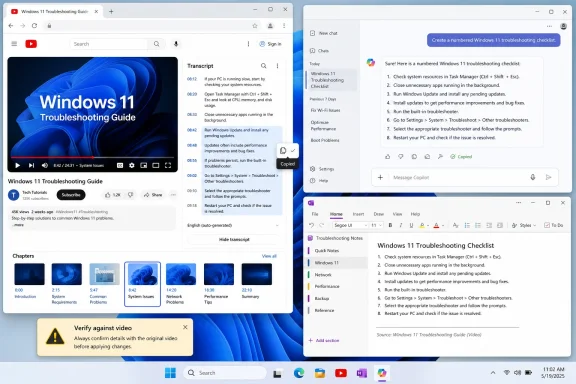
The Khaleej Times walkthrough is appealing because it refuses to overcomplicate the process. On desktop YouTube, many videos expose a transcript through the expanded description area or a “Show transcript” option. Once that transcript is visible, the user can copy it, paste it into an AI assistant, and ask for a summary, study notes, revision guide, beginner explanation, or key takeaways.
That sounds almost too simple to deserve attention, which is precisely why it matters. The consumer AI market has spent the past two years trying to convince users that productivity requires a dedicated copilot pane, an extension, a subscription, or a new workspace. In practice, many useful AI workflows still begin with selecting text and pressing Ctrl+C.
For WindowsForum readers, this is the kind of workflow that sits comfortably inside Edge, Chrome, Firefox, Notepad, Word, OneNote, or whatever note-taking system already exists. There is no need to grant a third-party extension broad access to browsing data just to summarize a caption track. There is no need to install a dubious “YouTube summarizer” whose long-term maintenance and privacy practices may be unclear.
The technique also works because transcripts are unusually AI-friendly input. A transcript is linear, textual, and usually structured around speech rather than formatting. That makes it much easier for a language model to condense than a cluttered web page full of navigation, ads, comments, and unrelated recommendations.
A two-hour developer conference session may contain ten minutes of information that a sysadmin actually needs. A motherboard troubleshooting video may include one BIOS setting buried after a long sponsorship read. A Windows tutorial may solve a problem in the final quarter of the video, after the creator has walked through three basic steps the viewer already knows. The transcript lets the user escape the timeline.
This is not just about impatience. It is about control. Video is excellent when motion, sequence, demonstration, or tone matters; it is inefficient when the user needs facts, commands, settings paths, or decision points. AI summarization lets the user treat a video as a source document rather than a captive viewing session.
That is especially relevant in technical communities. Windows troubleshooting often lives in videos because creators can show Device Manager, Settings, PowerShell, BIOS screens, or obscure installer dialogs more easily than they can describe them. But the person trying to fix a broken driver or understand a new Windows feature may not want a performance. They want the steps.
That distinction matters because the prompt is now the interface. The same transcript can become lecture notes, an executive summary, a command list, a glossary, a revision guide, a meeting brief, or a skeptical fact-checking outline. The quality of the output depends less on the magic of the model than on whether the user tells it what job the notes are supposed to do.
A student may want headings and definitions. A sysadmin may want prerequisites, risks, commands, and rollback steps. A developer may want API names, code snippets, and links to concepts to verify later. A journalist may want claims, names, dates, and places extracted for reporting. The transcript is raw material; the prompt is the production brief.
This is also where Microsoft Copilot, Google Gemini, and ChatGPT differ less than their marketing suggests. All can condense text, reorganize material, and generate outlines. The real advantage comes from giving the model enough context about the intended reader, the desired format, and the level of detail.
That matters at a time when AI vendors are trying to own the whole workflow. Microsoft wants Copilot woven through Windows and Microsoft 365. Google wants Gemini threaded through Search, Workspace, Android, and Chrome. OpenAI wants ChatGPT to become a general work surface. But the YouTube transcript trick shows that users do not always need a vertically integrated AI experience.
They need interoperability. Text is the lowest common denominator, and that is its strength. A transcript copied from YouTube can move into ChatGPT, Gemini, Copilot, Claude, Notepad, Obsidian, OneNote, Word, or an internal enterprise tool. The method is resilient because it does not depend on one vendor’s button being in one vendor’s interface.
There is an old-school PC lesson here. The clipboard remains one of the most important productivity tools ever shipped. AI has not replaced it; AI has made it more valuable.
Automatic captions can also be messy. They may misunderstand names, commands, product labels, acronyms, or technical terms. Anyone who has watched auto-captions turn “BitLocker” into something nonsensical knows the problem. If the transcript is wrong, the AI summary can confidently preserve or amplify the error.
This is where technical videos are especially vulnerable. A transcript that mangles a PowerShell command, registry path, Group Policy setting, or error code can lead to bad notes. The model may smooth over the garble and produce something that reads correctly but is operationally wrong. In consumer advice, that is annoying. In enterprise administration, it can be risky.
The transcript panel is therefore not a guarantee of accuracy. It is a starting point. The closer the content gets to security, compliance, health, law, finance, or production infrastructure, the more the user needs to compare the generated notes against the video and, ideally, against official documentation.
The model can omit the one caveat that mattered. It can collapse two distinct points into one misleading claim. It can infer a conclusion the speaker never made. It can turn a speculative aside into a firm recommendation. It can produce a clean structure that imposes certainty on a messy discussion.
That is the seductive danger of AI notes. A long, rambling transcript looks unreliable because it is obviously raw. A polished summary looks authoritative because it has headings, bullets, and tidy phrasing. Formatting creates trust faster than accuracy earns it.
For Windows enthusiasts and IT pros, the practical rule is simple: use AI summaries to decide where to focus attention, not to replace attention entirely. If a model says a video recommends disabling a security feature, changing firmware settings, editing the registry, or running a command as administrator, that is the point where the user should go back to the original video and verify the details.
Users may eventually paste private webinar transcripts, customer calls, training sessions, confidential briefings, or paid course material into consumer AI tools without thinking carefully about data handling. Enterprises have spent the last several years trying to define where employees can and cannot paste business information. This workflow sits directly in that gray zone.
The safest version of the trick is public-source summarization: public video in, personal notes out. The riskier version is operational summarization: internal recording in, AI output into a workstream. That second scenario needs policy, approved tools, retention controls, and clarity about whether the transcript contains personal data, proprietary information, credentials, customer details, or regulated material.
This is one reason Microsoft has pushed enterprise versions of Copilot so aggressively. The pitch is not only convenience; it is governance. Whether that promise is enough depends on licensing, configuration, tenant controls, and organizational policy, but the underlying point is real. AI summarization is a data movement event, not just a productivity trick.
That does not mean extensions are inherently bad. Power users may prefer them, especially if they summarize frequently, export notes, remove timestamps, or batch-process videos. But extensions should earn their place, particularly in browsers used for banking, work accounts, admin portals, or cloud consoles.
The manual transcript method has a healthy friction to it. The user sees what is being copied. The user chooses where it is pasted. The user can remove irrelevant sections, sponsorship reads, comments, or sensitive fragments before sending the text to an AI service. That small pause is a feature, not a defect.
For IT departments, this is the teachable version of AI adoption. Instead of telling users never to summarize anything, show them the safer pattern: use approved tools, paste only appropriate content, verify outputs, and avoid unnecessary extensions. Practical governance beats blanket panic.
That may subtly change how educational and technical creators produce content. A well-chaptered video with accurate captions is no longer just more accessible; it is more machine-readable. It becomes easier for viewers to extract notes, cite ideas, build study guides, and return to specific sections. The transcript becomes part of the product.
This could push against some of YouTube’s worst incentives. The platform rewards watch time, personality, and retention. AI note-taking rewards structure, clarity, and information density. A creator who buries the answer after twelve minutes of filler may still win the recommendation game, but the transcript economy makes that filler easier to skip.
Of course, there is a darker version too. If viewers increasingly consume summaries instead of videos, creators may lose engagement, context, and revenue. That tension is already visible across the web as AI systems repackage content into answers. YouTube transcripts are simply another battlefield in the larger fight over who captures value from published knowledge.
A user can summarize a long video to decide whether it is worth watching in full. A sysadmin can extract the relevant five minutes from a vendor webinar. A developer can identify the sections of a conference talk that mention a specific API. A learner can generate a glossary before watching so the actual video is easier to follow.
In that model, AI notes improve attention rather than replacing it. They provide a map before the journey. They turn long-form video from an all-or-nothing demand into a navigable source.
This is particularly useful for people with limited time, disabilities, language barriers, or attention constraints. A transcript can be searched, translated, enlarged, skimmed, reorganized, and revisited. AI adds another layer of adaptation. It can explain the same material at a beginner level, extract action items, or reformat the content into something closer to how the user learns.
Google has the obvious structural advantage because it owns YouTube and Gemini. Microsoft has the Windows and productivity advantage through Edge, Copilot, Word, OneNote, Teams, and Microsoft 365. OpenAI has the mindshare advantage with ChatGPT as the default place many users paste text to get work done. The transcript trick sits at the intersection of all three strategies.
What makes the manual method interesting is that it resists lock-in. Google may prefer users to stay inside YouTube and Gemini. Microsoft may prefer Copilot as the workplace summarizer. OpenAI may prefer ChatGPT as the universal assistant. But as long as the transcript is copyable, the user decides.
That portability is worth defending. The web became useful because text could be copied, quoted, indexed, transformed, and moved. AI should not become an excuse to trap user workflows inside sealed panes and proprietary context windows.
A better prompt might say: “Create structured notes from this transcript for a Windows administrator. Preserve any commands exactly. Flag any recommendation that affects security, privacy, registry settings, firmware, or data loss. Include timestamps if present. Do not add information that is not in the transcript.”
That kind of instruction changes the model’s role. It is no longer merely a summarizer. It becomes a clerk, extracting and organizing material under constraints. For technical work, constraints are everything.
The same principle applies to education. “Explain this like I’m a beginner” is useful, but “Create study notes with definitions, examples, likely exam questions, and a list of points I should verify in the original video” is better. The point is not to ask the AI to be smart in the abstract. The point is to tell it what kind of usefulness you need.
If the transcript includes timestamps, users should preserve them where possible. Timestamps turn AI output into an index. They allow the user to jump back to the exact moment where a claim, command, demonstration, or caveat appears. Without them, the summary becomes detached from the original evidence.
This is one reason many AI-generated summaries feel unsatisfying despite being fluent. They compress but do not anchor. They tell the user what the model thinks happened, but not where to verify it. A better workflow asks the AI to include section markers, quoted short phrases, or timestamp references from the transcript when available.
For Windows troubleshooting, reversibility is essential. If a video claims that a certain driver version fixes a problem, the notes should point back to the moment that claim appears. If a tutorial demonstrates a risky step, the notes should make it easy to rewatch before acting. The goal is not just faster consumption; it is safer action.
That is the right balance for everyday AI. Fully automated agents may eventually watch videos, extract tasks, update documents, and schedule follow-ups. For now, the dependable workflow is humbler. Feed the model bounded text. Ask for bounded output. Check anything consequential.
This pattern is also easier to teach. It does not require users to understand embeddings, retrieval systems, context windows, or model families. It requires them to understand that AI is good at transforming text and imperfect at knowing what is true. That is a manageable mental model.
In the long run, AI literacy may look less like learning one product and more like learning these small patterns. Copy clean input. Give precise instructions. Ask for structure. Preserve links to the source. Verify high-stakes claims. Avoid pasting sensitive data into unapproved tools.
The bigger story is that AI is quietly turning the video web back into something searchable, skimmable, and reusable. YouTube made video the default container for knowledge; generative AI is now making the transcript the more valuable artifact. That shift is powerful, but it also comes with a familiar warning: a summary is not the source, and an AI-generated set of notes is only as reliable as the transcript and the model’s interpretation of it.
 The Best AI Feature May Be the Copy Button
The Khaleej Times walkthrough is appealing because it refuses to overcomplicate the process. On desktop YouTube, many videos expose a transcript through the expanded description area or a “Show transcript” option. Once that transcript is visible, the user can copy it, paste it into an AI assistant, and ask for a summary, study notes, revision guide, beginner explanation, or key takeaways.That sounds almost too simple to deserve attention, which is precisely why it matters. The consumer AI market has spent the past two years trying to convince users that productivity requires a dedicated copilot pane, an extension, a subscription, or a new workspace. In practice, many useful AI workflows still begin with selecting text and pressing Ctrl+C.
For WindowsForum readers, this is the kind of workflow that sits comfortably inside Edge, Chrome, Firefox, Notepad, Word, OneNote, or whatever note-taking system already exists. There is no need to grant a third-party extension broad access to browsing data just to summarize a caption track. There is no need to install a dubious “YouTube summarizer” whose long-term maintenance and privacy practices may be unclear.
The technique also works because transcripts are unusually AI-friendly input. A transcript is linear, textual, and usually structured around speech rather than formatting. That makes it much easier for a language model to condense than a cluttered web page full of navigation, ads, comments, and unrelated recommendations.
YouTube Accidentally Built the Study Layer Everyone Wanted
YouTube’s transcript feature was originally a utility layer: useful for accessibility, search, translation, and skipping around a video. But in the AI era, it has become something more important. It is the bridge between a video platform optimized for attention and a text model optimized for compression.A two-hour developer conference session may contain ten minutes of information that a sysadmin actually needs. A motherboard troubleshooting video may include one BIOS setting buried after a long sponsorship read. A Windows tutorial may solve a problem in the final quarter of the video, after the creator has walked through three basic steps the viewer already knows. The transcript lets the user escape the timeline.
This is not just about impatience. It is about control. Video is excellent when motion, sequence, demonstration, or tone matters; it is inefficient when the user needs facts, commands, settings paths, or decision points. AI summarization lets the user treat a video as a source document rather than a captive viewing session.
That is especially relevant in technical communities. Windows troubleshooting often lives in videos because creators can show Device Manager, Settings, PowerShell, BIOS screens, or obscure installer dialogs more easily than they can describe them. But the person trying to fix a broken driver or understand a new Windows feature may not want a performance. They want the steps.
The Prompt Is the Interface
The Khaleej Times article correctly emphasizes that vague prompts produce weaker results. “Summarize this” is serviceable, but it leaves too much discretion to the model. “Turn this transcript into a numbered troubleshooting checklist for Windows 11 users” is more likely to produce something useful.That distinction matters because the prompt is now the interface. The same transcript can become lecture notes, an executive summary, a command list, a glossary, a revision guide, a meeting brief, or a skeptical fact-checking outline. The quality of the output depends less on the magic of the model than on whether the user tells it what job the notes are supposed to do.
A student may want headings and definitions. A sysadmin may want prerequisites, risks, commands, and rollback steps. A developer may want API names, code snippets, and links to concepts to verify later. A journalist may want claims, names, dates, and places extracted for reporting. The transcript is raw material; the prompt is the production brief.
This is also where Microsoft Copilot, Google Gemini, and ChatGPT differ less than their marketing suggests. All can condense text, reorganize material, and generate outlines. The real advantage comes from giving the model enough context about the intended reader, the desired format, and the level of detail.
The Windows Angle Is Bigger Than a Browser Trick
On Windows, this workflow is particularly natural because the operating system is still the place where mixed productivity happens. Users watch in a browser, paste into an AI chat, clean the result in Word, store it in OneNote, share it in Teams, or save it as a Markdown file. The desktop remains the staging area.That matters at a time when AI vendors are trying to own the whole workflow. Microsoft wants Copilot woven through Windows and Microsoft 365. Google wants Gemini threaded through Search, Workspace, Android, and Chrome. OpenAI wants ChatGPT to become a general work surface. But the YouTube transcript trick shows that users do not always need a vertically integrated AI experience.
They need interoperability. Text is the lowest common denominator, and that is its strength. A transcript copied from YouTube can move into ChatGPT, Gemini, Copilot, Claude, Notepad, Obsidian, OneNote, Word, or an internal enterprise tool. The method is resilient because it does not depend on one vendor’s button being in one vendor’s interface.
There is an old-school PC lesson here. The clipboard remains one of the most important productivity tools ever shipped. AI has not replaced it; AI has made it more valuable.
The Limitation Is Hiding in the Word “Many”
The trick works for many YouTube videos, not all of them. That caveat is doing real work. YouTube transcripts depend on captions being available and exposed to the viewer. Some creators upload polished manual captions. Some rely on automatic captions. Some disable captions or publish content where transcripts are unavailable, incomplete, or difficult to access.Automatic captions can also be messy. They may misunderstand names, commands, product labels, acronyms, or technical terms. Anyone who has watched auto-captions turn “BitLocker” into something nonsensical knows the problem. If the transcript is wrong, the AI summary can confidently preserve or amplify the error.
This is where technical videos are especially vulnerable. A transcript that mangles a PowerShell command, registry path, Group Policy setting, or error code can lead to bad notes. The model may smooth over the garble and produce something that reads correctly but is operationally wrong. In consumer advice, that is annoying. In enterprise administration, it can be risky.
The transcript panel is therefore not a guarantee of accuracy. It is a starting point. The closer the content gets to security, compliance, health, law, finance, or production infrastructure, the more the user needs to compare the generated notes against the video and, ideally, against official documentation.
AI Summaries Are Compression, Not Verification
OpenAI’s own help material warns users that ChatGPT can produce inaccurate information and should be checked for important use. That warning applies equally to the broader class of large language models. Summarization feels safer than open-ended generation because the model is working from supplied text, but it is not immune from mistakes.The model can omit the one caveat that mattered. It can collapse two distinct points into one misleading claim. It can infer a conclusion the speaker never made. It can turn a speculative aside into a firm recommendation. It can produce a clean structure that imposes certainty on a messy discussion.
That is the seductive danger of AI notes. A long, rambling transcript looks unreliable because it is obviously raw. A polished summary looks authoritative because it has headings, bullets, and tidy phrasing. Formatting creates trust faster than accuracy earns it.
For Windows enthusiasts and IT pros, the practical rule is simple: use AI summaries to decide where to focus attention, not to replace attention entirely. If a model says a video recommends disabling a security feature, changing firmware settings, editing the registry, or running a command as administrator, that is the point where the user should go back to the original video and verify the details.
The Privacy Trade-Off Is Easy to Miss
Copying a transcript into an AI assistant may feel harmless because the source is public. In many cases, it is. A public YouTube lecture or product demo does not carry the same sensitivity as an internal Teams meeting. But the habit can bleed into riskier territory.Users may eventually paste private webinar transcripts, customer calls, training sessions, confidential briefings, or paid course material into consumer AI tools without thinking carefully about data handling. Enterprises have spent the last several years trying to define where employees can and cannot paste business information. This workflow sits directly in that gray zone.
The safest version of the trick is public-source summarization: public video in, personal notes out. The riskier version is operational summarization: internal recording in, AI output into a workstream. That second scenario needs policy, approved tools, retention controls, and clarity about whether the transcript contains personal data, proprietary information, credentials, customer details, or regulated material.
This is one reason Microsoft has pushed enterprise versions of Copilot so aggressively. The pitch is not only convenience; it is governance. Whether that promise is enough depends on licensing, configuration, tenant controls, and organizational policy, but the underlying point is real. AI summarization is a data movement event, not just a productivity trick.
Browser Extensions Are Convenient, but Text Is Safer
There are many tools that promise one-click YouTube summaries. Some are useful. Some are probably fine. Some may disappear, break when YouTube changes its interface, or ask for permissions users should not casually grant. The Khaleej Times method avoids that entire category of risk by using YouTube’s own transcript interface and an AI assistant chosen by the user.That does not mean extensions are inherently bad. Power users may prefer them, especially if they summarize frequently, export notes, remove timestamps, or batch-process videos. But extensions should earn their place, particularly in browsers used for banking, work accounts, admin portals, or cloud consoles.
The manual transcript method has a healthy friction to it. The user sees what is being copied. The user chooses where it is pasted. The user can remove irrelevant sections, sponsorship reads, comments, or sensitive fragments before sending the text to an AI service. That small pause is a feature, not a defect.
For IT departments, this is the teachable version of AI adoption. Instead of telling users never to summarize anything, show them the safer pattern: use approved tools, paste only appropriate content, verify outputs, and avoid unnecessary extensions. Practical governance beats blanket panic.
The Technique Rewards Better Creators
There is also an interesting creator-side consequence. Videos with accurate captions are more useful in the AI layer. Creators who upload clean transcripts, speak clearly, structure their videos, and use precise terminology will have their work summarized more accurately and reused more often.That may subtly change how educational and technical creators produce content. A well-chaptered video with accurate captions is no longer just more accessible; it is more machine-readable. It becomes easier for viewers to extract notes, cite ideas, build study guides, and return to specific sections. The transcript becomes part of the product.
This could push against some of YouTube’s worst incentives. The platform rewards watch time, personality, and retention. AI note-taking rewards structure, clarity, and information density. A creator who buries the answer after twelve minutes of filler may still win the recommendation game, but the transcript economy makes that filler easier to skip.
Of course, there is a darker version too. If viewers increasingly consume summaries instead of videos, creators may lose engagement, context, and revenue. That tension is already visible across the web as AI systems repackage content into answers. YouTube transcripts are simply another battlefield in the larger fight over who captures value from published knowledge.
The Best Use Case Is Not Laziness, but Triage
The lazy caricature is obvious: students paste a lecture transcript into AI, generate notes, and never watch the lecture. That happens. But it is not the most interesting use case. The more defensible use is triage.A user can summarize a long video to decide whether it is worth watching in full. A sysadmin can extract the relevant five minutes from a vendor webinar. A developer can identify the sections of a conference talk that mention a specific API. A learner can generate a glossary before watching so the actual video is easier to follow.
In that model, AI notes improve attention rather than replacing it. They provide a map before the journey. They turn long-form video from an all-or-nothing demand into a navigable source.
This is particularly useful for people with limited time, disabilities, language barriers, or attention constraints. A transcript can be searched, translated, enlarged, skimmed, reorganized, and revisited. AI adds another layer of adaptation. It can explain the same material at a beginner level, extract action items, or reformat the content into something closer to how the user learns.
The Small Workflow That Reveals the AI Platform War
There is a reason every major AI company wants to summarize video. Video contains a vast amount of human explanation that has historically been difficult to index in detail. If an assistant can reliably understand and condense video, it becomes a gateway to education, entertainment, support, research, and commerce.Google has the obvious structural advantage because it owns YouTube and Gemini. Microsoft has the Windows and productivity advantage through Edge, Copilot, Word, OneNote, Teams, and Microsoft 365. OpenAI has the mindshare advantage with ChatGPT as the default place many users paste text to get work done. The transcript trick sits at the intersection of all three strategies.
What makes the manual method interesting is that it resists lock-in. Google may prefer users to stay inside YouTube and Gemini. Microsoft may prefer Copilot as the workplace summarizer. OpenAI may prefer ChatGPT as the universal assistant. But as long as the transcript is copyable, the user decides.
That portability is worth defending. The web became useful because text could be copied, quoted, indexed, transformed, and moved. AI should not become an excuse to trap user workflows inside sealed panes and proprietary context windows.
The Notes Are Only as Good as the Question
The most effective users will quickly move beyond generic summary prompts. They will ask the model to preserve timestamps, separate claims from opinions, list commands exactly as spoken, flag unclear sections, identify assumptions, or generate questions for review. They will ask for uncertainty rather than just concision.A better prompt might say: “Create structured notes from this transcript for a Windows administrator. Preserve any commands exactly. Flag any recommendation that affects security, privacy, registry settings, firmware, or data loss. Include timestamps if present. Do not add information that is not in the transcript.”
That kind of instruction changes the model’s role. It is no longer merely a summarizer. It becomes a clerk, extracting and organizing material under constraints. For technical work, constraints are everything.
The same principle applies to education. “Explain this like I’m a beginner” is useful, but “Create study notes with definitions, examples, likely exam questions, and a list of points I should verify in the original video” is better. The point is not to ask the AI to be smart in the abstract. The point is to tell it what kind of usefulness you need.
The Real Productivity Gain Is Reversibility
Good notes let a user return to the source. Bad notes replace the source with an uncheckable paraphrase. The distinction matters.If the transcript includes timestamps, users should preserve them where possible. Timestamps turn AI output into an index. They allow the user to jump back to the exact moment where a claim, command, demonstration, or caveat appears. Without them, the summary becomes detached from the original evidence.
This is one reason many AI-generated summaries feel unsatisfying despite being fluent. They compress but do not anchor. They tell the user what the model thinks happened, but not where to verify it. A better workflow asks the AI to include section markers, quoted short phrases, or timestamp references from the transcript when available.
For Windows troubleshooting, reversibility is essential. If a video claims that a certain driver version fixes a problem, the notes should point back to the moment that claim appears. If a tutorial demonstrates a risky step, the notes should make it easy to rewatch before acting. The goal is not just faster consumption; it is safer action.
This Trick Works Because It Keeps Humans in the Loop
The phrase “human in the loop” is overused in enterprise AI, but here it actually fits. The user selects the video, opens the transcript, chooses the AI tool, writes the prompt, reads the output, and decides what to verify. The model is powerful, but it is not autonomous.That is the right balance for everyday AI. Fully automated agents may eventually watch videos, extract tasks, update documents, and schedule follow-ups. For now, the dependable workflow is humbler. Feed the model bounded text. Ask for bounded output. Check anything consequential.
This pattern is also easier to teach. It does not require users to understand embeddings, retrieval systems, context windows, or model families. It requires them to understand that AI is good at transforming text and imperfect at knowing what is true. That is a manageable mental model.
In the long run, AI literacy may look less like learning one product and more like learning these small patterns. Copy clean input. Give precise instructions. Ask for structure. Preserve links to the source. Verify high-stakes claims. Avoid pasting sensitive data into unapproved tools.
The Clipboard Workflow Has Rules Worth Keeping
The YouTube transcript trick is useful precisely because it is simple, but simple workflows still deserve guardrails. Treat AI-generated notes as a first draft of understanding, not as a final authority.- Use YouTube’s built-in transcript when it is available before installing a browser extension that asks for broad permissions.
- Give the AI assistant a specific role, audience, and output format instead of asking for a generic summary.
- Preserve timestamps when possible so the notes remain tied to the original video.
- Verify commands, settings changes, legal claims, health advice, financial guidance, and security recommendations against the original source.
- Avoid pasting private, internal, paid, or regulated transcripts into consumer AI tools unless your organization explicitly allows it.
- Remember that a polished summary can still omit context, misunderstand speech, or invent certainty that was not in the video.
References
- Primary source: Khaleej Times
Published: 2026-07-07T13:50:11.779777
Loading…
www.khaleejtimes.com - Official source: support.google.com
Loading…
support.google.com - Related coverage: youtubetranscribes.com
Loading…
youtubetranscribes.com - Related coverage: umatechnology.org
Loading…
umatechnology.org - Related coverage: youtubetranscriptfast.com
Loading…
youtubetranscriptfast.com - Related coverage: notelm.ai
Loading…
www.notelm.ai