

CNX Software’s June 14, 2026 follow-up review of the Creality Sermoon S1 shows a simple but uncomfortable truth about modern prosumer 3D scanning: the scanner is only half the product, and the Windows workstation behind it can decide whether the experience feels professional or barely usable. The same scanner that limped through infrared captures on an under-specced Intel laptop became a much more convincing tool once paired with a Khadas Mind 2 mini PC and an NVIDIA GeForce RTX 5060 Ti 16GB dock. That shift matters because 3D scanning is no longer just a niche add-on for makers; it is becoming another workload where GPU acceleration, memory headroom, and software maturity define the real cost of entry.
The Sermoon S1 itself is not the villain here. If anything, the review makes Creality’s hardware look more capable than the earlier testing suggested. But the story is less flattering for anyone hoping that a high-end scanner can simply be plugged into whatever Windows 11 laptop happens to be nearby. In this corner of the creator hardware market, “minimum requirements” are not paperwork. They are the difference between a workflow and a punishment.
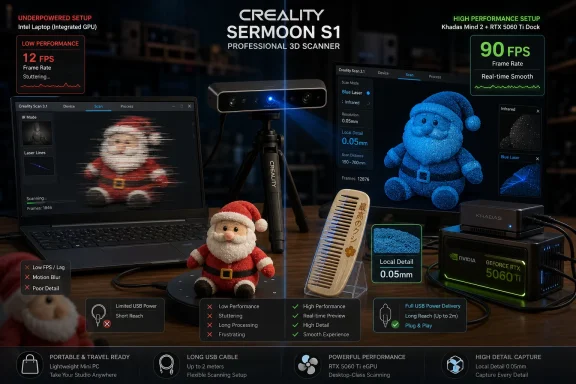
The earlier phase of the review used an Intel Core i5-13500H laptop with 16GB of RAM and no discrete NVIDIA GPU. That machine could run Windows 11 and Creality Scan 4, but it was below Creality’s stated expectations for the scanner, which call for NVIDIA graphics and 32GB of memory. The result was predictable but still instructive: infrared scanning could be made to work, but only at roughly 4 to 5 frames per second, and blue light scanning was effectively off the table.
That is the sort of experience that can easily be misread as a scanner problem. A new user sees tracking loss, slow feedback, long processing times, and failed modes, then concludes that the hardware is flaky or the software is unfinished. The more accurate conclusion is harsher and more expensive: the scanner assumes a host PC with enough GPU and memory resources to keep the capture loop alive.
The Khadas setup changed that equation. The Mind 2 mini PC brought 32GB of RAM and Intel’s Core Ultra 7 155H, while the Mind Graphics 2 dock added a desktop-class NVIDIA GeForce RTX 5060 Ti 16GB eGPU. Creality Scan 4’s own performance estimate moved from “Poor PC performance” to “Excellent PC performance,” with the software reporting up to 90 FPS in blue laser mode and 30 FPS in infrared mode.
That leap is not a benchmark curiosity. It is the difference between scanning as an interactive process and scanning as a lottery. A scanner depends on continuous motion, tracking, pose estimation, point cloud generation, and operator feedback. When the machine cannot keep up, the person holding the scanner starts compensating for the computer instead of capturing the object.
The reported frame rate tells the story more cleanly than any marketing table. The screenshot showed 21 FPS, but the reviewer says the scan generally hovered around 29 FPS. That is close enough to real-time feedback that the user can move naturally around the object, adjust angle and distance, and see whether the capture is building correctly.
The faster host also made calibration less painful. After a firmware update and a fresh calibration, the process reportedly took only two to three minutes, helped by the higher frame rate. Calibration is one of those chores that separates lab hardware from daily-use hardware: if it is slow, brittle, or easy to botch, users postpone it, and results suffer.
The infrared scan was not perfect. There were extra parts and holes, and the workflow still required Fusion and Mesh processing with settings such as “Remove Isolated Parts,” “Fill Small Holes,” and “Water tight.” Even after reducing the mesh to 1.2 million triangles, Fusion took several minutes. But that is a very different complaint from “the scan barely works.” It is the normal post-processing tax of 3D scanning rather than the emergency response to an underpowered system.
With the RTX-equipped dock, blue laser mode finally became available in practice. Creality Scan 4 reported up to 90 FPS, and the reviewer was able to test detailed objects rather than merely confirm that the mode launches. That is the good news.
The first target, however, was almost designed to punish the workflow: a 32mm Thai 20 baht commemorative coin with fine text, reflective surfaces, and details that can be difficult to read even by eye. The reviewer skipped scanning spray, despite acknowledging that a shiny object of this kind would normally benefit from it. That decision makes the test less controlled, but more revealing for ordinary users, who often try the object they have before buying consumables or setting up a formal scanning station.
Markers had to be placed around the object, and the scan was configured for blue laser mode with marker tracking, point cloud scan mode, parallel lines, and flat-base exclusion. The initial scan captured the object quickly but did not resolve enough detail. The answer was “Local Detail” mode at 0.05mm resolution, applied across the coin’s detailed face.
That extra pass improved the result enough to make some text readable, including “20 Baht,” but the workflow became fussy. The reviewer had to scan both sides, run Fusion Batch Process with marker removal, use ultra-detail and the finest available resolution, keep noise removal at 30%, and then manually align the two faces. Automatic marker alignment reportedly merged the two faces incorrectly instead of forming a coin, forcing a manual feature alignment using strategic points.
This is where the review becomes most useful. The RTX 5060 Ti dock did not magically turn 3D scanning into photography. It made the workflow possible, fast, and responsive, but it did not remove the need to understand markers, local resolution, scan cleanup, alignment, meshing, and the physical behavior of reflective materials. Better hardware removes one bottleneck. It does not abolish the craft.
Small, shiny, shallow-relief objects are hard. They reflect light, they offer little geometry for tracking, and their most interesting details may sit near the edge of what the scanner, operator, and reconstruction pipeline can reliably preserve. Scanning spray might have helped. A more careful side pass might have helped. A simpler coin reportedly produced better results in another scan when spray was used. But the review’s messy result is exactly the kind of result a new user should see before spending thousands of dollars.
The artifacts around marker positions were especially telling. The reviewer recommends cleaning the scan before later processing steps, because blobs and unwanted points became frustrating once carried forward. This is a software workflow lesson as much as a scanner lesson: garbage in the point cloud does not politely disappear just because the next pipeline stage has a professional-sounding name.
Manual alignment was another reality check. The expectation that markers would make the two sides of the coin snap into place did not hold. Instead, automatic alignment merged the faces incorrectly, and manual feature alignment had to rescue the scan. For hobbyists, that is a learning curve. For professional users, it is billable time.
The important distinction is that the system was now failing in understandable, correctable ways. On the earlier laptop, blue laser mode was not meaningfully usable. On the Khadas and NVIDIA rig, the operator could at least reach the harder problems: material preparation, marker strategy, scan order, cleanup discipline, and alignment.
At that setting, the overall shape came in quickly, reportedly in less than a minute at a smooth 90 FPS. That alone is a strong demonstration of what the upgraded workstation changed. Instead of waiting on the machine, the reviewer could capture the object, inspect the weak area, and switch techniques.
The Japanese text was not clear at the default resolution, so the reviewer enabled Local Detail mode and selected the text area. After another short scan, the lettering became clear. That is the Sermoon S1 workflow at its most convincing: a fast broad capture, followed by selective high-resolution passes only where detail matters.
The scan still needed cleanup. There was dirt around the scan, and the reviewer had to delete unwanted regions before and after Fusion. Because both sides of the comb were identical, the reviewer hoped for a duplicate scan function but did not find one, so the object had to be flipped and scanned again. Manual feature alignment was again used to combine the two sides.
The final Mesh step showed open areas, marked in yellow, which were then closed using Hole Filling in the Mesh Processing tab. The finished result exported to STL and imported into Blender without issue. That is probably the most commercially meaningful sentence in the review: the scan moved from Creality’s capture software into a standard 3D workflow.
That makes the Sermoon S1 another example of a broader Windows hardware pattern. The PC is no longer just the place where files are saved. It is the real-time compute node that decides whether a peripheral’s advertised capability can be reached. We have seen this in AI cameras, local LLM tools, video upscaling, photogrammetry, CAD, and now prosumer 3D scanning.
The review also shows why eGPU docks remain more interesting than their niche reputation suggests. A mini PC with an integrated GPU may be convenient, but some workloads still want NVIDIA CUDA-class acceleration, abundant VRAM, and a driver ecosystem that creative software vendors target first. The Khadas Mind Graphics 2 is not just a gaming accessory in this scenario. It is the part that turns a small PC into a field workstation.
There is a portability angle here too. A desktop tower could probably do the job for less money or with more upgrade flexibility, but it is awkward around a large object. A mini PC and graphics dock can be moved to the scanning location, repositioned when the USB cable is too short, and carried with the scanner. That matters when the thing being scanned is not sitting conveniently beside a workstation.
Still, Windows users should not confuse “portable” with “casual.” This is not a plug-and-scan accessory for a random office laptop. It is a specialized peripheral whose practical host requirements look closer to mobile CAD, GPU rendering, or local AI inference than to ordinary USB devices.
That sounds mundane until you imagine scanning something larger: a chair, a sculpture, a body panel, a piece of workshop equipment, or the side of a vehicle. The scanner operator needs freedom of movement, and the host system needs to remain close enough for the cable. If the cable limits motion, the scan path changes, and the scan quality can follow.
Wi-Fi is the obvious answer, and Creality supports wireless operation through an optional kit. But the review correctly treats Wi-Fi as a trade-off rather than a pure upgrade. Wireless scanning may be more convenient for large objects, yet bandwidth and latency can become constraints depending on mode and parameters.
This is where high-end prosumer hardware often lives: between lab-grade discipline and consumer-grade expectations. USB gives speed but restricts movement. Wi-Fi gives freedom but may compromise throughput. Blue laser gives detail but demands markers and cleanup. Infrared gives speed but still needs post-processing. None of these are deal-breakers, but all of them shape the buying decision.
That figure should reset expectations. A buyer who already owns a strong NVIDIA-equipped workstation may view the Sermoon S1 as a $2,299 scanner. A buyer starting from an ordinary laptop should view it as part of a $4,000-plus workstation investment. The difference is not academic, because the earlier testing showed that falling below the recommended PC class can erase entire modes and turn infrared scanning into a chore.
This is the trap in many creator-hardware categories. The peripheral has a sticker price, but the workflow has a system price. A camera needs storage and lenses. A CNC router needs tooling and dust collection. A 3D printer needs filament, drying, slicer tuning, and maintenance. A 3D scanner needs compute, markers, spray for difficult objects, software literacy, and post-processing time.
The Sermoon S1 may be good value for a small shop, a product designer, an archivist, a repair business, or a serious maker who can turn scans into revenue or reusable models. It is harder to justify as a casual hobby purchase unless the buyer already has the PC and accepts the learning curve. That is not a criticism of Creality so much as a reality check on the category.
The review’s strongest implicit warning is that a scanner spec sheet can overstate simplicity without lying. The hardware can be capable, the software can work, and the results can be useful — while the overall process still demands patience, money, and a workstation that many users do not already own.
But the reviewer’s experience also suggests that the software does not always guide the user out of trouble. Marker artifacts persisted. Automatic alignment failed on the coin. Cleanup timing mattered. Local Detail mode had to be discovered and applied selectively. The lack of an obvious duplicate-scan workflow for a symmetrical object added unnecessary repetition.
This is familiar territory for Windows creative software. The tools are powerful, but the interface assumes that the user will learn the pipeline rather than be carried through it. That can be acceptable for professional users, who expect control and are willing to iterate. It is less friendly to buyers who arrive from consumer 3D printing and expect a slicer-like experience.
The review also makes a case for better workflow templates. A coin, a comb, a face, a bust, and a large object are not the same job. Creality Scan could do more to encode best practices for object class, surface finish, marker placement, alignment strategy, and when to use Local Detail. The hardware may be high-end, but software guidance is often what makes high-end hardware feel accessible.
That said, the final comb result matters. After cleanup, alignment, mesh processing, and hole filling, the model exported to Blender without issue. For many users, that is the line between a toy and a tool. Once the scan leaves vendor software and survives in a standard 3D application, the rest of the workflow opens up.
That distinction is important for anyone evaluating 3D scanning reviews. A bad scan can come from a bad scanner, bad lighting, bad material preparation, weak tracking, poor marker placement, inadequate compute, software bugs, or operator inexperience. Without a capable PC, it is hard to know which failure you are seeing. With the upgraded rig, the remaining failures became more diagnostic.
The infrared plush scan demonstrated speed and usability. The coin demonstrated the limits of reflective micro-detail and the importance of preparation. The comb demonstrated a realistic blue laser workflow with local detail and successful export. Together, those tests paint a more credible picture than a single perfect demo object would have.
The most useful reviews are often not the cleanest ones. This one includes awkward artifacts, imperfect alignment, cable complaints, long processing steps, and a failed expectation around automatic marker alignment. Those details are precisely why it is valuable. They show what a buyer will actually have to manage after the unboxing glow fades.
That use case is different from a desktop scanning bench, where a tower workstation, fixed turntable, controlled lighting, and prepared surfaces might be easier. It is also different from casual mobile scanning with a phone, where convenience outranks precision. The Sermoon S1 with a portable NVIDIA workstation sits in the middle: too serious to be casual, too flexible to be locked to a lab.
For Windows enthusiasts, this is also a reminder that small form factor PCs are no longer defined only by office productivity or media playback. With docks, external GPUs, and high-speed interconnects, they can become modular workstations. The catch is that every module adds cost and another point of workflow dependency.
The RTX 5060 Ti 16GB dock’s role is especially notable because VRAM and GPU acceleration are becoming a dividing line in creative workloads. We usually discuss that in the context of games, AI, video, and rendering. This review adds 3D scanning to the pile of tasks where integrated graphics may run the software but discrete NVIDIA hardware makes the experience viable.
The lesson for sysadmins and lab managers is practical. If a department asks for a scanner, do not budget only for the scanner. Budget for the host, the GPU, memory, cabling, wireless kit if needed, markers, spray, training time, and storage. A 1.2 million-triangle mesh is not a Word document.
The Sermoon S1 itself is not the villain here. If anything, the review makes Creality’s hardware look more capable than the earlier testing suggested. But the story is less flattering for anyone hoping that a high-end scanner can simply be plugged into whatever Windows 11 laptop happens to be nearby. In this corner of the creator hardware market, “minimum requirements” are not paperwork. They are the difference between a workflow and a punishment.
 The Scanner Was Never the Whole Workstation
The earlier phase of the review used an Intel Core i5-13500H laptop with 16GB of RAM and no discrete NVIDIA GPU. That machine could run Windows 11 and Creality Scan 4, but it was below Creality’s stated expectations for the scanner, which call for NVIDIA graphics and 32GB of memory. The result was predictable but still instructive: infrared scanning could be made to work, but only at roughly 4 to 5 frames per second, and blue light scanning was effectively off the table.That is the sort of experience that can easily be misread as a scanner problem. A new user sees tracking loss, slow feedback, long processing times, and failed modes, then concludes that the hardware is flaky or the software is unfinished. The more accurate conclusion is harsher and more expensive: the scanner assumes a host PC with enough GPU and memory resources to keep the capture loop alive.
The Khadas setup changed that equation. The Mind 2 mini PC brought 32GB of RAM and Intel’s Core Ultra 7 155H, while the Mind Graphics 2 dock added a desktop-class NVIDIA GeForce RTX 5060 Ti 16GB eGPU. Creality Scan 4’s own performance estimate moved from “Poor PC performance” to “Excellent PC performance,” with the software reporting up to 90 FPS in blue laser mode and 30 FPS in infrared mode.
That leap is not a benchmark curiosity. It is the difference between scanning as an interactive process and scanning as a lottery. A scanner depends on continuous motion, tracking, pose estimation, point cloud generation, and operator feedback. When the machine cannot keep up, the person holding the scanner starts compensating for the computer instead of capturing the object.
Infrared Mode Becomes the Easy Part Once the PC Stops Fighting Back
The most dramatic comparison came from infrared mode, which is supposed to be the Sermoon S1’s friendlier mode for larger objects, faces, busts, sculptures, and items with enough geometry or texture to track cleanly. On the earlier laptop, a usable scan could take 15 minutes and still feel like a struggle. On the Khadas and NVIDIA dock combination, the same class of job — a largish Santa Claus plush toy — was completed in just over two minutes.The reported frame rate tells the story more cleanly than any marketing table. The screenshot showed 21 FPS, but the reviewer says the scan generally hovered around 29 FPS. That is close enough to real-time feedback that the user can move naturally around the object, adjust angle and distance, and see whether the capture is building correctly.
The faster host also made calibration less painful. After a firmware update and a fresh calibration, the process reportedly took only two to three minutes, helped by the higher frame rate. Calibration is one of those chores that separates lab hardware from daily-use hardware: if it is slow, brittle, or easy to botch, users postpone it, and results suffer.
The infrared scan was not perfect. There were extra parts and holes, and the workflow still required Fusion and Mesh processing with settings such as “Remove Isolated Parts,” “Fill Small Holes,” and “Water tight.” Even after reducing the mesh to 1.2 million triangles, Fusion took several minutes. But that is a very different complaint from “the scan barely works.” It is the normal post-processing tax of 3D scanning rather than the emergency response to an underpowered system.
Blue Laser Mode Exposes Both the Promise and the Pain
Blue laser scanning is the Sermoon S1’s more demanding party trick. It is meant for high-accuracy, high-detail work, typically with tracking markers, and it can target much smaller features than infrared mode. It was also the mode that the earlier Intel-only laptop could not use at all.With the RTX-equipped dock, blue laser mode finally became available in practice. Creality Scan 4 reported up to 90 FPS, and the reviewer was able to test detailed objects rather than merely confirm that the mode launches. That is the good news.
The first target, however, was almost designed to punish the workflow: a 32mm Thai 20 baht commemorative coin with fine text, reflective surfaces, and details that can be difficult to read even by eye. The reviewer skipped scanning spray, despite acknowledging that a shiny object of this kind would normally benefit from it. That decision makes the test less controlled, but more revealing for ordinary users, who often try the object they have before buying consumables or setting up a formal scanning station.
Markers had to be placed around the object, and the scan was configured for blue laser mode with marker tracking, point cloud scan mode, parallel lines, and flat-base exclusion. The initial scan captured the object quickly but did not resolve enough detail. The answer was “Local Detail” mode at 0.05mm resolution, applied across the coin’s detailed face.
That extra pass improved the result enough to make some text readable, including “20 Baht,” but the workflow became fussy. The reviewer had to scan both sides, run Fusion Batch Process with marker removal, use ultra-detail and the finest available resolution, keep noise removal at 30%, and then manually align the two faces. Automatic marker alignment reportedly merged the two faces incorrectly instead of forming a coin, forcing a manual feature alignment using strategic points.
This is where the review becomes most useful. The RTX 5060 Ti dock did not magically turn 3D scanning into photography. It made the workflow possible, fast, and responsive, but it did not remove the need to understand markers, local resolution, scan cleanup, alignment, meshing, and the physical behavior of reflective materials. Better hardware removes one bottleneck. It does not abolish the craft.
The Coin Test Was a Warning, Not a Failure
It would be tempting to treat the coin result as a disappointment. The final mesh was not ideal, much of the text remained unreadable, and the side of the coin was not captured well enough. But that conclusion would miss the point: the coin showed where the Sermoon S1’s advertised precision runs into the realities of object preparation and software cleanup.Small, shiny, shallow-relief objects are hard. They reflect light, they offer little geometry for tracking, and their most interesting details may sit near the edge of what the scanner, operator, and reconstruction pipeline can reliably preserve. Scanning spray might have helped. A more careful side pass might have helped. A simpler coin reportedly produced better results in another scan when spray was used. But the review’s messy result is exactly the kind of result a new user should see before spending thousands of dollars.
The artifacts around marker positions were especially telling. The reviewer recommends cleaning the scan before later processing steps, because blobs and unwanted points became frustrating once carried forward. This is a software workflow lesson as much as a scanner lesson: garbage in the point cloud does not politely disappear just because the next pipeline stage has a professional-sounding name.
Manual alignment was another reality check. The expectation that markers would make the two sides of the coin snap into place did not hold. Instead, automatic alignment merged the faces incorrectly, and manual feature alignment had to rescue the scan. For hobbyists, that is a learning curve. For professional users, it is billable time.
The important distinction is that the system was now failing in understandable, correctable ways. On the earlier laptop, blue laser mode was not meaningfully usable. On the Khadas and NVIDIA rig, the operator could at least reach the harder problems: material preparation, marker strategy, scan order, cleanup discipline, and alignment.
The Comb Was the More Honest Demo
The second blue laser test, a comb with Japanese text, was a better match for the scanner’s strengths. It was larger than the coin, less visually hostile, and still included fine detail that could test local resolution. The reviewer added 6mm markers, used blue laser scanning with parallel lines, and started at the default 0.5mm resolution.At that setting, the overall shape came in quickly, reportedly in less than a minute at a smooth 90 FPS. That alone is a strong demonstration of what the upgraded workstation changed. Instead of waiting on the machine, the reviewer could capture the object, inspect the weak area, and switch techniques.
The Japanese text was not clear at the default resolution, so the reviewer enabled Local Detail mode and selected the text area. After another short scan, the lettering became clear. That is the Sermoon S1 workflow at its most convincing: a fast broad capture, followed by selective high-resolution passes only where detail matters.
The scan still needed cleanup. There was dirt around the scan, and the reviewer had to delete unwanted regions before and after Fusion. Because both sides of the comb were identical, the reviewer hoped for a duplicate scan function but did not find one, so the object had to be flipped and scanned again. Manual feature alignment was again used to combine the two sides.
The final Mesh step showed open areas, marked in yellow, which were then closed using Hole Filling in the Mesh Processing tab. The finished result exported to STL and imported into Blender without issue. That is probably the most commercially meaningful sentence in the review: the scan moved from Creality’s capture software into a standard 3D workflow.
Windows Is the Default Because the Software Stack Says So
For WindowsForum readers, the operating system detail is not incidental. The Sermoon S1 does not support Linux through Creality’s desktop software path. Users need Windows or macOS, with Android and iPhone possible through an optional Wi-Fi kit. In practice, the reviewed setup is a Windows creator workstation: Creality Scan 4, GPU acceleration, USB capture, local mesh processing, and export to STL for downstream tools such as Blender.That makes the Sermoon S1 another example of a broader Windows hardware pattern. The PC is no longer just the place where files are saved. It is the real-time compute node that decides whether a peripheral’s advertised capability can be reached. We have seen this in AI cameras, local LLM tools, video upscaling, photogrammetry, CAD, and now prosumer 3D scanning.
The review also shows why eGPU docks remain more interesting than their niche reputation suggests. A mini PC with an integrated GPU may be convenient, but some workloads still want NVIDIA CUDA-class acceleration, abundant VRAM, and a driver ecosystem that creative software vendors target first. The Khadas Mind Graphics 2 is not just a gaming accessory in this scenario. It is the part that turns a small PC into a field workstation.
There is a portability angle here too. A desktop tower could probably do the job for less money or with more upgrade flexibility, but it is awkward around a large object. A mini PC and graphics dock can be moved to the scanning location, repositioned when the USB cable is too short, and carried with the scanner. That matters when the thing being scanned is not sitting conveniently beside a workstation.
Still, Windows users should not confuse “portable” with “casual.” This is not a plug-and-scan accessory for a random office laptop. It is a specialized peripheral whose practical host requirements look closer to mobile CAD, GPU rendering, or local AI inference than to ordinary USB devices.
The USB Cable Is a Small Detail With Big Workflow Consequences
One of the most grounded complaints in the review is the USB cable. The cable is useful because it enables maximum frame rate, but it can be too short for larger objects. During the Santa Claus plush scan, the reviewer had to adjust the mini PC and object position because cable reach became a constraint.That sounds mundane until you imagine scanning something larger: a chair, a sculpture, a body panel, a piece of workshop equipment, or the side of a vehicle. The scanner operator needs freedom of movement, and the host system needs to remain close enough for the cable. If the cable limits motion, the scan path changes, and the scan quality can follow.
Wi-Fi is the obvious answer, and Creality supports wireless operation through an optional kit. But the review correctly treats Wi-Fi as a trade-off rather than a pure upgrade. Wireless scanning may be more convenient for large objects, yet bandwidth and latency can become constraints depending on mode and parameters.
This is where high-end prosumer hardware often lives: between lab-grade discipline and consumer-grade expectations. USB gives speed but restricts movement. Wi-Fi gives freedom but may compromise throughput. Blue laser gives detail but demands markers and cleanup. Infrared gives speed but still needs post-processing. None of these are deal-breakers, but all of them shape the buying decision.
The $4,747 Lesson Is That “High-End Scanner” Means System Budget
The most important number in the review is not 90 FPS or 0.05mm. It is $4,747. That is the approximate total hardware cost of the reviewed setup: $2,299 for the Creality Sermoon S1, $1,099 for the Khadas Mind 2, and $1,349 for the Mind Graphics 2 dock.That figure should reset expectations. A buyer who already owns a strong NVIDIA-equipped workstation may view the Sermoon S1 as a $2,299 scanner. A buyer starting from an ordinary laptop should view it as part of a $4,000-plus workstation investment. The difference is not academic, because the earlier testing showed that falling below the recommended PC class can erase entire modes and turn infrared scanning into a chore.
This is the trap in many creator-hardware categories. The peripheral has a sticker price, but the workflow has a system price. A camera needs storage and lenses. A CNC router needs tooling and dust collection. A 3D printer needs filament, drying, slicer tuning, and maintenance. A 3D scanner needs compute, markers, spray for difficult objects, software literacy, and post-processing time.
The Sermoon S1 may be good value for a small shop, a product designer, an archivist, a repair business, or a serious maker who can turn scans into revenue or reusable models. It is harder to justify as a casual hobby purchase unless the buyer already has the PC and accepts the learning curve. That is not a criticism of Creality so much as a reality check on the category.
The review’s strongest implicit warning is that a scanner spec sheet can overstate simplicity without lying. The hardware can be capable, the software can work, and the results can be useful — while the overall process still demands patience, money, and a workstation that many users do not already own.
Creality Scan 4 Looks Capable, but Still Makes the User Earn It
Creality Scan 4 comes across as a functional but demanding application. It can assess host performance, update firmware, calibrate the scanner, run infrared and blue laser modes, support marker workflows, process Fusion and Meshing, remove isolated parts, fill holes, create watertight meshes, and export usable STL files. That is a substantial pipeline.But the reviewer’s experience also suggests that the software does not always guide the user out of trouble. Marker artifacts persisted. Automatic alignment failed on the coin. Cleanup timing mattered. Local Detail mode had to be discovered and applied selectively. The lack of an obvious duplicate-scan workflow for a symmetrical object added unnecessary repetition.
This is familiar territory for Windows creative software. The tools are powerful, but the interface assumes that the user will learn the pipeline rather than be carried through it. That can be acceptable for professional users, who expect control and are willing to iterate. It is less friendly to buyers who arrive from consumer 3D printing and expect a slicer-like experience.
The review also makes a case for better workflow templates. A coin, a comb, a face, a bust, and a large object are not the same job. Creality Scan could do more to encode best practices for object class, surface finish, marker placement, alignment strategy, and when to use Local Detail. The hardware may be high-end, but software guidance is often what makes high-end hardware feel accessible.
That said, the final comb result matters. After cleanup, alignment, mesh processing, and hole filling, the model exported to Blender without issue. For many users, that is the line between a toy and a tool. Once the scan leaves vendor software and survives in a standard 3D application, the rest of the workflow opens up.
The Real Upgrade Was From Experiment to Instrument
The Khadas and NVIDIA setup did not merely make the Sermoon S1 faster. It changed the character of the review. The earlier laptop test was about whether the scanner could be coaxed into doing anything useful below its requirements. This test was about what the scanner can do when the host PC is no longer the obvious bottleneck.That distinction is important for anyone evaluating 3D scanning reviews. A bad scan can come from a bad scanner, bad lighting, bad material preparation, weak tracking, poor marker placement, inadequate compute, software bugs, or operator inexperience. Without a capable PC, it is hard to know which failure you are seeing. With the upgraded rig, the remaining failures became more diagnostic.
The infrared plush scan demonstrated speed and usability. The coin demonstrated the limits of reflective micro-detail and the importance of preparation. The comb demonstrated a realistic blue laser workflow with local detail and successful export. Together, those tests paint a more credible picture than a single perfect demo object would have.
The most useful reviews are often not the cleanest ones. This one includes awkward artifacts, imperfect alignment, cable complaints, long processing steps, and a failed expectation around automatic marker alignment. Those details are precisely why it is valuable. They show what a buyer will actually have to manage after the unboxing glow fades.
The Sermoon S1’s Best Case Is a Mobile Windows Scanning Bench
The reviewed combination points toward a specific kind of buyer: someone who needs a powerful but movable Windows-based scanning station. The Khadas Mind 2 and Mind Graphics 2 dock are expensive together, but they solve a real deployment problem. They bring GPU-class performance into a compact setup that can travel to the object.That use case is different from a desktop scanning bench, where a tower workstation, fixed turntable, controlled lighting, and prepared surfaces might be easier. It is also different from casual mobile scanning with a phone, where convenience outranks precision. The Sermoon S1 with a portable NVIDIA workstation sits in the middle: too serious to be casual, too flexible to be locked to a lab.
For Windows enthusiasts, this is also a reminder that small form factor PCs are no longer defined only by office productivity or media playback. With docks, external GPUs, and high-speed interconnects, they can become modular workstations. The catch is that every module adds cost and another point of workflow dependency.
The RTX 5060 Ti 16GB dock’s role is especially notable because VRAM and GPU acceleration are becoming a dividing line in creative workloads. We usually discuss that in the context of games, AI, video, and rendering. This review adds 3D scanning to the pile of tasks where integrated graphics may run the software but discrete NVIDIA hardware makes the experience viable.
The lesson for sysadmins and lab managers is practical. If a department asks for a scanner, do not budget only for the scanner. Budget for the host, the GPU, memory, cabling, wireless kit if needed, markers, spray, training time, and storage. A 1.2 million-triangle mesh is not a Word document.
The Fine Print That Buyers Should Read First
The review’s practical message is sharper than its polite conclusion. The Sermoon S1 can produce good results, but it rewards users who treat 3D scanning as a workflow rather than a button. Near the end of the buying process, that distinction matters more than any single resolution figure.- The Creality Sermoon S1 became dramatically more usable when moved from an under-specced Intel laptop to a Windows workstation with 32GB of RAM and an NVIDIA GeForce RTX 5060 Ti 16GB dock.
- Infrared scanning improved from a slow, fragile experience to a roughly two-minute capture on a plush object, with frame rates generally near the software’s 30 FPS infrared ceiling.
- Blue laser mode, previously unusable on the weaker laptop, reached smooth 90 FPS operation but still required markers, cleanup, local detail passes, and manual alignment for difficult objects.
- Small reflective objects such as coins remain challenging, especially without scanning spray and careful side capture.
- Larger but detailed objects, such as the comb tested in the review, better showed the scanner’s strengths because broad shape capture and selective high-resolution scanning worked together.
- Buyers without an existing GPU-equipped workstation should think in terms of a $4,000-plus system, not just a $2,299 scanner.
References
- Primary source: CNX Software
Published: 2026-06-14T08:20:17.350625
Creality Sermoon S1 review - Part 3: 3D scanning with Khadas Mind 2 and NVIDIA GeForce RTX 5060 Ti 16GB dock - CNX Software
At the end of last year, I received a Creality Sermoon S1 high-end 3D scanner for review. After checking the specifications and going through an unboxingwww.cnx-software.com
