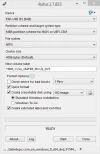
Look the picture please, and tell me if you can which is the best settings here? cluster size, file system etc..partition scheme and target system type..
NTFS should be fine, and MBR scheme is fine since that all computers can't handle UEFI. Rufus is a great tool, but I like creating bootable USB devices manually just for the sake of knowing how.
From a command prompt type diskpart this should prompt for elevated rights so accept
At the diskpart prompt, with your usb plugged in, type list disk this will provide of list of all of your disks starting from 0 (zero)
Next select your usb drive (lets say its disk 1 in this example) select disk 1
Next you remove any old data and meta data from the disk with clean
Next you need to create a partition create part primary then select it select part 1
Next you format the partition with a filesystem fs=<flesystem> format fs=ntfs label="My USB" the label switch is optional
Last you have to mark the partition as active by typing active
Exit diskpart by typing exit
Now you can just extract the content of the ISO and copy it to the USB and it should be bootable.
Me personally, when I see post being replied to that are a year or older (3yrs in some cases), I just leave them alone. 99% of the time it's just a spammer with a link to some junk software and they are dealt with. The other 1% of the time it's newbies just jumping in not realizing that the posts are 1 to 3 years old.
Use Rufus or Balena Etcher.
Both are great tools to make a bootable USB drive.
Out of the Two, I would recommend you to use Rufus.
If you have the boot file stored on a drive , you can burn that to the USB drive using Rufus.
i am also looking for a software to make a bootable usb for my window i am looking for a valid informative solution if someone has with no doubts and this and thats i mean a professional solution needed plz help if you know anything about it i am waiting for the reply.