

Small businesses can now turn ordinary spreadsheet exports into interactive dashboards in minutes by uploading clean sales data to tools such as Claude, Microsoft Copilot, or ChatGPT and asking, in plain English, for charts, summary cards, and filters. That is the practical promise behind Peta-Gaye Hardy’s Jamaica Observer column, but the bigger story is not that AI can draw a bar chart. It is that the old boundary between “having data” and “having usable business intelligence” is starting to collapse. For Windows users and Microsoft 365 shops, that collapse is both liberating and risky.
For decades, Excel has been the unofficial operating system of small business. It holds sales, rotas, inventory, invoices, payroll extracts, supplier lists, and half the institutional memory that never made it into a formal system. The problem was never that businesses lacked data; it was that the data lived in files only one or two people could interpret.
The weekly meeting Hardy describes is familiar far beyond Jamaica. Someone exports a point-of-sale report, someone else copies totals into a slide, and the room spends its opening minutes deciding whether the numbers are even right. By the time the discussion reaches performance, margin, stockouts, or staffing, the meeting has already burned through its best attention.
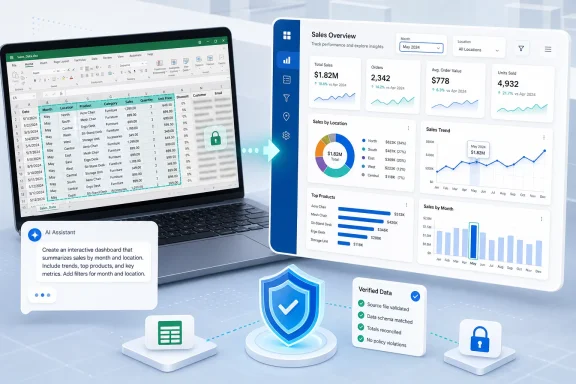
A dashboard fixes that by creating a shared surface. It turns rows into a revenue trend, product rankings, location comparisons, and filters that let managers interrogate the same dataset together. The old catch was that dashboards required a specialist: Power BI, Tableau, Looker Studio, custom HTML, or at least the office Excel wizard with enough spare time to build slicers and pivot charts.
Generative AI attacks precisely that bottleneck. If the assistant can read a clean spreadsheet, infer the fields, write JavaScript, generate charts, and package the result as a browser-ready HTML file, then the first version of a dashboard no longer needs a business intelligence project. It needs a prompt, a dataset, and a human willing to check the math.
Traditional analytics software asks users to learn the logic of the tool. You build relationships, define measures, configure visuals, drag fields, set filters, and publish a report. That model is powerful, but it assumes the business has either trained users or dedicated analysts. Many small firms have neither.
AI flips the interaction around. Instead of asking the user to understand the software’s grammar, it lets the user describe the desired business view: total revenue, growth versus last month, average sale value, monthly trend, top products, location breakdown, month filter, location filter. That description is not “technical” in the old sense, but it is still a specification.
This is why the dashboard-in-minutes idea is more serious than a novelty. It gives non-technical operators a way to express analytical intent without first translating that intent into pivot tables, DAX, JavaScript, or chart configuration. The assistant becomes a compiler for management questions.
But plain English does not remove the need for precision. “Show sales by location” is weaker than “create a dashboard with total revenue, month-over-month growth, average sale value, a monthly revenue line chart, top ten products by revenue, and a location filter.” The skill shifts from software operation to business articulation.
That is a meaningful democratization, but it is not magic. The person writing the prompt still needs to know which numbers matter, which comparisons are fair, and which filters will actually change the conversation in the room.
Claude’s strength is often presentation. It has become popular among users who want polished, self-contained outputs: HTML pages, reports, summaries, and prototypes that feel closer to a finished deliverable than a scratchpad. For a business owner who wants a dashboard that looks credible in a Monday meeting, that matters.
ChatGPT’s advantage is flexibility. Upload a spreadsheet, ask for analysis, iterate on the layout, and ask it to generate a downloadable file. For many professionals already paying for ChatGPT, the friction is low enough that the first experiment costs only time.
Copilot is the more strategic case for WindowsForum readers because it lives where the spreadsheet already lives. Microsoft has spent years positioning Microsoft 365 Copilot as an assistant embedded in Word, Excel, PowerPoint, Outlook, Teams, and the Microsoft Graph. For organizations already standardized on Microsoft 365, Copilot’s selling point is not just intelligence; it is proximity.
That proximity cuts both ways. Copilot can work with the files, permissions, and organizational context users already have. It also means the organization must understand what Copilot can see, which files are overshared, and whether old access-control sins are about to become newly visible through a chat box.
In other words, the dashboard race is not simply about which chatbot draws the nicest chart. It is about where the assistant sits in the workstream: beside the spreadsheet, inside the spreadsheet, or across the whole tenant.
For a small business, that is liberating. A manager can email the file, drop it into Teams, keep it in OneDrive, or open it during a meeting from a browser. No one needs to deploy a reporting server or buy a dashboard license for every viewer.
For IT departments, however, the same portability looks like shadow BI. A self-contained dashboard may include embedded data, generated JavaScript, chart libraries, and business figures that were never reviewed, classified, versioned, or governed. The convenience that makes it useful also makes it easy to leak, duplicate, or act on after it becomes stale.
This is not an argument against the technique. It is an argument for treating AI-generated dashboards as real business artifacts, not disposable toys. If a dashboard influences staffing, purchasing, discounts, commissions, or cash-flow decisions, it deserves basic controls.
Those controls do not need to be elaborate. Label the reporting period. Store the source export beside the dashboard. Put the file somewhere with appropriate access permissions. Regenerate it when the source changes rather than letting old versions circulate as truth.
The danger is not that AI will build a dashboard. The danger is that it will build a convincing one from dirty data, old data, or data that should never have left the building.
A spreadsheet with duplicate rows, inconsistent product names, blank dates, mixed currencies, or misspelled locations can still generate a beautiful dashboard. “Montego Bay,” “Mobay,” and “Montego B.” may become three separate locations. Refunds may be counted as sales. Tax-inclusive and tax-exclusive amounts may be blended. A date column may be read in the wrong format.
This is where the human workflow matters. Hardy advises checking total revenue, one product, and one location against the source sheet before sharing. That is not a disclaimer; it is the minimum viable audit.
A better routine would add a few more habits. Sort the raw data before uploading. Remove obvious duplicates. Standardize location and product names. Confirm that negative values mean what the dashboard thinks they mean. Ask the assistant to explain its assumptions and calculations in a short notes section.
That last step is underused. If an AI-generated dashboard says “growth versus last month,” the manager should ask exactly how it calculated growth. Did it compare full months? Did it compare partial months? Did it handle missing prior-month data? Did it exclude refunds?
A dashboard is persuasive because it reduces complexity to visual form. That is also why it can mislead. The cleaner the interface, the more important it is to inspect the machinery underneath.
The major providers now make stronger commitments for business offerings than for casual consumer use. OpenAI says business and enterprise products do not use customer inputs and outputs for model training by default. Anthropic says commercial offerings such as Claude for Work are not used to train its models by default. Microsoft says Copilot for Microsoft 365 uses tenant-grounded data under Microsoft 365 controls and does not use that customer data to train foundation models.
Those commitments matter, but they are not a substitute for data minimization. A sales dashboard generally does not need customer names, phone numbers, card details, addresses, employee records, or account numbers. Aggregated revenue by date, product, and location is usually enough.
This is where small businesses should be more conservative than the software vendors’ marketing departments. Remove personally identifiable information before upload. Use a business plan rather than a personal account for company data. Disable training options where they exist. Avoid third-party “AI wrapper” sites that ask for file uploads but provide unclear data terms.
The safest dashboard prompt is one that never sends sensitive columns in the first place. AI tools cannot expose what you did not upload.
Excel already has the raw ingredients: tables, formulas, Power Query, PivotTables, charts, slicers, and integration with Power BI. Microsoft 365 Copilot adds natural-language interaction over that environment. The obvious destination is a world where a user can open a workbook and ask Excel to create an executive dashboard, explain the calculations, identify anomalies, and prepare a PowerPoint summary for Monday morning.
That is useful, but it raises an old Microsoft problem in a new form. Excel is powerful enough to become infrastructure accidentally. Many organizations already run mission-critical processes from workbooks that began as quick fixes. AI will make that pattern faster.
The administrative answer is not to ban it. Users will keep using the tool that solves the problem in front of them. The answer is to create a path from ad hoc dashboard to governed report.
If a dashboard is for one meeting, an HTML file may be fine. If it becomes a recurring operating report, it should probably move into a controlled workbook, Power BI report, or line-of-business system with refresh rules, permissions, and ownership. AI can help build the prototype, but IT still has to decide when the prototype has become production.
That boundary is where many companies will stumble. The first dashboard will feel like a miracle. The fifteenth may become a governance problem.
A good analyst does more than build charts. Analysts define metrics, challenge assumptions, reconcile source systems, understand seasonality, spot sampling problems, and explain why a number moved. They know when a revenue spike is a real signal and when it is a late batch upload. They know that “top product” by revenue is not the same as “top product” by margin.
AI is increasingly capable of assisting with those tasks, but it still needs context. It can calculate that Mandeville is down eight percent. It cannot automatically know that road works reduced foot traffic, a competitor opened nearby, a key salesperson resigned, or a promotion ended the week before.
The best use of dashboard automation is therefore not to replace analysts. It is to stop wasting analyst time on the first draft. Let the machine build the initial interface, charts, and filters. Let humans validate the numbers, refine the metrics, and decide what action follows.
For small firms without analysts, this still represents a major upgrade. A rough but verified dashboard is better than a meeting run from screenshots and memory. But the word “verified” is doing the heavy lifting.
That matters because AI workflows often fail when they remain personal tricks. One employee knows the right phrasing, the right upload format, and the right follow-up corrections. When that employee is away, the process collapses. This is the same spreadsheet dependency problem in new clothes.
A better approach is to document the prompt and the required data format. The export should have agreed columns. The assistant should be told how to treat dates, refunds, locations, and missing values. The output should include a generated date, a source-file name, and a short calculation note.
This is not bureaucracy for its own sake. It is how a clever experiment becomes repeatable. Small businesses do not need a six-month analytics transformation to benefit from AI dashboards, but they do need enough discipline to avoid inventing the process from scratch every Friday.
The irony is that plain-English AI may make written operating procedures more valuable, not less. If the prompt is the interface, the procedure is the source code.
When the dashboard is on screen and the filters work, the conversation moves. Revenue is down in one location. The team clicks into the month. A product category is underperforming. The team filters by store. Average sale value rose while transaction count fell. The team can discuss pricing, promotions, staffing, and inventory instead of asking someone to “send the report later.”
This is the quiet productivity gain that vendors often oversell and underexplain. AI does not need to replace whole jobs to matter. Sometimes it only needs to remove the delay between a question and the first useful view of the data.
That delay has historically been expensive for small businesses. If every follow-up question requires a new export, a new pivot table, or a message to the one person who understands the spreadsheet, managers learn to stop asking. They settle for surface-level reporting because deeper reporting is too slow.
Clickable dashboards change the social behavior of the meeting. They reward curiosity. They make it easier to challenge assumptions in the moment. They also expose which questions the data cannot answer, which is itself useful.
Messy data is easier to tolerate when no one expects much from it. If the sales export is just a compliance artifact or a file for the accountant, inconsistent labels feel like a nuisance. If the same export powers the Monday dashboard, inconsistent labels become visible management problems.
That visibility can drive better habits at the point of entry. Staff may standardize product names. Managers may fix location codes. Owners may insist that refunds, discounts, and taxes be recorded consistently. The dashboard becomes a mirror, and the business starts grooming itself for the mirror.
This is how lightweight AI tools can produce institutional change without a formal transformation program. The first win is a better meeting. The longer-term win is a cleaner operating dataset.
But there is a trap. Businesses may start optimizing for what is easy to chart rather than what is important to understand. Revenue by location is easy. Profitability by product after returns, wastage, supplier changes, and labor costs is harder. AI lowers the cost of visualization, not the cost of thinking carefully about the business model.
 The Spreadsheet Was Always the Database Nobody Admitted Using
For decades, Excel has been the unofficial operating system of small business. It holds sales, rotas, inventory, invoices, payroll extracts, supplier lists, and half the institutional memory that never made it into a formal system. The problem was never that businesses lacked data; it was that the data lived in files only one or two people could interpret.The weekly meeting Hardy describes is familiar far beyond Jamaica. Someone exports a point-of-sale report, someone else copies totals into a slide, and the room spends its opening minutes deciding whether the numbers are even right. By the time the discussion reaches performance, margin, stockouts, or staffing, the meeting has already burned through its best attention.
A dashboard fixes that by creating a shared surface. It turns rows into a revenue trend, product rankings, location comparisons, and filters that let managers interrogate the same dataset together. The old catch was that dashboards required a specialist: Power BI, Tableau, Looker Studio, custom HTML, or at least the office Excel wizard with enough spare time to build slicers and pivot charts.
Generative AI attacks precisely that bottleneck. If the assistant can read a clean spreadsheet, infer the fields, write JavaScript, generate charts, and package the result as a browser-ready HTML file, then the first version of a dashboard no longer needs a business intelligence project. It needs a prompt, a dataset, and a human willing to check the math.
Plain English Is Becoming a Business Intelligence Interface
The most important sentence in Hardy’s piece is not the prompt itself, useful though it is. It is the claim that “the tool matters far less than the prompt.” That is the shift managers should notice.Traditional analytics software asks users to learn the logic of the tool. You build relationships, define measures, configure visuals, drag fields, set filters, and publish a report. That model is powerful, but it assumes the business has either trained users or dedicated analysts. Many small firms have neither.
AI flips the interaction around. Instead of asking the user to understand the software’s grammar, it lets the user describe the desired business view: total revenue, growth versus last month, average sale value, monthly trend, top products, location breakdown, month filter, location filter. That description is not “technical” in the old sense, but it is still a specification.
This is why the dashboard-in-minutes idea is more serious than a novelty. It gives non-technical operators a way to express analytical intent without first translating that intent into pivot tables, DAX, JavaScript, or chart configuration. The assistant becomes a compiler for management questions.
But plain English does not remove the need for precision. “Show sales by location” is weaker than “create a dashboard with total revenue, month-over-month growth, average sale value, a monthly revenue line chart, top ten products by revenue, and a location filter.” The skill shifts from software operation to business articulation.
That is a meaningful democratization, but it is not magic. The person writing the prompt still needs to know which numbers matter, which comparisons are fair, and which filters will actually change the conversation in the room.
Claude, Copilot, and ChatGPT Are Converging on the Same Office Job
Hardy’s column names three assistants: Anthropic’s Claude, Microsoft Copilot, and OpenAI’s ChatGPT. They are different products with different strengths, but for this use case they are converging on the same role: a fast, conversational analyst that can turn a spreadsheet into an interactive artifact.Claude’s strength is often presentation. It has become popular among users who want polished, self-contained outputs: HTML pages, reports, summaries, and prototypes that feel closer to a finished deliverable than a scratchpad. For a business owner who wants a dashboard that looks credible in a Monday meeting, that matters.
ChatGPT’s advantage is flexibility. Upload a spreadsheet, ask for analysis, iterate on the layout, and ask it to generate a downloadable file. For many professionals already paying for ChatGPT, the friction is low enough that the first experiment costs only time.
Copilot is the more strategic case for WindowsForum readers because it lives where the spreadsheet already lives. Microsoft has spent years positioning Microsoft 365 Copilot as an assistant embedded in Word, Excel, PowerPoint, Outlook, Teams, and the Microsoft Graph. For organizations already standardized on Microsoft 365, Copilot’s selling point is not just intelligence; it is proximity.
That proximity cuts both ways. Copilot can work with the files, permissions, and organizational context users already have. It also means the organization must understand what Copilot can see, which files are overshared, and whether old access-control sins are about to become newly visible through a chat box.
In other words, the dashboard race is not simply about which chatbot draws the nicest chart. It is about where the assistant sits in the workstream: beside the spreadsheet, inside the spreadsheet, or across the whole tenant.
The HTML File Is the New Shadow BI
Hardy’s suggested output is a single downloadable HTML file. That detail sounds small, but it is one of the reasons the idea is so powerful. HTML is portable, familiar, and easy to open on almost any machine without installing a specialized client.For a small business, that is liberating. A manager can email the file, drop it into Teams, keep it in OneDrive, or open it during a meeting from a browser. No one needs to deploy a reporting server or buy a dashboard license for every viewer.
For IT departments, however, the same portability looks like shadow BI. A self-contained dashboard may include embedded data, generated JavaScript, chart libraries, and business figures that were never reviewed, classified, versioned, or governed. The convenience that makes it useful also makes it easy to leak, duplicate, or act on after it becomes stale.
This is not an argument against the technique. It is an argument for treating AI-generated dashboards as real business artifacts, not disposable toys. If a dashboard influences staffing, purchasing, discounts, commissions, or cash-flow decisions, it deserves basic controls.
Those controls do not need to be elaborate. Label the reporting period. Store the source export beside the dashboard. Put the file somewhere with appropriate access permissions. Regenerate it when the source changes rather than letting old versions circulate as truth.
The danger is not that AI will build a dashboard. The danger is that it will build a convincing one from dirty data, old data, or data that should never have left the building.
Garbage In Now Comes With Better Typography
The oldest rule in computing survives the AI wave intact: garbage in, garbage out. The uncomfortable update is that AI can make garbage look professionally designed.A spreadsheet with duplicate rows, inconsistent product names, blank dates, mixed currencies, or misspelled locations can still generate a beautiful dashboard. “Montego Bay,” “Mobay,” and “Montego B.” may become three separate locations. Refunds may be counted as sales. Tax-inclusive and tax-exclusive amounts may be blended. A date column may be read in the wrong format.
This is where the human workflow matters. Hardy advises checking total revenue, one product, and one location against the source sheet before sharing. That is not a disclaimer; it is the minimum viable audit.
A better routine would add a few more habits. Sort the raw data before uploading. Remove obvious duplicates. Standardize location and product names. Confirm that negative values mean what the dashboard thinks they mean. Ask the assistant to explain its assumptions and calculations in a short notes section.
That last step is underused. If an AI-generated dashboard says “growth versus last month,” the manager should ask exactly how it calculated growth. Did it compare full months? Did it compare partial months? Did it handle missing prior-month data? Did it exclude refunds?
A dashboard is persuasive because it reduces complexity to visual form. That is also why it can mislead. The cleaner the interface, the more important it is to inspect the machinery underneath.
Privacy Is Not a Footnote When the Spreadsheet Leaves the Laptop
Hardy’s security warning is the sober center of the piece. Before uploading real sales data to an AI assistant, a business needs to ask where the file goes, who can process it, whether it can be used for model training, and what kind of plan governs the interaction.The major providers now make stronger commitments for business offerings than for casual consumer use. OpenAI says business and enterprise products do not use customer inputs and outputs for model training by default. Anthropic says commercial offerings such as Claude for Work are not used to train its models by default. Microsoft says Copilot for Microsoft 365 uses tenant-grounded data under Microsoft 365 controls and does not use that customer data to train foundation models.
Those commitments matter, but they are not a substitute for data minimization. A sales dashboard generally does not need customer names, phone numbers, card details, addresses, employee records, or account numbers. Aggregated revenue by date, product, and location is usually enough.
This is where small businesses should be more conservative than the software vendors’ marketing departments. Remove personally identifiable information before upload. Use a business plan rather than a personal account for company data. Disable training options where they exist. Avoid third-party “AI wrapper” sites that ask for file uploads but provide unclear data terms.
The safest dashboard prompt is one that never sends sensitive columns in the first place. AI tools cannot expose what you did not upload.
Windows Shops Will Meet This Through Excel First
For many WindowsForum readers, the real test will not be whether Claude or ChatGPT can generate an HTML dashboard. It will be whether Microsoft can make this workflow feel native inside Excel without hiding too much of the process.Excel already has the raw ingredients: tables, formulas, Power Query, PivotTables, charts, slicers, and integration with Power BI. Microsoft 365 Copilot adds natural-language interaction over that environment. The obvious destination is a world where a user can open a workbook and ask Excel to create an executive dashboard, explain the calculations, identify anomalies, and prepare a PowerPoint summary for Monday morning.
That is useful, but it raises an old Microsoft problem in a new form. Excel is powerful enough to become infrastructure accidentally. Many organizations already run mission-critical processes from workbooks that began as quick fixes. AI will make that pattern faster.
The administrative answer is not to ban it. Users will keep using the tool that solves the problem in front of them. The answer is to create a path from ad hoc dashboard to governed report.
If a dashboard is for one meeting, an HTML file may be fine. If it becomes a recurring operating report, it should probably move into a controlled workbook, Power BI report, or line-of-business system with refresh rules, permissions, and ownership. AI can help build the prototype, but IT still has to decide when the prototype has become production.
That boundary is where many companies will stumble. The first dashboard will feel like a miracle. The fifteenth may become a governance problem.
The Analyst Is Not Dead, but the First Draft Is Automated
The headline promise — no analyst, no software, no wait — is useful marketing, but it should not be read literally. AI does reduce the need for a specialist to create the first pass. It does not eliminate the need for analytical judgment.A good analyst does more than build charts. Analysts define metrics, challenge assumptions, reconcile source systems, understand seasonality, spot sampling problems, and explain why a number moved. They know when a revenue spike is a real signal and when it is a late batch upload. They know that “top product” by revenue is not the same as “top product” by margin.
AI is increasingly capable of assisting with those tasks, but it still needs context. It can calculate that Mandeville is down eight percent. It cannot automatically know that road works reduced foot traffic, a competitor opened nearby, a key salesperson resigned, or a promotion ended the week before.
The best use of dashboard automation is therefore not to replace analysts. It is to stop wasting analyst time on the first draft. Let the machine build the initial interface, charts, and filters. Let humans validate the numbers, refine the metrics, and decide what action follows.
For small firms without analysts, this still represents a major upgrade. A rough but verified dashboard is better than a meeting run from screenshots and memory. But the word “verified” is doing the heavy lifting.
The Prompt Is Becoming an Operating Procedure
One underappreciated lesson from Hardy’s column is that the prompt itself can become a reusable business process. Once a company finds a dashboard prompt that works, it can standardize it.That matters because AI workflows often fail when they remain personal tricks. One employee knows the right phrasing, the right upload format, and the right follow-up corrections. When that employee is away, the process collapses. This is the same spreadsheet dependency problem in new clothes.
A better approach is to document the prompt and the required data format. The export should have agreed columns. The assistant should be told how to treat dates, refunds, locations, and missing values. The output should include a generated date, a source-file name, and a short calculation note.
This is not bureaucracy for its own sake. It is how a clever experiment becomes repeatable. Small businesses do not need a six-month analytics transformation to benefit from AI dashboards, but they do need enough discipline to avoid inventing the process from scratch every Friday.
The irony is that plain-English AI may make written operating procedures more valuable, not less. If the prompt is the interface, the procedure is the source code.
The Meeting Changes When the Numbers Are Clickable
The business case for AI dashboards is not aesthetics. It is time. A meeting that begins with arguments over totals is a meeting trapped in clerical work.When the dashboard is on screen and the filters work, the conversation moves. Revenue is down in one location. The team clicks into the month. A product category is underperforming. The team filters by store. Average sale value rose while transaction count fell. The team can discuss pricing, promotions, staffing, and inventory instead of asking someone to “send the report later.”
This is the quiet productivity gain that vendors often oversell and underexplain. AI does not need to replace whole jobs to matter. Sometimes it only needs to remove the delay between a question and the first useful view of the data.
That delay has historically been expensive for small businesses. If every follow-up question requires a new export, a new pivot table, or a message to the one person who understands the spreadsheet, managers learn to stop asking. They settle for surface-level reporting because deeper reporting is too slow.
Clickable dashboards change the social behavior of the meeting. They reward curiosity. They make it easier to challenge assumptions in the moment. They also expose which questions the data cannot answer, which is itself useful.
The Cheap Dashboard Will Force Better Data Hygiene
There is a second-order effect here that may be more important than the dashboards themselves. Once managers see what a clean export can produce, they have an incentive to keep the underlying data cleaner.Messy data is easier to tolerate when no one expects much from it. If the sales export is just a compliance artifact or a file for the accountant, inconsistent labels feel like a nuisance. If the same export powers the Monday dashboard, inconsistent labels become visible management problems.
That visibility can drive better habits at the point of entry. Staff may standardize product names. Managers may fix location codes. Owners may insist that refunds, discounts, and taxes be recorded consistently. The dashboard becomes a mirror, and the business starts grooming itself for the mirror.
This is how lightweight AI tools can produce institutional change without a formal transformation program. The first win is a better meeting. The longer-term win is a cleaner operating dataset.
But there is a trap. Businesses may start optimizing for what is easy to chart rather than what is important to understand. Revenue by location is easy. Profitability by product after returns, wastage, supplier changes, and labor costs is harder. AI lowers the cost of visualization, not the cost of thinking carefully about the business model.
The Dashboard-in-Minutes Era Still Needs Rules
The promise is real enough to try, and risky enough to govern. The practical path is not to wait for perfect enterprise architecture before experimenting. It is to run small, verify aggressively, and keep sensitive data out of the prompt.- A clean spreadsheet with date, product, location, and amount is enough to create a useful first dashboard.
- The first version should be treated as a draft until totals, sample products, and sample locations are checked against the source.
- Business or enterprise AI plans are safer defaults for company data than personal accounts with unclear or enabled training settings.
- Customer names, account numbers, addresses, card details, and staff information should be removed unless they are absolutely necessary.
- A dashboard used repeatedly should gain an owner, a refresh process, and a controlled storage location.
- AI is best used to accelerate the first build, while humans remain responsible for metric definitions, data quality, and decisions.
References
- Primary source: Jamaica Observer
Published: 2026-06-19T22:50:08.279156
A dashboard in minutes — no analyst, no software, no wait - Jamaica Observer
Picture your weekly Monday management meeting. The numbers exist, buried in a spreadsheet with 11 tabs that only one person knows how to navigate. So someone screenshots a few cells into WhatsApp, someone else reads totals off a printout, and the first twenty minutes go to establishing what the...www.jamaicaobserver.com
