Windows 7 Creating shortcuts w/o the file extension and word "shortcut to"

EarlZ

New Member
Joined
Aug 3, 2009
Messages
10
Is there an app or a method to do this under Windows 7 ?
 

Solution
Hello EarlZ,

You can try this method;
1. Start Regedit, click Start, Run and type in regedit and hit enter.
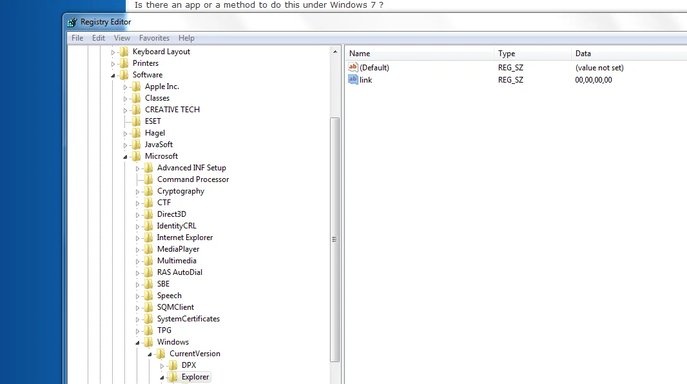
2. Go to: HKEY_USERS \ .Default \ Software \ Microsoft \ Windows \ CurrentVersion \ Explorer
3. Add binary value to Explorer: link="00,00,00,00"
4. You should now be able to make Shortcuts to the desktop without "Shortcut To" text.


This is a Registry Edit, so do so at your own risk and back it up before hand.

Hope this helps
Don

Hello EarlZ,

You can try this method;
1. Start Regedit, click Start, Run and type in regedit and hit enter.
2. Go to: HKEY_USERS \ .Default \ Software \ Microsoft \ Windows \ CurrentVersion \ Explorer
3. Add binary value to Explorer: link="00,00,00,00"
4. You should now be able to make Shortcuts to the desktop without "Shortcut To" text.


This is a Registry Edit, so do so at your own risk and back it up before hand.

Hope this helps
Don

 

Solution
If you are unhappy with making your own reg edits, you can use this. Includes both 64Bit and 32Bit. I havn't had a reason to use it for a long time, but it did work. You are probably aware, that after you have created a shortcut, you can right click and rename it to anything you please - this includes eliminating the ".exe"
 

Attachments

Hello EarlZ,

You can try this method;
1. Start Regedit, click Start, Run and type in regedit and hit enter.
2. Go to: HKEY_USERS \ .Default \ Software \ Microsoft \ Windows \ CurrentVersion \ Explorer
3. Add binary value to Explorer: link="00,00,00,00"
4. You should now be able to make Shortcuts to the desktop without "Shortcut To" text.


This is a Registry Edit, so do so at your own risk and back it up before hand.

Hope this helps
Don

Like this ?
 

Attachments

  • Capture.webp
    Capture.webp
    33.6 KB · Views: 448
These messages are occurring on other threads (spm2703).
 

Back
Top