

Creative Fabrica has launched Studio Desktop, a Windows and macOS app that runs a small set of AI creative tools locally rather than sending files to cloud services. As reported by AiThority, the company is pitching the app as free to use without a subscription, credits, or usage caps for its on-device features.
The initial local toolset includes background removal, image upscaling to 4× resolution, image generation, and text-to-speech. Creative Fabrica says the app uses the PC’s own GPU and can work offline, with prompts, images, and generated audio remaining on the machine.
Studio Desktop is a roughly 120MB download for Windows and requires users to register for an account, but Creative Fabrica says payment details are not required. Its official product page describes the following local tools as free:
There are trade-offs. “Local” does not automatically mean fast: image generation and upscaling performance will depend heavily on the PC’s GPU, available VRAM, storage, and drivers. The company has not positioned the included local models as replacements for top-tier cloud image models, and users should expect premium cloud options to remain more capable for some tasks.
Creative Fabrica also says Studio Desktop can switch to its cloud models from within the same application, so the free local mode is best understood as an entry-level utility layer rather than a fully detached open-source AI suite.
Windows users interested in private, no-metering background removal or routine image upscaling can download the app and test whether their hardware delivers acceptable local performance.
The initial local toolset includes background removal, image upscaling to 4× resolution, image generation, and text-to-speech. Creative Fabrica says the app uses the PC’s own GPU and can work offline, with prompts, images, and generated audio remaining on the machine.
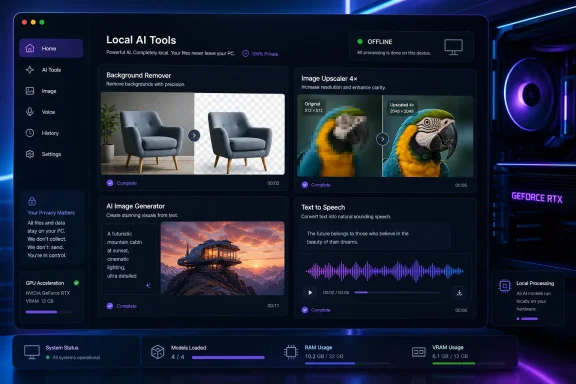 What Windows users get
Studio Desktop is a roughly 120MB download for Windows and requires users to register for an account, but Creative Fabrica says payment details are not required. Its official product page describes the following local tools as free:- Background Remover for transparent cut-outs
- Upscaler for 4× image enlargement
- Image Generator running from a local model
- Voice Generator for on-device text-to-speech
Why the local approach matters
For Windows users, local processing can remove a few familiar annoyances from browser-based AI tools: upload delays, queues, recurring charges, and uncertainty over where source files are stored. It may be particularly useful for makers, print-on-demand sellers, and small businesses handling customer images or product photography that they do not want to upload to another provider.There are trade-offs. “Local” does not automatically mean fast: image generation and upscaling performance will depend heavily on the PC’s GPU, available VRAM, storage, and drivers. The company has not positioned the included local models as replacements for top-tier cloud image models, and users should expect premium cloud options to remain more capable for some tasks.
Creative Fabrica also says Studio Desktop can switch to its cloud models from within the same application, so the free local mode is best understood as an entry-level utility layer rather than a fully detached open-source AI suite.
Windows users interested in private, no-metering background removal or routine image upscaling can download the app and test whether their hardware delivers acceptable local performance.
References
- Primary source: AiThority
Published: 2026-07-13T08:14:47+00:00
Creative Fabrica Launches ‘Studio Desktop’ to Bring Free, Subscription-Free AI Utilities Directly to Users Computers
Creative Fabrica today announced the launch of their Studio Desktop App, a local-first desktop application for Windows and Mac.aithority.com - Related coverage: creativefabrica.com
Fitness Studio Desktop Lightroom Presets Graphic by 3Motional · Creative Fabrica
Click here and download the Fitness Studio Desktop Lightroom Presets graphic · Window, Mac, Linux · Last updated 2026 · Commercial licence included ✓www.creativefabrica.com