

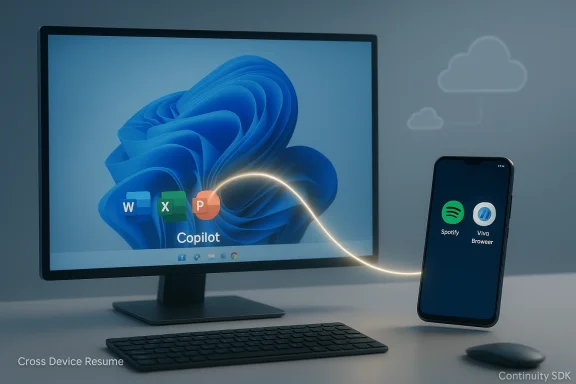
Microsoft’s vision of seamless phone-to-PC continuity just took a significant step forward: the Windows Insider team released builds 26100.7701 and 26200.7701 (KB5074105) to the Release Preview Channel on January 27, 2026, and those builds expand Cross‑Device Resume—Microsoft’s Apple Handoff‑like feature—so you can resume Spotify playback, continue browsing sessions, and pick up work on Word, Excel, or PowerPoint files that were opened via the Microsoft Copilot mobile app. This isn’t a vague tease: the Windows Insider notes list specific OEMs and behaviors, and the presence of the update in the Release Preview Channel strongly indicates a near‑term push toward broader availability. (blogs.windows.com)
Cross‑Device Resume (often shortened to “Resume”) is Microsoft’s answer to cross‑device continuity. It first appeared in a May 2025 Windows non‑security update and has been iteratively tested in Insider channels since then. The idea is simple: when you’re doing something on your Android phone—listening to music, browsing, or editing a document—you should be able to pick up exactly where you left off on your Windows 11 PC with a single click. The PC shows a taskbar badge annotated with a phone icon; clicking that badge resumes the activity. (blogs.windows.com)
Early public tests and demos focused on media playback (notably Spotify), but Microsoft and partners have been expanding the scenarios developers and OEMs can support. Reporters and insiders observed demos and screenshots during 2025, and Microsoft has since formalized the experience in documentation and the Insider blog.
That change is a double‑edged sword: it reduces the risk of users being permanently locked out of the feature after a single false positive, but it also means a less rigid assurance that SAC state is immutable. For security‑forward users and enterprises, this makes SAC more flexible and realistic for production deployments—but organizations should update deployment guidance and group policy baselines accordingly.
That said, the experience will be uneven at first. Dependence on vendor integrations, required developer onboarding, feature gating, market exclusions, and privacy/security questions ensure that Resume will be powerful for some users and unavailable or restricted for others. Administrators and privacy‑conscious users should evaluate the feature carefully and use the new SAC flexibility and resume settings to align behavior with organizational policy.
If you want to test Resume today: join the Release Preview Channel, install the January 27, 2026 update (KB5074105), link your phone with Link to Windows, and try resuming a Spotify track or a Copilot‑opened file. Watch Microsoft’s rollout flags—features may not light up immediately even on identical builds—and consult the Continuity SDK documentation if you’re a developer planning to participate. (blogs.windows.com)
Cross‑device continuity finally feels like a practical reality for Windows 11 and Android users. The next challenge for Microsoft will be turning this carefully controlled, OEM‑assisted capability into a consistently reliable, privacy‑respecting, and broadly available experience—and that will take time, developer cooperation, and clear enterprise controls.
Source: Android Authority Windows 11 is getting close to resuming your Android apps like Apple Handoff
 Background: what Cross‑Device Resume is and where it came from
Cross‑Device Resume (often shortened to “Resume”) is Microsoft’s answer to cross‑device continuity. It first appeared in a May 2025 Windows non‑security update and has been iteratively tested in Insider channels since then. The idea is simple: when you’re doing something on your Android phone—listening to music, browsing, or editing a document—you should be able to pick up exactly where you left off on your Windows 11 PC with a single click. The PC shows a taskbar badge annotated with a phone icon; clicking that badge resumes the activity. (blogs.windows.com)Early public tests and demos focused on media playback (notably Spotify), but Microsoft and partners have been expanding the scenarios developers and OEMs can support. Reporters and insiders observed demos and screenshots during 2025, and Microsoft has since formalized the experience in documentation and the Insider blog.
What Microsoft announced in KB5074105 (builds 26100.7701 / 26200.7701)
The Release Preview update adds concrete, user‑facing expansions to Resume:- Resume Spotify playback started on your Android phone and continue playing on the PC (Windows will prompt to install the desktop Spotify client if it’s missing). (blogs.windows.com)
- Continue browsing sessions from supported Android browsers—Microsoft specifically calls out the Vivo Browser for Vivo phones. (blogs.windows.com)
- Resume online files opened in the Microsoft Copilot mobile app on supported phones (HONOR, OPPO, Samsung, Vivo, Xiaomi): those documents will open in the corresponding Microsoft 365 desktop app if installed, or in the default browser as a fallback. Offline‑only local files on the phone are not supported. (blogs.windows.com)
- The update also includes policy and UI changes such as the ability to toggle Smart App Control on or off without needing a clean OS install, and a new Device card on Settings’ home page (the Device card is US‑only at the time of writing). (blogs.windows.com)
How Cross‑Device Resume works (technical overview)
At a high level, Resume is a continuity bridge that connects app state on an Android device to the corresponding experience on Windows:- The Android side must support the Continuity/Resume integration via Microsoft’s Continuity SDK (XDR). That integration exposes the point in the app or document that can be resumed. Microsoft restricts access to the API through a Limited Access Feature (LAF) onboarding process to protect the integrity of Link to Windows and the Resume experience.
- The phone needs to be linked to the PC through Link to Windows (or the vendor’s packaged “Link to Windows” integration), and the user must be online. The Microsoft Support page lists Android 10 or later and Link to Windows as prerequisites. The PC must be running Windows 11.
- When the supported action occurs on the phone, the phone sends a resume alert to the linked PC, which displays a phone‑badged taskbar icon for the app. Clicking that badge wakes or opens the desktop equivalent and restores the activity. For files opened in Copilot mobile, the PC will open the file in the desktop Microsoft 365 app when available, or in the default browser otherwise. (blogs.windows.com)
- For developers, the Continuity SDK specifies minimum SDK levels, dependencies, and meta tags to register resumeable activities in the Android app manifest. Microsoft’s developer guidance also emphasizes that XDR is a controlled feature and that developers must request access to interoperate with Link to Windows.
Supported apps, OEMs, and edge cases
Microsoft’s blog message and associated documentation enumerate current and targeted partners:- Early, concrete app support includes Spotify for media resume, and Microsoft’s own Copilot mobile app for document resume that hands off to Word, Excel, and PowerPoint on the PC. (blogs.windows.com)
- Microsoft specifically names HONOR, OPPO, Samsung, Vivo, and Xiaomi as OEMs whose phones can resume online Copilot‑opened files into desktop Microsoft 365 apps. Vivo Browser is explicitly mentioned for resumed browsing sessions on Vivo phones. (blogs.windows.com)
- Offline files that live only on the phone aren’t supported; Resume is intended for online or cloud‑backed content. (blogs.windows.com)
- Feature availability varies by device, market, and the gradual rollout schedule; some items are only available in the United States and are blocked in certain markets such as the European Economic Area at present. (blogs.windows.com)
- Apps must implement the Continuity SDK and undergo Microsoft’s limited access onboarding to participate; this is not an automatic capability for all Android apps.
Why this matters: immediate user benefits
Cross‑Device Resume fills a long‑standing continuity gap between Android phones and Windows PCs. The most tangible wins:- Fewer friction points when switching devices—media playback, active browsing tabs, and cloud documents can shift context without manual search, link sharing, or logging back in. Early demos show Spotify resuming playback at the exact timestamp left on the phone.
- Smarter app fallbacks—if the corresponding desktop app is installed, Resume launches it; otherwise, Windows offers to download the app or uses the default browser to open the content. That reduces “dead ends” when moving across devices. (blogs.windows.com)
- Ecosystem leverage—by supporting document handoff from Copilot mobile into Office desktop apps, Microsoft ties its AI/assistant and productivity stacks closer together, improving the value of Copilot and Microsoft 365 subscriptions for power users. (blogs.windows.com)
Risks, privacy concerns, and potential friction points
The convenience of cross‑device continuity comes with real trade‑offs. Consider the following risks and practical constraints:- Data forwarding and privacy: Resume necessarily passes metadata about what you’re doing on your phone to your PC. While Microsoft’s public documentation emphasizes account and device linking, admins and privacy‑conscious users will want clear statements about what metadata is shared, how long it’s retained, and whether telemetry is used to tailor the experience. These specifics aren’t exhaustively documented in the public release notes. Treat any claim about “private by default” behavior cautiously and verify settings in your environment. (blogs.windows.com)
- Account matching and authentication: For services like Spotify, you’ll need to be signed into the same account on phone and PC. That requirement is straightforward for consumer apps but can become messy for shared or corporate devices. Expect prompts to sign in and step‑up authentication in some workflows.
- Fragmentation: Resume depends on OEM implementations, Link to Windows versions, and developer adoption of the Continuity SDK. This means your experience will vary widely across phones and apps—don’t expect uniform behavior across the entire Android ecosystem on day one.
- Security surface area: Any feature that executes remote handoffs increases the attack surface. Resume should inherit protections from Link to Windows and Windows security stacks, but enterprises should confirm how handoffs are authenticated and whether MFA or device‑level policies can block or audit resumes. The ability to toggle Smart App Control without a clean install reduces friction, but also changes the lifecycle of app protection, which admins must consider. (blogs.windows.com)
Smart App Control: related changes and why they matter
KB5074105 also brings a notable change to Smart App Control (SAC): users can now turn SAC on or off without doing a clean reinstall of Windows. Previously, SAC could only be enabled on a fresh Windows install; toggling it off would lock it permanently until a reset. Microsoft says it updated SAC to allow on/off switching without reinstalling, which makes SAC significantly more usable for people who encountered false positives. (blogs.windows.com)That change is a double‑edged sword: it reduces the risk of users being permanently locked out of the feature after a single false positive, but it also means a less rigid assurance that SAC state is immutable. For security‑forward users and enterprises, this makes SAC more flexible and realistic for production deployments—but organizations should update deployment guidance and group policy baselines accordingly.
Rollout expectations: Release Preview vs stable channels
The build’s arrival in the Release Preview Channel is an important signal. Release Preview is the bridge between Insider testing and general availability: features appearing here are frequently the last step before a stable rollout, but Microsoft still often gates functionality behind CFRs. That means:- Some users in Release Preview will see the expanded Resume capabilities immediately.
- Most users—even on the same build—may not see the features until Microsoft flips rollout flags or partners complete required integrations. (blogs.windows.com)
What power users and IT administrators should do now
For enthusiasts, testers, and IT pros who want to evaluate or prepare for Resume, follow these practical steps:- Confirm your PC is eligible and enrolled in the appropriate Insider channel (Release Preview for the builds discussed).
- Make sure your Android device runs Android 10 or later and has the correct Link to Windows / vendor Link package installed and linked to the same Microsoft account as the PC.
- If you’re an app developer, review the “Continuity SDK” developer guidance and request Limited Access Feature onboarding if you plan to support Resume in your Android app. Expect Microsoft to vet workflows and package IDs.
- For enterprises: evaluate whether Resume should be allowed on corporate devices. Use MDM controls and Group Policy to govern Link to Windows and the Resume setting (Settings > Apps > Resume). Audit behavior in a pilot group before broader deployment.
- If the taskbar resume badge doesn’t appear: confirm Link to Windows connectivity, matching account sign‑in, and that the Android app implements or is permitted to use the Continuity SDK.
- If Copilot‑opened files don’t open in Office desktop apps: verify that the corresponding Microsoft 365 apps are installed and registered with the same Microsoft account. The fallback is the default browser. (blogs.windows.com)
Developer perspective: what it takes to support Resume
Microsoft intentionally controls who can integrate with Resume to prevent abuse and ensure a consistent user experience. The Continuity SDK docs highlight:- Minimum Android build and library requirements, manifest meta tags, and a developer onboarding process that requests screenshots, package IDs, and a description of the resume scenario. Microsoft will approve access to interoperate with Link to Windows on a case‑by‑case basis.
Market and ecosystem implications
Cross‑Device Resume may not fundamentally change Windows’ market position, but it materially improves the Windows + Android experience—especially for users tied into Microsoft’s productivity ecosystem (Copilot + Microsoft 365). A few likely outcomes:- Microsoft wins UX points among Android users who also use Windows 11, blunting one of macOS/iOS’ signature continuity advantages. Early support for Spotify and Copilot documents demonstrates both consumer and professional value.
- OEM partnerships (Samsung, Xiaomi, Vivo, HONOR, OPPO) are key. Vendors that preinstall or tightly integrate Link to Windows stand to deliver a better out‑of‑box experience. That could influence buyer behavior for users who prize phone‑to‑PC fluidity. (blogs.windows.com)
- Store and sign‑in dynamics: the fallback to the browser or prompting to install desktop apps nudges users toward the Microsoft Store and Microsoft 365—small nudges that can have measurable platform effects over time. (blogs.windows.com)
Final appraisal: promising, but gated and gradual
Cross‑Device Resume’s expanded capabilities in KB5074105 are a meaningful step toward true phone‑to‑PC continuity on Windows. The practical scenarios—resuming Spotify, continuing an Edge‑style browsing session, or handing a Copilot‑opened Word doc to the desktop app—are precisely the fixes users have asked for, and the Release Preview presence suggests a broader rollout is imminent. (blogs.windows.com)That said, the experience will be uneven at first. Dependence on vendor integrations, required developer onboarding, feature gating, market exclusions, and privacy/security questions ensure that Resume will be powerful for some users and unavailable or restricted for others. Administrators and privacy‑conscious users should evaluate the feature carefully and use the new SAC flexibility and resume settings to align behavior with organizational policy.
If you want to test Resume today: join the Release Preview Channel, install the January 27, 2026 update (KB5074105), link your phone with Link to Windows, and try resuming a Spotify track or a Copilot‑opened file. Watch Microsoft’s rollout flags—features may not light up immediately even on identical builds—and consult the Continuity SDK documentation if you’re a developer planning to participate. (blogs.windows.com)
Cross‑device continuity finally feels like a practical reality for Windows 11 and Android users. The next challenge for Microsoft will be turning this carefully controlled, OEM‑assisted capability into a consistently reliable, privacy‑respecting, and broadly available experience—and that will take time, developer cooperation, and clear enterprise controls.
Source: Android Authority Windows 11 is getting close to resuming your Android apps like Apple Handoff
