

Microsoft just pushed Windows 11 another step toward true Android–PC continuity: the operating system’s Cross‑Device Resume feature has been expanded in the Release Preview channel to let users pick up activities from select Android phones — from Spotify playback to Microsoft 365 documents and browser sessions — directly on a Windows 11 PC. This is not a cosmetic badge change; under the hood Microsoft is shipping developer tooling and a lightweight metadata handshake so activities started on a phone can be mapped to the most appropriate desktop handler (native app or browser). The update also bundles a set of other refinements — MIDI 2.0 improvements, voice‑typing tweaks, and extended Windows Hello Enhanced Sign‑in Security support for peripheral fingerprint sensors — that together paint a picture of a Windows 11 rollout centered on continuity, productivity, and gradual platform convergence.
Microsoft introduced a limited form of cross‑device resume in a May 2025 non‑security update (preview KB5058499), where the flow relied on recently opened OneDrive files and a narrow time window to offer a “pick up where you left off” prompt on PC. That implementation was useful but constrained: it depended on cloud‑backed documents and only applied to a small set of scenarios. Over the remainder of 2025 Microsoft iterated on the concept, adding developer-facing tooling and alternative integration paths so third‑party Android apps can now publish what the user is doing to the paired PC.
The January 2026 Release Preview update (delivered in builds 26100.7701 and 26200.7701) marks the practical transition from a cloud‑only OneDrive trickle to a broader, app‑driven continuity model that supports media, documents, and browser sessions. Microsoft has been testing the expanded behavior in Insider channels for months and — as of the Release Preview rollout — the company appears to be moving toward a staged, server‑gated public deployment.
Microsoft’s challenge is different: it must bridge Android and Windows 11, two very different ecosystems with broad device and OEM variation. The new Cross‑Device Resume resembles Handoff in user experience (a subtle visual cue and one‑click continuation), but it solves the problem differently: rather than tightly coupling runtime state across homogenous devices, Microsoft uses a lightweight, metadata‑first approach and leverages desktop handlers for fidelity.
This effort also traces a line back to Microsoft’s earlier Project Rome initiative (introduced in the mid‑2010s) that aimed to enable cross‑device experiences. Project Rome laid groundwork — SDKs and APIs — but never achieved broad developer adoption. The current push looks like a pragmatic re‑tooling: smaller payloads, clearer handler mapping, and both SDK and server‑side integration options to entice developer buy‑in.
Potential next steps include:
For users, the immediate benefits — quick resume of Spotify, Microsoft 365 documents, and browser sessions — are real and useful, provided your phone, OEM, and apps are supported. For IT and security teams, the change introduces manageable new surface area that deserves policy attention and testing. Ultimately, the success of this initiative will rest on whether Microsoft can translate a clever technical design and staged rollout into broad developer integrations and everyday user value. If that happens, Windows 11 could finally offer the kind of cross‑device continuity many power users have long wanted — without asking them to buy into a single‑vendor ecosystem.
Source: Ubergizmo Windows 11 Moves Closer To Android App Continuity
 Background
Microsoft introduced a limited form of cross‑device resume in a May 2025 non‑security update (preview KB5058499), where the flow relied on recently opened OneDrive files and a narrow time window to offer a “pick up where you left off” prompt on PC. That implementation was useful but constrained: it depended on cloud‑backed documents and only applied to a small set of scenarios. Over the remainder of 2025 Microsoft iterated on the concept, adding developer-facing tooling and alternative integration paths so third‑party Android apps can now publish what the user is doing to the paired PC.The January 2026 Release Preview update (delivered in builds 26100.7701 and 26200.7701) marks the practical transition from a cloud‑only OneDrive trickle to a broader, app‑driven continuity model that supports media, documents, and browser sessions. Microsoft has been testing the expanded behavior in Insider channels for months and — as of the Release Preview rollout — the company appears to be moving toward a staged, server‑gated public deployment.
What changed in the latest Release Preview
Expanded app scenarios
The evolved Cross‑Device Resume capability is no longer restricted to OneDrive-synced documents. New, documented resume scenarios include:- Resuming Spotify playback from a phone to PC.
- Continuing work in Microsoft Word, Excel, and PowerPoint when a document was being edited on the phone.
- Restoring browser sessions from a phone (examples include vendor browsers such as vivo Browser) and opening the corresponding content in Microsoft Edge on the PC when appropriate.
Developer tooling and integration paths
Microsoft is shipping a Continuity SDK (also referenced as a Continuity or Cross‑Device Resume SDK) that enables Android apps to send a compact metadata payload — commonly called an AppContext — to the linked Windows device. AppContext contains a short-lived context identifier, a deep link or web link for the content, a title and optional preview thumbnail, and a short lifetime (often five minutes by default). Two developer paths are available:- Integration via the Continuity SDK (native app approach).
- Server‑side or push notification integration using existing push channels (for partners that prefer not to embed the SDK).
Platform and OEM scope
Reported early adopters and supported ecosystems include select Android OEMs such as Samsung, vivo, HONOR, OPPO, and Xiaomi. Behavior and breadth of resume scenarios depend on the OEM’s Link to Windows (LTW) companion implementation and the partner app’s use of the Continuity integration. Microsoft continues to gate features via server flags, meaning not every device or account will see the experience immediately.Other features bundled in the same update
The Release Preview update is not just cross‑device resume. Key additions include:- Improved MIDI 2.0 support for musicians and audio hardware.
- Voice Typing enhancements, including a new “wait time before acting” setting to better handle different speech patterns.
- Windows Hello Enhanced Sign‑in Security (ESS): expanded support to include peripheral fingerprint sensors (for example, external USB fingerprint readers) beyond integrated hardware.
- Copilot+ PC Settings Agent language support expanded to include German, Portuguese, Spanish, Korean, Japanese, Hindi, Italian, and Simplified Chinese on eligible Copilot+ hardware.
How Cross‑Device Resume works (technical breakdown)
The AppContext handshake
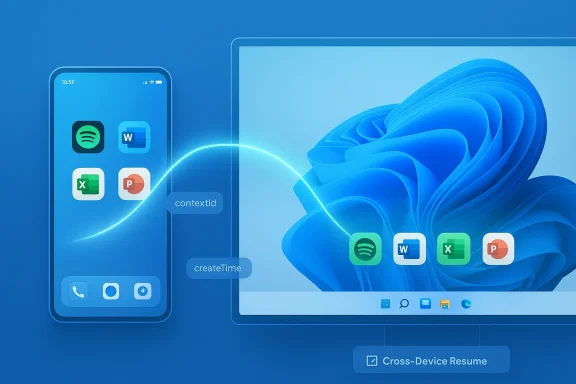
At its core, Cross‑Device Resume uses a tiny structured metadata object — AppContext — to communicate what the user is doing on the phone and where that activity should land on the PC. AppContext typically contains:- contextId — a unique activity identifier.
- createTime and a short lifetime to prevent stale prompts (commonly bound to a few minutes).
- intentUri or weblink — a deep link that instructs Windows which handler to launch.
- appId/package name, title, and preview bytes for UI affordances.
Link to Windows and Cross Device Experience Host
The phone‑to‑PC channel uses the Link to Windows (LTW) companion and the Cross Device Experience Host on Windows. Once devices are paired and the user has granted the required permissions, LTW forwards AppContext descriptors to the PC. On Windows, the OS resolves the descriptor, surfaces a subtle resume affordance (for example, a badge on the taskbar or a notification), and attempts to launch:- A native desktop handler (registered protocol or URI) when available.
- The web link in the default browser (Edge).
- A store or install prompt when no appropriate handler exists.
Security and privacy posture
Because the system transfers only metadata and short‑lived pointers, Microsoft reduces the surface area for replay or data leakage compared to streaming whole app states. AppContext lifetime windows and user permission flows (pairing, LTW permissions, Microsoft account authentication) are the principal mechanisms to limit exposure. However, the design still relies on push channels and server gating, which introduces additional operational and privacy considerations (discussed below).How this compares to Apple’s Handoff and the Project Rome legacy
Apple’s Handoff has been a mature, tightly controlled device continuity system for years, operating inside a closed Apple ecosystem (iPhone, iPad, Mac). Handoff benefits from uniform OS versions, integrated app frameworks, and homogeneous device management — all factors that make cross‑device state predictable.Microsoft’s challenge is different: it must bridge Android and Windows 11, two very different ecosystems with broad device and OEM variation. The new Cross‑Device Resume resembles Handoff in user experience (a subtle visual cue and one‑click continuation), but it solves the problem differently: rather than tightly coupling runtime state across homogenous devices, Microsoft uses a lightweight, metadata‑first approach and leverages desktop handlers for fidelity.
This effort also traces a line back to Microsoft’s earlier Project Rome initiative (introduced in the mid‑2010s) that aimed to enable cross‑device experiences. Project Rome laid groundwork — SDKs and APIs — but never achieved broad developer adoption. The current push looks like a pragmatic re‑tooling: smaller payloads, clearer handler mapping, and both SDK and server‑side integration options to entice developer buy‑in.
Real‑world implications for users and IT
What users should expect
- Expect a gradual rollout. The Release Preview inclusion signals near‑general availability, but Microsoft will gate features server‑side. Not every eligible PC or phone will see Cross‑Device Resume immediately.
- Prepare the ecosystem: update Link to Windows (phone companion), keep the desktop apps current (Spotify, Microsoft 365 apps), and sign both devices into the same Microsoft account if required.
- Behavior is dependent on installed apps: if you prefer desktop apps, install the appropriate desktop client; otherwise the system will fall back to opening content in a browser.
Requirements checklist
- A Windows 11 PC on a supported build (Release Preview / upcoming public rollout).
- An Android phone with a compatible LTW implementation (select OEMs have early support).
- Updated partner apps (Spotify, Microsoft 365 apps, or vendor browsers).
- Permissions granted in Link to Windows and Windows’ Mobile Devices settings.
- Awareness that the resume affordance is time‑limited (AppContext lifetimes are short).
For IT administrators
- Understand that Cross‑Device Resume introduces new cross‑device attack surfaces, however small, and assess whether group policy or MDM controls are needed (particularly in managed environments).
- Review pairings and account policies: corporate devices may need stricter controls around LTW pairing and Microsoft account sign‑in to avoid accidental data cross‑pollination.
- Evaluate whether Smart App Control or Windows Defender policies should be tuned to permit the new resume flows for approved vendor apps.
Strengths and benefits
- Low friction, high payoff: A single tap to resume a media stream or document is a strong UX win for productivity and convenience.
- Native fidelity: By mapping activity to desktop handlers, Windows preserves the PC’s strengths (keyboard, larger screen, full app features) instead of trying to emulate a phone’s UI.
- Developer flexibility: The Continuity SDK and server‑push options lower the bar for adoption; apps that already use push notifications can integrate resume affordances without heavy native SDK work.
- Lighter on resources: Metadata handoffs are far cheaper than streaming or virtualization, reducing CPU, memory, and battery overhead.
- Incremental rollout reduces risk: Server‑gated deployment lets Microsoft monitor telemetry and scale the experience while addressing edge cases.
Risks, limitations, and unresolved questions
- Fragmentation and OEM dependency: Early availability skews toward specific OEMs and companion implementations. Users with other phones may see limited or no benefit for months.
- Partial overlap with existing sync features: Many apps already offer cross‑device continuity (Spotify Connect, OneDrive autosave, browser sync). The new resume affordances must deliver clear incremental value over those existing flows, or adoption will stall.
- Privacy surface: Even though AppContext is metadata‑only, the system still reveals what the user was doing to the paired PC and — depending on account ties — to Microsoft services. Enterprises will want clear documentation and controls.
- Security considerations: Short lifetimes mitigate replay, but reliance on push channels and cross‑device pairing creates additional vectors that need auditing. Peripheral fingerprint support in ESS — while welcome — also expands the hardware and driver surface area for security teams to verify.
- Developer adoption is not guaranteed: Past efforts (Project Rome) had limited uptake; successful adoption now relies on convincing popular apps to implement the Continuity SDK or use push paths. Microsoft’s requirement for certain manifest entries and minimum SDK levels may be a blocker for some apps.
- Server‑gated rollout unpredictability: Users and admins may find it difficult to determine whether problems are local or a result of server gating. Microsoft’s Controlled Feature Rollout approach, while safer, can be opaque.
Developer perspective: what integration looks like
Developers targeting Cross‑Device Resume have two pragmatic options:- Embed the Continuity SDK: This provides a first‑class experience, including thumbnail previews and intent URIs. Minimum Android SDK levels and LTW companion versions are required; developers must register metadata in the Android manifest and implement AppContext management callbacks. The SDK model offers the most predictable resume experience.
- Use server‑side notifications: Apps that already use push notifications or server‑driven deep links can publish AppContext via back‑end channels. This lowers friction but may offer less granular previews and lifecycle control.
Practical recommendations
For consumers
- Update your PC to the latest Release Preview or wait for the public February update if you prefer stable channels.
- Keep your phone’s Link to Windows companion app up to date and check OEM update notes for LTW changes.
- Install desktop counterparts for apps you want to resume, and verify you’re signed into the same Microsoft account where required.
- If you are privacy‑minded, audit LTW permissions and review pairing settings before enabling resume affordances.
For power users and creators
- Musicians and producers should test MIDI 2.0 updates in this build to verify compatibility before relying on it in live workflows.
- Test voice typing changes to tune the new “wait time before acting” setting for dictation accuracy.
For IT and security teams
- Review policies that control device pairing; consider blocking LTW pairing for managed machines until your organization has validated the security implications.
- Validate fingerprint peripheral drivers and ensure ESS is configured consistently across desktop images.
- Monitor for telemetry-based rollouts and prepare helpdesk guidance in case users see resume affordances unexpectedly.
Where this could go next
Cross‑Device Resume in Windows 11 feels like the infrastructure phase of a broader continuity strategy: Microsoft has chosen a modular, metadata-driven architecture that can scale across apps and OEMs. If developers embrace the Continuity SDK and major vendors standardize LTW behavior, we could see a fast ripening of cross‑device experiences — more than handoff, closer to a fluid “task continuity” fabric where phone activities smoothly rehome to the desktop.Potential next steps include:
- Wider OEM adoption and standardized LTW behavior across Android vendors.
- Richer resume payloads for complex app states (subject to privacy and security constraints).
- A developer marketplace signal to encourage adoption (for example, telemetry perks or discoverability on Windows).
- Tighter enterprise controls for corporate device scenarios.
Conclusion
Microsoft’s expanded Cross‑Device Resume is a pragmatic, well‑engineered attempt to bring Handoff‑style convenience to a fragmented Android‑to‑Windows world. By favoring a lightweight metadata handshake (AppContext) and mapping activities to native desktop handlers, Windows 11 aims to deliver continuity with minimal resource cost and sensible privacy tradeoffs. The Release Preview rollout shows the feature is materially closer to general availability, but adoption will depend on OEM cooperation and developer buy‑in.For users, the immediate benefits — quick resume of Spotify, Microsoft 365 documents, and browser sessions — are real and useful, provided your phone, OEM, and apps are supported. For IT and security teams, the change introduces manageable new surface area that deserves policy attention and testing. Ultimately, the success of this initiative will rest on whether Microsoft can translate a clever technical design and staged rollout into broad developer integrations and everyday user value. If that happens, Windows 11 could finally offer the kind of cross‑device continuity many power users have long wanted — without asking them to buy into a single‑vendor ecosystem.
Source: Ubergizmo Windows 11 Moves Closer To Android App Continuity
